07適用バーのスティッキー登場 — 選択有無の値で位置を求め直す下部バー
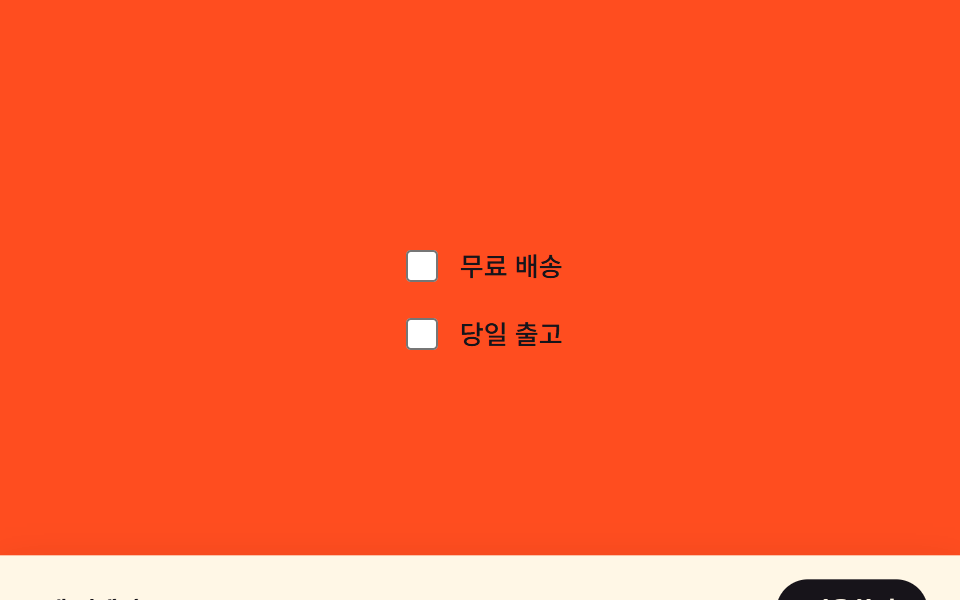
選択されたフィルターが1つ以上ある状態になると、画面下に隠れていた適用バーの縦位置の値が画面内へ補間されて現れ、選択がない状態になると再び隠れます。
使いどころモバイルフィルターシートの適用ボタンバー、コマースアプリの下部固定CTA
transformtranslateY(classList.toggle
<main class="stage" id="stage">
  <div class="options">
    <label class="option"><input class="option__input" type="checkbox" data-idx="0"> 送料無料</label>
    <label class="option"><input class="option__input" type="checkbox" data-idx="1"> 即日発送</label>
  </div>
  <div class="apply-bar is-demo" id="bar">
    <span class="apply-bar__label">2件選択中</span>
    <button class="apply-bar__btn" type="button">適用する</button>
  </div>
</main>
@use "../../../../site/static/demo-tokens" as *;
$duration: $dur-enter;
$easing: $ease-spring;
$color: $subject-cream;
@include stage($stage-orange);
.stage {
position: relative;
overflow: hidden;
}
.options {
display: flex;
flex-direction: column;
gap: $sp-3;
}
.option {
display: flex;
align-items: center;
gap: $sp-2;
color: $subject-ink;
font-weight: 500;
font-size: 13px;
line-height: 1.4;
}
.option__input {
width: 16px;
height: 16px;
accent-color: $subject-ink;
}
.apply-bar {
box-sizing: border-box;
position: absolute;
left: 0;
right: 0;
bottom: 0;
display: flex;
align-items: center;
justify-content: space-between;
padding: $sp-3 $sp-4;
background: $color;
color: $subject-ink;
box-shadow: $shadow-raised;
transform: translateY(100%);
transition: transform $duration $easing;
}
.apply-bar__label {
font-weight: 600;
font-size: 12px;
line-height: 1.3;
}
.apply-bar__btn {
border: 0;
border-radius: $r-pill;
padding: $sp-2 $sp-4;
background: $subject-ink;
color: $color;
font-family: inherit;
font-weight: 600;
font-size: 12px;
line-height: 1.3;
cursor: pointer;
}
.stage.has-selection .apply-bar {
transform: translateY(0);
}
.apply-bar.is-demo {
animation-name: bar-loop;
animation-duration: $dur-loop;
animation-timing-function: $easing;
animation-iteration-count: infinite;
}
@keyframes bar-loop {
0%, 15% { transform: translateY(100%); }
40%, 75% { transform: translateY(0); }
100% { transform: translateY(100%); }
}
@media (max-width: 340px) {
.apply-bar { padding: $sp-2 $sp-3; }
.options { gap: $sp-2; }
}
@media (prefers-reduced-motion: reduce) {
.apply-bar { transition: none; }
.apply-bar.is-demo { animation: none; transform: translateY(0); opacity: .96; }
}html, body {
margin: 0;
overflow: hidden;
}
.stage {
box-sizing: border-box;
min-height: 100vh;
display: grid;
place-items: center;
margin: 0;
background: #ff4d1f;
font-family: -apple-system, "Segoe UI", "Noto Sans KR", sans-serif;
padding: clamp(8px, 4vw, 24px);
}
.stage {
position: relative;
overflow: hidden;
}
.options {
display: flex;
flex-direction: column;
gap: 12px;
}
.option {
display: flex;
align-items: center;
gap: 8px;
color: #17141a;
font-weight: 500;
font-size: 13px;
line-height: 1.4;
}
.option__input {
width: 16px;
height: 16px;
accent-color: #17141a;
}
.apply-bar {
box-sizing: border-box;
position: absolute;
left: 0;
right: 0;
bottom: 0;
display: flex;
align-items: center;
justify-content: space-between;
padding: 12px 16px;
background: #fff7e6;
color: #17141a;
box-shadow: 0 14px 24px rgba(23, 20, 26, 0.32);
transform: translateY(100%);
transition: transform 600ms cubic-bezier(0.2, 0.8, 0.2, 1);
}
.apply-bar__label {
font-weight: 600;
font-size: 12px;
line-height: 1.3;
}
.apply-bar__btn {
border: 0;
border-radius: 999px;
padding: 8px 16px;
background: #17141a;
color: #fff7e6;
font-family: inherit;
font-weight: 600;
font-size: 12px;
line-height: 1.3;
cursor: pointer;
}
.stage.has-selection .apply-bar {
transform: translateY(0);
}
.apply-bar.is-demo {
animation-name: bar-loop;
animation-duration: 2s;
animation-timing-function: cubic-bezier(0.2, 0.8, 0.2, 1);
animation-iteration-count: infinite;
}
@keyframes bar-loop {
0%, 15% {
transform: translateY(100%);
}
40%, 75% {
transform: translateY(0);
}
100% {
transform: translateY(100%);
}
}
@media (max-width: 340px) {
.apply-bar {
padding: 8px 12px;
}
.options {
gap: 8px;
}
}
@media (prefers-reduced-motion: reduce) {
.apply-bar {
transition: none;
}
.apply-bar.is-demo {
animation: none;
transform: translateY(0);
opacity: 0.96;
}
}// 필터가 하나라도 선택되어 있는지(불 값)만 보고 바 위치를 translateY 로 보간한다.
// 실제 체크박스 변경: classList.toggle 로 has-selection 상태를 뒤집는다.
(function () {
var stage = document.getElementById('stage');
var bar = document.getElementById('bar');
var inputs = document.querySelectorAll('.option__input');
if (!stage || !bar || !inputs.length) return;
function sync() {
bar.classList.remove('is-demo');
var any = Array.prototype.some.call(inputs, function (input) {
return input.checked;
});
stage.classList.toggle('has-selection', any);
}
inputs.forEach(function (input) {
input.addEventListener('change', sync);
});
})();import { useEffect, useRef } from "react";
import styles from "./StickyApplyBarReveal.module.scss";
// 필터가 하나라도 선택되어 있는지(불 값)만 보고 바 위치를 translateY 로 보간한다.
// 실제 체크박스 변경: classList.toggle 로 has-selection 상태를 뒤집는다.
export default function StickyApplyBarReveal() {
const stageRef = useRef<HTMLElement>(null);
const barRef = useRef<HTMLDivElement>(null);
const input0Ref = useRef<HTMLInputElement>(null);
const input1Ref = useRef<HTMLInputElement>(null);
useEffect(() => {
const stage = stageRef.current;
const bar = barRef.current;
const inputs = [input0Ref.current, input1Ref.current].filter(
(x): x is HTMLInputElement => x !== null
);
if (!stage || !bar || inputs.length === 0) return;
function sync() {
bar!.classList.remove(styles["is-demo"]);
const anySelected = inputs.some((input) => input.checked);
stage!.classList.toggle(styles["has-selection"], anySelected);
}
inputs.forEach((input) => input.addEventListener("change", sync));
return () => {
inputs.forEach((input) => input.removeEventListener("change", sync));
};
}, []);
return (
<main ref={stageRef} className={styles.stage}>
<div className={styles.options}>
<label className={styles.option}>
<input ref={input0Ref} className={styles.option__input} type="checkbox" /> 무료 배송
</label>
<label className={styles.option}>
<input ref={input1Ref} className={styles.option__input} type="checkbox" /> 당일 출고
</label>
</div>
<div ref={barRef} className={`${styles["apply-bar"]} ${styles["is-demo"]}`}>
<span className={styles["apply-bar__label"]}>2개 선택됨</span>
<button className={styles["apply-bar__btn"]} type="button">
적용하기
</button>
</div>
</main>
);
}07 適用バーのスティッキー登場 — 選択有無の値で位置を求め直す下部バー — 計測 累積面積 19.0% · 動いたフレーム 12/23GODRICH オリジナル · SCSS と React は zip に同梱 · 絞り込み ui9選 — パネルスライドからチップ削除まで
このデモが属する記事
 絞り込み ui9選 — パネルスライドからチップ削除まで絞り込み uiは、実は一つの動きではなく複数の小さな計算でできています。9つのうち1つはチップが消えた分だけ残るチップの合計幅を求め直して詰め、1つはアクティブなフィルター数の変化量でバッジを膨らませてから戻し、もう1つは2つのスライダー値 この記事のデモをすべて見る