02ウェイト軸スライダー(100〜900)
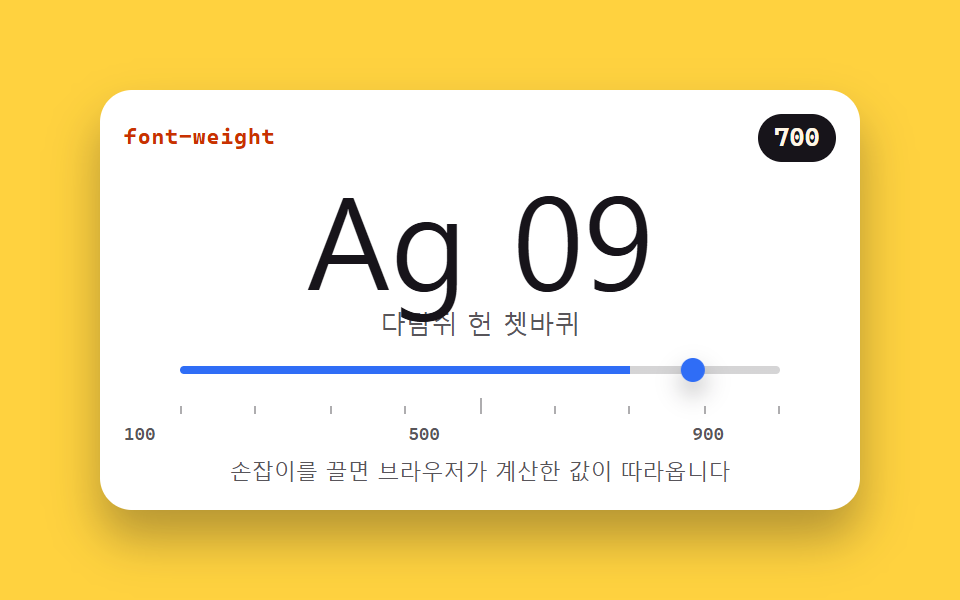
スライダーをドラッグすると font-weight が 100 から 900 まで動き、画面にはブラウザが実際に計算した値が追記されます。可変フォントでないシステムフォントが近いウェイトに寄る様子も見られます。
使いどころエディタ・ツールのフォント設定パネル
font-weightfont-variation-settingsoninput
<main class="stage">
<section class="wt is-demo" id="wt" aria-label="ウェイト軸スライダー">
  <header class="wt__bar">
    <span class="wt__name">font-weight</span>
    <span class="wt__out" id="wtOut">700</span>
  </header>
  <div class="wt__spec">
    <p class="wt__big" id="wtBig">Ag 09</p>
    <p class="wt__hangul" id="wtHangul">いろはにほへと</p>
  </div>
  <input class="wt__range" id="wtRange" type="range" min="100" max="900" step="100" value="700"
         aria-label="ウェイトスライダー" aria-valuemin="100" aria-valuemax="900" aria-valuenow="700">
  <div class="wt__ruler" aria-hidden="true">
    <i></i><i></i><i></i><i></i><i></i><i></i><i></i><i></i><i></i>
  </div>
  <p class="wt__scale"><span>100</span><span>500</span><span>900</span></p>
  <p class="wt__note">ハンドルをドラッグすると、ブラウザが計算した値が追ってきます</p>
</section>
</main>
@use "../../../../site/static/demo-tokens" as *;
// 굵기 축 슬라이더 — font-weight 를 100 에서 900 까지 움직인다.
// 화면 숫자는 브라우저가 실제로 계산한 값(getComputedStyle)을 다시 읽은 것이다.
// 가변 폰트 축은 font-variation-settings 'wght' 를 함께 건다 — 한쪽만 바꾸면
// 가변 서체에서는 다른 쪽 선언이 렌더링을 이긴다. 그래서 미리보기 루프의 키프레임도
// 두 속성을 같이 움직인다. latin(Ag 09)은 가변 축을 따라 부드럽게 움직이고
// 한글은 가변 축이 없는 시스템 서체로 떨어지며 가까운 굵기에 붙는다 — 그 차이가 이 데모의 이야기다.
$duration: $dur-quick;
$easing: $ease-spring;
$color: $subject-blue;
$sans: system-ui, -apple-system, "Segoe UI", "Noto Sans KR", sans-serif;
$mono: ui-monospace, "Cascadia Mono", Consolas, "Liberation Mono", monospace;
@include stage($stage-yellow);
.wt {
display: flex; flex-direction: column; gap: $sp-1;
box-sizing: border-box; width: min(100%, 380px); padding: $sp-3;
border-radius: $r-card; background: $stage-paper;
box-shadow: $shadow-raised;
}
// ── 속성 이름과 계산값 배지
.wt__bar { display: flex; align-items: center; justify-content: space-between; }
.wt__name {
color: $subject-orange-deep;
font-family: $mono; font-weight: 700; font-size: 11px; line-height: 1.4; letter-spacing: .04em;
}
.wt__out {
padding: $sp-1 $sp-2; border-radius: $r-pill;
background: $subject-ink; color: $subject-cream;
font-family: $mono; font-weight: 700; font-size: 13px; line-height: 1.2;
}
// ── 표본. 위 줄은 가변 축을 타는 latin, 아래 줄은 가까운 굵기에 붙는 한글
.wt__spec { margin: 0; display: flex; flex-direction: column; align-items: center; }
.wt__big {
margin: 0; color: $subject-ink;
font-family: $sans; font-weight: 700;
font-size: clamp(38px, 15vw, 64px); line-height: 1.05;
font-variation-settings: 'wght' var(--w, 700);
}
.wt__hangul {
margin: 0; color: rgba($subject-ink, .72);
font-family: $sans; font-weight: 700; font-size: 13px; line-height: 1.5;
font-variation-settings: 'wght' var(--w, 700);
}
// ── 슬라이더. 트랙 채움은 --fill(%) 로, 손잡이 위치는 브라우저가 맡는다
.wt__range {
--fill: 75%;
--travel: 288px;
appearance: none; -webkit-appearance: none;
display: block; width: 300px; max-width: 100%; margin: 0 auto;
height: 20px; background: transparent; cursor: pointer;
}
.wt__range::-webkit-slider-runnable-track {
height: 4px; border-radius: $r-pill;
background: linear-gradient(90deg, $color 0 var(--fill), rgba($subject-ink, .18) var(--fill) 100%);
}
.wt__range::-webkit-slider-thumb {
-webkit-appearance: none; appearance: none;
width: 12px; height: 12px; margin-top: -4px;
border: 0; border-radius: 50%; background: $color;
box-shadow: $shadow-press;
}
.wt__range::-moz-range-track {
height: 4px; border-radius: $r-pill; background: rgba($subject-ink, .18);
}
.wt__range::-moz-range-thumb {
width: 12px; height: 12px; border: 0; border-radius: 50%; background: $color;
}
.wt__range:focus-visible { outline: 2px solid $color; outline-offset: 4px; }
// ── 눈금자 9칸(100 부터 900 까지 100 간격)과 실측 라벨
.wt__ruler {
display: flex; justify-content: space-between; align-items: flex-end;
width: 300px; max-width: 100%; margin: 0 auto; padding: 0 $sp-1;
}
.wt__ruler i { width: 1px; height: 4px; background: rgba($subject-ink, .35); }
.wt__ruler i:nth-child(5) { height: 8px; }
.wt__scale {
display: flex; justify-content: space-between;
width: 300px; max-width: 100%; margin: 0;
color: rgba($subject-ink, .72);
font-family: $mono; font-weight: 500; font-size: 9px; line-height: 1.4;
}
.wt__note {
margin: 0; color: rgba($subject-ink, .72); text-align: center;
font-family: $sans; font-weight: 500; font-size: 11px; line-height: 1.4;
}
// ── 격자 미리보기 루프 (2초). font-weight 는 애니메이션 가능한 속성이다 —
// 100 에서 900 까지 갔다가 되돌아온다. 손잡이도 같은 리듬으로 translateX 하고
// 계산값 배지는 정점에서 한 번 부풀어 "값이 따라온다" 를 알린다(자기 중심).
.wt.is-demo .wt__big,
.wt.is-demo .wt__hangul {
animation-name: wtSweep;
animation-duration: $dur-loop;
animation-timing-function: ease-in-out;
animation-iteration-count: infinite;
}
.wt.is-demo .wt__out {
animation-name: wtPulse;
animation-duration: $dur-loop;
animation-timing-function: $easing;
animation-iteration-count: infinite;
transform-origin: 50% 50%;
}
.wt.is-demo .wt__range::-webkit-slider-thumb {
animation-name: wtThumb;
animation-duration: $dur-loop;
animation-timing-function: ease-in-out;
animation-iteration-count: infinite;
}
@keyframes wtSweep {
0% { font-weight: 100; font-variation-settings: 'wght' 100; }
45% { font-weight: 900; font-variation-settings: 'wght' 900; }
90%, 100% { font-weight: 100; font-variation-settings: 'wght' 100; }
}
@keyframes wtThumb {
0% { transform: translateX(0); }
45% { transform: translateX(var(--travel, 288px)); }
90%, 100% { transform: translateX(0); }
}
@keyframes wtPulse {
0%, 45% { transform: scale(1); }
50% { transform: scale(1.12); }
56%, 100% { transform: scale(1); }
}
// ── 좁은 화면: 표본과 눈금을 내린다 (올리지 않는다)
@media (max-width: 340px) {
.wt { padding: $sp-2; gap: $sp-1; }
.wt__big { font-size: 40px; }
.wt__hangul { font-size: 11px; }
.wt__range, .wt__ruler, .wt__scale { width: 240px; }
.wt__range { --travel: 228px; }
.wt__note { font-size: 10px; }
}
@media (prefers-reduced-motion: reduce) {
.wt.is-demo .wt__big,
.wt.is-demo .wt__hangul,
.wt.is-demo .wt__out,
.wt.is-demo .wt__range::-webkit-slider-thumb {
animation: none !important;
transform: none !important;
}
}html, body {
margin: 0;
overflow: hidden;
}
.stage {
box-sizing: border-box;
min-height: 100vh;
display: grid;
place-items: center;
margin: 0;
background: #ffd23f;
font-family: -apple-system, "Segoe UI", "Noto Sans KR", sans-serif;
padding: clamp(8px, 4vw, 24px);
}
.wt {
display: flex;
flex-direction: column;
gap: 4px;
box-sizing: border-box;
width: min(100%, 380px);
padding: 12px;
border-radius: 16px;
background: #ffffff;
box-shadow: 0 14px 24px rgba(23, 20, 26, 0.32);
}
.wt__bar {
display: flex;
align-items: center;
justify-content: space-between;
}
.wt__name {
color: #c93000;
font-family: ui-monospace, "Cascadia Mono", Consolas, "Liberation Mono", monospace;
font-weight: 700;
font-size: 11px;
line-height: 1.4;
letter-spacing: 0.04em;
}
.wt__out {
padding: 4px 8px;
border-radius: 999px;
background: #17141a;
color: #fff7e6;
font-family: ui-monospace, "Cascadia Mono", Consolas, "Liberation Mono", monospace;
font-weight: 700;
font-size: 13px;
line-height: 1.2;
}
.wt__spec {
margin: 0;
display: flex;
flex-direction: column;
align-items: center;
}
.wt__big {
margin: 0;
color: #17141a;
font-family: system-ui, -apple-system, "Segoe UI", "Noto Sans KR", sans-serif;
font-weight: 700;
font-size: clamp(38px, 15vw, 64px);
line-height: 1.05;
font-variation-settings: "wght" var(--w, 700);
}
.wt__hangul {
margin: 0;
color: rgba(23, 20, 26, 0.72);
font-family: system-ui, -apple-system, "Segoe UI", "Noto Sans KR", sans-serif;
font-weight: 700;
font-size: 13px;
line-height: 1.5;
font-variation-settings: "wght" var(--w, 700);
}
.wt__range {
--fill: 75%;
--travel: 288px;
appearance: none;
-webkit-appearance: none;
display: block;
width: 300px;
max-width: 100%;
margin: 0 auto;
height: 20px;
background: transparent;
cursor: pointer;
}
.wt__range::-webkit-slider-runnable-track {
height: 4px;
border-radius: 999px;
background: linear-gradient(90deg, #2f6df6 0 var(--fill), rgba(23, 20, 26, 0.18) var(--fill) 100%);
}
.wt__range::-webkit-slider-thumb {
-webkit-appearance: none;
appearance: none;
width: 12px;
height: 12px;
margin-top: -4px;
border: 0;
border-radius: 50%;
background: #2f6df6;
box-shadow: 0 6px 12px rgba(23, 20, 26, 0.32);
}
.wt__range::-moz-range-track {
height: 4px;
border-radius: 999px;
background: rgba(23, 20, 26, 0.18);
}
.wt__range::-moz-range-thumb {
width: 12px;
height: 12px;
border: 0;
border-radius: 50%;
background: #2f6df6;
}
.wt__range:focus-visible {
outline: 2px solid #2f6df6;
outline-offset: 4px;
}
.wt__ruler {
display: flex;
justify-content: space-between;
align-items: flex-end;
width: 300px;
max-width: 100%;
margin: 0 auto;
padding: 0 4px;
}
.wt__ruler i {
width: 1px;
height: 4px;
background: rgba(23, 20, 26, 0.35);
}
.wt__ruler i:nth-child(5) {
height: 8px;
}
.wt__scale {
display: flex;
justify-content: space-between;
width: 300px;
max-width: 100%;
margin: 0;
color: rgba(23, 20, 26, 0.72);
font-family: ui-monospace, "Cascadia Mono", Consolas, "Liberation Mono", monospace;
font-weight: 500;
font-size: 9px;
line-height: 1.4;
}
.wt__note {
margin: 0;
color: rgba(23, 20, 26, 0.72);
text-align: center;
font-family: system-ui, -apple-system, "Segoe UI", "Noto Sans KR", sans-serif;
font-weight: 500;
font-size: 11px;
line-height: 1.4;
}
.wt.is-demo .wt__big,
.wt.is-demo .wt__hangul {
animation-name: wtSweep;
animation-duration: 2s;
animation-timing-function: ease-in-out;
animation-iteration-count: infinite;
}
.wt.is-demo .wt__out {
animation-name: wtPulse;
animation-duration: 2s;
animation-timing-function: cubic-bezier(0.2, 0.8, 0.2, 1);
animation-iteration-count: infinite;
transform-origin: 50% 50%;
}
.wt.is-demo .wt__range::-webkit-slider-thumb {
animation-name: wtThumb;
animation-duration: 2s;
animation-timing-function: ease-in-out;
animation-iteration-count: infinite;
}
@keyframes wtSweep {
0% {
font-weight: 100;
font-variation-settings: "wght" 100;
}
45% {
font-weight: 900;
font-variation-settings: "wght" 900;
}
90%, 100% {
font-weight: 100;
font-variation-settings: "wght" 100;
}
}
@keyframes wtThumb {
0% {
transform: translateX(0);
}
45% {
transform: translateX(var(--travel, 288px));
}
90%, 100% {
transform: translateX(0);
}
}
@keyframes wtPulse {
0%, 45% {
transform: scale(1);
}
50% {
transform: scale(1.12);
}
56%, 100% {
transform: scale(1);
}
}
@media (max-width: 340px) {
.wt {
padding: 8px;
gap: 4px;
}
.wt__big {
font-size: 40px;
}
.wt__hangul {
font-size: 11px;
}
.wt__range, .wt__ruler, .wt__scale {
width: 240px;
}
.wt__range {
--travel: 228px;
}
.wt__note {
font-size: 10px;
}
}
@media (prefers-reduced-motion: reduce) {
.wt.is-demo .wt__big,
.wt.is-demo .wt__hangul,
.wt.is-demo .wt__out,
.wt.is-demo .wt__range::-webkit-slider-thumb {
animation: none !important;
transform: none !important;
}
}var wt = document.getElementById('wt');
var big = document.getElementById('wtBig');
var hangul = document.getElementById('wtHangul');
var range = document.getElementById('wtRange');
var out = document.getElementById('wtOut');
// oninput — 손잡이가 붙어 있는 동안 매번 따라온다.
// 화면 숫자는 작성값을 echo 하는 게 아니라 getComputedStyle 로 브라우저가 실제로 계산한
// font-weight 를 다시 읽은 값이다. 가변 축은 font-variation-settings 'wght' 를 함께 건다 —
// 한쪽만 바꾸면 가변 서체에서는 나머지 쪽 선언이 렌더링을 이긴다.
range.oninput = function () {
wt.classList.remove('is-demo');
var v = range.value;
var pct = (v - 100) / 8;
big.style.fontWeight = v;
big.style.setProperty('--w', v);
hangul.style.fontWeight = v;
hangul.style.setProperty('--w', v);
range.style.setProperty('--fill', pct + '%');
range.setAttribute('aria-valuenow', v);
out.textContent = getComputedStyle(big).fontWeight;
};
range.addEventListener('pointerdown', function () { wt.classList.remove('is-demo'); });
// 처음 연 순간의 계산값은 미리보기 루프가 돌던 중이면 보간 중간값(135 같은)을 읽는다 —
// 그때는 HTML 에 적어 둔 초기값(700)이 slider·CSS 와 이미 일치하니 그대로 둔다.
if (!wt.classList.contains('is-demo')) {
out.textContent = getComputedStyle(big).fontWeight;
}// FontWeightSlider — vanilla 판(run/074/demo/02-font-weight-slider/index.html) 의 React 포트.
// 슬라이더가 font-weight 100~900 을 움직이고 화면 숫자는 getComputedStyle 로 브라우저가 실제로
// 계산한 값을 다시 읽어 보여준다(vanilla 의 oninput 경로 대신 React 의 onInput 프롭).
// 가변 축은 font-variation-settings 'wght' 를 함께 건다 — 키프레임은 vanilla 와 같은 글자다.
import { useEffect, useRef, useState } from "react";
import type { CSSProperties } from "react";
import styles from "./FontWeightSlider.module.scss";
export type FontWeightSliderProps = {
duration?: number;
easing?: string;
color?: string;
initialWeight?: number;
};
type Vars = CSSProperties & {
"--duration"?: string;
"--easing"?: string;
"--color"?: string;
"--w"?: string;
};
type Box<T> = { current: T | null };
// 이벤트 핸들러 파라미터는 로컬 타입으로 — ambient 타입이 React 제네릭을 안 준다
type RangeEvt = { target: { value: string } };
const NOTE = "손잡이를 끌면 브라우저가 계산한 값이 따라옵니다";
const ARIA_LABEL = "굵기 슬라이더";
const BIG_TEXT = "Ag 09";
const HANGUL_TEXT = "다람쥐 헌 쳇바퀴";
const SCALE = ["100", "500", "900"];
export default function FontWeightSlider(props: FontWeightSliderProps) {
const duration = props.duration ?? 220;
const easing = props.easing ?? "cubic-bezier(.2, .8, .2, 1)";
const color = props.color ?? "#2f6df6";
const initial = props.initialWeight ?? 700;
const [weight, setWeight] = useState<number>(initial);
const [computed, setComputed] = useState<string>(String(initial));
const [preview, setPreview] = useState<boolean>(true);
const bigRef = useRef<HTMLParagraphElement>(null) as Box<HTMLParagraphElement>;
// 화면 숫자는 작성값이 아니라 브라우저가 계산한 값 — 렌더 뒤에 다시 읽는다.
// 미리보기 루프가 돌던 중이면 계산값이 보간 중간값이니 읽지 않고 초기값(700)을 유지한다.
useEffect(() => {
const big = bigRef.current;
if (big && !preview) setComputed(getComputedStyle(big).fontWeight);
}, [weight, preview]);
const vars: Vars = {
"--duration": duration + "ms",
"--easing": easing,
"--color": color,
"--w": String(weight),
};
const fill = ((weight - 100) / 8).toFixed(1) + "%";
return (
<main className={styles.stage}>
<section className={styles.root + (preview ? " " + styles.isDemo : "")} style={vars} aria-label={ARIA_LABEL}>
<header className={styles.bar}>
<span className={styles.name}>font-weight</span>
<span className={styles.out}>{computed}</span>
</header>
<div className={styles.spec}>
<p className={styles.big} ref={bigRef} style={{ fontWeight: weight }}>{BIG_TEXT}</p>
<p className={styles.hangul} style={{ fontWeight: weight }}>{HANGUL_TEXT}</p>
</div>
<input
className={styles.range}
type="range"
min="100"
max="900"
step="100"
value={weight}
aria-label={ARIA_LABEL}
aria-valuemin="100"
aria-valuemax="900"
aria-valuenow={weight}
style={{ "--fill": fill } as CSSProperties}
onPointerDown={() => setPreview(false)}
onInput={(e: RangeEvt) => {
setPreview(false);
setWeight(Number(e.target.value));
}}
/>
<div className={styles.ruler} aria-hidden="true">
{Array.from({ length: 9 }, (_, i) => (
<i key={i}></i>
))}
</div>
<p className={styles.scale}>
{SCALE.map((s) => (
<span key={s}>{s}</span>
))}
</p>
<p className={styles.note}>{NOTE}</p>
</section>
</main>
);
}02 ウェイト軸スライダー(100〜900) — 計測 累積面積 5.237% · 動いたフレーム 14/23GODRICH オリジナル · SCSS と React は zip に同梱 · css タイポグラフィ プレイグラウンド 9種 — webフォントを読み込まずに
このデモが属する記事
 css タイポグラフィ プレイグラウンド 9種 — webフォントを読み込まずにcss タイポグラフィとは、フォントのダウンロードを待たずにサイズ・太さ・字間・行間でページの読み心地を決める作業です。この9つのプレイグラウンドは webフォントを読み込まずに、OS がもともと持っているシステムフォントだけで組んであり、 この記事のデモをすべて見る