03フローフィールドの線画
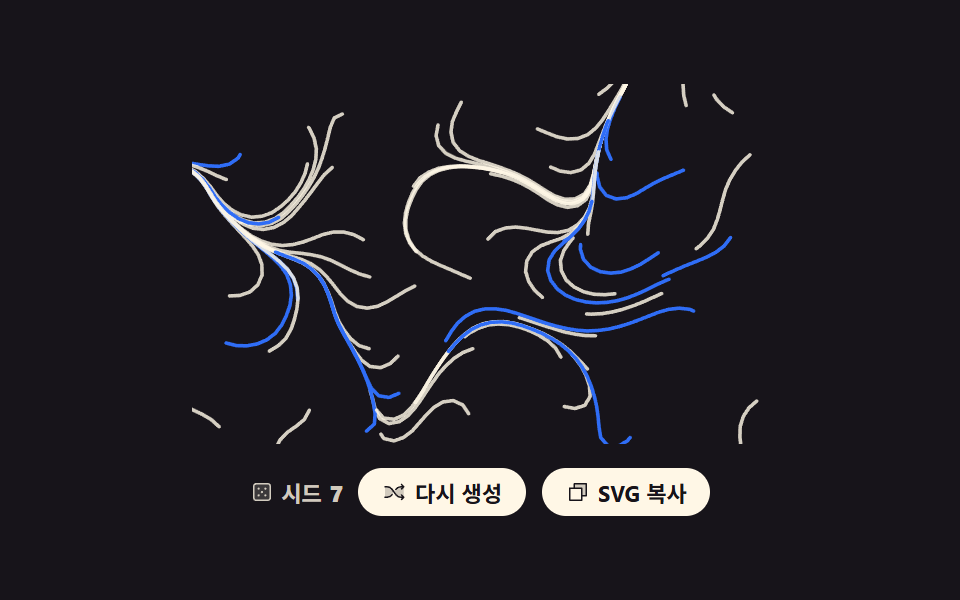
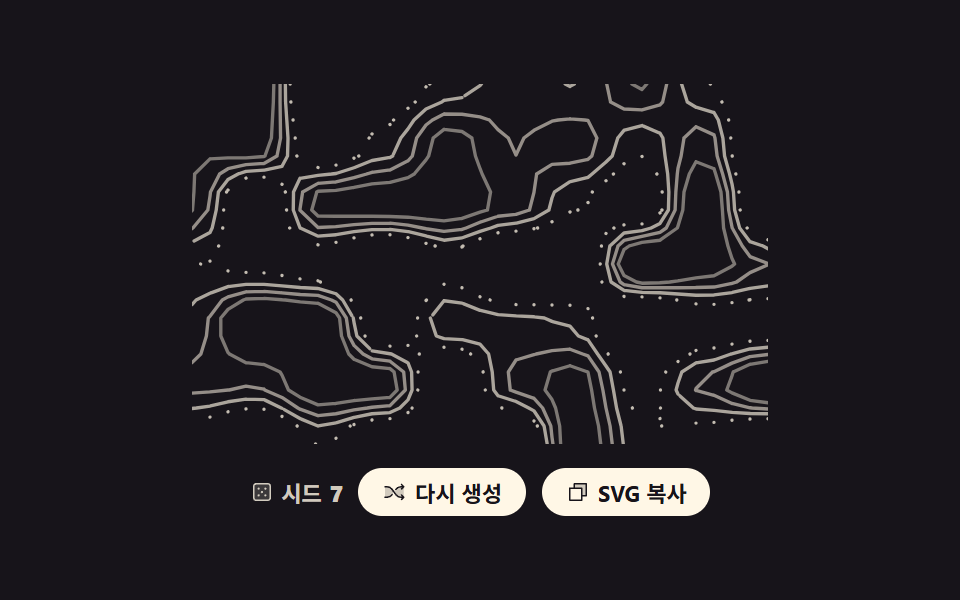
位置ごとに向きを決めておき、その向きへ短い歩幅をつないで長い曲線にします。
使いどころ音楽・展示ページの全面背景、長文の間に挟む休符のような帯
stroke-linecapstroke-dashoffsetcubic-bezier
<main class="stage">
<div class="ff is-demo" id="root">
  <svg class="ff__art" id="art" viewBox="0 0 240 150" role="img" data-label="方向の場に沿って流れる線で描いた絵、シード {n}"></svg>
  <div class="ff__bar">
    <p class="ff__seed">
      <svg xmlns="http://www.w3.org/2000/svg" class="ff__ic" viewBox="0 0 256 256" aria-hidden="true"><g fill="currentColor"><path d="M216 64v128a24 24 0 0 1-24 24H64a24 24 0 0 1-24-24V64a24 24 0 0 1 24-24h128a24 24 0 0 1 24 24" opacity=".2"/><path d="M192 32H64a32 32 0 0 0-32 32v128a32 32 0 0 0 32 32h128a32 32 0 0 0 32-32V64a32 32 0 0 0-32-32m16 160a16 16 0 0 1-16 16H64a16 16 0 0 1-16-16V64a16 16 0 0 1 16-16h128a16 16 0 0 1 16 16ZM104 92a12 12 0 1 1-12-12a12 12 0 0 1 12 12m72 0a12 12 0 1 1-12-12a12 12 0 0 1 12 12m-72 72a12 12 0 1 1-12-12a12 12 0 0 1 12 12m36-36a12 12 0 1 1-12-12a12 12 0 0 1 12 12m36 36a12 12 0 1 1-12-12a12 12 0 0 1 12 12"/></g></svg>
      シード <b id="num">7</b>
    </p>
    <button class="ff__btn" type="button" id="again">
      <svg xmlns="http://www.w3.org/2000/svg" class="ff__ic" viewBox="0 0 256 256" aria-hidden="true"><g fill="currentColor"><path d="M107.14 98.8L128 128l-20.86 29.2A64 64 0 0 1 55.06 184H32V72h23.06a64 64 0 0 1 52.08 26.8m93.8-26.8a64 64 0 0 0-52.08 26.8L128 128l20.86 29.2a64 64 0 0 0 52.08 26.8H232V72Z" opacity=".2"/><path d="M237.66 178.34a8 8 0 0 1 0 11.32l-24 24a8 8 0 0 1-11.32-11.32L212.69 192h-11.75a72.12 72.12 0 0 1-58.59-30.15l-41.72-58.4A56.1 56.1 0 0 0 55.06 80H32a8 8 0 0 1 0-16h23.06a72.12 72.12 0 0 1 58.59 30.15l41.72 58.4A56.1 56.1 0 0 0 200.94 176h11.75l-10.35-10.34a8 8 0 0 1 11.32-11.32ZM143 107a8 8 0 0 0 11.16-1.86l1.2-1.67A56.1 56.1 0 0 1 200.94 80h11.75l-10.35 10.34a8 8 0 0 0 11.32 11.32l24-24a8 8 0 0 0 0-11.32l-24-24a8 8 0 0 0-11.32 11.32L212.69 64h-11.75a72.12 72.12 0 0 0-58.59 30.15l-1.2 1.67A8 8 0 0 0 143 107m-30 42a8 8 0 0 0-11.16 1.86l-1.2 1.67A56.1 56.1 0 0 1 55.06 176H32a8 8 0 0 0 0 16h23.06a72.12 72.12 0 0 0 58.59-30.15l1.2-1.67A8 8 0 0 0 113 149"/></g></svg>
      <span class="ff__label">再生成</span>
    </button>
    <button class="ff__btn" type="button" id="copy" data-done="コピーしました">
      <svg xmlns="http://www.w3.org/2000/svg" class="ff__ic" viewBox="0 0 256 256" aria-hidden="true"><g fill="currentColor"><path d="M216 40v128h-48V88H88V40Z" opacity=".2"/><path d="M216 32H88a8 8 0 0 0-8 8v40H40a8 8 0 0 0-8 8v128a8 8 0 0 0 8 8h128a8 8 0 0 0 8-8v-40h40a8 8 0 0 0 8-8V40a8 8 0 0 0-8-8m-56 176H48V96h112Zm48-48h-32V88a8 8 0 0 0-8-8H96V48h112Z"/></g></svg>
      <span class="ff__label">SVGをコピー</span>
    </button>
  </div>
</div>
</main>
@use "../../../../site/static/demo-tokens" as *;
// 플로우 필드 선 그림 — 자리마다 각도를 하나씩 정해 둔 방향장 위를 짧은 걸음으로 걸어 곡선을 만든다.
// 경로 계산은 JS, 그리는 연출은 CSS: pathLength="1" 로 길이를 1 로 정규화하고
// stroke-dashoffset 을 1 → 0 → -1 로 돌린다. 1 과 -1 은 둘 다 "감춰짐" 이라 한 바퀴 끝에서 안 튄다.
$duration: $dur-loop;
$easing: cubic-bezier(.7, 0, .85, .4);
$color: $subject-cream;
@include stage($stage-ink);
.ff { display: grid; justify-items: center; gap: $sp-3; width: 100%; }
.ff__art { display: block; width: clamp(176px, 60vw, 320px); height: auto; }
.ff__line {
fill: none;
stroke-width: 1.5;
stroke-linecap: round;
stroke-linejoin: round;
stroke-dasharray: 1; // pathLength="1" 이라 1 = 경로 전체 길이
stroke-dashoffset: 0; // 정적 상태는 선이 다 그려진 그림
}
.ff__line--a { stroke: $color; opacity: .82; }
.ff__line--b { stroke: $subject-blue; }
.ff__bar { display: flex; flex-wrap: wrap; align-items: center; justify-content: center; gap: $sp-2; }
.ff__seed {
margin: 0;
display: inline-flex; align-items: center; gap: $sp-1;
color: rgba(255, 247, 230, .8);
font-weight: 700; font-size: clamp(9px, 2.4vw, 11px);
}
.ff__btn {
display: inline-flex; align-items: center; gap: $sp-1;
border: 0; border-radius: $r-pill;
padding: $sp-1 $sp-3;
background: $subject-cream; color: $subject-ink;
font-family: inherit; font-weight: 700; font-size: clamp(9px, 2.4vw, 11px);
cursor: pointer;
}
.ff__btn:focus-visible { outline: 3px solid $subject-blue; outline-offset: 2px; }
.ff__ic { width: 12px; height: 12px; flex: none; }
// ── 미리보기 루프: 「다시 생성」을 눌렀을 때 실제로 도는 것과 같은 그리기 연출을 무한 반복한다.
// 그리기는 느리게 시작해 끝에서 빨라지고 지우기는 그 반대라, 프레임당 변화가 가장 큰 순간이
// 「선이 거의 다 있는」 장면에 온다 — poster 가 빈 화면으로 뽑히지 않는다.
.ff.is-demo .ff__line {
animation-name: ffFlow;
animation-duration: $duration;
animation-timing-function: $easing;
animation-iteration-count: infinite;
animation-fill-mode: backwards;
animation-delay: calc(var(--i) * 62ms);
}
.ff.is-draw .ff__line {
animation-name: ffDraw;
animation-duration: $dur-enter;
animation-timing-function: $ease-out;
animation-iteration-count: 1;
animation-fill-mode: backwards;
animation-delay: calc(var(--i) * 30ms);
}
@keyframes ffFlow {
0% { stroke-dashoffset: 1; animation-timing-function: $easing; }
40% { stroke-dashoffset: 0; animation-timing-function: linear; }
52% { stroke-dashoffset: 0; animation-timing-function: $ease-out; }
86% { stroke-dashoffset: -1; }
100% { stroke-dashoffset: -1; }
}
@keyframes ffDraw {
from { stroke-dashoffset: 1; }
to { stroke-dashoffset: 0; }
}
@media (max-width: 340px) {
.ff { gap: $sp-2; }
.ff__ic { width: 10px; height: 10px; }
}
@media (prefers-reduced-motion: reduce) {
.ff.is-demo .ff__line,
.ff.is-draw .ff__line { animation: none !important; stroke-dashoffset: 0 !important; }
}html, body {
margin: 0;
overflow: hidden;
}
.stage {
box-sizing: border-box;
min-height: 100vh;
display: grid;
place-items: center;
margin: 0;
background: #17141a;
font-family: -apple-system, "Segoe UI", "Noto Sans KR", sans-serif;
padding: clamp(8px, 4vw, 24px);
}
.ff {
display: grid;
justify-items: center;
gap: 12px;
width: 100%;
}
.ff__art {
display: block;
width: clamp(176px, 60vw, 320px);
height: auto;
}
.ff__line {
fill: none;
stroke-width: 1.5;
stroke-linecap: round;
stroke-linejoin: round;
stroke-dasharray: 1;
stroke-dashoffset: 0;
}
.ff__line--a {
stroke: #fff7e6;
opacity: 0.82;
}
.ff__line--b {
stroke: #2f6df6;
}
.ff__bar {
display: flex;
flex-wrap: wrap;
align-items: center;
justify-content: center;
gap: 8px;
}
.ff__seed {
margin: 0;
display: inline-flex;
align-items: center;
gap: 4px;
color: rgba(255, 247, 230, 0.8);
font-weight: 700;
font-size: clamp(9px, 2.4vw, 11px);
}
.ff__btn {
display: inline-flex;
align-items: center;
gap: 4px;
border: 0;
border-radius: 999px;
padding: 4px 12px;
background: #fff7e6;
color: #17141a;
font-family: inherit;
font-weight: 700;
font-size: clamp(9px, 2.4vw, 11px);
cursor: pointer;
}
.ff__btn:focus-visible {
outline: 3px solid #2f6df6;
outline-offset: 2px;
}
.ff__ic {
width: 12px;
height: 12px;
flex: none;
}
.ff.is-demo .ff__line {
animation-name: ffFlow;
animation-duration: 2s;
animation-timing-function: cubic-bezier(0.7, 0, 0.85, 0.4);
animation-iteration-count: infinite;
animation-fill-mode: backwards;
animation-delay: calc(var(--i) * 62ms);
}
.ff.is-draw .ff__line {
animation-name: ffDraw;
animation-duration: 600ms;
animation-timing-function: ease-out;
animation-iteration-count: 1;
animation-fill-mode: backwards;
animation-delay: calc(var(--i) * 30ms);
}
@keyframes ffFlow {
0% {
stroke-dashoffset: 1;
animation-timing-function: cubic-bezier(0.7, 0, 0.85, 0.4);
}
40% {
stroke-dashoffset: 0;
animation-timing-function: linear;
}
52% {
stroke-dashoffset: 0;
animation-timing-function: ease-out;
}
86% {
stroke-dashoffset: -1;
}
100% {
stroke-dashoffset: -1;
}
}
@keyframes ffDraw {
from {
stroke-dashoffset: 1;
}
to {
stroke-dashoffset: 0;
}
}
@media (max-width: 340px) {
.ff {
gap: 8px;
}
.ff__ic {
width: 10px;
height: 10px;
}
}
@media (prefers-reduced-motion: reduce) {
.ff.is-demo .ff__line,
.ff.is-draw .ff__line {
animation: none !important;
stroke-dashoffset: 0 !important;
}
}var root = document.getElementById('root');
var art = document.getElementById('art');
var num = document.getElementById('num');
var W = 240, H = 150, COLS = 5, ROWS = 3, GX = 9, GY = 6, STEPS = 30, STEP = 4.4;
var seed = 7;
// mulberry32 — 32비트 정수 シード 하나로 언제나 같은 난수열을 돌려준다. 재현 가능한 생성의 뿌리
function mulberry32(a) {
return function () {
a = a + 0x6D2B79F5 | 0;
var t = Math.imul(a ^ a >>> 15, 1 | a);
t = t + Math.imul(t ^ t >>> 7, 61 | t) ^ t;
return ((t ^ t >>> 14) >>> 0) / 4294967296;
};
}
// 성긴 격자에 난수를 놓고 사이를 smoothstep 으로 이어 자리마다 하나의 각도를 준다 = 방향장
function makeAngles(s) {
var rand = mulberry32(s), lat = [], r, c;
for (r = 0; r <= ROWS; r++) { lat.push([]); for (c = 0; c <= COLS; c++) { lat[r].push(rand()); } }
return function (x, y) {
var gx = Math.max(0, Math.min(COLS - 0.001, x / W * COLS));
var gy = Math.max(0, Math.min(ROWS - 0.001, y / H * ROWS));
var ix = Math.floor(gx), iy = Math.floor(gy), fx = gx - ix, fy = gy - iy;
var sx = fx * fx * (3 - 2 * fx), sy = fy * fy * (3 - 2 * fy);
var top = lat[iy][ix] + (lat[iy][ix + 1] - lat[iy][ix]) * sx;
var bot = lat[iy + 1][ix] + (lat[iy + 1][ix + 1] - lat[iy + 1][ix]) * sx;
return (top + (bot - top) * sy) * Math.PI * 3;
};
}
// 한 점에서 시작해 그 자리의 각도로 한 걸음씩 옮기며 좌표를 이어 붙인다
function walk(angleAt, x, y) {
var d = 'M' + x.toFixed(1) + ' ' + y.toFixed(1), i;
for (i = 0; i < STEPS; i++) {
var a = angleAt(x, y);
x += Math.cos(a) * STEP;
y += Math.sin(a) * STEP;
if (x < -8 || x > W + 8 || y < -8 || y > H + 8) { break; }
d += 'L' + x.toFixed(1) + ' ' + y.toFixed(1);
}
return d;
}
function build() {
var angleAt = makeAngles(seed), rand = mulberry32(seed + 991), parts = [], gx, gy;
// 시작점을 흔들린 격자에서 뽑아 화면 전체에 고르게 깔리게 한다 (순수 난수면 한쪽에 뭉친다)
for (gy = 0; gy < GY; gy++) {
for (gx = 0; gx < GX; gx++) {
var x = (gx + 0.15 + rand() * 0.7) / GX * W, y = (gy + 0.15 + rand() * 0.7) / GY * H;
var tone = rand() < 0.34 ? 'b' : 'a';
parts.push('<path class="ff__line ff__line--' + tone + '" style="--i:' + ((gx + gy) % 11) + '" pathLength="1" d="' + walk(angleAt, x, y) + '"/>');
}
}
art.innerHTML = parts.join('');
art.setAttribute('aria-label', art.getAttribute('data-label').replace('{n}', seed));
num.textContent = seed;
}
document.getElementById('again').addEventListener('click', function () {
seed = (seed * 7 + 13) % 991 + 1;
build();
root.classList.remove('is-demo');
root.classList.remove('is-draw');
void art.getBoundingClientRect().width; // 한 번 읽어 리플로를 일으켜야 같은 애니메이션이 처음부터 다시 돈다
root.classList.add('is-draw');
});
var copyBtn = document.getElementById('copy');
copyBtn.addEventListener('click', function () {
var label = copyBtn.querySelector('.ff__label');
var before = label.textContent;
if (navigator.clipboard && navigator.clipboard.writeText) {
navigator.clipboard.writeText(art.outerHTML).catch(function () {});
}
label.textContent = copyBtn.getAttribute('data-done');
setTimeout(function () { label.textContent = before; }, 1200);
});
build();// FlowFieldLines — vanilla 판(run/293/demo/03-generative-flow-field-lines/index.html) 의 React 포트.
// 자리마다 각도를 하나씩 정해 둔 방향장 위를 짧은 걸음으로 걸어 곡선을 만든다. 경로는 JS, 그리는 연출은 CSS.
// 시드·격자 수·걸음 수·걸음 길이는 vanilla 와 같은 값이다.
import { useMemo, useRef, useState } from "react";
import type { CSSProperties } from "react";
import styles from "./FlowFieldLines.module.scss";
export type FlowFieldLinesProps = {
duration?: number;
easing?: string;
color?: string;
label?: string;
seedText?: string;
regenerateText?: string;
copyText?: string;
copiedText?: string;
};
type Vars = CSSProperties & { "--duration"?: string; "--easing"?: string; "--color"?: string };
// useRef 는 T | null 을 돌려준다. 처음부터 값이 있고 절대 비지 않는 상자는 이렇게 좁혀 쓴다
type Box<T> = { current: T };
type Line = { key: number; tone: string; i: number; d: string };
const W = 240;
const H = 150;
const COLS = 5;
const ROWS = 3;
const GX = 9;
const GY = 6;
const STEPS = 30;
const STEP = 4.4;
// mulberry32 — 32비트 정수 시드 하나로 언제나 같은 난수열을 돌려준다. 재현 가능한 생성의 뿌리
function mulberry32(a: number): () => number {
return function (): number {
a = a + 0x6D2B79F5 | 0;
let t = Math.imul(a ^ a >>> 15, 1 | a);
t = t + Math.imul(t ^ t >>> 7, 61 | t) ^ t;
return ((t ^ t >>> 14) >>> 0) / 4294967296;
};
}
// 성긴 격자에 난수를 놓고 사이를 smoothstep 으로 이어 자리마다 하나의 각도를 준다 = 방향장
function makeAngles(s: number): (x: number, y: number) => number {
const rand = mulberry32(s);
const lat: number[][] = [];
for (let r = 0; r <= ROWS; r++) {
const row: number[] = [];
for (let c = 0; c <= COLS; c++) { row.push(rand()); }
lat.push(row);
}
return function (x: number, y: number): number {
const gx = Math.max(0, Math.min(COLS - 0.001, x / W * COLS));
const gy = Math.max(0, Math.min(ROWS - 0.001, y / H * ROWS));
const ix = Math.floor(gx);
const iy = Math.floor(gy);
const fx = gx - ix;
const fy = gy - iy;
const sx = fx * fx * (3 - 2 * fx);
const sy = fy * fy * (3 - 2 * fy);
const top = lat[iy][ix] + (lat[iy][ix + 1] - lat[iy][ix]) * sx;
const bot = lat[iy + 1][ix] + (lat[iy + 1][ix + 1] - lat[iy + 1][ix]) * sx;
return (top + (bot - top) * sy) * Math.PI * 3;
};
}
// 한 점에서 시작해 그 자리의 각도로 한 걸음씩 옮기며 좌표를 이어 붙인다
function walk(angleAt: (x: number, y: number) => number, x: number, y: number): string {
let d = "M" + x.toFixed(1) + " " + y.toFixed(1);
for (let i = 0; i < STEPS; i++) {
const a = angleAt(x, y);
x += Math.cos(a) * STEP;
y += Math.sin(a) * STEP;
if (x < -8 || x > W + 8 || y < -8 || y > H + 8) { break; }
d += "L" + x.toFixed(1) + " " + y.toFixed(1);
}
return d;
}
export default function FlowFieldLines({
duration = 2000,
easing = "cubic-bezier(.7, 0, .85, .4)",
color = "#fff7e6",
label = "A picture drawn with lines flowing along a field of angles, seed {n}",
seedText = "Seed",
regenerateText = "Regenerate",
copyText = "Copy SVG",
copiedText = "Copied",
}: FlowFieldLinesProps) {
const artRef = useRef<SVGSVGElement | null>(null);
const timerRef = useRef<number>(0) as Box<number>;
const [seed, setSeed] = useState(7);
const [mode, setMode] = useState("demo");
const [copyLabel, setCopyLabel] = useState(copyText);
const vars: Vars = { "--duration": `${duration}ms`, "--easing": easing, "--color": color };
// 시드가 바뀔 때만 다시 계산한다 — 같은 시드면 언제나 같은 경로 문자열이 나온다.
// 시작점은 흔들린 격자에서 뽑아 화면 전체에 고르게 깔리게 한다 (순수 난수면 한쪽에 뭉친다)
const lines = useMemo(() => {
const angleAt = makeAngles(seed);
const rand = mulberry32(seed + 991);
const out: Line[] = [];
for (let gy = 0; gy < GY; gy++) {
for (let gx = 0; gx < GX; gx++) {
const x = (gx + 0.15 + rand() * 0.7) / GX * W;
const y = (gy + 0.15 + rand() * 0.7) / GY * H;
const tone = rand() < 0.34 ? "lineB" : "lineA";
out.push({ key: gy * GX + gx, tone, i: (gx + gy) % 11, d: walk(angleAt, x, y) });
}
}
return out;
}, [seed]);
function regenerate(): void {
setSeed((prev: number) => (prev * 7 + 13) % 991 + 1);
setMode("draw");
}
function copySvg(): void {
const art = artRef.current;
if (!art) { return; }
if (navigator.clipboard && navigator.clipboard.writeText) {
navigator.clipboard.writeText(art.outerHTML).catch(function () {});
}
setCopyLabel(copiedText);
clearTimeout(timerRef.current);
timerRef.current = window.setTimeout(() => setCopyLabel(copyText), 1200);
}
const rootClass = `${styles.ff} ${mode === "demo" ? styles.isDemo : styles.isDraw}`;
return (
<div className={rootClass} style={vars}>
<svg
ref={artRef}
className={styles.art}
viewBox={`0 0 ${W} ${H}`}
role="img"
aria-label={label.replace("{n}", String(seed))}
>
{lines.map((l: Line) => (
<path
key={l.key}
className={`${styles.line} ${styles[l.tone]}`}
style={{ "--i": l.i } as CSSProperties}
pathLength={1}
d={l.d}
/>
))}
</svg>
<div className={styles.bar}>
<p className={styles.seed}>{seedText} <b>{seed}</b></p>
<button className={styles.btn} type="button" onClick={regenerate}>{regenerateText}</button>
<button className={styles.btn} type="button" onClick={copySvg}>{copyLabel}</button>
</div>
</div>
);
}03 フローフィールドの線画 — 計測 累積面積 5.71% · 動いたフレーム 23/23GODRICH オリジナル · SCSS と React は zip に同梱 · css 背景 パターン ジェネレーター 自作9種
このデモが属する記事
 css 背景 パターン ジェネレーター 自作9種css 背景 パターン ジェネレーターは、画像ファイルを配る代わりに数字ひとつから模様をその場で計算する仕組みです。ここで紹介する9つはシードひとつで絵が決まり、同じ数字を入れ直せば同じ絵が必ず戻ってきます。 この記事のデモをすべて見る