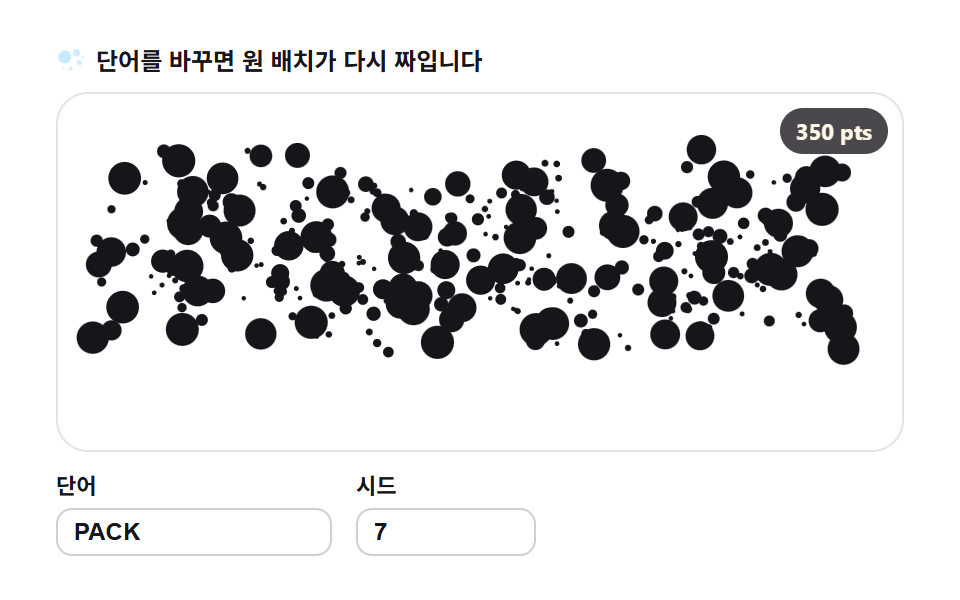
04円パッキング — マスク内に最大限の円
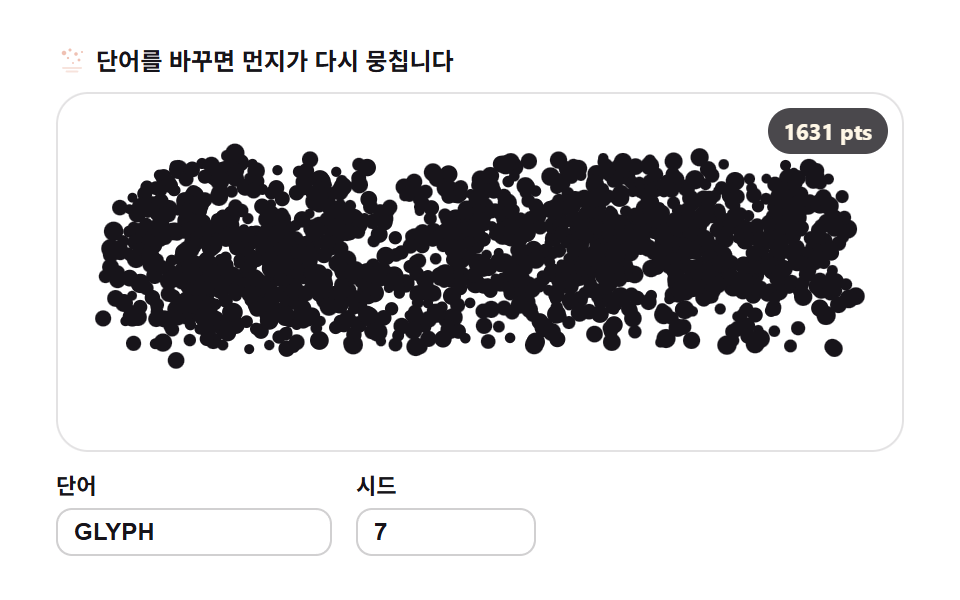
マスク内に直径を縮めながら円を貪欲に置き、重なるものは捨てます。シード固定のため同じ文字には常に同じ配置になります。
使いどころイベント・発表スライドのタイトル
arcgetImageDatafillText
<main class="stage">
<div class="gc" id="gc">
  <p class="gc__hint">
    <svg class="gc__ico" viewBox="0 0 256 256" aria-hidden="true"><g fill="currentColor"><circle cx="70" cy="104" r="52" opacity=".9"/><circle cx="164" cy="70" r="30" opacity=".8"/><circle cx="186" cy="150" r="22" opacity=".7"/><circle cx="118" cy="196" r="16" opacity=".6"/><circle cx="212" cy="106" r="12" opacity=".55"/><circle cx="58" cy="196" r="10" opacity=".5"/></g></svg>
    <span>言葉を変えると円の配置が組み直されます</span>
  </p>
  <div class="gc__field" id="field" role="application" aria-label="円パッキングの実験盤" tabindex="0">
    <canvas class="gc__cv" id="cv"></canvas>
    <b class="gc__badge" aria-hidden="true" id="badge">0 pts</b>
  </div>
  <div class="gc__bar">
    <label class="gc__dial">単語
      <input type="text" id="word" value="PACK" maxlength="12" spellcheck="false" aria-label="単語">
    </label>
    <label class="gc__dial">シード
      <input type="number" id="seed" min="1" max="9999" value="7" aria-label="シード">
    </label>
  </div>
</div>
</main>
@use "../../../../site/static/demo-tokens" as *;
// 원 채우기 — 움직임은 전부 캔버스 rAF 루프 안에 있다(@keyframes 0개 — 077-03 패턴).
// 입자색은 파스텔 변수를 커스텀 프로퍼티로 내려 JS 가 읽어 쓴다. 리터럴 hex 는 없다(BD26).
$glyph-ink: $subject-ink; // 글릿 본색 — 잉크
$glyph-sky: mix($subject-sky, $stage-paper, 42%); // 파스텔 하늘
$glyph-mint: mix($subject-mint, $stage-paper, 42%); // 파스텔 민트
$glyph-peach: mix($subject-orange-deep, $stage-paper, 30%); // 파스텔 복숭아
@include stage($stage-paper);
.gc {
--g0: #{$glyph-ink};
--g1: #{$glyph-sky};
--g2: #{$glyph-mint};
--g3: #{$glyph-peach};
display: flex; flex-direction: column; gap: $sp-2;
width: 100%; max-width: 424px;
}
.gc__hint {
display: flex; align-items: center; gap: $sp-1; margin: 0;
font-weight: 700; font-size: clamp(10px, 2.8vw, 12px); line-height: 1.35;
color: $subject-ink;
}
.gc__ico { width: 16px; height: 16px; flex: 0 0 auto; color: $glyph-sky; }
.gc__field {
position: relative; height: 180px;
border-radius: $r-card; overflow: hidden;
background: $stage-paper;
box-shadow: inset 0 0 0 1px rgba($subject-ink, .12);
}
.gc__field:focus-visible { outline: 2px solid $glyph-sky; outline-offset: 2px; }
.gc__cv { display: block; width: 100%; height: 100%; }
// 놓인 원의 수를 화면에 적는다 — 런타임 샘플링이 이 데모의 요점이다
.gc__badge {
position: absolute; right: $sp-2; top: $sp-2;
padding: $sp-1 $sp-2; border-radius: $r-pill;
background: rgba($subject-ink, .78);
color: $subject-cream; font-weight: 700; font-size: 11px;
}
.gc__bar { display: flex; align-items: flex-end; gap: $sp-3; }
.gc__dial {
display: flex; flex-direction: column; gap: $sp-1;
font-weight: 700; font-size: 11px; color: $subject-ink;
}
.gc__dial input {
width: 120px; margin: 0; padding: $sp-1 $sp-2;
border: 1px solid rgba($subject-ink, .2); border-radius: $r-sm;
background: $stage-paper; color: $subject-ink;
font-weight: 700; font-size: 12px;
}
.gc__dial input[type="number"] { width: 72px; }
.gc__dial input:focus-visible { outline: 2px solid $glyph-sky; outline-offset: 1px; }
@media (max-width: 340px) {
.gc { gap: $sp-1; }
.gc__field { height: 100px; }
.gc__badge { font-size: 10px; padding: 0 $sp-1; }
.gc__dial input { width: 88px; }
.gc__dial input[type="number"] { width: 56px; }
.gc__hint { font-size: 10px; }
}
// reduce — 루프가 아예 안 돈다. 완성 포즈의 정지 한 장이 남는다.
@media (prefers-reduced-motion: reduce) {
.gc.is-still .gc__field { cursor: default !important; }
}html, body {
margin: 0;
overflow: hidden;
}
.stage {
box-sizing: border-box;
min-height: 100vh;
display: grid;
place-items: center;
margin: 0;
background: #ffffff;
font-family: -apple-system, "Segoe UI", "Noto Sans KR", sans-serif;
padding: clamp(8px, 4vw, 24px);
}
.gc {
--g0: #17141a;
--g1: rgb(76.1176470588%, 90.9411764706%, 100%);
--g2: rgb(70.5176470588%, 92.9176470588%, 85.3411764706%);
--g3: rgb(93.6470588235%, 75.6470588235%, 70%);
display: flex;
flex-direction: column;
gap: 8px;
width: 100%;
max-width: 424px;
}
.gc__hint {
display: flex;
align-items: center;
gap: 4px;
margin: 0;
font-weight: 700;
font-size: clamp(10px, 2.8vw, 12px);
line-height: 1.35;
color: #17141a;
}
.gc__ico {
width: 16px;
height: 16px;
flex: 0 0 auto;
color: rgb(76.1176470588%, 90.9411764706%, 100%);
}
.gc__field {
position: relative;
height: 180px;
border-radius: 16px;
overflow: hidden;
background: #ffffff;
box-shadow: inset 0 0 0 1px rgba(23, 20, 26, 0.12);
}
.gc__field:focus-visible {
outline: 2px solid rgb(76.1176470588%, 90.9411764706%, 100%);
outline-offset: 2px;
}
.gc__cv {
display: block;
width: 100%;
height: 100%;
}
.gc__badge {
position: absolute;
right: 8px;
top: 8px;
padding: 4px 8px;
border-radius: 999px;
background: rgba(23, 20, 26, 0.78);
color: #fff7e6;
font-weight: 700;
font-size: 11px;
}
.gc__bar {
display: flex;
align-items: flex-end;
gap: 12px;
}
.gc__dial {
display: flex;
flex-direction: column;
gap: 4px;
font-weight: 700;
font-size: 11px;
color: #17141a;
}
.gc__dial input {
width: 120px;
margin: 0;
padding: 4px 8px;
border: 1px solid rgba(23, 20, 26, 0.2);
border-radius: 8px;
background: #ffffff;
color: #17141a;
font-weight: 700;
font-size: 12px;
}
.gc__dial input[type=number] {
width: 72px;
}
.gc__dial input:focus-visible {
outline: 2px solid rgb(76.1176470588%, 90.9411764706%, 100%);
outline-offset: 1px;
}
@media (max-width: 340px) {
.gc {
gap: 4px;
}
.gc__field {
height: 100px;
}
.gc__badge {
font-size: 10px;
padding: 0 4px;
}
.gc__dial input {
width: 88px;
}
.gc__dial input[type=number] {
width: 56px;
}
.gc__hint {
font-size: 10px;
}
}
@media (prefers-reduced-motion: reduce) {
.gc.is-still .gc__field {
cursor: default !important;
}
}// 원 채우기 — 글자를 픽셀로 뜯어 그 안에 최대한 많은 원을 탐욕적으로 놓는다.
// 1) 오프스크린 캔버스에 fillText 로 단어를 그려 getImageData 로 알파 마스크를 뽑는다
// 2) 지름을 10px 에서 1.4px 까지 줄여가며 무작위 위치에 원을 놓고, 마스크 밖이거나 겹치면 버린다
// 3) シード(mulberry32) 가 시도 순서를 정하므로 같은 単語+같은 시드는 항상 같은 배치가 나온다
// 완성 뒤에는 원들이 제각각의 위상으로 맥동한다(반경 ±7%) — 판이 숨쉰다.
var root = document.getElementById('gc');
var field = document.getElementById('field');
var cv = document.getElementById('cv');
var ctx = cv.getContext('2d');
var wordIn = document.getElementById('word');
var seedIn = document.getElementById('seed');
var badge = document.getElementById('badge');
var SW = 252, SH = 108; // 샘플 해상도 — 판 비율과 같다
var DIAMS = [9.2, 7.2, 5.6, 4.4, 3.4, 2.6, 1.9, 1.4]; // 지름 단계 — 큰 원부터 채운다
var TRIES = [1500, 2400, 3600, 5000, 6400, 7400, 8000, 8600]; // 단계별 시도 수
var CELL = 12, GW = 24; // 충돌 조회 격자(한 칸 12px — 최대 지름 10 보다 넉넉)
var reduce = window.matchMedia('(prefers-reduced-motion: reduce)').matches;
var W = 0, H = 0;
var circles = [];
var t0 = 0, raf = 0;
// 색 — scss 가 파스텔 커스텀 프로퍼티(--g0..--g3)로 내려준 넉 색을 읽어 쓴다
var css = getComputedStyle(root);
function hexOf(name) {
var v = css.getPropertyValue(name).trim().replace('#', '');
if (v.length === 3) v = v.charAt(0) + v.charAt(0) + v.charAt(1) + v.charAt(1) + v.charAt(2) + v.charAt(2);
return '#' + v;
}
var cols = [hexOf('--g0'), hexOf('--g1'), hexOf('--g2'), hexOf('--g3')];
// 결정적 난수 — シード 하나가 시도 순서·원의 위상·색 전부를 정한다
function mulberry32(a) {
return function () {
a |= 0; a = a + 0x6D2B79F5 | 0;
var t = Math.imul(a ^ a >>> 15, 1 | a);
t = t + Math.imul(t ^ t >>> 7, 61 | t) ^ t;
return ((t ^ t >>> 14) >>> 0) / 4294967296;
};
}
// ── 1) 글자 → 알파 마스크 ────────────────────────────────────────
function buildMask(word) {
var off = document.createElement('canvas');
off.width = SW; off.height = SH;
var oc = off.getContext('2d', { willReadFrequently: true });
oc.textAlign = 'center'; oc.textBaseline = 'middle';
var fs = 200;
oc.font = '900 ' + fs + 'px Arial';
var w = oc.measureText(word).width || 1;
fs = Math.min(fs * ((SW - 8) / w), SH - 6); // 폭·높이 안에서 제일 큰 글자
oc.font = '900 ' + Math.round(fs) + 'px Arial';
oc.fillStyle = '#fff';
oc.fillText(word, SW / 2, SH / 2);
return oc.getImageData(0, 0, SW, SH).data;
}
function pickColor(r) {
if (r < 0.55) return 0; // 잉크 다수
if (r < 0.73) return 1; // 하늘
if (r < 0.88) return 2; // 민트
return 3; // 복숭아
}
// ── 2) 탐욕 원 채우기 — 격자 조회로 충돌 검사를 O(1) 에 가깝게 ──
// 각 원은 흩어진 시작 자리(sx,sy — 시드로 결정)를 함께 받는다. 등장 때 이 자리에서 목표로 날아든다.
function packCircles(data, seed) {
var rnd = mulberry32(seed);
var out = [];
var grid = []; // 칸 -> 원 인덱스 목록
function hits(x, y, r) {
var cx = Math.floor(x / CELL), cy = Math.floor(y / CELL);
for (var gy = cy - 1; gy <= cy + 1; gy++) {
for (var gx = cx - 1; gx <= cx + 1; gx++) {
if (gx < 0 || gy < 0 || gx >= GW) continue;
var cell = grid[gy * GW + gx];
if (!cell) continue;
for (var k = 0; k < cell.length; k++) {
var c = out[cell[k]];
var dx = c.x - x, dy = c.y - y, rr = c.r + r + 0.25;
if (dx * dx + dy * dy < rr * rr) return true;
}
}
}
return false;
}
for (var d = 0; d < DIAMS.length; d++) {
var r = DIAMS[d] / 2;
for (var i = 0; i < TRIES[d]; i++) {
var x = rnd() * SW, y = rnd() * SH;
var xi = x | 0, yi = y | 0;
if (data[(yi * SW + xi) * 4 + 3] <= 128) continue; // 마스크 밖 — 버린다
if (hits(x, y, r)) continue; // 겹침 — 버린다
var c = { x: x, y: y, r: r, ph: rnd() * 6.2832, ci: pickColor(rnd()), sx: rnd() * SW, sy: rnd() * SH };
var gi = (y / CELL | 0) * GW + (x / CELL | 0);
(grid[gi] || (grid[gi] = [])).push(out.length);
out.push(c);
}
}
return out;
}
// ── 3) 単語·시드가 바뀌면 배치를 다시 계산한다 ───────────────────
var word = 'PACK', seed = 7;
function resample(nextWord, nextSeed) {
var w = String(nextWord == null ? word : nextWord).trim().toUpperCase();
if (w) word = w; // 빈 문자열이면 직전 값을 유지
var s = Math.floor(Number(nextSeed));
if (s >= 1) seed = s;
circles = packCircles(buildMask(word), seed);
window.__sampleInfo = { targets: circles.length, particles: circles.length };
badge.textContent = circles.length + ' pts';
if (reduce) {
paint(1); // 완성 포즈 한 장 — k=1
} else {
t0 = performance.now(); // 등장 연출을 처음부터 다시
}
}
function fit() {
var r = field.getBoundingClientRect();
var d = window.devicePixelRatio || 1;
W = r.width; H = r.height;
cv.width = Math.round(W * d); cv.height = Math.round(H * d);
ctx.setTransform(d, 0, 0, d, 0, 0);
}
// 등장 — 원들이 흩어진 자리에서 채워진 배치로 날아든다(0.55 초, easeOutQuad).
// 이후 2초 주기로 숨쉰다: 배치가 중심 쪽으로 0.78↔1.0 만큼 오그라들었다 펴진다.
function posK(t) {
var cyc = Math.floor(t / 2) * 2;
var u = t - cyc;
if (u < 0.55) {
var q = u / 0.55;
return 1 - (1 - q) * (1 - q); // 날아드는 중 — 목표를 향해 가속
}
var s = (u - 0.55) / 1.45;
return 0.78 + 0.22 * (0.5 - 0.5 * Math.cos(s * 6.2832)); // 정착부 — 호흡
}
function paint(t) {
ctx.clearRect(0, 0, W, H);
var sx = W / SW, sy = H / SH;
var k = reduce ? 1 : posK(t);
var ox = Math.sin(t * 0.8) * 1.2, oy = Math.cos(t * 0.6) * 1.0; // 판 등록 미세 흔들림
for (var i = 0; i < circles.length; i++) {
var c = circles[i];
var x = c.sx + (c.x - c.sx) * k; // 흩어진 자리 → 채워진 자리
var y = c.sy + (c.y - c.sy) * k;
var pulse = 1 + 0.07 * Math.sin(t * 6.2832 + c.ph); // 원마다 위상이 다른 맥동
ctx.fillStyle = cols[c.ci];
ctx.beginPath();
ctx.arc((x + ox) * sx, (y + oy) * sy, c.r * pulse * sx, 0, 6.2832);
ctx.fill();
}
}
function frame(now) {
paint((now - t0) / 1000);
raf = requestAnimationFrame(frame);
}
wordIn.addEventListener('input', function () { resample(wordIn.value, seedIn.value); });
seedIn.addEventListener('input', function () { resample(wordIn.value, seedIn.value); });
window.addEventListener('resize', function () { fit(); if (reduce) paint(1); });
fit();
resample(wordIn.value, seedIn.value);
if (reduce) {
root.classList.add('is-still'); // 루프 없이 정지 한 장
} else {
raf = requestAnimationFrame(frame);
}// GlyphCirclePacking — vanilla 판(run/310/demo/04-glyph-circle-packing/index.html) 의 React 포트.
// 오프스크린 캔버스에 fillText 로 단어를 그려 getImageData 로 알파 마스크를 뽑고,
// 지름을 9.2→1.4px 로 줄여가며 마스크 안에 겹치지 않게 원을 탐욕적으로 놓는다.
// 시도 순서·시작 자리·위상·색은 전부 mulberry32(시드) 로 정한다 — 같은 시드는 같은 배치.
// 움직임은 캔버스 rAF 루프가 전부 그리므로 @keyframes 는 없다 — props 는 CSS 변수로 내려간다.
import { useEffect, useRef, useState } from "react";
import type { CSSProperties } from "react";
import styles from "./GlyphCirclePacking.module.scss";
export type GlyphCirclePackingProps = {
duration?: string;
easing?: string;
color?: string;
};
type Vars = CSSProperties & { "--duration"?: string; "--easing"?: string; "--color"?: string };
type Box<T> = { current: T };
// React 이벤트 제네릭이 없는 환경이라 필요한 것만 로컬로 선언한다
type InputEvt = { target: { value: string } };
const SW = 252, SH = 108; // 샘플 해상도 — 판 비율과 같다
const DIAMS = [9.2, 7.2, 5.6, 4.4, 3.4, 2.6, 1.9, 1.4]; // 지름 단계 — 큰 원부터 채운다
const TRIES = [1500, 2400, 3600, 5000, 6400, 7400, 8000, 8600]; // 단계별 시도 수
const CELL = 12, GW = 24; // 충돌 조회 격자(한 칸 12px)
const FIELD_LABEL = "원 채우기 실험판";
// 결정적 난수 — mulberry32. 같은 시드면 같은 수열을 돌려준다
function mulberry32(a: number): () => number {
return function () {
a |= 0; a = (a + 0x6D2B79F5) | 0;
const t = Math.imul(a ^ (a >>> 15), 1 | a);
const u = (t + Math.imul(t ^ (t >>> 7), 61 | t)) ^ t;
return ((u ^ (u >>> 14)) >>> 0) / 4294967296;
};
}
type Circle = { x: number; y: number; r: number; ph: number; ci: number; sx: number; sy: number };
// 오프스크린 fillText → 알파 마스크 픽셀 배열
function buildMask(word: string): Uint8ClampedArray {
const off = document.createElement("canvas");
off.width = SW; off.height = SH;
const oc = off.getContext("2d", { willReadFrequently: true }) as CanvasRenderingContext2D;
oc.textAlign = "center"; oc.textBaseline = "middle";
let fs = 200;
oc.font = "900 " + fs + "px Arial";
const w = oc.measureText(word).width || 1;
fs = Math.min(fs * ((SW - 8) / w), SH - 6); // 폭·높이 안에서 제일 큰 글자
oc.font = "900 " + Math.round(fs) + "px Arial";
oc.fillStyle = "#fff";
oc.fillText(word, SW / 2, SH / 2);
return oc.getImageData(0, 0, SW, SH).data;
}
function pickColor(r: number): number {
if (r < 0.55) return 0; // 잉크 다수
if (r < 0.73) return 1; // 하늘
if (r < 0.88) return 2; // 민트
return 3; // 복숭아
}
// 탐욕 원 채우기 — 격자 조회로 충돌 검사를 O(1) 에 가깝게.
// 각 원은 흩어진 시작 자리(sx,sy — 시드로 결정)를 함께 받는다.
function packCircles(data: Uint8ClampedArray, seed: number): Circle[] {
const rnd = mulberry32(seed);
const out: Circle[] = [];
const grid: (number[] | undefined)[] = []; // 칸 -> 원 인덱스 목록
function hits(x: number, y: number, r: number): boolean {
const cx = Math.floor(x / CELL), cy = Math.floor(y / CELL);
for (let gy = cy - 1; gy <= cy + 1; gy++) {
for (let gx = cx - 1; gx <= cx + 1; gx++) {
if (gx < 0 || gy < 0 || gx >= GW) continue;
const cell = grid[gy * GW + gx];
if (!cell) continue;
for (let k = 0; k < cell.length; k++) {
const c = out[cell[k]];
const dx = c.x - x, dy = c.y - y, rr = c.r + r + 0.25;
if (dx * dx + dy * dy < rr * rr) return true;
}
}
}
return false;
}
for (let d = 0; d < DIAMS.length; d++) {
const r = DIAMS[d] / 2;
for (let i = 0; i < TRIES[d]; i++) {
const x = rnd() * SW, y = rnd() * SH;
const xi = x | 0, yi = y | 0;
if (data[(yi * SW + xi) * 4 + 3] <= 128) continue; // 마스크 밖 — 버린다
if (hits(x, y, r)) continue; // 겹침 — 버린다
const c: Circle = { x, y, r, ph: rnd() * 6.2832, ci: pickColor(rnd()), sx: rnd() * SW, sy: rnd() * SH };
const gi = ((y / CELL) | 0) * GW + ((x / CELL) | 0);
(grid[gi] || (grid[gi] = [])).push(out.length);
out.push(c);
}
}
return out;
}
// 등장(0.55 초 easeOutQuad) 뒤 2초 주기로 숨쉰다 — 배치가 0.78↔1.0 만큼 오그라들었다 펴진다
function posK(t: number): number {
const cyc = Math.floor(t / 2) * 2;
const u = t - cyc;
if (u < 0.55) {
const q = u / 0.55;
return 1 - (1 - q) * (1 - q); // 날아드는 중 — 목표를 향해 가속
}
const s = (u - 0.55) / 1.45;
return 0.78 + 0.22 * (0.5 - 0.5 * Math.cos(s * 6.2832)); // 정착부 — 호흡
}
export default function GlyphCirclePacking({
duration = "2s", // vanilla $duration: $dur-loop
easing = "cubic-bezier(.2, .8, .2, 1)", // vanilla $easing: $ease-spring
color = "#17141a", // vanilla $glyph-ink
}: GlyphCirclePackingProps) {
const rootRef = useRef<HTMLDivElement | null>(null);
const fieldRef = useRef<HTMLDivElement | null>(null);
const cvRef = useRef<HTMLCanvasElement | null>(null);
const ctxRef = useRef<CanvasRenderingContext2D | null>(null);
const circlesRef = useRef<Circle[]>([]) as Box<Circle[]>;
const colsRef = useRef<string[]>([]) as Box<string[]>;
const sizeRef = useRef({ w: 0, h: 0 }) as Box<{ w: number; h: number }>;
const stateRef = useRef({ word: "PACK", seed: 7, t0: 0 }) as Box<{ word: string; seed: number; t0: number }>;
const rafRef = useRef(0) as Box<number>;
const [count, setCount] = useState(0);
const [still, setStill] = useState(false);
const vars: Vars = { "--duration": duration, "--easing": easing, "--color": color };
function reduced(): boolean {
return window.matchMedia("(prefers-reduced-motion: reduce)").matches;
}
function hex3to6(v: string): string {
if (v.length === 3) return v.charAt(0) + v.charAt(0) + v.charAt(1) + v.charAt(1) + v.charAt(2) + v.charAt(2);
return v;
}
function colors(): string[] {
const root = rootRef.current;
if (!root) return ["#17141a", "#17141a", "#17141a", "#17141a"];
const one = (n: string) => hex3to6(getComputedStyle(root).getPropertyValue(n).trim());
return [one("--g0"), one("--g1"), one("--g2"), one("--g3")];
}
// 고DPI 대응 — 배킹 스토어는 devicePixelRatio 배, 그리기 좌표계는 CSS 픽셀 그대로
function fit(): void {
const field = fieldRef.current;
const cv = cvRef.current;
if (!field || !cv) return;
const r = field.getBoundingClientRect();
const dpr = window.devicePixelRatio || 1;
sizeRef.current.w = r.width;
sizeRef.current.h = r.height;
cv.width = Math.round(r.width * dpr);
cv.height = Math.round(r.height * dpr);
const ctx = ctxRef.current;
if (ctx) ctx.setTransform(dpr, 0, 0, dpr, 0, 0);
}
function paint(t: number): void {
const ctx = ctxRef.current;
const circles = circlesRef.current;
const cols = colsRef.current;
if (!ctx) return;
const W = sizeRef.current.w, H = sizeRef.current.h;
ctx.clearRect(0, 0, W, H);
const sx = W / SW, sy = H / SH;
const k = reduced() ? 1 : posK(t);
const ox = Math.sin(t * 0.8) * 1.2, oy = Math.cos(t * 0.6) * 1.0; // 판 등록 미세 흔들림
for (let i = 0; i < circles.length; i++) {
const c = circles[i];
const x = c.sx + (c.x - c.sx) * k; // 흩어진 자리 → 채워진 자리
const y = c.sy + (c.y - c.sy) * k;
const pulse = 1 + 0.07 * Math.sin(t * 6.2832 + c.ph); // 원마다 위상이 다른 맥동
ctx.fillStyle = cols[c.ci] || "#17141a";
ctx.beginPath();
ctx.arc((x + ox) * sx, (y + oy) * sy, c.r * pulse * sx, 0, 6.2832);
ctx.fill();
}
}
// 단어·시드가 바뀌면 배치를 다시 계산한다(런타임 샘플링)
function resample(nextWord: string, nextSeed: number): void {
const st = stateRef.current;
const w = String(nextWord == null ? st.word : nextWord).trim().toUpperCase();
if (w) st.word = w;
if (nextSeed >= 1) st.seed = Math.floor(nextSeed);
circlesRef.current = packCircles(buildMask(st.word), st.seed);
setCount(circlesRef.current.length);
if (reduced()) {
paint(1); // 완성 포즈 한 장 — k=1
} else {
st.t0 = performance.now(); // 등장 연출을 처음부터 다시
}
}
function frame(now: number): void {
paint((now - stateRef.current.t0) / 1000);
rafRef.current = requestAnimationFrame(frame);
}
function onWord(e: InputEvt): void {
resample(e.target.value, stateRef.current.seed);
}
function onSeed(e: InputEvt): void {
const v = Math.floor(Number(e.target.value)) || 1;
resample(stateRef.current.word, v);
}
function onResize(): void {
fit();
if (reduced()) paint(1);
}
useEffect(() => {
const cv = cvRef.current;
if (!cv) return;
ctxRef.current = cv.getContext("2d");
if (!ctxRef.current) return;
colsRef.current = colors();
fit();
resample("PACK", 7);
window.addEventListener("resize", onResize);
if (reduced()) {
// reduce — 루프를 시작하지 않고 완성 포즈 한 장만 그린다
setStill(true);
} else {
rafRef.current = requestAnimationFrame(frame);
}
return () => {
window.removeEventListener("resize", onResize);
cancelAnimationFrame(rafRef.current);
};
}, []);
const cls = [styles.root, still ? styles.isStill : ""].filter(Boolean).join(" ");
return (
<main className={styles.stage}>
<div className={cls} ref={rootRef} style={vars}>
<p className={styles.hint}>
<svg className={styles.ico} viewBox="0 0 256 256" aria-hidden="true"><g fill="currentColor"><circle cx="70" cy="104" r="52" opacity=".9"/><circle cx="164" cy="70" r="30" opacity=".8"/><circle cx="186" cy="150" r="22" opacity=".7"/><circle cx="118" cy="196" r="16" opacity=".6"/><circle cx="212" cy="106" r="12" opacity=".55"/><circle cx="58" cy="196" r="10" opacity=".5"/></g></svg>
<span>단어를 바꾸면 원 배치가 다시 짜입니다</span>
</p>
<div className={styles.field} ref={fieldRef} role="application" aria-label={FIELD_LABEL} tabIndex={0}>
<canvas className={styles.cv} ref={cvRef} id="cv"></canvas>
<b className={styles.badge} aria-hidden="true">{count} pts</b>
</div>
<div className={styles.bar}>
<label className={styles.dial}>단어
<input type="text" id="word" defaultValue="PACK" maxLength={12} spellCheck={false} aria-label="단어" onInput={onWord} />
</label>
<label className={styles.dial}>시드
<input type="number" id="seed" defaultValue={7} min={1} max={9999} aria-label="시드" onInput={onSeed} />
</label>
</div>
</div>
</main>
);
}04 円パッキング — マスク内に最大限の円 — 計測 累積面積 32.033% · 動いたフレーム 23/23GODRICH オリジナル · SCSS と React は zip に同梱 · テキスト アニメーション css 9選 — 文字をキャンバスのピクセルから作り直す
このデモが属する記事
 テキスト アニメーション css 9選 — 文字をキャンバスのピクセルから作り直すテキスト アニメーションをcssのキーフレームだけで組むと、文字はいつも塊のまま動きます。この9種は違います。文字をピクセルにサンプリングして組み直す、つまりfillTextで描いた文字をgetImageDataで読み返し、粒子・点・線・円 この記事のデモをすべて見る