06数値カウンターヒーロー
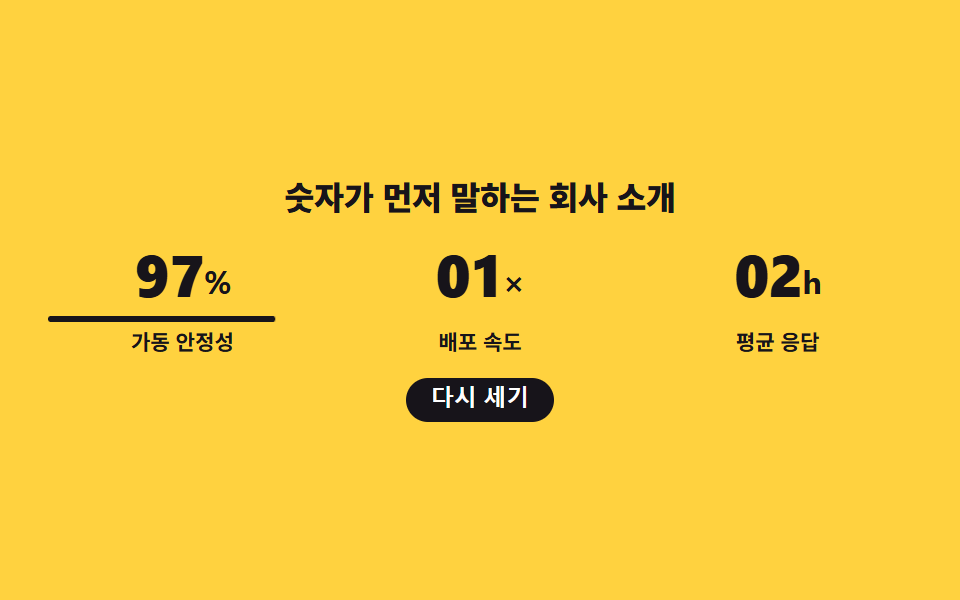
数値3枠がスロットのように桁を回して上げ、回転が止まると各数値の下線が左から満ちて値の確定を示します。
使いどころ実績・規模を前面に出す会社紹介の冒頭
steps(6, end)font-variant-numerictranslateY
<main class="stage">
  <section class="hc is-demo">
    <h1 class="hc__title">数字が先に語る会社紹介</h1>

    <div class="hc__row">
      <div class="hc__cell hc__cell--1">
        <!-- 자릿수 스트립: 세로로 쌓은 숫자 열을 창 안에서 굴려 올린다. 읽히는 값은 aria-label 하나 -->
        <p class="hc__value" role="img" aria-label="98パーセント">
          <span class="hc__win" aria-hidden="true"><span class="hc__strip"><span class="hc__digit">3</span><span class="hc__digit">4</span><span class="hc__digit">5</span><span class="hc__digit">6</span><span class="hc__digit">7</span><span class="hc__digit">8</span><span class="hc__digit">9</span></span></span>
          <span class="hc__win" aria-hidden="true"><span class="hc__strip"><span class="hc__digit">2</span><span class="hc__digit">3</span><span class="hc__digit">4</span><span class="hc__digit">5</span><span class="hc__digit">6</span><span class="hc__digit">7</span><span class="hc__digit">8</span></span></span>
          <span class="hc__unit" aria-hidden="true">%</span>
        </p>
        <span class="hc__rule" aria-hidden="true"></span>
        <p class="hc__label">稼働の安定性</p>
      </div>

      <div class="hc__cell hc__cell--2">
        <p class="hc__value" role="img" aria-label="12倍">
          <span class="hc__win" aria-hidden="true"><span class="hc__strip"><span class="hc__digit">5</span><span class="hc__digit">6</span><span class="hc__digit">7</span><span class="hc__digit">8</span><span class="hc__digit">9</span><span class="hc__digit">0</span><span class="hc__digit">1</span></span></span>
          <span class="hc__win" aria-hidden="true"><span class="hc__strip"><span class="hc__digit">6</span><span class="hc__digit">7</span><span class="hc__digit">8</span><span class="hc__digit">9</span><span class="hc__digit">0</span><span class="hc__digit">1</span><span class="hc__digit">2</span></span></span>
          <span class="hc__unit" aria-hidden="true">×</span>
        </p>
        <span class="hc__rule" aria-hidden="true"></span>
        <p class="hc__label">デプロイ速度</p>
      </div>

      <div class="hc__cell hc__cell--3">
        <p class="hc__value" role="img" aria-label="24時間">
          <span class="hc__win" aria-hidden="true"><span class="hc__strip"><span class="hc__digit">6</span><span class="hc__digit">7</span><span class="hc__digit">8</span><span class="hc__digit">9</span><span class="hc__digit">0</span><span class="hc__digit">1</span><span class="hc__digit">2</span></span></span>
          <span class="hc__win" aria-hidden="true"><span class="hc__strip"><span class="hc__digit">8</span><span class="hc__digit">9</span><span class="hc__digit">0</span><span class="hc__digit">1</span><span class="hc__digit">2</span><span class="hc__digit">3</span><span class="hc__digit">4</span></span></span>
          <span class="hc__unit" aria-hidden="true">h</span>
        </p>
        <span class="hc__rule" aria-hidden="true"></span>
        <p class="hc__label">平均応答</p>
      </div>
    </div>

    <button class="hc__again" type="button">もう一度数える</button>
  </section>
</main>@use "../../../../site/static/demo-tokens" as *;
// 275 히어로 팔레트 — 아홉 항목이 같은 값을 쓴다. 괄호 안은 실측 대비비
$hr-ink: $stage-ink; // 옐로 무대 위 글자는 전부 잉크 (12.63:1)
$hr-paper: $stage-paper; // 버튼 글자
$hr-yellow: $stage-yellow; // 무대
$hc-cell: 1.15em; // 한 자릿수 칸의 높이 — 스트립은 이 단위로만 굴러간다
$duration: $dur-loop; // 굴림 + 확정 밑줄 한 바퀴
$easing: $ease-spring; // 밑줄이 차오르는 결
$color: $hr-ink; // 옐로 무대 위 강조는 잉크뿐
@include stage($hr-yellow);
.hc {
box-sizing: border-box;
display: grid;
justify-items: center;
gap: clamp(8px, 2.4vw, 12px);
width: clamp(272px, 94vw, 432px);
text-align: center;
}
.hc__title {
margin: 0;
color: $color; // 잉크 on 옐로 12.63:1
font-weight: 800; font-size: clamp(13px, 3.4vw, 20px); line-height: 1.2;
letter-spacing: -.01em;
word-break: keep-all; // 한국어는 낱말 단위로 줄을 바꾼다
}
// 세 칸은 1fr 로 정확히 균등하게 나눈다 (BD19 오탐 회피이자 칸 폭이 흔들리지 않는 정답)
.hc__row {
display: grid;
grid-template-columns: repeat(3, 1fr);
gap: clamp(8px, 3vw, 16px);
width: 100%;
}
.hc__cell {
--d: 0s; // 칸마다 굴림이 어긋나는 만큼
display: grid;
justify-items: center;
gap: $sp-1;
min-width: 0;
}
.hc__cell--2 { --d: .16s; }
.hc__cell--3 { --d: .32s; }
// 정적 상태 — 스트립 기본 위치가 곧 최종 숫자다. 루프는 그 위에 덧씌운다
.hc__value {
display: flex;
align-items: flex-end;
justify-content: center;
gap: 0;
margin: 0;
color: $color;
font-variant-numeric: tabular-nums; // 자릿수 폭이 흔들리지 않는다
font-weight: 800; font-size: clamp(20px, 6vw, 32px); line-height: 1;
letter-spacing: -.02em;
}
.hc__win {
display: block;
overflow: hidden;
height: $hc-cell;
}
.hc__strip {
display: block;
transform: translateY($hc-cell * -6); // 일곱 칸 중 마지막 = 확정된 숫자
}
.hc__digit {
display: block;
height: $hc-cell;
line-height: $hc-cell;
}
.hc__unit {
font-weight: 700; font-size: .56em; line-height: 1.6;
}
// 확정 밑줄 — 정적 상태에서는 이미 차 있다
.hc__rule {
width: 100%;
height: 3px;
border-radius: $r-pill;
background: $color;
transform: scaleX(1);
transform-origin: left center; // 규칙8: 밑줄 왼쪽 기준 채움
}
.hc__label {
margin: 0;
color: $color;
font-weight: 600; font-size: clamp(9px, 2.2vw, 12px); line-height: 1.2;
}
.hc__again {
padding: $sp-1 $sp-3;
border: 0;
border-radius: $r-pill;
background: $hr-ink;
color: $hr-paper; // 흰 글자 on 잉크 18.24:1
font-weight: 700; font-size: clamp(10px, 2.4vw, 12px); line-height: 1.2;
cursor: pointer;
}
.hc__again:focus-visible {
outline: 2px solid $hr-ink;
outline-offset: 2px;
}
// ── 자동 재생 ─────────────────────────────────────────────
// 스트립은 steps(6, end) 로 굴러 매 프레임 온전한 숫자만 보이고, 굴림이 멈추면 밑줄이 차오른다.
// animation 단축은 delay 를 0 으로 리셋하므로 낱개 속성으로 쓴다
.hc.is-demo .hc__strip {
animation-name: hcRoll;
animation-duration: $duration;
animation-timing-function: steps(6, end);
animation-iteration-count: infinite;
animation-fill-mode: backwards;
animation-delay: var(--d);
}
// 한 칸 안에서도 뒷자리가 조금 늦게 선다
.hc.is-demo .hc__win:nth-child(2) .hc__strip { animation-delay: calc(var(--d) + .08s); }
.hc.is-demo .hc__rule {
animation-name: hcRule;
animation-duration: $duration;
animation-timing-function: $easing;
animation-iteration-count: infinite;
animation-fill-mode: backwards;
animation-delay: var(--d);
}
@keyframes hcRoll {
0% { transform: translateY(0); }
60% { transform: translateY($hc-cell * -6); }
100% { transform: translateY($hc-cell * -6); }
}
// 복귀는 90% 안에 끝낸다 — 24프레임의 마지막 장은 95.8% 지점이다
@keyframes hcRule {
0%, 58% { transform: scaleX(0); }
72%, 86% { transform: scaleX(1); }
90%, 100% { transform: scaleX(0); }
}
// 좁은 화면 — 세 칸을 유지하고 글자·여백만 줄인다 (이 안에서는 간격을 올리지 않는다)
@media (max-width: 340px), (max-height: 220px) {
.hc { gap: $sp-2; width: 100%; }
.hc__row { gap: $sp-1; }
.hc__cell { gap: 0; }
.hc__rule { height: 2px; }
.hc__again { padding: 0 $sp-2; }
}
@media (prefers-reduced-motion: reduce) {
// .hc.is-demo .hc__strip (0,3,0) 를 이기려면 !important 가 필요하다 —
// 애니메이션이 꺼져도 기본 위치가 최종 숫자라 값과 라벨은 그대로 보인다
.hc__strip, .hc__rule { animation: none !important; }
}html, body {
margin: 0;
overflow: hidden;
}
.stage {
box-sizing: border-box;
min-height: 100vh;
display: grid;
place-items: center;
margin: 0;
background: #ffd23f;
font-family: -apple-system, "Segoe UI", "Noto Sans KR", sans-serif;
padding: clamp(8px, 4vw, 24px);
}
.hc {
box-sizing: border-box;
display: grid;
justify-items: center;
gap: clamp(8px, 2.4vw, 12px);
width: clamp(272px, 94vw, 432px);
text-align: center;
}
.hc__title {
margin: 0;
color: #17141a;
font-weight: 800;
font-size: clamp(13px, 3.4vw, 20px);
line-height: 1.2;
letter-spacing: -0.01em;
word-break: keep-all;
}
.hc__row {
display: grid;
grid-template-columns: repeat(3, 1fr);
gap: clamp(8px, 3vw, 16px);
width: 100%;
}
.hc__cell {
--d: 0s;
display: grid;
justify-items: center;
gap: 4px;
min-width: 0;
}
.hc__cell--2 {
--d: .16s;
}
.hc__cell--3 {
--d: .32s;
}
.hc__value {
display: flex;
align-items: flex-end;
justify-content: center;
gap: 0;
margin: 0;
color: #17141a;
font-variant-numeric: tabular-nums;
font-weight: 800;
font-size: clamp(20px, 6vw, 32px);
line-height: 1;
letter-spacing: -0.02em;
}
.hc__win {
display: block;
overflow: hidden;
height: 1.15em;
}
.hc__strip {
display: block;
transform: translateY(-6.9em);
}
.hc__digit {
display: block;
height: 1.15em;
line-height: 1.15em;
}
.hc__unit {
font-weight: 700;
font-size: 0.56em;
line-height: 1.6;
}
.hc__rule {
width: 100%;
height: 3px;
border-radius: 999px;
background: #17141a;
transform: scaleX(1);
transform-origin: left center;
}
.hc__label {
margin: 0;
color: #17141a;
font-weight: 600;
font-size: clamp(9px, 2.2vw, 12px);
line-height: 1.2;
}
.hc__again {
padding: 4px 12px;
border: 0;
border-radius: 999px;
background: #17141a;
color: #ffffff;
font-weight: 700;
font-size: clamp(10px, 2.4vw, 12px);
line-height: 1.2;
cursor: pointer;
}
.hc__again:focus-visible {
outline: 2px solid #17141a;
outline-offset: 2px;
}
.hc.is-demo .hc__strip {
animation-name: hcRoll;
animation-duration: 2s;
animation-timing-function: steps(6, end);
animation-iteration-count: infinite;
animation-fill-mode: backwards;
animation-delay: var(--d);
}
.hc.is-demo .hc__win:nth-child(2) .hc__strip {
animation-delay: calc(var(--d) + 0.08s);
}
.hc.is-demo .hc__rule {
animation-name: hcRule;
animation-duration: 2s;
animation-timing-function: cubic-bezier(0.2, 0.8, 0.2, 1);
animation-iteration-count: infinite;
animation-fill-mode: backwards;
animation-delay: var(--d);
}
@keyframes hcRoll {
0% {
transform: translateY(0);
}
60% {
transform: translateY(-6.9em);
}
100% {
transform: translateY(-6.9em);
}
}
@keyframes hcRule {
0%, 58% {
transform: scaleX(0);
}
72%, 86% {
transform: scaleX(1);
}
90%, 100% {
transform: scaleX(0);
}
}
@media (max-width: 340px), (max-height: 220px) {
.hc {
gap: 8px;
width: 100%;
}
.hc__row {
gap: 4px;
}
.hc__cell {
gap: 0;
}
.hc__rule {
height: 2px;
}
.hc__again {
padding: 0 8px;
}
}
@media (prefers-reduced-motion: reduce) {
.hc__strip, .hc__rule {
animation: none !important;
}
}(function () {
var root = document.querySelector('.hc');
var row = root.querySelector('.hc__row');
var again = root.querySelector('.hc__again');
// 격자 미리보기용 자동 루프 — 숫자 칸에 손이 닿으면 뗀다 (버튼은 예외라 눌러서 다시 셀 수 있다)
function stopLoop() { root.classList.remove('is-demo'); }
again.addEventListener('click', function () {
root.classList.remove('is-demo');
void root.offsetWidth; // 리플로우 — 같은 애니메이션을 처음부터 다시 건다
root.classList.add('is-demo');
});
row.addEventListener('pointerenter', stopLoop);
root.addEventListener('focusin', function (e) {
if (e.target !== again) { stopLoop(); }
});
})();import { useState } from "react";
import type { CSSProperties, ReactNode } from "react";
import styles from "./HeroStatCounter.module.scss";
/* ambient 에 FocusEvent 가 없어 파일 안에 필요한 만큼만 선언한다 */
type FocusEvt = { target: unknown; currentTarget: unknown };
export type Stat = {
/** 자릿수 스트립 — 마지막 칸이 확정된 숫자다 */
digits: string[][];
/** 숫자 뒤 단위 (%, ×, h …) */
unit: string;
/** 스크린 리더가 읽을 값 */
value: string;
label: string;
};
export type HeroStatCounterProps = {
title?: string;
stats?: Stat[];
againLabel?: string;
/** 굴림 + 확정 밑줄 한 바퀴(ms) */
duration?: number;
easing?: string;
/** 옐로 무대 위 강조는 잉크뿐 */
color?: string;
};
type Vars = CSSProperties & { "--duration"?: string; "--easing"?: string; "--color"?: string };
const DEFAULT_STATS: Stat[] = [
{ digits: [["3", "4", "5", "6", "7", "8", "9"], ["2", "3", "4", "5", "6", "7", "8"]], unit: "%", value: "98퍼센트", label: "가동 안정성" },
{ digits: [["5", "6", "7", "8", "9", "0", "1"], ["6", "7", "8", "9", "0", "1", "2"]], unit: "×", value: "12배", label: "배포 속도" },
{ digits: [["6", "7", "8", "9", "0", "1", "2"], ["8", "9", "0", "1", "2", "3", "4"]], unit: "h", value: "24시간", label: "평균 응답" },
];
export default function HeroStatCounter({
title = "숫자가 먼저 말하는 회사 소개",
stats = DEFAULT_STATS,
againLabel = "다시 세기",
duration = 2000,
easing = "cubic-bezier(.2,.8,.2,1)",
color = "#17141a",
}: HeroStatCounterProps): ReactNode {
const [loop, setLoop] = useState<boolean>(true);
/* 같은 애니메이션을 처음부터 다시 걸기 위한 열쇠 — 값이 바뀌면 노드가 새로 선다 */
const [run, setRun] = useState<number>(0);
const vars: Vars = { "--duration": `${duration}ms`, "--easing": easing, "--color": color };
const delay = ["0s", ".16s", ".32s"];
const again = (): void => {
setLoop(true);
setRun(run + 1);
};
return (
<section
className={loop ? `${styles.hc} ${styles.isDemo}` : styles.hc}
style={vars}
onFocus={(e: FocusEvt) => { if (e.target !== e.currentTarget) { setLoop(false); } }}
>
<h1 className={styles.title}>{title}</h1>
<div className={styles.row} key={run} onPointerEnter={() => setLoop(false)}>
{stats.map((s: Stat, i: number) => (
<div className={styles.cell} key={s.label} style={{ "--d": delay[i % delay.length] } as CSSProperties}>
{/* 자릿수 스트립은 창 안에서 굴러간다 — 읽히는 값은 aria-label 하나 */}
<p className={styles.value} role="img" aria-label={s.value}>
{s.digits.map((col: string[], k: number) => (
<span className={styles.win} aria-hidden="true" key={k}>
<span className={k === 1 ? `${styles.strip} ${styles.stripB}` : styles.strip}>
{col.map((d: string, n: number) => (
<span className={styles.digit} key={n}>{d}</span>
))}
</span>
</span>
))}
<span className={styles.unit} aria-hidden="true">{s.unit}</span>
</p>
<span className={styles.rule} aria-hidden="true" />
<p className={styles.label}>{s.label}</p>
</div>
))}
</div>
<button className={styles.again} type="button" onClick={again}>{againLabel}</button>
</section>
);
}06 数値カウンターヒーロー — 計測 累積面積 2.145% · 動いたフレーム 21/23GODRICH オリジナル · SCSS と React は zip に同梱 · ファーストビュー デザイン 9パターン、コピペで置ける
このデモが属する記事
 ファーストビュー デザイン 9パターン、コピペで置けるファーストビュー デザインとは、ページを開いた最初の一画面全体の置き方のことです。ここでは九つのファーストビューを、貼った場所でそのまま動くHTMLとSCSSで載せました。どれも外部のファイルを一つも読み込まず、動きはCSSだけで組んであり この記事のデモをすべて見る