07スクロールで畳まれるヒーロー
スクロールするとヒーローはその場に留まったまま縮んで角が丸くなり、本文カードがその上に重なって覆います。
使いどころファーストビューから本文へ移る継ぎ目
scroll-timeline-nameanimation-timelineposition: sticky
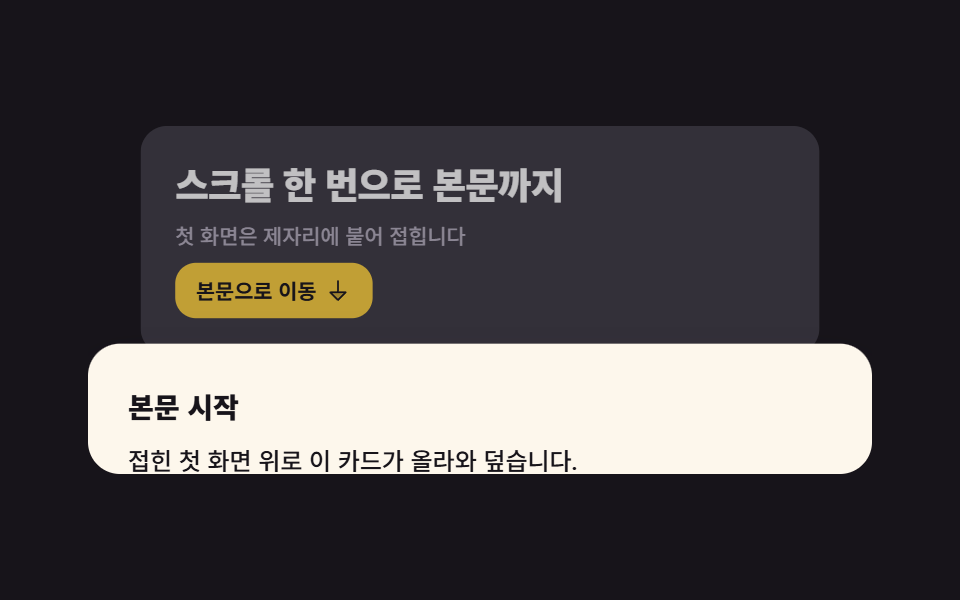
<main class="stage">
  <div class="hf">
    <!-- 자체 스크롤 상자. 이 상자가 스크롤포트이자 타임라인(--hfscroll)의 주인이다.
         html·body 는 절대 스크롤되지 않는다 -->
    <div class="hf__scroller" tabindex="0" role="region" aria-label="ファーストビューのスクロール領域">
      <section class="hf__hero">
        <div class="hf__inner">
          <h1 class="hf__title">ひと巻きで本文まで</h1>
          <p class="hf__sub">ファーストビューはその場に留まり畳まれます</p>
          <button class="hf__btn" type="button">
            本文へ移動
            <svg viewBox="0 0 256 256" width="16" height="16" aria-hidden="true" focusable="false" fill="currentColor"><path d="M200,144l-72,72L56,144Z" opacity="0.2"/><path d="M207.39,140.94A8,8,0,0,0,200,136H136V40a8,8,0,0,0-16,0v96H56a8,8,0,0,0-5.66,13.66l72,72a8,8,0,0,0,11.32,0l72-72A8,8,0,0,0,207.39,140.94ZM128,204.69,75.31,152H180.69Z"/></svg>
          </button>
        </div>
        <div class="hf__dim" aria-hidden="true"></div>
      </section>

      <article class="hf__doc">
        <h2 class="hf__h2">本文はここから</h2>
        <p class="hf__p">畳まれたファーストビューの上にこのカードが重なります。</p>
        <p class="hf__p hf__p--soft">方向キーでも同じ位置に届きます。</p>
      </article>
    </div>
  </div>
</main>@use "../../../../site/static/demo-tokens" as *;
// 275 히어로 팔레트 — 아홉 항목이 같은 값을 쓴다. 괄호 안은 실측 대비비
$hr-ink: $stage-ink; // 무대 · 히어로 바닥
$hr-paper: $stage-paper; // 제목 글자 on 잉크 18.24:1
$hr-cream: #fdf7ec; // 본문 카드 면 (잉크 글자 17.10:1)
$hr-stone: #56505e; // 크림 위 보조 글자 7.28:1
$hr-mist: #b6b0c0; // 잉크 위 보조 글자 8.65:1
$hr-yellow: $stage-yellow; // 버튼 면 (잉크 글자 12.63:1)
$hr-lilac: #d8d6eb; // 잉크 위 강조 6.99:1
// ── 변수 3개 ──────────────────────────────────────────
$duration: $dur-quick; // 버튼·포커스 같은 손맛. 접히는 동작의 길이는 스크롤 양이 정한다
$easing: linear; // 스크롤 구동은 등속이라야 스크롤 양과 화면이 1:1 로 맞는다
$color: $hr-lilac; // 이 항목의 강조색
@include stage($hr-ink);
.hf { width: min(392px, 90vw); }
// ⚠ 타임라인에 **이름**을 붙인다. `scroll(nearest)` 는 `overflow: hidden` 인 조상도
// 스크롤포트로 잡아, 진행률이 영원히 0 인 타임라인에 묶이는 일이 있다 (260 02·03·04 실측).
// position: relative 는 본문 카드의 offsetTop 기준을 이 상자로 못 박기 위한 것
.hf__scroller {
--h: clamp(148px, 58vh, 176px);
position: relative;
height: var(--h);
overflow-y: auto;
overscroll-behavior: contain;
border-radius: $r-card;
background: $hr-ink;
scroll-timeline-name: --hfscroll;
scroll-timeline-axis: y;
scrollbar-width: none;
&::-webkit-scrollbar { display: none; }
&:focus-visible { outline: 2px solid $color; outline-offset: 2px; }
}
// ── 실제 동작 ① 히어로 판은 제자리에 붙는다 ─────────────
// sticky 의 여유는 **부모의 콘텐츠 박스**가 정한다 — 부모에 padding-bottom 을 줘 봐야
// sticky 범위 밖이라 안 먹는다 (260 03·06·07·08 실측). 여기서는 본문 카드의 height 가 그 여유다
.hf__hero {
position: sticky;
top: 0;
z-index: 0;
display: grid;
align-content: center;
height: calc(var(--h) * .76);
padding: 0 $sp-5;
overflow: hidden;
background: rgba($hr-lilac, .2);
transform-origin: top center; // 규칙8: 윗변 경첩 접힘 축소
// ── 실제 동작 ② 스크롤 진행이 곧 접힘. 한 방향 키프레임 + fill-mode both 라
// 더 내려도 되돌아가거나 스냅백하지 않는다 (260-05 실측)
animation-name: hfFold;
animation-duration: 1s;
animation-timing-function: $easing;
animation-fill-mode: both;
animation-timeline: --hfscroll;
}
.hf__inner { display: grid; gap: $sp-2; justify-items: start; }
.hf__title {
margin: 0;
color: $hr-paper;
font-weight: 800;
font-size: clamp(17px, 4.6vw, 21px);
line-height: 1.2;
letter-spacing: -.02em;
}
.hf__sub {
margin: 0;
color: $hr-mist;
font-weight: 500;
font-size: 12px;
line-height: 1.35;
}
.hf__btn {
display: inline-flex;
align-items: center;
gap: $sp-1;
margin: 0;
padding: $sp-2 $sp-3;
border: 0;
border-radius: $r-control;
background: $hr-yellow;
color: $hr-ink;
font-family: inherit;
font-weight: 700;
font-size: 12px;
line-height: 1;
cursor: pointer;
transition: transform $duration $ease-spring;
}
.hf__btn:hover { transform: translateY(-2px); }
.hf__btn:focus-visible { outline: 2px solid $hr-paper; outline-offset: 2px; }
// 접히면서 살짝 어두워진다 — 여기 얹는 잉크는 얇게(.28). 두껍게 덮으면 제목이 읽히지 않는다
.hf__dim {
position: absolute;
inset: 0;
pointer-events: none; // 안 주면 히어로 전체를 덮은 이 막이 버튼 클릭을 가로챈다 (Playwright 실측)
background: $hr-ink;
opacity: 0;
animation-name: hfDim;
animation-duration: 1s;
animation-timing-function: $easing;
animation-fill-mode: both;
animation-timeline: --hfscroll;
}
// ── 실제 동작 ③ 본문 카드가 히어로 위로 올라와 덮는다 ───
// 음수 margin-top 으로 늘 히어로 아랫단을 물고 있으므로, 히어로가 작아져도 둘 사이가 벌어지지 않는다.
// 카드 높이를 상자 높이(--h)와 같게 두면 **스크롤 여유 = 카드의 시작 위치** 가 되어,
// 다 내렸을 때 카드가 히어로를 정확히 덮는다. 더 길게 두면 절반쯤에서 이미 다 덮여 접힘이 안 보인다
.hf__doc {
position: relative;
z-index: 1;
box-sizing: border-box; // 전역 리셋이 없다 — 안 주면 min-height 에 padding 이 더해져 카드가 40px 더 길어진다
min-height: calc(var(--h) - #{$sp-5});
margin-top: -$sp-6;
// 위 여백을 24px 로 둬야 스크롤 0 에서 보이는 카드 조각이 제목 뒤 **빈 줄**에서 끊긴다
// (16px 이면 둘째 줄 글자가 상자 밑변에 반쯤 걸려 잘린 것처럼 보인다)
padding: $sp-6 $sp-5;
border-radius: $r-card $r-card 0 0;
background: $hr-cream;
color: $hr-ink;
box-shadow: $shadow-raised;
animation-name: hfRise;
animation-duration: 1s;
animation-timing-function: $easing;
animation-fill-mode: both;
animation-timeline: --hfscroll;
}
.hf__h2 {
margin: 0 0 $sp-2;
font-weight: 800;
font-size: 14px;
line-height: 1.2;
}
.hf__p {
margin: 0 0 $sp-2;
font-weight: 500;
font-size: 12px;
line-height: 1.5;
}
.hf__p--soft { margin-bottom: 0; color: $hr-stone; }
@keyframes hfFold {
from { transform: scale(1); border-radius: 0; }
to { transform: scale(.86); border-radius: $r-card; }
}
@keyframes hfDim {
from { opacity: 0; }
to { opacity: .28; }
}
// 카드는 스크롤보다 조금 늦게 따라온다(시차) — 끝에서 transform 이 0 이라 아래가 비지 않는다
@keyframes hfRise {
from { transform: translateY(20px); }
to { transform: translateY(0); }
}
// 좁은 화면 — 글자와 여백만 줄인다. 값을 올리지 않는다 (올리면 174px 여유를 넘긴다)
@media (max-width: 340px), (max-height: 220px) {
.hf__hero { padding: 0 $sp-4; }
.hf__sub { font-size: 11px; }
.hf__doc { padding: $sp-3 $sp-4 $sp-4; }
.hf__p { font-size: 11px; }
}
// 스크롤 구동 애니메이션(scroll-timeline-name·animation-timeline)은 caniuse 실측 2026-09-12 기준
// Chrome·Edge 115+ · Safari 26.0 · iOS Safari 26.0 지원, 전역 87.22%. 안정판에서 아직 못 쓰는 건
// Firefox 뿐이다(155, 플래그 뒤) — 거기서는 접힘 없이 히어로가 그대로 서 있고 카드가 위로 지나간다.
// 정적 상태를 먼저 쓴 이유가 이것이다
@media (prefers-reduced-motion: reduce) {
// .hf__hero (0,1,0) 와 같은 특이도라도 뒤에 오는 이 블록이 이기지만, 안전하게 !important
.hf__hero, .hf__dim, .hf__doc { animation: none !important; }
.hf__hero { border-radius: $r-card $r-card 0 0; }
.hf__doc { transform: none !important; }
.hf__btn { transition: none !important; }
}html, body {
margin: 0;
overflow: hidden;
}
.stage {
box-sizing: border-box;
min-height: 100vh;
display: grid;
place-items: center;
margin: 0;
background: #17141a;
font-family: -apple-system, "Segoe UI", "Noto Sans KR", sans-serif;
padding: clamp(8px, 4vw, 24px);
}
.hf {
width: min(392px, 90vw);
}
.hf__scroller {
--h: clamp(148px, 58vh, 176px);
position: relative;
height: var(--h);
overflow-y: auto;
overscroll-behavior: contain;
border-radius: 16px;
background: #17141a;
scroll-timeline-name: --hfscroll;
scroll-timeline-axis: y;
scrollbar-width: none;
}
.hf__scroller::-webkit-scrollbar {
display: none;
}
.hf__scroller:focus-visible {
outline: 2px solid #d8d6eb;
outline-offset: 2px;
}
.hf__hero {
position: sticky;
top: 0;
z-index: 0;
display: grid;
align-content: center;
height: calc(var(--h) * 0.76);
padding: 0 20px;
overflow: hidden;
background: rgba(216, 214, 235, 0.2);
transform-origin: top center;
animation-name: hfFold;
animation-duration: 1s;
animation-timing-function: linear;
animation-fill-mode: both;
animation-timeline: --hfscroll;
}
.hf__inner {
display: grid;
gap: 8px;
justify-items: start;
}
.hf__title {
margin: 0;
color: #ffffff;
font-weight: 800;
font-size: clamp(17px, 4.6vw, 21px);
line-height: 1.2;
letter-spacing: -0.02em;
}
.hf__sub {
margin: 0;
color: #b6b0c0;
font-weight: 500;
font-size: 12px;
line-height: 1.35;
}
.hf__btn {
display: inline-flex;
align-items: center;
gap: 4px;
margin: 0;
padding: 8px 12px;
border: 0;
border-radius: 12px;
background: #ffd23f;
color: #17141a;
font-family: inherit;
font-weight: 700;
font-size: 12px;
line-height: 1;
cursor: pointer;
transition: transform 220ms cubic-bezier(0.2, 0.8, 0.2, 1);
}
.hf__btn:hover {
transform: translateY(-2px);
}
.hf__btn:focus-visible {
outline: 2px solid #ffffff;
outline-offset: 2px;
}
.hf__dim {
position: absolute;
inset: 0;
pointer-events: none;
background: #17141a;
opacity: 0;
animation-name: hfDim;
animation-duration: 1s;
animation-timing-function: linear;
animation-fill-mode: both;
animation-timeline: --hfscroll;
}
.hf__doc {
position: relative;
z-index: 1;
box-sizing: border-box;
min-height: calc(var(--h) - 20px);
margin-top: -24px;
padding: 24px 20px;
border-radius: 16px 16px 0 0;
background: #fdf7ec;
color: #17141a;
box-shadow: 0 14px 24px rgba(23, 20, 26, 0.32);
animation-name: hfRise;
animation-duration: 1s;
animation-timing-function: linear;
animation-fill-mode: both;
animation-timeline: --hfscroll;
}
.hf__h2 {
margin: 0 0 8px;
font-weight: 800;
font-size: 14px;
line-height: 1.2;
}
.hf__p {
margin: 0 0 8px;
font-weight: 500;
font-size: 12px;
line-height: 1.5;
}
.hf__p--soft {
margin-bottom: 0;
color: #56505e;
}
@keyframes hfFold {
from {
transform: scale(1);
border-radius: 0;
}
to {
transform: scale(0.86);
border-radius: 16px;
}
}
@keyframes hfDim {
from {
opacity: 0;
}
to {
opacity: 0.28;
}
}
@keyframes hfRise {
from {
transform: translateY(20px);
}
to {
transform: translateY(0);
}
}
@media (max-width: 340px), (max-height: 220px) {
.hf__hero {
padding: 0 16px;
}
.hf__sub {
font-size: 11px;
}
.hf__doc {
padding: 12px 16px 16px;
}
.hf__p {
font-size: 11px;
}
}
@media (prefers-reduced-motion: reduce) {
.hf__hero, .hf__dim, .hf__doc {
animation: none !important;
}
.hf__hero {
border-radius: 16px 16px 0 0;
}
.hf__doc {
transform: none !important;
}
.hf__btn {
transition: none !important;
}
}(function () {
var box = document.querySelector('.hf__scroller');
var doc = document.querySelector('.hf__doc');
var btn = document.querySelector('.hf__btn');
// 접근성: 움직임을 줄이겠다고 한 사람에게는 부드러운 스크롤 대신 즉시 이동
function prefersInstant() {
return !!(window.matchMedia && window.matchMedia('(prefers-reduced-motion: reduce)').matches);
}
// 상자 안 본문 카드 자리로 옮긴다. offsetTop 은 position: relative 인 상자 기준이고
// 스크롤 양과 무관한 값이라 누를 때마다 같은 자리로 간다
btn.addEventListener('click', function () {
box.scrollTo({ top: doc.offsetTop, behavior: prefersInstant() ? 'auto' : 'smooth' });
});
// 상자가 tabindex="0" 이라 Tab 으로 잡히고, 잡힌 뒤엔 방향키·PageDown 으로 브라우저가 스크롤한다.
// Home·End 만 따로 받아 양 끝으로 보낸다
box.addEventListener('keydown', function (e) {
if (e.key !== 'Home' && e.key !== 'End') { return; }
e.preventDefault();
box.scrollTo({ top: e.key === 'Home' ? 0 : box.scrollHeight, behavior: prefersInstant() ? 'auto' : 'smooth' });
});
})();import { useRef } from "react";
import type { CSSProperties, ReactNode } from "react";
import styles from "./HeroScrollFold.module.scss";
/* ambient 에 KeyboardEvent 가 없어 파일 안에 필요한 만큼만 선언한다 */
type KeyEvt = { key: string; preventDefault(): void };
export type HeroScrollFoldProps = {
title?: string;
sub?: string;
cta?: string;
docTitle?: string;
docBody?: string;
docNote?: string;
/** 스크롤 상자를 읽어 줄 이름 */
regionLabel?: string;
/** 버튼·포커스 같은 손맛(ms). 접히는 길이는 스크롤 양이 정한다 */
duration?: number;
easing?: string;
/** 강조색 — 히어로 바닥의 엷은 막과 포커스 테두리 */
color?: string;
};
type Vars = CSSProperties & { "--duration"?: string; "--easing"?: string; "--color"?: string };
const ArrowDownIcon = (): ReactNode => (
<svg viewBox="0 0 256 256" width="16" height="16" aria-hidden="true" focusable="false" fill="currentColor">
<path d="M200,144l-72,72L56,144Z" opacity="0.2" />
<path d="M207.39,140.94A8,8,0,0,0,200,136H136V40a8,8,0,0,0-16,0v96H56a8,8,0,0,0-5.66,13.66l72,72a8,8,0,0,0,11.32,0l72-72A8,8,0,0,0,207.39,140.94ZM128,204.69,75.31,152H180.69Z" />
</svg>
);
export default function HeroScrollFold({
title = "스크롤 한 번으로 본문까지",
sub = "첫 화면은 제자리에 붙어 접힙니다",
cta = "본문으로 이동",
docTitle = "본문 시작",
docBody = "접힌 첫 화면 위로 이 카드가 올라와 덮습니다.",
docNote = "방향키로도 같은 자리를 지납니다.",
regionLabel = "첫 화면 스크롤 상자",
duration = 220,
easing = "linear",
color = "#9d93ff",
}: HeroScrollFoldProps): ReactNode {
const boxRef = useRef<HTMLDivElement>(null);
const docRef = useRef<HTMLElement>(null);
const vars: Vars = { "--duration": `${duration}ms`, "--easing": easing, "--color": color };
/* 접근성: 움직임을 줄이겠다고 한 사람에게는 부드러운 스크롤 대신 즉시 이동 */
const prefersInstant = (): boolean =>
!!(typeof window !== "undefined" && window.matchMedia && window.matchMedia("(prefers-reduced-motion: reduce)").matches);
/* offsetTop 은 position: relative 인 상자 기준이고 스크롤 양과 무관하다 */
const goToBody = (): void => {
const box = boxRef.current;
const doc = docRef.current;
if (!box || !doc) { return; }
box.scrollTo({ top: doc.offsetTop, behavior: prefersInstant() ? "auto" : "smooth" });
};
const onKey = (e: KeyEvt): void => {
const box = boxRef.current;
if (!box || (e.key !== "Home" && e.key !== "End")) { return; }
e.preventDefault();
box.scrollTo({ top: e.key === "Home" ? 0 : box.scrollHeight, behavior: prefersInstant() ? "auto" : "smooth" });
};
return (
<div className={styles.hf} style={vars}>
{/* 자체 스크롤 상자 = 스크롤포트이자 타임라인(--hfscroll)의 주인 */}
<div
className={styles.scroller}
ref={boxRef}
tabIndex={0}
role="region"
aria-label={regionLabel}
onKeyDown={(e: KeyEvt) => onKey(e)}
>
<section className={styles.hero}>
<div className={styles.inner}>
<h1 className={styles.title}>{title}</h1>
<p className={styles.sub}>{sub}</p>
<button className={styles.btn} type="button" onClick={goToBody}>
{cta}
<ArrowDownIcon />
</button>
</div>
<div className={styles.dim} aria-hidden="true" />
</section>
<article className={styles.doc} ref={docRef}>
<h2 className={styles.h2}>{docTitle}</h2>
<p className={styles.p}>{docBody}</p>
<p className={`${styles.p} ${styles.pSoft}`}>{docNote}</p>
</article>
</div>
</div>
);
}07 スクロールで畳まれるヒーロー — 計測 累積面積 19.888% · 動いたフレーム 23/23GODRICH オリジナル · SCSS と React は zip に同梱 · ファーストビュー デザイン 9パターン、コピペで置ける
このデモが属する記事
 ファーストビュー デザイン 9パターン、コピペで置けるファーストビュー デザインとは、ページを開いた最初の一画面全体の置き方のことです。ここでは九つのファーストビューを、貼った場所でそのまま動くHTMLとSCSSで載せました。どれも外部のファイルを一つも読み込まず、動きはCSSだけで組んであり この記事のデモをすべて見る