03フィルタープリセット六つ
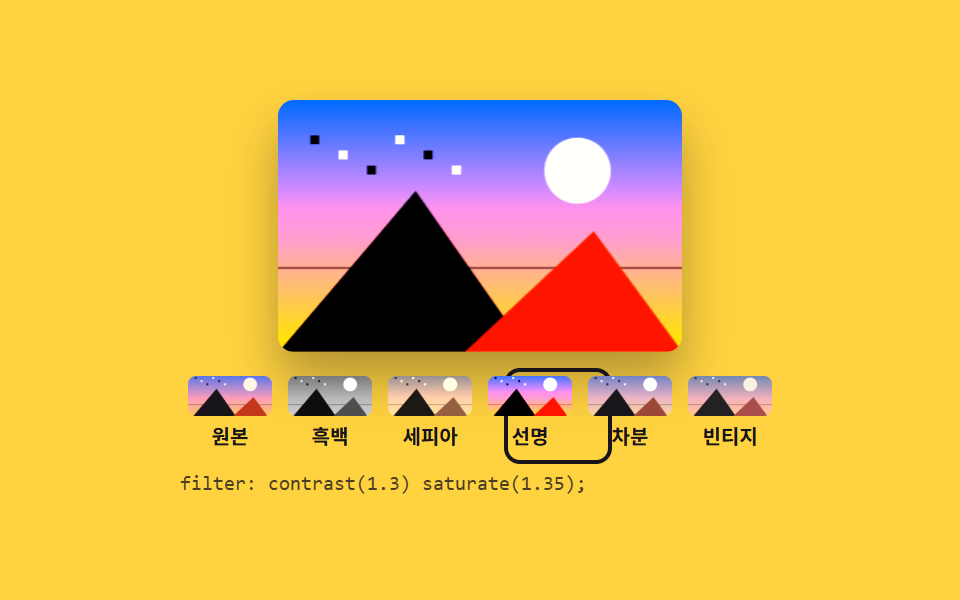
モノクロやセピアなどのプリセットを押すと小さな見本と大きな写真が同時に変わり、適用された値も文字で出ます。
使いどころSNS 投稿前のトーン統一、ECの商品カットのモノクロ版
filtersepiasaturate
<main class="stage">
<div class="fp is-demo" id="fp">
  <div class="fp__frame">
    <canvas class="fp__view" id="view" width="320" height="200" role="img" aria-label="プレビュー写真、フィルターなし"></canvas>
    <span class="fp__ghost" aria-hidden="true"></span>
  </div>
  <div class="fp__row" id="row">
    <span class="fp__ring" aria-hidden="true"></span>
    <button type="button" class="fp__p" data-f="none" aria-pressed="true"><span class="fp__sw fp__sw--a" aria-hidden="true"></span><span class="fp__name">元画像</span></button>
    <button type="button" class="fp__p" data-f="grayscale(1) contrast(1.08)" aria-pressed="false"><span class="fp__sw fp__sw--b" aria-hidden="true"></span><span class="fp__name">モノクロ</span></button>
    <button type="button" class="fp__p" data-f="sepia(0.75) saturate(1.2)" aria-pressed="false"><span class="fp__sw fp__sw--c" aria-hidden="true"></span><span class="fp__name">セピア</span></button>
    <button type="button" class="fp__p" data-f="contrast(1.3) saturate(1.35)" aria-pressed="false"><span class="fp__sw fp__sw--d" aria-hidden="true"></span><span class="fp__name">くっきり</span></button>
    <button type="button" class="fp__p" data-f="saturate(0.55) brightness(1.08)" aria-pressed="false"><span class="fp__sw fp__sw--e" aria-hidden="true"></span><span class="fp__name">落ち着き</span></button>
    <button type="button" class="fp__p" data-f="sepia(0.4) contrast(0.9) hue-rotate(-14deg)" aria-pressed="false"><span class="fp__sw fp__sw--f" aria-hidden="true"></span><span class="fp__name">ビンテージ</span></button>
  </div>
  <p class="fp__code">
    <code class="fp__real" id="code">filter: none;</code>
    <code class="fp__demo fp__demo--a" aria-hidden="true">filter: none;</code>
    <code class="fp__demo fp__demo--b" aria-hidden="true">filter: grayscale(1) contrast(1.08);</code>
    <code class="fp__demo fp__demo--c" aria-hidden="true">filter: sepia(0.75) saturate(1.2);</code>
    <code class="fp__demo fp__demo--d" aria-hidden="true">filter: contrast(1.3) saturate(1.35);</code>
    <code class="fp__demo fp__demo--e" aria-hidden="true">filter: saturate(0.55) brightness(1.08);</code>
    <code class="fp__demo fp__demo--f" aria-hidden="true">filter: sepia(0.4) contrast(0.9) hue-rotate(-14deg);</code>
  </p>
</div>
</main>@use "../../../../site/static/demo-tokens" as *;
// 필터 프리셋 여섯 개 — 누르면 큰 사진과 아래 글자가 같이 바뀐다. 프리셋 값은 index.html 의 data-f 하나뿐이다.
// 격자 미리보기(.is-demo)는 유령 판의 filter 를 여섯 상태로 이어 돌린다. 이때만 함수 목록을
// grayscale sepia saturate contrast brightness hue-rotate 여섯 개로 통일해 적는다 —
// 함수 목록이 서로 다르면 브라우저가 보간을 포기하고 툭 끊기기 때문이다. 계산 결과는 프리셋과 같다.
$duration: $dur-loop;
$easing: $ease-out;
$color: $subject-ink;
@include stage($stage-yellow);
.fp { display: flex; flex-direction: column; align-items: center; gap: $sp-2; width: 100%; }
.fp__frame {
position: relative; height: clamp(84px, 42vh, 148px); aspect-ratio: 16 / 10; max-width: 100%;
border-radius: $r-sm; overflow: hidden; box-shadow: $shadow-raised;
}
.fp__view { display: block; width: 100%; height: 100%; }
.fp__ghost {
display: none; position: absolute; inset: 0;
background-image: var(--photo); background-size: cover;
}
.fp__row {
position: relative; display: grid; grid-template-columns: repeat(6, 1fr);
width: min(100%, 300px);
}
.fp__ring {
position: absolute; top: 0; left: 0; width: calc(100% / 6); height: 100%;
border: 2px solid $color; border-radius: $r-sm; pointer-events: none;
}
.fp__p {
display: grid; justify-items: center; gap: $sp-1; width: 100%; cursor: pointer;
padding: $sp-1; border: 0; background: transparent; color: $color;
font-family: inherit; font-weight: 700;
}
.fp__p:focus-visible { outline: 3px solid $subject-blue; outline-offset: 2px; }
.fp__sw {
width: 100%; height: 20px; border-radius: $r-xs;
background-image: var(--photo); background-size: cover; background-position: center;
}
.fp__sw--b { filter: grayscale(1) contrast(1.08); }
.fp__sw--c { filter: sepia(0.75) saturate(1.2); }
.fp__sw--d { filter: contrast(1.3) saturate(1.35); }
.fp__sw--e { filter: saturate(0.55) brightness(1.08); }
.fp__sw--f { filter: sepia(0.4) contrast(0.9) hue-rotate(-14deg); }
.fp__name { font-size: clamp(8px, 2.2vw, 10px); line-height: 1.2; }
.fp__code {
position: relative; margin: 0; width: min(100%, 300px); height: 14px;
font-family: ui-monospace, "Consolas", monospace; font-size: clamp(8px, 2.1vw, 10px);
color: rgba(23, 20, 26, .78); white-space: nowrap; overflow: hidden;
}
.fp__demo { display: none; position: absolute; left: 0; top: 0; }
// ── 미리보기 루프: 원본 → 흑백 → 세피아 → 선명 → 차분 → 빈티지 → 원본.
// 복귀는 88% 에 끝난다. 24장 표본의 마지막 장이 2초의 95.8% 지점이라 그 뒤는 안 찍힌다
.fp.is-demo .fp__view { visibility: hidden; }
.fp.is-demo .fp__ghost {
display: block;
animation-name: fpChain; animation-duration: $duration;
animation-timing-function: $easing; animation-iteration-count: infinite;
}
@keyframes fpChain {
0%, 10% { filter: grayscale(0) sepia(0) saturate(1) contrast(1) brightness(1) hue-rotate(0deg); }
14%, 24% { filter: grayscale(1) sepia(0) saturate(1) contrast(1.08) brightness(1) hue-rotate(0deg); }
28%, 38% { filter: grayscale(0) sepia(0.75) saturate(1.2) contrast(1) brightness(1) hue-rotate(0deg); }
42%, 52% { filter: grayscale(0) sepia(0) saturate(1.35) contrast(1.3) brightness(1) hue-rotate(0deg); }
56%, 66% { filter: grayscale(0) sepia(0) saturate(0.55) contrast(1) brightness(1.08) hue-rotate(0deg); }
70%, 85% { filter: grayscale(0) sepia(0.4) saturate(1) contrast(0.9) brightness(1) hue-rotate(-14deg); }
89%, 100% { filter: grayscale(0) sepia(0) saturate(1) contrast(1) brightness(1) hue-rotate(0deg); }
}
// 테두리는 글자와 **같은 순간에** 끊어야 한다 — 부드럽게 밀면 테두리가 먼저 도착한 프레임이
// poster 로 뽑혀 「선명 칸에 테두리, 아래는 세피아 값」 같은 어긋난 대표 이미지가 나온다 (실측)
.fp.is-demo .fp__ring {
animation-name: fpRing; animation-duration: $duration;
animation-timing-function: steps(1, end); animation-iteration-count: infinite;
}
@keyframes fpRing {
0%, 11% { transform: translateX(0); }
12%, 25% { transform: translateX(100%); }
26%, 39% { transform: translateX(200%); }
40%, 53% { transform: translateX(300%); }
54%, 67% { transform: translateX(400%); }
68%, 86% { transform: translateX(500%); }
87%, 100% { transform: translateX(0); }
}
// 글자는 보간할 수 없으니 여섯 칸을 steps(1, end) 로 갈아 끼운다 — 반투명하게 겹치는 장면이 없다
.fp.is-demo .fp__real { color: transparent; }
.fp.is-demo .fp__demo {
display: block;
animation-duration: $duration;
animation-timing-function: steps(1, end);
animation-iteration-count: infinite;
}
.fp.is-demo .fp__demo--a { animation-name: fpTextA; }
.fp.is-demo .fp__demo--b { animation-name: fpTextB; }
.fp.is-demo .fp__demo--c { animation-name: fpTextC; }
.fp.is-demo .fp__demo--d { animation-name: fpTextD; }
.fp.is-demo .fp__demo--e { animation-name: fpTextE; }
.fp.is-demo .fp__demo--f { animation-name: fpTextF; }
@keyframes fpTextA { 0%, 11% { opacity: 1; } 12%, 86% { opacity: 0; } 87%, 100% { opacity: 1; } }
@keyframes fpTextB { 0%, 11% { opacity: 0; } 12%, 25% { opacity: 1; } 26%, 100% { opacity: 0; } }
@keyframes fpTextC { 0%, 25% { opacity: 0; } 26%, 39% { opacity: 1; } 40%, 100% { opacity: 0; } }
@keyframes fpTextD { 0%, 39% { opacity: 0; } 40%, 53% { opacity: 1; } 54%, 100% { opacity: 0; } }
@keyframes fpTextE { 0%, 53% { opacity: 0; } 54%, 67% { opacity: 1; } 68%, 100% { opacity: 0; } }
@keyframes fpTextF { 0%, 67% { opacity: 0; } 68%, 86% { opacity: 1; } 87%, 100% { opacity: 0; } }
@media (max-width: 340px) {
.fp { gap: $sp-1; }
.fp__sw { height: 16px; }
}
@media (prefers-reduced-motion: reduce) {
.fp.is-demo .fp__ghost,
.fp.is-demo .fp__ring,
.fp.is-demo .fp__demo { animation: none !important; }
// 움직임 없이 세피아를 고른 상태로 세운다
.fp.is-demo .fp__ghost { filter: grayscale(0) sepia(0.75) saturate(1.2) contrast(1) brightness(1) hue-rotate(0deg) !important; }
.fp.is-demo .fp__ring { transform: translateX(200%) !important; }
.fp.is-demo .fp__demo--a,
.fp.is-demo .fp__demo--b,
.fp.is-demo .fp__demo--d,
.fp.is-demo .fp__demo--e,
.fp.is-demo .fp__demo--f { opacity: 0 !important; }
.fp.is-demo .fp__demo--c { opacity: 1 !important; }
}html, body {
margin: 0;
overflow: hidden;
}
.stage {
box-sizing: border-box;
min-height: 100vh;
display: grid;
place-items: center;
margin: 0;
background: #ffd23f;
font-family: -apple-system, "Segoe UI", "Noto Sans KR", sans-serif;
padding: clamp(8px, 4vw, 24px);
}
.fp {
display: flex;
flex-direction: column;
align-items: center;
gap: 8px;
width: 100%;
}
.fp__frame {
position: relative;
height: clamp(84px, 42vh, 148px);
aspect-ratio: 16/10;
max-width: 100%;
border-radius: 8px;
overflow: hidden;
box-shadow: 0 14px 24px rgba(23, 20, 26, 0.32);
}
.fp__view {
display: block;
width: 100%;
height: 100%;
}
.fp__ghost {
display: none;
position: absolute;
inset: 0;
background-image: var(--photo);
background-size: cover;
}
.fp__row {
position: relative;
display: grid;
grid-template-columns: repeat(6, 1fr);
width: min(100%, 300px);
}
.fp__ring {
position: absolute;
top: 0;
left: 0;
width: 16.6666666667%;
height: 100%;
border: 2px solid #17141a;
border-radius: 8px;
pointer-events: none;
}
.fp__p {
display: grid;
justify-items: center;
gap: 4px;
width: 100%;
cursor: pointer;
padding: 4px;
border: 0;
background: transparent;
color: #17141a;
font-family: inherit;
font-weight: 700;
}
.fp__p:focus-visible {
outline: 3px solid #2f6df6;
outline-offset: 2px;
}
.fp__sw {
width: 100%;
height: 20px;
border-radius: 4px;
background-image: var(--photo);
background-size: cover;
background-position: center;
}
.fp__sw--b {
filter: grayscale(1) contrast(1.08);
}
.fp__sw--c {
filter: sepia(0.75) saturate(1.2);
}
.fp__sw--d {
filter: contrast(1.3) saturate(1.35);
}
.fp__sw--e {
filter: saturate(0.55) brightness(1.08);
}
.fp__sw--f {
filter: sepia(0.4) contrast(0.9) hue-rotate(-14deg);
}
.fp__name {
font-size: clamp(8px, 2.2vw, 10px);
line-height: 1.2;
}
.fp__code {
position: relative;
margin: 0;
width: min(100%, 300px);
height: 14px;
font-family: ui-monospace, "Consolas", monospace;
font-size: clamp(8px, 2.1vw, 10px);
color: rgba(23, 20, 26, 0.78);
white-space: nowrap;
overflow: hidden;
}
.fp__demo {
display: none;
position: absolute;
left: 0;
top: 0;
}
.fp.is-demo .fp__view {
visibility: hidden;
}
.fp.is-demo .fp__ghost {
display: block;
animation-name: fpChain;
animation-duration: 2s;
animation-timing-function: ease-out;
animation-iteration-count: infinite;
}
@keyframes fpChain {
0%, 10% {
filter: grayscale(0) sepia(0) saturate(1) contrast(1) brightness(1) hue-rotate(0deg);
}
14%, 24% {
filter: grayscale(1) sepia(0) saturate(1) contrast(1.08) brightness(1) hue-rotate(0deg);
}
28%, 38% {
filter: grayscale(0) sepia(0.75) saturate(1.2) contrast(1) brightness(1) hue-rotate(0deg);
}
42%, 52% {
filter: grayscale(0) sepia(0) saturate(1.35) contrast(1.3) brightness(1) hue-rotate(0deg);
}
56%, 66% {
filter: grayscale(0) sepia(0) saturate(0.55) contrast(1) brightness(1.08) hue-rotate(0deg);
}
70%, 85% {
filter: grayscale(0) sepia(0.4) saturate(1) contrast(0.9) brightness(1) hue-rotate(-14deg);
}
89%, 100% {
filter: grayscale(0) sepia(0) saturate(1) contrast(1) brightness(1) hue-rotate(0deg);
}
}
.fp.is-demo .fp__ring {
animation-name: fpRing;
animation-duration: 2s;
animation-timing-function: steps(1, end);
animation-iteration-count: infinite;
}
@keyframes fpRing {
0%, 11% {
transform: translateX(0);
}
12%, 25% {
transform: translateX(100%);
}
26%, 39% {
transform: translateX(200%);
}
40%, 53% {
transform: translateX(300%);
}
54%, 67% {
transform: translateX(400%);
}
68%, 86% {
transform: translateX(500%);
}
87%, 100% {
transform: translateX(0);
}
}
.fp.is-demo .fp__real {
color: transparent;
}
.fp.is-demo .fp__demo {
display: block;
animation-duration: 2s;
animation-timing-function: steps(1, end);
animation-iteration-count: infinite;
}
.fp.is-demo .fp__demo--a {
animation-name: fpTextA;
}
.fp.is-demo .fp__demo--b {
animation-name: fpTextB;
}
.fp.is-demo .fp__demo--c {
animation-name: fpTextC;
}
.fp.is-demo .fp__demo--d {
animation-name: fpTextD;
}
.fp.is-demo .fp__demo--e {
animation-name: fpTextE;
}
.fp.is-demo .fp__demo--f {
animation-name: fpTextF;
}
@keyframes fpTextA {
0%, 11% {
opacity: 1;
}
12%, 86% {
opacity: 0;
}
87%, 100% {
opacity: 1;
}
}
@keyframes fpTextB {
0%, 11% {
opacity: 0;
}
12%, 25% {
opacity: 1;
}
26%, 100% {
opacity: 0;
}
}
@keyframes fpTextC {
0%, 25% {
opacity: 0;
}
26%, 39% {
opacity: 1;
}
40%, 100% {
opacity: 0;
}
}
@keyframes fpTextD {
0%, 39% {
opacity: 0;
}
40%, 53% {
opacity: 1;
}
54%, 100% {
opacity: 0;
}
}
@keyframes fpTextE {
0%, 53% {
opacity: 0;
}
54%, 67% {
opacity: 1;
}
68%, 100% {
opacity: 0;
}
}
@keyframes fpTextF {
0%, 67% {
opacity: 0;
}
68%, 86% {
opacity: 1;
}
87%, 100% {
opacity: 0;
}
}
@media (max-width: 340px) {
.fp {
gap: 4px;
}
.fp__sw {
height: 16px;
}
}
@media (prefers-reduced-motion: reduce) {
.fp.is-demo .fp__ghost,
.fp.is-demo .fp__ring,
.fp.is-demo .fp__demo {
animation: none !important;
}
.fp.is-demo .fp__ghost {
filter: grayscale(0) sepia(0.75) saturate(1.2) contrast(1) brightness(1) hue-rotate(0deg) !important;
}
.fp.is-demo .fp__ring {
transform: translateX(200%) !important;
}
.fp.is-demo .fp__demo--a,
.fp.is-demo .fp__demo--b,
.fp.is-demo .fp__demo--d,
.fp.is-demo .fp__demo--e,
.fp.is-demo .fp__demo--f {
opacity: 0 !important;
}
.fp.is-demo .fp__demo--c {
opacity: 1 !important;
}
}var fp = document.getElementById('fp');
var view = document.getElementById('view');
var code = document.getElementById('code');
var ring = document.querySelector('.fp__ring');
var presets = document.querySelectorAll('.fp__p');
var VIEW_LABEL = 'プレビュー写真、フィルター %n';
// 가짜 사진 — 외부 파일 없이 그라디언트와 도형으로 합성한다. 필터·히스토그램이 보이도록 대비를 세게 준다
function paintPhoto(c, w, h) {
var sky = c.createLinearGradient(0, 0, 0, h);
sky.addColorStop(0, '#2f6df6'); sky.addColorStop(0.55, '#ff9ebb'); sky.addColorStop(1, '#ffd23f');
c.fillStyle = sky; c.fillRect(0, 0, w, h);
c.fillStyle = '#fff7e6';
c.beginPath(); c.arc(w * 0.74, h * 0.28, h * 0.13, 0, Math.PI * 2); c.fill();
// 곧은 수평선 하나 — 기울기 보정이 눈에 보이려면 비교할 직선이 있어야 한다
c.fillStyle = 'rgba(23, 20, 26, 0.5)'; c.fillRect(0, Math.round(h * 0.66), w, 2);
c.fillStyle = '#17141a';
c.beginPath(); c.moveTo(0, h); c.lineTo(w * 0.34, h * 0.36); c.lineTo(w * 0.62, h); c.closePath(); c.fill();
c.fillStyle = '#c2361a';
c.beginPath(); c.moveTo(w * 0.46, h); c.lineTo(w * 0.78, h * 0.52); c.lineTo(w, h); c.closePath(); c.fill();
for (var i = 0; i < 6; i++) { c.fillStyle = i % 2 ? '#fff7e6' : '#17141a'; c.fillRect(w * (0.08 + i * 0.07), h * (0.14 + (i % 3) * 0.06), 7, 7); }
}
function pick(index) {
var el = presets[index], chain = el.getAttribute('data-f');
fp.classList.remove('is-demo');
for (var i = 0; i < presets.length; i++) { presets[i].setAttribute('aria-pressed', i === index ? 'true' : 'false'); }
// 사진에는 CSS filter 를 そのまま 걸고, 같은 문자열을 아래 칸에 글자로 내보낸다
view.style.filter = chain;
code.textContent = 'filter: ' + chain + ';';
ring.style.transform = 'translateX(' + index * 100 + '%)';
view.setAttribute('aria-label', VIEW_LABEL.replace('%n', el.querySelector('.fp__name').textContent));
}
for (var i = 0; i < presets.length; i++) {
(function (index) { presets[index].addEventListener('click', function () { pick(index); }); })(i);
}
paintPhoto(view.getContext('2d'), view.width, view.height);
document.documentElement.style.setProperty('--photo', 'url(' + view.toDataURL() + ')');// FilterPresets — vanilla 판(run/295/demo/03-image-edit-filter-presets/index.html) 의 React 포트.
// 프리셋 여섯 개의 값은 PRESETS 배열 하나뿐이다 — 사진에 거는 CSS filter 와 아래 칸에 찍는 글자가 같은 문자열이다.
// 누른 칸은 aria-pressed 로 알리고, 테두리는 인덱스 × 100% 만큼 옆으로 민다. 값·수치는 vanilla 와 같다.
import { useEffect, useRef, useState } from "react";
import type { CSSProperties } from "react";
import styles from "./FilterPresets.module.scss";
export type FilterPresetsProps = {
duration?: number;
easing?: string;
color?: string;
};
type Vars = CSSProperties & {
"--duration"?: string;
"--easing"?: string;
"--color"?: string;
"--photo"?: string;
};
type Preset = { name: string; chain: string; sw: string };
const VIEW_LABEL = "미리보기 사진, 필터 %n";
// 첫 화면의 대체텍스트는 통째로 사전에 든 문자열이다 — 「없음」만 따로 떼면 언어팩이 그 조각을 못 바꾼다
const VIEW_LABEL_NONE = "미리보기 사진, 필터 없음";
const VIEW_W = 320;
const VIEW_H = 200;
const PRESETS: Preset[] = [
{ name: "원본", chain: "none", sw: "swA" },
{ name: "흑백", chain: "grayscale(1) contrast(1.08)", sw: "swB" },
{ name: "세피아", chain: "sepia(0.75) saturate(1.2)", sw: "swC" },
{ name: "선명", chain: "contrast(1.3) saturate(1.35)", sw: "swD" },
{ name: "차분", chain: "saturate(0.55) brightness(1.08)", sw: "swE" },
{ name: "빈티지", chain: "sepia(0.4) contrast(0.9) hue-rotate(-14deg)", sw: "swF" },
];
// 가짜 사진 — 외부 파일 없이 그라디언트와 도형으로 합성한다. 필터·히스토그램이 보이도록 대비를 세게 준다
function paintPhoto(c: CanvasRenderingContext2D, w: number, h: number): void {
const sky = c.createLinearGradient(0, 0, 0, h);
sky.addColorStop(0, "#2f6df6"); sky.addColorStop(0.55, "#ff9ebb"); sky.addColorStop(1, "#ffd23f");
c.fillStyle = sky; c.fillRect(0, 0, w, h);
c.fillStyle = "#fff7e6";
c.beginPath(); c.arc(w * 0.74, h * 0.28, h * 0.13, 0, Math.PI * 2); c.fill();
// 곧은 수평선 하나 — 기울기 보정이 눈에 보이려면 비교할 직선이 있어야 한다
c.fillStyle = "rgba(23, 20, 26, 0.5)"; c.fillRect(0, Math.round(h * 0.66), w, 2);
c.fillStyle = "#17141a";
c.beginPath(); c.moveTo(0, h); c.lineTo(w * 0.34, h * 0.36); c.lineTo(w * 0.62, h); c.closePath(); c.fill();
c.fillStyle = "#c2361a";
c.beginPath(); c.moveTo(w * 0.46, h); c.lineTo(w * 0.78, h * 0.52); c.lineTo(w, h); c.closePath(); c.fill();
for (let i = 0; i < 6; i++) { c.fillStyle = i % 2 ? "#fff7e6" : "#17141a"; c.fillRect(w * (0.08 + i * 0.07), h * (0.14 + (i % 3) * 0.06), 7, 7); }
}
export default function FilterPresets({
duration = 2000,
easing = "ease-out",
color = "#17141a",
}: FilterPresetsProps) {
const viewRef = useRef<HTMLCanvasElement | null>(null);
const [picked, setPicked] = useState(-1);
const [demo, setDemo] = useState(true);
const [photo, setPhoto] = useState("");
const vars: Vars = { "--duration": `${duration}ms`, "--easing": easing, "--color": color };
if (photo) vars["--photo"] = `url(${photo})`;
// 아직 아무것도 안 누른 첫 화면은 원본 그대로다 — 그때의 대체텍스트만 「필터 없음」이다
const index = picked < 0 ? 0 : picked;
const chain = PRESETS[index].chain;
const label = picked < 0 ? VIEW_LABEL_NONE : VIEW_LABEL.replace("%n", PRESETS[index].name);
useEffect(() => {
const view = viewRef.current;
if (!view) return;
const ctx = view.getContext("2d");
if (!ctx) return;
paintPhoto(ctx, view.width, view.height);
setPhoto(view.toDataURL());
}, []);
// 사진에는 CSS filter 를 그대로 걸고, 같은 문자열을 아래 칸에 글자로 내보낸다
function pick(next: number): void {
setDemo(false);
setPicked(next);
}
const cls = [styles.root, demo ? styles.isDemo : ""].filter(Boolean).join(" ");
return (
<main className={styles.stage}>
<div className={cls} style={vars}>
<div className={styles.frame}>
<canvas className={styles.view} ref={viewRef} width={VIEW_W} height={VIEW_H} role="img" aria-label={label} style={{ filter: chain }}></canvas>
<span className={styles.ghost} aria-hidden="true"></span>
</div>
<div className={styles.row}>
<span className={styles.ring} style={{ transform: `translateX(${index * 100}%)` }} aria-hidden="true"></span>
{PRESETS.map((preset, i) => (
<button
key={preset.name}
type="button"
className={styles.preset}
aria-pressed={picked < 0 ? i === 0 : i === picked}
onClick={() => pick(i)}
>
<span className={[styles.sw, styles[preset.sw]].filter(Boolean).join(" ")} aria-hidden="true"></span>
<span className={styles.name}>{preset.name}</span>
</button>
))}
</div>
<p className={styles.code}>
<code className={styles.real}>{`filter: ${chain};`}</code>
<code className={`${styles.codeDemo} ${styles.codeA}`} aria-hidden="true">filter: none;</code>
<code className={`${styles.codeDemo} ${styles.codeB}`} aria-hidden="true">filter: grayscale(1) contrast(1.08);</code>
<code className={`${styles.codeDemo} ${styles.codeC}`} aria-hidden="true">filter: sepia(0.75) saturate(1.2);</code>
<code className={`${styles.codeDemo} ${styles.codeD}`} aria-hidden="true">filter: contrast(1.3) saturate(1.35);</code>
<code className={`${styles.codeDemo} ${styles.codeE}`} aria-hidden="true">filter: saturate(0.55) brightness(1.08);</code>
<code className={`${styles.codeDemo} ${styles.codeF}`} aria-hidden="true">filter: sepia(0.4) contrast(0.9) hue-rotate(-14deg);</code>
</p>
</div>
</main>
);
}03 フィルタープリセット六つ — 計測 累積面積 19.97% · 動いたフレーム 10/23GODRICH オリジナル · SCSS と React は zip に同梱 · 画像 編集 javascript のトリミングUI 9選
このデモが属する記事
 画像 編集 javascript のトリミングUI 9選画像 編集 javascript の入口は、写真から残す範囲を選んで切り抜く UI です。ここに並べた九つはアップロードなしでブラウザーの中だけで完結するように、canvas の 2D コンテキストと Pointer Events だけで組 この記事のデモをすべて見る