05フィルターチェーンのプリセット
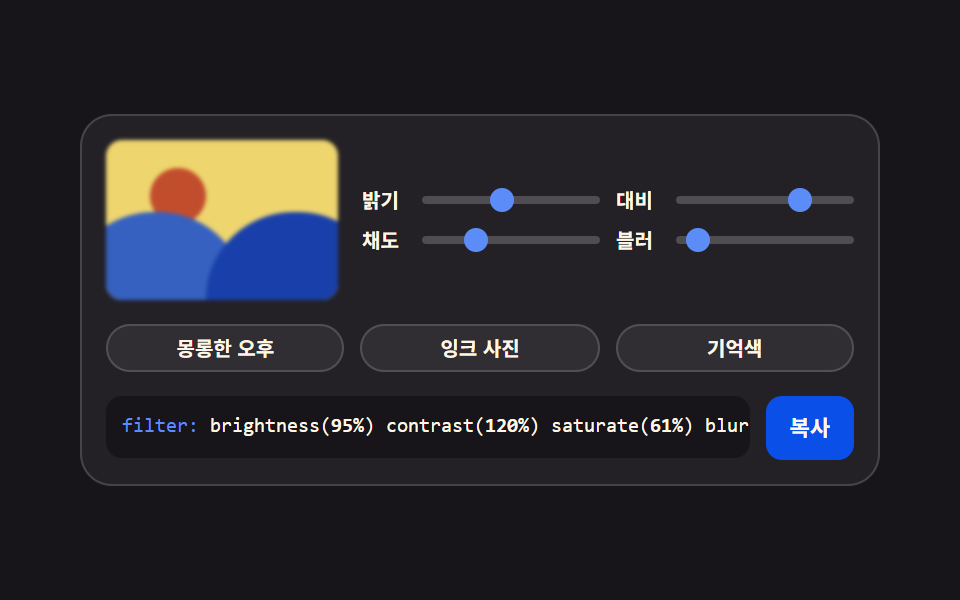
明るさ・コントラスト・彩度・ぼかしを一行につなげ、プリセットボタンが四つの値を一度に動かします。順番を変えると結果も変わります。
使いどころ写真ギャラリーのトーン統一、無効状態のかすんだサムネイル
filtersaturatedata-preset
<main class="stage">
<div class="gen is-demo" id="gen">
  <div class="gen__top">
    <div class="gen__preview" aria-hidden="true">
      <span class="gen__sun"></span>
      <span class="gen__hill gen__hill--a"></span>
      <span class="gen__hill gen__hill--b"></span>
    </div>
    <div class="gen__grid">
      <label class="gen__row">
        <span class="gen__lab">明るさ</span>
        <span class="gen__slot">
          <input class="gen__rng" type="range" min="50" max="150" step="5" value="100" data-var="--f-bri" aria-label="明るさ">
          <span class="gen__thumb" aria-hidden="true"></span>
        </span>
      </label>
      <label class="gen__row">
        <span class="gen__lab">コントラスト</span>
        <span class="gen__slot">
          <input class="gen__rng" type="range" min="50" max="150" step="5" value="110" data-var="--f-con" aria-label="コントラスト">
          <span class="gen__thumb" aria-hidden="true"></span>
        </span>
      </label>
      <label class="gen__row">
        <span class="gen__lab">彩度</span>
        <span class="gen__slot">
          <input class="gen__rng" type="range" min="0" max="200" step="10" value="130" data-var="--f-sat" aria-label="彩度">
          <span class="gen__thumb" aria-hidden="true"></span>
        </span>
      </label>
      <label class="gen__row">
        <span class="gen__lab">ぼかし</span>
        <span class="gen__slot">
          <input class="gen__rng" type="range" min="0" max="8" step="1" value="0" data-var="--f-blur" aria-label="ぼかし">
          <span class="gen__thumb" aria-hidden="true"></span>
        </span>
      </label>
    </div>
  </div>
  <div class="gen__presets">
    <button class="gen__preset" type="button" data-preset="100,110,130,0">うつらうつらの午後</button>
    <button class="gen__preset" type="button" data-preset="100,115,0,0">インク写真</button>
    <button class="gen__preset" type="button" data-preset="85,140,180,2">記憶色</button>
  </div>
  <div class="gen__out">
    <code class="gen__code"><span class="gen__prop">filter:</span> brightness(<span class="gen__v gen__v--bri"></span>%) contrast(<span class="gen__v gen__v--con"></span>%) saturate(<span class="gen__v gen__v--sat"></span>%) blur(<span class="gen__v gen__v--blur"></span>px)</code>
    <button class="gen__copy" type="button" id="copy">コピー</button>
  </div>
</div>
</main>@use "../../../../site/static/demo-tokens" as *;
// 필터 체인 프리셋 — 밝기·대비·채도·블러 네 값을 사용자 지정 속성에 모으고
// 미리보기 그림(해와 언덕)이 filter 한 줄로 전부 받는다. 프리셋 단추는 네 속성을 한꺼번에 옮긴다.
// 필터는 순서를 바꾸면 결과가 달라진다 — brightness 부터 blur 까지 이 순서가 정석이다(본문 참조).
$duration: $dur-loop;
$easing: $ease-spring;
$color: $subject-blue-light;
$mono: ui-monospace, SFMono-Regular, "SF Mono", Consolas, "Liberation Mono", monospace;
$line: rgba(255, 255, 255, .16);
$track: rgba(255, 255, 255, .2);
$rail: 4px;
$thumb: 12px;
@property --f-bri { syntax: "<integer>"; inherits: true; initial-value: 100; }
@property --f-con { syntax: "<integer>"; inherits: true; initial-value: 110; }
@property --f-sat { syntax: "<integer>"; inherits: true; initial-value: 130; }
@property --f-blur { syntax: "<integer>"; inherits: true; initial-value: 0; }
@include stage($stage-ink);
.gen {
min-width: 0; // stage grid item 의 자동 최소폭(min-content) 을 끊는다 — BD9
--f-bri: 100;
--f-con: 110;
--f-sat: 130;
--f-blur: 0;
display: flex; flex-direction: column; gap: $sp-3;
box-sizing: border-box; width: min(100%, 400px);
padding: $sp-3; border: 1px solid $line; border-radius: $r-card;
background: rgba(255, 255, 255, .05);
}
.gen__top { display: flex; align-items: center; gap: $sp-3; }
// ── 미리보기 — 해와 언덕. 채도가 0 이 되면 회색으로 가라앉고 블러가 번진다
.gen__preview {
position: relative; flex: 0 0 auto; overflow: hidden;
box-sizing: border-box; width: 116px; height: 80px;
border-radius: $r-sm;
background: $stage-yellow;
filter:
brightness(calc(var(--f-bri) * 1%))
contrast(calc(var(--f-con) * 1%))
saturate(calc(var(--f-sat) * 1%))
blur(calc(var(--f-blur) * 1px));
}
.gen__sun {
position: absolute; left: 22px; top: 14px;
width: 28px; height: 28px; border-radius: 50%;
background: $stage-orange;
}
.gen__hill { position: absolute; bottom: 0; width: 90px; height: 44px; border-radius: $r-pill $r-pill 0 0; }
.gen__hill--a { left: -20px; background: $subject-blue; }
.gen__hill--b { right: -24px; background: $subject-blue-deep; }
.gen__grid { flex: 1 1 auto; min-width: 0; display: grid; grid-template-columns: repeat(2, minmax(0, 1fr)); gap: $sp-1 $sp-2; }
.gen__row { display: flex; align-items: center; gap: $sp-1; cursor: pointer; }
.gen__lab {
flex: 0 0 auto; width: 26px;
color: $subject-cream;
font-weight: 700; font-size: 10px; line-height: 1.4;
}
.gen__slot {
position: relative; flex: 1 1 auto; min-width: 0;
display: grid; align-items: center; height: 16px;
}
.gen__slot::before {
content: ""; grid-area: 1 / 1;
height: $rail; border-radius: $r-pill; background: $track;
}
.gen__rng {
grid-area: 1 / 1; appearance: none; -webkit-appearance: none;
width: 100%; min-width: 0; height: 16px; margin: 0; background: transparent;
cursor: pointer;
}
.gen__rng::-webkit-slider-thumb {
-webkit-appearance: none; appearance: none;
width: $thumb; height: $thumb; border: 0; border-radius: 50%;
background: transparent;
}
.gen__rng::-moz-range-thumb {
width: $thumb; height: $thumb; border: 0; border-radius: 50%;
background: transparent;
}
.gen__rng:focus-visible { outline: 2px solid $color; outline-offset: 2px; border-radius: $r-pill; }
.gen__thumb {
position: absolute; top: 50%; left: calc(var(--pct) * 1%);
width: $thumb; height: $thumb; margin-top: -($thumb * .5); margin-left: -($thumb * .5);
border-radius: 50%; background: $color;
pointer-events: none;
}
.gen__row:nth-child(1) .gen__thumb { --pct: calc((var(--f-bri) - 50) / 100 * 100); }
.gen__row:nth-child(2) .gen__thumb { --pct: calc((var(--f-con) - 50) / 100 * 100); }
.gen__row:nth-child(3) .gen__thumb { --pct: calc(var(--f-sat) / 200 * 100); }
.gen__row:nth-child(4) .gen__thumb { --pct: calc(var(--f-blur) / 8 * 100); }
// ── 프리셋 단추 줄
.gen__presets { display: flex; gap: $sp-2; }
.gen__preset {
flex: 1 1 0;
padding: $sp-1 $sp-2; border: 1px solid $line; border-radius: $r-pill;
background: rgba(255, 255, 255, .06); color: $subject-cream;
font-family: inherit; font-weight: 700; font-size: 10px; line-height: 1.4;
cursor: pointer;
}
.gen__preset:hover { background: rgba(255, 255, 255, .12); }
.gen__preset:focus-visible { outline: 2px solid $color; outline-offset: 2px; }
.gen__out { display: flex; align-items: flex-start; gap: $sp-2; }
.gen__code {
flex: 1 1 auto; min-width: 0;
padding: $sp-2; border-radius: $r-sm;
background: $subject-ink; color: $subject-cream;
font-family: $mono; font-weight: 500; font-size: 10px; line-height: 1.5;
white-space: nowrap; overflow: hidden;
}
.gen__prop { color: $subject-blue-light; }
.gen__v { font-weight: 700; }
.gen__v--bri::after { counter-reset: v var(--f-bri); content: counter(v); }
.gen__v--con::after { counter-reset: v var(--f-con); content: counter(v); }
.gen__v--sat::after { counter-reset: v var(--f-sat); content: counter(v); }
.gen__v--blur::after { counter-reset: v var(--f-blur); content: counter(v); }
.gen__copy {
flex: 0 0 auto;
padding: $sp-2 $sp-3; border: 0; border-radius: $r-sm;
background: $subject-blue-deep; color: $subject-cream;
font-family: inherit; font-weight: 700; font-size: 11px; line-height: 1.4;
cursor: pointer;
}
.gen__copy:focus-visible { outline: 2px solid $color; outline-offset: 2px; }
// ── 격자 미리보기 — 채도가 꺼졌다 켜지고 블러가 번졌다 잡힌다 (프리셋 사이를 오가는 느낌)
@keyframes fBri { 0%, 100% { --f-bri: 100; } 50% { --f-bri: 85; } }
@keyframes fCon { 0%, 100% { --f-con: 110; } 50% { --f-con: 140; } }
@keyframes fSat { 0%, 100% { --f-sat: 130; } 30% { --f-sat: 0; } 70% { --f-sat: 180; } }
@keyframes fBlur { 0%, 100% { --f-blur: 0; } 45% { --f-blur: 2; } 85% { --f-blur: 0; } }
.gen.is-demo {
animation-name: fBri, fCon, fSat, fBlur;
animation-duration: $duration;
animation-timing-function: $easing;
animation-iteration-count: infinite;
}
@media (prefers-reduced-motion: reduce) {
.gen.is-demo { animation: none !important; }
}
@media (max-width: 340px) {
.gen { gap: $sp-2; padding: $sp-2; }
.gen__top { gap: $sp-2; }
.gen__preview { width: 96px; height: 68px; }
.gen__preset { font-size: 9px; }
.gen__code { font-size: 9px; }
}@property --f-bri {
syntax: "<integer>";
inherits: true;
initial-value: 100;
}
@property --f-con {
syntax: "<integer>";
inherits: true;
initial-value: 110;
}
@property --f-sat {
syntax: "<integer>";
inherits: true;
initial-value: 130;
}
@property --f-blur {
syntax: "<integer>";
inherits: true;
initial-value: 0;
}
html, body {
margin: 0;
overflow: hidden;
}
.stage {
box-sizing: border-box;
min-height: 100vh;
display: grid;
place-items: center;
margin: 0;
background: #17141a;
font-family: -apple-system, "Segoe UI", "Noto Sans KR", sans-serif;
padding: clamp(8px, 4vw, 24px);
}
.gen {
min-width: 0;
--f-bri: 100;
--f-con: 110;
--f-sat: 130;
--f-blur: 0;
display: flex;
flex-direction: column;
gap: 12px;
box-sizing: border-box;
width: min(100%, 400px);
padding: 12px;
border: 1px solid rgba(255, 255, 255, 0.16);
border-radius: 16px;
background: rgba(255, 255, 255, 0.05);
}
.gen__top {
display: flex;
align-items: center;
gap: 12px;
}
.gen__preview {
position: relative;
flex: 0 0 auto;
overflow: hidden;
box-sizing: border-box;
width: 116px;
height: 80px;
border-radius: 8px;
background: #ffd23f;
filter: brightness(calc(var(--f-bri) * 1%)) contrast(calc(var(--f-con) * 1%)) saturate(calc(var(--f-sat) * 1%)) blur(calc(var(--f-blur) * 1px));
}
.gen__sun {
position: absolute;
left: 22px;
top: 14px;
width: 28px;
height: 28px;
border-radius: 50%;
background: #ff4d1f;
}
.gen__hill {
position: absolute;
bottom: 0;
width: 90px;
height: 44px;
border-radius: 999px 999px 0 0;
}
.gen__hill--a {
left: -20px;
background: #2f6df6;
}
.gen__hill--b {
right: -24px;
background: #0a4fe8;
}
.gen__grid {
flex: 1 1 auto;
min-width: 0;
display: grid;
grid-template-columns: repeat(2, minmax(0, 1fr));
gap: 4px 8px;
}
.gen__row {
display: flex;
align-items: center;
gap: 4px;
cursor: pointer;
}
.gen__lab {
flex: 0 0 auto;
width: 26px;
color: #fff7e6;
font-weight: 700;
font-size: 10px;
line-height: 1.4;
}
.gen__slot {
position: relative;
flex: 1 1 auto;
min-width: 0;
display: grid;
align-items: center;
height: 16px;
}
.gen__slot::before {
content: "";
grid-area: 1/1;
height: 4px;
border-radius: 999px;
background: rgba(255, 255, 255, 0.2);
}
.gen__rng {
grid-area: 1/1;
appearance: none;
-webkit-appearance: none;
width: 100%;
min-width: 0;
height: 16px;
margin: 0;
background: transparent;
cursor: pointer;
}
.gen__rng::-webkit-slider-thumb {
-webkit-appearance: none;
appearance: none;
width: 12px;
height: 12px;
border: 0;
border-radius: 50%;
background: transparent;
}
.gen__rng::-moz-range-thumb {
width: 12px;
height: 12px;
border: 0;
border-radius: 50%;
background: transparent;
}
.gen__rng:focus-visible {
outline: 2px solid #5b8cf8;
outline-offset: 2px;
border-radius: 999px;
}
.gen__thumb {
position: absolute;
top: 50%;
left: calc(var(--pct) * 1%);
width: 12px;
height: 12px;
margin-top: -6px;
margin-left: -6px;
border-radius: 50%;
background: #5b8cf8;
pointer-events: none;
}
.gen__row:nth-child(1) .gen__thumb {
--pct: calc((var(--f-bri) - 50) / 100 * 100);
}
.gen__row:nth-child(2) .gen__thumb {
--pct: calc((var(--f-con) - 50) / 100 * 100);
}
.gen__row:nth-child(3) .gen__thumb {
--pct: calc(var(--f-sat) / 200 * 100);
}
.gen__row:nth-child(4) .gen__thumb {
--pct: calc(var(--f-blur) / 8 * 100);
}
.gen__presets {
display: flex;
gap: 8px;
}
.gen__preset {
flex: 1 1 0;
padding: 4px 8px;
border: 1px solid rgba(255, 255, 255, 0.16);
border-radius: 999px;
background: rgba(255, 255, 255, 0.06);
color: #fff7e6;
font-family: inherit;
font-weight: 700;
font-size: 10px;
line-height: 1.4;
cursor: pointer;
}
.gen__preset:hover {
background: rgba(255, 255, 255, 0.12);
}
.gen__preset:focus-visible {
outline: 2px solid #5b8cf8;
outline-offset: 2px;
}
.gen__out {
display: flex;
align-items: flex-start;
gap: 8px;
}
.gen__code {
flex: 1 1 auto;
min-width: 0;
padding: 8px;
border-radius: 8px;
background: #17141a;
color: #fff7e6;
font-family: ui-monospace, SFMono-Regular, "SF Mono", Consolas, "Liberation Mono", monospace;
font-weight: 500;
font-size: 10px;
line-height: 1.5;
white-space: nowrap;
overflow: hidden;
}
.gen__prop {
color: #5b8cf8;
}
.gen__v {
font-weight: 700;
}
.gen__v--bri::after {
counter-reset: v var(--f-bri);
content: counter(v);
}
.gen__v--con::after {
counter-reset: v var(--f-con);
content: counter(v);
}
.gen__v--sat::after {
counter-reset: v var(--f-sat);
content: counter(v);
}
.gen__v--blur::after {
counter-reset: v var(--f-blur);
content: counter(v);
}
.gen__copy {
flex: 0 0 auto;
padding: 8px 12px;
border: 0;
border-radius: 8px;
background: #0a4fe8;
color: #fff7e6;
font-family: inherit;
font-weight: 700;
font-size: 11px;
line-height: 1.4;
cursor: pointer;
}
.gen__copy:focus-visible {
outline: 2px solid #5b8cf8;
outline-offset: 2px;
}
@keyframes fBri {
0%, 100% {
--f-bri: 100;
}
50% {
--f-bri: 85;
}
}
@keyframes fCon {
0%, 100% {
--f-con: 110;
}
50% {
--f-con: 140;
}
}
@keyframes fSat {
0%, 100% {
--f-sat: 130;
}
30% {
--f-sat: 0;
}
70% {
--f-sat: 180;
}
}
@keyframes fBlur {
0%, 100% {
--f-blur: 0;
}
45% {
--f-blur: 2;
}
85% {
--f-blur: 0;
}
}
.gen.is-demo {
animation-name: fBri, fCon, fSat, fBlur;
animation-duration: 2s;
animation-timing-function: cubic-bezier(0.2, 0.8, 0.2, 1);
animation-iteration-count: infinite;
}
@media (prefers-reduced-motion: reduce) {
.gen.is-demo {
animation: none !important;
}
}
@media (max-width: 340px) {
.gen {
gap: 8px;
padding: 8px;
}
.gen__top {
gap: 8px;
}
.gen__preview {
width: 96px;
height: 68px;
}
.gen__preset {
font-size: 9px;
}
.gen__code {
font-size: 9px;
}
}var gen = document.getElementById('gen');
var copyBtn = document.getElementById('copy');
var ranges = Array.prototype.slice.call(gen.querySelectorAll('.gen__rng'));
var VARS = ['--f-bri', '--f-con', '--f-sat', '--f-blur'];
var COPY_LABEL = 'コピー';
var DONE_LABEL = 'コピーしました';
// 네 값은 @property 등록 정수 — 미리보기·손잡이·코드 숫자가 전부 여기에 매달린다
function readVar(name) {
return parseInt(getComputedStyle(gen).getPropertyValue(name), 10) || 0;
}
function filterText() {
return 'filter: brightness(' + readVar('--f-bri') + '%) contrast(' + readVar('--f-con') + '%) saturate(' + readVar('--f-sat') + '%) blur(' + readVar('--f-blur') + 'px);';
}
// 클립보드는 iframe·http 환경에서 막힐 수 있다 — 거부된 프로미스를 반드시 catch 로 받아 선택 방식으로 떨어진다
function fallbackCopy(text) {
var area = document.createElement('textarea');
area.value = text;
area.setAttribute('readonly', '');
area.style.position = 'fixed';
area.style.opacity = '0';
document.body.appendChild(area);
area.select();
try { document.execCommand('copy'); } catch (err) { /* 여기까지 막히면 조용히 포기한다 */ }
document.body.removeChild(area);
}
ranges.forEach(function (input) {
input.addEventListener('input', function () {
gen.classList.remove('is-demo');
gen.style.setProperty(input.dataset.var, input.value);
});
input.addEventListener('pointerdown', function () { gen.classList.remove('is-demo'); });
});
// 프리셋 단추 — 네 값을 한꺼번에 속성에 넣는다. 단추가 값의 출처라는 걸 data-preset 으로 보여 준다
Array.prototype.forEach.call(gen.querySelectorAll('.gen__preset'), function (btn) {
btn.addEventListener('click', function () {
gen.classList.remove('is-demo');
btn.dataset.preset.split(',').forEach(function (val, i) {
gen.style.setProperty(VARS[i], val);
ranges[i].value = val;
});
});
});
copyBtn.addEventListener('click', function () {
gen.classList.remove('is-demo');
var text = filterText();
if (navigator.clipboard && navigator.clipboard.writeText) {
navigator.clipboard.writeText(text).catch(function () { fallbackCopy(text); });
} else {
fallbackCopy(text);
}
copyBtn.textContent = DONE_LABEL;
setTimeout(function () { copyBtn.textContent = COPY_LABEL; }, 1200);
});import { useState, useMemo } from 'react';
import styles from './FilterPresets.module.scss';
type Axis = { key: string; label: string; min: number; max: number; step: number };
// ambient 선언에 React 이벤트 제네릭이 없어 로컬 타입으로 받는다 (blog-demo TS7006 항)
type RangeEvt = { target: { value: string } };
const AXES: Axis[] = [
{ key: 'bri', label: '밝기', min: 50, max: 150, step: 5 },
{ key: 'con', label: '대비', min: 50, max: 150, step: 5 },
{ key: 'sat', label: '채도', min: 0, max: 200, step: 10 },
{ key: 'blur', label: '블러', min: 0, max: 8, step: 1 }
];
const PRESETS: Array<{ name: string; values: Record<string, number> }> = [
{ name: '몽롱한 오후', values: { bri: 100, con: 110, sat: 130, blur: 0 } },
{ name: '잉크 사진', values: { bri: 100, con: 115, sat: 0, blur: 0 } },
{ name: '기억색', values: { bri: 85, con: 140, sat: 180, blur: 2 } }
];
export type FilterPresetsProps = {
duration?: string;
easing?: string;
color?: string;
};
export default function FilterPresets({ duration = '2s', easing = 'cubic-bezier(.2, .8, .2, 1)', color = '#5b8cf8' }: FilterPresetsProps) {
const [values, setValues] = useState<Record<string, number>>({ bri: 100, con: 110, sat: 130, blur: 0 });
const [live, setLive] = useState(true);
const filterStyle = useMemo(() => {
return `brightness(${values.bri}%) contrast(${values.con}%) saturate(${values.sat}%) blur(${values.blur}px)`;
}, [values]);
const style = {
'--dur-loop': duration,
'--ease-spring': easing,
'--accent': color
} as Record<string, string | number>;
function copy() {
setLive(false);
const text = `filter: ${filterStyle};`;
try {
navigator.clipboard.writeText(text);
} catch (err) {
/* 클립보드가 막힌 환경에서는 조용히 넘어간다 */
}
}
return (
<div className={live ? `${styles.gen} ${styles.isDemo}` : styles.gen} style={style}>
<div className={styles.top}>
<div className={styles.preview} aria-hidden="true" style={{ filter: filterStyle }}>
<span className={styles.sun}></span>
<span className={`${styles.hill} ${styles.hillA}`}></span>
<span className={`${styles.hill} ${styles.hillB}`}></span>
</div>
<div className={styles.grid}>
{AXES.map((axis) => (
<label className={styles.row} key={axis.key}>
<span className={styles.lab}>{axis.label}</span>
<span className={styles.slot}>
<input
className={styles.rng}
type="range"
min={axis.min}
max={axis.max}
step={axis.step}
value={values[axis.key]}
aria-label={axis.label}
onChange={(e: RangeEvt) => {
setLive(false);
setValues((v) => ({ ...v, [axis.key]: Number(e.target.value) }));
}}
/>
<span
className={styles.thumb}
aria-hidden="true"
style={{ left: `${((values[axis.key] - axis.min) / (axis.max - axis.min)) * 100}%` }}
/>
</span>
</label>
))}
</div>
</div>
<div className={styles.presets}>
{PRESETS.map((p) => (
<button key={p.name} className={styles.preset} type="button" onClick={() => { setLive(false); setValues(p.values); }}>
{p.name}
</button>
))}
</div>
<div className={styles.out}>
<code className={styles.code}>
<span className={styles.prop}>filter:</span> brightness({values.bri}%) contrast({values.con}%) saturate({values.sat}%) blur({values.blur}px)
</code>
<button className={styles.copy} type="button" onClick={copy}>복사</button>
</div>
</div>
);
}05 フィルターチェーンのプリセット — 計測 累積面積 9.446% · 動いたフレーム 23/23GODRICH オリジナル · SCSS と React は zip に同梱 · css ジェネレーター 9種 — スライダーで作る css 影のつけ方
このデモが属する記事
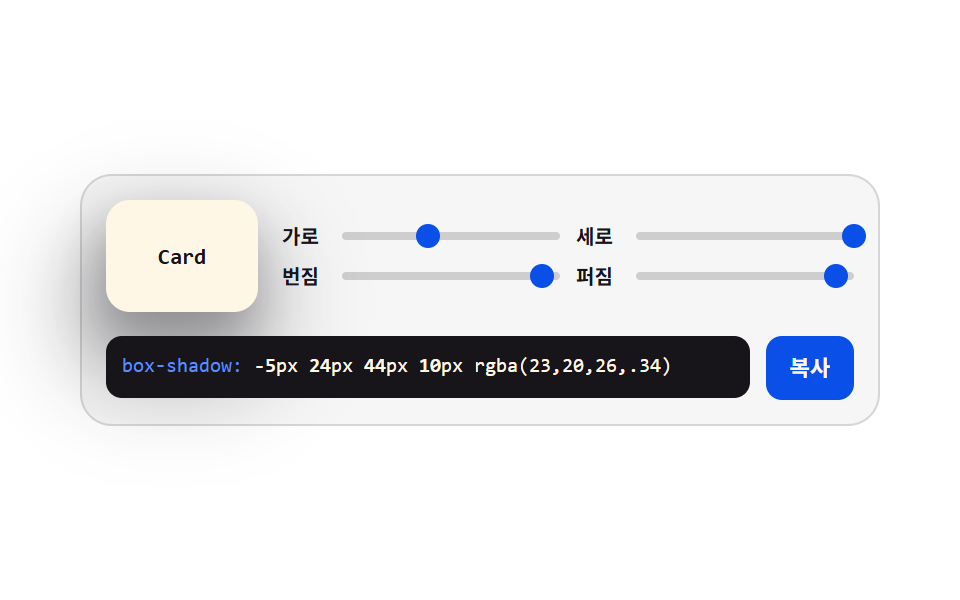 css ジェネレーター 9種 — スライダーで作る css 影のつけ方css ジェネレーター とは、CSS の値を画面の上でつまんで決める道具のことです — スライダーを動かすとコードが変わります。影・グラデーション・角丸・タイミングを目で合わせ、下のコード欄からそのまま貼って使えます。9つを自作し、グリッド この記事のデモをすべて見る