07ドラッグで一周する360度ビュー
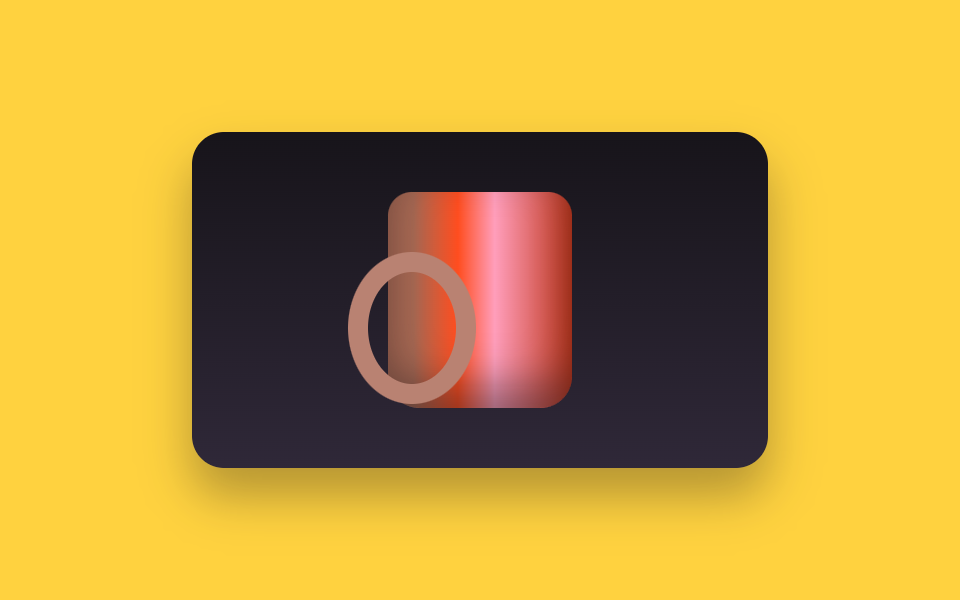
12枚の絵が一列に並び、窓は1枚だけを見せます。ドラッグすると列が translateX で1コマずつ動き、自動再生は steps(12, end) で同じコマを同じ順に踏み、12枚目から1枚目へつながります。
使いどころ靴やバッグなど背面まで見せて売る商品ページ
steps(12, end)translateXpointerdown
<main class="stage">
  <div class="sp is-demo" id="sp">
    <div class="sp__win" id="sp-win" tabindex="0" role="img" aria-label="マグカップの360度ビュー。矢印キーで回します">
      <div class="sp__track" id="sp-track">
        <div class="sp__f"><i class="sp__handle"></i><i class="sp__body"></i><i class="sp__logo"></i></div>
        <div class="sp__f"><i class="sp__handle"></i><i class="sp__body"></i><i class="sp__logo"></i></div>
        <div class="sp__f"><i class="sp__handle"></i><i class="sp__body"></i><i class="sp__logo"></i></div>
        <div class="sp__f"><i class="sp__handle"></i><i class="sp__body"></i><i class="sp__logo"></i></div>
        <div class="sp__f"><i class="sp__handle"></i><i class="sp__body"></i><i class="sp__logo"></i></div>
        <div class="sp__f"><i class="sp__handle"></i><i class="sp__body"></i><i class="sp__logo"></i></div>
        <div class="sp__f"><i class="sp__handle"></i><i class="sp__body"></i><i class="sp__logo"></i></div>
        <div class="sp__f"><i class="sp__handle"></i><i class="sp__body"></i><i class="sp__logo"></i></div>
        <div class="sp__f"><i class="sp__handle"></i><i class="sp__body"></i><i class="sp__logo"></i></div>
        <div class="sp__f"><i class="sp__handle"></i><i class="sp__body"></i><i class="sp__logo"></i></div>
        <div class="sp__f"><i class="sp__handle"></i><i class="sp__body"></i><i class="sp__logo"></i></div>
        <div class="sp__f"><i class="sp__handle"></i><i class="sp__body"></i><i class="sp__logo"></i></div>
      </div>
    </div>
  </div>
</main>
@use "../../../../site/static/demo-tokens" as *;
$duration: $dur-base;
$easing: $ease-out;
$color: $subject-ink;
@include stage($stage-yellow);
.sp { position: relative; }
.sp__win {
box-sizing: border-box;
width: 288px;
height: 168px;
overflow: hidden;
border-radius: $r-card;
background: linear-gradient($stage-ink, #2f2838);
box-shadow: $shadow-raised;
cursor: grab;
touch-action: none;
}
.sp__win:focus-visible { outline: 3px solid $subject-ink; outline-offset: 2px; }
// 열두 칸이 한 줄로 붙어 있고 창은 한 칸만 보여 준다. gap 은 0 — 있으면 한 바퀴마다 어긋난다
.sp__track {
display: flex;
width: 1200%;
height: 100%;
transform: translateX(0);
}
.sp__f {
position: relative;
flex: 0 0 8.3333%;
height: 100%;
display: grid;
place-items: center;
}
.sp__f > i {
position: absolute;
left: 50%;
top: 50%;
display: block;
}
// 가짜 사진 — 파일 없이 그린 머그컵. 손잡이와 로고가 각도마다 자리를 바꾼다
.sp__body {
width: 92px;
height: 108px;
margin-left: -46px;
margin-top: -54px;
border-radius: $r-control $r-control $r-card $r-card;
background: linear-gradient(90deg, #a96953 0 14%, $stage-orange 38%, $subject-pink 58%, $error 100%);
box-shadow: inset 0 -12px 20px rgba(23, 20, 26, .45);
z-index: 1;
}
.sp__handle {
width: 44px;
height: 56px;
margin-left: -22px;
margin-top: -24px;
border: 10px solid #b98272;
border-radius: 50%;
transform: translateX(calc(44px * var(--sin))) scaleX(var(--hs));
z-index: var(--hz);
}
.sp__logo {
width: 36px;
height: 36px;
margin-left: -18px;
margin-top: -16px;
border-radius: 50%;
background: $stage-yellow;
opacity: var(--lo);
transform: translateX(calc(-44px * var(--sin))) scaleX(var(--ls));
z-index: 2;
}
// 30도씩 열두 각도. --sin 은 손잡이 가로 위치(반지름 44px 에 곱한다),
// --hs 는 옆으로 뻗은 손잡이가 정면을 볼수록 납작해지는 정도, --ls 는 컵에 찍힌 로고가 돌아가며 눌리는 정도,
// --hz 는 손잡이가 컵 앞(2)인지 뒤(0)인지, --lo 는 로고가 이쪽을 보는지.
// 첫 칸을 60도로 잡아, 루프를 끈 정지 화면에서도 손잡이가 보이는 3/4 각도로 선다
.sp__f:nth-child(1) { --sin: .87; --hs: .87; --ls: .5; --hz: 2; --lo: 0; }
.sp__f:nth-child(2) { --sin: 1; --hs: 1; --ls: 0; --hz: 2; --lo: 0; }
.sp__f:nth-child(3) { --sin: .87; --hs: .87; --ls: .5; --hz: 0; --lo: 1; }
.sp__f:nth-child(4) { --sin: .5; --hs: .5; --ls: .87; --hz: 0; --lo: 1; }
.sp__f:nth-child(5) { --sin: 0; --hs: .06; --ls: 1; --hz: 0; --lo: 1; }
.sp__f:nth-child(6) { --sin: -.5; --hs: .5; --ls: .87; --hz: 0; --lo: 1; }
.sp__f:nth-child(7) { --sin: -.87; --hs: .87; --ls: .5; --hz: 0; --lo: 1; }
.sp__f:nth-child(8) { --sin: -1; --hs: 1; --ls: 0; --hz: 2; --lo: 0; }
.sp__f:nth-child(9) { --sin: -.87; --hs: .87; --ls: .5; --hz: 2; --lo: 0; }
.sp__f:nth-child(10) { --sin: -.5; --hs: .5; --ls: .87; --hz: 2; --lo: 0; }
.sp__f:nth-child(11) { --sin: 0; --hs: .06; --ls: 1; --hz: 2; --lo: 0; }
.sp__f:nth-child(12) { --sin: .5; --hs: .5; --ls: .87; --hz: 2; --lo: 0; }
// ── 자동 루프 (2s) ────────────────────────────────────
// steps(12, end) 가 0/12 부터 11/12 까지 열두 칸을 정확히 밟는다.
// 열두 번째 다음이 첫 장이고 그 둘은 이어지는 각도라 한 바퀴가 매끄럽다
.sp.is-demo .sp__track {
animation-name: sp-spin;
animation-duration: $dur-loop;
animation-timing-function: steps(12, end);
animation-iteration-count: infinite;
}
@keyframes sp-spin {
0% { transform: translateX(0); }
100% { transform: translateX(-100%); }
}
@media (max-width: 360px) {
.sp__win { height: 160px; }
.sp__body { width: 84px; height: 100px; margin-left: -42px; margin-top: -50px; }
}
@media (prefers-reduced-motion: reduce) {
.sp.is-demo .sp__track { animation: none !important; transform: translateX(-25%); }
}html, body {
margin: 0;
overflow: hidden;
}
.stage {
box-sizing: border-box;
min-height: 100vh;
display: grid;
place-items: center;
margin: 0;
background: #ffd23f;
font-family: -apple-system, "Segoe UI", "Noto Sans KR", sans-serif;
padding: clamp(8px, 4vw, 24px);
}
.sp {
position: relative;
}
.sp__win {
box-sizing: border-box;
width: 288px;
height: 168px;
overflow: hidden;
border-radius: 16px;
background: linear-gradient(#17141a, #2f2838);
box-shadow: 0 14px 24px rgba(23, 20, 26, 0.32);
cursor: grab;
touch-action: none;
}
.sp__win:focus-visible {
outline: 3px solid #17141a;
outline-offset: 2px;
}
.sp__track {
display: flex;
width: 1200%;
height: 100%;
transform: translateX(0);
}
.sp__f {
position: relative;
flex: 0 0 8.3333%;
height: 100%;
display: grid;
place-items: center;
}
.sp__f > i {
position: absolute;
left: 50%;
top: 50%;
display: block;
}
.sp__body {
width: 92px;
height: 108px;
margin-left: -46px;
margin-top: -54px;
border-radius: 12px 12px 16px 16px;
background: linear-gradient(90deg, #a96953 0 14%, #ff4d1f 38%, #ff9ebb 58%, #c2361a 100%);
box-shadow: inset 0 -12px 20px rgba(23, 20, 26, 0.45);
z-index: 1;
}
.sp__handle {
width: 44px;
height: 56px;
margin-left: -22px;
margin-top: -24px;
border: 10px solid #b98272;
border-radius: 50%;
transform: translateX(calc(44px * var(--sin))) scaleX(var(--hs));
z-index: var(--hz);
}
.sp__logo {
width: 36px;
height: 36px;
margin-left: -18px;
margin-top: -16px;
border-radius: 50%;
background: #ffd23f;
opacity: var(--lo);
transform: translateX(calc(-44px * var(--sin))) scaleX(var(--ls));
z-index: 2;
}
.sp__f:nth-child(1) {
--sin: .87;
--hs: .87;
--ls: .5;
--hz: 2;
--lo: 0;
}
.sp__f:nth-child(2) {
--sin: 1;
--hs: 1;
--ls: 0;
--hz: 2;
--lo: 0;
}
.sp__f:nth-child(3) {
--sin: .87;
--hs: .87;
--ls: .5;
--hz: 0;
--lo: 1;
}
.sp__f:nth-child(4) {
--sin: .5;
--hs: .5;
--ls: .87;
--hz: 0;
--lo: 1;
}
.sp__f:nth-child(5) {
--sin: 0;
--hs: .06;
--ls: 1;
--hz: 0;
--lo: 1;
}
.sp__f:nth-child(6) {
--sin: -.5;
--hs: .5;
--ls: .87;
--hz: 0;
--lo: 1;
}
.sp__f:nth-child(7) {
--sin: -.87;
--hs: .87;
--ls: .5;
--hz: 0;
--lo: 1;
}
.sp__f:nth-child(8) {
--sin: -1;
--hs: 1;
--ls: 0;
--hz: 2;
--lo: 0;
}
.sp__f:nth-child(9) {
--sin: -.87;
--hs: .87;
--ls: .5;
--hz: 2;
--lo: 0;
}
.sp__f:nth-child(10) {
--sin: -.5;
--hs: .5;
--ls: .87;
--hz: 2;
--lo: 0;
}
.sp__f:nth-child(11) {
--sin: 0;
--hs: .06;
--ls: 1;
--hz: 2;
--lo: 0;
}
.sp__f:nth-child(12) {
--sin: .5;
--hs: .5;
--ls: .87;
--hz: 2;
--lo: 0;
}
.sp.is-demo .sp__track {
animation-name: sp-spin;
animation-duration: 2s;
animation-timing-function: steps(12, end);
animation-iteration-count: infinite;
}
@keyframes sp-spin {
0% {
transform: translateX(0);
}
100% {
transform: translateX(-100%);
}
}
@media (max-width: 360px) {
.sp__win {
height: 160px;
}
.sp__body {
width: 84px;
height: 100px;
margin-left: -42px;
margin-top: -50px;
}
}
@media (prefers-reduced-motion: reduce) {
.sp.is-demo .sp__track {
animation: none !important;
transform: translateX(-25%);
}
}// 실제 동작: 끈 거리를 프레임 번호로 바꾼다. 열두 장이 한 바퀴다.
var sp = document.getElementById('sp');
var spWin = document.getElementById('sp-win');
var spTrack = document.getElementById('sp-track');
var SP_N = 12, SP_STEP = 18;
var spI = 0, spDrag = null;
function spPaint() {
sp.classList.remove('is-demo'); // 사람이 손대면 자동 루프를 멈춘다
spI = ((spI % SP_N) + SP_N) % SP_N;
spTrack.style.transform = 'translateX(' + (-spI * 100 / SP_N) + '%)';
}
spWin.addEventListener('pointerdown', function (e) {
spDrag = { x: e.clientX, i: spI };
spWin.setPointerCapture(e.pointerId);
});
spWin.addEventListener('pointermove', function (e) {
if (!spDrag) return;
spI = spDrag.i - Math.round((e.clientX - spDrag.x) / SP_STEP);
spPaint();
});
spWin.addEventListener('pointerup', function () { spDrag = null; });
spWin.addEventListener('keydown', function (e) {
if (e.key !== 'ArrowLeft' && e.key !== 'ArrowRight') return;
e.preventDefault();
spI += e.key === 'ArrowRight' ? 1 : -1;
spPaint();
});import { useRef, useState } from "react";
import type { CSSProperties } from "react";
import styles from "./SpinView360.module.scss";
export type SpinView360Props = {
label?: string;
/** 한 바퀴를 이루는 칸 수. module.scss 의 steps(N, end) 와 같아야 한다 */
frames?: number;
/** 한 칸을 넘기는 데 필요한 드래그 거리(px) */
dragStep?: number;
/** 자동 재생 루프 (갤러리용). 사람이 손대면 꺼진다 */
demo?: boolean;
duration?: number;
easing?: string;
color?: string;
};
type Vars = CSSProperties & { "--duration"?: string; "--easing"?: string; "--color"?: string };
type DragEvt = { clientX: number; pointerId: number };
type KeyEvt = { key: string; preventDefault: () => void };
export default function SpinView360({
label = "Mug in 360 degrees. Turn it with the arrow keys",
frames = 12,
dragStep = 18,
demo = true,
duration = 300,
easing = "ease-out",
color = "#17141a",
}: SpinView360Props) {
const drag = useRef<{ x: number; i: number } | null>(null);
const [live, setLive] = useState(demo);
const [i, setI] = useState(0);
function go(next: number) {
setLive(false);
setI(((next % frames) + frames) % frames);
}
const vars: Vars = { "--duration": `${duration}ms`, "--easing": easing, "--color": color };
const track: CSSProperties = { transform: `translateX(${(-i * 100) / frames}%)` };
return (
<div className={[styles.root, live ? styles.isDemo : ""].join(" ")} style={vars}>
<div
className={styles.win}
tabIndex={0}
role="img"
aria-label={label}
onPointerDown={(e: DragEvt) => { drag.current = { x: e.clientX, i }; }}
onPointerMove={(e: DragEvt) => {
const d = drag.current;
if (!d) return;
go(d.i - Math.round((e.clientX - d.x) / dragStep));
}}
onPointerUp={() => { drag.current = null; }}
onKeyDown={(e: KeyEvt) => {
if (e.key !== "ArrowLeft" && e.key !== "ArrowRight") return;
e.preventDefault();
go(i + (e.key === "ArrowRight" ? 1 : -1));
}}
>
<div className={styles.track} style={live ? undefined : track}>
{Array.from({ length: frames }, (_, k) => (
<div className={styles.f} key={k}>
<i className={styles.handle} />
<i className={styles.body} />
<i className={styles.logo} />
</div>
))}
</div>
</div>
</div>
);
}07 ドラッグで一周する360度ビュー — 計測 累積面積 5.815% · 動いたフレーム 11/23GODRICH オリジナル · SCSS と React は zip に同梱 · 画像 拡大 表示 UI 9選 — 写真ファイルなしで作るビューア
このデモが属する記事
 画像 拡大 表示 UI 9選 — 写真ファイルなしで作るビューア画像 拡大 表示とは、一枚の絵を大きく、回して、あるいは一か所だけ指して見せる画面の仕組みです。9つとも実際に動き、写真ファイルは一枚も使わず、グラデーションだけで描いています。 この記事のデモをすべて見る