09写真に刺さる説明ピン
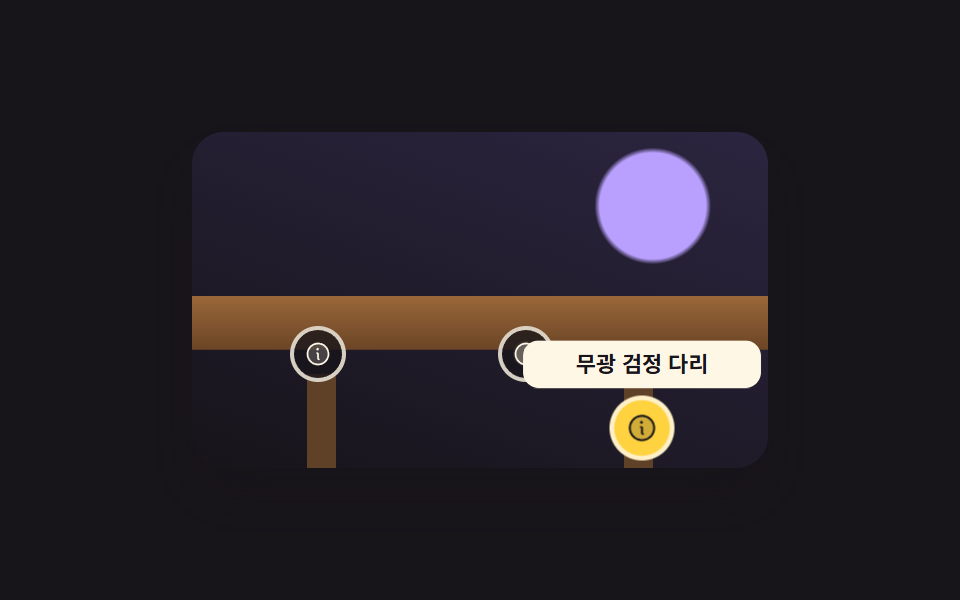
絵の3か所にピンが刺さっており、開くとその場から説明の付箋が scale で膨らんで現れます。ピンはボタンなのでタブキーで移動でき、開いているかどうかは aria-expanded にそのまま書かれます。
使いどころ部品名や素材を指す製品紹介やインテリア写真
aria-expandedscalefocus-visible
<main class="stage">
  <div class="hs is-demo" id="hs">
    <div class="hs__view" role="img" aria-label="机の写真">
      <div class="hs__spot hs__spot--1">
        <button class="hs__pin" type="button" aria-expanded="false" aria-controls="hs-n1" aria-label="天板の説明"><svg viewBox="0 0 256 256" width="14" height="14" aria-hidden="true"><g fill="currentColor"><path d="M224 128a96 96 0 1 1-96-96a96 96 0 0 1 96 96" opacity=".2"/><path d="M144 176a8 8 0 0 1-8 8a16 16 0 0 1-16-16v-40a8 8 0 0 1 0-16a16 16 0 0 1 16 16v40a8 8 0 0 1 8 8m88-48A104 104 0 1 1 128 24a104.11 104.11 0 0 1 104 104m-16 0a88 88 0 1 0-88 88a88.1 88.1 0 0 0 88-88m-92-32a12 12 0 1 0-12-12a12 12 0 0 0 12 12"/></g></svg></button>
        <span class="hs__note" id="hs-n1">オークの天板</span>
      </div>
      <div class="hs__spot hs__spot--2">
        <button class="hs__pin" type="button" aria-expanded="false" aria-controls="hs-n2" aria-label="取っ手の説明"><svg viewBox="0 0 256 256" width="14" height="14" aria-hidden="true"><g fill="currentColor"><path d="M224 128a96 96 0 1 1-96-96a96 96 0 0 1 96 96" opacity=".2"/><path d="M144 176a8 8 0 0 1-8 8a16 16 0 0 1-16-16v-40a8 8 0 0 1 0-16a16 16 0 0 1 16 16v40a8 8 0 0 1 8 8m88-48A104 104 0 1 1 128 24a104.11 104.11 0 0 1 104 104m-16 0a88 88 0 1 0-88 88a88.1 88.1 0 0 0 88-88m-92-32a12 12 0 1 0-12-12a12 12 0 0 0 12 12"/></g></svg></button>
        <span class="hs__note" id="hs-n2">真鍮の取っ手</span>
      </div>
      <div class="hs__spot hs__spot--3">
        <button class="hs__pin" type="button" aria-expanded="false" aria-controls="hs-n3" aria-label="脚の説明"><svg viewBox="0 0 256 256" width="14" height="14" aria-hidden="true"><g fill="currentColor"><path d="M224 128a96 96 0 1 1-96-96a96 96 0 0 1 96 96" opacity=".2"/><path d="M144 176a8 8 0 0 1-8 8a16 16 0 0 1-16-16v-40a8 8 0 0 1 0-16a16 16 0 0 1 16 16v40a8 8 0 0 1 8 8m88-48A104 104 0 1 1 128 24a104.11 104.11 0 0 1 104 104m-16 0a88 88 0 1 0-88 88a88.1 88.1 0 0 0 88-88m-92-32a12 12 0 1 0-12-12a12 12 0 0 0 12 12"/></g></svg></button>
        <span class="hs__note" id="hs-n3">マットブラックの脚</span>
      </div>
    </div>
  </div>
</main>
@use "../../../../site/static/demo-tokens" as *;
$duration: $dur-quick;
$easing: $ease-pop;
$color: $stage-yellow;
@include stage($stage-ink);
// 가짜 사진 — 파일 없이 그린 책상. 상판·손잡이·다리 세 곳에 핀을 꽂는다
$desk:
linear-gradient(90deg, transparent 0 20%, #5f4128 20% 25%, transparent 25% 75%, #5f4128 75% 80%, transparent 80%) no-repeat 0 100% / 100% 28%,
radial-gradient(circle at 58% 66%, #d4c4a7 0 2.6%, transparent 3.4%),
linear-gradient(#9a6739, #6b4526) no-repeat 0 58% / 100% 16%,
radial-gradient(circle at 80% 22%, $subject-lilac 0 10%, transparent 11%),
linear-gradient(200deg, #2b2540, $stage-ink);
.hs { position: relative; }
.hs__view {
position: relative;
box-sizing: border-box;
width: 288px;
height: 168px;
overflow: hidden;
border-radius: $r-card;
background: $desk;
box-shadow: $shadow-raised;
}
.hs__spot { position: absolute; }
.hs__spot--1 { left: 22%; top: 66%; }
.hs__spot--2 { left: 58%; top: 66%; }
.hs__spot--3 { left: 78%; top: 88%; }
.hs__pin {
position: absolute;
left: -14px;
top: -14px;
display: inline-flex;
width: 28px;
height: 28px;
align-items: center;
justify-content: center;
padding: 0;
border: 2px solid rgba(255, 247, 230, .82);
border-radius: 50%;
background: rgba(23, 20, 26, .78);
color: $subject-cream;
cursor: pointer;
transform: scale(1);
transition: transform $duration $easing, background $duration $easing;
}
.hs__pin:focus-visible { outline: 3px solid $color; outline-offset: 2px; }
.hs__pin[aria-expanded="true"] { background: $color; color: $subject-ink; transform: scale(1.16); }
.hs__note {
position: absolute;
left: -60px;
top: 20px;
display: block;
box-sizing: border-box;
width: 120px;
padding: $sp-1 $sp-2;
border-radius: $r-sm;
background: $subject-cream;
color: $subject-ink;
text-align: center;
font-size: 11px;
line-height: 16px;
font-weight: 700;
opacity: 0;
transform-origin: center top;
transform: scale(.6);
transition: transform $duration $easing, opacity $duration $easing;
pointer-events: none;
}
.hs__spot--3 .hs__note { top: -44px; transform-origin: center bottom; }
.hs__pin[aria-expanded="true"] + .hs__note { opacity: 1; transform: scale(1); }
// ── 자동 루프 (2s) ────────────────────────────────────
// 세 쪽지가 차례로 부풀었다 사라지고 88% 에 모두 닫힌다 — 24장 미리보기의 마지막 장까지 닫힌 뒤다
.hs.is-demo .hs__note {
transition: none;
animation-duration: $dur-loop;
animation-timing-function: $easing;
animation-iteration-count: infinite;
}
.hs.is-demo .hs__pin {
transition: none;
animation-duration: $dur-loop;
animation-timing-function: steps(1, end);
animation-iteration-count: infinite;
}
.hs.is-demo .hs__spot--1 .hs__note { animation-name: hs-n1; }
.hs.is-demo .hs__spot--2 .hs__note { animation-name: hs-n2; }
.hs.is-demo .hs__spot--3 .hs__note { animation-name: hs-n3; }
.hs.is-demo .hs__spot--1 .hs__pin { animation-name: hs-p1; }
.hs.is-demo .hs__spot--2 .hs__pin { animation-name: hs-p2; }
.hs.is-demo .hs__spot--3 .hs__pin { animation-name: hs-p3; }
@keyframes hs-n1 {
0% { opacity: 0; transform: scale(.6); }
6% { opacity: 0; transform: scale(.6); }
7% { opacity: 1; transform: scale(.6); }
16% { opacity: 1; transform: scale(1); }
34% { opacity: 1; transform: scale(1); }
35% { opacity: 0; transform: scale(.6); }
100% { opacity: 0; transform: scale(.6); }
}
@keyframes hs-n2 {
0% { opacity: 0; transform: scale(.6); }
40% { opacity: 0; transform: scale(.6); }
41% { opacity: 1; transform: scale(.6); }
50% { opacity: 1; transform: scale(1); }
66% { opacity: 1; transform: scale(1); }
67% { opacity: 0; transform: scale(.6); }
100% { opacity: 0; transform: scale(.6); }
}
@keyframes hs-n3 {
0% { opacity: 0; transform: scale(.6); }
72% { opacity: 0; transform: scale(.6); }
73% { opacity: 1; transform: scale(.6); }
80% { opacity: 1; transform: scale(1); }
87% { opacity: 1; transform: scale(1); }
88% { opacity: 0; transform: scale(.6); }
100% { opacity: 0; transform: scale(.6); }
}
@keyframes hs-p1 {
0% { background: rgba(23, 20, 26, .78); color: $subject-cream; transform: scale(1); }
7% { background: $color; color: $subject-ink; transform: scale(1.16); }
35% { background: rgba(23, 20, 26, .78); color: $subject-cream; transform: scale(1); }
100% { background: rgba(23, 20, 26, .78); color: $subject-cream; transform: scale(1); }
}
@keyframes hs-p2 {
0% { background: rgba(23, 20, 26, .78); color: $subject-cream; transform: scale(1); }
41% { background: $color; color: $subject-ink; transform: scale(1.16); }
67% { background: rgba(23, 20, 26, .78); color: $subject-cream; transform: scale(1); }
100% { background: rgba(23, 20, 26, .78); color: $subject-cream; transform: scale(1); }
}
@keyframes hs-p3 {
0% { background: rgba(23, 20, 26, .78); color: $subject-cream; transform: scale(1); }
73% { background: $color; color: $subject-ink; transform: scale(1.16); }
88% { background: rgba(23, 20, 26, .78); color: $subject-cream; transform: scale(1); }
100% { background: rgba(23, 20, 26, .78); color: $subject-cream; transform: scale(1); }
}
@media (max-width: 360px) {
.hs__view { height: 160px; }
.hs__note { width: 112px; left: -56px; }
}
@media (prefers-reduced-motion: reduce) {
.hs.is-demo .hs__note,
.hs.is-demo .hs__pin { animation: none !important; }
.hs.is-demo .hs__spot--2 .hs__note { opacity: 1; transform: scale(1); }
.hs.is-demo .hs__spot--2 .hs__pin { background: $color; color: $subject-ink; }
}html, body {
margin: 0;
overflow: hidden;
}
.stage {
box-sizing: border-box;
min-height: 100vh;
display: grid;
place-items: center;
margin: 0;
background: #17141a;
font-family: -apple-system, "Segoe UI", "Noto Sans KR", sans-serif;
padding: clamp(8px, 4vw, 24px);
}
.hs {
position: relative;
}
.hs__view {
position: relative;
box-sizing: border-box;
width: 288px;
height: 168px;
overflow: hidden;
border-radius: 16px;
background: linear-gradient(90deg, transparent 0 20%, #5f4128 20% 25%, transparent 25% 75%, #5f4128 75% 80%, transparent 80%) no-repeat 0 100%/100% 28%, radial-gradient(circle at 58% 66%, #d4c4a7 0 2.6%, transparent 3.4%), linear-gradient(#9a6739, #6b4526) no-repeat 0 58%/100% 16%, radial-gradient(circle at 80% 22%, #b9a0ff 0 10%, transparent 11%), linear-gradient(200deg, #2b2540, #17141a);
box-shadow: 0 14px 24px rgba(23, 20, 26, 0.32);
}
.hs__spot {
position: absolute;
}
.hs__spot--1 {
left: 22%;
top: 66%;
}
.hs__spot--2 {
left: 58%;
top: 66%;
}
.hs__spot--3 {
left: 78%;
top: 88%;
}
.hs__pin {
position: absolute;
left: -14px;
top: -14px;
display: inline-flex;
width: 28px;
height: 28px;
align-items: center;
justify-content: center;
padding: 0;
border: 2px solid rgba(255, 247, 230, 0.82);
border-radius: 50%;
background: rgba(23, 20, 26, 0.78);
color: #fff7e6;
cursor: pointer;
transform: scale(1);
transition: transform 220ms cubic-bezier(0.2, 1.4, 0.4, 1), background 220ms cubic-bezier(0.2, 1.4, 0.4, 1);
}
.hs__pin:focus-visible {
outline: 3px solid #ffd23f;
outline-offset: 2px;
}
.hs__pin[aria-expanded=true] {
background: #ffd23f;
color: #17141a;
transform: scale(1.16);
}
.hs__note {
position: absolute;
left: -60px;
top: 20px;
display: block;
box-sizing: border-box;
width: 120px;
padding: 4px 8px;
border-radius: 8px;
background: #fff7e6;
color: #17141a;
text-align: center;
font-size: 11px;
line-height: 16px;
font-weight: 700;
opacity: 0;
transform-origin: center top;
transform: scale(0.6);
transition: transform 220ms cubic-bezier(0.2, 1.4, 0.4, 1), opacity 220ms cubic-bezier(0.2, 1.4, 0.4, 1);
pointer-events: none;
}
.hs__spot--3 .hs__note {
top: -44px;
transform-origin: center bottom;
}
.hs__pin[aria-expanded=true] + .hs__note {
opacity: 1;
transform: scale(1);
}
.hs.is-demo .hs__note {
transition: none;
animation-duration: 2s;
animation-timing-function: cubic-bezier(0.2, 1.4, 0.4, 1);
animation-iteration-count: infinite;
}
.hs.is-demo .hs__pin {
transition: none;
animation-duration: 2s;
animation-timing-function: steps(1, end);
animation-iteration-count: infinite;
}
.hs.is-demo .hs__spot--1 .hs__note {
animation-name: hs-n1;
}
.hs.is-demo .hs__spot--2 .hs__note {
animation-name: hs-n2;
}
.hs.is-demo .hs__spot--3 .hs__note {
animation-name: hs-n3;
}
.hs.is-demo .hs__spot--1 .hs__pin {
animation-name: hs-p1;
}
.hs.is-demo .hs__spot--2 .hs__pin {
animation-name: hs-p2;
}
.hs.is-demo .hs__spot--3 .hs__pin {
animation-name: hs-p3;
}
@keyframes hs-n1 {
0% {
opacity: 0;
transform: scale(0.6);
}
6% {
opacity: 0;
transform: scale(0.6);
}
7% {
opacity: 1;
transform: scale(0.6);
}
16% {
opacity: 1;
transform: scale(1);
}
34% {
opacity: 1;
transform: scale(1);
}
35% {
opacity: 0;
transform: scale(0.6);
}
100% {
opacity: 0;
transform: scale(0.6);
}
}
@keyframes hs-n2 {
0% {
opacity: 0;
transform: scale(0.6);
}
40% {
opacity: 0;
transform: scale(0.6);
}
41% {
opacity: 1;
transform: scale(0.6);
}
50% {
opacity: 1;
transform: scale(1);
}
66% {
opacity: 1;
transform: scale(1);
}
67% {
opacity: 0;
transform: scale(0.6);
}
100% {
opacity: 0;
transform: scale(0.6);
}
}
@keyframes hs-n3 {
0% {
opacity: 0;
transform: scale(0.6);
}
72% {
opacity: 0;
transform: scale(0.6);
}
73% {
opacity: 1;
transform: scale(0.6);
}
80% {
opacity: 1;
transform: scale(1);
}
87% {
opacity: 1;
transform: scale(1);
}
88% {
opacity: 0;
transform: scale(0.6);
}
100% {
opacity: 0;
transform: scale(0.6);
}
}
@keyframes hs-p1 {
0% {
background: rgba(23, 20, 26, 0.78);
color: #fff7e6;
transform: scale(1);
}
7% {
background: #ffd23f;
color: #17141a;
transform: scale(1.16);
}
35% {
background: rgba(23, 20, 26, 0.78);
color: #fff7e6;
transform: scale(1);
}
100% {
background: rgba(23, 20, 26, 0.78);
color: #fff7e6;
transform: scale(1);
}
}
@keyframes hs-p2 {
0% {
background: rgba(23, 20, 26, 0.78);
color: #fff7e6;
transform: scale(1);
}
41% {
background: #ffd23f;
color: #17141a;
transform: scale(1.16);
}
67% {
background: rgba(23, 20, 26, 0.78);
color: #fff7e6;
transform: scale(1);
}
100% {
background: rgba(23, 20, 26, 0.78);
color: #fff7e6;
transform: scale(1);
}
}
@keyframes hs-p3 {
0% {
background: rgba(23, 20, 26, 0.78);
color: #fff7e6;
transform: scale(1);
}
73% {
background: #ffd23f;
color: #17141a;
transform: scale(1.16);
}
88% {
background: rgba(23, 20, 26, 0.78);
color: #fff7e6;
transform: scale(1);
}
100% {
background: rgba(23, 20, 26, 0.78);
color: #fff7e6;
transform: scale(1);
}
}
@media (max-width: 360px) {
.hs__view {
height: 160px;
}
.hs__note {
width: 112px;
left: -56px;
}
}
@media (prefers-reduced-motion: reduce) {
.hs.is-demo .hs__note,
.hs.is-demo .hs__pin {
animation: none !important;
}
.hs.is-demo .hs__spot--2 .hs__note {
opacity: 1;
transform: scale(1);
}
.hs.is-demo .hs__spot--2 .hs__pin {
background: #ffd23f;
color: #17141a;
}
}// 실제 동작: 핀은 버튼이다. 열림 여부는 색이 아니라 aria-expanded 에 적힌다.
var hs = document.getElementById('hs');
var hsPins = [].slice.call(hs.querySelectorAll('.hs__pin'));
function hsOpen(pin) {
hs.classList.remove('is-demo'); // 사람이 누르면 자동 루프를 멈춘다
var was = pin.getAttribute('aria-expanded') === 'true';
hsPins.forEach(function (p) { p.setAttribute('aria-expanded', 'false'); });
pin.setAttribute('aria-expanded', was ? 'false' : 'true');
}
hsPins.forEach(function (pin) {
pin.addEventListener('click', function () { hsOpen(pin); });
});
document.addEventListener('keydown', function (e) {
if (e.key !== 'Escape') return;
hs.classList.remove('is-demo');
hsPins.forEach(function (p) { p.setAttribute('aria-expanded', 'false'); });
});import { useState } from "react";
import type { CSSProperties } from "react";
import styles from "./HotspotPins.module.scss";
export type Hotspot = { pinLabel: string; note: string };
export type HotspotPinsProps = {
viewLabel?: string;
spots?: Hotspot[];
/** 자동 재생 루프 (갤러리용). 사람이 누르면 꺼진다 */
demo?: boolean;
duration?: number;
easing?: string;
color?: string;
};
type Vars = CSSProperties & { "--duration"?: string; "--easing"?: string; "--color"?: string };
type KeyEvt = { key: string; preventDefault: () => void };
const Info = () => (
<svg viewBox="0 0 256 256" width="14" height="14" aria-hidden="true">
<g fill="currentColor">
<path d="M224 128a96 96 0 1 1-96-96a96 96 0 0 1 96 96" opacity=".2" />
<path d="M144 176a8 8 0 0 1-8 8a16 16 0 0 1-16-16v-40a8 8 0 0 1 0-16a16 16 0 0 1 16 16v40a8 8 0 0 1 8 8m88-48A104 104 0 1 1 128 24a104.11 104.11 0 0 1 104 104m-16 0a88 88 0 1 0-88 88a88.1 88.1 0 0 0 88-88m-92-32a12 12 0 1 0-12-12a12 12 0 0 0 12 12" />
</g>
</svg>
);
const DEFAULT_SPOTS: Hotspot[] = [
{ pinLabel: "About the top", note: "Oak top" },
{ pinLabel: "About the handle", note: "Brass handle" },
{ pinLabel: "About the legs", note: "Matte black legs" },
];
export default function HotspotPins({
viewLabel = "Desk photo",
spots = DEFAULT_SPOTS,
demo = true,
duration = 220,
easing = "cubic-bezier(.2,1.4,.4,1)",
color = "#ffd23f",
}: HotspotPinsProps) {
const [live, setLive] = useState(demo);
const [open, setOpen] = useState(-1);
const vars: Vars = { "--duration": `${duration}ms`, "--easing": easing, "--color": color };
const place = [styles.spot1, styles.spot2, styles.spot3];
return (
<div
className={[styles.root, live ? styles.isDemo : ""].join(" ")}
style={vars}
onKeyDown={(e: KeyEvt) => {
if (e.key !== "Escape") return;
setLive(false);
setOpen(-1);
}}
>
<div className={styles.view} role="img" aria-label={viewLabel}>
{spots.map((s, i) => (
<div className={[styles.spot, place[i]].join(" ")} key={i}>
<button
className={styles.pin}
type="button"
aria-expanded={open === i}
aria-controls={`hs-n${i + 1}`}
aria-label={s.pinLabel}
onClick={() => { setLive(false); setOpen(open === i ? -1 : i); }}
>
<Info />
</button>
<span className={styles.note} id={`hs-n${i + 1}`}>{s.note}</span>
</div>
))}
</div>
</div>
);
}09 写真に刺さる説明ピン — 計測 累積面積 7.31% · 動いたフレーム 14/23GODRICH オリジナル · SCSS と React は zip に同梱 · 画像 拡大 表示 UI 9選 — 写真ファイルなしで作るビューア
このデモが属する記事
 画像 拡大 表示 UI 9選 — 写真ファイルなしで作るビューア画像 拡大 表示とは、一枚の絵を大きく、回して、あるいは一か所だけ指して見せる画面の仕組みです。9つとも実際に動き、写真ファイルは一枚も使わず、グラデーションだけで描いています。 この記事のデモをすべて見る