08仮想ウィンドウの再計算 — 見えている範囲のインデックス値だけを描くリスト
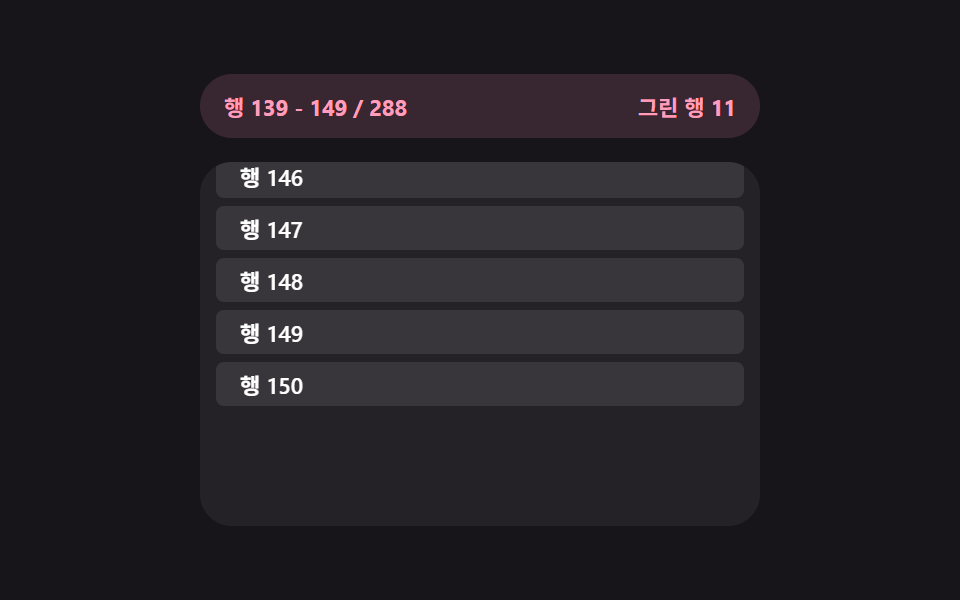
リストが増え続ける状態になると、スクロール位置の値から今見えているインデックス範囲の値を求め直し、その範囲外の項目は描かず、範囲が変わった状態になると上下の余白の値もその分求め直されます。
使いどころ数千行のデータ表、大容量チャットログ
renderWindowOVERSCANscrollTop
<main class="stage">
<div class="vwr is-demo" id="vwr">
  <div class="vwr__stats">
    <span class="vwr__stat" id="vwrRange">行 0 - 11 / 999</span>
    <span class="vwr__stat" id="vwrDom">描画した行 12</span>
  </div>
  <div class="vwr__view" id="vwrView">
    <div class="vwr__spacer" id="vwrTop" aria-hidden="true"></div>
    <ul class="vwr__window" id="vwrWindow"></ul>
    <div class="vwr__spacer" id="vwrBottom" aria-hidden="true"></div>
  </div>
</div>
</main>
@use "../../../../site/static/demo-tokens" as *;
// 가상 윈도우 재계산 — renderWindow() 가 scrollTop 값에서 보이는 인덱스 범위를 다시 구해
// 그 범위만 DOM 에 그린다. 위·아래 spacer 높이도 범위 값에서 다시 계산된다.
$duration: $dur-quick;
$easing: $ease-out;
$color: $subject-pink;
@include stage($stage-ink);
.vwr {
display: flex;
flex-direction: column;
gap: $sp-3;
width: min(100%, 280px);
}
.vwr__stats {
display: flex;
justify-content: space-between;
padding: $sp-2 $sp-3;
border-radius: $r-pill;
background: rgba(255, 158, 187, .14);
}
.vwr__stat {
font-weight: 700;
font-size: 11px;
color: $color;
font-variant-numeric: tabular-nums;
}
.vwr__view {
box-sizing: border-box;
width: 100%;
height: 182px;
overflow-y: auto;
overflow-x: hidden;
border-radius: $r-card;
background: rgba(255, 255, 255, .06);
padding: $sp-2;
scrollbar-width: thin;
}
.vwr__window {
list-style: none;
margin: 0;
padding: 0;
display: flex;
flex-direction: column;
gap: $sp-1;
}
.vwr__row {
box-sizing: border-box;
height: 22px;
display: flex;
align-items: center;
padding: 0 $sp-3;
border-radius: $r-xs;
background: rgba(255, 255, 255, .09);
color: $stage-paper;
font-weight: 600;
font-size: 11px;
font-variant-numeric: tabular-nums;
}
.vwr__spacer {
width: 100%;
}
@media (max-width: 340px) {
.vwr { gap: $sp-1; }
.vwr__stats { padding: $sp-1 $sp-2; }
.vwr__view { height: 90px; }
.vwr__row { font-size: 10px; height: 20px; }
}
@media (prefers-reduced-motion: reduce) {
.vwr__row { transition: none !important; }
}html, body {
margin: 0;
overflow: hidden;
}
.stage {
box-sizing: border-box;
min-height: 100vh;
display: grid;
place-items: center;
margin: 0;
background: #17141a;
font-family: -apple-system, "Segoe UI", "Noto Sans KR", sans-serif;
padding: clamp(8px, 4vw, 24px);
}
.vwr {
display: flex;
flex-direction: column;
gap: 12px;
width: min(100%, 280px);
}
.vwr__stats {
display: flex;
justify-content: space-between;
padding: 8px 12px;
border-radius: 999px;
background: rgba(255, 158, 187, 0.14);
}
.vwr__stat {
font-weight: 700;
font-size: 11px;
color: #ff9ebb;
font-variant-numeric: tabular-nums;
}
.vwr__view {
box-sizing: border-box;
width: 100%;
height: 182px;
overflow-y: auto;
overflow-x: hidden;
border-radius: 16px;
background: rgba(255, 255, 255, 0.06);
padding: 8px;
scrollbar-width: thin;
}
.vwr__window {
list-style: none;
margin: 0;
padding: 0;
display: flex;
flex-direction: column;
gap: 4px;
}
.vwr__row {
box-sizing: border-box;
height: 22px;
display: flex;
align-items: center;
padding: 0 12px;
border-radius: 4px;
background: rgba(255, 255, 255, 0.09);
color: #ffffff;
font-weight: 600;
font-size: 11px;
font-variant-numeric: tabular-nums;
}
.vwr__spacer {
width: 100%;
}
@media (max-width: 340px) {
.vwr {
gap: 4px;
}
.vwr__stats {
padding: 4px 8px;
}
.vwr__view {
height: 90px;
}
.vwr__row {
font-size: 10px;
height: 20px;
}
}
@media (prefers-reduced-motion: reduce) {
.vwr__row {
transition: none !important;
}
}(function () {
var view = document.getElementById('vwrView');
var topSpacer = document.getElementById('vwrTop');
var bottomSpacer = document.getElementById('vwrBottom');
var win = document.getElementById('vwrWindow');
var rangeEl = document.getElementById('vwrRange');
var domEl = document.getElementById('vwrDom');
var root = document.getElementById('vwr');
var TOTAL_ROWS = 999;
var ROW_H = 26;
var OVERSCAN = 2;
var GROW_PER_TICK = 8; // 자동 루프에서 한 틱마다 불러오는(늘어나는) 行 수
var available = 96; // 지금까지 불러온 行 수 (계속 늘어난다)
var rendered = null;
var dir = 1;
var autoplayTimer = null;
// 계산 겹: scrollTop 값으로 지금 보이는 인덱스 범위(start..end)를 다시 구하고, 그 범위 밖의
// 행은 DOM 에 없다. 위·아래 여백(spacer) 높이도 범위 값에서 다시 계산해 전체 높이는 유지한다.
function renderWindow() {
var scrollTop = view.scrollTop;
var first = Math.floor(scrollTop / ROW_H) - OVERSCAN;
var visible = Math.ceil(view.clientHeight / ROW_H) + OVERSCAN * 2;
var start = Math.max(0, Math.min(first, available - visible));
var end = Math.min(available, start + visible);
if (rendered === start + ':' + end) { return; }
rendered = start + ':' + end;
while (win.firstChild) { win.removeChild(win.firstChild); }
for (var i = start; i < end; i += 1) {
var li = document.createElement('li');
li.className = 'vwr__row';
li.textContent = '行 ' + String(i + 1).padStart(3, '0');
win.appendChild(li);
}
topSpacer.style.height = (start * ROW_H) + 'px';
bottomSpacer.style.height = Math.max(0, (available - end) * ROW_H) + 'px';
rangeEl.textContent = '行 ' + start + ' - ' + (end - 1) + ' / ' + available;
domEl.textContent = '描画した行 ' + (end - start);
}
renderWindow();
view.addEventListener('scroll', renderWindow);
function userTakesOver() {
if (!root.classList.contains('is-demo')) { return; }
root.classList.remove('is-demo');
stopAutoplay();
}
view.addEventListener('wheel', userTakesOver, { passive: true });
view.addEventListener('touchstart', userTakesOver, { passive: true });
function autoplayTick() {
if (available < TOTAL_ROWS) {
available = Math.min(available + GROW_PER_TICK, TOTAL_ROWS); // 목록이 계속 늘어난다
}
var max = view.scrollHeight - view.clientHeight;
if (dir > 0 && view.scrollTop >= max - 1) { dir = -1; }
if (dir < 0 && view.scrollTop <= 0) { dir = 1; }
view.scrollTop = Math.min(Math.max(view.scrollTop + 7 * dir, 0), max);
renderWindow();
}
function stopAutoplay() {
if (autoplayTimer) { clearInterval(autoplayTimer); autoplayTimer = null; }
}
var reduce = window.matchMedia('(prefers-reduced-motion: reduce)').matches;
if (!reduce) {
autoplayTimer = setInterval(autoplayTick, 60);
}
})();import { useEffect, useRef, useState, useCallback } from "react";
import styles from "./VirtualWindowRecalc.module.scss";
// 가상 윈도우 재계산 — renderWindow() 가 scrollTop 값에서 보이는 인덱스 범위를 다시 구해
// 그 범위만 DOM 에 그린다. 위·아래 spacer 높이도 범위 값에서 다시 계산된다.
const TOTAL_ROWS = 999;
const ROW_H = 26;
const OVERSCAN = 2;
const GROW_PER_TICK = 8;
export default function VirtualWindowRecalc() {
const rootRef = useRef<HTMLDivElement>(null);
const viewRef = useRef<HTMLDivElement>(null);
const topSpacerRef = useRef<HTMLDivElement>(null);
const bottomSpacerRef = useRef<HTMLDivElement>(null);
const [available, setAvailable] = useState(96);
const [rangeText, setRangeText] = useState("행 0 - 11 / 96");
const [domText, setDomText] = useState("그린 행 12");
const renderedRef = useRef("");
const dirRef = useRef(1);
const autoplayRef = useRef<number | null>(null);
const availableRef = useRef(96);
availableRef.current = available;
// 계산 겹: scrollTop 값으로 지금 보이는 인덱스 범위(start..end)를 다시 구하고, 그 범위 밖의
// 행은 DOM 에 없다. 위·아래 여백(spacer) 높이도 범위 값에서 다시 계산해 전체 높이는 유지한다.
const renderWindow = useCallback(() => {
const view = viewRef.current;
const top = topSpacerRef.current;
const bottom = bottomSpacerRef.current;
if (!view || !top || !bottom) { return; }
const avail = availableRef.current ?? 0;
const first = Math.floor(view.scrollTop / ROW_H) - OVERSCAN;
const visible = Math.ceil(view.clientHeight / ROW_H) + OVERSCAN * 2;
const start = Math.max(0, Math.min(first, avail - visible));
const end = Math.min(avail, start + visible);
const key = start + ":" + end;
if (renderedRef.current === key) { return; }
renderedRef.current = key;
// 범위를 CSS 변수로 넘겨 행 리스트는 범위 밖을 그리지 않는다
view.style.setProperty("--vstart", String(start));
view.style.setProperty("--vend", String(end));
top.style.height = (start * ROW_H) + "px";
bottom.style.height = Math.max(0, (avail - end) * ROW_H) + "px";
setRangeText("행 " + start + " - " + (end - 1) + " / " + avail);
setDomText("그린 행 " + (end - start));
}, []);
useEffect(() => {
const view = viewRef.current;
if (!view) { return; }
renderWindow();
const onScroll = () => renderWindow();
view.addEventListener("scroll", onScroll);
const takeover = () => {
rootRef.current?.classList.remove(styles["is-demo"]);
if (autoplayRef.current !== null) { window.clearInterval(autoplayRef.current); }
};
view.addEventListener("wheel", takeover, { passive: true });
view.addEventListener("touchstart", takeover, { passive: true });
const reduce = window.matchMedia("(prefers-reduced-motion: reduce)").matches;
if (!reduce) {
autoplayRef.current = window.setInterval(() => {
const v = viewRef.current;
if (!v) { return; }
if ((availableRef.current ?? 0) < TOTAL_ROWS) {
setAvailable((prev) => Math.min(prev + GROW_PER_TICK, TOTAL_ROWS)); // 목록이 계속 늘어난다
}
const max = v.scrollHeight - v.clientHeight;
const d = dirRef.current ?? 1;
if (d > 0 && v.scrollTop >= max - 1) { dirRef.current = -1; }
if (d < 0 && v.scrollTop <= 0) { dirRef.current = 1; }
v.scrollTop = Math.min(Math.max(v.scrollTop + 7 * (dirRef.current ?? 1), 0), max);
renderWindow();
}, 60);
}
return () => {
view.removeEventListener("scroll", onScroll);
view.removeEventListener("wheel", takeover);
view.removeEventListener("touchstart", takeover);
if (autoplayRef.current !== null) { window.clearInterval(autoplayRef.current); }
};
}, [renderWindow]);
// 렌더링은 상태(rangeText)와 분리 — 범위 값으로 직접 행을 만든다
const view = viewRef.current;
const start = Number((view && view.style.getPropertyValue("--vstart")) || 0);
const end = Number((view && view.style.getPropertyValue("--vend")) || 12);
const rowEls = [];
for (let i = start; i < end; i += 1) {
rowEls.push(
<li key={i} className={styles["vwr__row"]}>행 {String(i + 1).padStart(3, "0")}</li>
);
}
return (
<main className={styles.stage}>
<div ref={rootRef} className={`${styles.vwr} ${styles["is-demo"]}`} id="vwr">
<div className={styles["vwr__stats"]}>
<span className={styles["vwr__stat"]}>{rangeText}</span>
<span className={styles["vwr__stat"]}>{domText}</span>
</div>
<div ref={viewRef} className={styles["vwr__view"]}>
<div ref={topSpacerRef} className={styles["vwr__spacer"]} aria-hidden="true" />
<ul className={styles["vwr__window"]}>{rowEls}</ul>
<div ref={bottomSpacerRef} className={styles["vwr__spacer"]} aria-hidden="true" />
</div>
</div>
</main>
);
}08 仮想ウィンドウの再計算 — 見えている範囲のインデックス値だけを描くリスト — 計測 累積面積 33.788% · 動いたフレーム 23/23GODRICH オリジナル · SCSS と React は zip に同梱 · 無限スクロールローディング UIパターン9選 — スピナーから仮想ウィンドウまで
このデモが属する記事
 無限スクロールローディング UIパターン9選 — スピナーから仮想ウィンドウまで9つのうち1つは残りスクロール距離の値からローディング表示の不透明度を求め直し、1つは上に追加された高さの値の分だけスクロール位置を補正して画面がずれないようにし、もう1つは見えているインデックス範囲の値だけを残し他は描きません。無限スクロ この記事のデモをすべて見る