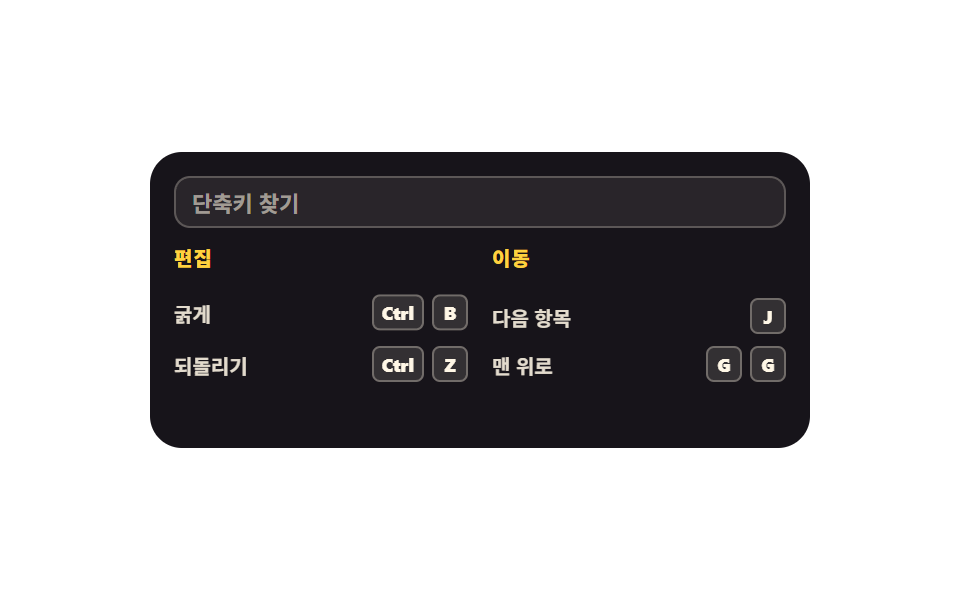
08はてなマークのヘルプシート
はてなマークを押すと、今の画面で使えるショートカットだけがグループごとに開きます。上の検索欄に文字を入れるとその場で絞り込まれ、Esc で閉じます。
使いどころ生産性Webアプリのショートカット案内、ダッシュボードのヘルプ
clip-pathsteps(1, end)aria-modal
<svg width="0" height="0" style="position:absolute" aria-hidden="true">
  <defs>
    <symbol id="question" viewBox="0 0 256 256" fill="currentColor"><path d="M224,128a96,96,0,1,1-96-96A96,96,0,0,1,224,128Z" opacity="0.2"/><path d="M140,180a12,12,0,1,1-12-12A12,12,0,0,1,140,180ZM128,72c-22.06,0-40,16.15-40,36v4a8,8,0,0,0,16,0v-4c0-11,10.77-20,24-20s24,9,24,20-10.77,20-24,20a8,8,0,0,0-8,8v8a8,8,0,0,0,16,0v-.72c18.24-3.35,32-17.9,32-35.28C168,88.15,150.06,72,128,72Zm104,56A104,104,0,1,1,128,24,104.11,104.11,0,0,1,232,128Zm-16,0a88,88,0,1,0-88,88A88.1,88.1,0,0,0,216,128Z"/></symbol>
  </defs>
</svg>
<main class="stage">
<div class="hs is-demo" id="hs">
  <div class="hs__app">
    <div class="hs__bar">
      <span class="hs__appName">ドキュメント編集</span>
      <button type="button" class="hs__ask" id="ask" aria-expanded="false" aria-controls="sheet" aria-keyshortcuts="Shift+?">
        <svg class="hs__ico" aria-hidden="true"><use href="#question"/></svg>
      </button>
    </div>
    <div class="hs__paper" aria-hidden="true"><i></i><i></i><i></i></div>
    <div class="hs__sheet" id="sheet" role="dialog" aria-modal="true" aria-label="この画面のショートカット">
      <input class="hs__search" id="search" type="search" placeholder="ショートカットを検索" aria-label="ショートカットを検索">
      <div class="hs__cols">
        <section class="hs__group">
          <p class="hs__groupName">編集</p>
          <ul class="hs__list">
            <li class="hs__item"><span class="hs__what">太字</span><span class="hs__keys"><kbd class="hs__key">Ctrl</kbd><kbd class="hs__key">B</kbd></span></li>
            <li class="hs__item"><span class="hs__what">元に戻す</span><span class="hs__keys"><kbd class="hs__key">Ctrl</kbd><kbd class="hs__key">Z</kbd></span></li>
          </ul>
        </section>
        <section class="hs__group">
          <p class="hs__groupName">移動</p>
          <ul class="hs__list">
            <li class="hs__item"><span class="hs__what">次の項目</span><span class="hs__keys"><kbd class="hs__key">J</kbd></span></li>
            <li class="hs__item"><span class="hs__what">先頭へ</span><span class="hs__keys"><kbd class="hs__key">G</kbd><kbd class="hs__key">G</kbd></span></li>
          </ul>
        </section>
      </div>
    </div>
  </div>
</div>
</main>@use "../../../../site/static/demo-tokens" as *;
// 물음표 도움말 시트 — ? 를 누르면 지금 화면에서 쓸 수 있는 단축키만 묶음별로 펼쳐진다.
// 실제 조작(클릭·? 입력)에서 열림은 clip-path 위프(transition, ease-out)이고 안쪽 줄은 translateY 로 뒤따른다.
// 시트는 앱 카드 안(inset: 0)에 갇힌 절대배치라 무대 높이를 넘기지 않는다.
$duration: $dur-base;
$easing: $ease-spring;
$color: $subject-ink;
@include stage($stage-paper);
.hs { display: flex; justify-content: center; width: 100%; }
.hs__app {
position: relative; overflow: hidden; box-sizing: border-box;
width: min(100%, 330px); height: 148px;
background: rgba(23, 20, 26, .05); border-radius: $r-card; padding: $sp-3;
}
.hs__bar { display: flex; align-items: center; justify-content: space-between; gap: $sp-2; }
.hs__appName { font-weight: 800; font-size: clamp(11px, 3vw, 12px); color: $color; }
.hs__ask {
display: grid; place-items: center; border: 0; cursor: pointer;
width: 24px; height: 24px; border-radius: 50%;
background: rgba(23, 20, 26, .10); color: $color;
transition: transform $dur-instant $easing, background $dur-instant $easing;
}
.hs__ask:focus-visible { outline: 3px solid $subject-blue; outline-offset: 2px; }
.hs__ico { width: 16px; height: 16px; }
.hs__paper { display: flex; flex-direction: column; gap: $sp-2; margin-top: $sp-4; }
.hs__paper i { height: 6px; border-radius: $r-pill; background: rgba(23, 20, 26, .10); }
.hs__paper i:nth-child(2) { width: 76%; }
.hs__paper i:nth-child(3) { width: 54%; }
.hs__sheet {
position: absolute; inset: 0; box-sizing: border-box;
display: flex; flex-direction: column; gap: $sp-2;
background: $color; padding: $sp-3;
clip-path: inset(0 0 100% 0);
transition: clip-path $duration $ease-out;
}
.hs.is-open .hs__sheet { clip-path: inset(0 0 0 0); }
.hs__search {
box-sizing: border-box; width: 100%; height: 26px;
border: 1px solid rgba(255, 247, 230, .24); border-radius: $r-sm;
background: rgba(255, 247, 230, .08); color: $subject-cream;
font-family: inherit; font-weight: 600; font-size: 11px; line-height: 1; padding: 0 $sp-2;
}
.hs__search::placeholder { color: rgba(255, 247, 230, .56); }
.hs__cols { display: grid; grid-template-columns: repeat(2, 1fr); gap: $sp-3; }
.hs__group { min-width: 0; }
.hs__groupName {
margin: 0 0 $sp-1; font-weight: 800; font-size: 10px; line-height: 1.4;
color: $stage-yellow; letter-spacing: .04em;
}
.hs__list { list-style: none; margin: 0; padding: 0; display: flex; flex-direction: column; gap: $sp-1; }
.hs__item {
display: flex; align-items: center; justify-content: space-between; gap: $sp-1;
min-height: 20px;
}
.hs__item.is-hidden { visibility: hidden; }
.hs__what { font-weight: 600; font-size: 10px; color: rgba(255, 247, 230, .88); }
.hs__keys { display: flex; align-items: center; gap: $sp-1; }
.hs__key {
display: grid; place-items: center; box-sizing: border-box; height: 18px; min-width: 18px;
border-radius: $r-xs; border: 1px solid rgba(255, 247, 230, .30);
background: rgba(255, 247, 230, .12); color: $subject-cream;
font-family: inherit; font-weight: 800; font-size: 9px; line-height: 1; padding: 0 $sp-1;
}
// ── 격자 미리보기 루프: 0~14% 닫힌 문서 · 15% 에 시트가 한 프레임에 열리고 그 뒤로는 열린 채로 머문다.
// 위프를 그대로 미리보기에 쓰면 24프레임 중 한 장이 **반쯤 열린** 장면이 되고, 그 장이 최대 변화라
// poster 로 뽑힌다 (이 편 실측). 시트처럼 면적이 큰 판은 미리보기에서만 steps(1, end) 로 컷한다 —
// 실제 클릭·? 입력은 위의 transition: clip-path 그대로 부드럽게 열린다 (252 와 같은 계열).
// 닫히는 장면은 루프에 두지 않는다 — 빈 문서 화면이 최대 변화가 되어 버린다 (255 실측).
.hs.is-demo .hs__sheet {
animation-name: hsOpen; animation-duration: $dur-loop; animation-timing-function: steps(1, end);
animation-iteration-count: infinite; animation-fill-mode: backwards;
}
@keyframes hsOpen {
0%, 14% { clip-path: inset(0 0 100% 0); }
15%, 100% { clip-path: inset(0 0 0 0); }
}
.hs.is-demo .hs__ask {
animation-name: hsAsk; animation-duration: $dur-loop; animation-timing-function: $easing;
animation-iteration-count: infinite; animation-fill-mode: backwards;
}
@keyframes hsAsk {
0%, 8% { transform: scale(1); background: rgba(23, 20, 26, .10); }
14% { transform: scale(.86); background: rgba(23, 20, 26, .20); }
22%, 100% { transform: scale(1); background: rgba(23, 20, 26, .10); }
}
// 묶음 안 줄은 위프가 지나간 뒤 차례로 올라온다 — 퍼센트로 시차를 주고 delay 는 쓰지 않는다
.hs.is-demo .hs__item {
animation-duration: $dur-loop; animation-timing-function: $easing;
animation-iteration-count: infinite; animation-fill-mode: backwards;
}
.hs.is-demo .hs__group:nth-child(1) .hs__item:nth-child(1) { animation-name: hsRise1; }
.hs.is-demo .hs__group:nth-child(1) .hs__item:nth-child(2) { animation-name: hsRise2; }
.hs.is-demo .hs__group:nth-child(2) .hs__item:nth-child(1) { animation-name: hsRise3; }
.hs.is-demo .hs__group:nth-child(2) .hs__item:nth-child(2) { animation-name: hsRise4; }
@keyframes hsRise1 { 0%, 16% { transform: translateY(8px); } 28%, 100% { transform: translateY(0); } }
@keyframes hsRise2 { 0%, 21% { transform: translateY(8px); } 33%, 100% { transform: translateY(0); } }
@keyframes hsRise3 { 0%, 26% { transform: translateY(8px); } 38%, 100% { transform: translateY(0); } }
@keyframes hsRise4 { 0%, 31% { transform: translateY(8px); } 43%, 100% { transform: translateY(0); } }
@media (max-width: 340px) {
.hs__app { padding: $sp-2; height: 144px; }
.hs__sheet { padding: $sp-2; gap: $sp-1; }
.hs__cols { gap: $sp-2; }
.hs__paper { margin-top: $sp-3; }
}
@media (prefers-reduced-motion: reduce) {
.hs.is-demo .hs__sheet,
.hs.is-demo .hs__ask,
.hs.is-demo .hs__item { animation: none !important; }
.hs.is-demo .hs__sheet { clip-path: inset(0 0 0 0) !important; }
.hs__sheet, .hs__ask { transition: none !important; }
}html, body {
margin: 0;
overflow: hidden;
}
.stage {
box-sizing: border-box;
min-height: 100vh;
display: grid;
place-items: center;
margin: 0;
background: #ffffff;
font-family: -apple-system, "Segoe UI", "Noto Sans KR", sans-serif;
padding: clamp(8px, 4vw, 24px);
}
.hs {
display: flex;
justify-content: center;
width: 100%;
}
.hs__app {
position: relative;
overflow: hidden;
box-sizing: border-box;
width: min(100%, 330px);
height: 148px;
background: rgba(23, 20, 26, 0.05);
border-radius: 16px;
padding: 12px;
}
.hs__bar {
display: flex;
align-items: center;
justify-content: space-between;
gap: 8px;
}
.hs__appName {
font-weight: 800;
font-size: clamp(11px, 3vw, 12px);
color: #17141a;
}
.hs__ask {
display: grid;
place-items: center;
border: 0;
cursor: pointer;
width: 24px;
height: 24px;
border-radius: 50%;
background: rgba(23, 20, 26, 0.1);
color: #17141a;
transition: transform 140ms cubic-bezier(0.2, 0.8, 0.2, 1), background 140ms cubic-bezier(0.2, 0.8, 0.2, 1);
}
.hs__ask:focus-visible {
outline: 3px solid #2f6df6;
outline-offset: 2px;
}
.hs__ico {
width: 16px;
height: 16px;
}
.hs__paper {
display: flex;
flex-direction: column;
gap: 8px;
margin-top: 16px;
}
.hs__paper i {
height: 6px;
border-radius: 999px;
background: rgba(23, 20, 26, 0.1);
}
.hs__paper i:nth-child(2) {
width: 76%;
}
.hs__paper i:nth-child(3) {
width: 54%;
}
.hs__sheet {
position: absolute;
inset: 0;
box-sizing: border-box;
display: flex;
flex-direction: column;
gap: 8px;
background: #17141a;
padding: 12px;
clip-path: inset(0 0 100% 0);
transition: clip-path 300ms ease-out;
}
.hs.is-open .hs__sheet {
clip-path: inset(0 0 0 0);
}
.hs__search {
box-sizing: border-box;
width: 100%;
height: 26px;
border: 1px solid rgba(255, 247, 230, 0.24);
border-radius: 8px;
background: rgba(255, 247, 230, 0.08);
color: #fff7e6;
font-family: inherit;
font-weight: 600;
font-size: 11px;
line-height: 1;
padding: 0 8px;
}
.hs__search::placeholder {
color: rgba(255, 247, 230, 0.56);
}
.hs__cols {
display: grid;
grid-template-columns: repeat(2, 1fr);
gap: 12px;
}
.hs__group {
min-width: 0;
}
.hs__groupName {
margin: 0 0 4px;
font-weight: 800;
font-size: 10px;
line-height: 1.4;
color: #ffd23f;
letter-spacing: 0.04em;
}
.hs__list {
list-style: none;
margin: 0;
padding: 0;
display: flex;
flex-direction: column;
gap: 4px;
}
.hs__item {
display: flex;
align-items: center;
justify-content: space-between;
gap: 4px;
min-height: 20px;
}
.hs__item.is-hidden {
visibility: hidden;
}
.hs__what {
font-weight: 600;
font-size: 10px;
color: rgba(255, 247, 230, 0.88);
}
.hs__keys {
display: flex;
align-items: center;
gap: 4px;
}
.hs__key {
display: grid;
place-items: center;
box-sizing: border-box;
height: 18px;
min-width: 18px;
border-radius: 4px;
border: 1px solid rgba(255, 247, 230, 0.3);
background: rgba(255, 247, 230, 0.12);
color: #fff7e6;
font-family: inherit;
font-weight: 800;
font-size: 9px;
line-height: 1;
padding: 0 4px;
}
.hs.is-demo .hs__sheet {
animation-name: hsOpen;
animation-duration: 2s;
animation-timing-function: steps(1, end);
animation-iteration-count: infinite;
animation-fill-mode: backwards;
}
@keyframes hsOpen {
0%, 14% {
clip-path: inset(0 0 100% 0);
}
15%, 100% {
clip-path: inset(0 0 0 0);
}
}
.hs.is-demo .hs__ask {
animation-name: hsAsk;
animation-duration: 2s;
animation-timing-function: cubic-bezier(0.2, 0.8, 0.2, 1);
animation-iteration-count: infinite;
animation-fill-mode: backwards;
}
@keyframes hsAsk {
0%, 8% {
transform: scale(1);
background: rgba(23, 20, 26, 0.1);
}
14% {
transform: scale(0.86);
background: rgba(23, 20, 26, 0.2);
}
22%, 100% {
transform: scale(1);
background: rgba(23, 20, 26, 0.1);
}
}
.hs.is-demo .hs__item {
animation-duration: 2s;
animation-timing-function: cubic-bezier(0.2, 0.8, 0.2, 1);
animation-iteration-count: infinite;
animation-fill-mode: backwards;
}
.hs.is-demo .hs__group:nth-child(1) .hs__item:nth-child(1) {
animation-name: hsRise1;
}
.hs.is-demo .hs__group:nth-child(1) .hs__item:nth-child(2) {
animation-name: hsRise2;
}
.hs.is-demo .hs__group:nth-child(2) .hs__item:nth-child(1) {
animation-name: hsRise3;
}
.hs.is-demo .hs__group:nth-child(2) .hs__item:nth-child(2) {
animation-name: hsRise4;
}
@keyframes hsRise1 {
0%, 16% {
transform: translateY(8px);
}
28%, 100% {
transform: translateY(0);
}
}
@keyframes hsRise2 {
0%, 21% {
transform: translateY(8px);
}
33%, 100% {
transform: translateY(0);
}
}
@keyframes hsRise3 {
0%, 26% {
transform: translateY(8px);
}
38%, 100% {
transform: translateY(0);
}
}
@keyframes hsRise4 {
0%, 31% {
transform: translateY(8px);
}
43%, 100% {
transform: translateY(0);
}
}
@media (max-width: 340px) {
.hs__app {
padding: 8px;
height: 144px;
}
.hs__sheet {
padding: 8px;
gap: 4px;
}
.hs__cols {
gap: 8px;
}
.hs__paper {
margin-top: 12px;
}
}
@media (prefers-reduced-motion: reduce) {
.hs.is-demo .hs__sheet,
.hs.is-demo .hs__ask,
.hs.is-demo .hs__item {
animation: none !important;
}
.hs.is-demo .hs__sheet {
clip-path: inset(0 0 0 0) !important;
}
.hs__sheet, .hs__ask {
transition: none !important;
}
}var hs = document.getElementById('hs');
var ask = document.getElementById('ask');
var search = document.getElementById('search');
var items = Array.prototype.slice.call(document.querySelectorAll('.hs__item'));
function applySheet(open) {
hs.classList.remove('is-demo');
hs.classList.toggle('is-open', open);
ask.setAttribute('aria-expanded', open ? 'true' : 'false');
if (open) { search.focus({ preventScroll: true }); }
}
ask.addEventListener('click', function () {
applySheet(ask.getAttribute('aria-expanded') !== 'true');
});
window.addEventListener('keydown', function (e) {
if (e.isComposing) { return; }
if (e.key === '?') { e.preventDefault(); applySheet(true); return; }
if (e.key === 'Escape') { applySheet(false); }
});
search.addEventListener('input', function () {
var want = search.value.trim().toLowerCase();
items.forEach(function (item) {
var text = item.textContent.toLowerCase();
item.classList.toggle('is-hidden', want !== '' && text.indexOf(want) < 0);
});
});// HelpSheet — vanilla 판(run/288/demo/08-shortcut-help-sheet/index.html) 의 React 포트.
// ? 로 열고 Esc 로 닫는다. 검색칸에 글자를 넣으면 지금 화면의 단축키만 그 자리에서 걸러진다.
import { useEffect, useRef, useState } from "react";
import type { CSSProperties } from "react";
import styles from "./HelpSheet.module.scss";
export type HelpSheetProps = {
/** 격자 미리보기용 2초 자동 루프. 물음표를 누르거나 ? 를 입력하면 꺼진다 */
demo?: boolean;
duration?: number;
easing?: string;
color?: string;
};
type Vars = CSSProperties & { "--duration"?: string; "--easing"?: string; "--color"?: string };
/** useRef<T> 는 T | null 을 돌려주므로 쓰기 전에 null 을 걸러 낸다 */
type InputBox = { current: HTMLInputElement | null };
/** React 이벤트 제네릭이 ambient 에 없어 쓰는 필드만 지역 타입으로 선언한다 */
type ChangeEvt = { target: { value: string } };
type Group = { name: string; items: { what: string; keys: string[] }[] };
const GROUPS: Group[] = [
{ name: "편집", items: [{ what: "굵게", keys: ["Ctrl", "B"] }, { what: "되돌리기", keys: ["Ctrl", "Z"] }] },
{ name: "이동", items: [{ what: "다음 항목", keys: ["J"] }, { what: "맨 위로", keys: ["G", "G"] }] },
];
export default function HelpSheet({
demo = true,
duration = 300,
easing = "cubic-bezier(.2, .8, .2, 1)",
color = "#17141a",
}: HelpSheetProps) {
const [live, setLive] = useState(demo);
const [open, setOpen] = useState(false);
const [query, setQuery] = useState("");
const searchRef = useRef<HTMLInputElement>(null) as InputBox;
const vars: Vars = { "--duration": `${duration}ms`, "--easing": easing, "--color": color };
function applySheet(next: boolean) {
setLive(false);
setOpen(next);
if (next && searchRef.current) {
searchRef.current.focus({ preventScroll: true });
}
}
useEffect(() => {
function handleDown(e: KeyboardEvent) {
if (e.isComposing) { return; }
if (e.key === "?") { e.preventDefault(); applySheet(true); return; }
if (e.key === "Escape") { applySheet(false); }
}
window.addEventListener("keydown", handleDown);
return () => window.removeEventListener("keydown", handleDown);
}, []);
const want = query.trim().toLowerCase();
const cls = [styles.root, live ? styles.isDemo : "", open ? styles.isOpen : ""].filter(Boolean).join(" ");
return (
<main className={styles.stage} style={vars}>
<svg width="0" height="0" style={{ position: "absolute" }} aria-hidden="true">
<defs>
<symbol id="question" viewBox="0 0 256 256" fill="currentColor">
<path d="M224,128a96,96,0,1,1-96-96A96,96,0,0,1,224,128Z" opacity="0.2" />
<path d="M140,180a12,12,0,1,1-12-12A12,12,0,0,1,140,180ZM128,72c-22.06,0-40,16.15-40,36v4a8,8,0,0,0,16,0v-4c0-11,10.77-20,24-20s24,9,24,20-10.77,20-24,20a8,8,0,0,0-8,8v8a8,8,0,0,0,16,0v-.72c18.24-3.35,32-17.9,32-35.28C168,88.15,150.06,72,128,72Zm104,56A104,104,0,1,1,128,24,104.11,104.11,0,0,1,232,128Zm-16,0a88,88,0,1,0-88,88A88.1,88.1,0,0,0,216,128Z" />
</symbol>
</defs>
</svg>
<div className={cls}>
<div className={styles.app}>
<div className={styles.bar}>
<span className={styles.appName}>문서 편집</span>
<button
type="button"
className={styles.ask}
aria-expanded={open}
aria-controls="sheet"
aria-keyshortcuts="Shift+?"
onClick={() => applySheet(!open)}
>
<svg className={styles.ico} aria-hidden="true"><use href="#question" /></svg>
</button>
</div>
<div className={styles.paper} aria-hidden="true"><i /><i /><i /></div>
<div className={styles.sheet} id="sheet" role="dialog" aria-modal="true" aria-label="이 화면의 단축키">
<input
ref={searchRef}
className={styles.search}
type="search"
placeholder="단축키 찾기"
aria-label="단축키 찾기"
value={query}
onChange={(e: ChangeEvt) => setQuery(e.target.value)}
/>
<div className={styles.cols}>
{GROUPS.map((group) => (
<section className={styles.group} key={group.name}>
<p className={styles.groupName}>{group.name}</p>
<ul className={styles.list}>
{group.items.map((item) => {
const text = (item.what + item.keys.join("")).toLowerCase();
const hidden = want !== "" && text.indexOf(want) < 0;
return (
<li className={[styles.item, hidden ? styles.isHidden : ""].filter(Boolean).join(" ")} key={item.what}>
<span className={styles.what}>{item.what}</span>
<span className={styles.keys}>
{item.keys.map((k, ki) => (
<kbd className={styles.key} key={String(ki) + k}>{k}</kbd>
))}
</span>
</li>
);
})}
</ul>
</section>
))}
</div>
</div>
</div>
</div>
</main>
);
}08 はてなマークのヘルプシート — 計測 累積面積 33.781% · 動いたフレーム 9/23GODRICH オリジナル · SCSS と React は zip に同梱 · ショートカットキー 表示 UI 9選 — キーキャップからヘルプシートまで
このデモが属する記事
 ショートカットキー 表示 UI 9選 — キーキャップからヘルプシートまでショートカットキー 表示 UI とは、キーボードで画面を操作するためのキーキャップ・表記・案内を設計する仕事です。ここにある9点は、キーキャップの3スタイルからOS自動切替・録画・衝突テーブル・ヘルプシートまでをCSS と少しの JS で作 この記事のデモをすべて見る