05段階で選ぶ大きなシート
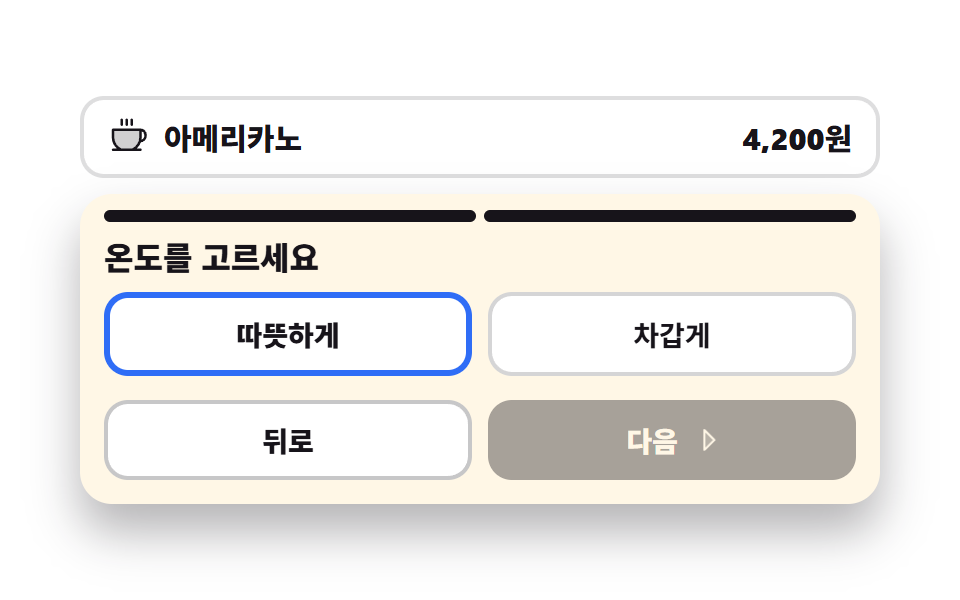
メニューの下に付いた大きなシートがサイズと温度を二つの歩みに分けて見せ、歩みが変わると上の表示も一つ埋まります。戻っても前の歩みで選んだ値はそのまま残ります。
使いどころドリンクのサイズと温度を選ぶ画面、オプションが二段階のメニュー詳細
aria-checkedsteps(1, end)translateX
<main class="stage">
<div class="ko is-demo" id="ko">
  <p class="ko__menu">
    <svg xmlns="http://www.w3.org/2000/svg" viewBox="0 0 256 256" fill="currentColor" class="ko__ico" aria-hidden="true"><path d="M208,88v48a88,88,0,0,1-51.3,80H83.3A88,88,0,0,1,32,136V88Z" opacity="0.2"/><path d="M80,56V24a8,8,0,0,1,16,0V56a8,8,0,0,1-16,0Zm40,8a8,8,0,0,0,8-8V24a8,8,0,0,0-16,0V56A8,8,0,0,0,120,64Zm32,0a8,8,0,0,0,8-8V24a8,8,0,0,0-16,0V56A8,8,0,0,0,152,64Zm96,56v8a40,40,0,0,1-37.51,39.91,96.59,96.59,0,0,1-27,40.09H208a8,8,0,0,1,0,16H32a8,8,0,0,1,0-16H56.54A96.3,96.3,0,0,1,24,136V88a8,8,0,0,1,8-8H208A40,40,0,0,1,248,120ZM200,96H40v40a80.27,80.27,0,0,0,45.12,72h69.76A80.27,80.27,0,0,0,200,136Zm32,24a24,24,0,0,0-16-22.62V136a95.78,95.78,0,0,1-1.2,15A24,24,0,0,0,232,128Z"/></svg>
    <span class="ko__name">アメリカーノ</span>
    <b class="ko__price">4,200円</b>
  </p>

  <div class="ko__sheet" id="sheet">
    <span class="ko__steps" aria-hidden="true">
      <i class="ko__seg ko__seg--1"></i>
      <i class="ko__seg ko__seg--2"></i>
    </span>

    <div class="ko__panes">
      <section class="ko__pane ko__pane--1" id="pane1">
        <h2 class="ko__title">サイズをお選びください</h2>
        <div class="ko__opts" role="radiogroup" aria-label="サイズ" data-group="size">
          <button type="button" class="ko__opt" role="radio" aria-checked="false" data-v="S">S</button>
          <button type="button" class="ko__opt is-on" role="radio" aria-checked="true" data-v="M">M</button>
          <button type="button" class="ko__opt" role="radio" aria-checked="false" data-v="L">L</button>
        </div>
      </section>
      <section class="ko__pane ko__pane--2" id="pane2">
        <h2 class="ko__title">温度をお選びください</h2>
        <div class="ko__opts" role="radiogroup" aria-label="温度" data-group="temp">
          <button type="button" class="ko__opt is-on" role="radio" aria-checked="true" data-v="ホット">ホット</button>
          <button type="button" class="ko__opt" role="radio" aria-checked="false" data-v="アイス">アイス</button>
        </div>
      </section>
    </div>

    <div class="ko__nav">
      <button type="button" class="ko__back" id="back">戻る</button>
      <button type="button" class="ko__next" id="next">
        <span>次へ</span>
        <svg xmlns="http://www.w3.org/2000/svg" viewBox="0 0 256 256" fill="currentColor" class="ko__caret" aria-hidden="true"><path d="M176,128,96,208V48Z" opacity="0.2"/><path d="M181.66,122.34l-80-80A8,8,0,0,0,88,48V208a8,8,0,0,0,13.66,5.66l80-80A8,8,0,0,0,181.66,122.34ZM104,188.69V67.31L164.69,128Z"/></svg>
      </button>
    </div>
  </div>
</div>
</main>@use "../../../../site/static/demo-tokens" as *;
// 옵션 고르는 큰 시트 — 한 화면에 다 늘어놓지 않고 크기·온도 두 걸음으로 나눈다.
// 걸음 교체는 steps(1, end) 컷이다. 두 판을 opacity 로 겹쳐 교차하면 24장 표본의 중간 프레임이
// 두 걸음이 반투명하게 겹친 유령이 되고 그 장이 poster 로 뽑힌다 (237·248 계열).
// 걸음 표시·제목·옵션 줄이 전부 같은 컷 시각표에 올라가야 「굵어진 걸음 표시 + 옛 제목」 같은 어긋난 장면이 안 생긴다.
// 컷만 있으면 움직인 프레임이 두세 장으로 떨어지므로, 「다음」의 꺾쇠가 오른쪽으로 밀렸다 돌아오는 움직임을 같은 2초 시계에 붙인다.
// 시트를 아래에서 끌어올리는 연출은 쓰지 않는다 — 루프가 이어붙는 지점에서 시트가 한 번에 다시 내려가 튄다.
$duration: $dur-loop;
$easing: $ease-spring;
$color: $subject-blue;
@include stage($stage-paper);
.ko { display: grid; gap: $sp-2; width: 100%; max-width: 400px; }
.ko__menu {
display: flex; align-items: center; gap: $sp-2; margin: 0;
padding: $sp-2 $sp-3; border: 2px solid rgba(23, 20, 26, .14); border-radius: $r-control;
background: $stage-paper; color: $subject-ink;
}
.ko__ico { width: clamp(16px, 4.4vw, 20px); height: clamp(16px, 4.4vw, 20px); flex: 0 0 auto; }
.ko__name { flex: 1 1 auto; font-weight: 800; font-size: clamp(12px, 3.2vw, 15px); }
.ko__price { font-weight: 800; font-size: clamp(12px, 3.2vw, 15px); }
.ko__sheet {
padding: $sp-2 $sp-3 $sp-3; border-radius: $r-card;
background: $subject-cream; box-shadow: $shadow-raised;
}
.ko__steps { display: grid; grid-template-columns: repeat(2, 1fr); gap: $sp-1; margin-bottom: $sp-2; }
.ko__seg { display: block; height: 6px; border-radius: $r-pill; background: rgba(23, 20, 26, .16); }
.ko__seg--1 { background: $subject-ink; }
.ko.is-step2 .ko__seg--2 { background: $subject-ink; }
// 두 걸음 판을 같은 격자 칸에 겹쳐 둔다 — 높이가 큰 쪽으로 고정돼 걸음이 바뀔 때 시트가 들썩이지 않는다
.ko__panes { display: grid; }
.ko__pane { grid-area: 1 / 1; }
.ko:not(.is-step2) .ko__pane--2,
.ko.is-step2 .ko__pane--1 { visibility: hidden; opacity: 0; }
.ko__title {
margin: 0 0 $sp-2; font-weight: 800; font-size: clamp(13px, 3.6vw, 16px); line-height: 1.2;
color: $subject-ink;
}
.ko__opts { display: grid; grid-auto-flow: column; grid-auto-columns: 1fr; gap: $sp-2; }
// 버튼 격자는 width:100% 를 못 박는다 — 버튼은 fit-content 라 1fr 칸이 내용 폭으로 접힌다
.ko__opt {
width: 100%; padding: $sp-2 $sp-1; cursor: pointer;
border: 2px solid rgba(23, 20, 26, .18); border-radius: $r-control;
background: $stage-paper; color: $subject-ink;
font-family: inherit; font-weight: 700; font-size: clamp(11px, 3vw, 14px);
}
// 고른 칸은 흰 바탕에 파란 테두리다. 파랑을 바탕으로 깔고 크림 글자를 얹으면 4.25:1 로 AA 에 못 미친다
.ko__opt.is-on { border-color: $color; border-width: 3px; font-weight: 800; }
.ko__opt:focus-visible { outline: 3px solid $color; outline-offset: 2px; }
.ko__nav { display: grid; grid-template-columns: repeat(2, 1fr); gap: $sp-2; margin-top: $sp-3; }
.ko__back, .ko__next {
width: 100%; padding: $sp-2; cursor: pointer; border-radius: $r-control;
font-family: inherit; font-weight: 800; font-size: clamp(11px, 3vw, 14px);
}
.ko__back { border: 2px solid rgba(23, 20, 26, .24); background: $stage-paper; color: $subject-ink; }
.ko__next {
display: flex; align-items: center; justify-content: center; gap: $sp-1;
border: 0; background: $subject-ink; color: $subject-cream;
}
.ko__back:disabled, .ko__next:disabled { opacity: .38; cursor: default; }
.ko__back:focus-visible, .ko__next:focus-visible { outline: 3px solid $color; outline-offset: 2px; }
.ko__caret { width: clamp(13px, 3.4vw, 16px); height: clamp(13px, 3.4vw, 16px); flex: 0 0 auto; }
// ── 미리보기 루프 ────────────────────────────────────────────────
// 1걸음 → 2걸음 → 1걸음. 세 컷이 전부 같은 2초 시계를 쓰므로 제목·옵션·걸음 표시가 한 프레임에 함께 간다.
.ko.is-demo .ko__pane--1,
.ko.is-demo .ko__pane--2 {
animation-duration: $duration; animation-timing-function: steps(1, end);
animation-iteration-count: infinite; animation-fill-mode: backwards;
}
.ko.is-demo .ko__pane--1 { animation-name: koPane1; }
.ko.is-demo .ko__pane--2 { animation-name: koPane2; }
@keyframes koPane1 {
0%, 46% { visibility: visible; opacity: 1; }
50%, 82% { visibility: hidden; opacity: 0; }
86%, 100% { visibility: visible; opacity: 1; }
}
@keyframes koPane2 {
0%, 46% { visibility: hidden; opacity: 0; }
50%, 82% { visibility: visible; opacity: 1; }
86%, 100% { visibility: hidden; opacity: 0; }
}
.ko.is-demo .ko__seg--2 {
animation-name: koSeg; animation-duration: $duration;
animation-timing-function: steps(1, end); animation-iteration-count: infinite;
animation-fill-mode: backwards;
}
@keyframes koSeg {
0%, 46% { background: rgba(23, 20, 26, .16); }
50%, 82% { background: $subject-ink; }
86%, 100% { background: rgba(23, 20, 26, .16); }
}
// 걸음이 바뀌면 쓸 수 있는 버튼도 바뀐다 — 1걸음에서는 「뒤로」가, 2걸음에서는 「다음」이 흐리다.
// 이것도 같은 컷 시각표에 올려야 「2걸음 판인데 뒤로가 흐린」 어긋난 장면이 대표 이미지로 뽑히지 않는다
// (`disabled` 속성은 CSS 가 못 바꾸므로 미리보기에서는 흐림만 같은 시각표로 흉내 낸다)
.ko.is-demo .ko__back,
.ko.is-demo .ko__next {
animation-duration: $duration; animation-timing-function: steps(1, end);
animation-iteration-count: infinite; animation-fill-mode: backwards;
}
.ko.is-demo .ko__back { animation-name: koBack; }
.ko.is-demo .ko__next { animation-name: koNext; }
@keyframes koBack {
0%, 46% { opacity: .38; }
50%, 82% { opacity: 1; }
86%, 100% { opacity: .38; }
}
@keyframes koNext {
0%, 46% { opacity: 1; }
50%, 82% { opacity: .38; }
86%, 100% { opacity: 1; }
}
// 꺾쇠는 자기 중심에서 오른쪽으로 밀렸다 돌아온다 — 컷 사이의 빈 칸을 이 움직임이 채운다
.ko.is-demo .ko__caret {
animation-name: koCaret; animation-duration: $duration;
animation-timing-function: $easing; animation-iteration-count: infinite;
}
@keyframes koCaret {
0%, 100% { transform: translateX(0); }
22% { transform: translateX(4px); }
44% { transform: translateX(0); }
66% { transform: translateX(4px); }
88% { transform: translateX(0); }
}
@media (max-width: 340px) {
.ko__menu { padding: $sp-1 $sp-2; }
.ko__sheet { padding: $sp-2; }
.ko__title { margin-bottom: $sp-1; }
.ko__nav { margin-top: $sp-2; }
}
@media (prefers-reduced-motion: reduce) {
.ko.is-demo .ko__pane--1,
.ko.is-demo .ko__pane--2,
.ko.is-demo .ko__seg--2,
.ko.is-demo .ko__back,
.ko.is-demo .ko__next,
.ko.is-demo .ko__caret { animation: none !important; }
.ko.is-demo .ko__back { opacity: 1 !important; }
.ko.is-demo .ko__next { opacity: .38 !important; }
// 움직임 없이 2걸음이 열린 자리에 세워 둔다
.ko.is-demo .ko__pane--1 { visibility: hidden !important; opacity: 0 !important; }
.ko.is-demo .ko__pane--2 { visibility: visible !important; opacity: 1 !important; }
.ko.is-demo .ko__seg--2 { background: $subject-ink !important; }
}html, body {
margin: 0;
overflow: hidden;
}
.stage {
box-sizing: border-box;
min-height: 100vh;
display: grid;
place-items: center;
margin: 0;
background: #ffffff;
font-family: -apple-system, "Segoe UI", "Noto Sans KR", sans-serif;
padding: clamp(8px, 4vw, 24px);
}
.ko {
display: grid;
gap: 8px;
width: 100%;
max-width: 400px;
}
.ko__menu {
display: flex;
align-items: center;
gap: 8px;
margin: 0;
padding: 8px 12px;
border: 2px solid rgba(23, 20, 26, 0.14);
border-radius: 12px;
background: #ffffff;
color: #17141a;
}
.ko__ico {
width: clamp(16px, 4.4vw, 20px);
height: clamp(16px, 4.4vw, 20px);
flex: 0 0 auto;
}
.ko__name {
flex: 1 1 auto;
font-weight: 800;
font-size: clamp(12px, 3.2vw, 15px);
}
.ko__price {
font-weight: 800;
font-size: clamp(12px, 3.2vw, 15px);
}
.ko__sheet {
padding: 8px 12px 12px;
border-radius: 16px;
background: #fff7e6;
box-shadow: 0 14px 24px rgba(23, 20, 26, 0.32);
}
.ko__steps {
display: grid;
grid-template-columns: repeat(2, 1fr);
gap: 4px;
margin-bottom: 8px;
}
.ko__seg {
display: block;
height: 6px;
border-radius: 999px;
background: rgba(23, 20, 26, 0.16);
}
.ko__seg--1 {
background: #17141a;
}
.ko.is-step2 .ko__seg--2 {
background: #17141a;
}
.ko__panes {
display: grid;
}
.ko__pane {
grid-area: 1/1;
}
.ko:not(.is-step2) .ko__pane--2,
.ko.is-step2 .ko__pane--1 {
visibility: hidden;
opacity: 0;
}
.ko__title {
margin: 0 0 8px;
font-weight: 800;
font-size: clamp(13px, 3.6vw, 16px);
line-height: 1.2;
color: #17141a;
}
.ko__opts {
display: grid;
grid-auto-flow: column;
grid-auto-columns: 1fr;
gap: 8px;
}
.ko__opt {
width: 100%;
padding: 8px 4px;
cursor: pointer;
border: 2px solid rgba(23, 20, 26, 0.18);
border-radius: 12px;
background: #ffffff;
color: #17141a;
font-family: inherit;
font-weight: 700;
font-size: clamp(11px, 3vw, 14px);
}
.ko__opt.is-on {
border-color: #2f6df6;
border-width: 3px;
font-weight: 800;
}
.ko__opt:focus-visible {
outline: 3px solid #2f6df6;
outline-offset: 2px;
}
.ko__nav {
display: grid;
grid-template-columns: repeat(2, 1fr);
gap: 8px;
margin-top: 12px;
}
.ko__back, .ko__next {
width: 100%;
padding: 8px;
cursor: pointer;
border-radius: 12px;
font-family: inherit;
font-weight: 800;
font-size: clamp(11px, 3vw, 14px);
}
.ko__back {
border: 2px solid rgba(23, 20, 26, 0.24);
background: #ffffff;
color: #17141a;
}
.ko__next {
display: flex;
align-items: center;
justify-content: center;
gap: 4px;
border: 0;
background: #17141a;
color: #fff7e6;
}
.ko__back:disabled, .ko__next:disabled {
opacity: 0.38;
cursor: default;
}
.ko__back:focus-visible, .ko__next:focus-visible {
outline: 3px solid #2f6df6;
outline-offset: 2px;
}
.ko__caret {
width: clamp(13px, 3.4vw, 16px);
height: clamp(13px, 3.4vw, 16px);
flex: 0 0 auto;
}
.ko.is-demo .ko__pane--1,
.ko.is-demo .ko__pane--2 {
animation-duration: 2s;
animation-timing-function: steps(1, end);
animation-iteration-count: infinite;
animation-fill-mode: backwards;
}
.ko.is-demo .ko__pane--1 {
animation-name: koPane1;
}
.ko.is-demo .ko__pane--2 {
animation-name: koPane2;
}
@keyframes koPane1 {
0%, 46% {
visibility: visible;
opacity: 1;
}
50%, 82% {
visibility: hidden;
opacity: 0;
}
86%, 100% {
visibility: visible;
opacity: 1;
}
}
@keyframes koPane2 {
0%, 46% {
visibility: hidden;
opacity: 0;
}
50%, 82% {
visibility: visible;
opacity: 1;
}
86%, 100% {
visibility: hidden;
opacity: 0;
}
}
.ko.is-demo .ko__seg--2 {
animation-name: koSeg;
animation-duration: 2s;
animation-timing-function: steps(1, end);
animation-iteration-count: infinite;
animation-fill-mode: backwards;
}
@keyframes koSeg {
0%, 46% {
background: rgba(23, 20, 26, 0.16);
}
50%, 82% {
background: #17141a;
}
86%, 100% {
background: rgba(23, 20, 26, 0.16);
}
}
.ko.is-demo .ko__back,
.ko.is-demo .ko__next {
animation-duration: 2s;
animation-timing-function: steps(1, end);
animation-iteration-count: infinite;
animation-fill-mode: backwards;
}
.ko.is-demo .ko__back {
animation-name: koBack;
}
.ko.is-demo .ko__next {
animation-name: koNext;
}
@keyframes koBack {
0%, 46% {
opacity: 0.38;
}
50%, 82% {
opacity: 1;
}
86%, 100% {
opacity: 0.38;
}
}
@keyframes koNext {
0%, 46% {
opacity: 1;
}
50%, 82% {
opacity: 0.38;
}
86%, 100% {
opacity: 1;
}
}
.ko.is-demo .ko__caret {
animation-name: koCaret;
animation-duration: 2s;
animation-timing-function: cubic-bezier(0.2, 0.8, 0.2, 1);
animation-iteration-count: infinite;
}
@keyframes koCaret {
0%, 100% {
transform: translateX(0);
}
22% {
transform: translateX(4px);
}
44% {
transform: translateX(0);
}
66% {
transform: translateX(4px);
}
88% {
transform: translateX(0);
}
}
@media (max-width: 340px) {
.ko__menu {
padding: 4px 8px;
}
.ko__sheet {
padding: 8px;
}
.ko__title {
margin-bottom: 4px;
}
.ko__nav {
margin-top: 8px;
}
}
@media (prefers-reduced-motion: reduce) {
.ko.is-demo .ko__pane--1,
.ko.is-demo .ko__pane--2,
.ko.is-demo .ko__seg--2,
.ko.is-demo .ko__back,
.ko.is-demo .ko__next,
.ko.is-demo .ko__caret {
animation: none !important;
}
.ko.is-demo .ko__back {
opacity: 1 !important;
}
.ko.is-demo .ko__next {
opacity: 0.38 !important;
}
.ko.is-demo .ko__pane--1 {
visibility: hidden !important;
opacity: 0 !important;
}
.ko.is-demo .ko__pane--2 {
visibility: visible !important;
opacity: 1 !important;
}
.ko.is-demo .ko__seg--2 {
background: #17141a !important;
}
}var ko = document.getElementById('ko');
var back = document.getElementById('back');
var next = document.getElementById('next');
var panes = [document.getElementById('pane1'), document.getElementById('pane2')];
var step = 0;
// 시트는 걸음마다 옵션 줄만 갈아 끼운다. 고른 값은 걸음을 오가도 버리지 않는다 —
// 라디오 상태를 DOM 에 그대로 두고 보이는 칸만 바꾸기 때문이다.
var picks = { size: 'M', temp: 'ホット' };
function paint() {
ko.classList.toggle('is-step2', step === 1);
for (var i = 0; i < panes.length; i++) {
panes[i].setAttribute('aria-hidden', i === step ? 'false' : 'true');
}
back.disabled = step === 0;
next.disabled = step === panes.length - 1;
}
function go(to) {
ko.classList.remove('is-demo');
step = Math.max(0, Math.min(panes.length - 1, to));
paint();
var first = panes[step].querySelector('[aria-checked="true"]') || panes[step].querySelector('.ko__opt');
if (first) { first.focus({ preventScroll: true }); }
}
function pick(group, btn) {
ko.classList.remove('is-demo');
var opts = btn.parentNode.querySelectorAll('.ko__opt');
for (var i = 0; i < opts.length; i++) {
var on = opts[i] === btn;
opts[i].setAttribute('aria-checked', on ? 'true' : 'false');
opts[i].classList.toggle('is-on', on);
opts[i].tabIndex = on ? 0 : -1;
}
picks[group] = btn.getAttribute('data-v');
}
var groups = ko.querySelectorAll('.ko__opts');
for (var g = 0; g < groups.length; g++) {
(function (box) {
var group = box.getAttribute('data-group');
var opts = box.querySelectorAll('.ko__opt');
for (var i = 0; i < opts.length; i++) {
opts[i].tabIndex = opts[i].getAttribute('aria-checked') === 'true' ? 0 : -1;
opts[i].addEventListener('click', function () { pick(group, this); });
}
// 라디오 묶음은 화살표로 옮겨 다닌다 — Tab 은 묶음 하나에 한 번만 들어온다
box.addEventListener('keydown', function (e) {
var list = Array.prototype.slice.call(opts);
var at = list.indexOf(document.activeElement);
var d = 0;
if (e.key === 'ArrowRight' || e.key === 'ArrowDown') { d = 1; }
else if (e.key === 'ArrowLeft' || e.key === 'ArrowUp') { d = -1; }
else { return; }
e.preventDefault();
var to = list[(at + d + list.length) % list.length];
pick(group, to);
to.focus({ preventScroll: true });
});
})(groups[g]);
}
back.addEventListener('click', function () { go(step - 1); });
next.addEventListener('click', function () { go(step + 1); });
paint();// OptionSheetStep — vanilla 판(run/298/demo/05-kiosk-option-sheet-step/index.html) 의 React 포트.
// 옵션을 한 화면에 다 늘어놓지 않고 크기·온도 두 걸음으로 나눈다. 두 판은 같은 격자 칸(grid-area: 1 / 1)에
// 겹쳐 서고 visibility + opacity 로만 갈린다 — 높이가 큰 쪽으로 고정돼 걸음이 바뀔 때 시트가 들썩이지 않는다.
// 고른 값은 걸음을 오가도 버리지 않는다. 라디오 상태를 DOM 에 그대로 두고 보이는 칸만 바꾸기 때문이다.
// 라디오 묶음은 Tab 이 한 번만 들어오는 로빙 tabindex 다 — 안에서는 화살표로 옮겨 다닌다.
// 미리보기 루프(.isDemo)는 CSS 키프레임이 돌리고, 사람이 만지면 여기서 루프를 뗀다. 값·수치는 vanilla 와 같다.
import { useEffect, useRef, useState } from "react";
import type { CSSProperties } from "react";
import styles from "./OptionSheetStep.module.scss";
export type OptionSheetStepProps = {
duration?: number;
easing?: string;
color?: string;
};
type Vars = CSSProperties & {
"--duration"?: string;
"--easing"?: string;
"--color"?: string;
};
// ambient 타입에는 React 이벤트 제네릭이 없다 — 핸들러가 실제로 쓰는 것만 지역 타입으로 적는다
type KeyEvt = { key: string; preventDefault(): void };
// useRef 는 T | null 을 돌려준다. 처음부터 값이 있고 절대 비지 않는 상자는 이렇게 좁혀 쓴다
type Box<T> = { current: T };
const MENU_NAME = "아메리카노";
const MENU_PRICE = "4,200원";
const BACK_LABEL = "뒤로";
const NEXT_LABEL = "다음";
type Group = { pane: string; title: string; label: string; opts: string[] };
const GROUPS: Group[] = [
{ pane: "pane1", title: "크기를 고르세요", label: "크기 고르기", opts: ["작게", "보통", "크게"] },
{ pane: "pane2", title: "온도를 고르세요", label: "온도 고르기", opts: ["따뜻하게", "차갑게"] },
];
const FIRST_PICKS: string[] = ["보통", "따뜻하게"];
export default function OptionSheetStep({
duration = 2000,
easing = "cubic-bezier(.2, .8, .2, 1)",
color = "#2f6df6",
}: OptionSheetStepProps) {
const box1 = useRef<HTMLDivElement | null>(null);
const box2 = useRef<HTMLDivElement | null>(null);
const boxes = [box1, box2];
// 첫 렌더에는 초점을 옮기지 않는다 — 사람이 만진 뒤부터가 걸음 이동이다
const touchedRef = useRef<boolean>(false) as Box<boolean>;
const [step, setStep] = useState(0);
const [picks, setPicks] = useState(FIRST_PICKS);
const [demo, setDemo] = useState(true);
const vars: Vars = { "--duration": `${duration}ms`, "--easing": easing, "--color": color };
useEffect(() => {
if (!touchedRef.current) return;
const box = boxes[step].current;
if (!box) return;
// 걸음을 옮기면 그 판에서 이미 고른 칸으로 초점이 간다 (없으면 첫 칸)
const on = box.querySelector('[aria-checked="true"]') as HTMLButtonElement | null;
const first = on || (box.querySelector("button") as HTMLButtonElement | null);
if (first) first.focus({ preventScroll: true });
}, [step]);
function go(to: number): void {
touchedRef.current = true;
setDemo(false);
setStep(Math.max(0, Math.min(GROUPS.length - 1, to)));
}
function pick(gi: number, value: string): void {
setDemo(false);
setPicks((prev) => prev.map((v, i) => (i === gi ? value : v)));
}
// 라디오 묶음은 화살표로 옮겨 다닌다 — 로빙 tabindex 라 초점은 늘 고른 칸에 있다
function keys(gi: number, event: KeyEvt): void {
let d = 0;
if (event.key === "ArrowRight" || event.key === "ArrowDown") d = 1;
else if (event.key === "ArrowLeft" || event.key === "ArrowUp") d = -1;
else return;
event.preventDefault();
const opts = GROUPS[gi].opts;
const at = opts.indexOf(picks[gi]);
const next = (at + d + opts.length) % opts.length;
pick(gi, opts[next]);
const box = boxes[gi].current;
if (!box) return;
const btn = box.querySelectorAll("button")[next] as HTMLButtonElement | undefined;
if (btn) btn.focus({ preventScroll: true });
}
const cls = [styles.root, demo ? styles.isDemo : "", step === 1 ? styles.isStep2 : ""].filter(Boolean).join(" ");
return (
<main className={styles.stage}>
<div className={cls} style={vars}>
<p className={styles.menu}>
<svg xmlns="http://www.w3.org/2000/svg" viewBox="0 0 256 256" fill="currentColor" className={styles.ico} aria-hidden="true"><path d="M208,88v48a88,88,0,0,1-51.3,80H83.3A88,88,0,0,1,32,136V88Z" opacity="0.2"/><path d="M80,56V24a8,8,0,0,1,16,0V56a8,8,0,0,1-16,0Zm40,8a8,8,0,0,0,8-8V24a8,8,0,0,0-16,0V56A8,8,0,0,0,120,64Zm32,0a8,8,0,0,0,8-8V24a8,8,0,0,0-16,0V56A8,8,0,0,0,152,64Zm96,56v8a40,40,0,0,1-37.51,39.91,96.59,96.59,0,0,1-27,40.09H208a8,8,0,0,1,0,16H32a8,8,0,0,1,0-16H56.54A96.3,96.3,0,0,1,24,136V88a8,8,0,0,1,8-8H208A40,40,0,0,1,248,120ZM200,96H40v40a80.27,80.27,0,0,0,45.12,72h69.76A80.27,80.27,0,0,0,200,136Zm32,24a24,24,0,0,0-16-22.62V136a95.78,95.78,0,0,1-1.2,15A24,24,0,0,0,232,128Z"/></svg>
<span className={styles.name}>{MENU_NAME}</span>
<b className={styles.price}>{MENU_PRICE}</b>
</p>
<div className={styles.sheet}>
<span className={styles.steps} aria-hidden="true">
<i className={`${styles.seg} ${styles.seg1}`}></i>
<i className={`${styles.seg} ${styles.seg2}`}></i>
</span>
<div className={styles.panes}>
{GROUPS.map((group, gi) => (
<section className={`${styles.pane} ${styles[group.pane]}`} key={group.pane} aria-hidden={gi === step ? "false" : "true"}>
<h2 className={styles.title}>{group.title}</h2>
<div
className={styles.opts}
role="radiogroup"
aria-label={group.label}
ref={boxes[gi]}
onKeyDown={(event: KeyEvt) => keys(gi, event)}
>
{group.opts.map((opt) => {
const on = picks[gi] === opt;
return (
<button
type="button"
key={opt}
className={[styles.opt, on ? styles.isOn : ""].filter(Boolean).join(" ")}
role="radio"
aria-checked={on ? "true" : "false"}
tabIndex={on ? 0 : -1}
onClick={() => pick(gi, opt)}
>
{opt}
</button>
);
})}
</div>
</section>
))}
</div>
<div className={styles.nav}>
<button type="button" className={styles.back} disabled={step === 0} onClick={() => go(step - 1)}>{BACK_LABEL}</button>
<button type="button" className={styles.next} disabled={step === GROUPS.length - 1} onClick={() => go(step + 1)}>
<span>{NEXT_LABEL}</span>
<svg xmlns="http://www.w3.org/2000/svg" viewBox="0 0 256 256" fill="currentColor" className={styles.caret} aria-hidden="true"><path d="M176,128,96,208V48Z" opacity="0.2"/><path d="M181.66,122.34l-80-80A8,8,0,0,0,88,48V208a8,8,0,0,0,13.66,5.66l80-80A8,8,0,0,0,181.66,122.34ZM104,188.69V67.31L164.69,128Z"/></svg>
</button>
</div>
</div>
</div>
</main>
);
}05 段階で選ぶ大きなシート — 計測 累積面積 14.037% · 動いたフレーム 17/23GODRICH オリジナル · SCSS と React は zip に同梱 · タッチパネル 注文 画面のUI 9選 — 指の大きさで作る
このデモが属する記事
 タッチパネル 注文 画面のUI 9選 — 指の大きさで作るタッチパネル 注文 の画面は、立ったままの客が指一本で最後まで進めるように組む画面です。ここに並べた九つは、待つ・選ぶ・迷う・受け取るの流れをそのまま九枚に割り、押す枠を先に指の大きさで決めてから中身を詰めました。 この記事のデモをすべて見る