04メニュータイルと売り切れ枠
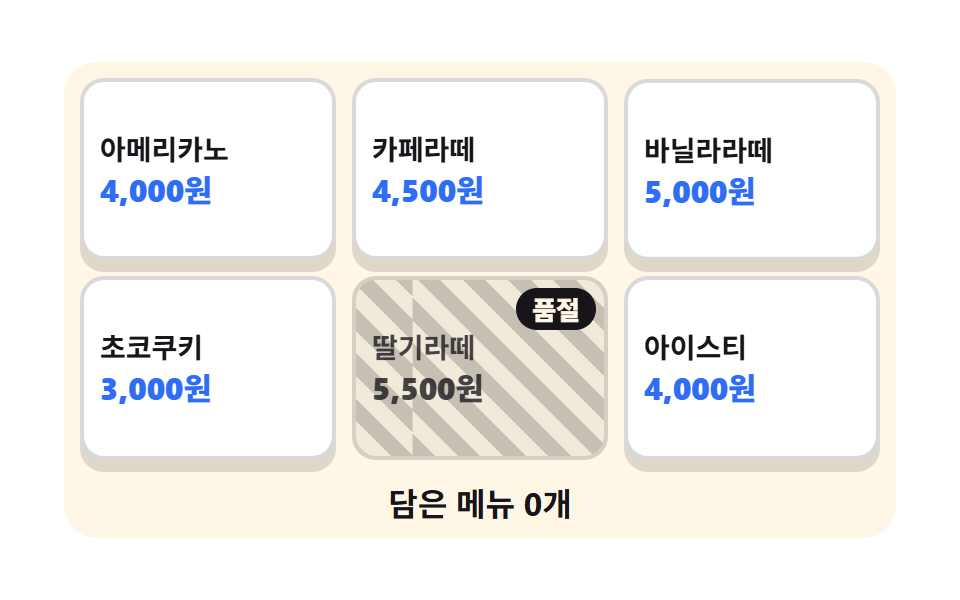
大きなメニュータイル六枚のうち一枚だけが薄くなり、斜めの帯と売り切れの文字が重なります。その枠は押しても反応せず、ほかの枠だけが沈みます。
使いどころ在庫が切れたメニューが混じる注文画面、時間帯で売る品が変わる端末
aria-disabledrepeating-linear-gradientanimation-delay
<main class="stage">
<div class="mt is-demo" id="mt">
  <ul class="mt__grid" aria-label="メニューを選ぶ">
    <li class="mt__cell"><button type="button" class="mt__tile mt__tile--1">
      <span class="mt__name">アメリカーノ</span><span class="mt__price">4,000円</span>
    </button></li>
    <li class="mt__cell"><button type="button" class="mt__tile mt__tile--2">
      <span class="mt__name">カフェラテ</span><span class="mt__price">4,500円</span>
    </button></li>
    <li class="mt__cell"><button type="button" class="mt__tile mt__tile--3">
      <span class="mt__name">バニララテ</span><span class="mt__price">5,000円</span>
    </button></li>
    <li class="mt__cell"><button type="button" class="mt__tile mt__tile--4">
      <span class="mt__name">チョコクッキー</span><span class="mt__price">3,000円</span>
    </button></li>
    <li class="mt__cell"><button type="button" class="mt__tile mt__tile--out" id="out" aria-disabled="true">
      <span class="mt__band" aria-hidden="true"></span>
      <span class="mt__name">いちごラテ</span><span class="mt__price">5,500円</span>
      <span class="mt__stamp">売り切れ</span>
    </button></li>
    <li class="mt__cell"><button type="button" class="mt__tile mt__tile--6">
      <span class="mt__name">アイスティー</span><span class="mt__price">4,000円</span>
    </button></li>
  </ul>
  <p class="mt__bag" id="bag" aria-live="polite">カゴに0点</p>
</div>
</main>@use "../../../../site/static/demo-tokens" as *;
// 메뉴 타일과 품절 칸 — 여섯 칸 중 한 칸만 재고가 떨어졌다.
// 미리보기 루프가 보여 주는 것은 "눌림이 칸에서 칸으로 옮겨가다가 품절 칸만 건너뛴다" 는 사실이다.
// 그래서 눌림 애니메이션은 품절 칸(.mt__tile--out)에 아예 걸지 않고, 그 자리에서는 사선 띠만 흐른다.
// 띠의 흐름이 24장 내내 이어지는 연속 움직임이라 컷 없이도 움직인 프레임이 채워진다.
// 눌림은 6px 내려앉는 transform 이라 반투명 유령이 안 생긴다 — opacity 로 깜빡이지 않는 이유다.
$duration: $dur-loop;
$easing: $ease-spring;
$color: $subject-blue;
// 다섯 칸이 2초를 나눠 쓴다. 마지막 칸(1.28s)의 눌림이 1.58s = 79% 에 끝나 루프 복귀가 90% 안에 든다.
$press-step: 320ms;
@include stage($stage-paper);
// 무대가 흰색이라 타일도 흰색이면 경계가 죽는다. 크림 판 위에 흰 타일을 얹어 층을 만든다 —
// 덤으로 파랑 가격표가 흰 바탕 위에 놓여 대비 4.53:1 로 AA 를 넘는다 (크림 위에서는 4.25:1 로 미달).
.mt {
width: 100%; max-width: 400px;
padding: $sp-2; border-radius: $r-card; background: $subject-cream;
}
.mt__grid {
display: grid; grid-template-columns: repeat(3, 1fr); gap: $sp-2;
margin: 0; padding: 0; list-style: none;
}
.mt__cell { display: flex; }
// 버튼 격자는 width:100% 를 못 박는다 — 버튼은 fit-content 라 1fr 칸이 내용 폭으로 접힌다
.mt__tile {
position: relative; overflow: hidden; width: 100%; cursor: pointer;
display: flex; flex-direction: column; align-items: flex-start; justify-content: center; gap: $sp-1;
min-height: clamp(56px, 19vw, 92px); padding: $sp-2; margin: 0;
border: 2px solid rgba($subject-ink, .16); border-radius: $r-control;
background: $stage-paper; color: $subject-ink; text-align: left;
font-family: inherit;
box-shadow: 0 6px 0 rgba($subject-ink, .14);
}
.mt__tile:focus-visible { outline: 3px solid $color; outline-offset: 2px; }
// 사람이 실제로 누른 자리의 피드백. 미리보기 루프(.is-demo)와 별개 경로라 여기에도 눌림을 둔다.
.mt__tile.is-tapped { transform: translateY(6px); box-shadow: 0 0 0 rgba($subject-ink, .14); }
.mt__name {
font-weight: 700; font-size: clamp(11px, 3vw, 14px); line-height: 1.25;
}
.mt__price {
font-weight: 800; font-size: clamp(12px, 3.2vw, 16px); line-height: 1.1; color: $color;
}
// ── 품절 칸 ──────────────────────────────────────────────────
// 흐리게 보이되 글자 대비는 지킨다. 사선 띠 위에서도 4.5:1 을 넘도록 먹을 .78 까지만 흐린다
// (run/298/_probe/대비.04.json 에 실측값).
.mt__tile--out {
cursor: not-allowed; border-color: rgba($subject-ink, .12);
background: rgba($subject-ink, .06); box-shadow: none;
}
.mt__tile--out .mt__name,
.mt__tile--out .mt__price { color: rgba($subject-ink, .78); }
// 사선 띠. 한 주기는 45° 축 방향으로 16px 이고, 가로로는 16 × √2 = 22.627px 마다 같은 무늬가 된다.
// 2초에 세 주기(67.882px)를 흘려 매 프레임 2.8px 씩 움직이게 했다 — 이음매 없는 루프다.
.mt__band {
position: absolute; inset: 0; pointer-events: none;
background-image: repeating-linear-gradient(45deg,
rgba($subject-ink, .2) 0 8px, rgba($subject-ink, 0) 8px 16px);
}
.mt__stamp {
position: absolute; top: $sp-1; right: $sp-1;
padding: $sp-1 $sp-2; border-radius: $r-pill;
background: $subject-ink; color: $subject-cream;
font-weight: 800; font-size: clamp(10px, 2.8vw, 13px); line-height: 1;
}
.mt__bag {
margin: $sp-3 0 0; text-align: center;
font-weight: 700; font-size: clamp(12px, 3.4vw, 16px); line-height: 1.2; color: $subject-ink;
}
// ── 미리보기 루프 ────────────────────────────────────────────────
// animation 단축을 쓰면 animation-delay 가 0s 로 리셋돼 다섯 칸이 동시에 눌린다 — 낱개 속성으로만 쓴다.
// 지연이 걸린 칸은 fill-mode: backwards 가 없으면 0프레임에 눌린 상태가 한 번 번쩍인다.
.mt.is-demo .mt__tile--1,
.mt.is-demo .mt__tile--2,
.mt.is-demo .mt__tile--3,
.mt.is-demo .mt__tile--4,
.mt.is-demo .mt__tile--6 {
animation-name: mtPress;
animation-duration: $duration;
animation-timing-function: $easing;
animation-iteration-count: infinite;
animation-fill-mode: backwards;
}
.mt.is-demo .mt__tile--2 { animation-delay: $press-step; }
.mt.is-demo .mt__tile--3 { animation-delay: $press-step * 2; }
.mt.is-demo .mt__tile--4 { animation-delay: $press-step * 3; }
// 5번 칸(품절)은 건너뛴다. 6번 칸이 네 번째 순서를 이어받는 것이 이 데모의 주제다.
.mt.is-demo .mt__tile--6 { animation-delay: $press-step * 4; }
@keyframes mtPress {
0%, 100% { transform: translateY(0); box-shadow: 0 6px 0 rgba($subject-ink, .14); }
6% { transform: translateY(6px); box-shadow: 0 0 0 rgba($subject-ink, .14); }
14% { transform: translateY(0); box-shadow: 0 6px 0 rgba($subject-ink, .14); }
}
.mt.is-demo .mt__band {
animation-name: mtBand;
animation-duration: $duration;
animation-timing-function: linear;
animation-iteration-count: infinite;
}
@keyframes mtBand {
0% { background-position: 0 0; }
100% { background-position: 67.882px 0; }
}
// 320px 에서는 간격을 올리지 않고 내린다 — 폰의 세로 여유는 174px 뿐이다
@media (max-width: 340px) {
.mt { padding: $sp-1; }
.mt__grid { gap: $sp-1; }
.mt__tile { min-height: 48px; padding: $sp-1; }
.mt__bag { margin-top: $sp-1; }
}
@media (prefers-reduced-motion: reduce) {
// @media 안의 선언은 .mt.is-demo .mt__tile--1 특이도에 지므로 !important 로 이긴다
.mt.is-demo .mt__tile--1,
.mt.is-demo .mt__tile--2,
.mt.is-demo .mt__tile--3,
.mt.is-demo .mt__tile--4,
.mt.is-demo .mt__tile--6,
.mt.is-demo .mt__band { animation: none !important; }
// 움직임을 껐어도 "지금 눌린 칸" 이 하나는 보이게 첫 칸을 내려앉힌 채로 둔다
.mt.is-demo .mt__tile--1 {
transform: translateY(6px) !important;
box-shadow: 0 0 0 rgba($subject-ink, .14) !important;
}
}html, body {
margin: 0;
overflow: hidden;
}
.stage {
box-sizing: border-box;
min-height: 100vh;
display: grid;
place-items: center;
margin: 0;
background: #ffffff;
font-family: -apple-system, "Segoe UI", "Noto Sans KR", sans-serif;
padding: clamp(8px, 4vw, 24px);
}
.mt {
width: 100%;
max-width: 400px;
padding: 8px;
border-radius: 16px;
background: #fff7e6;
}
.mt__grid {
display: grid;
grid-template-columns: repeat(3, 1fr);
gap: 8px;
margin: 0;
padding: 0;
list-style: none;
}
.mt__cell {
display: flex;
}
.mt__tile {
position: relative;
overflow: hidden;
width: 100%;
cursor: pointer;
display: flex;
flex-direction: column;
align-items: flex-start;
justify-content: center;
gap: 4px;
min-height: clamp(56px, 19vw, 92px);
padding: 8px;
margin: 0;
border: 2px solid rgba(23, 20, 26, 0.16);
border-radius: 12px;
background: #ffffff;
color: #17141a;
text-align: left;
font-family: inherit;
box-shadow: 0 6px 0 rgba(23, 20, 26, 0.14);
}
.mt__tile:focus-visible {
outline: 3px solid #2f6df6;
outline-offset: 2px;
}
.mt__tile.is-tapped {
transform: translateY(6px);
box-shadow: 0 0 0 rgba(23, 20, 26, 0.14);
}
.mt__name {
font-weight: 700;
font-size: clamp(11px, 3vw, 14px);
line-height: 1.25;
}
.mt__price {
font-weight: 800;
font-size: clamp(12px, 3.2vw, 16px);
line-height: 1.1;
color: #2f6df6;
}
.mt__tile--out {
cursor: not-allowed;
border-color: rgba(23, 20, 26, 0.12);
background: rgba(23, 20, 26, 0.06);
box-shadow: none;
}
.mt__tile--out .mt__name,
.mt__tile--out .mt__price {
color: rgba(23, 20, 26, 0.78);
}
.mt__band {
position: absolute;
inset: 0;
pointer-events: none;
background-image: repeating-linear-gradient(45deg, rgba(23, 20, 26, 0.2) 0 8px, rgba(23, 20, 26, 0) 8px 16px);
}
.mt__stamp {
position: absolute;
top: 4px;
right: 4px;
padding: 4px 8px;
border-radius: 999px;
background: #17141a;
color: #fff7e6;
font-weight: 800;
font-size: clamp(10px, 2.8vw, 13px);
line-height: 1;
}
.mt__bag {
margin: 12px 0 0;
text-align: center;
font-weight: 700;
font-size: clamp(12px, 3.4vw, 16px);
line-height: 1.2;
color: #17141a;
}
.mt.is-demo .mt__tile--1,
.mt.is-demo .mt__tile--2,
.mt.is-demo .mt__tile--3,
.mt.is-demo .mt__tile--4,
.mt.is-demo .mt__tile--6 {
animation-name: mtPress;
animation-duration: 2s;
animation-timing-function: cubic-bezier(0.2, 0.8, 0.2, 1);
animation-iteration-count: infinite;
animation-fill-mode: backwards;
}
.mt.is-demo .mt__tile--2 {
animation-delay: 320ms;
}
.mt.is-demo .mt__tile--3 {
animation-delay: 640ms;
}
.mt.is-demo .mt__tile--4 {
animation-delay: 960ms;
}
.mt.is-demo .mt__tile--6 {
animation-delay: 1280ms;
}
@keyframes mtPress {
0%, 100% {
transform: translateY(0);
box-shadow: 0 6px 0 rgba(23, 20, 26, 0.14);
}
6% {
transform: translateY(6px);
box-shadow: 0 0 0 rgba(23, 20, 26, 0.14);
}
14% {
transform: translateY(0);
box-shadow: 0 6px 0 rgba(23, 20, 26, 0.14);
}
}
.mt.is-demo .mt__band {
animation-name: mtBand;
animation-duration: 2s;
animation-timing-function: linear;
animation-iteration-count: infinite;
}
@keyframes mtBand {
0% {
background-position: 0 0;
}
100% {
background-position: 67.882px 0;
}
}
@media (max-width: 340px) {
.mt {
padding: 4px;
}
.mt__grid {
gap: 4px;
}
.mt__tile {
min-height: 48px;
padding: 4px;
}
.mt__bag {
margin-top: 4px;
}
}
@media (prefers-reduced-motion: reduce) {
.mt.is-demo .mt__tile--1,
.mt.is-demo .mt__tile--2,
.mt.is-demo .mt__tile--3,
.mt.is-demo .mt__tile--4,
.mt.is-demo .mt__tile--6,
.mt.is-demo .mt__band {
animation: none !important;
}
.mt.is-demo .mt__tile--1 {
transform: translateY(6px) !important;
box-shadow: 0 0 0 rgba(23, 20, 26, 0.14) !important;
}
}var mt = document.getElementById('mt');
var bag = document.getElementById('bag');
var tiles = [].slice.call(document.querySelectorAll('.mt__tile'));
var BAG_LABEL = 'カゴに{n}点';
var picked = 0;
// 売り切れ 칸은 disabled 속성 대신 aria-disabled 로 표시한다. disabled 를 주면 Tab 이 그 칸을 건너뛰어
// "왜 못 누르는지" 를 읽어 줄 기회가 사라진다 — 포커스는 남기고 담기만 여기 한 줄로 막는다.
function add(tile) {
if (tile.getAttribute('aria-disabled') === 'true') return;
mt.classList.remove('is-demo');
picked += 1;
bag.textContent = BAG_LABEL.replace('{n}', picked);
tile.classList.add('is-tapped');
setTimeout(function () { tile.classList.remove('is-tapped'); }, 180);
}
tiles.forEach(function (tile) {
// 버튼이라 Enter·Space 도 click 으로 들어온다 — 키보드 경로를 따로 만들지 않는다.
tile.addEventListener('click', function () { add(tile); });
});// MenuTileSoldOut — vanilla 판(run/298/demo/04-kiosk-menu-tile-soldout/index.html) 의 React 포트.
// 여섯 칸 중 한 칸만 재고가 떨어졌다. 그 칸은 `disabled` 가 아니라 `aria-disabled="true"` 다 —
// disabled 를 주면 Tab 이 그 칸을 건너뛰어 "왜 못 누르는지" 를 읽어 줄 기회가 사라진다.
// 그래서 초점은 남기고 담기만 add() 한 줄에서 막는다. 눌러도 담은 개수가 안 오르는 것이 이 부품의 핵심이다.
// 미리보기 루프(.isDemo)는 CSS 키프레임이 돌리고, 사람이 누르면 여기서 루프를 뗀다. 값·수치는 vanilla 와 같다.
import { useEffect, useRef, useState } from "react";
import type { CSSProperties } from "react";
import styles from "./MenuTileSoldOut.module.scss";
export type MenuTileSoldOutProps = {
duration?: number;
easing?: string;
color?: string;
};
type Vars = CSSProperties & {
"--duration"?: string;
"--easing"?: string;
"--color"?: string;
};
// useRef 는 T | null 을 돌려준다. 처음부터 값이 있고 절대 비지 않는 상자는 이렇게 좁혀 쓴다
type Box<T> = { current: T };
const GRID_LABEL = "메뉴 고르기";
const BAG_LABEL = "담은 메뉴 {n}개";
const STAMP = "품절";
const TAP_MS = 180; // 사람이 누른 자리의 눌림이 남는 시간
type Tile = { cls: string; name: string; price: string; out: boolean };
const TILES: Tile[] = [
{ cls: "tile1", name: "아메리카노", price: "4,000원", out: false },
{ cls: "tile2", name: "카페라떼", price: "4,500원", out: false },
{ cls: "tile3", name: "바닐라라떼", price: "5,000원", out: false },
{ cls: "tile4", name: "초코쿠키", price: "3,000원", out: false },
{ cls: "tileOut", name: "딸기라떼", price: "5,500원", out: true },
{ cls: "tile6", name: "아이스티", price: "4,000원", out: false },
];
export default function MenuTileSoldOut({
duration = 2000,
easing = "cubic-bezier(.2, .8, .2, 1)",
color = "#2f6df6",
}: MenuTileSoldOutProps) {
const timerRef = useRef<number>(0) as Box<number>;
const [picked, setPicked] = useState(0);
const [tapped, setTapped] = useState("");
const [demo, setDemo] = useState(true);
const vars: Vars = { "--duration": `${duration}ms`, "--easing": easing, "--color": color };
useEffect(() => {
return () => { if (timerRef.current) window.clearTimeout(timerRef.current); };
}, []);
// 품절 칸은 여기서 되돌아간다 — 초점도 가고 눌리기도 하지만 담은 개수는 오르지 않는다
function add(tile: Tile): void {
if (tile.out) return;
setDemo(false);
setPicked((n) => n + 1);
setTapped(tile.cls);
if (timerRef.current) window.clearTimeout(timerRef.current);
timerRef.current = window.setTimeout(() => { setTapped(""); }, TAP_MS);
}
const cls = [styles.root, demo ? styles.isDemo : ""].filter(Boolean).join(" ");
return (
<main className={styles.stage}>
<div className={cls} style={vars}>
<ul className={styles.grid} aria-label={GRID_LABEL}>
{TILES.map((tile) => (
<li className={styles.cell} key={tile.cls}>
{/* 버튼이라 Enter·Space 도 click 으로 들어온다 — 키보드 경로를 따로 만들지 않는다 */}
<button
type="button"
className={[styles.tile, styles[tile.cls], tapped === tile.cls ? styles.isTapped : ""].filter(Boolean).join(" ")}
aria-disabled={tile.out ? "true" : undefined}
onClick={() => add(tile)}
>
{tile.out ? <span className={styles.band} aria-hidden="true"></span> : null}
<span className={styles.name}>{tile.name}</span>
<span className={styles.price}>{tile.price}</span>
{tile.out ? <span className={styles.stamp}>{STAMP}</span> : null}
</button>
</li>
))}
</ul>
<p className={styles.bag} aria-live="polite">{BAG_LABEL.replace("{n}", String(picked))}</p>
</div>
</main>
);
}04 メニュータイルと売り切れ枠 — 計測 累積面積 18.788% · 動いたフレーム 23/23GODRICH オリジナル · SCSS と React は zip に同梱 · タッチパネル 注文 画面のUI 9選 — 指の大きさで作る
このデモが属する記事
 タッチパネル 注文 画面のUI 9選 — 指の大きさで作るタッチパネル 注文 の画面は、立ったままの客が指一本で最後まで進めるように組む画面です。ここに並べた九つは、待つ・選ぶ・迷う・受け取るの流れをそのまま九枚に割り、押す枠を先に指の大きさで決めてから中身を詰めました。 この記事のデモをすべて見る