07呼び出し番号板
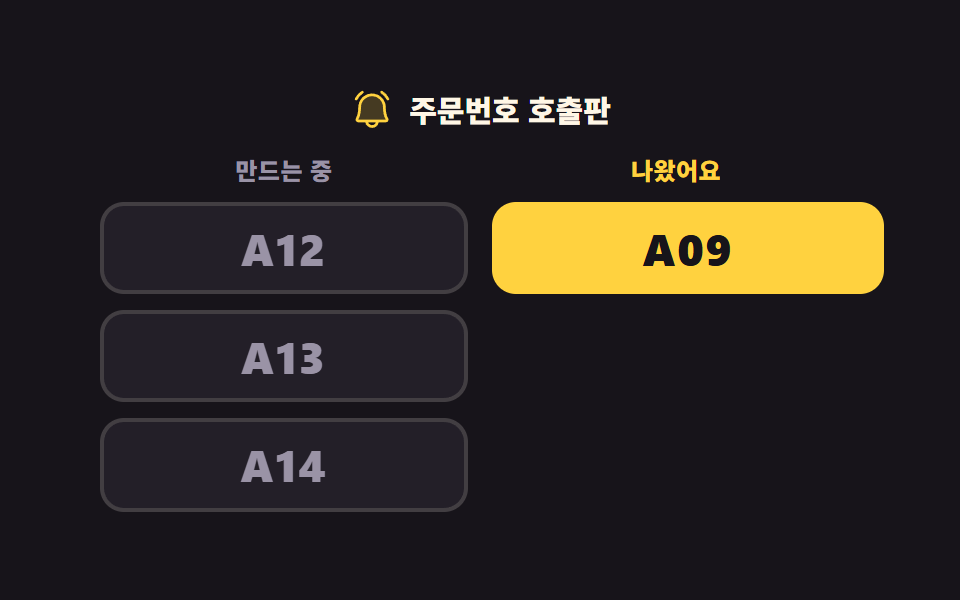
準備中の列にあった番号が一つ受け取りの列へ渡り、その番号だけが二回点滅します。残りの番号は空いた場所を詰めて上に上がります。
使いどころカフェの受け取り台の上の呼び出し画面、フードコートの呼び出しベルの代わりの番号板
translateXaria-livesteps(1, end)
<main class="stage">
<div class="kb is-demo" id="kb">
  <p class="kb__title">
    <svg xmlns="http://www.w3.org/2000/svg" viewBox="0 0 256 256" fill="currentColor" class="kb__ico" aria-hidden="true"><path d="M208,192H48a8,8,0,0,1-6.88-12C47.71,168.6,56,147.81,56,112a72,72,0,0,1,144,0c0,35.82,8.3,56.6,14.9,68A8,8,0,0,1,208,192Z" opacity="0.2"/><path d="M224,71.1a8,8,0,0,1-10.78-3.42,94.13,94.13,0,0,0-33.46-36.91,8,8,0,1,1,8.54-13.54,111.46,111.46,0,0,1,39.12,43.09A8,8,0,0,1,224,71.1ZM35.71,72a8,8,0,0,0,7.1-4.32A94.13,94.13,0,0,1,76.27,30.77a8,8,0,1,0-8.54-13.54A111.46,111.46,0,0,0,28.61,60.32,8,8,0,0,0,35.71,72Zm186.1,103.94A16,16,0,0,1,208,200H167.2a40,40,0,0,1-78.4,0H48a16,16,0,0,1-13.79-24.06C43.22,160.39,48,138.28,48,112a80,80,0,0,1,160,0C208,138.27,212.78,160.38,221.81,175.94ZM150.62,200H105.38a24,24,0,0,0,45.24,0ZM208,184c-10.64-18.27-16-42.49-16-72a64,64,0,0,0-128,0c0,29.52-5.38,53.74-16,72Z"/></svg>
    <span class="kb__titleText">呼び出し番号ボード</span>
  </p>
  <div class="kb__cols">
    <section class="kb__col">
      <h2 class="kb__head kb__head--making">準備中</h2>
      <ul class="kb__list" id="making">
        <li><button type="button" class="kb__num kb__num--making kb__num--go">A12</button></li>
        <li><button type="button" class="kb__num kb__num--making kb__num--up1">A13</button></li>
        <li><button type="button" class="kb__num kb__num--making kb__num--up2">A14</button></li>
      </ul>
    </section>
    <section class="kb__col">
      <h2 class="kb__head kb__head--ready">できました</h2>
      <ul class="kb__list" id="ready" aria-live="polite">
        <li><span class="kb__num kb__num--ready kb__num--down">A09</span></li>
      </ul>
    </section>
  </div>
</div>
</main>
@use "../../../../site/static/demo-tokens" as *;
// 주문번호 호출판 — 왼쪽 「만드는 중」, 오른쪽 「나왔어요」. 어두운 무대라 번호를 밝게 쓰되
// 오른쪽(나온 번호)은 노랑으로 눈에 띄게, 왼쪽(아직 만드는 번호)은 한 단계 낮은 밝기로 둔다
// (대비 실측은 run/298/_probe/대비.07.json — 작은 글자는 전부 4.5:1 이상).
//
// 미리보기 루프는 번호 하나가 왼쪽에서 오른쪽으로 건너가고, 도착한 번호만 두 번 깜빡이고,
// 남은 번호들이 빈자리를 메우며 올라선다. 깜빡임은 steps(1, end) 컷이다 —
// opacity 페이드로 하면 24장 표본의 중간 프레임이 반투명 유령이 되고 그 장이 poster 로 뽑힌다.
$duration: $dur-loop;
$easing: $ease-spring;
$color: $stage-yellow;
@include stage($stage-ink);
.kb { width: 100%; max-width: 380px; }
.kb__title {
display: flex; align-items: center; justify-content: center; gap: $sp-2;
margin: 0 0 $sp-3; color: $subject-cream;
font-weight: 800; font-size: clamp(12px, 3.4vw, 15px); line-height: 1.2;
}
.kb__ico { width: clamp(16px, 5vw, 22px); height: clamp(16px, 5vw, 22px); flex: 0 0 auto; color: $color; }
.kb__titleText { line-height: 1.2; }
.kb__cols { display: grid; grid-template-columns: repeat(2, 1fr); gap: $sp-3; align-items: start; }
.kb__col { min-width: 0; }
.kb__head {
margin: 0 0 $sp-2; text-align: center;
font-weight: 800; font-size: clamp(10px, 3vw, 12px); line-height: 1.2; letter-spacing: .02em;
}
.kb__head--making { color: $tick-mute; }
.kb__head--ready { color: $color; }
.kb__list { display: grid; gap: $sp-2; margin: 0; padding: 0; list-style: none; }
.kb__num {
display: block; width: 100%; margin: 0; padding: clamp(4px, 2.4vw, 8px) $sp-1;
border-radius: $r-control; text-align: center; font-family: inherit;
font-weight: 800; font-size: clamp(15px, 4.6vw, 22px); line-height: 1.2; letter-spacing: .04em;
}
.kb__num--making {
border: 2px solid rgba(255, 247, 230, .14); background: $tick-panel; color: $tick-mute; cursor: pointer;
}
.kb__num--ready {
border: 2px solid $color; background: $color; color: $subject-ink; cursor: default;
}
.kb__num:focus-visible { outline: 3px solid $subject-cream; outline-offset: 3px; }
// ── 미리보기 루프 ────────────────────────────────────────────────
// 순서가 있다. ① 오른쪽 칸이 8~24% 에 한 줄 내려가 자리를 비우고 ② 번호가 26~52% 에 건너가고
// ③ 남은 번호가 34~58% 에 올라선다. 겹쳐 돌리면 건너가는 번호가 노란 조각 위를 지나가고,
// 그 프레임(어두운 조각 위에 노랑)이 가장 크게 달라져 poster 로 뽑힌다 (298-07 실측).
// 복귀는 88% 컷 — 마지막 프레임이 2초의 95.8% 지점이라 90% 를 넘기면 아예 안 찍힌다.
// 되돌아가는 움직임을 보여 주면 "나온 번호가 다시 들어간다" 로 읽히므로 컷으로 끊는다.
.kb.is-demo .kb__num--go {
animation-name: kbGo, kbArrive;
animation-duration: $duration, $duration;
animation-timing-function: $easing, steps(1, end);
animation-iteration-count: infinite, infinite;
animation-fill-mode: backwards, backwards;
}
// 100% 는 자기 폭이고 $sp-3 은 두 칸 사이 간격이라, 둘을 더하면 정확히 오른쪽 칸의 같은 줄이다
@keyframes kbGo {
0% { transform: translateX(0); animation-timing-function: $ease-spring; }
26% { transform: translateX(0); animation-timing-function: $ease-spring; }
52% { transform: translateX(calc(100% + #{$sp-3})); animation-timing-function: steps(1, end); }
88% { transform: translateX(0); }
100% { transform: translateX(0); }
}
// 도착한 번호만 두 번 깜빡인다. 색을 바꾸는 컷이라 사라지는 프레임이 없다
@keyframes kbArrive {
0% { border-color: rgba(255, 247, 230, .14); background: $tick-panel; color: $tick-mute; }
52% { border-color: $stage-yellow; background: $stage-yellow; color: $subject-ink; }
58% { border-color: $subject-cream; background: $subject-cream; color: $subject-ink; }
66% { border-color: $stage-yellow; background: $stage-yellow; color: $subject-ink; }
70% { border-color: $subject-cream; background: $subject-cream; color: $subject-ink; }
78% { border-color: $stage-yellow; background: $stage-yellow; color: $subject-ink; }
88% { border-color: rgba(255, 247, 230, .14); background: $tick-panel; color: $tick-mute; }
100% { border-color: rgba(255, 247, 230, .14); background: $tick-panel; color: $tick-mute; }
}
.kb.is-demo .kb__num--up1,
.kb.is-demo .kb__num--up2 {
animation-name: kbUp; animation-duration: $duration;
animation-timing-function: $easing; animation-iteration-count: infinite;
animation-fill-mode: backwards;
}
// 한 줄 = 자기 높이 + 줄 간격($sp-2)
@keyframes kbUp {
0% { transform: translateY(0); animation-timing-function: $ease-spring; }
34% { transform: translateY(0); animation-timing-function: $ease-spring; }
58% { transform: translateY(calc(-100% - #{$sp-2})); animation-timing-function: steps(1, end); }
88% { transform: translateY(0); }
100% { transform: translateY(0); }
}
.kb.is-demo .kb__num--down {
animation-name: kbDown; animation-duration: $duration;
animation-timing-function: $easing; animation-iteration-count: infinite;
animation-fill-mode: backwards;
}
@keyframes kbDown {
0% { transform: translateY(0); animation-timing-function: $ease-spring; }
8% { transform: translateY(0); animation-timing-function: $ease-spring; }
24% { transform: translateY(calc(100% + #{$sp-2})); animation-timing-function: steps(1, end); }
88% { transform: translateY(0); }
100% { transform: translateY(0); }
}
@media (max-width: 340px) {
// 폰에서 쓸 수 있는 세로는 174px 남짓이다 — 좁은 화면에서는 간격을 올리지 않고 내린다
.kb__title { margin: 0 0 $sp-2; }
.kb__head { margin: 0 0 $sp-1; }
}
@media (prefers-reduced-motion: reduce) {
.kb.is-demo .kb__num--go,
.kb.is-demo .kb__num--up1,
.kb.is-demo .kb__num--up2,
.kb.is-demo .kb__num--down { animation: none !important; }
// 움직임 없이 두 칸이 각자 제자리에 선 호출판을 세워 둔다
.kb.is-demo .kb__num { transform: none !important; }
}html, body {
margin: 0;
overflow: hidden;
}
.stage {
box-sizing: border-box;
min-height: 100vh;
display: grid;
place-items: center;
margin: 0;
background: #17141a;
font-family: -apple-system, "Segoe UI", "Noto Sans KR", sans-serif;
padding: clamp(8px, 4vw, 24px);
}
.kb {
width: 100%;
max-width: 380px;
}
.kb__title {
display: flex;
align-items: center;
justify-content: center;
gap: 8px;
margin: 0 0 12px;
color: #fff7e6;
font-weight: 800;
font-size: clamp(12px, 3.4vw, 15px);
line-height: 1.2;
}
.kb__ico {
width: clamp(16px, 5vw, 22px);
height: clamp(16px, 5vw, 22px);
flex: 0 0 auto;
color: #ffd23f;
}
.kb__titleText {
line-height: 1.2;
}
.kb__cols {
display: grid;
grid-template-columns: repeat(2, 1fr);
gap: 12px;
align-items: start;
}
.kb__col {
min-width: 0;
}
.kb__head {
margin: 0 0 8px;
text-align: center;
font-weight: 800;
font-size: clamp(10px, 3vw, 12px);
line-height: 1.2;
letter-spacing: 0.02em;
}
.kb__head--making {
color: #9a93a6;
}
.kb__head--ready {
color: #ffd23f;
}
.kb__list {
display: grid;
gap: 8px;
margin: 0;
padding: 0;
list-style: none;
}
.kb__num {
display: block;
width: 100%;
margin: 0;
padding: clamp(4px, 2.4vw, 8px) 4px;
border-radius: 12px;
text-align: center;
font-family: inherit;
font-weight: 800;
font-size: clamp(15px, 4.6vw, 22px);
line-height: 1.2;
letter-spacing: 0.04em;
}
.kb__num--making {
border: 2px solid rgba(255, 247, 230, 0.14);
background: #231f28;
color: #9a93a6;
cursor: pointer;
}
.kb__num--ready {
border: 2px solid #ffd23f;
background: #ffd23f;
color: #17141a;
cursor: default;
}
.kb__num:focus-visible {
outline: 3px solid #fff7e6;
outline-offset: 3px;
}
.kb.is-demo .kb__num--go {
animation-name: kbGo, kbArrive;
animation-duration: 2s, 2s;
animation-timing-function: cubic-bezier(0.2, 0.8, 0.2, 1), steps(1, end);
animation-iteration-count: infinite, infinite;
animation-fill-mode: backwards, backwards;
}
@keyframes kbGo {
0% {
transform: translateX(0);
animation-timing-function: cubic-bezier(0.2, 0.8, 0.2, 1);
}
26% {
transform: translateX(0);
animation-timing-function: cubic-bezier(0.2, 0.8, 0.2, 1);
}
52% {
transform: translateX(calc(100% + 12px));
animation-timing-function: steps(1, end);
}
88% {
transform: translateX(0);
}
100% {
transform: translateX(0);
}
}
@keyframes kbArrive {
0% {
border-color: rgba(255, 247, 230, 0.14);
background: #231f28;
color: #9a93a6;
}
52% {
border-color: #ffd23f;
background: #ffd23f;
color: #17141a;
}
58% {
border-color: #fff7e6;
background: #fff7e6;
color: #17141a;
}
66% {
border-color: #ffd23f;
background: #ffd23f;
color: #17141a;
}
70% {
border-color: #fff7e6;
background: #fff7e6;
color: #17141a;
}
78% {
border-color: #ffd23f;
background: #ffd23f;
color: #17141a;
}
88% {
border-color: rgba(255, 247, 230, 0.14);
background: #231f28;
color: #9a93a6;
}
100% {
border-color: rgba(255, 247, 230, 0.14);
background: #231f28;
color: #9a93a6;
}
}
.kb.is-demo .kb__num--up1,
.kb.is-demo .kb__num--up2 {
animation-name: kbUp;
animation-duration: 2s;
animation-timing-function: cubic-bezier(0.2, 0.8, 0.2, 1);
animation-iteration-count: infinite;
animation-fill-mode: backwards;
}
@keyframes kbUp {
0% {
transform: translateY(0);
animation-timing-function: cubic-bezier(0.2, 0.8, 0.2, 1);
}
34% {
transform: translateY(0);
animation-timing-function: cubic-bezier(0.2, 0.8, 0.2, 1);
}
58% {
transform: translateY(calc(-100% - 8px));
animation-timing-function: steps(1, end);
}
88% {
transform: translateY(0);
}
100% {
transform: translateY(0);
}
}
.kb.is-demo .kb__num--down {
animation-name: kbDown;
animation-duration: 2s;
animation-timing-function: cubic-bezier(0.2, 0.8, 0.2, 1);
animation-iteration-count: infinite;
animation-fill-mode: backwards;
}
@keyframes kbDown {
0% {
transform: translateY(0);
animation-timing-function: cubic-bezier(0.2, 0.8, 0.2, 1);
}
8% {
transform: translateY(0);
animation-timing-function: cubic-bezier(0.2, 0.8, 0.2, 1);
}
24% {
transform: translateY(calc(100% + 8px));
animation-timing-function: steps(1, end);
}
88% {
transform: translateY(0);
}
100% {
transform: translateY(0);
}
}
@media (max-width: 340px) {
.kb__title {
margin: 0 0 8px;
}
.kb__head {
margin: 0 0 4px;
}
}
@media (prefers-reduced-motion: reduce) {
.kb.is-demo .kb__num--go,
.kb.is-demo .kb__num--up1,
.kb.is-demo .kb__num--up2,
.kb.is-demo .kb__num--down {
animation: none !important;
}
.kb.is-demo .kb__num {
transform: none !important;
}
}var kb = document.getElementById('kb');
var making = document.getElementById('making');
var ready = document.getElementById('ready');
var MAX_READY = 3;
// 「準備中」의 번호를 누르면(Enter 도 같다 — 네이티브 button) 그 조각이 「できました」 칸 맨 위로 옮겨간다.
// 옮겨 간 칸에 aria-live="polite" 가 붙어 있어 화면을 못 보는 사람도 새로 나온 번호를 듣는다.
// 미리보기 루프(.is-demo)는 CSS 키프레임이고 여기는 실제 DOM 이동이라 둘은 별개 코드다.
making.addEventListener('click', function (e) {
var btn = e.target.closest('.kb__num');
if (!btn || btn.disabled) return;
kb.classList.remove('is-demo');
var row = btn.parentNode;
btn.className = 'kb__num kb__num--ready';
btn.disabled = true;
ready.insertBefore(row, ready.firstChild);
// 호출판은 최근 MAX_READY 건만 남긴다. 무한히 쌓으면 칸이 화면 밖으로 자란다
// (298-07 실측: 네 칸이 되자 320×200 에서 문서높이 239px — 조작 전만 재는 BD9 는 이걸 못 본다)
while (ready.children.length > MAX_READY) ready.removeChild(ready.lastElementChild);
var next = making.querySelector('.kb__num');
if (next) next.focus({ preventScroll: true });
});// OrderNumberBoard — vanilla 판(run/298/demo/07-kiosk-order-number-board/index.html) 의 React 포트.
// 「만드는 중」의 번호를 누르면(Enter 도 같다 — 네이티브 button) 그 조각이 「나왔어요」 칸 맨 위로 옮겨간다.
// 옮겨 간 칸에 aria-live="polite" 가 붙어 있어 화면을 못 보는 사람도 새로 나온 번호를 듣는다.
// 미리보기 루프(.isDemo)는 CSS 키프레임이고 여기는 실제 목록 이동이라 둘은 별개 코드다.
import { useEffect, useRef, useState } from "react";
import type { CSSProperties } from "react";
import styles from "./OrderNumberBoard.module.scss";
export type OrderNumberBoardProps = {
duration?: number;
easing?: string;
color?: string;
};
type Vars = CSSProperties & {
"--duration"?: string;
"--easing"?: string;
"--color"?: string;
};
// useRef 는 T | null 을 돌려준다. 처음부터 값이 있고 절대 비지 않는 상자는 이렇게 좁혀 쓴다
type Box<T> = { current: T };
// 나온 번호 한 줄 — moved 는 사람이 눌러 건너온 조각인지(그러면 disabled 버튼이다)
type Ready = { num: string; moved: boolean };
const BOARD_TITLE = "주문번호 호출판";
const HEAD_MAKING = "만드는 중";
const HEAD_READY = "나왔어요";
// 호출판은 최근 MAX_READY 건만 남긴다. 무한히 쌓으면 칸이 화면 밖으로 자란다
// (298-07 실측: 네 칸이 되자 320×200 에서 문서높이 239px — 조작 전만 재는 BD9 는 이걸 못 본다)
const MAX_READY = 3;
const FIRST_MAKING = ["A12", "A13", "A14"];
const FIRST_READY: Ready[] = [{ num: "A09", moved: false }];
// 왼쪽 칸의 자리마다 붙는 미리보기 클래스 — 맨 위는 건너가고 아래 둘은 빈자리를 메우며 올라선다
const MAKING_ANIM = ["numGo", "numUp1", "numUp2"];
export default function OrderNumberBoard({
duration = 2000,
easing = "cubic-bezier(.2, .8, .2, 1)",
color = "#ffd23f",
}: OrderNumberBoardProps) {
const makingRef = useRef<HTMLUListElement | null>(null);
const wantFocusRef = useRef<boolean>(false) as Box<boolean>;
const [demo, setDemo] = useState(true);
const [making, setMaking] = useState<string[]>(FIRST_MAKING);
const [ready, setReady] = useState<Ready[]>(FIRST_READY);
const vars: Vars = { "--duration": `${duration}ms`, "--easing": easing, "--color": color };
// 옮긴 뒤 남은 줄의 맨 위로 초점을 넘긴다 — 목록이 다시 그려진 다음이라야 그 버튼이 있다
useEffect(() => {
if (!wantFocusRef.current) return;
wantFocusRef.current = false;
const list = makingRef.current;
if (!list) return;
const next = list.querySelector("button");
if (next) next.focus({ preventScroll: true });
}, [making]);
function call(num: string): void {
setDemo(false);
setMaking(making.filter((item) => item !== num));
setReady([{ num: num, moved: true }].concat(ready).slice(0, MAX_READY));
wantFocusRef.current = true;
}
const cls = [styles.root, demo ? styles.isDemo : ""].filter(Boolean).join(" ");
return (
<main className={styles.stage}>
<div className={cls} style={vars}>
<p className={styles.title}>
<svg xmlns="http://www.w3.org/2000/svg" viewBox="0 0 256 256" fill="currentColor" className={styles.ico} aria-hidden="true"><path d="M208,192H48a8,8,0,0,1-6.88-12C47.71,168.6,56,147.81,56,112a72,72,0,0,1,144,0c0,35.82,8.3,56.6,14.9,68A8,8,0,0,1,208,192Z" opacity="0.2"/><path d="M224,71.1a8,8,0,0,1-10.78-3.42,94.13,94.13,0,0,0-33.46-36.91,8,8,0,1,1,8.54-13.54,111.46,111.46,0,0,1,39.12,43.09A8,8,0,0,1,224,71.1ZM35.71,72a8,8,0,0,0,7.1-4.32A94.13,94.13,0,0,1,76.27,30.77a8,8,0,1,0-8.54-13.54A111.46,111.46,0,0,0,28.61,60.32,8,8,0,0,0,35.71,72Zm186.1,103.94A16,16,0,0,1,208,200H167.2a40,40,0,0,1-78.4,0H48a16,16,0,0,1-13.79-24.06C43.22,160.39,48,138.28,48,112a80,80,0,0,1,160,0C208,138.27,212.78,160.38,221.81,175.94ZM150.62,200H105.38a24,24,0,0,0,45.24,0ZM208,184c-10.64-18.27-16-42.49-16-72a64,64,0,0,0-128,0c0,29.52-5.38,53.74-16,72Z"/></svg>
<span className={styles.titleText}>{BOARD_TITLE}</span>
</p>
<div className={styles.cols}>
<section className={styles.col}>
<h2 className={`${styles.head} ${styles.headMaking}`}>{HEAD_MAKING}</h2>
<ul className={styles.list} ref={makingRef}>
{making.map((num, i) => (
<li key={num}>
<button
type="button"
className={`${styles.num} ${styles.numMaking} ${styles[MAKING_ANIM[i]] || ""}`}
onClick={() => call(num)}
>{num}</button>
</li>
))}
</ul>
</section>
<section className={styles.col}>
<h2 className={`${styles.head} ${styles.headReady}`}>{HEAD_READY}</h2>
<ul className={styles.list} aria-live="polite">
{ready.map((item) => (
<li key={item.num}>
{item.moved ? (
<button type="button" className={`${styles.num} ${styles.numReady}`} disabled>{item.num}</button>
) : (
<span className={`${styles.num} ${styles.numReady} ${styles.numDown}`}>{item.num}</span>
)}
</li>
))}
</ul>
</section>
</div>
</div>
</main>
);
}07 呼び出し番号板 — 計測 累積面積 31.229% · 動いたフレーム 17/23GODRICH オリジナル · SCSS と React は zip に同梱 · タッチパネル 注文 画面のUI 9選 — 指の大きさで作る
このデモが属する記事
 タッチパネル 注文 画面のUI 9選 — 指の大きさで作るタッチパネル 注文 の画面は、立ったままの客が指一本で最後まで進めるように組む画面です。ここに並べた九つは、待つ・選ぶ・迷う・受け取るの流れをそのまま九枚に割り、押す枠を先に指の大きさで決めてから中身を詰めました。 この記事のデモをすべて見る