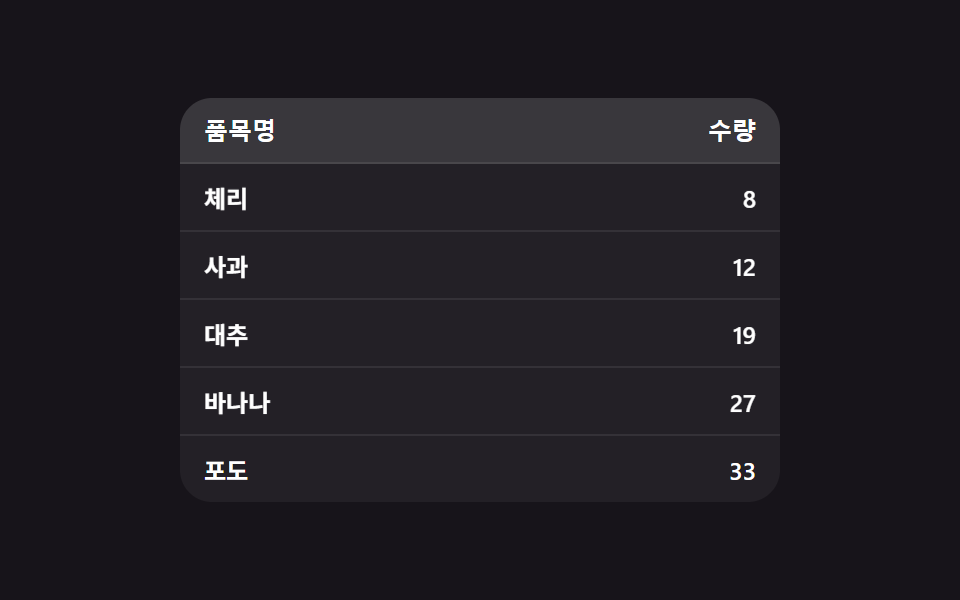
07行が実際に位置を入れ替えて並び替わる表
列見出しをクリックすると値が並び替わるだけでなく、各行が新しい順位の位置まで実座標を移動するアニメーションを描いて実際に入れ替わる(257の複数列同時ソート・362の行挿入・削除トランジションとは異なる実演 — こちらは単一列クリックソートにおける行位置移動そのものだけを計算する)。
使いどころ価格・名前順の並び替えが必要な管理画面の表
sortByupdateHeadersaria-sort
<main class="stage">
<div class="srt is-demo" id="srt">
  <table class="srt__table" id="srtTable">
    <thead>
      <tr>
        <th scope="col" class="srt__th" data-key="name" aria-sort="none">
          <button type="button" class="srt__headerBtn">品目名</button>
        </th>
        <th scope="col" class="srt__th srt__th--num" data-key="qty" aria-sort="none">
          <button type="button" class="srt__headerBtn">数量</button>
        </th>
      </tr>
    </thead>
    <tbody id="srtBody">
      <tr data-id="1" data-name="りんご" data-qty="12"><td>りんご</td><td class="srt__num">12</td></tr>
      <tr data-id="2" data-name="バナナ" data-qty="27"><td>バナナ</td><td class="srt__num">27</td></tr>
      <tr data-id="3" data-name="チェリー" data-qty="8"><td>チェリー</td><td class="srt__num">8</td></tr>
      <tr data-id="4" data-name="なつめ" data-qty="19"><td>なつめ</td><td class="srt__num">19</td></tr>
      <tr data-id="5" data-name="ぶどう" data-qty="33"><td>ぶどう</td><td class="srt__num">33</td></tr>
    </tbody>
  </table>
</div>
</main>
@use "../../../../site/static/demo-tokens" as *;
// 변수 3개
$duration: $dur-base;
$easing: $ease-spring;
$color: $subject-blue-light;
// 계산 겹: index.html 의 sortBy() 가 FLIP(First-Last-Invert-Play) 으로 행의 이전 위치와
// 새 위치 차이를 구해 그 차이만큼 transform 을 되돌렸다가 트랜지션으로 흘려보낸다.
@include stage($stage-ink);
.srt {
width: min(100%, 300px);
}
.srt__table {
width: 100%;
border-collapse: collapse;
border-radius: $r-card;
overflow: hidden;
background: rgba(255, 255, 255, .05);
}
.srt__th {
padding: 0;
text-align: left;
background: rgba(255, 255, 255, .1);
&--num {
text-align: right;
}
}
.srt__headerBtn {
box-sizing: border-box;
width: 100%;
border: 0;
background: transparent;
padding: $sp-2 $sp-3;
color: $stage-paper;
font-weight: 700;
font-size: 12px;
text-align: inherit;
cursor: pointer;
&:focus-visible {
outline: 2px solid $color;
outline-offset: -2px;
}
}
.srt__table tbody tr {
--reorder-ms: #{$duration};
transition: transform var(--reorder-ms) $easing;
}
.srt__table td {
box-sizing: border-box;
padding: $sp-2 $sp-3;
color: $stage-paper;
font-weight: 600;
font-size: 12px;
border-top: 1px solid rgba(255, 255, 255, .08);
}
.srt__num {
text-align: right;
color: $color;
}
@media (max-width: 340px) {
.srt__headerBtn { padding: $sp-1 $sp-2; font-size: 11px; }
.srt__table td { padding: $sp-1 $sp-2; font-size: 11px; }
}
// reduce: 실사용 경로 적용 — 행 이동 트랜지션만 없앤다. 정렬 계산·순서 변경은 그대로 동작(즉시 반영)
@media (prefers-reduced-motion: reduce) {
.srt__table tbody tr { transition: none; }
}html, body {
margin: 0;
overflow: hidden;
}
.stage {
box-sizing: border-box;
min-height: 100vh;
display: grid;
place-items: center;
margin: 0;
background: #17141a;
font-family: -apple-system, "Segoe UI", "Noto Sans KR", sans-serif;
padding: clamp(8px, 4vw, 24px);
}
.srt {
width: min(100%, 300px);
}
.srt__table {
width: 100%;
border-collapse: collapse;
border-radius: 16px;
overflow: hidden;
background: rgba(255, 255, 255, 0.05);
}
.srt__th {
padding: 0;
text-align: left;
background: rgba(255, 255, 255, 0.1);
}
.srt__th--num {
text-align: right;
}
.srt__headerBtn {
box-sizing: border-box;
width: 100%;
border: 0;
background: transparent;
padding: 8px 12px;
color: #ffffff;
font-weight: 700;
font-size: 12px;
text-align: inherit;
cursor: pointer;
}
.srt__headerBtn:focus-visible {
outline: 2px solid #5b8cf8;
outline-offset: -2px;
}
.srt__table tbody tr {
--reorder-ms: 300ms;
transition: transform var(--reorder-ms) cubic-bezier(0.2, 0.8, 0.2, 1);
}
.srt__table td {
box-sizing: border-box;
padding: 8px 12px;
color: #ffffff;
font-weight: 600;
font-size: 12px;
border-top: 1px solid rgba(255, 255, 255, 0.08);
}
.srt__num {
text-align: right;
color: #5b8cf8;
}
@media (max-width: 340px) {
.srt__headerBtn {
padding: 4px 8px;
font-size: 11px;
}
.srt__table td {
padding: 4px 8px;
font-size: 11px;
}
}
@media (prefers-reduced-motion: reduce) {
.srt__table tbody tr {
transition: none;
}
}(function () {
var SORT_REORDER_MS = 250; // 변형 대상 — 정렬로 행이 이동하는 애니메이션 길이
var AUTO_STEP_MS = 900;
var AUTO_KEYS = ['name', 'qty'];
var root = document.getElementById('srt');
var table = document.getElementById('srtTable');
var tbody = document.getElementById('srtBody');
var headerCells = Array.prototype.slice.call(table.querySelectorAll('th[data-key]'));
table.style.setProperty('--reorder-ms', SORT_REORDER_MS + 'ms');
var currentKey = null;
var currentDir = 'asc';
function getRows() {
return Array.prototype.slice.call(tbody.querySelectorAll('tr'));
}
function comparator(key, dir) {
return function (a, b) {
var av = a.dataset[key];
var bv = b.dataset[key];
if (key === 'qty') { av = Number(av); bv = Number(bv); }
var cmp = av < bv ? -1 : (av > bv ? 1 : 0);
return dir === 'asc' ? cmp : -cmp;
};
}
function updateHeaders() {
headerCells.forEach(function (th) {
if (th.dataset.key === currentKey) {
th.setAttribute('aria-sort', currentDir === 'asc' ? 'ascending' : 'descending');
} else {
th.setAttribute('aria-sort', 'none');
}
});
}
// 계산 겹: FLIP — 정렬 전 각 행의 화면 위치(First)를 재고, DOM 순서를 실제로 바꾼 뒤(Last)
// 그 차이(Invert)만큼 transform 으로 되돌려 놓았다가 트랜지션으로 제자리로 흘려보낸다(Play).
function sortBy(key) {
var dir = (key === currentKey) ? (currentDir === 'asc' ? 'desc' : 'asc') : 'asc';
currentKey = key;
currentDir = dir;
var rows = getRows();
var first = {};
rows.forEach(function (row) { first[row.dataset.id] = row.getBoundingClientRect().top; });
rows.sort(comparator(key, dir));
rows.forEach(function (row) { tbody.appendChild(row); });
rows.forEach(function (row) {
var last = row.getBoundingClientRect().top;
var delta = first[row.dataset.id] - last;
if (delta) {
row.style.transition = 'none';
row.style.transform = 'translateY(' + delta + 'px)';
void row.offsetHeight;
row.style.transition = '';
row.style.transform = 'translateY(0)';
}
});
updateHeaders();
}
function human() {
if (root.classList.contains('is-demo')) {
root.classList.remove('is-demo');
if (timer) { window.clearInterval(timer); timer = null; }
}
}
headerCells.forEach(function (th) {
var btn = th.querySelector('button');
btn.addEventListener('click', function () {
human();
sortBy(th.dataset.key);
});
});
var timer = null;
var seqPos = 0;
function autoTick() {
sortBy(AUTO_KEYS[seqPos % AUTO_KEYS.length]);
seqPos += 1;
}
var reduce = window.matchMedia('(prefers-reduced-motion: reduce)').matches;
if (!reduce) {
timer = window.setInterval(autoTick, AUTO_STEP_MS);
} else {
// reduce: 실사용 경로 적용 — 자동 정렬 루프를 멈춘다. 헤더 클릭 정렬·FLIP 계산은 그대로 동작(트랜지션만 scss 에서 제거)
}
})();// SortableTable — vanilla 판(run/381/demo/07-sortable-table/index.html)의 React 포트.
// FLIP 기법: 재정렬 전 각 행의 위치(First)를 재고, DOM 순서를 바꾼 뒤 위치(Last)를 다시 재
// 그 차이(Invert)만큼 역이동시켰다가 트랜지션으로 0 으로 풀어(Play) 자연스럽게 미끄러지게 한다.
import { useEffect, useRef } from "react";
import type { CSSProperties } from "react";
import styles from "./SortableTable.module.scss";
export type SortableTableProps = {
duration?: string;
easing?: string;
color?: string;
};
type Vars = CSSProperties & { "--duration"?: string; "--easing"?: string; "--color"?: string };
type SortKey = "name" | "qty";
type SortDir = "asc" | "desc";
const ROWS: { id: number; name: string; qty: number }[] = [
{ id: 1, name: "사과", qty: 12 },
{ id: 2, name: "바나나", qty: 27 },
{ id: 3, name: "체리", qty: 8 },
{ id: 4, name: "대추", qty: 19 },
{ id: 5, name: "포도", qty: 33 },
];
export default function SortableTable({
duration = "300ms", // vanilla $duration: $dur-base
easing = "cubic-bezier(.2, .8, .2, 1)", // vanilla $easing: $ease-spring
color = "#5b8cf8", // vanilla $color: $subject-blue-light
}: SortableTableProps) {
const rootRef = useRef<HTMLDivElement | null>(null);
useEffect(() => {
const root = rootRef.current;
if (!root) return;
const table = root.querySelector<HTMLTableElement>('[data-role="table"]');
const tbody = root.querySelector<HTMLTableSectionElement>('[data-role="tbody"]');
if (!table || !tbody) return;
const headerCells = Array.prototype.slice.call(
table.querySelectorAll("th[data-key]")
) as HTMLTableCellElement[];
const SORT_REORDER_MS = 250; // 변형 대상 — 정렬로 행이 이동하는 애니메이션 길이
const AUTO_STEP_MS = 900;
const AUTO_KEYS: SortKey[] = ["name", "qty"];
table.style.setProperty("--reorder-ms", SORT_REORDER_MS + "ms");
let currentKey: SortKey | null = null;
let currentDir: SortDir = "asc";
function getRows(): HTMLTableRowElement[] {
return Array.prototype.slice.call(tbody!.querySelectorAll("tr"));
}
function comparator(key: SortKey, dir: SortDir) {
return (a: HTMLTableRowElement, b: HTMLTableRowElement): number => {
let av: string | number = a.dataset[key] as string;
let bv: string | number = b.dataset[key] as string;
if (key === "qty") {
av = Number(av);
bv = Number(bv);
}
const cmp = av < bv ? -1 : av > bv ? 1 : 0;
return dir === "asc" ? cmp : -cmp;
};
}
function updateHeaders(): void {
headerCells.forEach((th) => {
if (th.dataset.key === currentKey) {
th.setAttribute("aria-sort", currentDir === "asc" ? "ascending" : "descending");
} else {
th.setAttribute("aria-sort", "none");
}
});
}
function human(): void {
if (root!.classList.contains("is-demo")) {
root!.classList.remove("is-demo");
if (timer) {
window.clearInterval(timer);
timer = null;
}
}
}
function sortBy(key: SortKey): void {
const dir: SortDir = key === currentKey ? (currentDir === "asc" ? "desc" : "asc") : "asc";
currentKey = key;
currentDir = dir;
const rows = getRows();
const first: Record<string, number> = {};
rows.forEach((row) => {
first[row.dataset.id as string] = row.getBoundingClientRect().top;
});
rows.sort(comparator(key, dir));
rows.forEach((row) => tbody!.appendChild(row));
rows.forEach((row) => {
const last = row.getBoundingClientRect().top;
const delta = first[row.dataset.id as string] - last;
if (delta) {
row.style.transition = "none";
row.style.transform = "translateY(" + delta + "px)";
void row.offsetHeight; // 리플로우 강제 — Invert 값을 실제로 적용한 뒤 되돌려야 트랜지션이 재생된다
row.style.transition = "";
row.style.transform = "translateY(0)";
}
});
updateHeaders();
}
const clickHandlers: (() => void)[] = [];
const buttons: HTMLButtonElement[] = [];
headerCells.forEach((th) => {
const btn = th.querySelector<HTMLButtonElement>("button")!;
const onClick = () => {
human();
sortBy(th.dataset.key as SortKey);
};
btn.addEventListener("click", onClick);
buttons.push(btn);
clickHandlers.push(onClick);
});
let timer: number | null = null;
let seqPos = 0;
function autoTick(): void {
sortBy(AUTO_KEYS[seqPos % AUTO_KEYS.length]);
seqPos += 1;
}
const reduce = window.matchMedia("(prefers-reduced-motion: reduce)").matches;
if (!reduce) {
timer = window.setInterval(autoTick, AUTO_STEP_MS);
}
// reduce: 실사용 경로 적용 — 자동 정렬 루프를 멈춘다. 헤더 클릭 정렬·FLIP 계산은 그대로 동작(트랜지션만 scss 에서 제거)
return () => {
buttons.forEach((btn, i) => {
btn.removeEventListener("click", clickHandlers[i]);
});
if (timer) {
window.clearInterval(timer);
}
};
}, []);
const vars: Vars = { "--duration": duration, "--easing": easing, "--color": color };
return (
<main className={styles.stage}>
<div className={`${styles.srt} is-demo`} ref={rootRef} style={vars}>
<table className={styles.srt__table} data-role="table">
<thead>
<tr>
<th scope="col" className={styles.srt__th} data-key="name" aria-sort="none">
<button type="button" className={styles.srt__headerBtn}>
품목명
</button>
</th>
<th
scope="col"
className={`${styles.srt__th} ${styles["srt__th--num"]}`}
data-key="qty"
aria-sort="none"
>
<button type="button" className={styles.srt__headerBtn}>
수량
</button>
</th>
</tr>
</thead>
<tbody data-role="tbody">
{ROWS.map((row) => (
<tr key={row.id} data-id={row.id} data-name={row.name} data-qty={row.qty}>
<td>{row.name}</td>
<td className={styles.srt__num}>{row.qty}</td>
</tr>
))}
</tbody>
</table>
</div>
</main>
);
}07 行が実際に位置を入れ替えて並び替わる表 — 計測 累積面積 2.227% · 動いたフレーム 9/23GODRICH オリジナル · SCSS と React は zip に同梱 · 無限スクロール 実装 9種 — リスト・テーブルUI基本パターン集
このデモが属する記事
 無限スクロール 実装 9種 — リスト・テーブルUI基本パターン集無限スクロール 実装の9種のうち、1つはスピナーなしで新しい行が順に滑り込み、1つは並び替えボタンを押すと行が実際に位置を入れ替えて移動し、1つは横スクロール中に固定した最初の列にだけ影が付きます。 この記事のデモをすべて見る