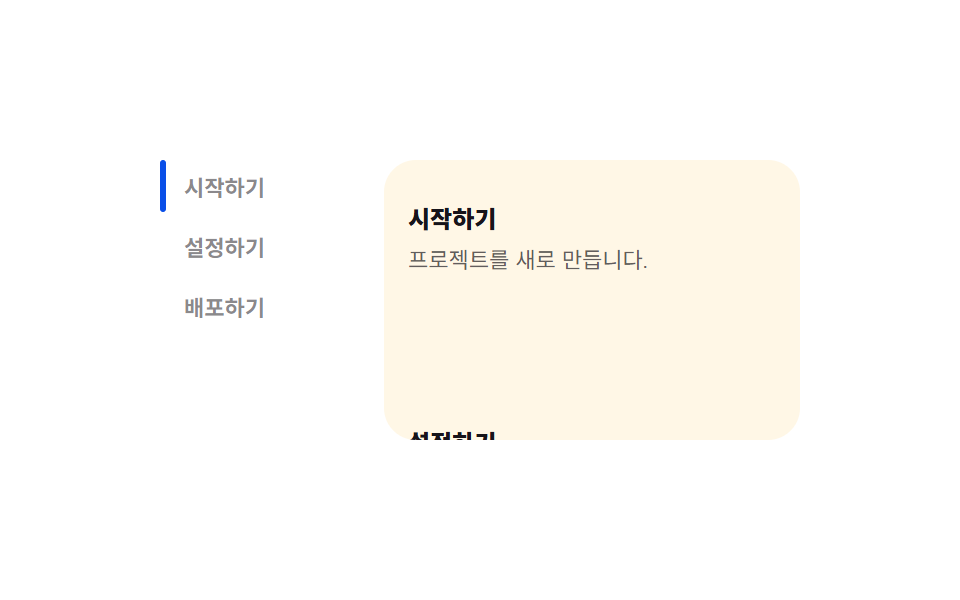
04スクロールスパイ目次 — 重なり比率の値を比較して活性項目を変える目次
ページをスクロールした状態になると、各見出しがビューポートと重なる比率の値を求め直し、最も大きい値を持つ見出しを活性にし、目次の強調表示の位置もその項目の位置の値まで移動します。
使いどころ長い文書のサイド目次、技術ドキュメントページ
IntersectionObserverintersectionRatio--i
<main class="stage">
<div class="ss is-demo" id="ss">
  <nav class="ss__toc" aria-label="目次">
    <div class="ss__marker" id="ssMarker" style="--i: 0" aria-hidden="true"></div>
    <button class="ss__link" data-j="0" type="button">はじめる</button>
    <button class="ss__link" data-j="1" type="button">設定する</button>
    <button class="ss__link" data-j="2" type="button">デプロイする</button>
  </nav>
  <div class="ss__pane" id="ssPane">
    <section class="ss__section" data-h="0"><h3>はじめる</h3><p>新しいプロジェクトを作成します。</p></section>
    <section class="ss__section" data-h="1"><h3>設定する</h3><p>環境変数を入力します。</p></section>
    <section class="ss__section" data-h="2"><h3>デプロイする</h3><p>成果物をアップロードします。</p></section>
  </div>
</div>
</main>
@use "../../../../site/static/demo-tokens" as *;
// 스크롤 스파이 목차 — 마커는 --i(겹침 비율을 비교해 고른 활성 항목 값)로만 이동한다.
// 스크롤 자체는 브라우저 네이티브 overflow-y, JS 는 IntersectionObserver 결과만 비교한다.
$duration: $dur-base;
$easing: $ease-spring;
$color: $subject-blue-deep;
$row-h: 26px;
$row-step: 32px;
@include stage($stage-paper);
.ss {
display: flex;
gap: $sp-5;
width: min(100%, 320px);
}
.ss__toc {
position: relative;
flex: 0 0 auto;
display: flex;
flex-direction: column;
gap: $sp-1;
width: 92px;
}
.ss__marker {
position: absolute;
left: 0;
top: 0;
width: 3px;
height: $row-h;
border-radius: $r-xs;
background: $color;
transform: translateY(calc(var(--i, 0) * #{$row-step}));
transition: transform $duration $easing;
}
.ss__link {
height: $row-h;
box-sizing: border-box;
padding-left: $sp-3;
border: 0;
background: transparent;
text-align: left;
font-family: inherit;
font-weight: 600;
font-size: 11px;
color: rgba(23, 20, 26, .5);
cursor: pointer;
}
.ss__link[aria-current="true"] { color: $color; font-weight: 800; }
.ss__pane {
flex: 1 1 auto;
height: $row-step * 3 + 20px;
overflow-y: auto;
scroll-behavior: auto;
border-radius: $r-card;
background: $subject-cream;
padding: $sp-3;
}
.ss__section {
min-height: $row-step * 3;
padding: $sp-2 0;
}
.ss__section h3 {
margin: 0 0 $sp-1;
font-size: 12px;
font-weight: 800;
color: $subject-ink;
}
.ss__section p {
margin: 0;
font-size: 11px;
color: rgba(23, 20, 26, .68);
}
@media (max-width: 340px) {
.ss { gap: $sp-3; }
.ss__toc { width: 76px; }
}
@media (prefers-reduced-motion: reduce) {
.ss__marker { transition: none !important; }
.ss__pane { scroll-behavior: auto !important; }
}html, body {
margin: 0;
overflow: hidden;
}
.stage {
box-sizing: border-box;
min-height: 100vh;
display: grid;
place-items: center;
margin: 0;
background: #ffffff;
font-family: -apple-system, "Segoe UI", "Noto Sans KR", sans-serif;
padding: clamp(8px, 4vw, 24px);
}
.ss {
display: flex;
gap: 20px;
width: min(100%, 320px);
}
.ss__toc {
position: relative;
flex: 0 0 auto;
display: flex;
flex-direction: column;
gap: 4px;
width: 92px;
}
.ss__marker {
position: absolute;
left: 0;
top: 0;
width: 3px;
height: 26px;
border-radius: 4px;
background: #0a4fe8;
transform: translateY(calc(var(--i, 0) * 32px));
transition: transform 300ms cubic-bezier(0.2, 0.8, 0.2, 1);
}
.ss__link {
height: 26px;
box-sizing: border-box;
padding-left: 12px;
border: 0;
background: transparent;
text-align: left;
font-family: inherit;
font-weight: 600;
font-size: 11px;
color: rgba(23, 20, 26, 0.5);
cursor: pointer;
}
.ss__link[aria-current=true] {
color: #0a4fe8;
font-weight: 800;
}
.ss__pane {
flex: 1 1 auto;
height: 116px;
overflow-y: auto;
scroll-behavior: auto;
border-radius: 16px;
background: #fff7e6;
padding: 12px;
}
.ss__section {
min-height: 96px;
padding: 8px 0;
}
.ss__section h3 {
margin: 0 0 4px;
font-size: 12px;
font-weight: 800;
color: #17141a;
}
.ss__section p {
margin: 0;
font-size: 11px;
color: rgba(23, 20, 26, 0.68);
}
@media (max-width: 340px) {
.ss {
gap: 12px;
}
.ss__toc {
width: 76px;
}
}
@media (prefers-reduced-motion: reduce) {
.ss__marker {
transition: none !important;
}
.ss__pane {
scroll-behavior: auto !important;
}
}(function () {
var root = document.getElementById('ss');
var pane = document.getElementById('ssPane');
var marker = document.getElementById('ssMarker');
var links = Array.prototype.slice.call(document.querySelectorAll('.ss__link'));
var sections = Array.prototype.slice.call(document.querySelectorAll('.ss__section'));
var ratios = new Array(sections.length).fill(0);
var active = 0;
var autoplay = null;
// 계산 겹: 모든 제목의 겹침 비율(intersectionRatio) 값을 매 프레임 비교해 가장 큰 값을 가진
// 항목을 활성으로 고른다 — 고정 스크롤 위치가 아니라 값의 비교로 활성 항목이 정해진다.
function activate(i) {
if (i === active) { return; }
active = i;
marker.style.setProperty('--i', String(active));
links.forEach(function (l, k) { l.setAttribute('aria-current', k === active ? 'true' : 'false'); });
}
var io = new IntersectionObserver(function (entries) {
entries.forEach(function (entry) {
var i = Number(entry.target.getAttribute('data-h'));
ratios[i] = entry.intersectionRatio;
});
var best = 0;
for (var k = 1; k < ratios.length; k++) { if (ratios[k] > ratios[best]) { best = k; } }
if (ratios[best] > 0) { activate(best); }
}, { root: pane, threshold: [0, .25, .5, .75, 1] });
sections.forEach(function (s) { io.observe(s); });
links.forEach(function (l) {
l.addEventListener('click', function () {
root.classList.remove('is-demo');
stopAutoplay();
var i = Number(l.getAttribute('data-j'));
sections[i].scrollIntoView({ block: 'start', behavior: 'auto' });
});
});
function stopAutoplay() {
if (autoplay) { clearInterval(autoplay); autoplay = null; }
}
var reduce = window.matchMedia('(prefers-reduced-motion: reduce)').matches;
if (!reduce) {
var targets = [0, sections[1].offsetTop, sections[2].offsetTop, 0];
var step = 0;
autoplay = setInterval(function () {
pane.scrollTop = targets[step % targets.length];
step += 1;
}, 480);
}
})();import { useEffect, useRef, useState } from "react";
import type { CSSProperties } from "react";
import styles from "./ScrollSpyToc.module.scss";
// 스크롤 스파이 목차 — 모든 제목의 겹침 비율(intersectionRatio) 값을 매 프레임 비교해 가장 큰 값을 가진
// 항목을 활성으로 고른다. 계산 겹: 고정 스크롤 위치가 아니라 값의 비교로 활성 항목이 정해진다.
const SECTIONS = [
{ title: "시작하기", body: "프로젝트를 새로 만듭니다." },
{ title: "설정하기", body: "환경 값을 채웁니다." },
{ title: "배포하기", body: "결과물을 올립니다." },
];
export default function ScrollSpyToc() {
const rootRef = useRef<HTMLDivElement>(null);
const paneRef = useRef<HTMLDivElement>(null);
const markerRef = useRef<HTMLDivElement>(null);
const sectionRefs = useRef<(HTMLElement | null)[]>([]);
const [active, setActiveState] = useState(0);
const activeRef = useRef(0);
const autoplayRef = useRef<number | null>(null);
function activate(i: number) {
if (i === activeRef.current) return;
activeRef.current = i;
setActiveState(i);
markerRef.current?.style.setProperty("--i", String(i));
}
function stopAutoplay() {
if (autoplayRef.current) {
window.clearInterval(autoplayRef.current);
autoplayRef.current = null;
}
}
useEffect(() => {
const pane = paneRef.current;
if (!pane) return;
const ratios = new Array(SECTIONS.length).fill(0);
const io = new IntersectionObserver((entries) => {
entries.forEach((entry) => {
const i = Number((entry.target as HTMLElement).getAttribute("data-h"));
ratios[i] = entry.intersectionRatio;
});
let best = 0;
for (let k = 1; k < ratios.length; k++) { if (ratios[k] > ratios[best]) best = k; }
if (ratios[best] > 0) activate(best);
}, { root: pane, threshold: [0, .25, .5, .75, 1] });
(sectionRefs.current ?? []).forEach((s) => { if (s) io.observe(s); });
const reduce = window.matchMedia("(prefers-reduced-motion: reduce)").matches;
if (!reduce) {
const secs = sectionRefs.current ?? [];
const targets = [0, secs[1]?.offsetTop || 0, secs[2]?.offsetTop || 0, 0];
let step = 0;
autoplayRef.current = window.setInterval(() => {
pane.scrollTop = targets[step % targets.length];
step += 1;
}, 480);
}
return () => { io.disconnect(); stopAutoplay(); };
// eslint-disable-next-line react-hooks/exhaustive-deps
}, []);
return (
<main className={styles.stage}>
<div ref={rootRef} className={`${styles.ss} ${styles["is-demo"]}`}>
<nav className={styles.ss__toc} aria-label="목차">
<div ref={markerRef} className={styles.ss__marker} style={{ "--i": 0 } as CSSProperties} aria-hidden="true" />
{SECTIONS.map((s, i) => (
<button
key={s.title}
className={styles.ss__link}
type="button"
aria-current={i === active}
onClick={() => {
rootRef.current?.classList.remove(styles["is-demo"]);
stopAutoplay();
(sectionRefs.current ?? [])[i]?.scrollIntoView({ block: "start", behavior: "auto" });
}}
>
{s.title}
</button>
))}
</nav>
<div ref={paneRef} className={styles.ss__pane}>
{SECTIONS.map((s, i) => (
<section
key={s.title}
ref={(el: HTMLElement | null) => { if (sectionRefs.current) sectionRefs.current[i] = el; }}
className={styles.ss__section}
data-h={i}
>
<h3>{s.title}</h3>
<p>{s.body}</p>
</section>
))}
</div>
</div>
</main>
);
}04 スクロールスパイ目次 — 重なり比率の値を比較して活性項目を変える目次 — 計測 累積面積 2.205% · 動いたフレーム 10/23GODRICH オリジナル · SCSS と React は zip に同梱 · マイクロインタラクション UIパターン9選 — トーストからスクロールスパイまで
このデモが属する記事
 マイクロインタラクション UIパターン9選 — トーストからスクロールスパイまでマイクロインタラクションは、9つのうち1つは通知が積まれた順番の値から消える時点を求め直し後ろの通知の位置を詰め、1つはスクロールした位置で各見出しの重なり比率の値を比べて活性項目を変え、もう1つは入力の値が変わるたびに待機時間の値を最初か この記事のデモをすべて見る