06ナビゲーションのカーソルエフェクト — 滑るピル
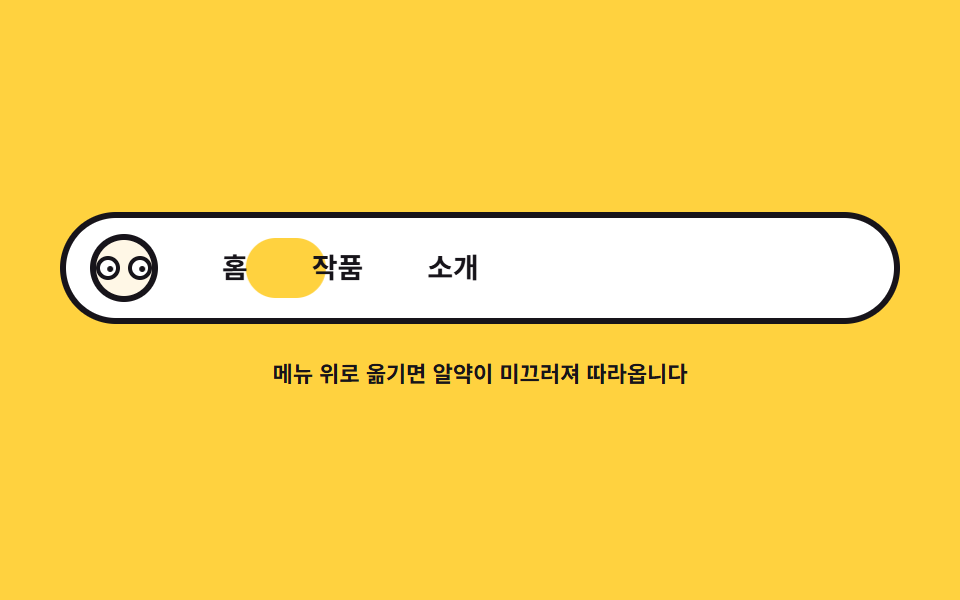
メニュー項目の下のピル・ハイライトが getBoundingClientRect で測った項目位置へ滑り、ロゴの瞳はカーソル x を追います。
使いどころサイトヘッダーのナビゲーション
pointerovergetBoundingClientRecttranslate3d
<main class="stage">
<div class="nv is-demo" id="nv">
  <nav class="nv__bar" aria-label="デモメニュー">
    <span class="nv__logo" aria-hidden="true">
      <span class="nv__eye"><span class="nv__pupil"></span></span>
      <span class="nv__eye"><span class="nv__pupil"></span></span>
    </span>
    <span class="nv__items" id="nvItems">
      <span class="nv__pill" id="nvPill" aria-hidden="true"></span>
      <button class="nv__item" type="button">ホーム</button>
      <button class="nv__item" type="button">作品</button>
      <button class="nv__item" type="button">紹介</button>
    </span>
  </nav>
  <p class="nv__hint">メニューに乗せるとピルが滑って追ってきます</p>
</div>
</main>
@use "../../../../site/static/demo-tokens" as *;
// 네비게이션 커서 이펙트 — 알약 하이라이트가 getBoundingClientRect 로 잰 항목 자리로
// lerp(0.16)로 미끄러져 옮겨 가고, 로고 눈동자는 커서 x 를 따라간다.
// 격자 미리보기(.is-demo)는 알약이 세 항목을 차례로 지나가는 루프를 @keyframes 로 돌린다.
// 루프의 자리·폭은 JS 가 로드 시 실측해 wrap 에 넣은 CSS 변수(--p0x/--p0w …)를 읽는다 (079-06 수리).
$duration: $dur-loop;
$easing: $ease-spring;
$color: $subject-ink;
@include stage($stage-yellow);
.nv { display: grid; justify-items: center; gap: $sp-4; width: 100%; }
.nv__bar {
display: flex; align-items: center; gap: $sp-5;
box-sizing: border-box;
width: min(100%, 420px);
padding: $sp-2 $sp-3;
background: $stage-paper;
border: 3px solid $color; border-radius: $r-pill;
}
// 로고 — 눈 두 개가 커서를 본다
.nv__logo {
display: flex; gap: $sp-1;
width: 34px; height: 34px; box-sizing: border-box;
align-items: center; justify-content: center;
background: $subject-cream; border: 3px solid $color; border-radius: 50%;
}
.nv__eye {
position: relative; overflow: hidden;
width: 8px; height: 8px;
background: $stage-paper; border: 2px solid $color; border-radius: 50%;
}
.nv__pupil {
position: absolute; left: 50%; top: 50%;
width: 3px; height: 3px; margin: -1.5px 0 0 -1.5px;
background: $color; border-radius: 50%;
}
.nv__items { position: relative; display: flex; gap: $sp-2; flex: 1; }
// 알약 — 항목 아래 깔리는 하이라이트. 자리와 폭은 JS 가 잡는다.
// 노랑으로 깔아 잉크 글자가 알약 위에서도 그대로 읽힌다 (파랑이면 4.03:1 로 미달)
.nv__pill {
position: absolute; left: 0; top: 50%;
height: 30px; margin-top: -15px;
background: $stage-yellow;
border-radius: $r-pill;
will-change: transform, width;
}
.nv__item {
position: relative; z-index: 1;
appearance: none; border: 0;
padding: $sp-1 $sp-3;
background: transparent;
color: $color;
font-family: inherit; font-weight: 700; font-size: clamp(12px, 3vw, 14px); line-height: 1.4;
border-radius: $r-pill;
cursor: pointer;
}
// 키보드 경로 — 알약이 곧 포커스 링이 된다
.nv__item:focus-visible { outline: 3px solid $subject-blue; outline-offset: 2px; }
.nv__hint { margin: 0; color: $color; font-weight: 700; font-size: clamp(9px, 2.4vw, 11px); }
// ── 미리보기 루프: 알약이 홈 → 작품 → 소개 → 홈으로 미끄러진다
.nv.is-demo .nv__pill { animation: nvSlide $duration $easing infinite; }
.nv.is-demo .nv__pupil { animation: nvPeek $duration $ease-out infinite; }
// 키프레임의 자리·폭은 index.html 이 로드 시 실측해 wrap 에 넣은 --p0x/--p0w … 변수를 쓴다
// (하드코딩 px 는 항목 폭이 글자·폰트·로케일에 따라 달라지면 알약이 글자를 넘어선다 — 079-06 수리)
@keyframes nvSlide {
0%, 10% { transform: translate3d(var(--p0x, 2px), 0, 0); width: var(--p0w, 44px); }
30%, 40% { transform: translate3d(var(--p1x, 70px), 0, 0); width: var(--p1w, 56px); }
60%, 70% { transform: translate3d(var(--p2x, 150px), 0, 0); width: var(--p2w, 56px); }
90%, 100% { transform: translate3d(var(--p0x, 2px), 0, 0); width: var(--p0w, 44px); }
}
@keyframes nvPeek {
0%, 10% { transform: translate3d(-2.5px, 0, 0); }
30%, 70% { transform: translate3d(2.5px, 0, 0); }
90%, 100% { transform: translate3d(-2.5px, 0, 0); }
}
@media (max-width: 340px) {
.nv { gap: $sp-2; }
.nv__bar { gap: $sp-3; padding: $sp-2; }
.nv__logo { width: 28px; height: 28px; }
.nv__item { padding: $sp-1 $sp-2; }
.nv.is-demo .nv__pill { animation-name: nvSlideNarrow; }
}
@keyframes nvSlideNarrow {
0%, 10% { transform: translate3d(var(--p0x, 2px), 0, 0); width: var(--p0w, 34px); }
30%, 40% { transform: translate3d(var(--p1x, 52px), 0, 0); width: var(--p1w, 44px); }
60%, 70% { transform: translate3d(var(--p2x, 112px), 0, 0); width: var(--p2w, 44px); }
90%, 100% { transform: translate3d(var(--p0x, 2px), 0, 0); width: var(--p0w, 34px); }
}
@media (prefers-reduced-motion: reduce) {
.nv.is-demo .nv__pill,
.nv.is-demo .nv__pupil { animation: none !important; }
// reduce 에서는 알약이 첫 항목에 붙어 있다 — 자리도 실측 변수를 쓴다 (079-06 수리)
.nv.is-demo .nv__pill { transform: translate3d(var(--p0x, 2px), 0, 0) !important; width: var(--p0w, 44px) !important; }
}html, body {
margin: 0;
overflow: hidden;
}
.stage {
box-sizing: border-box;
min-height: 100vh;
display: grid;
place-items: center;
margin: 0;
background: #ffd23f;
font-family: -apple-system, "Segoe UI", "Noto Sans KR", sans-serif;
padding: clamp(8px, 4vw, 24px);
}
.nv {
display: grid;
justify-items: center;
gap: 16px;
width: 100%;
}
.nv__bar {
display: flex;
align-items: center;
gap: 20px;
box-sizing: border-box;
width: min(100%, 420px);
padding: 8px 12px;
background: #ffffff;
border: 3px solid #17141a;
border-radius: 999px;
}
.nv__logo {
display: flex;
gap: 4px;
width: 34px;
height: 34px;
box-sizing: border-box;
align-items: center;
justify-content: center;
background: #fff7e6;
border: 3px solid #17141a;
border-radius: 50%;
}
.nv__eye {
position: relative;
overflow: hidden;
width: 8px;
height: 8px;
background: #ffffff;
border: 2px solid #17141a;
border-radius: 50%;
}
.nv__pupil {
position: absolute;
left: 50%;
top: 50%;
width: 3px;
height: 3px;
margin: -1.5px 0 0 -1.5px;
background: #17141a;
border-radius: 50%;
}
.nv__items {
position: relative;
display: flex;
gap: 8px;
flex: 1;
}
.nv__pill {
position: absolute;
left: 0;
top: 50%;
height: 30px;
margin-top: -15px;
background: #ffd23f;
border-radius: 999px;
will-change: transform, width;
}
.nv__item {
position: relative;
z-index: 1;
appearance: none;
border: 0;
padding: 4px 12px;
background: transparent;
color: #17141a;
font-family: inherit;
font-weight: 700;
font-size: clamp(12px, 3vw, 14px);
line-height: 1.4;
border-radius: 999px;
cursor: pointer;
}
.nv__item:focus-visible {
outline: 3px solid #2f6df6;
outline-offset: 2px;
}
.nv__hint {
margin: 0;
color: #17141a;
font-weight: 700;
font-size: clamp(9px, 2.4vw, 11px);
}
.nv.is-demo .nv__pill {
animation: nvSlide 2s cubic-bezier(0.2, 0.8, 0.2, 1) infinite;
}
.nv.is-demo .nv__pupil {
animation: nvPeek 2s ease-out infinite;
}
@keyframes nvSlide {
0%, 10% {
transform: translate3d(var(--p0x, 2px), 0, 0);
width: var(--p0w, 44px);
}
30%, 40% {
transform: translate3d(var(--p1x, 70px), 0, 0);
width: var(--p1w, 56px);
}
60%, 70% {
transform: translate3d(var(--p2x, 150px), 0, 0);
width: var(--p2w, 56px);
}
90%, 100% {
transform: translate3d(var(--p0x, 2px), 0, 0);
width: var(--p0w, 44px);
}
}
@keyframes nvPeek {
0%, 10% {
transform: translate3d(-2.5px, 0, 0);
}
30%, 70% {
transform: translate3d(2.5px, 0, 0);
}
90%, 100% {
transform: translate3d(-2.5px, 0, 0);
}
}
@media (max-width: 340px) {
.nv {
gap: 8px;
}
.nv__bar {
gap: 12px;
padding: 8px;
}
.nv__logo {
width: 28px;
height: 28px;
}
.nv__item {
padding: 4px 8px;
}
.nv.is-demo .nv__pill {
animation-name: nvSlideNarrow;
}
}
@keyframes nvSlideNarrow {
0%, 10% {
transform: translate3d(var(--p0x, 2px), 0, 0);
width: var(--p0w, 34px);
}
30%, 40% {
transform: translate3d(var(--p1x, 52px), 0, 0);
width: var(--p1w, 44px);
}
60%, 70% {
transform: translate3d(var(--p2x, 112px), 0, 0);
width: var(--p2w, 44px);
}
90%, 100% {
transform: translate3d(var(--p0x, 2px), 0, 0);
width: var(--p0w, 34px);
}
}
@media (prefers-reduced-motion: reduce) {
.nv.is-demo .nv__pill,
.nv.is-demo .nv__pupil {
animation: none !important;
}
.nv.is-demo .nv__pill {
transform: translate3d(var(--p0x, 2px), 0, 0) !important;
width: var(--p0w, 44px) !important;
}
}var root = document.getElementById('nv');
var items = Array.prototype.slice.call(document.querySelectorAll('.nv__item'));
var pill = document.getElementById('nvPill');
var pupils = Array.prototype.slice.call(document.querySelectorAll('.nv__pupil'));
var wrap = document.getElementById('nvItems');
var reduce = window.matchMedia('(prefers-reduced-motion: reduce)').matches;
function lerp(a, b, k) { return a + (b - a) * k; }
// 알약이 가야 할 자리 — 항목의 왼쪽 끝과 폭. getBoundingClientRect 로 잰다
var slot = { x: 0, w: 0 };
var now = { x: 0, w: 0 };
var px = 0.5;
var pxNow = 0.5;
function measure(el) {
var r = el.getBoundingClientRect();
var w = wrap.getBoundingClientRect();
return { x: r.left - w.left, w: r.width };
}
// 미리보기 루프의 알약 자리 — 항목 폭은 글자·폰트·로케일마다 달라지므로 로드 시 실측해
// wrap 에 CSS 변수로 박는다. @keyframes nvSlide 는 이 변수를 읽는다
// (하드코딩 px 는 폰트가 바뀌는 순간 알약이 글자를 넘어선다 — 079-06 수리)
function injectSlots() {
items.forEach(function (item, i) {
var s = measure(item);
wrap.style.setProperty('--p' + i + 'x', s.x.toFixed(1) + 'px');
wrap.style.setProperty('--p' + i + 'w', s.w.toFixed(1) + 'px');
});
}
function draw() {
pill.style.transform = 'translate3d(' + now.x.toFixed(1) + 'px,0,0)';
pill.style.width = now.w.toFixed(1) + 'px';
var d = pxNow - 0.5;
for (var i = 0; i < pupils.length; i++) {
pupils[i].style.transform = 'translate3d(' + (d * 5).toFixed(1) + 'px,0,0)';
}
}
function tick() {
now.x = lerp(now.x, slot.x, 0.16);
now.w = lerp(now.w, slot.w, 0.16);
pxNow = lerp(pxNow, px, 0.1);
draw();
requestAnimationFrame(tick);
}
items.forEach(function (item, i) {
item.addEventListener('pointerenter', function (e) {
root.classList.remove('is-demo');
slot = measure(item);
var w = wrap.getBoundingClientRect();
px = Math.min(1, Math.max(0, (e.clientX - w.left) / w.width));
});
item.addEventListener('focus', function () {
root.classList.remove('is-demo');
slot = measure(item);
});
});
// 무대 こ 어디서든 로고 눈동자는 커서 x 를 본다
root.addEventListener('pointermove', function (e) {
var w = wrap.getBoundingClientRect();
px = Math.min(1, Math.max(0, (e.clientX - w.left) / w.width));
});
function init() {
slot = measure(items[0]);
now = { x: slot.x, w: slot.w };
draw();
}
injectSlots();
init();
// 폰트가 늦게 들어오거나 창이 바뀌면 슬롯이 달라진다 — 재주입 (079-06 수리)
if ('ResizeObserver' in window) new ResizeObserver(injectSlots).observe(wrap);
document.fonts && document.fonts.ready.then(injectSlots);
if (reduce) {
// reduce 에서는 미끄러짐 없이 즉시 항목 자리에 붙는다
items.forEach(function (item) {
item.addEventListener('pointerenter', function () { slot = measure(item); now = { x: slot.x, w: slot.w }; draw(); });
item.addEventListener('focus', function () { slot = measure(item); now = { x: slot.x, w: slot.w }; draw(); });
});
} else {
requestAnimationFrame(tick);
}// NavIndicator — vanilla 판(run/079/demo/06-follow-nav-indicator/index.html) 의 React 포트.
// 알약 하이라이트가 getBoundingClientRect 로 잰 항목 자리로 lerp(0.16)로 미끄러져 옮겨 가고,
// 로고 눈동자는 커서 x 를 따라간다. 계수·자리 재는 법은 vanilla 와 같다.
// 미리보기 루프의 키프레임 자리는 로드 시 실측해 CSS 변수로 넣는다(vanilla 079-06 수리와 동일).
import { useEffect, useRef, useState } from "react";
import type { CSSProperties } from "react";
import styles from "./NavIndicator.module.scss";
export type NavIndicatorProps = {
duration?: number;
easing?: string;
color?: string;
};
type Vars = CSSProperties & { "--duration"?: string; "--easing"?: string; "--color"?: string };
// useRef 는 T | null 을 돌려준다. 처음부터 값이 있고 절대 비지 않는 상자는 이렇게 좁혀 쓴다
type Box<T> = { current: T };
// 전역 DOM 타입에 기대지 않는다 — 포인터 이벤트에서 실제로 읽는 것만 적는다
type PtrEvt = { clientX: number };
const NAV_LABEL = "데모 메뉴";
const ITEMS = ["홈", "작품", "소개"];
const HINT = "메뉴 위로 옮기면 알약이 미끄러져 따라옵니다";
// lerp: 매 프레임 남은 거리의 일부만 더 가는 선형 보간
function lerp(a: number, b: number, k: number): number {
return a + (b - a) * k;
}
export default function NavIndicator({
duration = 2000,
easing = "cubic-bezier(.2, .8, .2, 1)",
color = "#17141a",
}: NavIndicatorProps) {
const rootRef = useRef<HTMLDivElement | null>(null);
const wrapRef = useRef<HTMLSpanElement | null>(null) as Box<HTMLSpanElement>;
const pillRef = useRef<HTMLSpanElement | null>(null);
const itemRef = useRef<(HTMLButtonElement | null)[]>(new Array(ITEMS.length).fill(null)) as Box<(HTMLButtonElement | null)[]>;
const pupilRef = useRef<(HTMLSpanElement | null)[]>(new Array(2).fill(null)) as Box<(HTMLSpanElement | null)[]>;
const [demo, setDemo] = useState(true);
const vars: Vars = { "--duration": `${duration}ms`, "--easing": easing, "--color": color };
function setItem(index: number) {
return (el: HTMLButtonElement | null): void => {
itemRef.current[index] = el;
};
}
function setPupil(index: number) {
return (el: HTMLSpanElement | null): void => {
pupilRef.current[index] = el;
};
}
useEffect(() => {
const root = rootRef.current;
const wrap = wrapRef.current;
if (!root || !wrap) return;
const reduce = window.matchMedia("(prefers-reduced-motion: reduce)").matches;
// 알약이 가야 할 자리 — 항목의 왼쪽 끝과 폭. getBoundingClientRect 로 잰다
let slot = { x: 0, w: 0 };
let now = { x: 0, w: 0 };
let px = 0.5;
let pxNow = 0.5;
function measure(el: HTMLElement): { x: number; w: number } {
const r = el.getBoundingClientRect();
const w = wrap.getBoundingClientRect();
return { x: r.left - w.left, w: r.width };
}
// 미리보기 루프의 알약 자리 — 항목 폭은 글자·폰트·로케일마다 달라지므로 로드 시 실측해
// wrap 에 CSS 변수로 박는다. @keyframes nvSlide 는 이 변수를 읽는다
// (하드코딩 px 는 폰트가 바뀌는 순간 알약이 글자를 넘어선다 — 079-06 수리)
function injectSlots(): void {
itemRef.current.forEach((item, i) => {
if (!item) return;
const s = measure(item);
wrap.style.setProperty("--p" + i + "x", s.x.toFixed(1) + "px");
wrap.style.setProperty("--p" + i + "w", s.w.toFixed(1) + "px");
});
}
function draw(): void {
const pill = pillRef.current;
if (pill) {
pill.style.transform = "translate3d(" + now.x.toFixed(1) + "px,0,0)";
pill.style.width = now.w.toFixed(1) + "px";
}
const d = pxNow - 0.5;
for (let i = 0; i < pupilRef.current.length; i++) {
const pupil = pupilRef.current[i];
if (pupil) pupil.style.transform = "translate3d(" + (d * 5).toFixed(1) + "px,0,0)";
}
}
function tick(): void {
now.x = lerp(now.x, slot.x, 0.16);
now.w = lerp(now.w, slot.w, 0.16);
pxNow = lerp(pxNow, px, 0.1);
draw();
raf = requestAnimationFrame(tick);
}
const offs: (() => void)[] = [];
itemRef.current.forEach((item) => {
if (!item) return;
const onEnter = (event: PtrEvt): void => {
setDemo(false);
slot = measure(item);
const w = wrap.getBoundingClientRect();
px = Math.min(1, Math.max(0, (event.clientX - w.left) / w.width));
if (reduce) {
// reduce 에서는 미끄러짐 없이 즉시 항목 자리에 붙는다
now = { x: slot.x, w: slot.w };
draw();
}
};
const onFocus = (): void => {
setDemo(false);
slot = measure(item);
if (reduce) {
now = { x: slot.x, w: slot.w };
draw();
}
};
item.addEventListener("pointerenter", onEnter);
item.addEventListener("focus", onFocus);
offs.push(() => {
item.removeEventListener("pointerenter", onEnter);
item.removeEventListener("focus", onFocus);
});
});
// 무대 안 어디서든 로고 눈동자는 커서 x 를 본다
function onMove(event: PtrEvt): void {
const w = wrap.getBoundingClientRect();
px = Math.min(1, Math.max(0, (event.clientX - w.left) / w.width));
}
root.addEventListener("pointermove", onMove);
let raf = 0;
const first = itemRef.current[0];
if (first) slot = measure(first);
now = { x: slot.x, w: slot.w };
injectSlots();
draw();
// 폰트가 늦게 들어오거나 창이 바뀌면 슬롯이 달라진다 — 재주입 (079-06 수리)
const ro: ResizeObserver | null = "ResizeObserver" in window ? new ResizeObserver(injectSlots) : null;
ro?.observe(wrap);
const fonts = (document as { fonts?: { ready: Promise<unknown> } }).fonts;
const fontsDone: Promise<unknown> | null = fonts ? fonts.ready.then(() => injectSlots()) : null;
if (!reduce) raf = requestAnimationFrame(tick);
return () => {
offs.forEach((off) => off());
root.removeEventListener("pointermove", onMove);
cancelAnimationFrame(raf);
ro?.disconnect();
void fontsDone;
};
}, []);
return (
<main className={styles.stage}>
<div className={styles.root + (demo ? " " + styles.isDemo : "")} style={vars} ref={rootRef}>
<nav className={styles.bar} aria-label={NAV_LABEL}>
<span className={styles.logo} aria-hidden="true">
<span className={styles.eye}><span className={styles.pupil} ref={setPupil(0)}></span></span>
<span className={styles.eye}><span className={styles.pupil} ref={setPupil(1)}></span></span>
</span>
<span className={styles.items} ref={wrapRef}>
<span className={styles.pill} aria-hidden="true" ref={pillRef}></span>
{ITEMS.map((label, i) => (
<button className={styles.item} type="button" key={label} ref={setItem(i)}>{label}</button>
))}
</span>
</nav>
<p className={styles.hint}>{HINT}</p>
</div>
</main>
);
}06 ナビゲーションのカーソルエフェクト — 滑るピル — 計測 累積面積 3.0% · 動いたフレーム 16/23GODRICH オリジナル · SCSS と React は zip に同梱 · マウス 追従 エフェクト 9選 — マウスストーカーの作り方
このデモが属する記事
 マウス 追従 エフェクト 9選 — マウスストーカーの作り方マウス 追従 エフェクトとは、カーソルの座標を毎フレーム読んで要素を一拍遅れで追わせるインタラクションです。核は lerp 一行で、canvas 不要、transform だけなので軽く動きます。文字・光・背景・パーティクル・カードまで9種 この記事のデモをすべて見る