02色の帯が走り抜けて中身を入れ替える転換
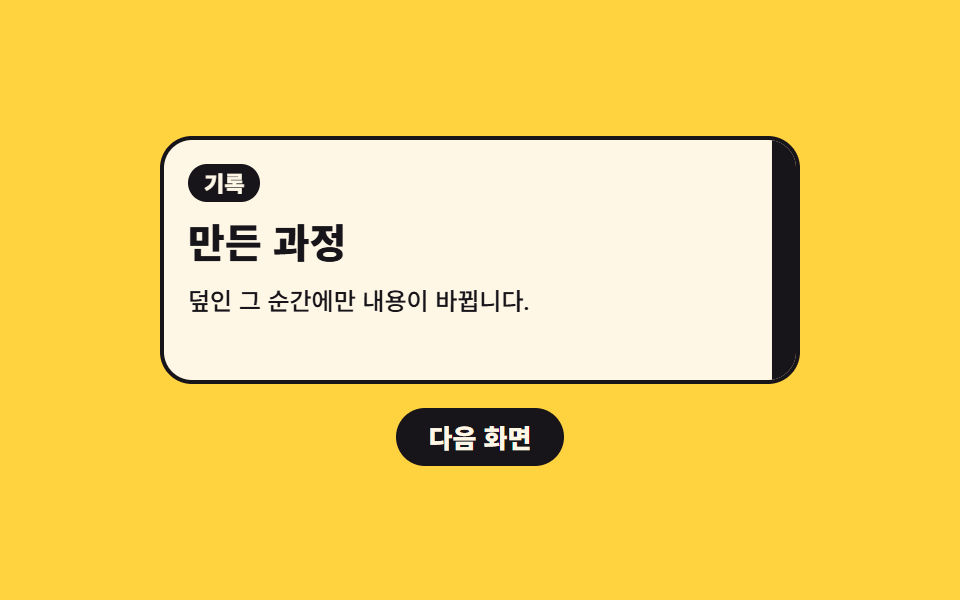
一方向へ押し出す色の帯が画面を完全に覆った瞬間だけ本文が steps(1, end) で入れ替わるので、切り替わる場面が半透明に重なりません。
使いどころ画面ごとが作品になるポートフォリオサイトのメニュー移動
translateXsteps(1, end)aria-busy
<main class="stage">
  <section class="ws is-demo" id="ws" aria-label="色帯の画面転換プレビュー">
    <div class="ws__screen">
      <div class="ws__pages" id="ws-pages" aria-busy="false">
        <article class="ws__page ws__page--a">
          <p class="ws__eyebrow">作品</p>
          <p class="ws__head">写真12点</p>
          <p class="ws__text">左から帯が入り、画面を覆います。</p>
        </article>
        <article class="ws__page ws__page--b">
          <p class="ws__eyebrow">記録</p>
          <p class="ws__head">制作の過程</p>
          <p class="ws__text">覆われた瞬間だけ中身が入れ替わります。</p>
        </article>
      </div>
      <span class="ws__band" id="ws-band" aria-hidden="true"></span>
    </div>
    <button class="ws__go" type="button" id="ws-go">次の画面</button>
  </section>
</main>
@use "../../../../site/static/demo-tokens" as *;
// 한 장짜리 색 띠가 좌→우 한 방향으로 훑고 지나가며 그 아래 내용을 갈아 끼운다
$duration: $dur-enter;
$easing: $ease-spring;
$color: $subject-ink;
@include stage($stage-yellow);
.ws {
box-sizing: border-box;
display: grid;
gap: $sp-3;
width: min(320px, 88vw);
color: $subject-ink;
}
.ws * { box-sizing: border-box; }
.ws__screen {
position: relative;
overflow: hidden;
border: 2px solid $subject-ink;
border-radius: $r-card;
background: $subject-cream;
}
// 두 장을 같은 칸에 겹쳐 둔다 — 자리가 고정이라 갈아 끼워도 아래가 밀리지 않는다
.ws__pages {
display: grid;
min-height: 120px;
padding: $sp-3;
}
.ws__page {
grid-area: 1 / 1;
display: grid;
gap: $sp-2;
align-content: start;
}
.ws__page--b { opacity: 0; }
// 정적(손으로 조작) 경로 — 클래스 하나로 두 장이 컷으로 바뀐다. 반투명으로 겹치는 구간이 없다
.ws__pages.is-b .ws__page--a { opacity: 0; }
.ws__pages.is-b .ws__page--b { opacity: 1; }
.ws__eyebrow {
justify-self: start;
margin: 0;
padding: $sp-1 $sp-2;
border-radius: $r-pill;
background: $color;
color: $subject-cream;
font-size: 11px;
font-weight: 800;
line-height: 1;
}
.ws__head {
margin: 0;
font-size: 20px;
font-weight: 800;
line-height: 1.2;
}
.ws__text {
margin: 0;
font-size: 12px;
font-weight: 500;
line-height: 1.5;
}
// ── 색 띠 ──
// 화면 한 장 크기 그대로 두고 translateX 로만 민다.
// clip-path 로 깎지 않는 이유: steps 타이밍 안에서 clip-path 는 보간되지 않아 위프가 컷으로 죽는다
.ws__band {
position: absolute;
inset: 0;
background: $color;
transform: translateX(-101%);
}
// 실제 클릭 경로 — 한 번만 훑고 지나간다. 한가운데(덮은 순간)에 JS 가 본문을 갈아 끼운다
.ws__band.is-run {
animation-name: ws-once;
animation-duration: $duration * 1.2;
animation-timing-function: $easing;
animation-iteration-count: 1;
animation-fill-mode: both;
}
@keyframes ws-once {
0% { transform: translateX(-101%); }
45%, 55% { transform: translateX(0); }
100% { transform: translateX(101%); }
}
.ws__go {
justify-self: center;
margin: 0;
padding: $sp-2 $sp-4;
border: 0;
border-radius: $r-pill;
background: $color;
color: $subject-cream;
font-family: inherit;
font-size: 13px;
font-weight: 800;
line-height: 1;
cursor: pointer;
}
.ws__go:focus-visible { outline: 2px solid $subject-ink; outline-offset: 2px; }
// ── 격자 미리보기 전용 2초 루프 ──
// 한 방향 훑기를 두 번(A→B, B→A) 돌린다. 두 번째 훑기가 처음 상태로 돌려놓으므로
// 되돌아가는 장면이 따로 필요 없고, 교체는 언제나 띠 아래에서 일어난다
// 덮고 있는 구간은 짧게, 내용이 보이는 구간은 길게 잡는다.
// 빠져나가는 구간(8%)이 들어오는 구간(22%)보다 짧아서, 프레임당 변화가 가장 큰 장면은
// 언제나 "띠가 빠지며 새 내용이 드러나는 순간" 이 된다 — 대표 이미지가 거기서 잡힌다
@keyframes ws-sweep {
0% { transform: translateX(-101%); }
22%, 25% { transform: translateX(0); }
33% { transform: translateX(101%); animation-timing-function: steps(1, end); }
46% { transform: translateX(-101%); }
68%, 71% { transform: translateX(0); }
79%, 100% { transform: translateX(101%); }
}
// 교체는 띠가 완전히 덮은 구간(22~25% · 68~71%) 안에서 한 프레임에 컷
@keyframes ws-a {
0%, 22% { opacity: 1; }
23%, 68% { opacity: 0; }
69%, 100% { opacity: 1; }
}
@keyframes ws-b {
0%, 22% { opacity: 0; }
23%, 68% { opacity: 1; }
69%, 100% { opacity: 0; }
}
.ws.is-demo {
.ws__band {
animation-name: ws-sweep;
animation-duration: $dur-loop;
animation-timing-function: $easing;
animation-iteration-count: infinite;
}
.ws__page--a { animation-name: ws-a; }
.ws__page--b { animation-name: ws-b; }
.ws__page {
animation-duration: $dur-loop;
animation-timing-function: steps(1, end);
animation-iteration-count: infinite;
}
}
@media (max-width: 340px) {
.ws { gap: $sp-2; }
.ws__pages { min-height: 88px; padding: $sp-2; }
.ws__page { gap: $sp-1; }
.ws__eyebrow { font-size: 10px; }
.ws__head { font-size: 15px; }
.ws__text { font-size: 11px; }
.ws__go { padding: $sp-1 $sp-3; font-size: 12px; }
}
@media (prefers-reduced-motion: reduce) {
.ws.is-demo .ws__band,
.ws.is-demo .ws__page--a,
.ws.is-demo .ws__page--b,
.ws__band.is-run { animation: none !important; }
// 움직임만 끄고 "갈아 끼워진 뒤" 결과는 남긴다
.ws.is-demo .ws__band { transform: translateX(-101%) !important; }
.ws.is-demo .ws__page--a { opacity: 0 !important; }
.ws.is-demo .ws__page--b { opacity: 1 !important; }
}html, body {
margin: 0;
overflow: hidden;
}
.stage {
box-sizing: border-box;
min-height: 100vh;
display: grid;
place-items: center;
margin: 0;
background: #ffd23f;
font-family: -apple-system, "Segoe UI", "Noto Sans KR", sans-serif;
padding: clamp(8px, 4vw, 24px);
}
.ws {
box-sizing: border-box;
display: grid;
gap: 12px;
width: min(320px, 88vw);
color: #17141a;
}
.ws * {
box-sizing: border-box;
}
.ws__screen {
position: relative;
overflow: hidden;
border: 2px solid #17141a;
border-radius: 16px;
background: #fff7e6;
}
.ws__pages {
display: grid;
min-height: 120px;
padding: 12px;
}
.ws__page {
grid-area: 1/1;
display: grid;
gap: 8px;
align-content: start;
}
.ws__page--b {
opacity: 0;
}
.ws__pages.is-b .ws__page--a {
opacity: 0;
}
.ws__pages.is-b .ws__page--b {
opacity: 1;
}
.ws__eyebrow {
justify-self: start;
margin: 0;
padding: 4px 8px;
border-radius: 999px;
background: #17141a;
color: #fff7e6;
font-size: 11px;
font-weight: 800;
line-height: 1;
}
.ws__head {
margin: 0;
font-size: 20px;
font-weight: 800;
line-height: 1.2;
}
.ws__text {
margin: 0;
font-size: 12px;
font-weight: 500;
line-height: 1.5;
}
.ws__band {
position: absolute;
inset: 0;
background: #17141a;
transform: translateX(-101%);
}
.ws__band.is-run {
animation-name: ws-once;
animation-duration: 720ms;
animation-timing-function: cubic-bezier(0.2, 0.8, 0.2, 1);
animation-iteration-count: 1;
animation-fill-mode: both;
}
@keyframes ws-once {
0% {
transform: translateX(-101%);
}
45%, 55% {
transform: translateX(0);
}
100% {
transform: translateX(101%);
}
}
.ws__go {
justify-self: center;
margin: 0;
padding: 8px 16px;
border: 0;
border-radius: 999px;
background: #17141a;
color: #fff7e6;
font-family: inherit;
font-size: 13px;
font-weight: 800;
line-height: 1;
cursor: pointer;
}
.ws__go:focus-visible {
outline: 2px solid #17141a;
outline-offset: 2px;
}
@keyframes ws-sweep {
0% {
transform: translateX(-101%);
}
22%, 25% {
transform: translateX(0);
}
33% {
transform: translateX(101%);
animation-timing-function: steps(1, end);
}
46% {
transform: translateX(-101%);
}
68%, 71% {
transform: translateX(0);
}
79%, 100% {
transform: translateX(101%);
}
}
@keyframes ws-a {
0%, 22% {
opacity: 1;
}
23%, 68% {
opacity: 0;
}
69%, 100% {
opacity: 1;
}
}
@keyframes ws-b {
0%, 22% {
opacity: 0;
}
23%, 68% {
opacity: 1;
}
69%, 100% {
opacity: 0;
}
}
.ws.is-demo .ws__band {
animation-name: ws-sweep;
animation-duration: 2s;
animation-timing-function: cubic-bezier(0.2, 0.8, 0.2, 1);
animation-iteration-count: infinite;
}
.ws.is-demo .ws__page--a {
animation-name: ws-a;
}
.ws.is-demo .ws__page--b {
animation-name: ws-b;
}
.ws.is-demo .ws__page {
animation-duration: 2s;
animation-timing-function: steps(1, end);
animation-iteration-count: infinite;
}
@media (max-width: 340px) {
.ws {
gap: 8px;
}
.ws__pages {
min-height: 88px;
padding: 8px;
}
.ws__page {
gap: 4px;
}
.ws__eyebrow {
font-size: 10px;
}
.ws__head {
font-size: 15px;
}
.ws__text {
font-size: 11px;
}
.ws__go {
padding: 4px 12px;
font-size: 12px;
}
}
@media (prefers-reduced-motion: reduce) {
.ws.is-demo .ws__band,
.ws.is-demo .ws__page--a,
.ws.is-demo .ws__page--b,
.ws__band.is-run {
animation: none !important;
}
.ws.is-demo .ws__band {
transform: translateX(-101%) !important;
}
.ws.is-demo .ws__page--a {
opacity: 0 !important;
}
.ws.is-demo .ws__page--b {
opacity: 1 !important;
}
}// 띠가 화면을 완전히 덮은 순간(애니메이션 한가운데)에만 본문을 갈아 끼운다.
var ws = document.getElementById('ws');
var wsBand = document.getElementById('ws-band');
var wsPages = document.getElementById('ws-pages');
var wsGo = document.getElementById('ws-go');
var wsBusy = false;
function wsSweep() {
ws.classList.remove('is-demo');
if (wsBusy) return;
wsBusy = true;
wsPages.setAttribute('aria-busy', 'true');
wsBand.classList.remove('is-run');
void wsBand.offsetWidth;
wsBand.classList.add('is-run');
setTimeout(function () { wsPages.classList.toggle('is-b'); }, 360);
setTimeout(function () {
wsBand.classList.remove('is-run');
wsPages.setAttribute('aria-busy', 'false');
wsBusy = false;
}, 740);
}
wsGo.addEventListener('click', wsSweep);import { useEffect, useRef, useState } from "react";
import type { CSSProperties } from "react";
import styles from "./WipeSwapTransition.module.scss";
export type WipePage = { eyebrow: string; head: string; text: string };
export type WipeSwapTransitionProps = {
/** 갈아 끼울 두 화면. 띠가 완전히 덮은 순간에만 바뀐다 */
pages?: [WipePage, WipePage];
buttonLabel?: string;
groupLabel?: string;
/** 격자 미리보기용 2초 자동 루프. 사람이 손대면 꺼진다 */
demo?: boolean;
duration?: number;
easing?: string;
color?: string;
};
type Vars = CSSProperties & { "--duration"?: string; "--easing"?: string; "--color"?: string };
// ambient 가 얇아 useRef 가 T | null 을 돌려준다 — 필요한 꼴만 로컬 타입으로 단언
type Box<T> = { current: T };
const DEFAULT_PAGES: [WipePage, WipePage] = [
{ eyebrow: "Work", head: "Twelve photographs", text: "The band comes in from the left and covers the screen." },
{ eyebrow: "Notes", head: "How it was made", text: "The content swaps only while it is covered." },
];
export default function WipeSwapTransition({
pages = DEFAULT_PAGES,
buttonLabel = "Next screen",
groupLabel = "Wipe swap transition preview",
demo = true,
duration = 600,
easing = "cubic-bezier(.2,.8,.2,1)",
color = "#17141a",
}: WipeSwapTransitionProps) {
const [live, setLive] = useState(demo);
const [second, setSecond] = useState(false);
const [busy, setBusy] = useState(false);
const [run, setRun] = useState(false);
const timers = useRef<number[]>([]) as Box<number[]>;
useEffect(() => () => {
for (const t of timers.current) clearTimeout(t);
}, []);
function sweep() {
setLive(false);
if (busy) return;
setBusy(true);
setRun(false);
// 한 프레임 뒤에 켜야 애니메이션이 처음부터 다시 돈다
const a = window.setTimeout(() => setRun(true), 20);
// 띠가 화면을 완전히 덮은 한가운데에서만 본문을 갈아 끼운다
const b = window.setTimeout(() => setSecond((v) => !v), 380);
const c = window.setTimeout(() => {
setRun(false);
setBusy(false);
}, 780);
timers.current = [a, b, c];
}
const vars: Vars = { "--duration": `${duration}ms`, "--easing": easing, "--color": color };
const cls = [styles.ws, live ? styles.isDemo : ""].filter(Boolean).join(" ");
const pageCls = [styles.pages, second ? styles.isB : ""].filter(Boolean).join(" ");
const bandCls = [styles.band, run ? styles.isRun : ""].filter(Boolean).join(" ");
return (
<section className={cls} style={vars} aria-label={groupLabel}>
<div className={styles.screen}>
<div className={pageCls} aria-busy={busy}>
{pages.map((p, i) => (
<article className={[styles.page, i === 0 ? styles.pageA : styles.pageB].join(" ")} key={p.head}>
<p className={styles.eyebrow}>{p.eyebrow}</p>
<p className={styles.head}>{p.head}</p>
<p className={styles.text}>{p.text}</p>
</article>
))}
</div>
<span className={bandCls} aria-hidden="true" />
</div>
<button className={styles.go} type="button" onClick={sweep}>{buttonLabel}</button>
</section>
);
}02 色の帯が走り抜けて中身を入れ替える転換 — 計測 累積面積 25.842% · 動いたフレーム 16/23GODRICH オリジナル · SCSS と React は zip に同梱 · ページ遷移 ローディング 9選 — コピペで動く
このデモが属する記事
 ページ遷移 ローディング 9選 — コピペで動くページ遷移 ローディングとは、画面が次の画面へ切り替わるまでのわずかな待ち時間を目に見える形にする仕組みです。この九つは中央で回るスピナーではなく、プログレスバー・色の帯・点線のプレースホルダー・楽観的な遷移のように、画面全体が入れ替わる瞬 この記事のデモをすべて見る