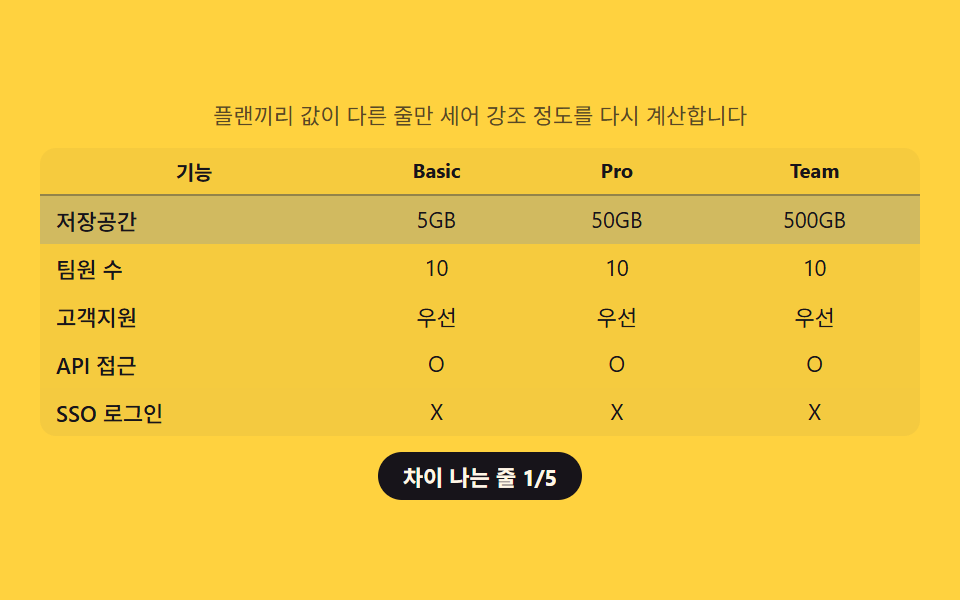
02比較表 — プラン間で値が違う行だけを数えて強調する表
各項目の値をプラン間で比べて実際に差がある行がいくつあるかを数え、その数に応じて差がある行の強調度を決めます。
使いどころ機能比較表、プラン別詳細スペックページ
--diff-alphaquerySelectorAllscope="row"
<main class="stage">
<section class="panel">
  <p class="hint">プラン間で値が異なる行だけを数え、強調の度合いを再計算します。</p>
  <table class="cmp">
    <caption class="cmpCaption">プラン比較</caption>
    <thead>
      <tr>
        <th scope="col">機能</th>
        <th scope="col">Basic</th>
        <th scope="col">Pro</th>
        <th scope="col">Team</th>
      </tr>
    </thead>
    <tbody id="rows">
      <tr data-row="storage"><th scope="row">ストレージ</th><td class="v v0"></td><td class="v v1"></td><td class="v v2"></td></tr>
      <tr data-row="seats"><th scope="row">チーム人数</th><td class="v v0"></td><td class="v v1"></td><td class="v v2"></td></tr>
      <tr data-row="support"><th scope="row">サポート</th><td class="v v0"></td><td class="v v1"></td><td class="v v2"></td></tr>
      <tr data-row="api"><th scope="row">APIアクセス</th><td class="v v0"></td><td class="v v1"></td><td class="v v2"></td></tr>
      <tr data-row="sso"><th scope="row">SSOログイン</th><td class="v v0"></td><td class="v v1"></td><td class="v v2"></td></tr>
    </tbody>
  </table>
  <p class="chip" id="diffChip">差がある行 0/5</p>
</section>
</main>
@use "../../../../site/static/demo-tokens" as *;
$duration: $dur-base;
$easing: $ease-out;
$color: $subject-ink;
@include stage($stage-yellow);
.panel {
width: 100%;
max-width: 440px;
display: flex;
flex-direction: column;
align-items: center;
gap: $sp-2;
}
.hint {
margin: 0;
padding: 0 $sp-2;
text-align: center;
font-weight: 400;
font-size: 11px;
line-height: 1.4;
color: rgba($subject-ink, .72);
}
.cmp {
width: 100%;
border-collapse: collapse;
background: rgba($subject-ink, .04);
border-radius: $r-sm;
overflow: hidden;
}
.cmpCaption {
display: none;
}
.cmp th,
.cmp td {
padding: $sp-1 $sp-2;
text-align: center;
font-weight: 400;
font-size: 11px;
color: $subject-ink;
}
.cmp thead th {
font-weight: 700;
font-size: 10px;
border-bottom: 1px solid rgba($subject-ink, .18);
}
.cmp tbody th {
text-align: left;
font-weight: 500;
}
.cmp tbody tr {
background: rgba($subject-blue, var(--diff-alpha, 0));
transition: background $duration $easing;
}
.chip {
margin: 0;
padding: $sp-1 $sp-3;
border-radius: $r-pill;
background: $color;
color: $subject-cream;
font-weight: 700;
font-size: 11px;
}
@media (max-width: 340px) {
.panel { max-width: 300px; gap: $sp-1; }
.hint { font-size: 9px; }
.cmp th, .cmp td { padding: $sp-1; font-size: 9px; }
}
@media (prefers-reduced-motion: reduce) {
.cmp tbody tr {
transition: none;
}
}html, body {
margin: 0;
overflow: hidden;
}
.stage {
box-sizing: border-box;
min-height: 100vh;
display: grid;
place-items: center;
margin: 0;
background: #ffd23f;
font-family: -apple-system, "Segoe UI", "Noto Sans KR", sans-serif;
padding: clamp(8px, 4vw, 24px);
}
.panel {
width: 100%;
max-width: 440px;
display: flex;
flex-direction: column;
align-items: center;
gap: 8px;
}
.hint {
margin: 0;
padding: 0 8px;
text-align: center;
font-weight: 400;
font-size: 11px;
line-height: 1.4;
color: rgba(23, 20, 26, 0.72);
}
.cmp {
width: 100%;
border-collapse: collapse;
background: rgba(23, 20, 26, 0.04);
border-radius: 8px;
overflow: hidden;
}
.cmpCaption {
display: none;
}
.cmp th,
.cmp td {
padding: 4px 8px;
text-align: center;
font-weight: 400;
font-size: 11px;
color: #17141a;
}
.cmp thead th {
font-weight: 700;
font-size: 10px;
border-bottom: 1px solid rgba(23, 20, 26, 0.18);
}
.cmp tbody th {
text-align: left;
font-weight: 500;
}
.cmp tbody tr {
background: rgba(47, 109, 246, var(--diff-alpha, 0));
transition: background 300ms ease-out;
}
.chip {
margin: 0;
padding: 4px 12px;
border-radius: 999px;
background: #17141a;
color: #fff7e6;
font-weight: 700;
font-size: 11px;
}
@media (max-width: 340px) {
.panel {
max-width: 300px;
gap: 4px;
}
.hint {
font-size: 9px;
}
.cmp th, .cmp td {
padding: 4px;
font-size: 9px;
}
}
@media (prefers-reduced-motion: reduce) {
.cmp tbody tr {
transition: none;
}
}// 비교표(02) — 플랜 세 줄의 값을 서로 대조해 실제로 다른 줄의 개수(diffCount)를 세고,
// 그 개수를 전체 줄 수로 나눈 비율로 강조 배경의 알파를 다시 계산한다(계산 한 겹).
// 자동 시연은 3가지 시나리오를 900ms 마다 돌려 diffCount 가 매번 달라지는 것을 보여준다.
(function () {
var rowsEl = document.getElementById('rows');
var chip = document.getElementById('diffChip');
if (!rowsEl || !chip) return;
var reduce = window.matchMedia('(prefers-reduced-motion: reduce)').matches;
var SCENARIOS = [
{ storage: ['5GB', '50GB', '500GB'], seats: ['1', '10', '∞'], support: ['メール', '優先', '専任'], api: ['X', 'O', 'O'], sso: ['X', 'X', 'O'] },
{ storage: ['5GB', '50GB', '500GB'], seats: ['10', '10', '10'], support: ['優先', '優先', '優先'], api: ['X', 'O', 'O'], sso: ['X', 'X', 'O'] },
{ storage: ['5GB', '50GB', '500GB'], seats: ['10', '10', '10'], support: ['優先', '優先', '優先'], api: ['O', 'O', 'O'], sso: ['X', 'X', 'X'] }
];
var ROW_KEYS = ['storage', 'seats', 'support', 'api', 'sso'];
function allEqual(arr) {
return arr.every(function (v) { return v === arr[0]; });
}
function apply(scenario) {
var diffCount = 0;
ROW_KEYS.forEach(function (key) {
var values = scenario[key];
var tr = rowsEl.querySelector('tr[data-row="' + key + '"]');
if (!tr) return;
var cells = tr.querySelectorAll('.v');
cells.forEach(function (cell, i) { cell.textContent = values[i]; });
var differs = !allEqual(values);
if (differs) diffCount += 1;
tr.classList.toggle('is-diff', differs);
tr.style.setProperty('--diff-alpha', differs ? String(.12 + (diffCount / ROW_KEYS.length) * .35) : '0');
});
chip.textContent = '差がある行 ' + diffCount + '/' + ROW_KEYS.length;
}
apply(SCENARIOS[0]);
if (!reduce) {
var idx = 0;
setInterval(function () {
idx = (idx + 1) % SCENARIOS.length;
apply(SCENARIOS[idx]);
}, 900);
}
})();// PricingComparisonTable — vanilla 판(run/339/demo/02-pricing-comparison-table/index.html) 의 React 포트.
// 플랜 세 줄의 값을 서로 대조해 실제로 다른 줄의 개수(diffCount)를 세고, 그 개수를 전체 줄 수로
// 나눈 비율로 강조 배경의 알파를 다시 계산한다(계산 한 겹).
import { useEffect, useRef } from "react";
import styles from "./PricingComparisonTable.module.scss";
export type PricingComparisonTableProps = {
duration?: string;
easing?: string;
color?: string;
};
const HINT = "플랜끼리 값이 다른 줄만 세어 강조 정도를 다시 계산합니다";
const CAPTION = "플랜 비교";
type RowKey = "storage" | "seats" | "support" | "api" | "sso";
const ROW_LABELS: { key: RowKey; label: string }[] = [
{ key: "storage", label: "저장공간" },
{ key: "seats", label: "팀원 수" },
{ key: "support", label: "고객지원" },
{ key: "api", label: "API 접근" },
{ key: "sso", label: "SSO 로그인" }
];
type Scenario = Record<RowKey, string[]>;
const SCENARIOS: Scenario[] = [
{ storage: ["5GB", "50GB", "500GB"], seats: ["1", "10", "∞"], support: ["이메일", "우선", "전담"], api: ["X", "O", "O"], sso: ["X", "X", "O"] },
{ storage: ["5GB", "50GB", "500GB"], seats: ["10", "10", "10"], support: ["우선", "우선", "우선"], api: ["X", "O", "O"], sso: ["X", "X", "O"] },
{ storage: ["5GB", "50GB", "500GB"], seats: ["10", "10", "10"], support: ["우선", "우선", "우선"], api: ["O", "O", "O"], sso: ["X", "X", "X"] }
];
const ROW_KEYS: RowKey[] = ["storage", "seats", "support", "api", "sso"];
function allEqual(arr: string[]): boolean {
return arr.every((v) => v === arr[0]);
}
export default function PricingComparisonTable({
duration = "300ms",
easing = "ease-out",
color = "#17141a"
}: PricingComparisonTableProps) {
const rowRefs = useRef<Record<string, HTMLTableRowElement | null>>({});
const chipRef = useRef<HTMLParagraphElement | null>(null);
useEffect(() => {
const chip = chipRef.current;
if (!chip) return;
const reduce = window.matchMedia("(prefers-reduced-motion: reduce)").matches;
function apply(scenario: Scenario): void {
let diffCount = 0;
ROW_KEYS.forEach((key) => {
const values = scenario[key];
const tr = rowRefs.current![key];
if (!tr) return;
const cells = tr.querySelectorAll("." + styles.v);
cells.forEach((cell, i) => {
cell.textContent = values[i];
});
const differs = !allEqual(values);
if (differs) diffCount += 1;
tr.classList.toggle(styles.isDiff, differs);
tr.style.setProperty("--diff-alpha", differs ? String(0.12 + (diffCount / ROW_KEYS.length) * 0.35) : "0");
});
chip!.textContent = "차이 나는 줄 " + diffCount + "/" + ROW_KEYS.length;
}
apply(SCENARIOS[0]);
let timer = 0;
if (!reduce) {
let idx = 0;
timer = window.setInterval(() => {
idx = (idx + 1) % SCENARIOS.length;
apply(SCENARIOS[idx]);
}, 900);
}
return () => {
if (timer) window.clearInterval(timer);
};
// eslint-disable-next-line react-hooks/exhaustive-deps
}, []);
return (
<main className={styles.stage}>
<section className={styles.panel}>
<p className={styles.hint}>{HINT}</p>
<table className={styles.cmp}>
<caption className={styles.cmpCaption}>{CAPTION}</caption>
<thead>
<tr>
<th scope="col">기능</th>
<th scope="col">Basic</th>
<th scope="col">Pro</th>
<th scope="col">Team</th>
</tr>
</thead>
<tbody>
{ROW_LABELS.map((row) => (
<tr
key={row.key}
ref={(el: HTMLTableRowElement | null) => {
rowRefs.current![row.key] = el;
}}
>
<th scope="row">{row.label}</th>
<td className={styles.v} />
<td className={styles.v} />
<td className={styles.v} />
</tr>
))}
</tbody>
</table>
<p className={styles.chip} ref={chipRef}>
차이 나는 줄 0/5
</p>
</section>
</main>
);
}02 比較表 — プラン間で値が違う行だけを数えて強調する表 — 計測 累積面積 29.956% · 動いたフレーム 7/23GODRICH オリジナル · SCSS と React は zip に同梱 · 価格表 デザイン9選 — 年払い切替・割引率まで計算して見せる
このデモが属する記事
 価格表 デザイン9選 — 年払い切替・割引率まで計算して見せる価格表 デザインは、料金プランのボタン一つ・数字一つに計算の層を重ねる考え方です。年払い・月払いの切替が変わるたびに各プランの価格を計算し直し、割引バッジは定価と割引価格の差を自分で求め、法人窓口セクションは利用量の値からその場で見積もりを この記事のデモをすべて見る