04つや消しキーキャップトグル 3 連
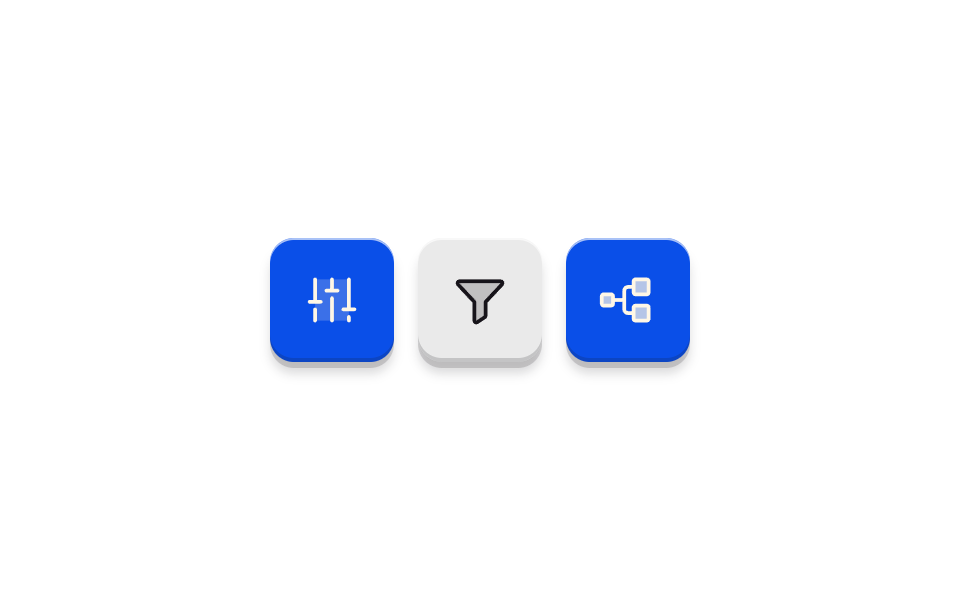
正方形に近いキーキャップが 3 つ並び、押すと沈みながらキャップの色が満ちます。光沢がないので状態は色と沈みの深さだけで読み取れます。
使いどころツールバーのオンオフボタン 3 つ
box-shadowbackground-colortransition
<main class="stage">
<div class="eq is-demo" id="eq">
  <button class="eq__key" id="eqKeyEq" type="button" role="switch" aria-checked="false" aria-label="イコライザー">
    <svg class="eq__icon" viewBox="0 0 256 256" aria-hidden="true" focusable="false"><g fill="currentColor"><path d="M200 40v176H56V40Z" opacity=".2"/><path d="M136 120v96a8 8 0 0 1-16 0v-96a8 8 0 0 1 16 0m64 72a8 8 0 0 0-8 8v16a8 8 0 0 0 16 0v-16a8 8 0 0 0-8-8m24-32h-16V40a8 8 0 0 0-16 0v120h-16a8 8 0 0 0 0 16h48a8 8 0 0 0 0-16m-168 0a8 8 0 0 0-8 8v48a8 8 0 0 0 16 0v-48a8 8 0 0 0-8-8m24-32H64V40a8 8 0 0 0-16 0v88H32a8 8 0 0 0 0 16h48a8 8 0 0 0 0-16m72-48h-16V40a8 8 0 0 0-16 0v40h-16a8 8 0 0 0 0 16h48a8 8 0 0 0 0-16"/></g></svg>
  </button>
  <button class="eq__key" id="eqKeyFilter" type="button" role="switch" aria-checked="false" aria-label="フィルター">
    <svg class="eq__icon" viewBox="0 0 256 256" aria-hidden="true" focusable="false"><g fill="currentColor"><path d="M221.9 61.38L152 136v58.65a8 8 0 0 1-3.56 6.66l-32 21.33A8 8 0 0 1 104 216v-80L34.1 61.38A8 8 0 0 1 40 48h176a8 8 0 0 1 5.9 13.38" opacity=".2"/><path d="M230.6 49.53A15.81 15.81 0 0 0 216 40H40a16 16 0 0 0-11.81 26.76l.08.09L96 139.17V216a16 16 0 0 0 24.87 13.32l32-21.34a16 16 0 0 0 7.13-13.32v-55.49l67.74-72.32l.08-.09a15.8 15.8 0 0 0 2.78-17.23m-84.42 81.05A8 8 0 0 0 144 136v58.66L112 216v-80a8 8 0 0 0-2.16-5.47L40 56h176Z"/></g></svg>
  </button>
  <button class="eq__key is-on" id="eqKeyBranch" type="button" role="switch" aria-checked="true" aria-label="ブランチ">
    <svg class="eq__icon" viewBox="0 0 256 256" aria-hidden="true" focusable="false"><g fill="currentColor"><path d="M64 112v32a8 8 0 0 1-8 8H24a8 8 0 0 1-8-8v-32a8 8 0 0 1 8-8h32a8 8 0 0 1 8 8m144-72h-48a8 8 0 0 0-8 8v48a8 8 0 0 0 8 8h48a8 8 0 0 0 8-8V48a8 8 0 0 0-8-8m0 112h-48a8 8 0 0 0-8 8v48a8 8 0 0 0 8 8h48a8 8 0 0 0 8-8v-48a8 8 0 0 0-8-8" opacity=".2"/><path d="M160 112h48a16 16 0 0 0 16-16V48a16 16 0 0 0-16-16h-48a16 16 0 0 0-16 16v16h-16a24 24 0 0 0-24 24v32H72v-8a16 16 0 0 0-16-16H24a16 16 0 0 0-16 16v32a16 16 0 0 0 16 16h32a16 16 0 0 0 16-16v-8h32v32a24 24 0 0 0 24 24h16v16a16 16 0 0 0 16 16h48a16 16 0 0 0 16-16v-48a16 16 0 0 0-16-16h-48a16 16 0 0 0-16 16v16h-16a8 8 0 0 1-8-8V88a8 8 0 0 1 8-8h16v16a16 16 0 0 0 16 16M56 144H24v-32h32zm104 16h48v48h-48Zm0-112h48v48h-48Z"/></g></svg>
  </button>
</div>
</main>
@use "../../../../site/static/demo-tokens" as *;
// 무광 키캡 토글 세 개 — 위 광원을 받은 볼록 캡. 광택 스펙큘러를 아예 두지 않고
// 위 1px 하이라이트 줄 · 아래 2px 어두운 줄 · 아래쪽 벽과 흐린 드롭섀도 세 가지 선으로만 볼록함을 만든다.
// 눌림(transform·box-shadow)은 $dur-instant, 색 충전(background-color·아이콘 color)은 $duration(220ms) —
// 축이 다르니 시간을 갈라 놓아 "탁 눌리고 색이 뒤따라 차오른다"는 순서가 생긴다.
// 아이콘은 Phosphor Duotone(faders·funnel·git-branch, MIT) 을 인라인으로 박았고 currentColor 로 캡 색을 따라간다.
// 세 키는 독립 토글(role="switch" + aria-checked)이고 화면 글자는 없다 — 상태는 색과 눌린 깊이로만 읽힌다.
// 미리보기(.is-demo)는 세 키가 3분의 1주기씩 시차(음수 delay)로 눌리고 차오르고 풀린다.
$duration: $dur-quick;
$easing: $ease-spring;
$color: $subject-blue-deep;
@include stage($stage-paper);
// 캡 두 상태의 그림자 — 꺼짐(쉴 때) 과 눌림. 벽(0 3px 0) 이 얇아지며 캡이 들어가 보인다
$cap-rest-shadow: inset 0 1px 0 rgba($stage-paper, .65), inset 0 -2px 0 rgba($subject-ink, .18), 0 3px 0 rgba($subject-ink, .16), 0 6px 5px rgba($subject-ink, .15);
$cap-press-shadow: inset 0 1px 0 rgba($stage-paper, .65), inset 0 -2px 0 rgba($subject-ink, .18), 0 1px 0 rgba($subject-ink, .16), 0 2px 2px rgba($subject-ink, .12);
$cap-off: rgba($subject-ink, .09);
.eq { display: flex; align-items: center; justify-content: center; gap: $sp-3; }
// 정사각에 가까운 키캡 — 표면은 무광 단색. 상태 글자 없음(참조 구도)
.eq__key {
display: flex; align-items: center; justify-content: center;
width: 62px; height: 62px; margin: 0; padding: 0;
border: 0; border-radius: $r-control; cursor: pointer;
color: $subject-ink; // 아이콘(currentColor) 은 키에서 물려받는다 — eqIcon 키프레임이 이 color 를 움직인다
background-color: $cap-off;
box-shadow: $cap-rest-shadow;
transform: translateY(0);
transition: transform $dur-instant $easing, box-shadow $dur-instant $easing, background-color $duration $ease-out, color $duration $ease-out;
}
.eq__key:active {
transform: translateY(2px);
box-shadow: $cap-press-shadow;
}
.eq__key:focus-visible { outline: 2px solid $subject-blue-deep; outline-offset: 3px; }
// 켜짐 — 캡이 $color 로 충전되고 아이콘이 잉크에서 크림으로 뒤집힌다(파란 면 위 크림은 AA 통과 조합)
.eq__key.is-on { background-color: $color; color: $subject-cream; }
// 아이콘 — duotone 뒷면(opacity .2 path) 이 currentColor 로 캡 색을 그대로 물들인다.
// color 를 여기에 두지 않는다: 자식의 직접 선언이 부모의 애니메이션 상속을 이겨 eqIcon 이 죽는다(포스터 육안 실측)
.eq__icon { width: 30px; height: 30px; }
// duotone 뒷면(opacity .2) 은 파란 캡 위 크림에서 거의 안 보인다(육안 실측) — 켜짐 캡에서만 반투명도를 올린다
.eq__key.is-on .eq__icon path[opacity=".2"] { opacity: .7; }
// ── 미리보기 루프(2초 한 바퀴) ────────────────────────────────
// 눌림과 색 충전은 축이 다르니 애니메이션을 갈라 놓고, 세 키는 같은 키프레임을 음수 delay 로
// 3분의 1주기씩 어긋나게 돌린다(음수 delay 는 시작 전 구간이 없어 fill-mode 가 필요 없다).
// delay 를 단축이 아닌 낱개 속성으로 뒤·높은 특이도에 두는 것은 단축 리셋 함정(240) 을 피하는 길이다.
.eq.is-demo .eq__key {
animation-name: eqPress, eqFill, eqIcon;
animation-duration: $dur-loop;
animation-timing-function: $easing, steps(1, end), steps(1, end);
animation-iteration-count: infinite;
}
.eq.is-demo .eq__key:nth-child(2) { animation-delay: calc(#{$dur-loop} / -3 * 2); }
.eq.is-demo .eq__key:nth-child(3) { animation-delay: calc(#{$dur-loop} / -3); }
@keyframes eqPress {
0% { transform: translateY(0); box-shadow: $cap-rest-shadow; }
3% { transform: translateY(2px); box-shadow: $cap-press-shadow; }
8%, 100% { transform: translateY(0); box-shadow: $cap-rest-shadow; }
}
@keyframes eqFill {
0%, 4% { background-color: $cap-off; }
10%, 40% { background-color: $color; }
46%, 100% { background-color: $cap-off; }
}
// 캡 색과 아이콘 샅은 같은 지점에서 steps(1,end) 컷으로 함께 뒤집는다 — 페이드의 중간 톤에서
// 어두운 아이콘이 반쯤 찬 파란 캡 위에 옅게 뜨는 프레임이 포스터로 뽑혔다(육안 실측).
// 실제 클릭은 정적 규칙의 transition(220ms 페이드) 그대로다 — 컷은 격자 미리보기 루프만.
@keyframes eqIcon {
0%, 4% { color: $subject-ink; }
10% { color: $subject-cream; }
46%, 100% { color: $subject-ink; }
}
@media (max-width: 340px) {
.eq__key { width: 48px; height: 48px; }
.eq__icon { width: 20px; height: 20px; }
}
@media (prefers-reduced-motion: reduce) {
.eq .eq__key { transition: none !important; }
.eq.is-demo .eq__key { animation: none !important; }
}html, body {
margin: 0;
overflow: hidden;
}
.stage {
box-sizing: border-box;
min-height: 100vh;
display: grid;
place-items: center;
margin: 0;
background: #ffffff;
font-family: -apple-system, "Segoe UI", "Noto Sans KR", sans-serif;
padding: clamp(8px, 4vw, 24px);
}
.eq {
display: flex;
align-items: center;
justify-content: center;
gap: 12px;
}
.eq__key {
display: flex;
align-items: center;
justify-content: center;
width: 62px;
height: 62px;
margin: 0;
padding: 0;
border: 0;
border-radius: 12px;
cursor: pointer;
color: #17141a;
background-color: rgba(23, 20, 26, 0.09);
box-shadow: inset 0 1px 0 rgba(255, 255, 255, 0.65), inset 0 -2px 0 rgba(23, 20, 26, 0.18), 0 3px 0 rgba(23, 20, 26, 0.16), 0 6px 5px rgba(23, 20, 26, 0.15);
transform: translateY(0);
transition: transform 140ms cubic-bezier(0.2, 0.8, 0.2, 1), box-shadow 140ms cubic-bezier(0.2, 0.8, 0.2, 1), background-color 220ms ease-out, color 220ms ease-out;
}
.eq__key:active {
transform: translateY(2px);
box-shadow: inset 0 1px 0 rgba(255, 255, 255, 0.65), inset 0 -2px 0 rgba(23, 20, 26, 0.18), 0 1px 0 rgba(23, 20, 26, 0.16), 0 2px 2px rgba(23, 20, 26, 0.12);
}
.eq__key:focus-visible {
outline: 2px solid #0a4fe8;
outline-offset: 3px;
}
.eq__key.is-on {
background-color: #0a4fe8;
color: #fff7e6;
}
.eq__icon {
width: 30px;
height: 30px;
}
.eq__key.is-on .eq__icon path[opacity=".2"] {
opacity: 0.7;
}
.eq.is-demo .eq__key {
animation-name: eqPress, eqFill, eqIcon;
animation-duration: 2s;
animation-timing-function: cubic-bezier(0.2, 0.8, 0.2, 1), steps(1, end), steps(1, end);
animation-iteration-count: infinite;
}
.eq.is-demo .eq__key:nth-child(2) {
animation-delay: calc(2s / -3 * 2);
}
.eq.is-demo .eq__key:nth-child(3) {
animation-delay: calc(2s / -3);
}
@keyframes eqPress {
0% {
transform: translateY(0);
box-shadow: inset 0 1px 0 rgba(255, 255, 255, 0.65), inset 0 -2px 0 rgba(23, 20, 26, 0.18), 0 3px 0 rgba(23, 20, 26, 0.16), 0 6px 5px rgba(23, 20, 26, 0.15);
}
3% {
transform: translateY(2px);
box-shadow: inset 0 1px 0 rgba(255, 255, 255, 0.65), inset 0 -2px 0 rgba(23, 20, 26, 0.18), 0 1px 0 rgba(23, 20, 26, 0.16), 0 2px 2px rgba(23, 20, 26, 0.12);
}
8%, 100% {
transform: translateY(0);
box-shadow: inset 0 1px 0 rgba(255, 255, 255, 0.65), inset 0 -2px 0 rgba(23, 20, 26, 0.18), 0 3px 0 rgba(23, 20, 26, 0.16), 0 6px 5px rgba(23, 20, 26, 0.15);
}
}
@keyframes eqFill {
0%, 4% {
background-color: rgba(23, 20, 26, 0.09);
}
10%, 40% {
background-color: #0a4fe8;
}
46%, 100% {
background-color: rgba(23, 20, 26, 0.09);
}
}
@keyframes eqIcon {
0%, 4% {
color: #17141a;
}
10% {
color: #fff7e6;
}
46%, 100% {
color: #17141a;
}
}
@media (max-width: 340px) {
.eq__key {
width: 48px;
height: 48px;
}
.eq__icon {
width: 20px;
height: 20px;
}
}
@media (prefers-reduced-motion: reduce) {
.eq .eq__key {
transition: none !important;
}
.eq.is-demo .eq__key {
animation: none !important;
}
}var eqRoot = document.getElementById('eq');
var eqKeys = eqRoot.querySelectorAll('.eq__key');
// 손이 닿으면 미리보기 루프를 멈춘다(01 電源 버튼과 같은 규칙). 세 키는 각자 독립 토글이다.
eqRoot.addEventListener('pointerdown', function () { eqRoot.classList.remove('is-demo'); });
for (var i = 0; i < eqKeys.length; i++) {
eqKeys[i].addEventListener('click', function () {
var on = this.getAttribute('aria-checked') !== 'true';
this.setAttribute('aria-checked', on ? 'true' : 'false');
this.classList.toggle('is-on', on);
});
}// SoftPlasticToggle — vanilla 판(run/076/demo/04-real-soft-plastic-toggle/index.html) 의 React 포트.
// 위 광원을 받은 볼록 무광 키캡 세 개. 눌림은 짧게, 색 충전은 그 뒤에 차오른다(축이 다르니 시간을 갈라 둔다).
// 값·키프레임은 vanilla 와 같다(다시 타이핑하지 않는다). 손이 닿으면 미리보기 루프를 뗀다.
import { useState } from "react";
import styles from "./SoftPlasticToggle.module.scss";
export type SoftPlasticToggleProps = {
duration?: number;
easing?: string;
color?: string;
};
type Vars = { [k: string]: any };
const LABEL_EQ = "이퀄라이저";
const LABEL_FILTER = "필터";
const LABEL_BRANCH = "분기";
export default function SoftPlasticToggle({
duration = 220,
easing = "cubic-bezier(.2, .8, .2, 1)", // = $ease-spring
color = "#0a4fe8",
}: SoftPlasticToggleProps) {
const [demo, setDemo] = useState(true);
const [on, setOn] = useState([false, false, true]);
const vars: Vars = {
"--duration": `${duration}ms`,
"--easing": easing,
"--color": color,
};
const cls = [styles.root, demo ? styles.isDemo : ""].filter(Boolean).join(" ");
function wake() {
setDemo(false);
}
function toggle(i: number) {
setDemo(false);
setOn((prev) => prev.map((v, j) => (j === i ? !v : v)));
}
return (
<main className={styles.stage}>
<div className={cls} style={vars} onPointerDown={wake}>
<button
className={[styles.key, on[0] ? styles.isOn : ""].filter(Boolean).join(" ")}
type="button"
role="switch"
aria-checked={on[0]}
aria-label={LABEL_EQ}
onClick={() => toggle(0)}
>
<svg className={styles.icon} viewBox="0 0 256 256" aria-hidden="true" focusable="false"><g fill="currentColor"><path d="M64 112v32a8 8 0 0 1-8 8H24a8 8 0 0 1-8-8v-32a8 8 0 0 1 8-8h32a8 8 0 0 1 8 8m144-72h-48a8 8 0 0 0-8 8v48a8 8 0 0 0 8 8h48a8 8 0 0 0 8-8V48a8 8 0 0 0-8-8m0 112h-48a8 8 0 0 0-8 8v48a8 8 0 0 0 8 8h48a8 8 0 0 0 8-8v-48a8 8 0 0 0-8-8" opacity=".2"/><path d="M160 112h48a16 16 0 0 0 16-16V48a16 16 0 0 0-16-16h-48a16 16 0 0 0-16 16v16h-16a24 24 0 0 0-24 24v32H72v-8a16 16 0 0 0-16-16H24a16 16 0 0 0-16 16v32a16 16 0 0 0 16 16h32a16 16 0 0 0 16-16v-8h32v32a24 24 0 0 0 24 24h16v16a16 16 0 0 0 16 16h48a16 16 0 0 0 16-16v-48a16 16 0 0 0-16-16h-48a16 16 0 0 0-16 16v16h-16a8 8 0 0 1-8-8V88a8 8 0 0 1 8-8h16v16a16 16 0 0 0 16 16M56 144H24v-32h32zm104 16h48v48h-48Zm0-112h48v48h-48Z"/></g></svg>
</button>
<button
className={[styles.key, on[1] ? styles.isOn : ""].filter(Boolean).join(" ")}
type="button"
role="switch"
aria-checked={on[1]}
aria-label={LABEL_FILTER}
onClick={() => toggle(1)}
>
<svg className={styles.icon} viewBox="0 0 256 256" aria-hidden="true" focusable="false"><g fill="currentColor"><path d="M221.9 61.38L152 136v58.65a8 8 0 0 1-3.56 6.66l-32 21.33A8 8 0 0 1 104 216v-80L34.1 61.38A8 8 0 0 1 40 48h176a8 8 0 0 1 5.9 13.38" opacity=".2"/><path d="M230.6 49.53A15.81 15.81 0 0 0 216 40H40a16 16 0 0 0-11.81 26.76l.08.09L96 139.17V216a16 16 0 0 0 24.87 13.32l32-21.34a16 16 0 0 0 7.13-13.32v-55.49l67.74-72.32l.08-.09a15.8 15.8 0 0 0 2.78-17.23m-84.42 81.05A8 8 0 0 0 144 136v58.66L112 216v-80a8 8 0 0 0-2.16-5.47L40 56h176Z"/></g></svg>
</button>
<button
className={[styles.key, on[2] ? styles.isOn : ""].filter(Boolean).join(" ")}
type="button"
role="switch"
aria-checked={on[2]}
aria-label={LABEL_BRANCH}
onClick={() => toggle(2)}
>
<svg className={styles.icon} viewBox="0 0 256 256" aria-hidden="true" focusable="false"><g fill="currentColor"><path d="M224 64a24 24 0 1 1-24-24a24 24 0 0 1 24 24" opacity=".2"/><path d="M232 64a32 32 0 1 0-40 31v17a8 8 0 0 1-8 8H96a23.8 23.8 0 0 0-8 1.38V95a32 32 0 1 0-16 0v66a32 32 0 1 0 16 0v-17a8 8 0 0 1 8-8h88a24 24 0 0 0 24-24V95a32.06 32.06 0 0 0 24-31M64 64a16 16 0 1 1 16 16a16 16 0 0 1-16-16m32 128a16 16 0 1 1-16-16a16 16 0 0 1 16 16M200 80a16 16 0 1 1 16-16a16 16 0 0 1-16 16"/></g></svg>
</button>
</div>
</main>
);
}04 つや消しキーキャップトグル 3 連 — 計測 累積面積 7.817% · 動いたフレーム 12/23GODRICH オリジナル · SCSS と React は zip に同梱 · css トグルスイッチ 9選 — 実物みたいなスイッチをコピペで
このデモが属する記事
 css トグルスイッチ 9選 — 実物みたいなスイッチをコピペでcss トグルスイッチは、画面の中で電源を入れたり切ったりする小さな切り替えのことです。9 つすべてをライブラリなし、チェックボックス1つで作りました。下のグリッドで今動いており、クリック・Space・ドラッグはどれも本物です。 この記事のデモをすべて見る