07比率の保存とプリセット
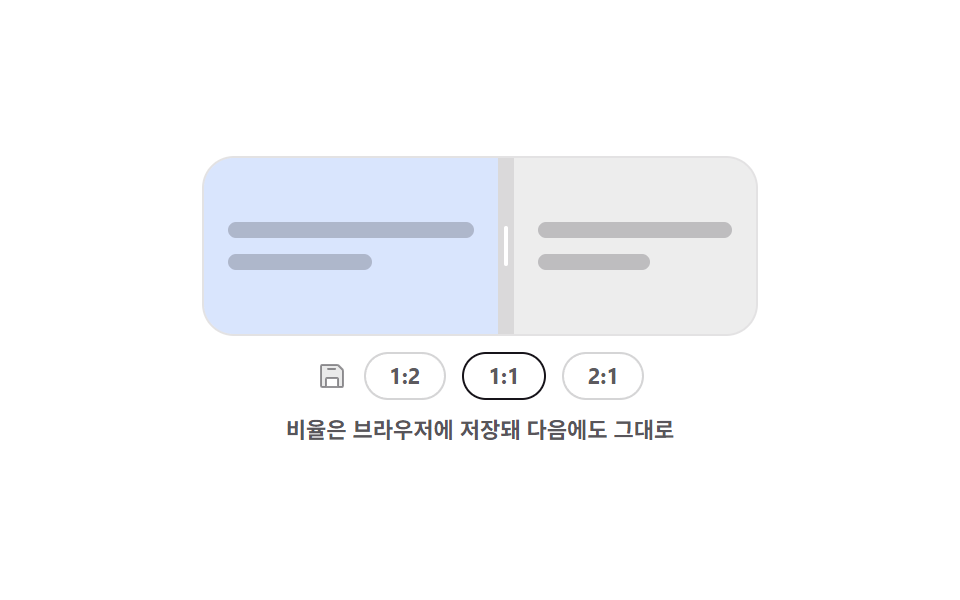
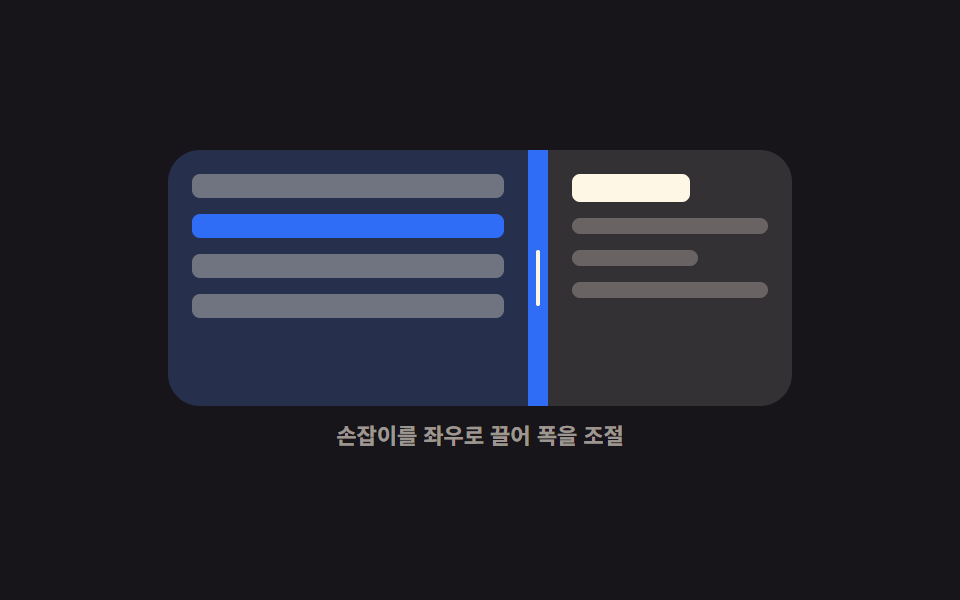
ドラッグで合わせた比率はすぐブラウザに保存され、プリセットボタンを押すと保存値からその比率へなめらかに移ります。
使いどころ毎日開くダッシュボードで、人ごとに違う比率を覚えて次も同じ状態で開きたいとき
localStorageJSON.parsearia-pressed
<main class="stage">
  <div class="rp is-demo" id="rp-root">
    <div class="rp__box" id="rp-box">
      <section class="rp__pane rp__pane--l" aria-label="左のパネル">
        <span class="rp__ln"></span>
        <span class="rp__ln rp__ln--s"></span>
      </section>
      <div class="rp__bar" id="rp-bar" role="separator" tabindex="0"
           aria-orientation="vertical" aria-label="分割比率" aria-valuemin="20" aria-valuemax="80" aria-valuenow="50">
        <i class="rp__grip" aria-hidden="true"></i>
      </div>
      <section class="rp__pane rp__pane--r" aria-label="右のパネル">
        <span class="rp__ln"></span>
        <span class="rp__ln rp__ln--s"></span>
      </section>
    </div>
    <div class="rp__row">
      <span class="rp__save" aria-hidden="true"><svg viewBox="0 0 256 256"><g fill="currentColor"><path d="M216 83.31V208a8 8 0 0 1-8 8h-32v-64a8 8 0 0 0-8-8H88a8 8 0 0 0-8 8v64H48a8 8 0 0 1-8-8V48a8 8 0 0 1 8-8h124.69a8 8 0 0 1 5.65 2.34l35.32 35.32a8 8 0 0 1 2.34 5.65" opacity=".2"/><path d="M219.31 72L184 36.69A15.86 15.86 0 0 0 172.69 32H48a16 16 0 0 0-16 16v160a16 16 0 0 0 16 16h160a16 16 0 0 0 16-16V83.31A15.86 15.86 0 0 0 219.31 72M168 208H88v-56h80Zm40 0h-24v-56a16 16 0 0 0-16-16H88a16 16 0 0 0-16 16v56H48V48h124.69L208 83.31ZM160 72a8 8 0 0 1-8 8H96a8 8 0 0 1 0-16h56a8 8 0 0 1 8 8"/></g></svg></span>
      <button class="rp__btn" type="button" data-v="34" aria-pressed="false">1:2</button>
      <button class="rp__btn is-on" type="button" data-v="50" aria-pressed="true">1:1</button>
      <button class="rp__btn" type="button" data-v="66" aria-pressed="false">2:1</button>
    </div>
    <p class="rp__cap">比率はブラウザに保存されて次回もそのまま</p>
  </div>
</main>@use "../../../../site/static/demo-tokens" as *;
$duration: $dur-base;
$easing: $ease-spring;
$color: $subject-blue;
@include stage($stage-paper);
@property --split {
syntax: "<percentage>";
inherits: true;
initial-value: 50%;
}
.rp {
--split: 50%;
width: min(276px, 86vw);
display: flex;
flex-direction: column;
align-items: center;
gap: $sp-2;
}
.rp.is-glide { transition: --split $duration $easing; }
.rp__box {
display: grid;
grid-template-columns: var(--split) 8px 1fr;
width: 100%;
height: 88px;
border-radius: $r-card;
overflow: hidden;
border: 1px solid rgba(23, 20, 26, .12);
}
.rp__pane {
box-sizing: border-box;
display: flex;
flex-direction: column;
justify-content: center;
gap: $sp-2;
padding: $sp-3;
overflow: hidden;
}
.rp__ln {
flex: 0 0 auto;
height: 8px;
border-radius: $r-xs;
background: rgba(23, 20, 26, .22);
}
.rp__ln--s { width: 58%; }
.rp__pane--l { background: rgba(47, 109, 246, .18); }
.rp__pane--r { background: rgba(23, 20, 26, .08); }
.rp__bar {
display: grid;
place-items: center;
background: rgba(23, 20, 26, .16);
cursor: col-resize;
touch-action: none;
transition: background $dur-quick $easing;
}
.rp__grip {
display: block;
width: 2px;
height: 20px;
border-radius: $r-pill;
background: #ffffff;
}
.rp__bar:hover { background: $color; }
.rp__bar:focus-visible { outline: 2px solid $subject-ink; outline-offset: -2px; }
.rp__row {
display: flex;
align-items: center;
gap: $sp-2;
}
.rp__save {
display: block;
width: 16px;
height: 16px;
color: rgba(23, 20, 26, .45);
}
.rp__save svg { display: block; width: 16px; height: 16px; }
.rp__btn {
box-sizing: border-box;
height: 24px;
padding: 0 $sp-3;
border: 1px solid rgba(23, 20, 26, .18);
border-radius: $r-pill;
background: #ffffff;
color: rgba(23, 20, 26, .7);
font-family: inherit;
font-size: 11px;
line-height: 20px;
font-weight: 700;
cursor: pointer;
transition: background $dur-quick $easing, color $dur-quick $easing;
}
.rp__btn.is-on {
background: $subject-ink;
border-color: $subject-ink;
color: $subject-cream;
}
.rp__btn:focus-visible { outline: 2px solid $color; outline-offset: 2px; }
.rp__cap {
margin: 0;
font-size: 11px;
line-height: 14px;
font-weight: 600;
color: rgba(23, 20, 26, .72); // AA 4.5 (blog-design)
text-align: center;
}
// ── 자동 루프: 1:1 → 1:2 → 2:1 → 1:1. 눌린 단추는 컷으로 바뀐다 ──
.rp.is-demo { animation: rp-move $dur-loop $easing infinite; }
@keyframes rp-move {
0%, 10% { --split: 50%; }
34%, 46% { --split: 34%; }
70%, 82% { --split: 66%; }
90%, 100% { --split: 50%; }
}
.rp.is-demo .rp__btn:nth-of-type(1) { animation: rp-b1 $dur-loop steps(1, end) infinite; }
.rp.is-demo .rp__btn:nth-of-type(2) { animation: rp-b2 $dur-loop steps(1, end) infinite; }
.rp.is-demo .rp__btn:nth-of-type(3) { animation: rp-b3 $dur-loop steps(1, end) infinite; }
// 눌린 표시는 비율이 **도착한 뒤**에만 켠다 — 옮겨 가는 중에 켜면
// poster 가 "2:1 눌림 + 화면은 1:1" 인 어긋난 장면으로 뽑힌다 (242-06 과 같은 계열)
@keyframes rp-b1 {
0%, 33% { background: #ffffff; color: rgba(23, 20, 26, .7); }
34%, 46% { background: $subject-ink; color: $subject-cream; }
47%, 100% { background: #ffffff; color: rgba(23, 20, 26, .7); }
}
@keyframes rp-b2 {
0%, 10% { background: $subject-ink; color: $subject-cream; }
11%, 89% { background: #ffffff; color: rgba(23, 20, 26, .7); }
90%, 100% { background: $subject-ink; color: $subject-cream; }
}
@keyframes rp-b3 {
0%, 69% { background: #ffffff; color: rgba(23, 20, 26, .7); }
70%, 82% { background: $subject-ink; color: $subject-cream; }
83%, 100% { background: #ffffff; color: rgba(23, 20, 26, .7); }
}
@media (prefers-reduced-motion: reduce) {
.rp.is-demo,
.rp.is-demo .rp__btn { animation: none !important; }
.rp, .rp__btn, .rp__bar { transition: none; }
}
@media (max-width: 340px) {
.rp__box { height: 76px; }
.rp__btn { padding: 0 $sp-2; }
}html, body {
margin: 0;
overflow: hidden;
}
.stage {
box-sizing: border-box;
min-height: 100vh;
display: grid;
place-items: center;
margin: 0;
background: #ffffff;
font-family: -apple-system, "Segoe UI", "Noto Sans KR", sans-serif;
padding: clamp(8px, 4vw, 24px);
}
@property --split {
syntax: "<percentage>";
inherits: true;
initial-value: 50%;
}
.rp {
--split: 50%;
width: min(276px, 86vw);
display: flex;
flex-direction: column;
align-items: center;
gap: 8px;
}
.rp.is-glide {
transition: --split 300ms cubic-bezier(0.2, 0.8, 0.2, 1);
}
.rp__box {
display: grid;
grid-template-columns: var(--split) 8px 1fr;
width: 100%;
height: 88px;
border-radius: 16px;
overflow: hidden;
border: 1px solid rgba(23, 20, 26, 0.12);
}
.rp__pane {
box-sizing: border-box;
display: flex;
flex-direction: column;
justify-content: center;
gap: 8px;
padding: 12px;
overflow: hidden;
}
.rp__ln {
flex: 0 0 auto;
height: 8px;
border-radius: 4px;
background: rgba(23, 20, 26, 0.22);
}
.rp__ln--s {
width: 58%;
}
.rp__pane--l {
background: rgba(47, 109, 246, 0.18);
}
.rp__pane--r {
background: rgba(23, 20, 26, 0.08);
}
.rp__bar {
display: grid;
place-items: center;
background: rgba(23, 20, 26, 0.16);
cursor: col-resize;
touch-action: none;
transition: background 220ms cubic-bezier(0.2, 0.8, 0.2, 1);
}
.rp__grip {
display: block;
width: 2px;
height: 20px;
border-radius: 999px;
background: #ffffff;
}
.rp__bar:hover {
background: #2f6df6;
}
.rp__bar:focus-visible {
outline: 2px solid #17141a;
outline-offset: -2px;
}
.rp__row {
display: flex;
align-items: center;
gap: 8px;
}
.rp__save {
display: block;
width: 16px;
height: 16px;
color: rgba(23, 20, 26, 0.45);
}
.rp__save svg {
display: block;
width: 16px;
height: 16px;
}
.rp__btn {
box-sizing: border-box;
height: 24px;
padding: 0 12px;
border: 1px solid rgba(23, 20, 26, 0.18);
border-radius: 999px;
background: #ffffff;
color: rgba(23, 20, 26, 0.7);
font-family: inherit;
font-size: 11px;
line-height: 20px;
font-weight: 700;
cursor: pointer;
transition: background 220ms cubic-bezier(0.2, 0.8, 0.2, 1), color 220ms cubic-bezier(0.2, 0.8, 0.2, 1);
}
.rp__btn.is-on {
background: #17141a;
border-color: #17141a;
color: #fff7e6;
}
.rp__btn:focus-visible {
outline: 2px solid #2f6df6;
outline-offset: 2px;
}
.rp__cap {
margin: 0;
font-size: 11px;
line-height: 14px;
font-weight: 600;
color: rgba(23, 20, 26, 0.72);
text-align: center;
}
.rp.is-demo {
animation: rp-move 2s cubic-bezier(0.2, 0.8, 0.2, 1) infinite;
}
@keyframes rp-move {
0%, 10% {
--split: 50%;
}
34%, 46% {
--split: 34%;
}
70%, 82% {
--split: 66%;
}
90%, 100% {
--split: 50%;
}
}
.rp.is-demo .rp__btn:nth-of-type(1) {
animation: rp-b1 2s steps(1, end) infinite;
}
.rp.is-demo .rp__btn:nth-of-type(2) {
animation: rp-b2 2s steps(1, end) infinite;
}
.rp.is-demo .rp__btn:nth-of-type(3) {
animation: rp-b3 2s steps(1, end) infinite;
}
@keyframes rp-b1 {
0%, 33% {
background: #ffffff;
color: rgba(23, 20, 26, 0.7);
}
34%, 46% {
background: #17141a;
color: #fff7e6;
}
47%, 100% {
background: #ffffff;
color: rgba(23, 20, 26, 0.7);
}
}
@keyframes rp-b2 {
0%, 10% {
background: #17141a;
color: #fff7e6;
}
11%, 89% {
background: #ffffff;
color: rgba(23, 20, 26, 0.7);
}
90%, 100% {
background: #17141a;
color: #fff7e6;
}
}
@keyframes rp-b3 {
0%, 69% {
background: #ffffff;
color: rgba(23, 20, 26, 0.7);
}
70%, 82% {
background: #17141a;
color: #fff7e6;
}
83%, 100% {
background: #ffffff;
color: rgba(23, 20, 26, 0.7);
}
}
@media (prefers-reduced-motion: reduce) {
.rp.is-demo,
.rp.is-demo .rp__btn {
animation: none !important;
}
.rp, .rp__btn, .rp__bar {
transition: none;
}
}
@media (max-width: 340px) {
.rp__box {
height: 76px;
}
.rp__btn {
padding: 0 8px;
}
}// 실제 동작: 끌 때마다 localStorage 에 비율을 쓰고, 열 때 JSON.parse 로 읽어 복원한다.
var root = document.getElementById('rp-root');
var box = document.getElementById('rp-box');
var bar = document.getElementById('rp-bar');
var btns = [].slice.call(document.querySelectorAll('.rp__btn'));
var KEY = 'godrich-split-250', dragging = false;
function set(pct, mark) {
var v = Math.max(20, Math.min(pct, 80));
root.style.setProperty('--split', v.toFixed(1) + '%');
bar.setAttribute('aria-valuenow', String(Math.round(v)));
btns.forEach(function (b) {
var on = mark && b.dataset.v === String(Math.round(v));
b.classList.toggle('is-on', !!on);
b.setAttribute('aria-pressed', String(!!on));
});
// 사생활 보호 모드에서는 저장이 막혀 예외가 난다 — 조용히 넘어간다
try { localStorage.setItem(KEY, JSON.stringify({ split: Math.round(v) })); } catch (err) { return; }
}
try {
var saved = JSON.parse(localStorage.getItem(KEY) || 'null');
if (saved && saved.split) { root.classList.remove('is-demo'); set(saved.split, true); }
} catch (err) { /* 저장값이 깨졌으면 기본값 */ }
btns.forEach(function (b) {
b.addEventListener('click', function () {
root.classList.remove('is-demo');
root.classList.add('is-glide');
set(Number(b.dataset.v), true);
});
});
bar.addEventListener('pointerdown', function (e) {
root.classList.remove('is-demo');
root.classList.remove('is-glide');
dragging = true;
bar.setPointerCapture(e.pointerId);
e.preventDefault();
});
bar.addEventListener('pointermove', function (e) {
if (!dragging) return;
set((e.clientX - box.getBoundingClientRect().left) / box.clientWidth * 100, true);
});
bar.addEventListener('pointerup', function () { dragging = false; });
bar.addEventListener('keydown', function (e) {
var d = e.key === 'ArrowLeft' ? -4 : e.key === 'ArrowRight' ? 4 : 0;
if (!d) return;
root.classList.remove('is-demo');
root.classList.remove('is-glide');
set(Number(bar.getAttribute('aria-valuenow')) + d, true);
bar.focus({ preventScroll: true });
e.preventDefault();
});import { useEffect, useRef, useState } from "react";
import type { CSSProperties } from "react";
import styles from "./RatioPresets.module.scss";
export type RatioPresetsProps = {
/** localStorage 키 */
storageKey?: string;
presets?: { label: string; value: number }[];
duration?: number;
easing?: string;
color?: string;
};
type PEvt = { clientX: number; pointerId: number; preventDefault(): void; currentTarget: { setPointerCapture(id: number): void } };
type KeyEvt = { key: string; preventDefault(): void };
type Vars = CSSProperties & { "--split"?: string; "--duration"?: string; "--easing"?: string; "--color"?: string };
export default function RatioPresets({
storageKey = "godrich-split-250",
presets = [{ label: "1:2", value: 34 }, { label: "1:1", value: 50 }, { label: "2:1", value: 66 }],
duration = 300,
easing = "cubic-bezier(.2,.8,.2,1)",
color = "#2f6df6",
}: RatioPresetsProps) {
const [split, setSplit] = useState(50);
const [glide, setGlide] = useState(false);
const boxRef = useRef<HTMLDivElement>(null);
const dragging = useRef(false);
// 열 때 한 번 복원한다 — 값이 깨졌으면 기본값 그대로
useEffect(() => {
try {
const raw = localStorage.getItem(storageKey);
const saved = raw ? JSON.parse(raw) : null;
if (saved && typeof saved.split === "number") setSplit(saved.split);
} catch (err) { /* 사생활 보호 모드 */ }
}, [storageKey]);
function save(v: number): void {
try { localStorage.setItem(storageKey, JSON.stringify({ split: Math.round(v) })); } catch (err) { /* 저장 불가 */ }
}
function set(pct: number): void {
const v = Math.max(20, Math.min(pct, 80));
setSplit(v);
save(v);
}
function onDown(e: PEvt): void {
setGlide(false);
dragging.current = true;
e.currentTarget.setPointerCapture(e.pointerId);
e.preventDefault();
}
function onMove(e: PEvt): void {
const box = boxRef.current;
if (!dragging.current || !box) return;
set(((e.clientX - box.getBoundingClientRect().left) / box.clientWidth) * 100);
}
function onUp(): void { dragging.current = false; }
function onKey(e: KeyEvt): void {
const d = e.key === "ArrowLeft" ? -4 : e.key === "ArrowRight" ? 4 : 0;
if (!d) return;
setGlide(false);
set(split + d);
e.preventDefault();
}
const vars: Vars = {
"--split": `${split.toFixed(1)}%`,
"--duration": `${duration}ms`,
"--easing": easing,
"--color": color,
};
return (
<div className={glide ? `${styles.rp} ${styles.isGlide}` : styles.rp} style={vars}>
<div className={styles.box} ref={boxRef}>
<section className={`${styles.pane} ${styles.paneL}`} aria-label="Left pane">
<span className={styles.ln} />
<span className={`${styles.ln} ${styles.lnShort}`} />
</section>
<div
className={styles.bar}
role="separator"
tabIndex={0}
aria-orientation="vertical"
aria-label="Split ratio"
aria-valuemin={20}
aria-valuemax={80}
aria-valuenow={Math.round(split)}
onPointerDown={onDown}
onPointerMove={onMove}
onPointerUp={onUp}
onPointerCancel={onUp}
onKeyDown={onKey}
>
<i className={styles.grip} aria-hidden="true" />
</div>
<section className={`${styles.pane} ${styles.paneR}`} aria-label="Right pane">
<span className={styles.ln} />
<span className={`${styles.ln} ${styles.lnShort}`} />
</section>
</div>
<div className={styles.row}>
<span className={styles.save} aria-hidden="true">
<svg viewBox="0 0 256 256"><g fill="currentColor"><path d="M216 83.31V208a8 8 0 0 1-8 8h-32v-64a8 8 0 0 0-8-8H88a8 8 0 0 0-8 8v64H48a8 8 0 0 1-8-8V48a8 8 0 0 1 8-8h124.69a8 8 0 0 1 5.65 2.34l35.32 35.32a8 8 0 0 1 2.34 5.65" opacity=".2" /><path d="M219.31 72L184 36.69A15.86 15.86 0 0 0 172.69 32H48a16 16 0 0 0-16 16v160a16 16 0 0 0 16 16h160a16 16 0 0 0 16-16V83.31A15.86 15.86 0 0 0 219.31 72M168 208H88v-56h80Zm40 0h-24v-56a16 16 0 0 0-16-16H88a16 16 0 0 0-16 16v56H48V48h124.69L208 83.31ZM160 72a8 8 0 0 1-8 8H96a8 8 0 0 1 0-16h56a8 8 0 0 1 8 8" /></g></svg>
</span>
{presets.map((p) => (
<button
key={p.label}
type="button"
className={Math.round(split) === p.value ? `${styles.btn} ${styles.isOn}` : styles.btn}
aria-pressed={Math.round(split) === p.value}
onClick={(): void => { setGlide(true); set(p.value); }}
>
{p.label}
</button>
))}
</div>
<p className={styles.cap}>The ratio is stored in the browser for next time</p>
</div>
);
}07 比率の保存とプリセット — 計測 累積面積 8.308% · 動いたフレーム 15/23GODRICH オリジナル · SCSS と React は zip に同梱 · 画面分割 css レイアウト9選 — ドラッグで幅が変わる
このデモが属する記事
 画面分割 css レイアウト9選 — ドラッグで幅が変わる画面分割 css とは、1つの画面を2つ以上の枠に区切り、その境界線をつかんで引くと各枠の大きさが変わる組み方です。9つのうち8つは境界線1本を動かすだけで隣の枠が縮み、1つは箱が狭くなった瞬間に左右が上下へ入れ替わります。 この記事のデモをすべて見る