02CRT 走査線と曲面ビネット
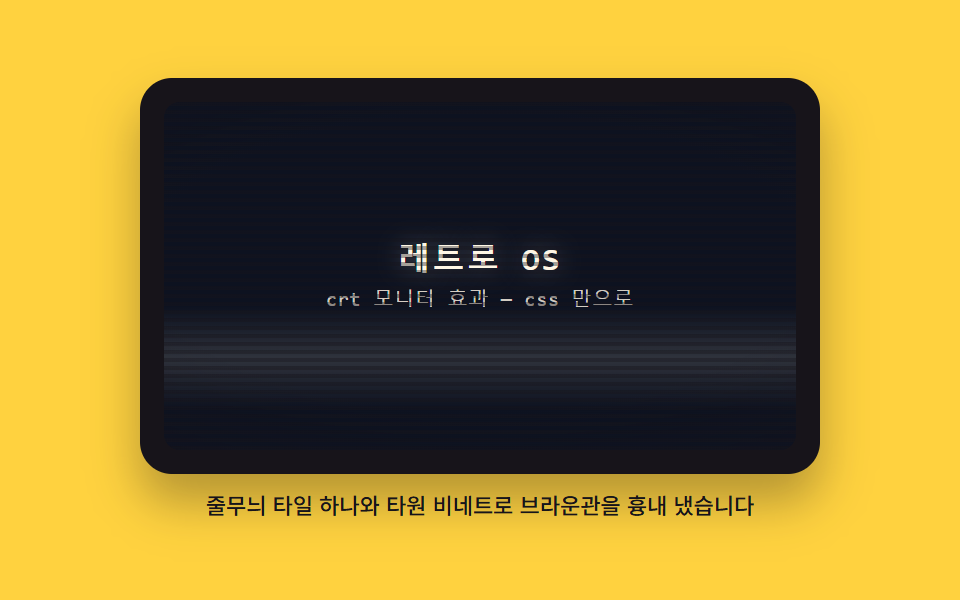
横縞をひとつのタイルとして定義して画面全体に敷き、端へ行くほど暗くなる楕円の影を重ねてブラウン管の曲面ガラスを真似ます。明るい帯が一本、上から下へゆっくり流れます。
使いどころレトロな雰囲気が要るヒーロー背景
repeating-linear-gradientradial-gradientbackground-size
<main class="stage">
<figure class="crt">
  <div class="crt__bezel">
    <div class="crt__screen">
      <div class="crt__content">
        <p class="crt__title">レトロOS</p>
        <p class="crt__sub">CRTモニター効果 — CSSだけで</p>
      </div>
      <span class="crt__band" aria-hidden="true"></span>
      <span class="crt__lines" aria-hidden="true"></span>
      <span class="crt__vig" aria-hidden="true"></span>
    </div>
  </div>
  <figcaption class="crt__cap">縞タイル1枚と楕円ビネットでブラウン管を真似ました</figcaption>
</figure>
</main>
@use "../../../../site/static/demo-tokens" as *;
// CRT 스캔라인과 곡면 비네트 — 가로 줄무늬를 타일 하나(4px, 그 안 줄 위치 0 부터 2px)로 정의해
// background-size 로 반복시키고, radial-gradient 타원으로 가장자리로 갈수록 어두워지는 유리를 얹는다.
// 밝은 띠 하나가 translateY 로 위에서 아래로 흐른다. 화면 안쪽 바탕은 비토큰 배경 픽셀(짙은 남색)이다.
$duration: $dur-loop;
$easing: $ease-out;
$color: $subject-cream;
$mono: ui-monospace, SFMono-Regular, "SF Mono", Consolas, "Liberation Mono", monospace;
$glass: #0d1220; // 비토큰 배경 픽셀 — 브라운관 형광면의 짙은 남색 바탕(주변 토큰으로는 없는 색)
@include stage($stage-yellow);
.crt {
display: flex; flex-direction: column; gap: $sp-2;
width: min(100%, 340px); margin: 0;
}
// ── 모니터 껍데기
.crt__bezel {
box-sizing: border-box; padding: $sp-3;
background: $subject-ink; border-radius: $r-card;
box-shadow: $shadow-raised;
}
// ── 유리면 — 안의 도형은 전부 이 상자에 absolute 로 겹친다. 밖으로 나가면 잘린다
.crt__screen {
position: relative; overflow: hidden;
display: grid; place-items: center;
height: clamp(112px, 58vh, 196px);
background: $glass;
border-radius: $r-sm;
}
.crt__content {
position: relative; z-index: 1;
display: grid; gap: $sp-1; justify-items: center;
padding: $sp-2; text-align: center;
}
.crt__title {
margin: 0; color: $color;
font-family: $mono; font-weight: 700;
font-size: clamp(16px, 4.2vh, 22px); line-height: 1.2;
letter-spacing: .08em;
text-shadow: 0 0 12px rgba($subject-cream, .35); // 형광체 빛 번짐
}
.crt__sub {
margin: 0; color: rgba($subject-cream, .82);
font-family: $mono; font-weight: 500;
font-size: clamp(10px, 2.6vh, 12px); line-height: 1.4;
letter-spacing: .04em;
}
// ── 위에서 아래로 흐르는 밝은 띠 — transform 만 움직인다
.crt__band {
position: absolute; left: 0; right: 0; top: 0; z-index: 2;
height: 30%; pointer-events: none;
background: linear-gradient(to bottom,
transparent,
rgba($subject-cream, .08) 28%,
rgba($subject-cream, .14) 50%,
rgba($subject-cream, .08) 72%,
transparent);
animation-name: crtBand;
animation-duration: $duration;
animation-timing-function: linear;
animation-iteration-count: infinite;
}
// ── 스캔라인 — 타일(4px)을 background-size 로 정의하고 그 안에 줄 위치를 둔다
.crt__lines {
position: absolute; inset: 0; z-index: 3; pointer-events: none;
background-image: repeating-linear-gradient(to bottom,
rgba($subject-ink, .38) 0 2px,
transparent 2px 4px);
background-size: 100% 4px;
}
// ── 곡면 비네트 — 타원으로 가장자리가 감아 들어가는 유리
.crt__vig {
position: absolute; inset: 0; z-index: 4; pointer-events: none;
border-radius: inherit;
background: radial-gradient(ellipse 130% 105% at 50% 46%,
transparent 40%,
rgba($subject-ink, .18) 64%,
rgba($subject-ink, .55) 100%);
}
.crt__cap {
margin: 0; color: $subject-ink;
font-weight: 500; font-size: 11px; line-height: 1.4;
text-align: center;
}
// 띠는 화면 높이의 넉 배 남짓을 지나가므로 시작과 끝이 모두 화면 밖 — 루프 이음새가 보이지 않는다
@keyframes crtBand {
0% { transform: translateY(-110%); }
100% { transform: translateY(500%); }
}
// ── 좁은 화면: 껍데기와 캡션을 줄인다(화면 높이는 vh 기준이라 함께 줄어든다)
@media (max-width: 340px) {
.crt { gap: $sp-1; }
.crt__bezel { padding: $sp-2; }
.crt__cap { font-size: 10px; }
}
@media (prefers-reduced-motion: reduce) {
.crt__band { animation: none !important; }
}html, body {
margin: 0;
overflow: hidden;
}
.stage {
box-sizing: border-box;
min-height: 100vh;
display: grid;
place-items: center;
margin: 0;
background: #ffd23f;
font-family: -apple-system, "Segoe UI", "Noto Sans KR", sans-serif;
padding: clamp(8px, 4vw, 24px);
}
.crt {
display: flex;
flex-direction: column;
gap: 8px;
width: min(100%, 340px);
margin: 0;
}
.crt__bezel {
box-sizing: border-box;
padding: 12px;
background: #17141a;
border-radius: 16px;
box-shadow: 0 14px 24px rgba(23, 20, 26, 0.32);
}
.crt__screen {
position: relative;
overflow: hidden;
display: grid;
place-items: center;
height: clamp(112px, 58vh, 196px);
background: #0d1220;
border-radius: 8px;
}
.crt__content {
position: relative;
z-index: 1;
display: grid;
gap: 4px;
justify-items: center;
padding: 8px;
text-align: center;
}
.crt__title {
margin: 0;
color: #fff7e6;
font-family: ui-monospace, SFMono-Regular, "SF Mono", Consolas, "Liberation Mono", monospace;
font-weight: 700;
font-size: clamp(16px, 4.2vh, 22px);
line-height: 1.2;
letter-spacing: 0.08em;
text-shadow: 0 0 12px rgba(255, 247, 230, 0.35);
}
.crt__sub {
margin: 0;
color: rgba(255, 247, 230, 0.82);
font-family: ui-monospace, SFMono-Regular, "SF Mono", Consolas, "Liberation Mono", monospace;
font-weight: 500;
font-size: clamp(10px, 2.6vh, 12px);
line-height: 1.4;
letter-spacing: 0.04em;
}
.crt__band {
position: absolute;
left: 0;
right: 0;
top: 0;
z-index: 2;
height: 30%;
pointer-events: none;
background: linear-gradient(to bottom, transparent, rgba(255, 247, 230, 0.08) 28%, rgba(255, 247, 230, 0.14) 50%, rgba(255, 247, 230, 0.08) 72%, transparent);
animation-name: crtBand;
animation-duration: 2s;
animation-timing-function: linear;
animation-iteration-count: infinite;
}
.crt__lines {
position: absolute;
inset: 0;
z-index: 3;
pointer-events: none;
background-image: repeating-linear-gradient(to bottom, rgba(23, 20, 26, 0.38) 0 2px, transparent 2px 4px);
background-size: 100% 4px;
}
.crt__vig {
position: absolute;
inset: 0;
z-index: 4;
pointer-events: none;
border-radius: inherit;
background: radial-gradient(ellipse 130% 105% at 50% 46%, transparent 40%, rgba(23, 20, 26, 0.18) 64%, rgba(23, 20, 26, 0.55) 100%);
}
.crt__cap {
margin: 0;
color: #17141a;
font-weight: 500;
font-size: 11px;
line-height: 1.4;
text-align: center;
}
@keyframes crtBand {
0% {
transform: translateY(-110%);
}
100% {
transform: translateY(500%);
}
}
@media (max-width: 340px) {
.crt {
gap: 4px;
}
.crt__bezel {
padding: 8px;
}
.crt__cap {
font-size: 10px;
}
}
@media (prefers-reduced-motion: reduce) {
.crt__band {
animation: none !important;
}
}// CrtScreen — vanilla 판(run/023/demo/02-os-crt-scanline-curve/index.html) 의 React 포트.
// 가로 줄무늬를 타일 하나(4px)로 정의해 background-size 로 반복하고 radial-gradient 타원 비네트를
// 얹는다. 밝은 띠가 translateY 로 위에서 아래로 흐른다. 조작 상태가 없어 그림만 그린다.
import type { CSSProperties } from "react";
import styles from "./CrtScreen.module.scss";
export type CrtScreenProps = {
duration?: number;
easing?: string;
color?: string;
title?: string;
subtitle?: string;
caption?: string;
};
type Vars = CSSProperties & { "--duration"?: string; "--easing"?: string; "--color"?: string };
export default function CrtScreen(props: CrtScreenProps) {
const vars: Vars = {
"--duration": (props.duration ?? 2000) + "ms",
"--easing": props.easing ?? "ease-out",
"--color": props.color ?? "#fff7e6"
};
return (
<main className={styles.stage}>
<figure className={styles.crt} style={vars}>
<div className={styles.bezel}>
<div className={styles.screen}>
<div className={styles.content}>
<p className={styles.title}>{props.title ?? "레트로 OS"}</p>
<p className={styles.sub}>{props.subtitle ?? "crt 모니터 효과 — css 만으로"}</p>
</div>
<span className={styles.band} aria-hidden="true" />
<span className={styles.lines} aria-hidden="true" />
<span className={styles.vig} aria-hidden="true" />
</div>
</div>
<figcaption className={styles.cap}>
{props.caption ?? "줄무늬 타일 하나와 타원 비네트로 브라운관을 흉내 냈습니다"}
</figcaption>
</figure>
</main>
);
}02 CRT 走査線と曲面ビネット — 計測 累積面積 37.75% · 動いたフレーム 16/23GODRICH オリジナル · SCSS と React は zip に同梱 · css crt effect 9選 — レトロOS UI をコピペで
このデモが属する記事
 css crt effect 9選 — レトロOS UI をコピペでcss crt effect は、Windows 98 の画面を HTML・SCSS・JS だけで組み直すレトロ UI の定番です。ここに並べた9つの部品はあの頃の机の上をそのまま再現していて、ウィンドウは本当に動いて最小化します。走査線の この記事のデモをすべて見る