07下から満ちる積み上げ面グラフ
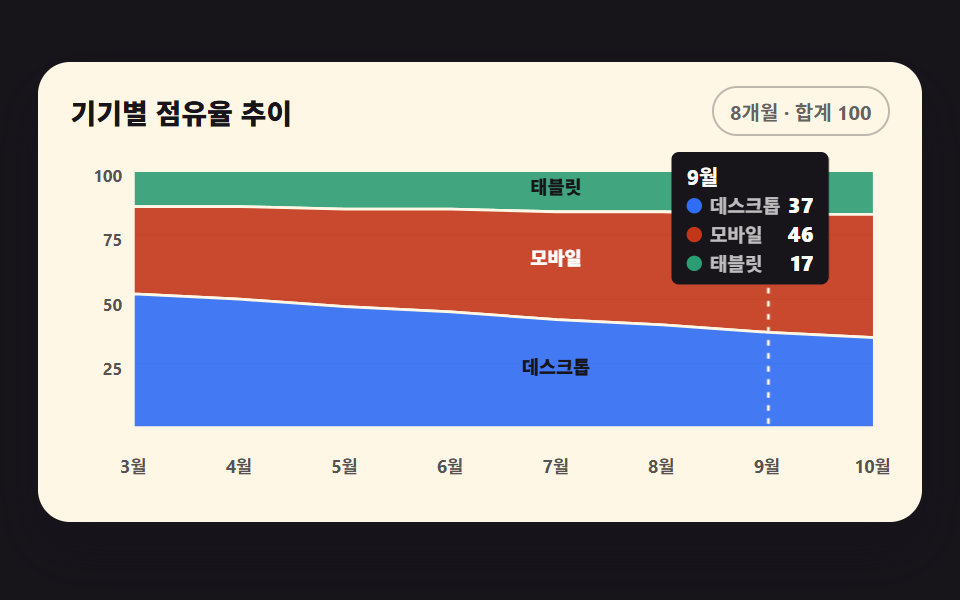
3系列の占有率を積み上げ面のpathに重ね、下の層から順に半透明で満ちていく
使いどころ端末・ブラウザ占有率の推移パネル
clip-pathopacitytransform-origin
<main class="stage">
<div class="ca is-demo" id="ca">
  <div class="ca__card">
    <div class="ca__head">
      <p class="ca__title">端末別占有率の推移</p>
      <span class="ca__chip">8か月 · 合計100</span>
    </div>
    <div class="ca__plot">
      <svg class="ca__svg" id="chart" viewBox="0 0 440 190" role="img" aria-label="デスクトップ・モバイル・タブレットの占有率積み上げ面グラフ。モバイルは34%から48%へ増え、デスクトップは52%から35%へ減る">
        <!-- 가로 격자 3단 — y 눈금(25/50/75)과 같은 간격 -->
        <g class="ca__grid">
          <line x1="34" y1="44.5" x2="432" y2="44.5"></line>
          <line x1="34" y1="79" x2="432" y2="79"></line>
          <line x1="34" y1="113.5" x2="432" y2="113.5"></line>
        </g>
        <g class="ca__ticks">
          <text x="28" y="14">100</text>
          <text x="28" y="48.5">75</text>
          <text x="28" y="83">50</text>
          <text x="28" y="117.5">25</text>
        </g>
        <!-- 밑변 軸 -->
        <line class="ca__axis" x1="34" y1="148" x2="432" y2="148"></line>
        <g class="ca__labels">
          <text x="34" y="170">3月</text>
          <text x="90.7" y="170">4月</text>
          <text x="147.4" y="170">5月</text>
          <text x="204.1" y="170">6月</text>
          <text x="260.9" y="170">7月</text>
          <text x="317.6" y="170">8月</text>
          <text x="374.3" y="170">9月</text>
          <text x="431" y="170">10月</text>
        </g>
        <!-- 레이어 3장 — 위부터 タブレット·モバイル·デスクトップ 순으로 그린다. d 는 JS 가 누적 경계로 채운다 -->
        <path class="ca__layer ca__layer--3" id="ly3" d=""></path>
        <path class="ca__layer ca__layer--2" id="ly2" d=""></path>
        <path class="ca__layer ca__layer--1" id="ly1" d=""></path>
        <!-- 호버 가이드선 — 포인터가 가리키는 달. x 는 JS -->
        <line class="ca__guide" id="guide" x1="0" y1="10" x2="0" y2="148"></line>
        <!-- 直接 라벨 — 레이어 이름이 각 영역 안에 산다. y 는 JS -->
        <text class="ca__lab ca__lab--1" id="lab1" x="261" text-anchor="middle">デスクトップ</text>
        <text class="ca__lab ca__lab--2" id="lab2" x="261" text-anchor="middle">モバイル</text>
        <text class="ca__lab ca__lab--3" id="lab3" x="261" text-anchor="middle">タブレット</text>
      </svg>
      <!-- 툴팁 — 달과 세 계열 값. plot 안 위쪽에 절대 배치. 계열은 한 줄에 하나씩 쌓아
           폭을 좁게 유지한다 (한 줄에 셋을 늘어놓으면 320px 에서 카드 밖으로 나간다) -->
      <div class="ca__tip" id="tip" aria-hidden="true">
        <span class="ca__tipMon" id="tipMon">9月</span>
        <span class="ca__tipRow"><i class="ca__sw ca__sw--1"></i><span class="ca__tipName">デスクトップ</span><b id="tv1">37</b></span>
        <span class="ca__tipRow"><i class="ca__sw ca__sw--2"></i><span class="ca__tipName">モバイル</span><b id="tv2">46</b></span>
        <span class="ca__tipRow"><i class="ca__sw ca__sw--3"></i><span class="ca__tipName">タブレット</span><b id="tv3">17</b></span>
      </div>
      <!-- 스크린리더용 데이터 표 — 화면에 안 보인다 -->
      <table class="ca__sr">
        <caption>端末別占有率の推移</caption>
        <thead><tr><th>月別</th><th>デスクトップ</th><th>モバイル</th><th>タブレット</th></tr></thead>
        <tbody id="srBody"></tbody>
      </table>
    </div>
  </div>
</div>
</main>@use "../../../../site/static/demo-tokens" as *;
// 아래에서 채워지는 누적 영역 그래프 — 실제 사용에선 JS 가 누적 경계선으로 세 레이어의 path 를 채워
// 완성 형태가 곧 뜨고, pointermove 로 가이드선과 세 계열 값 툴팁이 따라온다. 격자 미리보기(.is-demo)는
// 같은 레이어에 clip-path 위프를 얹어 아래 레이어부터 차례로 채워 올라가는 모양을 2초 루프로 보여 준다.
$duration: $dur-loop;
$easing: linear; // 면이 차오르는 속도는 일정 — 게이지가 아니라 채움이라 등속이 자연스럽다
$color: $chart-1;
@include stage($stage-ink);
.ca { display: flex; justify-content: center; width: 100%; padding-bottom: $sp-2; }
.ca__card {
width: min(100%, 420px); background: $subject-cream; border-radius: $r-card;
box-shadow: $shadow-raised; padding: $sp-3 $sp-4 $sp-2;
}
.ca__head { display: flex; align-items: center; justify-content: space-between; gap: $sp-2; margin-bottom: $sp-2; }
.ca__title { margin: 0; font-weight: 800; font-size: clamp(12px, 3vw, 14px); color: $subject-ink; }
.ca__chip {
font-weight: 700; font-size: clamp(9px, 2.4vw, 10px); color: rgba(23, 20, 26, .66);
border: 1px solid rgba(23, 20, 26, .28); border-radius: $r-pill; padding: $sp-1 $sp-2;
}
.ca__plot { position: relative; }
.ca__svg { display: block; width: 100%; height: auto; touch-action: none; cursor: crosshair; }
.ca__grid line { stroke: rgba(23, 20, 26, .12); stroke-width: 1; }
.ca__ticks text, .ca__labels text {
fill: rgba(23, 20, 26, .72); font-weight: 700; font-size: 9px;
text-anchor: end; dominant-baseline: middle;
}
.ca__labels text { text-anchor: middle; font-size: 9.5px; }
.ca__axis { stroke: rgba(23, 20, 26, .32); stroke-width: 1.5; }
// 레이어 — 계열 색은 차트 토큰 고정 순서(1 블루, 2 레드오렌지, 3 딥민트).
// 겹침 2px 표면 간격 규칙 대신 경계선을 크림 stroke 1.5px 로 긋는다
.ca__layer { fill-opacity: .9; stroke: $subject-cream; stroke-width: 1.5; }
.ca__layer--1 { fill: $color; }
.ca__layer--2 { fill: $chart-2; }
.ca__layer--3 { fill: $chart-3; }
// 직접 라벨 — 글자색은 그 라벨이 얹힌 면의 밝기로 고른다(면색은 손대지 않는다).
// 블루(#a0afd0)·딥민트(#41a67f) 위에서는 잉크가 4.68:1·6.07:1 로 AA 를 넘는다
.ca__lab {
fill: $subject-ink;
font-weight: 800; font-size: 10px; dominant-baseline: middle;
}
// 레드오렌지 면(#bb8174)만 잉크가 3.91:1 로 미달이라 흰 글자로 뒤집는다 — 4.66:1
.ca__lab--2 { fill: $stage-paper; }
// 계열 영역(면)은 dataviz 검증을 통과한 $chart-1~3 그대로 — 고치지 않는다
// 호버 가이드선 — 포인터가 가리키는 달을 세로로 짚는다
.ca__guide { stroke: $subject-cream; stroke-width: 1.5; stroke-dasharray: 3 4; opacity: 0; }
.ca__guide.is-on { opacity: .95; }
// 툴팁 — 그래프 안 위쪽에 절대 배치한다. 카드 위로 띄우면 폰 폭에서 카드 밖으로 나간다.
// transform-origin 은 가이드선이 내려가는 위쪽 변(50% 0) — 붙는 지점이 있는 요소라
// 중심이 아닌 원점을 쓴다 (스스로 완결한 요소였다면 중심에서 커져야 한다)
.ca__tip {
position: absolute; top: $sp-1; transform: translate(-50%, -4px) scale(.96);
transform-origin: 50% 0;
display: flex; flex-direction: column; pointer-events: none;
background: $subject-ink; color: $stage-paper; border-radius: $r-xs;
padding: $sp-1 $sp-2; font-weight: 700; font-size: 10px; white-space: nowrap;
opacity: 0;
}
.ca__tip.is-on { opacity: 1; transform: translate(-50%, 0) scale(1); transition: opacity $dur-quick $ease-out, transform $dur-quick $ease-out; }
.ca__tipMon { font-size: 11px; }
.ca__tipRow { display: flex; align-items: center; gap: $sp-1; }
.ca__tipName { opacity: .72; }
.ca__tipRow b { font-size: 11px; margin-left: auto; }
.ca__sw { width: 8px; height: 8px; border-radius: 50%; display: inline-block; }
.ca__sw--1 { background: $color; }
.ca__sw--2 { background: $chart-2; }
.ca__sw--3 { background: $chart-3; }
// 스크린리더용 표 — fixed 로 캔버스 밖에 둔다
.ca__sr {
position: fixed; top: 0; left: -640px; width: 320px; margin: 0;
}
// ── 미리보기 루프: 0~4% 빈 칸 → 데스크톱(4~26%) → 모바일(28~48%) → 태블릿(50~66%)이 아래부터
// 차례로 채워 올라간다 → 70% 에 레이어 이름 라벨 셋과 가이드선·툴팁(9월)이 **한 번에** 컷으로 뜬다
// → 96% 까지 완성 상태로 머문다. 위프는 이징 연속 — steps 와 clip-path 를 함께 쓰면 보간이 컷으로
// 죽는다. 되돌림은 98%(24프레임의 마지막 장이 95.8% 지점이라 그 뒤는 샘플이 없다) — 루프 안에서
// 접으면 "세 층이 한꺼번에 내려앉는 장" 이 최대 변화가 돼 poster 로 뽑힌다
// (실측 2026-09-12: 91.7% 프레임 22.573%). 라벨·툴팁을 완성 시점에 몰아 컷하는 것도 같은 이유다 —
// 그래야 최대 변화 프레임이 **다 그려진 장**이 된다.
.ca.is-demo .ca__layer {
animation-duration: $duration;
animation-timing-function: $easing;
animation-iteration-count: infinite;
}
.ca.is-demo .ca__layer--1 { animation-name: caWipe1; }
.ca.is-demo .ca__layer--2 { animation-name: caWipe2; }
.ca.is-demo .ca__layer--3 { animation-name: caWipe3; }
@keyframes caWipe1 {
0%, 4% { clip-path: inset(100% 0 0 0); }
26%, 96% { clip-path: inset(0 0 0 0); }
98%, 100% { clip-path: inset(100% 0 0 0); }
}
@keyframes caWipe2 {
0%, 28% { clip-path: inset(100% 0 0 0); }
48%, 96% { clip-path: inset(0 0 0 0); }
98%, 100% { clip-path: inset(100% 0 0 0); }
}
@keyframes caWipe3 {
0%, 50% { clip-path: inset(100% 0 0 0); }
66%, 96% { clip-path: inset(0 0 0 0); }
98%, 100% { clip-path: inset(100% 0 0 0); }
}
// 직접 라벨 셋과 가이드선·툴팁(9월은 JS 가 미리 놓아 둔다)은 세 레이어가 다 채워진 70% 에 한 번에
// 컷으로 붙는다. 시점을 animation-delay 로 쪼개지 않는 이유 두 가지 — ① 컷(steps) 애니메이션에 지연을
// 주면 루프 끝에서 한 바퀴가 어긋난다 ② 완성 시점에 몰아야 그 프레임이 최대 변화가 된다(poster)
.ca.is-demo .ca__lab,
.ca.is-demo .ca__tip,
.ca.is-demo .ca__guide {
animation-name: caReveal;
animation-duration: $duration;
animation-timing-function: steps(1, end);
animation-iteration-count: infinite;
}
@keyframes caReveal {
0%, 68% { opacity: 0; }
70%, 96% { opacity: 1; }
98%, 100% { opacity: 0; }
}
@media (max-width: 340px) {
// 320px 에서 8개 라벨이 겹친다 — 홀수 달만 남긴다 (짝수 달은 표·툴팁이 값을 갖고 있다)
.ca__labels text:nth-child(even) { display: none; }
.ca__labels text { font-size: 9px; }
.ca__card { padding: $sp-2 $sp-3 $sp-1; }
}
@media (prefers-reduced-motion: reduce) {
.ca.is-demo .ca__layer,
.ca.is-demo .ca__lab,
.ca.is-demo .ca__tip,
.ca.is-demo .ca__guide { animation: none !important; }
// 움직임 없이 세 레이어가 다 채워진 최종 상태로 점프한다
.ca.is-demo .ca__layer { clip-path: none !important; }
.ca.is-demo .ca__lab { opacity: 1 !important; }
}html, body {
margin: 0;
overflow: hidden;
}
.stage {
box-sizing: border-box;
min-height: 100vh;
display: grid;
place-items: center;
margin: 0;
background: #17141a;
font-family: -apple-system, "Segoe UI", "Noto Sans KR", sans-serif;
padding: clamp(8px, 4vw, 24px);
}
.ca {
display: flex;
justify-content: center;
width: 100%;
padding-bottom: 8px;
}
.ca__card {
width: min(100%, 420px);
background: #fff7e6;
border-radius: 16px;
box-shadow: 0 14px 24px rgba(23, 20, 26, 0.32);
padding: 12px 16px 8px;
}
.ca__head {
display: flex;
align-items: center;
justify-content: space-between;
gap: 8px;
margin-bottom: 8px;
}
.ca__title {
margin: 0;
font-weight: 800;
font-size: clamp(12px, 3vw, 14px);
color: #17141a;
}
.ca__chip {
font-weight: 700;
font-size: clamp(9px, 2.4vw, 10px);
color: rgba(23, 20, 26, 0.66);
border: 1px solid rgba(23, 20, 26, 0.28);
border-radius: 999px;
padding: 4px 8px;
}
.ca__plot {
position: relative;
}
.ca__svg {
display: block;
width: 100%;
height: auto;
touch-action: none;
cursor: crosshair;
}
.ca__grid line {
stroke: rgba(23, 20, 26, 0.12);
stroke-width: 1;
}
.ca__ticks text, .ca__labels text {
fill: rgba(23, 20, 26, 0.72);
font-weight: 700;
font-size: 9px;
text-anchor: end;
dominant-baseline: middle;
}
.ca__labels text {
text-anchor: middle;
font-size: 9.5px;
}
.ca__axis {
stroke: rgba(23, 20, 26, 0.32);
stroke-width: 1.5;
}
.ca__layer {
fill-opacity: 0.9;
stroke: #fff7e6;
stroke-width: 1.5;
}
.ca__layer--1 {
fill: #2f6df6;
}
.ca__layer--2 {
fill: #c2361a;
}
.ca__layer--3 {
fill: #2b9d74;
}
.ca__lab {
fill: #17141a;
font-weight: 800;
font-size: 10px;
dominant-baseline: middle;
}
.ca__lab--2 {
fill: #ffffff;
}
.ca__guide {
stroke: #fff7e6;
stroke-width: 1.5;
stroke-dasharray: 3 4;
opacity: 0;
}
.ca__guide.is-on {
opacity: 0.95;
}
.ca__tip {
position: absolute;
top: 4px;
transform: translate(-50%, -4px) scale(0.96);
transform-origin: 50% 0;
display: flex;
flex-direction: column;
pointer-events: none;
background: #17141a;
color: #ffffff;
border-radius: 4px;
padding: 4px 8px;
font-weight: 700;
font-size: 10px;
white-space: nowrap;
opacity: 0;
}
.ca__tip.is-on {
opacity: 1;
transform: translate(-50%, 0) scale(1);
transition: opacity 220ms ease-out, transform 220ms ease-out;
}
.ca__tipMon {
font-size: 11px;
}
.ca__tipRow {
display: flex;
align-items: center;
gap: 4px;
}
.ca__tipName {
opacity: 0.72;
}
.ca__tipRow b {
font-size: 11px;
margin-left: auto;
}
.ca__sw {
width: 8px;
height: 8px;
border-radius: 50%;
display: inline-block;
}
.ca__sw--1 {
background: #2f6df6;
}
.ca__sw--2 {
background: #c2361a;
}
.ca__sw--3 {
background: #2b9d74;
}
.ca__sr {
position: fixed;
top: 0;
left: -640px;
width: 320px;
margin: 0;
}
.ca.is-demo .ca__layer {
animation-duration: 2s;
animation-timing-function: linear;
animation-iteration-count: infinite;
}
.ca.is-demo .ca__layer--1 {
animation-name: caWipe1;
}
.ca.is-demo .ca__layer--2 {
animation-name: caWipe2;
}
.ca.is-demo .ca__layer--3 {
animation-name: caWipe3;
}
@keyframes caWipe1 {
0%, 4% {
clip-path: inset(100% 0 0 0);
}
26%, 96% {
clip-path: inset(0 0 0 0);
}
98%, 100% {
clip-path: inset(100% 0 0 0);
}
}
@keyframes caWipe2 {
0%, 28% {
clip-path: inset(100% 0 0 0);
}
48%, 96% {
clip-path: inset(0 0 0 0);
}
98%, 100% {
clip-path: inset(100% 0 0 0);
}
}
@keyframes caWipe3 {
0%, 50% {
clip-path: inset(100% 0 0 0);
}
66%, 96% {
clip-path: inset(0 0 0 0);
}
98%, 100% {
clip-path: inset(100% 0 0 0);
}
}
.ca.is-demo .ca__lab,
.ca.is-demo .ca__tip,
.ca.is-demo .ca__guide {
animation-name: caReveal;
animation-duration: 2s;
animation-timing-function: steps(1, end);
animation-iteration-count: infinite;
}
@keyframes caReveal {
0%, 68% {
opacity: 0;
}
70%, 96% {
opacity: 1;
}
98%, 100% {
opacity: 0;
}
}
@media (max-width: 340px) {
.ca__labels text:nth-child(even) {
display: none;
}
.ca__labels text {
font-size: 9px;
}
.ca__card {
padding: 8px 12px 4px;
}
}
@media (prefers-reduced-motion: reduce) {
.ca.is-demo .ca__layer,
.ca.is-demo .ca__lab,
.ca.is-demo .ca__tip,
.ca.is-demo .ca__guide {
animation: none !important;
}
.ca.is-demo .ca__layer {
clip-path: none !important;
}
.ca.is-demo .ca__lab {
opacity: 1 !important;
}
}var MON = ['3月', '4月', '5月', '6月', '7月', '8月', '9月', '10月'];
var DESK = [52, 50, 47, 45, 42, 40, 37, 35]; // 세 계열을 더하면 매월 100
var MOB = [34, 36, 38, 40, 42, 44, 46, 48];
var TAB = [14, 14, 15, 15, 16, 16, 17, 17];
var PAD_L = 34, PAD_R = 432, TOP = 10, BASE = 148; // viewBox 좌표
var ca = document.getElementById('ca');
var svg = document.getElementById('chart');
var tip = document.getElementById('tip');
var tipMon = document.getElementById('tipMon');
var tv1 = document.getElementById('tv1');
var tv2 = document.getElementById('tv2');
var tv3 = document.getElementById('tv3');
var guide = document.getElementById('guide');
// 스케일 함수 — 月 인덱스와 점유율(0-100)을 viewBox 좌표로 바꾼다
function xAt(i) { return PAD_L + (PAD_R - PAD_L) * i / (MON.length - 1); }
function yAt(v) { return BASE - (BASE - TOP) * v / 100; }
// 누적 경계선 — 바닥(0), デスクトップ 위, モバイル 위, 천장(100). 아래부터 쌓는 순서 그대로다
var B = [
MON.map(function () { return 0; }),
DESK.slice(),
DESK.map(function (v, i) { return v + MOB[i]; }),
MON.map(function () { return 100; })
];
// k번째 레이어 path — 위 경계를 좌에서 우로 걷고 아래 경계를 거꾸로 돌아와 면적을 닫는다
function layerPath(k) {
var d = '';
for (var i = 0; i < MON.length; i++) d += (i ? ' L' : 'M') + xAt(i).toFixed(1) + ',' + yAt(B[k + 1][i]).toFixed(1);
for (var j = MON.length - 1; j >= 0; j--) d += ' L' + xAt(j).toFixed(1) + ',' + yAt(B[k][j]).toFixed(1);
return d + ' Z';
}
document.getElementById('ly1').setAttribute('d', layerPath(0)); // デスクトップ: 바닥부터
document.getElementById('ly2').setAttribute('d', layerPath(1)); // モバイル: デスクトップ 위
document.getElementById('ly3').setAttribute('d', layerPath(2)); // タブレット: モバイル 위
// 直接 라벨 — 6월과 7月 사이(가운데)의 각 밴드 한가운데에 둔다
document.getElementById('lab1').setAttribute('y', yAt(B[1][3] / 2).toFixed(1));
document.getElementById('lab2').setAttribute('y', yAt(B[1][3] + MOB[3] / 2).toFixed(1));
document.getElementById('lab3').setAttribute('y', yAt(B[2][3] + TAB[3] / 2).toFixed(1));
// 스크린리더 표 채우기
var srBody = document.getElementById('srBody');
MON.forEach(function (m, i) {
var tr = document.createElement('tr');
var th = document.createElement('th'); th.setAttribute('scope', 'row'); th.textContent = m;
tr.appendChild(th);
[DESK[i], MOB[i], TAB[i]].forEach(function (v) {
var td = document.createElement('td'); td.textContent = v + '%'; tr.appendChild(td);
});
srBody.appendChild(tr);
});
// 툴팁과 가이드선 — 달을 받아 값을 채우고 x 위치를 잡는다. 툴팁은 양 끝에서 카드 밖으로 나가지 않게 17-83% 로 Clamp
function placeTip(i) {
tipMon.textContent = MON[i];
tv1.textContent = DESK[i]; tv2.textContent = MOB[i]; tv3.textContent = TAB[i];
var gx = xAt(i);
guide.setAttribute('x1', gx.toFixed(1)); guide.setAttribute('x2', gx.toFixed(1));
var pct = Math.min(83, Math.max(17, gx / 440 * 100));
tip.style.left = pct.toFixed(2) + '%';
}
placeTip(6); // 9月 — 모바일이 데스크톱을 앞선 달
// 포인터의 x 위치에서 가장 가까운 달을 찾는다
svg.addEventListener('pointermove', function (e) {
if (ca.classList.contains('is-demo')) { ca.classList.remove('is-demo'); }
var r = svg.getBoundingClientRect();
var vx = (e.clientX - r.left) / r.width * 440;
var i = Math.round((vx - PAD_L) / ((PAD_R - PAD_L) / (MON.length - 1)));
i = Math.max(0, Math.min(MON.length - 1, i));
placeTip(i);
tip.classList.add('is-on');
guide.classList.add('is-on');
});
svg.addEventListener('pointerleave', function () {
tip.classList.remove('is-on');
guide.classList.remove('is-on');
});// ChartAreaStack — vanilla 판(run/289/demo/07-chart-draw-area-stack/index.html) 의 React 포트.
// 세 계열 점유율을 누적 면적 path 로 쌓는 누적 영역 그래프.
// 사람이 포인터를 올리면 미리보기 루프(.isDemo)가 떨어지고 가이드선과 툴팁이 따라온다.
import { useRef, useState } from "react";
import type { CSSProperties } from "react";
import styles from "./ChartAreaStack.module.scss";
export type ChartAreaStackProps = {
/** 격자 미리보기용 2초 자동 루프. 사람이 포인터를 올리면 꺼진다 */
demo?: boolean;
};
type PtrEvt = { clientX: number };
type Box<T> = { current: T | null };
const MON = ["3월", "4월", "5월", "6월", "7월", "8월", "9월", "10월"];
const DESK = [52, 50, 47, 45, 42, 40, 37, 35]; // 세 계열을 더하면 매월 100
const MOB = [34, 36, 38, 40, 42, 44, 46, 48];
const TAB = [14, 14, 15, 15, 16, 16, 17, 17];
const VW = 440, VH = 190;
const PAD_L = 34, PAD_R = 432, TOP = 10, BASE = 148; // viewBox 좌표
const PREVIEW_IDX = 6; // 9월 — 모바일이 데스크톱을 앞선 달
/** 월 인덱스와 점유율(0-100)을 viewBox 좌표로 바꾼다 */
const xAt = (i: number) => PAD_L + (PAD_R - PAD_L) * i / (MON.length - 1);
const yAt = (v: number) => BASE - (BASE - TOP) * v / 100;
/** 누적 경계선 — 바닥(0), 데스크톱 위, 모바일 위, 천장(100). 아래부터 쌓는 순서 그대로다 */
const B: number[][] = [
MON.map(() => 0),
DESK.slice(),
DESK.map((v, i) => v + MOB[i]),
MON.map(() => 100)
];
/** k번째 레이어 path — 위 경계를 좌에서 우로 걷고 아래 경계를 거꾸로 돌아와 면적을 닫는다 */
function layerPath(k: number): string {
let d = "";
for (let i = 0; i < MON.length; i++) d += (i ? " L" : "M") + xAt(i).toFixed(1) + "," + yAt(B[k + 1][i]).toFixed(1);
for (let j = MON.length - 1; j >= 0; j--) d += " L" + xAt(j).toFixed(1) + "," + yAt(B[k][j]).toFixed(1);
return d + " Z";
}
/** 직접 라벨 — 6월과 7월 사이(가운데)의 각 밴드 한가운데 y */
const LAB_Y = [yAt(B[1][3] / 2), yAt(B[1][3] + MOB[3] / 2), yAt(B[2][3] + TAB[3] / 2)];
/** 툴팁 x — 양 끝에서 카드 밖으로 나가지 않게 17-83% 로 Clamp */
function tipLeft(i: number): CSSProperties {
const pct = Math.min(83, Math.max(17, xAt(i) / VW * 100));
return { left: pct.toFixed(2) + "%" };
}
export default function ChartAreaStack({ demo = true }: ChartAreaStackProps) {
const svgRef: Box<SVGSVGElement> = useRef(null);
const [live, setLive] = useState(!demo);
const [mon, setMon] = useState(PREVIEW_IDX);
const [hot, setHot] = useState(false); // 포인터가 svg 위에 있는 동안만 툴팁·가이드선이 켜진다
/** pointermove — 포인터의 x 위치에서 가장 가까운 달을 찾는다 */
function onMove(e: PtrEvt) {
const svg = svgRef.current;
if (!svg) return;
setLive(true); // live 를 켜야 .isDemo 루프가 떨어진다 (live=false 가 미리보기 상태다)
setHot(true);
const r = svg.getBoundingClientRect();
const vx = (e.clientX - r.left) / r.width * VW;
let i = Math.round((vx - PAD_L) / ((PAD_R - PAD_L) / (MON.length - 1)));
setMon(Math.max(0, Math.min(MON.length - 1, i)));
}
const rootCls = [styles.root, live ? "" : styles.isDemo].filter(Boolean).join(" ");
return (
<div className={rootCls}>
<div className={styles.card}>
<div className={styles.head}>
<p className={styles.title}>기기별 점유율 추이</p>
<span className={styles.chip}>8개월 · 합계 100</span>
</div>
<div className={styles.plot}>
<svg
className={styles.svg} ref={svgRef} viewBox={`0 0 ${VW} ${VH}`} role="img"
aria-label="데스크톱·모바일·태블릿 점유율 누적 영역 그래프, 모바일은 34%에서 48%로 늘고 데스크톱은 52%에서 35%로 준다"
onPointerMove={onMove}
onPointerLeave={() => setHot(false)}
>
{/* 가로 격자 3단 — y 눈금(25/50/75)과 같은 간격 */}
<g className={styles.grid}>
{[44.5, 79, 113.5].map((y) => (
<line key={y} x1={PAD_L} y1={y} x2={PAD_R} y2={y} />
))}
</g>
<g className={styles.ticks}>
<text x={28} y={14}>100</text>
<text x={28} y={48.5}>75</text>
<text x={28} y={83}>50</text>
<text x={28} y={117.5}>25</text>
</g>
{/* 밑변 축 */}
<line className={styles.axis} x1={PAD_L} y1={BASE} x2={PAD_R} y2={BASE} />
<g className={styles.labels}>
{MON.map((m, i) => (
<text key={m} x={xAt(i).toFixed(1)} y={170}>{m}</text>
))}
</g>
{/* 레이어 3장 — 위부터 태블릿·모바일·데스크톱 순으로 그린다 */}
<path className={styles.layer3} d={layerPath(2)} />
<path className={styles.layer2} d={layerPath(1)} />
<path className={styles.layer1} d={layerPath(0)} />
{/* 호버 가이드선 — 포인터가 가리키는 달 */}
<line className={[styles.guide, hot ? styles.guideIsOn : ""].filter(Boolean).join(" ")}
x1={xAt(mon).toFixed(1)} y1={TOP} x2={xAt(mon).toFixed(1)} y2={BASE} />
{/* 직접 라벨 — 레이어 이름이 각 영역 안에 산다 */}
<text className={styles.lab} x={261} y={LAB_Y[0].toFixed(1)} textAnchor="middle">데스크톱</text>
<text className={`${styles.lab} ${styles.lab2}`} x={261} y={LAB_Y[1].toFixed(1)} textAnchor="middle">모바일</text>
<text className={styles.lab} x={261} y={LAB_Y[2].toFixed(1)} textAnchor="middle">태블릿</text>
</svg>
{/* 툴팁 — 달과 세 계열 값. plot 안 위쪽에 절대 배치 */}
<div className={[styles.tip, hot ? styles.tipIsOn : ""].filter(Boolean).join(" ")} aria-hidden="true" style={tipLeft(mon)}>
<span className={styles.tipMon}>{MON[mon]}</span>
<span className={styles.tipRow}><i className={styles.sw1}></i><span className={styles.tipName}>데스크톱</span><b>{DESK[mon]}</b></span>
<span className={styles.tipRow}><i className={styles.sw2}></i><span className={styles.tipName}>모바일</span><b>{MOB[mon]}</b></span>
<span className={styles.tipRow}><i className={styles.sw3}></i><span className={styles.tipName}>태블릿</span><b>{TAB[mon]}</b></span>
</div>
{/* 스크린리더용 데이터 표 — 화면에 안 보인다 */}
<table className={styles.sr}>
<caption>기기별 점유율 추이</caption>
<thead><tr><th scope="col">월별</th><th scope="col">데스크톱</th><th scope="col">모바일</th><th scope="col">태블릿</th></tr></thead>
<tbody>
{MON.map((m, i) => (
<tr key={m}><th scope="row">{m}</th><td>{DESK[i]}%</td><td>{MOB[i]}%</td><td>{TAB[i]}%</td></tr>
))}
</tbody>
</table>
</div>
</div>
</div>
);
}07 下から満ちる積み上げ面グラフ — 計測 累積面積 33.087% · 動いたフレーム 16/23GODRICH オリジナル · SCSS と React は zip に同梱 · css グラフ をSVGで描く9種 — ライブラリなし
このデモが属する記事
 css グラフ をSVGで描く9種 — ライブラリなしcss グラフとは、数値を線・棒・面という目に見えるかたちに変える、いちばん軽い方法のことです。ここにある9種(折れ線・縦棒・ドーナツ・レーダー・ヒートマップ・スパークライン・積み上げ面・ツリーマップ・ゲージ)は、ライブラリなしでSVGの座 この記事のデモをすべて見る