01パネル実測高さの差が伸ばすタブコンテナ
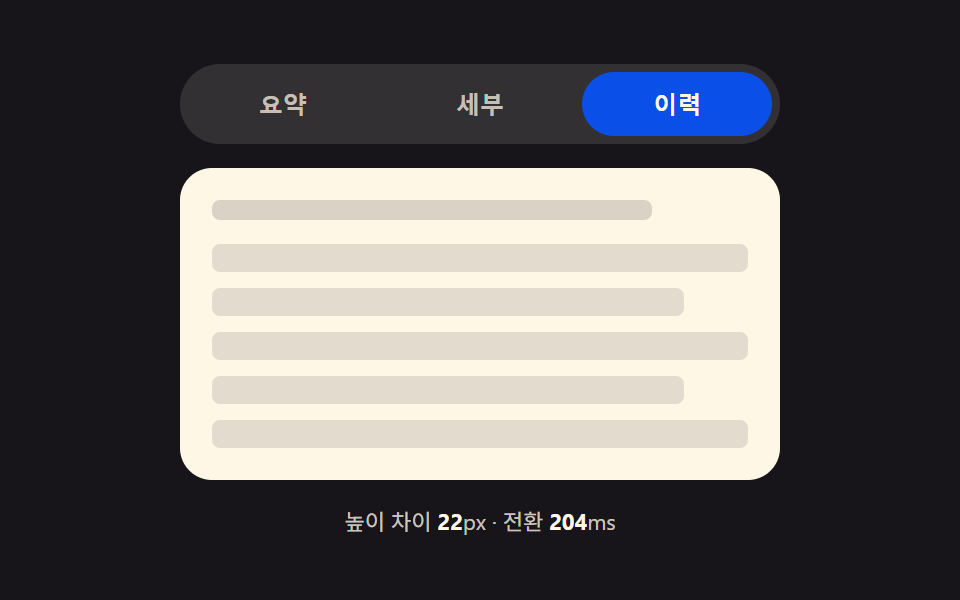
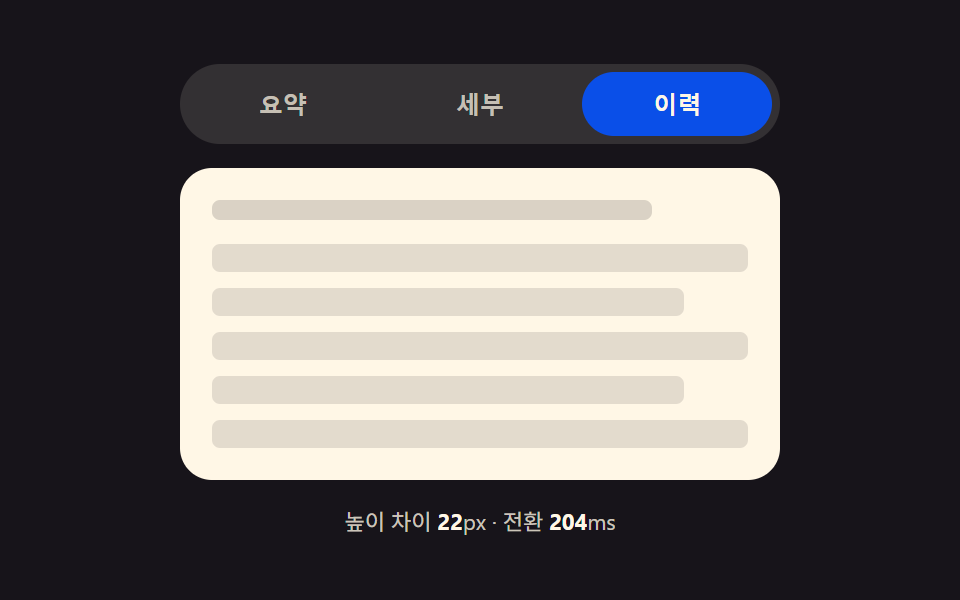
切り替え直前に2枚のパネルの実測高さを測ってその差(px)を求め、遷移中はコンテナの高さがその差分だけ補間されて次のパネルの高さに合わせられる。
使いどころ設定画面・プロフィールタブ・FAQセクション
getBoundingClientRect()wrap.style.height180~620ms
<main class="stage">
<div class="tp is-demo" id="tp">
  <div class="tp__tabs" role="tablist" aria-label="設定タブ">
    <button type="button" class="tp__tab is-active" role="tab" id="tp-tab-0" aria-selected="true" aria-controls="tp-panel-0" data-idx="0">概要</button>
    <button type="button" class="tp__tab" role="tab" id="tp-tab-1" aria-selected="false" aria-controls="tp-panel-1" data-idx="1" tabindex="-1">詳細</button>
    <button type="button" class="tp__tab" role="tab" id="tp-tab-2" aria-selected="false" aria-controls="tp-panel-2" data-idx="2" tabindex="-1">履歴</button>
  </div>
  <div class="tp__wrap" id="tpWrap">
    <div class="tp__panel" id="tp-panel-0" role="tabpanel" aria-labelledby="tp-tab-0" tabindex="0">
      <p class="tp__line tp__line--a"></p>
      <p class="tp__line tp__line--b"></p>
    </div>
    <div class="tp__panel" id="tp-panel-1" role="tabpanel" aria-labelledby="tp-tab-1" tabindex="0" hidden>
      <p class="tp__line tp__line--a"></p>
      <p class="tp__line tp__line--b"></p>
      <p class="tp__line tp__line--c"></p>
      <div class="tp__bars"><span></span><span></span><span></span><span></span></div>
    </div>
    <div class="tp__panel" id="tp-panel-2" role="tabpanel" aria-labelledby="tp-tab-2" tabindex="0" hidden>
      <p class="tp__line tp__line--a"></p>
      <ul class="tp__list">
        <li></li><li></li><li></li><li></li><li></li>
      </ul>
    </div>
  </div>
  <p class="tp__meta" id="tpMeta">高さの差 <b id="tpDiff">0</b>px・遷移 <b id="tpDur">0</b>ms</p>
</div>
</main>@use "../../../../site/static/demo-tokens" as *;
// 계산 겹: index.html select() 가 getBoundingClientRect 로 숨은/보이는 패널의 실측 높이를 재
// 그 차이(px)를 BASE_MS + diff*MS_PER_PX 식에 넣어 전환 시간을 정하고, wrap 의 height 를 그 시간 동안
// 이전 값에서 다음 패널 높이로 트랜지션한다 — 차이가 클수록 천천히, 작으면 짧게 늘어난다.
@include stage($stage-ink);
.tp { width: min(100%, 300px); display: flex; flex-direction: column; gap: $sp-3; }
.tp__tabs { display: flex; gap: $sp-1; background: rgba($subject-cream, .12); padding: $sp-1; border-radius: $r-pill; }
.tp__tab {
flex: 1 1 0; border: none; background: transparent; border-radius: $r-pill; cursor: pointer;
padding: $sp-2 $sp-3; font-size: 12px; font-weight: 700; color: rgba($subject-cream, .72);
}
.tp__tab.is-active { background: $subject-blue-deep; color: $subject-cream; }
.tp__tab:focus-visible { outline: 2px solid $subject-cream; outline-offset: 2px; }
.tp__wrap {
position: relative; overflow: hidden; border-radius: $r-card; background: $subject-cream;
transition: height var(--tp-dur, #{$dur-base}) $ease-out;
}
.tp__panel { padding: $sp-4; box-sizing: border-box; }
.tp__line { height: 10px; border-radius: $r-xs; background: rgba($subject-ink, .16); margin: 0 0 $sp-2; }
.tp__line--a { width: 82%; }
.tp__line--b { width: 58%; }
.tp__line--c { width: 68%; }
.tp__bars { display: flex; gap: $sp-2; margin-top: $sp-3; align-items: flex-end; height: 44px; }
.tp__bars span { flex: 1 1 0; border-radius: $r-xs $r-xs 0 0; background: $subject-blue; }
.tp__bars span:nth-child(1) { height: 60%; }
.tp__bars span:nth-child(2) { height: 100%; }
.tp__bars span:nth-child(3) { height: 40%; }
.tp__bars span:nth-child(4) { height: 78%; }
.tp__list { list-style: none; margin: $sp-3 0 0; padding: 0; display: flex; flex-direction: column; gap: $sp-2; }
.tp__list li { height: 14px; border-radius: $r-xs; background: rgba($subject-ink, .12); }
.tp__list li:nth-child(2n) { width: 88%; }
.tp__meta { margin: 0; font-size: 11px; color: rgba($subject-cream, .78); text-align: center; }
.tp__meta b { color: $subject-cream; font-weight: 700; }
@media (max-width: 340px) {
.tp { width: 100%; }
.tp__tab { font-size: 11px; padding: $sp-1 $sp-2; }
}
@media (prefers-reduced-motion: reduce) {
.tp__wrap { transition: none; }
}html, body {
margin: 0;
overflow: hidden;
}
.stage {
box-sizing: border-box;
min-height: 100vh;
display: grid;
place-items: center;
margin: 0;
background: #17141a;
font-family: -apple-system, "Segoe UI", "Noto Sans KR", sans-serif;
padding: clamp(8px, 4vw, 24px);
}
.tp {
width: min(100%, 300px);
display: flex;
flex-direction: column;
gap: 12px;
}
.tp__tabs {
display: flex;
gap: 4px;
background: rgba(255, 247, 230, 0.12);
padding: 4px;
border-radius: 999px;
}
.tp__tab {
flex: 1 1 0;
border: none;
background: transparent;
border-radius: 999px;
cursor: pointer;
padding: 8px 12px;
font-size: 12px;
font-weight: 700;
color: rgba(255, 247, 230, 0.72);
}
.tp__tab.is-active {
background: #0a4fe8;
color: #fff7e6;
}
.tp__tab:focus-visible {
outline: 2px solid #fff7e6;
outline-offset: 2px;
}
.tp__wrap {
position: relative;
overflow: hidden;
border-radius: 16px;
background: #fff7e6;
transition: height var(--tp-dur, 300ms) ease-out;
}
.tp__panel {
padding: 16px;
box-sizing: border-box;
}
.tp__line {
height: 10px;
border-radius: 4px;
background: rgba(23, 20, 26, 0.16);
margin: 0 0 8px;
}
.tp__line--a {
width: 82%;
}
.tp__line--b {
width: 58%;
}
.tp__line--c {
width: 68%;
}
.tp__bars {
display: flex;
gap: 8px;
margin-top: 12px;
align-items: flex-end;
height: 44px;
}
.tp__bars span {
flex: 1 1 0;
border-radius: 4px 4px 0 0;
background: #2f6df6;
}
.tp__bars span:nth-child(1) {
height: 60%;
}
.tp__bars span:nth-child(2) {
height: 100%;
}
.tp__bars span:nth-child(3) {
height: 40%;
}
.tp__bars span:nth-child(4) {
height: 78%;
}
.tp__list {
list-style: none;
margin: 12px 0 0;
padding: 0;
display: flex;
flex-direction: column;
gap: 8px;
}
.tp__list li {
height: 14px;
border-radius: 4px;
background: rgba(23, 20, 26, 0.12);
}
.tp__list li:nth-child(2n) {
width: 88%;
}
.tp__meta {
margin: 0;
font-size: 11px;
color: rgba(255, 247, 230, 0.78);
text-align: center;
}
.tp__meta b {
color: #fff7e6;
font-weight: 700;
}
@media (max-width: 340px) {
.tp {
width: 100%;
}
.tp__tab {
font-size: 11px;
padding: 4px 8px;
}
}
@media (prefers-reduced-motion: reduce) {
.tp__wrap {
transition: none;
}
}(function () {
var BASE_MS = 180; // 계산 겹 상수: 높이 차이가 0px 이어도 최소한의 스무딩을 준다
var MS_PER_PX = 1.1; // 계산 겹 상수: 高さの差 1px 마다 전환 시간이 이만큼 늘어난다
var MIN_MS = 180, MAX_MS = 620;
var HOLD_MS = 760; // 자동 순환이 탭 하나에 머무는 시간
var COUNT = 3;
var reduce = window.matchMedia('(prefers-reduced-motion: reduce)').matches;
var root = document.getElementById('tp');
var wrap = document.getElementById('tpWrap');
var diffEl = document.getElementById('tpDiff');
var durEl = document.getElementById('tpDur');
var tabs = [0, 1, 2].map(function (i) { return document.getElementById('tp-tab-' + i); });
var panels = [0, 1, 2].map(function (i) { return document.getElementById('tp-panel-' + i); });
var isDemo = true;
var active = 0;
var busy = false;
function rectHeight(idx) {
// 계산 겹: 숨은 패널도 잠깐 측정 가능한 상태로 만들어 getBoundingClientRect 로 실측한다 — 짐작값을 쓰지 않는다
var p = panels[idx];
var wasHidden = p.hasAttribute('hidden');
if (wasHidden) {
p.style.visibility = 'hidden';
p.style.position = 'absolute';
p.style.width = wrap.clientWidth + 'px';
p.removeAttribute('hidden');
}
var h = p.getBoundingClientRect().height;
if (wasHidden) {
p.setAttribute('hidden', '');
p.style.visibility = '';
p.style.position = '';
p.style.width = '';
}
return h;
}
function human() {
if (isDemo) { root.classList.remove('is-demo'); isDemo = false; }
}
function select(idx) {
if (idx === active || busy) return;
busy = true;
var fromH = rectHeight(active);
var toH = rectHeight(idx);
var diff = Math.abs(toH - fromH); // 계산 겹: 두 패널의 실측 高さの差(px)
var dur = Math.min(MAX_MS, Math.max(MIN_MS, BASE_MS + diff * MS_PER_PX)); // 계산 겹: 차이가 클수록 전환이 길다
wrap.style.setProperty('--tp-dur', dur.toFixed(0) + 'ms');
wrap.style.height = fromH.toFixed(2) + 'px';
wrap.getBoundingClientRect(); // 강제 리플로우 — 시작 높이를 확정한 뒤에 목표 높이를 건다
tabs[active].classList.remove('is-active');
tabs[active].setAttribute('aria-selected', 'false');
tabs[active].setAttribute('tabindex', '-1');
panels[active].setAttribute('hidden', '');
tabs[idx].classList.add('is-active');
tabs[idx].setAttribute('aria-selected', 'true');
tabs[idx].setAttribute('tabindex', '0');
panels[idx].removeAttribute('hidden');
requestAnimationFrame(function () {
wrap.style.height = toH.toFixed(2) + 'px';
});
diffEl.textContent = Math.round(diff);
durEl.textContent = Math.round(dur);
active = idx;
window.setTimeout(function () {
busy = false;
wrap.style.height = panels[active].getBoundingClientRect().height + 'px';
}, dur + 40);
}
tabs.forEach(function (t, i) {
t.addEventListener('click', function () { human(); select(i); });
});
root.addEventListener('keydown', function (e) {
var idx = tabs.indexOf(document.activeElement);
if (idx === -1) return;
var next = null;
if (e.key === 'ArrowRight') next = (idx + 1) % COUNT;
else if (e.key === 'ArrowLeft') next = (idx - 1 + COUNT) % COUNT;
else if (e.key === 'Home') next = 0;
else if (e.key === 'End') next = COUNT - 1;
if (next === null) return;
e.preventDefault();
human();
tabs[next].focus({ preventScroll: true });
select(next);
});
function loop() {
if (!isDemo) return;
select((active + 1) % COUNT);
window.setTimeout(loop, HOLD_MS);
}
wrap.style.height = rectHeight(0) + 'px';
if (!reduce) {
window.setTimeout(loop, HOLD_MS);
} else {
root.classList.remove('is-demo');
}
})();// TabHeightAutoMorph — vanilla 판(run/394/demo/01-tab-panel-height-auto-morph/index.html) 의 React 포트.
// select() 가 getBoundingClientRect 로 숨은/보이는 패널의 실측 높이를 재 그 차이(px)를
// BASE_MS + diff*MS_PER_PX 식에 넣어 전환 시간을 정하고, wrap 의 height 를 그 시간 동안 트랜지션한다.
import { useEffect, useRef } from "react";
import styles from "./TabHeightAutoMorph.module.scss";
type Box<T> = { current: T };
const BASE_MS = 180; // 계산 겹 상수: 높이 차이가 0px 이어도 최소한의 스무딩을 준다
const MS_PER_PX = 1.1; // 계산 겹 상수: 높이 차이 1px 마다 전환 시간이 이만큼 늘어난다
const MIN_MS = 180, MAX_MS = 620;
const HOLD_MS = 760; // 자동 순환이 탭 하나에 머무는 시간
const COUNT = 3;
export default function TabHeightAutoMorph() {
const rootRef = useRef(null) as unknown as Box<HTMLDivElement>;
const wrapRef = useRef(null) as unknown as Box<HTMLDivElement>;
const diffRef = useRef(null) as unknown as Box<HTMLElement>;
const durRef = useRef(null) as unknown as Box<HTMLElement>;
const tabRefs = useRef([null, null, null]) as unknown as Box<(HTMLButtonElement | null)[]>;
const panelRefs = useRef([null, null, null]) as unknown as Box<(HTMLDivElement | null)[]>;
const timerRef = useRef(0) as unknown as Box<number>;
useEffect(() => {
const reduce = window.matchMedia("(prefers-reduced-motion: reduce)").matches;
let isDemo = true;
let active = 0;
let busy = false;
function rectHeight(idx: number): number {
const p = panelRefs.current[idx];
const wrap = wrapRef.current;
if (!p || !wrap) return 0;
const wasHidden = p.hasAttribute("hidden");
if (wasHidden) {
p.style.visibility = "hidden";
p.style.position = "absolute";
p.style.width = wrap.clientWidth + "px";
p.removeAttribute("hidden");
}
const h = p.getBoundingClientRect().height;
if (wasHidden) {
p.setAttribute("hidden", "");
p.style.visibility = "";
p.style.position = "";
p.style.width = "";
}
return h;
}
function human() {
if (isDemo) { rootRef.current?.classList.remove(styles.isDemo); isDemo = false; }
}
function select(idx: number) {
if (idx === active || busy) return;
busy = true;
const wrap = wrapRef.current;
const fromH = rectHeight(active);
const toH = rectHeight(idx);
if (!wrap) return;
const diff = Math.abs(toH - fromH); // 계산 겹: 두 패널의 실측 높이 차이(px)
const dur = Math.min(MAX_MS, Math.max(MIN_MS, BASE_MS + diff * MS_PER_PX)); // 계산 겹: 차이가 클수록 전환이 길다
wrap.style.setProperty("--tp-dur", dur.toFixed(0) + "ms");
wrap.style.height = fromH.toFixed(2) + "px";
wrap.getBoundingClientRect(); // 강제 리플로우
const prevTab = tabRefs.current[active], nextTab = tabRefs.current[idx];
const prevPanel = panelRefs.current[active], nextPanel = panelRefs.current[idx];
prevTab?.classList.remove(styles.isActive);
prevTab?.setAttribute("aria-selected", "false");
prevTab?.setAttribute("tabindex", "-1");
prevPanel?.setAttribute("hidden", "");
nextTab?.classList.add(styles.isActive);
nextTab?.setAttribute("aria-selected", "true");
nextTab?.setAttribute("tabindex", "0");
nextPanel?.removeAttribute("hidden");
requestAnimationFrame(() => { wrap.style.height = toH.toFixed(2) + "px"; });
if (diffRef.current) diffRef.current.textContent = String(Math.round(diff));
if (durRef.current) durRef.current.textContent = String(Math.round(dur));
active = idx;
window.setTimeout(() => {
busy = false;
const p = panelRefs.current[active];
if (wrap && p) wrap.style.height = p.getBoundingClientRect().height + "px";
}, dur + 40);
}
function onKeydown(e: KeyboardEvent) {
const idx = tabRefs.current.indexOf(document.activeElement as HTMLButtonElement);
if (idx === -1) return;
let next: number | null = null;
if (e.key === "ArrowRight") next = (idx + 1) % COUNT;
else if (e.key === "ArrowLeft") next = (idx - 1 + COUNT) % COUNT;
else if (e.key === "Home") next = 0;
else if (e.key === "End") next = COUNT - 1;
if (next === null) return;
e.preventDefault();
human();
tabRefs.current[next]?.focus({ preventScroll: true });
select(next);
}
function onTabClick(i: number) { return () => { human(); select(i); }; }
const clickHandlers = [0, 1, 2].map(onTabClick);
tabRefs.current.forEach((t, i) => t?.addEventListener("click", clickHandlers[i]));
rootRef.current?.addEventListener("keydown", onKeydown);
function loop() {
if (!isDemo) return;
select((active + 1) % COUNT);
timerRef.current = window.setTimeout(loop, HOLD_MS);
}
const wrap = wrapRef.current;
if (wrap) wrap.style.height = rectHeight(0) + "px";
if (!reduce) {
timerRef.current = window.setTimeout(loop, HOLD_MS);
} else {
rootRef.current?.classList.remove(styles.isDemo);
}
return () => {
window.clearTimeout(timerRef.current);
tabRefs.current.forEach((t, i) => t?.removeEventListener("click", clickHandlers[i]));
rootRef.current?.removeEventListener("keydown", onKeydown);
};
}, []);
return (
<main className={styles.stage}>
<div className={styles.tp + " " + styles.isDemo} ref={rootRef}>
<div className={styles.tabs} role="tablist" aria-label="설정 탭">
<button type="button" className={styles.tab + " " + styles.isActive} role="tab" aria-selected="true" aria-controls="rtp-panel-0" data-idx="0"
ref={(el: HTMLButtonElement | null) => { tabRefs.current[0] = el; }}>요약</button>
<button type="button" className={styles.tab} role="tab" aria-selected="false" aria-controls="rtp-panel-1" data-idx="1" tabIndex={-1}
ref={(el: HTMLButtonElement | null) => { tabRefs.current[1] = el; }}>세부</button>
<button type="button" className={styles.tab} role="tab" aria-selected="false" aria-controls="rtp-panel-2" data-idx="2" tabIndex={-1}
ref={(el: HTMLButtonElement | null) => { tabRefs.current[2] = el; }}>이력</button>
</div>
<div className={styles.wrap} ref={wrapRef}>
<div className={styles.panel} id="rtp-panel-0" role="tabpanel" tabIndex={0}
ref={(el: HTMLDivElement | null) => { panelRefs.current[0] = el; }}>
<p className={styles.lineA} />
<p className={styles.lineB} />
</div>
<div className={styles.panel} id="rtp-panel-1" role="tabpanel" tabIndex={0} hidden
ref={(el: HTMLDivElement | null) => { panelRefs.current[1] = el; }}>
<p className={styles.lineA} />
<p className={styles.lineB} />
<p className={styles.lineC} />
<div className={styles.bars}><span /><span /><span /><span /></div>
</div>
<div className={styles.panel} id="rtp-panel-2" role="tabpanel" tabIndex={0} hidden
ref={(el: HTMLDivElement | null) => { panelRefs.current[2] = el; }}>
<p className={styles.lineA} />
<ul className={styles.list}>
<li /><li /><li /><li /><li />
</ul>
</div>
</div>
<p className={styles.meta}>
높이 차이 <b ref={diffRef}>0</b>px · 전환 <b ref={durRef}>0</b>ms
</p>
</div>
</main>
);
}01 パネル実測高さの差が伸ばすタブコンテナ — 計測 累積面積 42.901% · 動いたフレーム 9/23GODRICH オリジナル · SCSS と React は zip に同梱 · css タブ 切り替え ふわっと 9パターン — コードそのまま
このデモが属する記事
 css タブ 切り替え ふわっと 9パターン — コードそのままcss タブ 切り替え ふわっと の9パターンは、それぞれ違う値を計算の起点にしています。高さモーフは2枚のパネルの実測ピクセル差で伸びる時間を決め、スタック型はアクティブタブとのインデックス距離で縮小率を決め、弾性スライドはバネ定数で弾ん この記事のデモをすべて見る