06前後の数値をめくるカード
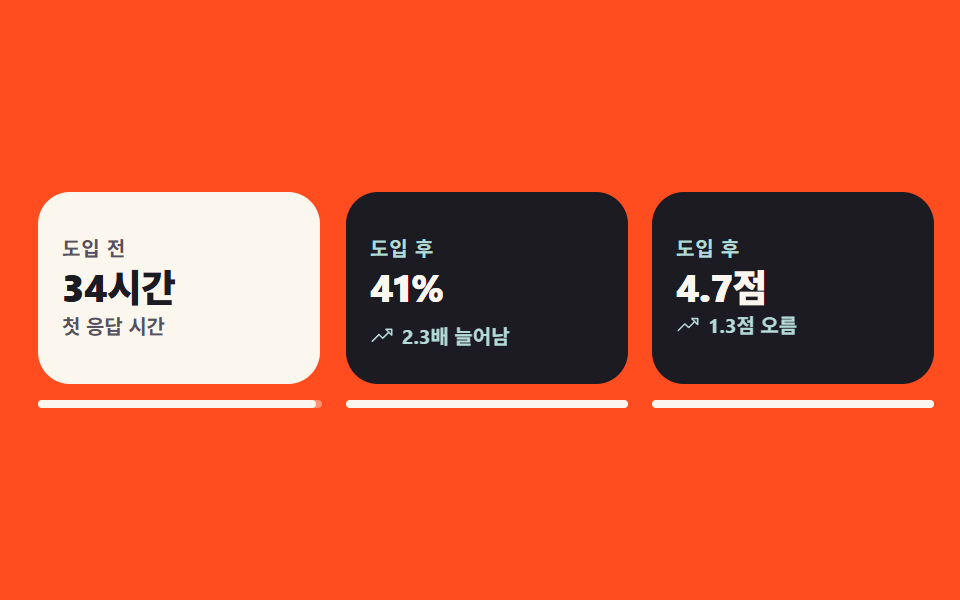
導入前の数値が書かれたカードを押すと裏返って導入後の数値が出て、プレビューのループでは横顔を挟まず1フレームで表裏が切り替わります。
使いどころ成果の数値を前後で比べる事例セクション
rotateYbackface-visibilityaria-pressed
<main class="stage">
  <section class="ba is-demo" aria-label="導入前後の数値比較">
    <ul class="ba__list">
      <li class="ba__item ba__item--1">
        <button class="ba__card" type="button" aria-pressed="false">
          <span class="ba__inner">
            <span class="ba__face ba__face--front">
              <span class="ba__tag">導入前</span>
              <span class="ba__val">34時間</span>
              <span class="ba__cap">初回応答時間</span>
            </span>
            <span class="ba__face ba__face--back">
              <span class="ba__tag">導入後</span>
              <span class="ba__val">2時間</span>
              <span class="ba__badge">
                <svg viewBox="0 0 256 256" width="12" height="12" fill="currentColor" aria-hidden="true" focusable="false"><path d="M216,128l-72,72V56Z" opacity="0.2"/><path d="M221.66,122.34l-72-72A8,8,0,0,0,136,56v64H40a8,8,0,0,0,0,16h96v64a8,8,0,0,0,13.66,5.66l72-72A8,8,0,0,0,221.66,122.34ZM152,180.69V75.31L204.69,128Z"/></svg>
                17倍速く
              </span>
            </span>
          </span>
          <span class="ba__bar" aria-hidden="true"><span class="ba__bar-bg"></span><span class="ba__bar-fill"></span></span>
        </button>
      </li>

      <li class="ba__item ba__item--2">
        <button class="ba__card" type="button" aria-pressed="false">
          <span class="ba__inner">
            <span class="ba__face ba__face--front">
              <span class="ba__tag">導入前</span>
              <span class="ba__val">18%</span>
              <span class="ba__cap">リピート率</span>
            </span>
            <span class="ba__face ba__face--back">
              <span class="ba__tag">導入後</span>
              <span class="ba__val">41%</span>
              <span class="ba__badge">
                <svg viewBox="0 0 256 256" width="12" height="12" fill="currentColor" aria-hidden="true" focusable="false"><path d="M232,56v64L168,56Z" opacity="0.2"/><path d="M232,48H168a8,8,0,0,0-5.66,13.66L188.69,88,136,140.69l-34.34-34.35a8,8,0,0,0-11.32,0l-72,72a8,8,0,0,0,11.32,11.32L96,123.31l34.34,34.35a8,8,0,0,0,11.32,0L200,99.31l26.34,26.35A8,8,0,0,0,240,120V56A8,8,0,0,0,232,48Zm-8,52.69L187.31,64H224Z"/></svg>
                2.3倍に増加
              </span>
            </span>
          </span>
          <span class="ba__bar" aria-hidden="true"><span class="ba__bar-bg"></span><span class="ba__bar-fill"></span></span>
        </button>
      </li>

      <li class="ba__item ba__item--3">
        <button class="ba__card" type="button" aria-pressed="false">
          <span class="ba__inner">
            <span class="ba__face ba__face--front">
              <span class="ba__tag">導入前</span>
              <span class="ba__val">3.4</span>
              <span class="ba__cap">平均評価</span>
            </span>
            <span class="ba__face ba__face--back">
              <span class="ba__tag">導入後</span>
              <span class="ba__val">4.7</span>
              <span class="ba__badge">
                <svg viewBox="0 0 256 256" width="12" height="12" fill="currentColor" aria-hidden="true" focusable="false"><path d="M232,56v64L168,56Z" opacity="0.2"/><path d="M232,48H168a8,8,0,0,0-5.66,13.66L188.69,88,136,140.69l-34.34-34.35a8,8,0,0,0-11.32,0l-72,72a8,8,0,0,0,11.32,11.32L96,123.31l34.34,34.35a8,8,0,0,0,11.32,0L200,99.31l26.34,26.35A8,8,0,0,0,240,120V56A8,8,0,0,0,232,48Zm-8,52.69L187.31,64H224Z"/></svg>
                1.3ポイント上昇
              </span>
            </span>
          </span>
          <span class="ba__bar" aria-hidden="true"><span class="ba__bar-bg"></span><span class="ba__bar-fill"></span></span>
        </button>
      </li>
    </ul>
  </section>
</main>@use "../../../../site/static/demo-tokens" as *;
// 276 공통 팔레트 — 아홉 항목이 같은 값을 쓴다. 괄호 안은 실측 대비비
$pf-ink: #1c1b22; // 뒷면 바탕
$pf-cream: #fbf7ef; // 앞면 바탕 · 잉크 위 글자 15.99:1
$pf-stone: #565062; // 크림 위 보조 글자 7.23:1
$pf-mint: #b3dad5; // 잉크 위 강조 11.45:1
$pf-flame: $stage-orange; // 무대 — 이 위에는 흰 글자를 얹지 않는다 (3.32:1)
$duration: $dur-loop; // 카드 석 장이 앞뒤로 갈리는 한 바퀴
$easing: $ease-spring; // 사람이 눌러 돌릴 때의 회전
$color: $pf-cream; // 앞면 카드 바탕
@include stage($pf-flame);
// 시각 요소 reset — 기본 margin 을 명시로 0
ul { margin: 0; }
.ba {
box-sizing: border-box;
width: clamp(288px, 96vw, 448px);
}
.ba__list {
display: grid;
grid-template-columns: repeat(3, 1fr);
gap: $sp-3;
padding: 0;
list-style: none;
}
.ba__item { perspective: 720px; }
.ba__item--2 { --d: -.2s; } // 카드마다 컷 시점을 어긋나게 해 프레임을 고루 채운다
.ba__item--3 { --d: -.4s; }
.ba__card {
display: grid;
gap: $sp-2;
width: 100%;
padding: 0;
border: 0;
border-radius: $r-card;
background: none;
font-family: inherit;
cursor: pointer;
}
.ba__card:focus-visible {
outline: 2px solid $pf-ink;
outline-offset: 4px;
}
// 사람이 실제로 누를 때는 이 transition 이 그대로 부드럽게 돈다
.ba__inner {
position: relative;
display: block;
height: 96px;
transform-style: preserve-3d;
transition: transform $dur-enter $easing;
}
.ba__card[aria-pressed="true"] .ba__inner { transform: rotateY(180deg); }
.ba__face {
position: absolute;
inset: 0;
box-sizing: border-box;
display: grid;
align-content: center;
justify-items: start;
gap: $sp-1;
padding: $sp-3;
border-radius: $r-card;
overflow: hidden;
backface-visibility: hidden;
text-align: left;
}
.ba__face--front { background: $pf-cream; color: $pf-ink; }
.ba__face--back { background: $pf-ink; color: $pf-cream; transform: rotateY(180deg); }
.ba__tag {
font-weight: 700; font-size: 10px; line-height: 1;
letter-spacing: .04em;
}
.ba__face--front .ba__tag { color: $pf-stone; }
.ba__face--back .ba__tag { color: $pf-mint; }
.ba__val {
font-weight: 800; font-size: clamp(15px, 4.4vw, 19px); line-height: 1.1;
letter-spacing: -.02em;
}
.ba__cap { color: $pf-stone; font-weight: 600; font-size: 10px; line-height: 1.2; }
.ba__badge {
display: inline-flex;
align-items: center;
gap: $sp-1;
color: $pf-mint;
font-weight: 700; font-size: 10px; line-height: 1;
transform: translateY(0);
}
.ba__badge svg { display: block; flex: 0 0 auto; }
// 카드 밑의 뒤집기 진행 막대 — 3D 면 밖이라 회전에 딸려가지 않는다
.ba__bar { display: grid; }
.ba__bar-bg, .ba__bar-fill {
grid-area: 1 / 1;
height: 4px;
border-radius: $r-pill;
}
.ba__bar-bg { background: rgba(251, 247, 239, .4); }
.ba__bar-fill {
background: $pf-cream;
transform: scaleX(0);
transform-origin: left center; // 규칙8: 진행 막대 왼쪽 채움
}
.ba__card[aria-pressed="true"] .ba__bar-fill {
transform: scaleX(1);
transition: transform $dur-enter $easing;
}
// ── 자동 재생 ────────────────────────────────────────────
// 3D 플립의 회전면 폭은 |cos θ| 라 프레임당 면적 변화율이 |sin θ| — 90° 부근이 언제나 최대다.
// 그대로 두면 poster 로 뽑히는 "가장 크게 달라진 장" 이 늘 모서리뷰(선 한 줄)가 된다.
// 그래서 미리보기 루프의 뒤집기만 steps(1, end) 컷으로 앞면 → 뒷면 → 앞면 을 갈아 끼우고,
// 사람이 누르는 실제 동작은 위의 transition: transform 그대로 부드럽게 둔다.
// 컷만 쓰면 움직인 프레임이 두세 장으로 떨어지므로 아래 막대(scaleX)와 배지(translateY) 가
// 중간 프레임을 채운다 — 둘 다 transform 이라 반투명 유령이 생기지 않는다.
// animation 단축은 delay 를 0 으로 리셋하므로 낱개 속성으로 쓴다
.ba.is-demo .ba__inner {
animation-name: baFlip;
animation-duration: $duration;
animation-timing-function: steps(1, end);
animation-iteration-count: infinite;
animation-delay: var(--d, 0s);
animation-fill-mode: backwards;
transition: none;
}
.ba.is-demo .ba__bar-fill {
animation-name: baBar;
animation-duration: $duration;
animation-timing-function: $easing;
animation-iteration-count: infinite;
animation-delay: var(--d, 0s);
animation-fill-mode: backwards;
transition: none;
}
.ba.is-demo .ba__badge {
animation-name: baPop;
animation-duration: $duration;
animation-timing-function: $ease-pop;
animation-iteration-count: infinite;
animation-delay: var(--d, 0s);
animation-fill-mode: backwards;
}
// 복귀는 80% 에 끝난다 — 24프레임의 마지막 장은 2초의 95.8% 지점이다
@keyframes baFlip {
0%, 29% { transform: rotateY(0deg); }
30%, 79% { transform: rotateY(180deg); }
80%, 100% { transform: rotateY(0deg); }
}
@keyframes baBar {
0% { transform: scaleX(0); }
30%, 72% { transform: scaleX(1); }
80%, 100% { transform: scaleX(0); }
}
@keyframes baPop {
0%, 29% { transform: translateY(12px); }
46%, 100% { transform: translateY(0); }
}
// 좁은 화면 — 석 장을 유지하고 글자·간격만 줄인다 (여기서는 값을 올리지 않는다)
@media (max-width: 340px), (max-height: 220px) {
.ba { width: 100%; }
.ba__list { gap: $sp-2; }
.ba__inner { height: 88px; }
.ba__face { gap: $sp-1; padding: $sp-2; }
.ba__val { font-size: 14px; }
.ba__tag, .ba__cap, .ba__badge { font-size: 9px; }
.ba__badge { gap: 0; }
}
@media (prefers-reduced-motion: reduce) {
// .ba.is-demo .ba__inner (0,3,0) 를 이기려면 !important 가 필요하다.
// 움직임만 끄고 누르면 뒤집히는 동작(상태)은 남긴다
.ba__inner, .ba__bar-fill, .ba__badge { animation: none !important; }
.ba__inner, .ba__bar-fill { transition: none !important; }
}html, body {
margin: 0;
overflow: hidden;
}
.stage {
box-sizing: border-box;
min-height: 100vh;
display: grid;
place-items: center;
margin: 0;
background: #ff4d1f;
font-family: -apple-system, "Segoe UI", "Noto Sans KR", sans-serif;
padding: clamp(8px, 4vw, 24px);
}
ul {
margin: 0;
}
.ba {
box-sizing: border-box;
width: clamp(288px, 96vw, 448px);
}
.ba__list {
display: grid;
grid-template-columns: repeat(3, 1fr);
gap: 12px;
padding: 0;
list-style: none;
}
.ba__item {
perspective: 720px;
}
.ba__item--2 {
--d: -.2s;
}
.ba__item--3 {
--d: -.4s;
}
.ba__card {
display: grid;
gap: 8px;
width: 100%;
padding: 0;
border: 0;
border-radius: 16px;
background: none;
font-family: inherit;
cursor: pointer;
}
.ba__card:focus-visible {
outline: 2px solid #1c1b22;
outline-offset: 4px;
}
.ba__inner {
position: relative;
display: block;
height: 96px;
transform-style: preserve-3d;
transition: transform 600ms cubic-bezier(0.2, 0.8, 0.2, 1);
}
.ba__card[aria-pressed=true] .ba__inner {
transform: rotateY(180deg);
}
.ba__face {
position: absolute;
inset: 0;
box-sizing: border-box;
display: grid;
align-content: center;
justify-items: start;
gap: 4px;
padding: 12px;
border-radius: 16px;
overflow: hidden;
backface-visibility: hidden;
text-align: left;
}
.ba__face--front {
background: #fbf7ef;
color: #1c1b22;
}
.ba__face--back {
background: #1c1b22;
color: #fbf7ef;
transform: rotateY(180deg);
}
.ba__tag {
font-weight: 700;
font-size: 10px;
line-height: 1;
letter-spacing: 0.04em;
}
.ba__face--front .ba__tag {
color: #565062;
}
.ba__face--back .ba__tag {
color: #b3dad5;
}
.ba__val {
font-weight: 800;
font-size: clamp(15px, 4.4vw, 19px);
line-height: 1.1;
letter-spacing: -0.02em;
}
.ba__cap {
color: #565062;
font-weight: 600;
font-size: 10px;
line-height: 1.2;
}
.ba__badge {
display: inline-flex;
align-items: center;
gap: 4px;
color: #b3dad5;
font-weight: 700;
font-size: 10px;
line-height: 1;
transform: translateY(0);
}
.ba__badge svg {
display: block;
flex: 0 0 auto;
}
.ba__bar {
display: grid;
}
.ba__bar-bg, .ba__bar-fill {
grid-area: 1/1;
height: 4px;
border-radius: 999px;
}
.ba__bar-bg {
background: rgba(251, 247, 239, 0.4);
}
.ba__bar-fill {
background: #fbf7ef;
transform: scaleX(0);
transform-origin: left center;
}
.ba__card[aria-pressed=true] .ba__bar-fill {
transform: scaleX(1);
transition: transform 600ms cubic-bezier(0.2, 0.8, 0.2, 1);
}
.ba.is-demo .ba__inner {
animation-name: baFlip;
animation-duration: 2s;
animation-timing-function: steps(1, end);
animation-iteration-count: infinite;
animation-delay: var(--d, 0s);
animation-fill-mode: backwards;
transition: none;
}
.ba.is-demo .ba__bar-fill {
animation-name: baBar;
animation-duration: 2s;
animation-timing-function: cubic-bezier(0.2, 0.8, 0.2, 1);
animation-iteration-count: infinite;
animation-delay: var(--d, 0s);
animation-fill-mode: backwards;
transition: none;
}
.ba.is-demo .ba__badge {
animation-name: baPop;
animation-duration: 2s;
animation-timing-function: cubic-bezier(0.2, 1.4, 0.4, 1);
animation-iteration-count: infinite;
animation-delay: var(--d, 0s);
animation-fill-mode: backwards;
}
@keyframes baFlip {
0%, 29% {
transform: rotateY(0deg);
}
30%, 79% {
transform: rotateY(180deg);
}
80%, 100% {
transform: rotateY(0deg);
}
}
@keyframes baBar {
0% {
transform: scaleX(0);
}
30%, 72% {
transform: scaleX(1);
}
80%, 100% {
transform: scaleX(0);
}
}
@keyframes baPop {
0%, 29% {
transform: translateY(12px);
}
46%, 100% {
transform: translateY(0);
}
}
@media (max-width: 340px), (max-height: 220px) {
.ba {
width: 100%;
}
.ba__list {
gap: 8px;
}
.ba__inner {
height: 88px;
}
.ba__face {
gap: 4px;
padding: 8px;
}
.ba__val {
font-size: 14px;
}
.ba__tag, .ba__cap, .ba__badge {
font-size: 9px;
}
.ba__badge {
gap: 0;
}
}
@media (prefers-reduced-motion: reduce) {
.ba__inner, .ba__bar-fill, .ba__badge {
animation: none !important;
}
.ba__inner, .ba__bar-fill {
transition: none !important;
}
}(function () {
var root = document.querySelector('.ba');
var cards = [].slice.call(root.querySelectorAll('.ba__card'));
// 사람이 손을 대면 미리보기 컷 루프를 끄고 앞면으로 돌려 둔다
function stopLoop() { root.classList.remove('is-demo'); }
// 진짜 <button> 이라 Enter·Space 는 브라우저가 click 으로 넘겨준다 (터치도 같은 경로)
cards.forEach(function (card) {
card.addEventListener('click', function () {
var was = card.getAttribute('aria-pressed') === 'true';
stopLoop();
card.setAttribute('aria-pressed', was ? 'false' : 'true');
});
});
root.addEventListener('pointerenter', stopLoop);
root.addEventListener('focusin', stopLoop);
})();import { useState } from "react";
import type { CSSProperties, ReactNode } from "react";
import styles from "./BeforeAfterFlip.module.scss";
/* ambient 에 React 이벤트 제네릭이 없어 파일 안에 필요한 만큼만 선언한다 */
type Vars = CSSProperties & { "--duration"?: string; "--easing"?: string; "--color"?: string };
type ItemVars = CSSProperties & { "--d"?: string };
export type FlipCard = {
/** 앞면 수치 */
before: string;
/** 뒷면 수치 */
after: string;
/** 앞면 설명 */
caption: string;
/** 뒷면 변화량 배지 */
badge: string;
/** 배지 옆 화살표 아이콘 */
icon: ReactNode;
};
export type BeforeAfterFlipProps = {
sectionLabel?: string;
beforeTag?: string;
afterTag?: string;
cards?: FlipCard[];
/** 카드 석 장이 앞뒤로 갈리는 한 바퀴(ms) */
duration?: number;
easing?: string;
/** 앞면 카드 바탕 */
color?: string;
};
const ArrowRight = (): ReactNode => (
<svg viewBox="0 0 256 256" width="12" height="12" fill="currentColor" aria-hidden="true" focusable="false">
<path d="M216,128l-72,72V56Z" opacity="0.2" />
<path d="M221.66,122.34l-72-72A8,8,0,0,0,136,56v64H40a8,8,0,0,0,0,16h96v64a8,8,0,0,0,13.66,5.66l72-72A8,8,0,0,0,221.66,122.34ZM152,180.69V75.31L204.69,128Z" />
</svg>
);
const TrendUp = (): ReactNode => (
<svg viewBox="0 0 256 256" width="12" height="12" fill="currentColor" aria-hidden="true" focusable="false">
<path d="M232,56v64L168,56Z" opacity="0.2" />
<path d="M232,48H168a8,8,0,0,0-5.66,13.66L188.69,88,136,140.69l-34.34-34.35a8,8,0,0,0-11.32,0l-72,72a8,8,0,0,0,11.32,11.32L96,123.31l34.34,34.35a8,8,0,0,0,11.32,0L200,99.31l26.34,26.35A8,8,0,0,0,240,120V56A8,8,0,0,0,232,48Zm-8,52.69L187.31,64H224Z" />
</svg>
);
const DEFAULT_CARDS: FlipCard[] = [
{ before: "34시간", after: "2시간", caption: "첫 응답 시간", badge: "17배 빨라짐", icon: <ArrowRight /> },
{ before: "18%", after: "41%", caption: "재구매율", badge: "2.3배 늘어남", icon: <TrendUp /> },
{ before: "3.4점", after: "4.7점", caption: "평균 별점", badge: "1.3점 오름", icon: <TrendUp /> },
];
/* 카드마다 컷 시점을 어긋나게 해 프레임을 고루 채운다 */
const LAG = ["0s", "-.2s", "-.4s"];
export default function BeforeAfterFlip({
sectionLabel = "도입 전후 수치 비교",
beforeTag = "도입 전",
afterTag = "도입 후",
cards = DEFAULT_CARDS,
duration = 2000,
easing = "cubic-bezier(.2,.8,.2,1)",
color = "#fbf7ef",
}: BeforeAfterFlipProps): ReactNode {
const [loop, setLoop] = useState<boolean>(true);
const [on, setOn] = useState<boolean[]>(cards.map(() => false));
const vars: Vars = { "--duration": `${duration}ms`, "--easing": easing, "--color": color };
/* 진짜 <button> 이라 Enter·Space 는 브라우저가 click 으로 넘겨준다 (터치도 같은 경로) */
const flip = (i: number): void => {
setLoop(false);
setOn(on.map((v: boolean, j: number) => (j === i ? !v : v)));
};
return (
<section
className={loop ? `${styles.ba} ${styles.isDemo}` : styles.ba}
style={vars}
aria-label={sectionLabel}
onPointerEnter={() => setLoop(false)}
onFocus={() => setLoop(false)}
>
<ul className={styles.list}>
{cards.map((c: FlipCard, i: number) => {
const itemVars: ItemVars = { "--d": LAG[i % LAG.length] };
return (
<li className={styles.item} style={itemVars} key={c.caption}>
<button
className={styles.card}
type="button"
aria-pressed={on[i] === true}
onClick={() => flip(i)}
>
<span className={styles.inner}>
<span className={`${styles.face} ${styles.front}`}>
<span className={styles.tag}>{beforeTag}</span>
<span className={styles.val}>{c.before}</span>
<span className={styles.cap}>{c.caption}</span>
</span>
<span className={`${styles.face} ${styles.back}`}>
<span className={styles.tag}>{afterTag}</span>
<span className={styles.val}>{c.after}</span>
<span className={styles.badge}>{c.icon}{c.badge}</span>
</span>
</span>
<span className={styles.bar} aria-hidden="true">
<span className={styles.barBg} />
<span className={styles.barFill} />
</span>
</button>
</li>
);
})}
</ul>
</section>
);
}06 前後の数値をめくるカード — 計測 累積面積 28.828% · 動いたフレーム 22/23GODRICH オリジナル · SCSS と React は zip に同梱 · お客様の声 デザインの型9選、そのまま貼れる
このデモが属する記事
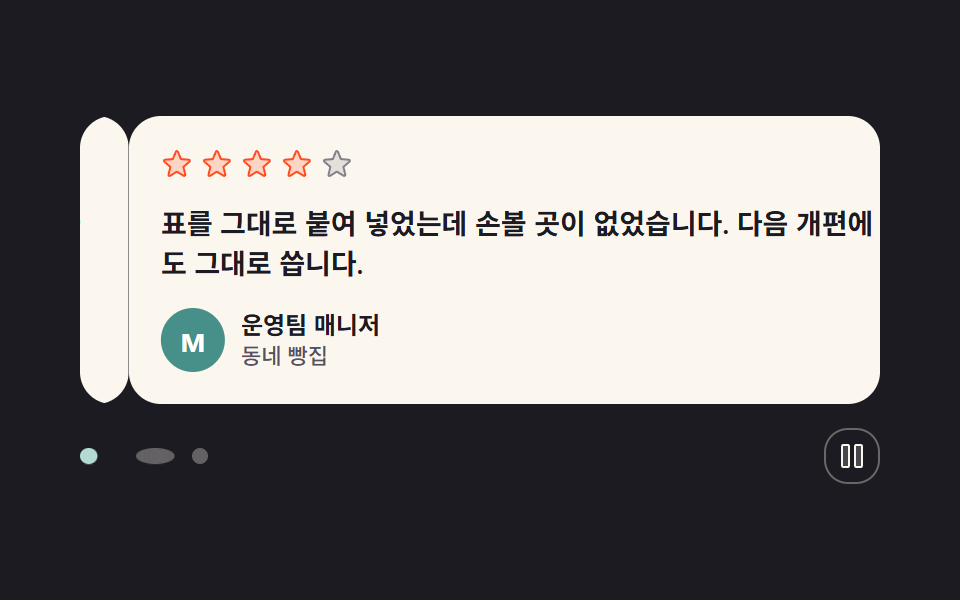 お客様の声 デザインの型9選、そのまま貼れるお客様の声 デザインで探しているのは、紹介文を並べただけでは伝わらない信頼を、画面の動きで示す区画のひな形です。ここにはレビュー3件の小さな帯から料金表の横の指標まで、九つの型をそのまま貼れるHTMLとSCSSでまとめました。どれもこの画面 この記事のデモをすべて見る