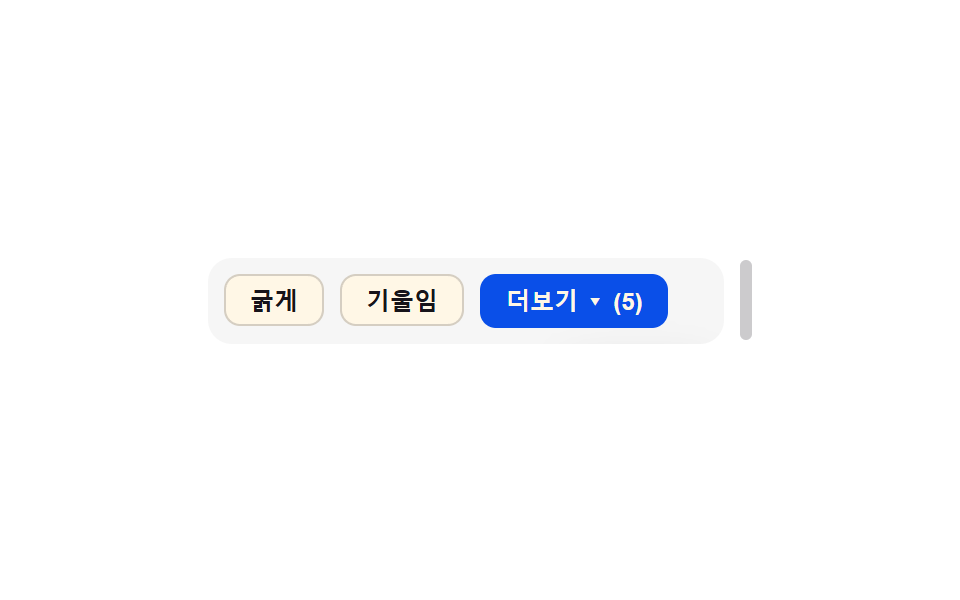
05溢れ折り畳みもっと見る — グループの幅の値が狭くなると溢れたボタンが一つのもっと見る値に折り畳まれる方式
グループの幅の値がボタンの合計幅の値より狭くなると、溢れたボタンが一つのもっと見る値に折り畳まれます。
使いどころ狭い画面のツールバーボタン群
OVERFLOW_BUFFER 24getBoundingClientRect cachewidths cutoff sum
<main class="stage">
<div class="ovm is-demo" id="ovm">
  <div class="ovm__resizer" id="ovmBox" style="width: 260px;">
    <div class="ovm__track" id="ovmTrack" role="toolbar" aria-label="書式ツール"></div>
    <button class="ovm__more" id="ovmMore" aria-haspopup="true" aria-expanded="false" hidden>もっと見る ▾</button>
    <ul class="ovm__menu" id="ovmMenu" hidden></ul>
  </div>
  <span class="ovm__handle" id="ovmHandle" aria-hidden="true"></span>
</div>
</main>
@use "../../../../site/static/demo-tokens" as *;
// 계산 겹: index.html 이 버튼마다 실측 폭을 한 번 캐시하고, 컨테이너 폭(실측)에서 OVERFLOW_BUFFER 를
// 뺀 여유값과 비교해 몇 개가 들어가는지 부분합으로 계산한다 — 추측 px 가 아니라 실측 합산이다.
// 컨테이너 폭 자체가 이 항목의 "값" 이라 여기서만 예외로 width 를 직접 바꾼다(다른 항목은 transform 전용).
@include stage($stage-paper);
.ovm {
display: flex;
align-items: center;
gap: $sp-2;
max-width: 100%;
overflow-x: auto;
overflow-y: hidden;
}
.ovm__resizer {
position: relative;
box-sizing: border-box;
overflow: hidden;
flex: 0 0 auto;
border-radius: $r-control;
background: rgba($subject-ink, .04);
padding: $sp-2;
display: flex;
align-items: center;
gap: $sp-2;
}
.ovm__track {
display: flex;
gap: $sp-2;
overflow: hidden;
flex: 0 0 auto;
}
.ovm__btn,
.ovm__more,
.ovm__menuBtn {
appearance: none;
border: 1px solid rgba($subject-ink, .18);
border-radius: $r-sm;
background: $subject-cream;
color: $subject-ink;
font-size: 12px;
font-weight: 600;
padding: $sp-1 $sp-3;
white-space: nowrap;
cursor: pointer;
flex: 0 0 auto;
}
.ovm__more {
background: $subject-blue-deep;
border-color: $subject-blue-deep;
color: $subject-cream;
}
.ovm__menu {
position: absolute;
top: 100%;
right: $sp-2;
margin: 4px 0 0;
padding: $sp-1;
list-style: none;
display: flex;
flex-direction: column;
gap: 4px;
background: $subject-cream;
border-radius: $r-sm;
box-shadow: $shadow-raised;
z-index: 2;
}
.ovm__handle {
flex: 0 0 auto;
width: 6px;
height: 40px;
border-radius: $r-xs;
background: rgba($subject-ink, .22);
cursor: ew-resize;
touch-action: none;
}
@media (max-width: 340px) {
.ovm__btn, .ovm__more, .ovm__menuBtn { font-size: 11px; padding: $sp-1 $sp-2; }
}
@media (prefers-reduced-motion: reduce) {
.ovm__resizer { transition: none; }
}html, body {
margin: 0;
overflow: hidden;
}
.stage {
box-sizing: border-box;
min-height: 100vh;
display: grid;
place-items: center;
margin: 0;
background: #ffffff;
font-family: -apple-system, "Segoe UI", "Noto Sans KR", sans-serif;
padding: clamp(8px, 4vw, 24px);
}
.ovm {
display: flex;
align-items: center;
gap: 8px;
max-width: 100%;
overflow-x: auto;
overflow-y: hidden;
}
.ovm__resizer {
position: relative;
box-sizing: border-box;
overflow: hidden;
flex: 0 0 auto;
border-radius: 12px;
background: rgba(23, 20, 26, 0.04);
padding: 8px;
display: flex;
align-items: center;
gap: 8px;
}
.ovm__track {
display: flex;
gap: 8px;
overflow: hidden;
flex: 0 0 auto;
}
.ovm__btn,
.ovm__more,
.ovm__menuBtn {
appearance: none;
border: 1px solid rgba(23, 20, 26, 0.18);
border-radius: 8px;
background: #fff7e6;
color: #17141a;
font-size: 12px;
font-weight: 600;
padding: 4px 12px;
white-space: nowrap;
cursor: pointer;
flex: 0 0 auto;
}
.ovm__more {
background: #0a4fe8;
border-color: #0a4fe8;
color: #fff7e6;
}
.ovm__menu {
position: absolute;
top: 100%;
right: 8px;
margin: 4px 0 0;
padding: 4px;
list-style: none;
display: flex;
flex-direction: column;
gap: 4px;
background: #fff7e6;
border-radius: 8px;
box-shadow: 0 14px 24px rgba(23, 20, 26, 0.32);
z-index: 2;
}
.ovm__handle {
flex: 0 0 auto;
width: 6px;
height: 40px;
border-radius: 4px;
background: rgba(23, 20, 26, 0.22);
cursor: ew-resize;
touch-action: none;
}
@media (max-width: 340px) {
.ovm__btn, .ovm__more, .ovm__menuBtn {
font-size: 11px;
padding: 4px 8px;
}
}
@media (prefers-reduced-motion: reduce) {
.ovm__resizer {
transition: none;
}
}(function () {
var LABELS = ['太字', '斜体', '下線', '取り消し線', '整列', '色', 'リンク'];
var OVERFLOW_BUFFER = 24; // 계산 겹 상수: 더보기 버튼 폭까지 계산한 뒤 남기는 안전 여유(px)
var MIN_W = 150, MAX_W = 320;
var reduce = window.matchMedia('(prefers-reduced-motion: reduce)').matches;
var root = document.getElementById('ovm');
var box = document.getElementById('ovmBox');
var track = document.getElementById('ovmTrack');
var more = document.getElementById('ovmMore');
var menu = document.getElementById('ovmMenu');
var handle = document.getElementById('ovmHandle');
var isDemo = true;
var btns = LABELS.map(function (label, i) {
var b = document.createElement('button');
b.className = 'ovm__btn';
b.type = 'button';
b.textContent = label;
b.dataset.i = String(i);
return b;
});
// 계산 겹: 각 버튼의 실제 폭을 한 번 실측해 캐시한다(추측 px 를 쓰지 않는다) — track 에 전부 넣고 잰 뒤
// 넘치는 만큼만 더보기로 옮긴다.
btns.forEach(function (b) { track.appendChild(b); });
var widths = btns.map(function (b) { return b.getBoundingClientRect().width; });
var gap = 8;
var moreWidth = 0;
function recompute() {
var avail = box.getBoundingClientRect().width - OVERFLOW_BUFFER;
moreWidth = moreWidth || (function () { more.hidden = false; var w = more.getBoundingClientRect().width; more.hidden = true; return w; })();
var sumAll = widths.reduce(function (s, w) { return s + w; }, 0) + gap * (widths.length - 1);
var cutoff = widths.length;
if (sumAll > avail) {
var sum = 0;
cutoff = 0;
for (var i = 0; i < widths.length; i++) {
var add = widths[i] + (i > 0 ? gap : 0);
if (sum + add + moreWidth > avail) break;
sum += add;
cutoff = i + 1;
}
cutoff = Math.max(1, cutoff);
}
btns.forEach(function (b, i) { b.hidden = i >= cutoff; });
var overflowCount = widths.length - cutoff;
more.hidden = overflowCount === 0;
more.textContent = 'もっと見る ▾ (' + overflowCount + ')';
menu.innerHTML = '';
for (var j = cutoff; j < widths.length; j++) {
var li = document.createElement('li');
var mb = document.createElement('button');
mb.type = 'button';
mb.className = 'ovm__menuBtn';
mb.textContent = LABELS[j];
li.appendChild(mb);
menu.appendChild(li);
}
}
more.addEventListener('click', function () {
human();
var open = menu.hidden;
menu.hidden = !open;
more.setAttribute('aria-expanded', String(open));
});
function human() {
if (isDemo) { root.classList.remove('is-demo'); isDemo = false; }
}
var dragging = false, dragStartX = 0, dragStartW = 0;
handle.addEventListener('pointerdown', function (e) {
human();
dragging = true;
dragStartX = e.clientX;
dragStartW = box.getBoundingClientRect().width;
handle.setPointerCapture(e.pointerId);
});
handle.addEventListener('pointermove', function (e) {
if (!dragging) return;
var w = Math.min(MAX_W, Math.max(MIN_W, dragStartW + (e.clientX - dragStartX)));
box.style.width = w + 'px';
recompute();
});
handle.addEventListener('pointerup', function () { dragging = false; });
var ro = new ResizeObserver(function () { recompute(); });
ro.observe(box);
var start = 0;
function demoWidth(ts) {
var t = (ts - start) / 1900;
var wave = (Math.sin(t * Math.PI * 2) + 1) / 2; // 0~1
return MIN_W + wave * (MAX_W - MIN_W);
}
function loop(ts) {
if (!start) start = ts;
if (isDemo && !reduce) {
box.style.width = demoWidth(ts).toFixed(1) + 'px';
recompute();
}
requestAnimationFrame(loop);
}
recompute();
if (reduce) { box.style.width = MAX_W + 'px'; recompute(); }
requestAnimationFrame(loop);
})();import { useEffect, useRef } from 'react';
import styles from './OverflowCollapseMore.module.scss';
type Box<T> = { current: T };
const LABELS = ['굵게', '기울임', '밑줄', '취소선', '정렬', '색상', '링크'];
const OVERFLOW_BUFFER = 24; // 계산 겹 상수: 더보기 버튼 폭까지 계산한 뒤 남기는 안전 여유(px)
const MIN_W = 150;
const MAX_W = 320;
const GAP = 8;
export default function OverflowCollapseMore() {
const rootRef = useRef(null) as unknown as Box<HTMLDivElement>;
const boxRef = useRef(null) as unknown as Box<HTMLDivElement>;
const trackRef = useRef(null) as unknown as Box<HTMLDivElement>;
const moreRef = useRef(null) as unknown as Box<HTMLButtonElement>;
const menuRef = useRef(null) as unknown as Box<HTMLUListElement>;
const handleRef = useRef(null) as unknown as Box<HTMLSpanElement>;
const btnRefs = useRef([]) as unknown as Box<HTMLButtonElement[]>;
useEffect(() => {
const root = rootRef.current;
const box = boxRef.current;
const track = trackRef.current;
const more = moreRef.current;
const menu = menuRef.current;
const handle = handleRef.current;
const btns = btnRefs.current;
const reduce = window.matchMedia('(prefers-reduced-motion: reduce)').matches;
let isDemo = true;
// 계산 겹: 각 버튼의 실제 폭을 한 번 실측해 캐시한다(추측 px 를 쓰지 않는다) — 넘치는 만큼만 더보기로 옮긴다.
const widths = btns.map((b) => b.getBoundingClientRect().width);
let moreWidth = 0;
function recompute() {
const avail = box.getBoundingClientRect().width - OVERFLOW_BUFFER;
if (!moreWidth) {
more.hidden = false;
moreWidth = more.getBoundingClientRect().width;
more.hidden = true;
}
const sumAll = widths.reduce((s, w) => s + w, 0) + GAP * (widths.length - 1);
let cutoff = widths.length;
if (sumAll > avail) {
let sum = 0;
cutoff = 0;
for (let i = 0; i < widths.length; i++) {
const add = widths[i] + (i > 0 ? GAP : 0);
if (sum + add + moreWidth > avail) break;
sum += add;
cutoff = i + 1;
}
cutoff = Math.max(1, cutoff);
}
btns.forEach((b, i) => { b.hidden = i >= cutoff; });
const overflowCount = widths.length - cutoff;
more.hidden = overflowCount === 0;
more.textContent = `더보기 ▾ (${overflowCount})`;
menu.innerHTML = '';
for (let j = cutoff; j < widths.length; j++) {
const li = document.createElement('li');
const mb = document.createElement('button');
mb.type = 'button';
mb.className = styles.menuBtn;
mb.textContent = LABELS[j];
li.appendChild(mb);
menu.appendChild(li);
}
}
function human() {
if (isDemo) { root.classList.remove(styles.isDemo); isDemo = false; }
}
function onMoreClick() {
human();
const open = menu.hidden;
menu.hidden = !open;
more.setAttribute('aria-expanded', String(open));
}
more.addEventListener('click', onMoreClick);
let dragging = false;
let dragStartX = 0;
let dragStartW = 0;
function onPointerDown(e: PointerEvent) {
human();
dragging = true;
dragStartX = e.clientX;
dragStartW = box.getBoundingClientRect().width;
handle.setPointerCapture(e.pointerId);
}
function onPointerMove(e: PointerEvent) {
if (!dragging) return;
const w = Math.min(MAX_W, Math.max(MIN_W, dragStartW + (e.clientX - dragStartX)));
box.style.width = w + 'px';
recompute();
}
function onPointerUp() { dragging = false; }
handle.addEventListener('pointerdown', onPointerDown);
handle.addEventListener('pointermove', onPointerMove);
handle.addEventListener('pointerup', onPointerUp);
const ro = new ResizeObserver(() => recompute());
ro.observe(box);
let start = 0;
function demoWidth(ts: number) {
const t = (ts - start) / 1900;
const wave = (Math.sin(t * Math.PI * 2) + 1) / 2; // 0~1
return MIN_W + wave * (MAX_W - MIN_W);
}
let raf = 0;
function loop(ts: number) {
if (!start) start = ts;
if (isDemo && !reduce) {
box.style.width = demoWidth(ts).toFixed(1) + 'px';
recompute();
}
raf = requestAnimationFrame(loop);
}
recompute();
if (reduce) { box.style.width = MAX_W + 'px'; recompute(); }
raf = requestAnimationFrame(loop);
return () => {
cancelAnimationFrame(raf);
ro.disconnect();
more.removeEventListener('click', onMoreClick);
handle.removeEventListener('pointerdown', onPointerDown);
handle.removeEventListener('pointermove', onPointerMove);
handle.removeEventListener('pointerup', onPointerUp);
};
}, []);
return (
<div className={`${styles.ovm} ${styles.isDemo}`} ref={(el: HTMLDivElement | null) => { if (el) rootRef.current = el; }}>
<div
className={styles.resizer}
style={{ width: '260px' }}
ref={(el: HTMLDivElement | null) => { if (el) boxRef.current = el; }}
>
<div
className={styles.track}
role="toolbar"
aria-label="서식 도구"
ref={(el: HTMLDivElement | null) => { if (el) trackRef.current = el; }}
>
{LABELS.map((label, i) => (
<button
key={label}
type="button"
className={styles.btn}
ref={(el: HTMLButtonElement | null) => { if (el) btnRefs.current[i] = el; }}
>
{label}
</button>
))}
</div>
<button
type="button"
className={styles.more}
aria-haspopup="true"
aria-expanded="false"
hidden
ref={(el: HTMLButtonElement | null) => { if (el) moreRef.current = el; }}
>
더보기 ▾
</button>
<ul
className={styles.menu}
hidden
ref={(el: HTMLUListElement | null) => { if (el) menuRef.current = el; }}
/>
</div>
<span
className={styles.handle}
aria-hidden="true"
ref={(el: HTMLSpanElement | null) => { if (el) handleRef.current = el; }}
/>
</div>
);
}05 溢れ折り畳みもっと見る — グループの幅の値が狭くなると溢れたボタンが一つのもっと見る値に折り畳まれる方式 — 計測 累積面積 6.63% · 動いたフレーム 22/23GODRICH オリジナル · SCSS と React は zip に同梱 · ボタン グループ ui 9選 — 隣り合うボタンが一つに動く仕組み
このデモが属する記事
 ボタン グループ ui 9選 — 隣り合うボタンが一つに動く仕組みボタン グループ ui: 9つのうち1つはアクティブボタンの値が変わるとスライド表示子の位置の値が実測座標に沿って移動し、1つはグループの幅の値が縮むと溢れたボタンがもっと見る値の中に折り畳まれ、もう1つは方向キーでフォーカスの値が移る際に この記事のデモをすべて見る