ボタン グループ ui 9選 — 隣り合うボタンが一つに動く仕組み
ボタン グループ ui: 9つのうち1つはアクティブボタンの値が変わるとスライド表示子の位置の値が実測座標に沿って移動し、1つはグループの幅の値が縮むと溢れたボタンがもっと見る値の中に折り畳まれ、もう1つは方向キーでフォーカスの値が移る際にフォーカスリングの位置の値がボタンの間を滑るように移動します。
 01 btn-group-shared-border-merge
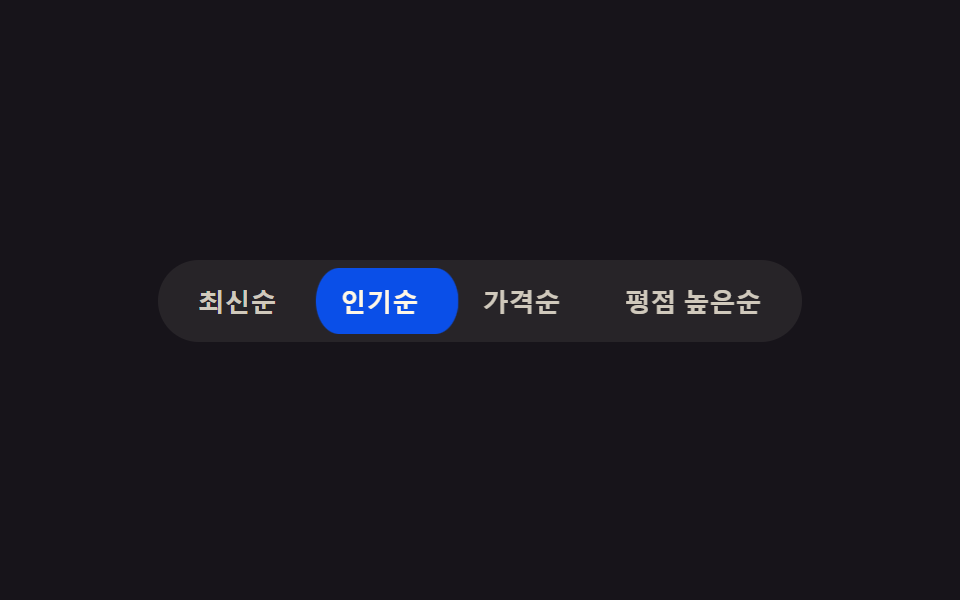 02 btn-group-active-slide-indicator
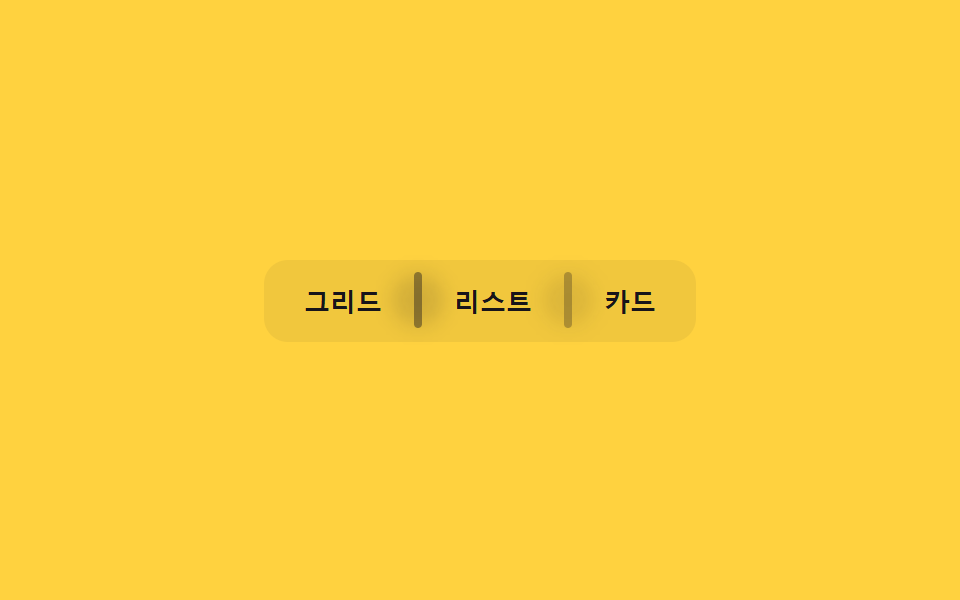 03 btn-group-divider-fade-on-hover
 04 btn-group-radio-exclusive-press
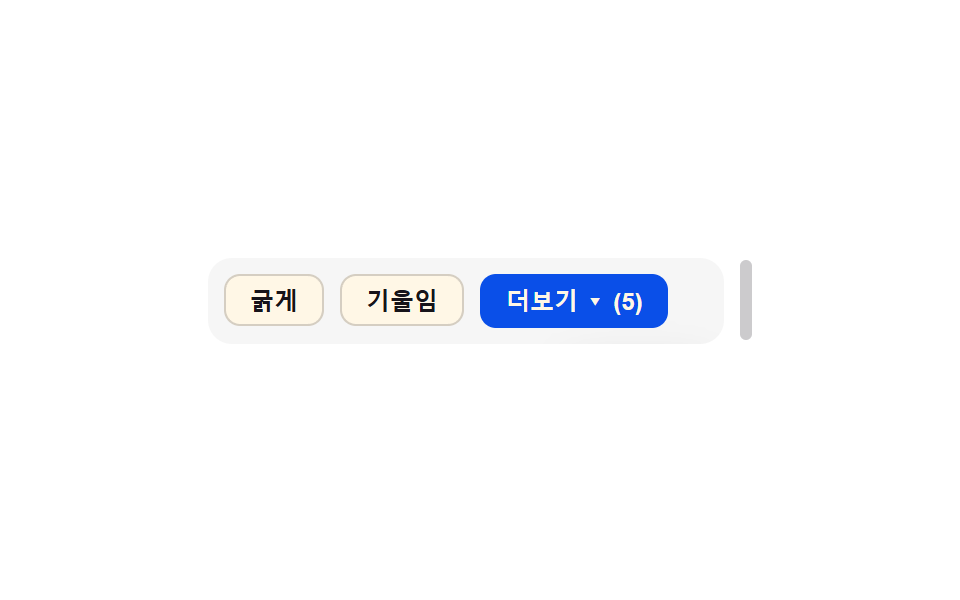 05 btn-group-overflow-collapse-more
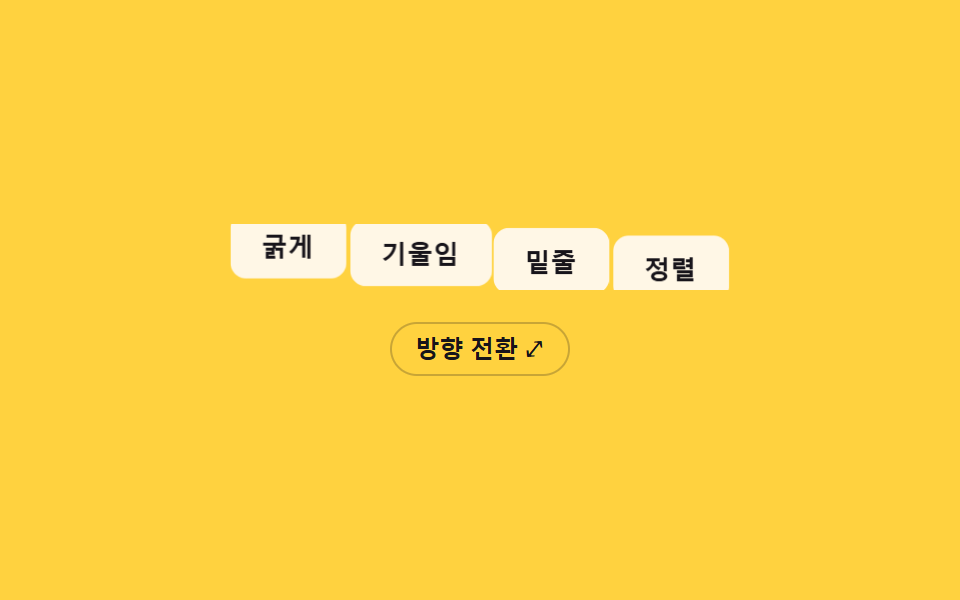 06 btn-group-vertical-horizontal-orient-morph
 07 btn-group-icon-label-combo-reveal
 08 btn-group-keyboard-arrow-focus-slide
 09 btn-group-disabled-ripple-block
自動再生 · タイルを押すとその項目へ · すべて1つのzip
- 01 共有境界線マージ — 隣り合う二つのボタンの内側の境界線の値が一つに重なり、二重に見えない方式
- 02 アクティブ表示子スライド — アクティブボタンの値が変わると強調背景の位置の値が実測座標に沿って隣のボタンへ滑る方式
- 03 区切り線フェード — ボタン間の区切り線の透明度の値がポインターが隣のボタンに近づくほど薄くなる方式
- 04 排他的押下状態 — 一つのボタンの押下値がオンになると、他の全てのボタンの押下値が同時にオフになる方式
- 05 溢れ折り畳みもっと見る — グループの幅の値が狭くなると溢れたボタンが一つのもっと見る値に折り畳まれる方式
- 06 縦横方向転換 — グループの方向の値が変わるとボタンの位置の値が実測座標の間を移動して並びが組み直される方式
- 07 アイコンラベル組合せ表示 — コンテナの幅の値が広がるとアイコンボタンの文字ラベルの幅の値が0から広がって現れる方式
- 08 キーボード方向キーフォーカススライド — 方向キーでフォーカスの値が移るとフォーカス枠の位置の値がボタン間の実測座標に沿って移動する方式
- 09 無効時波動ブロック — 無効値がオンのボタンを押すと波動拡散の値が途中で止まり、代わりに振動の値で反応する方式
9つのどれもサーバーに問い合わせず、localStorageに書き込まず、Math.randomも使いません。これらのトグル ボタン グループの各パターンはrequestAnimationFrameと少数の定数だけで動き、変わる状態値はいつも一つだけです——どのボタンがアクティブか、押されているか、フォーカスされているかのいずれかで、他のボタンのマークアップには触れません。この範囲の狭さのおかげで、実際に動く値の名前を知るだけで、どのボタンにこの9パターンのどれが合うか、コードを開く前に判断できます。
9つのパターンの解剖 — どの値がいつ変わるか
9つともrequestAnimationFrameを少なくとも一度は呼び、CSSトランジションだけに任せず、その呼び出しの中で実際の値を計算し直します。01番のtickRipples()はクリックした波動の半径を共有境界線自身の実測範囲まで切り取り、02番のloop()はSTIFFとDAMPによるばねをアクティブボタン自身のxとwに向けて積分し、03番のloop()はポインター距離の値をsmoothstepとSMOOTHの補間にかけて区切り線ごとに処理し、04番のrender()は各ボタンのdepthをSTIFFとDAMPのばねで1を超えて押し進めてから収め、05番のResizeObserverはポインタードラッグや自動再生ループがグループ自身の幅を変えるたびにOVERFLOW_BUFFER(24px)を加えた部分和のカットオフを再計算し、06番のflip()は方向転換の前後で全ボタンのgetBoundingClientRect()を読み取り、その差分だけをFLIP_MS(480ms)かけて戻し、07番のanimate()はラベル自身のclip-path表示をeaseOutCubicでイージングし、08番のselect()はフォーカスリングの位置を新しくフォーカスされたボタン自身の実測座標へイージングし、09番のstep()はhaltRで頭打ちになる波動の広がりと、それとは別の減衰するサイン振動の揺れを同時に計算します。リスナーはすべて作られたタイマーではなく実際の操作に応えます——01番と02番はそれぞれclickと、自分の境界線や表示子の位置を再計測するresizeを組み合わせ、03番はクリックなしでpointermoveを追いpointerleaveで消し、04番と08番はどちらもclickと方向キー用のkeydownを組み合わせ、05番はもっと見るボタンのclickと、ウィンドウのリサイズではなく手でグループ幅を変えるドラッグハンドルのpointerdown・pointermove・pointerupに応え、06番は自分の方向転換ボタンのclickだけに応え、07番はクリックもリサイズもなくpointerenter・pointerleave・focus・blurに応え、09番はclickではなくpointerdownに応えます。自動再生の循環は.is-demoクラスを通じて02・06・07・08番だけにあり、Math.randomは9つのどこにも使われていません。prefers-reduced-motion: reduceの下では、9つは一つの共通ルールではなく4つの異なる短縮方法に分かれます——01番は計算を保ったままRIPPLE_MSを1に縮め、02番はばねの目標値へ積分せずボタンへ直接スナップし、04・07・09番はそれぞれ自分のステップ関数自体を省略して深さ・clip-path・揺れを目標値へ直接移し、03番は自身の補間係数が1に落ちて区切り線が毎フレーム即座にスナップし、05番はフレームごとのループを一切使わずグループの最終幅を直接代入し、06番はflip()がFLIPの矩形を記録する前に処理を抜け、ネイティブなレイアウトだけが変形なしに行を組み直します。こうした複数ボタンの連動実装を調べると、共有境界線・アクティブスライド・区切り線フェード・排他的押下・溢れ折り畳み・方向転換・ラベル表示・フォーカススライド・無効時振動という、まさにこの9つの軸に行き着くことが多く、隠れた10番目の軸はありません。
パターン別コード
01共有境界線マージ — 隣り合う二つのボタンの内側の境界線の値が一つに重なり、二重に見えない方式
ボタンが接する内側の境界線の値はBLEED_PX(6px)によってあえて重ね合わされ、どのボタンがアクティブでも境界線が二重に見えません。ツールバーの整列ボタン群やフィルターオプションのボタン群にこの方式が向いていて、クリックした波動はclip-pathで共有境界線自身の実測された左右の範囲までしか切り取られないため、隣のボタンまでハイライトが越えて広がることがありません。
<main class="stage">
<div class="bg is-demo" id="bg" role="group" aria-label="テキスト整列">
  <button class="bg__btn" data-align="left" aria-pressed="true">左</button>
  <button class="bg__btn" data-align="center" aria-pressed="false">中央</button>
  <button class="bg__btn" data-align="right" aria-pressed="false">右</button>
  <button class="bg__btn" data-align="justify" aria-pressed="false">両端</button>
  <span class="bg__seam" id="seam0" aria-hidden="true"></span>
  <span class="bg__seam" id="seam1" aria-hidden="true"></span>
  <span class="bg__seam" id="seam2" aria-hidden="true"></span>
</div>
</main>
@use "../../../../site/static/demo-tokens" as *;
// 계산 겹: index.html 이 getBoundingClientRect 로 버튼 사이 공유 경계선의 실측 좌표를 재고,
// 클릭 파동(ripple)이 그 좌표 + BLEED_PX 만큼만 이웃으로 번지도록 clip-path 를 매 프레임 계산한다.
// 경계선 자체은 이 파일에서 음수 margin 으로 겹쳐 항상 한 겹으로만 보인다.
@include stage($stage-ink);
.bg {
position: relative;
display: flex;
border-radius: $r-control;
overflow: visible;
}
.bg__btn {
position: relative;
appearance: none;
border: 1.5px solid rgba($subject-cream, .38);
background: rgba($subject-cream, .06);
color: $subject-cream;
font-size: 13px;
font-weight: 600;
padding: $sp-2 $sp-4;
cursor: pointer;
overflow: hidden;
transition: background-color $dur-quick $ease-out, color $dur-quick $ease-out, border-color $dur-quick $ease-out;
// 공유 경계선 병합 — 이웃 버튼과 1.5px 만큼 겹쳐 안쪽 경계선이 항상 한 겹으로만 보인다
& + & { margin-left: -1.5px; }
&:first-child { border-radius: $r-control 0 0 $r-control; }
&:last-child { border-radius: 0 $r-control $r-control 0; }
&:hover, &:focus-visible { z-index: 1; }
&:focus-visible { outline: 2px solid $subject-blue-light; outline-offset: 2px; }
}
.bg__btn--on {
background: $subject-blue-deep;
border-color: $subject-blue-deep;
color: $subject-cream;
z-index: 2;
}
.bg__ripple {
position: absolute;
border-radius: 50%;
background: rgba($subject-cream, .5);
pointer-events: none;
will-change: width, height, opacity, clip-path;
}
.bg__seam {
position: absolute;
top: 4px;
bottom: 4px;
width: 1px;
left: var(--seam-x, 0);
transform: translateX(-50%);
background: rgba($subject-cream, .16);
pointer-events: none;
z-index: 3;
}
@media (max-width: 340px) {
.bg__btn { font-size: 12px; padding: $sp-2 $sp-3; }
}
@media (prefers-reduced-motion: reduce) {
.bg__btn { transition: none; }
.bg__ripple { display: none; }
}html, body {
margin: 0;
overflow: hidden;
}
.stage {
box-sizing: border-box;
min-height: 100vh;
display: grid;
place-items: center;
margin: 0;
background: #17141a;
font-family: -apple-system, "Segoe UI", "Noto Sans KR", sans-serif;
padding: clamp(8px, 4vw, 24px);
}
.bg {
position: relative;
display: flex;
border-radius: 12px;
overflow: visible;
}
.bg__btn {
position: relative;
appearance: none;
border: 1.5px solid rgba(255, 247, 230, 0.38);
background: rgba(255, 247, 230, 0.06);
color: #fff7e6;
font-size: 13px;
font-weight: 600;
padding: 8px 16px;
cursor: pointer;
overflow: hidden;
transition: background-color 220ms ease-out, color 220ms ease-out, border-color 220ms ease-out;
}
.bg__btn + .bg__btn {
margin-left: -1.5px;
}
.bg__btn:first-child {
border-radius: 12px 0 0 12px;
}
.bg__btn:last-child {
border-radius: 0 12px 12px 0;
}
.bg__btn:hover, .bg__btn:focus-visible {
z-index: 1;
}
.bg__btn:focus-visible {
outline: 2px solid #5b8cf8;
outline-offset: 2px;
}
.bg__btn--on {
background: #0a4fe8;
border-color: #0a4fe8;
color: #fff7e6;
z-index: 2;
}
.bg__ripple {
position: absolute;
border-radius: 50%;
background: rgba(255, 247, 230, 0.5);
pointer-events: none;
will-change: width, height, opacity, clip-path;
}
.bg__seam {
position: absolute;
top: 4px;
bottom: 4px;
width: 1px;
left: var(--seam-x, 0);
transform: translateX(-50%);
background: rgba(255, 247, 230, 0.16);
pointer-events: none;
z-index: 3;
}
@media (max-width: 340px) {
.bg__btn {
font-size: 12px;
padding: 8px 12px;
}
}
@media (prefers-reduced-motion: reduce) {
.bg__btn {
transition: none;
}
.bg__ripple {
display: none;
}
}(function () {
var CYCLE_MS = 900; // 자동 루프가 다음 버튼으로 넘어가는 간격
var BLEED_PX = 6; // 계산 겹 상수: 파동이 이웃 경계선을 넘어 번질 수 있는 최대 여유(px) — 이 값만큼만 넘고 그 이상은 실측 경계선에서 잘린다
var reduce = window.matchMedia('(prefers-reduced-motion: reduce)').matches;
var RIPPLE_MS = reduce ? 1 : 420; // 계산 자체는 유지하되 reduce 에서는 목표 상태로 즉시 놓는다
var root = document.getElementById('bg');
var btns = Array.prototype.slice.call(root.querySelectorAll('.bg__btn'));
var seams = [document.getElementById('seam0'), document.getElementById('seam1'), document.getElementById('seam2')];
var isDemo = true;
// 계산 겹: 버튼 사이 공유 경계선의 실제 화면 좌표를 getBoundingClientRect 로 잰다 — 짐작 px 를 쓰지 않는다.
function measureSeams() {
var rootRect = root.getBoundingClientRect();
for (var i = 0; i < seams.length; i++) {
var a = btns[i].getBoundingClientRect();
var b = btns[i + 1].getBoundingClientRect();
var seamX = (a.right + b.left) / 2 - rootRect.left; // 두 버튼이 겹치는 경계선의 실측 중점
seams[i].style.setProperty('--seam-x', seamX.toFixed(2) + 'px');
}
}
function setActive(btn) {
btns.forEach(function (b) { b.setAttribute('aria-pressed', String(b === btn)); b.classList.toggle('bg__btn--on', b === btn); });
}
var ripples = [];
function spawnRipple(btn, clientX) {
var idx = btns.indexOf(btn);
var rect = btn.getBoundingClientRect();
var rootRect = root.getBoundingClientRect();
var originX = (clientX == null ? rect.left + rect.width / 2 : clientX) - rect.left;
var leftSeam = idx > 0 ? btns[idx - 1].getBoundingClientRect().right - rect.left : null;
var rightSeam = idx < btns.length - 1 ? btns[idx + 1].getBoundingClientRect().left - rect.left : null;
var span = document.createElement('span');
span.className = 'bg__ripple';
span.style.left = originX + 'px';
span.style.top = (rect.height / 2) + 'px';
btn.appendChild(span);
ripples.push({
el: span, start: performance.now(), from: 0, to: Math.max(rect.width, rect.height) * 1.3,
// 계산 겹: 파동이 번질 수 있는 한계를 이웃 경계선 실측값 + BLEED_PX 로 고정한다
minClip: leftSeam == null ? -9999 : leftSeam - BLEED_PX,
maxClip: rightSeam == null ? 9999 : rightSeam + BLEED_PX,
originX: originX
});
}
function easeOutQuad(t) { return 1 - (1 - t) * (1 - t); }
function tickRipples(ts) {
for (var i = ripples.length - 1; i >= 0; i--) {
var r = ripples[i];
var t = Math.min(1, (ts - r.start) / RIPPLE_MS);
var radius = r.from + (r.to - r.from) * easeOutQuad(t);
var left = Math.max(r.minClip, r.originX - radius);
var right = Math.min(r.maxClip, r.originX + radius);
r.el.style.width = radius * 2 + 'px';
r.el.style.height = radius * 2 + 'px';
r.el.style.marginLeft = -radius + 'px';
r.el.style.marginTop = -radius + 'px';
r.el.style.opacity = String(1 - t);
// clip-path 로 파동이 실측 경계선 밖으로 못 나가게 자른다
r.el.style.clipPath = 'inset(-9999px ' + Math.max(0, r.originX + radius - right) + 'px -9999px ' + Math.max(0, left - (r.originX - radius)) + 'px)';
if (t >= 1) { r.el.remove(); ripples.splice(i, 1); }
}
}
function human() {
if (isDemo) { root.classList.remove('is-demo'); isDemo = false; }
}
btns.forEach(function (b) {
b.addEventListener('click', function (e) {
human();
setActive(b);
spawnRipple(b, reduce ? null : e.clientX);
});
});
window.addEventListener('resize', measureSeams);
measureSeams();
var cycleStart = 0, lastIdx = -1;
function loop(ts) {
if (!cycleStart) cycleStart = ts;
if (isDemo && !reduce) {
var idx = Math.floor((ts - cycleStart) / CYCLE_MS) % btns.length;
if (idx !== lastIdx) { lastIdx = idx; setActive(btns[idx]); spawnRipple(btns[idx], null); }
}
tickRipples(ts);
requestAnimationFrame(loop);
}
requestAnimationFrame(loop);
})();// SharedBorderMerge — vanilla 판(run/369/demo/01-btn-group-shared-border-merge/index.html) 의 React 포트.
// getBoundingClientRect 로 버튼 사이 공유 경계선의 실측 좌표를 재고, 클릭 파동을 그 좌표 + BLEED_PX
// 만큼만 이웃으로 번지도록 clip-path 로 매 프레임 계산해 자른다.
import { useEffect, useRef } from "react";
import styles from "./SharedBorderMerge.module.scss";
type Box<T> = { current: T };
type RippleState = { el: HTMLSpanElement; start: number; to: number; minClip: number; maxClip: number; originX: number };
const ALIGNS = ["left", "center", "right", "justify"] as const;
const LABELS: Record<string, string> = { left: "왼쪽", center: "중앙", right: "오른쪽", justify: "양쪽" };
export default function SharedBorderMerge() {
const rootRef = useRef(null) as unknown as Box<HTMLDivElement>;
const btnRefs = useRef([]) as unknown as Box<HTMLButtonElement[]>;
const seamRefs = useRef([]) as unknown as Box<HTMLSpanElement[]>;
const rafRef = useRef(0) as unknown as Box<number>;
useEffect(() => {
const CYCLE_MS = 900;
const BLEED_PX = 6; // 계산 겹 상수: 파동이 이웃 경계선을 넘어 번질 수 있는 최대 여유(px)
const reduce = window.matchMedia("(prefers-reduced-motion: reduce)").matches;
const RIPPLE_MS = reduce ? 1 : 420;
const root = rootRef.current;
const btns = btnRefs.current;
const seams = seamRefs.current;
if (!root || btns.length === 0) return;
let isDemo = true;
const ripples: RippleState[] = [];
function measureSeams() {
const rootRect = root.getBoundingClientRect();
for (let i = 0; i < seams.length; i++) {
const a = btns[i].getBoundingClientRect();
const b = btns[i + 1].getBoundingClientRect();
const seamX = (a.right + b.left) / 2 - rootRect.left;
seams[i].style.setProperty("--seam-x", seamX.toFixed(2) + "px");
}
}
function setActive(btn: HTMLButtonElement) {
btns.forEach((b) => {
b.setAttribute("aria-pressed", String(b === btn));
b.classList.toggle(styles.btnOn, b === btn);
});
}
function spawnRipple(btn: HTMLButtonElement, clientX: number | null) {
const idx = btns.indexOf(btn);
const rect = btn.getBoundingClientRect();
const originX = (clientX == null ? rect.left + rect.width / 2 : clientX) - rect.left;
const leftSeam = idx > 0 ? btns[idx - 1].getBoundingClientRect().right - rect.left : null;
const rightSeam = idx < btns.length - 1 ? btns[idx + 1].getBoundingClientRect().left - rect.left : null;
const span = document.createElement("span");
span.className = styles.ripple;
span.style.left = originX + "px";
span.style.top = rect.height / 2 + "px";
btn.appendChild(span);
ripples.push({
el: span, start: performance.now(), to: Math.max(rect.width, rect.height) * 1.3,
minClip: leftSeam == null ? -9999 : leftSeam - BLEED_PX,
maxClip: rightSeam == null ? 9999 : rightSeam + BLEED_PX,
originX,
});
}
function easeOutQuad(t: number) { return 1 - (1 - t) * (1 - t); }
function tickRipples(ts: number) {
for (let i = ripples.length - 1; i >= 0; i--) {
const r = ripples[i];
const t = Math.min(1, (ts - r.start) / RIPPLE_MS);
const radius = r.to * easeOutQuad(t);
const left = Math.max(r.minClip, r.originX - radius);
const right = Math.min(r.maxClip, r.originX + radius);
r.el.style.width = radius * 2 + "px";
r.el.style.height = radius * 2 + "px";
r.el.style.marginLeft = -radius + "px";
r.el.style.marginTop = -radius + "px";
r.el.style.opacity = String(1 - t);
r.el.style.clipPath = "inset(-9999px " + Math.max(0, r.originX + radius - right) + "px -9999px " + Math.max(0, left - (r.originX - radius)) + "px)";
if (t >= 1) { r.el.remove(); ripples.splice(i, 1); }
}
}
function human() { if (isDemo) { root.classList.remove(styles.isDemo); isDemo = false; } }
function onClick(this: HTMLButtonElement, e: MouseEvent) {
human();
setActive(this);
spawnRipple(this, reduce ? null : e.clientX);
}
btns.forEach((b) => b.addEventListener("click", onClick as unknown as EventListener));
window.addEventListener("resize", measureSeams);
measureSeams();
let cycleStart = 0, lastIdx = -1;
function loop(ts: number) {
if (!cycleStart) cycleStart = ts;
if (isDemo && !reduce) {
const idx = Math.floor((ts - cycleStart) / CYCLE_MS) % btns.length;
if (idx !== lastIdx) { lastIdx = idx; setActive(btns[idx]); spawnRipple(btns[idx], null); }
}
tickRipples(ts);
rafRef.current = requestAnimationFrame(loop);
}
rafRef.current = requestAnimationFrame(loop);
return () => {
btns.forEach((b) => b.removeEventListener("click", onClick as unknown as EventListener));
window.removeEventListener("resize", measureSeams);
cancelAnimationFrame(rafRef.current);
};
}, []);
return (
<main className={styles.stage}>
<div className={styles.bg + " " + styles.isDemo} ref={rootRef} role="group" aria-label="텍스트 정렬">
{ALIGNS.map((align, i) => (
<button
key={align}
className={styles.btn}
data-align={align}
aria-pressed={i === 0}
ref={(el: HTMLButtonElement | null) => { if (el) btnRefs.current[i] = el; }}
>
{LABELS[align]}
</button>
))}
{[0, 1, 2].map((i) => (
<span key={i} className={styles.seam} ref={(el: HTMLSpanElement | null) => { if (el) seamRefs.current[i] = el; }} aria-hidden="true" />
))}
</div>
</main>
);
}01 · 共有境界線マージ — 隣り合う二つのボタンの内側の境界線の値が一つに重なり、二重に見えない方式 — 計測 累積面積 2.754% · 動いたフレーム 11/23GODRICH オリジナル · SCSS と React は zip に同梱 · パスワードを見る
  function easeOutQuad(t) { return 1 - (1 - t) * (1 - t); }

  function tickRipples(ts) {
    for (var i = ripples.length - 1; i >= 0; i--) {
      var r = ripples[i];
      var t = Math.min(1, (ts - r.start) / RIPPLE_MS);
      var radius = r.from + (r.to - r.from) * easeOutQuad(t);
      var left = Math.max(r.minClip, r.originX - radius);
      var right = Math.min(r.maxClip, r.originX + radius);
      r.el.style.width = radius * 2 + 'px';
      r.el.style.height = radius * 2 + 'px';
      r.el.style.marginLeft = -radius + 'px';
      r.el.style.marginTop = -radius + 'px';
      r.el.style.opacity = String(1 - t);
      // clip-path で波動が実測境界線の外に出られないよう切り取る
      r.el.style.clipPath = 'inset(-9999px ' + Math.max(0, r.originX + radius - right) + 'px -9999px ' + Math.max(0, left - (r.originX - radius)) + 'px)';
      if (t >= 1) { r.el.remove(); ripples.splice(i, 1); }
    }
  }
数値が語ること
01番は23フレーム中11フレームで動きながら、累積面積2.75%・平均強度47.5を記録しますが、これは切り取られた波動が自分の境界線の実測幅の内側にしか描かれず、ボタン行全体を塗り替えないためです。
02アクティブ表示子スライド — アクティブボタンの値が変わると強調背景の位置の値が実測座標に沿って隣のボタンへ滑る方式
アクティブ値が別のボタンに移ると、強調背景の位置の値が二つのボタンの実測座標の間を滑るように移動します。タブ型ボタングループや並び順選択ボタンにこの方式が向いていて、STIFFとDAMPのばね積分が目標に着いた後も数フレームxとwを計算し続けるため、狙い先の幅に応じて表示子自身の幅が呼吸するように変わります。
<main class="stage">
<div class="asi-wrap">
<div class="asi is-demo" id="asi" role="group" aria-label="並び替え">
  <span class="asi__indicator" id="asiIndicator" aria-hidden="true"></span>
  <button class="asi__btn asi__btn--on" data-i="0" aria-pressed="true">新着順</button>
  <button class="asi__btn" data-i="1" aria-pressed="false">人気順</button>
  <button class="asi__btn" data-i="2" aria-pressed="false">価格順</button>
  <button class="asi__btn" data-i="3" aria-pressed="false">評価順</button>
</div>
</div>
</main>
@use "../../../../site/static/demo-tokens" as *;
// 계산 겹: index.html 이 getBoundingClientRect 로 활성 버튼의 실측 좌표·폭을 재고, 감쇠 스프링
// 방정식(x'' = k*(target-x) - c*x')을 매 프레임 적분해 표시자를 오버슛 후 정착시킨다.
// 폭 변화는 CSS width 가 아니라 transform: scaleX 비율로만 표현해 레이아웃을 다시 계산하지 않는다.
@include stage($stage-ink);
.asi-wrap {
max-width: 100%;
overflow-x: auto;
overflow-y: hidden;
}
.asi {
position: relative;
display: inline-flex;
gap: 0;
padding: 4px;
border-radius: $r-pill;
background: rgba($subject-cream, .07);
}
.asi__indicator {
position: absolute;
top: 4px;
left: 4px;
height: calc(100% - #{$sp-2});
border-radius: $r-pill;
background: $subject-blue-deep;
transform-origin: left center;
will-change: transform;
z-index: 0;
}
.asi__btn {
position: relative;
z-index: 1;
appearance: none;
border: none;
background: transparent;
color: rgba($subject-cream, .78);
font-size: 13px;
font-weight: 600;
padding: $sp-2 $sp-4;
white-space: nowrap;
cursor: pointer;
border-radius: $r-pill;
transition: color $dur-quick $ease-out;
}
.asi__btn--on {
color: $subject-cream;
}
.asi__btn:focus-visible {
outline: 2px solid $subject-blue-light;
outline-offset: 2px;
}
@media (max-width: 340px) {
.asi__btn { font-size: 12px; padding: $sp-1 $sp-3; }
}
@media (prefers-reduced-motion: reduce) {
.asi__btn { transition: none; }
}html, body {
margin: 0;
overflow: hidden;
}
.stage {
box-sizing: border-box;
min-height: 100vh;
display: grid;
place-items: center;
margin: 0;
background: #17141a;
font-family: -apple-system, "Segoe UI", "Noto Sans KR", sans-serif;
padding: clamp(8px, 4vw, 24px);
}
.asi-wrap {
max-width: 100%;
overflow-x: auto;
overflow-y: hidden;
}
.asi {
position: relative;
display: inline-flex;
gap: 0;
padding: 4px;
border-radius: 999px;
background: rgba(255, 247, 230, 0.07);
}
.asi__indicator {
position: absolute;
top: 4px;
left: 4px;
height: calc(100% - 8px);
border-radius: 999px;
background: #0a4fe8;
transform-origin: left center;
will-change: transform;
z-index: 0;
}
.asi__btn {
position: relative;
z-index: 1;
appearance: none;
border: none;
background: transparent;
color: rgba(255, 247, 230, 0.78);
font-size: 13px;
font-weight: 600;
padding: 8px 16px;
white-space: nowrap;
cursor: pointer;
border-radius: 999px;
transition: color 220ms ease-out;
}
.asi__btn--on {
color: #fff7e6;
}
.asi__btn:focus-visible {
outline: 2px solid #5b8cf8;
outline-offset: 2px;
}
@media (max-width: 340px) {
.asi__btn {
font-size: 12px;
padding: 4px 12px;
}
}
@media (prefers-reduced-motion: reduce) {
.asi__btn {
transition: none;
}
}(function () {
var CYCLE_MS = 1100; // 자동 루프가 다음 버튼으로 넘어가는 간격
var STIFF = 210; // 계산 겹 상수: 스프링 강성(k) — 클수록 목표에 빨리 붙는다
var DAMP = 18; // 계산 겹 상수: 감쇠(c) — 작을수록 오버슛이 크게 남는다
var reduce = window.matchMedia('(prefers-reduced-motion: reduce)').matches;
var root = document.getElementById('asi');
var indicator = document.getElementById('asiIndicator');
var btns = Array.prototype.slice.call(root.querySelectorAll('.asi__btn'));
var isDemo = true;
// 계산 겹: 목표(버튼 실측 좌표)를 향해 감쇠 스프링 방정식으로 위치·폭 비율을 매 프레임 적분한다.
// x'' = STIFF*(target-x) - DAMP*x' — cubic-bezier 로는 못 만드는 오버슛 후 정착 곡선이다.
// 폭은 CSS width 가 아니라 scaleX(비율) 로만 바꿔 레이아웃을 다시 계산하지 않는다(transform 전용 규칙).
var x = 0, w = 0, vx = 0, vw = 0, targetX = 0, targetW = 0, last = 0, activeIdx = 0;
var maxW = 0;
function measure(idx) {
var rootRect = root.getBoundingClientRect();
var r = btns[idx].getBoundingClientRect();
return { x: r.left - rootRect.left, w: r.width };
}
// 시작 시 모든 버튼 폭을 실측해 인디케이터의 고정 기준 폭(maxW)을 정한다 — scaleX 는 이 기준에 대한 비율이다
btns.forEach(function (b) { maxW = Math.max(maxW, b.getBoundingClientRect().width); });
indicator.style.width = maxW + 'px';
function goTo(idx, ts) {
activeIdx = idx;
btns.forEach(function (b, i) {
b.classList.toggle('asi__btn--on', i === idx);
b.setAttribute('aria-pressed', String(i === idx));
});
var m = measure(idx);
targetX = m.x; targetW = m.w;
if (reduce) { x = targetX; w = targetW; vx = 0; vw = 0; }
}
function human() {
if (isDemo) { root.classList.remove('is-demo'); isDemo = false; }
}
btns.forEach(function (b, i) {
b.addEventListener('click', function () { human(); goTo(i, performance.now()); });
});
window.addEventListener('resize', function () { var m = measure(activeIdx); targetX = m.x; targetW = m.w; });
// 초기 위치를 즉시 실측값으로 놓는다
requestAnimationFrame(function () { var m = measure(0); x = targetX = m.x; w = targetW = m.w; render(); });
function render() {
var scale = maxW > 0 ? w / maxW : 1;
indicator.style.transform = 'translateX(' + x.toFixed(2) + 'px) scaleX(' + scale.toFixed(4) + ')';
}
var cycleStart = 0, lastIdx = -1;
  function loop(ts) {
    if (!last) last = ts;
    var dt = Math.min(0.032, (ts - last) / 1000);
    last = ts;

    if (!cycleStart) cycleStart = ts;
    if (isDemo && !reduce) {
      var idx = Math.floor((ts - cycleStart) / CYCLE_MS) % btns.length;
      if (idx !== lastIdx) { lastIdx = idx; goTo(idx, ts); }
    }

    var ax = STIFF * (targetX - x) - DAMP * vx;
    var aw = STIFF * (targetW - w) - DAMP * vw;
    vx += ax * dt; x += vx * dt;
    vw += aw * dt; w += vw * dt;
    render();

    requestAnimationFrame(loop);
  }
requestAnimationFrame(loop);
})();// ActiveSlideIndicator — vanilla 판(run/369/demo/02-btn-group-active-slide-indicator/index.html) 의 React 포트.
// getBoundingClientRect 로 활성 버튼의 실측 좌표·폭을 재고, 감쇠 스프링 방정식을 매 프레임 적분해
// 표시자를 오버슛 후 정착시킨다. 폭 변화는 transform: scaleX 비율로만 표현한다.
import { useEffect, useRef } from "react";
import styles from "./ActiveSlideIndicator.module.scss";
type Box<T> = { current: T };
const LABELS = ["최신순", "인기순", "가격순", "평점 높은순"];
export default function ActiveSlideIndicator() {
const rootRef = useRef(null) as unknown as Box<HTMLDivElement>;
const indicatorRef = useRef(null) as unknown as Box<HTMLSpanElement>;
const btnRefs = useRef([]) as unknown as Box<HTMLButtonElement[]>;
const rafRef = useRef(0) as unknown as Box<number>;
useEffect(() => {
const CYCLE_MS = 1100;
const STIFF = 210; // 계산 겹 상수: 스프링 강성(k)
const DAMP = 18; // 계산 겹 상수: 감쇠(c)
const reduce = window.matchMedia("(prefers-reduced-motion: reduce)").matches;
const root = rootRef.current;
const indicator = indicatorRef.current;
const btns = btnRefs.current;
if (!root || !indicator || btns.length === 0) return;
let isDemo = true;
let x = 0, w = 0, vx = 0, vw = 0, targetX = 0, targetW = 0, last = 0, activeIdx = 0;
let maxW = 0;
btns.forEach((b) => { maxW = Math.max(maxW, b.getBoundingClientRect().width); });
indicator.style.width = maxW + "px";
function measure(idx: number) {
const rootRect = root!.getBoundingClientRect();
const r = btns[idx].getBoundingClientRect();
return { x: r.left - rootRect.left, w: r.width };
}
function goTo(idx: number) {
activeIdx = idx;
btns.forEach((b, i) => {
b.classList.toggle(styles.btnOn, i === idx);
b.setAttribute("aria-pressed", String(i === idx));
});
const m = measure(idx);
targetX = m.x; targetW = m.w;
if (reduce) { x = targetX; w = targetW; vx = 0; vw = 0; }
}
function human() { if (isDemo) { root!.classList.remove(styles.isDemo); isDemo = false; } }
function onResize() { const m = measure(activeIdx); targetX = m.x; targetW = m.w; }
window.addEventListener("resize", onResize);
const clicks: (() => void)[] = [];
btns.forEach((b, i) => {
const fn = () => { human(); goTo(i); };
b.addEventListener("click", fn);
clicks.push(fn);
});
function render() {
const scale = maxW > 0 ? w / maxW : 1;
indicator!.style.transform = "translateX(" + x.toFixed(2) + "px) scaleX(" + scale.toFixed(4) + ")";
}
let cycleStart = 0, lastIdx = -1;
function loop(ts: number) {
if (!last) last = ts;
const dt = Math.min(0.032, (ts - last) / 1000);
last = ts;
if (!cycleStart) cycleStart = ts;
if (isDemo && !reduce) {
const idx = Math.floor((ts - cycleStart) / CYCLE_MS) % btns.length;
if (idx !== lastIdx) { lastIdx = idx; goTo(idx); }
}
const ax = STIFF * (targetX - x) - DAMP * vx;
const aw = STIFF * (targetW - w) - DAMP * vw;
vx += ax * dt; x += vx * dt;
vw += aw * dt; w += vw * dt;
render();
rafRef.current = requestAnimationFrame(loop);
}
requestAnimationFrame(() => { const m = measure(0); x = targetX = m.x; w = targetW = m.w; render(); });
rafRef.current = requestAnimationFrame(loop);
return () => {
window.removeEventListener("resize", onResize);
btns.forEach((b, i) => b.removeEventListener("click", clicks[i]));
cancelAnimationFrame(rafRef.current);
};
}, []);
return (
<main className={styles.stage}>
<div className={styles.asiWrap}>
<div className={styles.asi + " " + styles.isDemo} ref={rootRef} role="group" aria-label="정렬 기준">
<span className={styles.indicator} ref={indicatorRef} aria-hidden="true" />
{LABELS.map((label, i) => (
<button
key={label}
className={styles.btn + (i === 0 ? " " + styles.btnOn : "")}
aria-pressed={i === 0}
ref={(el: HTMLButtonElement | null) => { if (el) btnRefs.current[i] = el; }}
>
{label}
</button>
))}
</div>
</div>
</main>
);
}02 · アクティブ表示子スライド — アクティブボタンの値が変わると強調背景の位置の値が実測座標に沿って隣のボタンへ滑る方式 — 計測 累積面積 4.878% · 動いたフレーム 13/23GODRICH オリジナル · SCSS と React は zip に同梱 · パスワードを見る
function loop(ts) {
if (!last) last = ts;
var dt = Math.min(0.032, (ts - last) / 1000);
last = ts;
if (!cycleStart) cycleStart = ts;
if (isDemo && !reduce) {
var idx = Math.floor((ts - cycleStart) / CYCLE_MS) % btns.length;
if (idx !== lastIdx) { lastIdx = idx; goTo(idx, ts); }
}
var ax = STIFF * (targetX - x) - DAMP * vx;
var aw = STIFF * (targetW - w) - DAMP * vw;
vx += ax * dt; x += vx * dt;
vw += aw * dt; w += vw * dt;
render();
requestAnimationFrame(loop);
}
数値が語ること
02番は23フレーム中13フレームで動きながら、累積面積4.88%・平均強度102.6を記録しますが、これは表示子が見た目に到着した後もばねの速度計算が数フレーム残り、完全には即座に止まらないためです。
03区切り線フェード — ボタン間の区切り線の透明度の値がポインターが隣のボタンに近づくほど薄くなる方式
ポインター距離の値が区切り線に近づくほど、その区切り線の透明度の値が下がり、隣のボタンとの境が薄くなります。設定パネルの表示切替ボタン群にこの方式が向いていて、targetOpacity()がポインター距離をスムーズステップの減衰にかけ、SMOOTHの補間で行全体ではなく区切り線一本ずつを個別にフェードさせます。
<main class="stage">
<div class="dfh is-demo" id="dfh" role="group" aria-label="表示切替">
  <button class="dfh__btn">グリッド</button>
  <span class="dfh__seam" id="seam0" aria-hidden="true"></span>
  <button class="dfh__btn">リスト</button>
  <span class="dfh__seam" id="seam1" aria-hidden="true"></span>
  <button class="dfh__btn">カード</button>
</div>
</main>
@use "../../../../site/static/demo-tokens" as *;
// 계산 겹: index.html 이 포인터(x) 와 각 구분선의 실측 중점 사이 거리 값을 매 프레임 재고,
// smoothstep falloff 로 목표 투명도를 구한 뒤 지수 완화(lerp)로 순간이동 없이 따라가게 한다.
@include stage($stage-yellow);
.dfh {
position: relative;
display: flex;
align-items: center;
border-radius: $r-control;
background: rgba($subject-ink, .06);
padding: $sp-1;
}
.dfh__btn {
appearance: none;
border: none;
background: transparent;
color: $subject-ink;
font-size: 13px;
font-weight: 700;
padding: $sp-2 $sp-4;
cursor: pointer;
border-radius: $r-sm;
transition: background-color $dur-quick $ease-out;
&:hover, &:focus-visible { background: rgba($subject-ink, .08); }
&:focus-visible { outline: 2px solid $subject-blue; outline-offset: 2px; }
}
.dfh__seam {
position: relative;
width: 4px;
height: 28px;
align-self: center;
opacity: 1;
will-change: opacity;
&::before {
content: "";
position: absolute;
inset: 0;
border-radius: $r-xs;
background: rgba($subject-ink, .42);
}
&::after {
content: "";
position: absolute;
top: 50%;
left: 50%;
width: 26px;
height: 26px;
transform: translate(-50%, -50%);
border-radius: 50%;
background: rgba($subject-ink, .14);
filter: blur(5px);
}
}
@media (max-width: 340px) {
.dfh__btn { font-size: 12px; padding: $sp-2 $sp-3; }
}
@media (prefers-reduced-motion: reduce) {
.dfh__btn { transition: none; }
.dfh__seam { opacity: 1 !important; }
}html, body {
margin: 0;
overflow: hidden;
}
.stage {
box-sizing: border-box;
min-height: 100vh;
display: grid;
place-items: center;
margin: 0;
background: #ffd23f;
font-family: -apple-system, "Segoe UI", "Noto Sans KR", sans-serif;
padding: clamp(8px, 4vw, 24px);
}
.dfh {
position: relative;
display: flex;
align-items: center;
border-radius: 12px;
background: rgba(23, 20, 26, 0.06);
padding: 4px;
}
.dfh__btn {
appearance: none;
border: none;
background: transparent;
color: #17141a;
font-size: 13px;
font-weight: 700;
padding: 8px 16px;
cursor: pointer;
border-radius: 8px;
transition: background-color 220ms ease-out;
}
.dfh__btn:hover, .dfh__btn:focus-visible {
background: rgba(23, 20, 26, 0.08);
}
.dfh__btn:focus-visible {
outline: 2px solid #2f6df6;
outline-offset: 2px;
}
.dfh__seam {
position: relative;
width: 4px;
height: 28px;
align-self: center;
opacity: 1;
will-change: opacity;
}
.dfh__seam::before {
content: "";
position: absolute;
inset: 0;
border-radius: 4px;
background: rgba(23, 20, 26, 0.42);
}
.dfh__seam::after {
content: "";
position: absolute;
top: 50%;
left: 50%;
width: 26px;
height: 26px;
transform: translate(-50%, -50%);
border-radius: 50%;
background: rgba(23, 20, 26, 0.14);
filter: blur(5px);
}
@media (max-width: 340px) {
.dfh__btn {
font-size: 12px;
padding: 8px 12px;
}
}
@media (prefers-reduced-motion: reduce) {
.dfh__btn {
transition: none;
}
.dfh__seam {
opacity: 1 !important;
}
}(function () {
var FALLOFF_PX = 46; // 계산 겹 상수: 포인터 거리 값이 이 px 안이면 구분선 투명도가 낮아지기 시작한다
var SMOOTH = 0.22; // 계산 겹 상수: 지수 완화(lerp) 비율 — 값이 순간이동하지 않고 따라간다
var reduce = window.matchMedia('(prefers-reduced-motion: reduce)').matches;
var root = document.getElementById('dfh');
var seams = [document.getElementById('seam0'), document.getElementById('seam1')];
var isDemo = true;
var pointerX = null;
var opac = [1, 1]; // 계산 겹: 각 구분선의 현재 렌더 투명도(완화된 값)
function seamCenters() {
var rootRect = root.getBoundingClientRect();
return seams.map(function (s) {
var r = s.getBoundingClientRect();
return r.left + r.width / 2 - rootRect.left;
});
}
// 계산 겹: 포인터 거리 값 → 투명도 목표값(0~1)을 매끄러운 falloff 곡선으로 계산
function targetOpacity(dist) {
var t = Math.min(1, Math.max(0, dist / FALLOFF_PX));
return t * t * (3 - 2 * t); // smoothstep — 선형보다 자연스러운 감쇠
}
function human() {
if (isDemo) { root.classList.remove('is-demo'); isDemo = false; }
}
root.addEventListener('pointermove', function (e) {
human();
pointerX = e.clientX - root.getBoundingClientRect().left;
});
root.addEventListener('pointerleave', function () { pointerX = null; });
var demoStart = 0;
function demoPointerX(ts, width) {
var t = (ts - demoStart) / 1000;
return width / 2 + Math.sin(t * 1.1) * (width / 2 - 10); // 좌우로 오가는 시뮬레이션 좌표
}
  function loop(ts) {
    if (!demoStart) demoStart = ts;
    var rect = root.getBoundingClientRect();
    var px = isDemo && !reduce ? demoPointerX(ts, rect.width) : pointerX;
    var centers = seamCenters();

    for (var i = 0; i < seams.length; i++) {
      var target = px == null ? 1 : targetOpacity(Math.abs(px - centers[i]));
      opac[i] += (target - opac[i]) * (reduce ? 1 : SMOOTH);
      seams[i].style.opacity = opac[i].toFixed(3);
    }

    requestAnimationFrame(loop);
  }
  requestAnimationFrame(loop);
})();// DividerFadeOnHover — vanilla 판(run/369/demo/03-btn-group-divider-fade-on-hover/index.html) 의 React 포트.
// 포인터(x) 와 각 구분선의 실측 중점 사이 거리 값을 매 프레임 재고, smoothstep falloff 로 목표
// 투명도를 구한 뒤 지수 완화(lerp)로 순간이동 없이 따라가게 한다.
import { useEffect, useRef } from "react";
import styles from "./DividerFadeOnHover.module.scss";
type Box<T> = { current: T };
export default function DividerFadeOnHover() {
const rootRef = useRef(null) as unknown as Box<HTMLDivElement>;
const seamRefs = useRef([]) as unknown as Box<HTMLSpanElement[]>;
const rafRef = useRef(0) as unknown as Box<number>;
useEffect(() => {
const FALLOFF_PX = 46; // 계산 겹 상수: 포인터 거리 값이 이 px 안이면 구분선 투명도가 낮아지기 시작한다
const SMOOTH = 0.22; // 계산 겹 상수: 지수 완화(lerp) 비율
const reduce = window.matchMedia("(prefers-reduced-motion: reduce)").matches;
const root = rootRef.current;
const seams = seamRefs.current;
if (!root || seams.length === 0) return;
let isDemo = true;
let pointerX: number | null = null;
const opac = [1, 1];
function seamCenters() {
const rootRect = root!.getBoundingClientRect();
return seams.map((s) => {
const r = s.getBoundingClientRect();
return r.left + r.width / 2 - rootRect.left;
});
}
function targetOpacity(dist: number) {
const t = Math.min(1, Math.max(0, dist / FALLOFF_PX));
return t * t * (3 - 2 * t);
}
function human() { if (isDemo) { root!.classList.remove(styles.isDemo); isDemo = false; } }
function onMove(e: PointerEvent) { human(); pointerX = e.clientX - root!.getBoundingClientRect().left; }
function onLeave() { pointerX = null; }
root.addEventListener("pointermove", onMove);
root.addEventListener("pointerleave", onLeave);
let demoStart = 0;
function demoPointerX(ts: number, width: number) {
const t = (ts - demoStart) / 1000;
return width / 2 + Math.sin(t * 1.1) * (width / 2 - 10);
}
function loop(ts: number) {
if (!demoStart) demoStart = ts;
const rect = root!.getBoundingClientRect();
const px = isDemo && !reduce ? demoPointerX(ts, rect.width) : pointerX;
const centers = seamCenters();
for (let i = 0; i < seams.length; i++) {
const target = px == null ? 1 : targetOpacity(Math.abs(px - centers[i]));
opac[i] += (target - opac[i]) * (reduce ? 1 : SMOOTH);
seams[i].style.opacity = opac[i].toFixed(3);
}
rafRef.current = requestAnimationFrame(loop);
}
rafRef.current = requestAnimationFrame(loop);
return () => {
root.removeEventListener("pointermove", onMove);
root.removeEventListener("pointerleave", onLeave);
cancelAnimationFrame(rafRef.current);
};
}, []);
return (
<main className={styles.stage}>
<div className={styles.dfh + " " + styles.isDemo} ref={rootRef} role="group" aria-label="보기 전환">
<button className={styles.btn}>그리드</button>
<span className={styles.seam} ref={(el: HTMLSpanElement | null) => { if (el) seamRefs.current[0] = el; }} aria-hidden="true" />
<button className={styles.btn}>리스트</button>
<span className={styles.seam} ref={(el: HTMLSpanElement | null) => { if (el) seamRefs.current[1] = el; }} aria-hidden="true" />
<button className={styles.btn}>카드</button>
</div>
</main>
);
}03 · 区切り線フェード — ボタン間の区切り線の透明度の値がポインターが隣のボタンに近づくほど薄くなる方式 — 計測 累積面積 0.297% · 動いたフレーム 13/23GODRICH オリジナル · SCSS と React は zip に同梱 · パスワードを見る
function loop(ts) {
if (!demoStart) demoStart = ts;
var rect = root.getBoundingClientRect();
var px = isDemo && !reduce ? demoPointerX(ts, rect.width) : pointerX;
var centers = seamCenters();
for (var i = 0; i < seams.length; i++) {
var target = px == null ? 1 : targetOpacity(Math.abs(px - centers[i]));
opac[i] += (target - opac[i]) * (reduce ? 1 : SMOOTH);
seams[i].style.opacity = opac[i].toFixed(3);
}
requestAnimationFrame(loop);
}
requestAnimationFrame(loop);
数値が語ること
03番は23フレーム中13フレームで動きながら、累積面積0.30%・平均強度24.9という最も低い値を記録しますが、これは幅1pxの区切り線だけが塗り替わり、ボタン自体は一切変化しないためです。
04排他的押下状態 — 一つのボタンの押下値がオンになると、他の全てのボタンの押下値が同時にオフになる方式
一つのボタンの押下値がオンになった瞬間、他の全てのボタンの押下値が同時にオフになり、常に一つの値だけがオンのままです。表示方式選択ボタンや単一選択のフィルターボタン群にこの方式が向いていて、STIFFとDAMPのばねが各ボタンのdepth値を1より先まで押し進めてから収まるため、押した瞬間に影のぼかしと位置がわずかに行き過ぎてから戻ります。
<main class="stage">
<div class="rep is-demo" id="rep" role="radiogroup" aria-label="表示方式">
  <button class="rep__btn" role="radio" aria-checked="true" tabindex="0" data-i="0">リスト型</button>
  <button class="rep__btn" role="radio" aria-checked="false" tabindex="-1" data-i="1">グリッド型</button>
  <button class="rep__btn" role="radio" aria-checked="false" tabindex="-1" data-i="2">ボード型</button>
</div>
</main>
@use "../../../../site/static/demo-tokens" as *;
// 계산 겹: index.html 이 버튼마다 눌림 깊이(depth)를 감쇠 스프링으로 적분한다. 한 버튼이 켜지는
// 순간 나머지가 동시에 0으로 되돌아가고, 켜지는 버튼은 depth 1을 살짝 넘겼다가 정착한다(오버슛).
// translateY·box-shadow 는 그 깊이값의 함수다 — 레이아웃에 영향 없는 transform·paint 만 바뀐다.
@include stage($stage-orange);
.rep {
display: flex;
gap: $sp-3;
}
.rep__btn {
appearance: none;
border: none;
border-radius: $r-control;
background: $subject-cream;
color: $subject-ink;
font-size: 13px;
font-weight: 700;
padding: $sp-3 $sp-5;
cursor: pointer;
box-shadow: 0 8px 14px rgba(23, 20, 26, .34);
will-change: transform, box-shadow;
&:focus-visible { outline: 2px solid $subject-blue-deep; outline-offset: 2px; }
}
.rep__btn--on {
background: $subject-blue-deep;
color: $subject-cream;
}
@media (max-width: 340px) {
.rep { gap: $sp-2; }
.rep__btn { font-size: 12px; padding: $sp-2 $sp-4; }
}
@media (prefers-reduced-motion: reduce) {
.rep__btn { transition: none; }
}html, body {
margin: 0;
overflow: hidden;
}
.stage {
box-sizing: border-box;
min-height: 100vh;
display: grid;
place-items: center;
margin: 0;
background: #ff4d1f;
font-family: -apple-system, "Segoe UI", "Noto Sans KR", sans-serif;
padding: clamp(8px, 4vw, 24px);
}
.rep {
display: flex;
gap: 12px;
}
.rep__btn {
appearance: none;
border: none;
border-radius: 12px;
background: #fff7e6;
color: #17141a;
font-size: 13px;
font-weight: 700;
padding: 12px 20px;
cursor: pointer;
box-shadow: 0 8px 14px rgba(23, 20, 26, 0.34);
will-change: transform, box-shadow;
}
.rep__btn:focus-visible {
outline: 2px solid #0a4fe8;
outline-offset: 2px;
}
.rep__btn--on {
background: #0a4fe8;
color: #fff7e6;
}
@media (max-width: 340px) {
.rep {
gap: 8px;
}
.rep__btn {
font-size: 12px;
padding: 8px 16px;
}
}
@media (prefers-reduced-motion: reduce) {
.rep__btn {
transition: none;
}
}(function () {
var CYCLE_MS = 950; // 자동 루프가 다음 버튼을 누르는 간격
var STIFF = 320; // 계산 겹 상수: 눌림 깊이 스프링 강성
var DAMP = 14; // 계산 겹 상수: 감쇠 — 작을수록 눌린 뒤 살짝 되튀는 오버슛이 남는다
var reduce = window.matchMedia('(prefers-reduced-motion: reduce)').matches;
var root = document.getElementById('rep');
var btns = Array.prototype.slice.call(root.querySelectorAll('.rep__btn'));
var isDemo = true;
var checkedIdx = 0;
// 계산 겹: 버튼마다 눌림 깊이(depth 0~1)를 감쇠 스프링으로 적분한다 — 켜지는 버튼은
// depth 1을 살짝 넘겼다가(오버슛) 정착하고, 나머지는 동시에 0으로 되돌아간다.
var depth = btns.map(function () { return 0; });
var vel = btns.map(function () { return 0; });
var target = btns.map(function (b, i) { return i === 0 ? 1 : 0; });
function setChecked(idx) {
checkedIdx = idx;
btns.forEach(function (b, i) {
var on = i === idx;
b.setAttribute('aria-checked', String(on));
b.setAttribute('tabindex', on ? '0' : '-1');
target[i] = on ? 1 : 0;
if (reduce) { depth[i] = target[i]; vel[i] = 0; }
});
}
function human() {
if (isDemo) { root.classList.remove('is-demo'); isDemo = false; }
}
btns.forEach(function (b, i) {
b.addEventListener('click', function () { human(); setChecked(i); b.focus({ preventScroll: true }); });
});
root.addEventListener('keydown', function (e) {
if (e.key !== 'ArrowRight' && e.key !== 'ArrowLeft') return;
human();
var dir = e.key === 'ArrowRight' ? 1 : -1;
var next = (checkedIdx + dir + btns.length) % btns.length;
setChecked(next);
btns[next].focus({ preventScroll: true });
e.preventDefault();
});
function render(i) {
var d = depth[i];
var overshootLift = Math.max(0, -(d - 1)) * -2; // 오버슛 구간(d>1)에서 살짝 더 눌리는 표현
var y = d * 3 + (d > 1 ? (d - 1) * 4 : 0);
var blur = 14 - d * 8;
var offY = 8 - d * 6;
btns[i].style.transform = 'translateY(' + y.toFixed(2) + 'px)';
btns[i].style.boxShadow = '0 ' + Math.max(1, offY).toFixed(1) + 'px ' + Math.max(4, blur).toFixed(1) + 'px rgba(23,20,26,.34)';
btns[i].classList.toggle('rep__btn--on', d > 0.5);
}
var cycleStart = 0, lastIdx = -1;
function loop(ts) {
if (!cycleStart) cycleStart = ts;
if (isDemo && !reduce) {
var idx = Math.floor((ts - cycleStart) / CYCLE_MS) % btns.length;
if (idx !== lastIdx) { lastIdx = idx; setChecked(idx); }
}
for (var i = 0; i < btns.length; i++) {
var acc = STIFF * (target[i] - depth[i]) - DAMP * vel[i];
vel[i] += acc * (1 / 60);
depth[i] += vel[i] * (1 / 60);
render(i);
}
requestAnimationFrame(loop);
}
requestAnimationFrame(loop);
})();// RadioExclusivePress — vanilla 판(run/369/demo/04-btn-group-radio-exclusive-press/index.html) 의 React 포트.
// 버튼마다 눌림 깊이(depth)를 감쇠 스프링으로 적분한다. 한 버튼이 켜지는 순간 나머지가 동시에
// 0으로 되돌아가고, 켜지는 버튼은 depth 1을 살짝 넘겼다가 정착한다(오버슛).
import { useEffect, useRef } from "react";
import styles from "./RadioExclusivePress.module.scss";
type Box<T> = { current: T };
const LABELS = ["목록형", "격자형", "보드형"];
export default function RadioExclusivePress() {
const rootRef = useRef(null) as unknown as Box<HTMLDivElement>;
const btnRefs = useRef([]) as unknown as Box<HTMLButtonElement[]>;
const rafRef = useRef(0) as unknown as Box<number>;
useEffect(() => {
const CYCLE_MS = 950;
const STIFF = 320; // 계산 겹 상수: 눌림 깊이 스프링 강성
const DAMP = 14; // 계산 겹 상수: 감쇠
const reduce = window.matchMedia("(prefers-reduced-motion: reduce)").matches;
const root = rootRef.current;
const btns = btnRefs.current;
if (!root || btns.length === 0) return;
let isDemo = true;
let checkedIdx = 0;
const depth = btns.map(() => 0);
const vel = btns.map(() => 0);
const target = btns.map((_, i) => (i === 0 ? 1 : 0));
function setChecked(idx: number) {
checkedIdx = idx;
btns.forEach((b, i) => {
const on = i === idx;
b.setAttribute("aria-checked", String(on));
b.setAttribute("tabindex", on ? "0" : "-1");
target[i] = on ? 1 : 0;
if (reduce) { depth[i] = target[i]; vel[i] = 0; }
});
}
function human() { if (isDemo) { root!.classList.remove(styles.isDemo); isDemo = false; } }
const clicks: (() => void)[] = [];
btns.forEach((b, i) => {
const fn = () => { human(); setChecked(i); b.focus({ preventScroll: true }); };
b.addEventListener("click", fn);
clicks.push(fn);
});
function onKeydown(e: KeyboardEvent) {
if (e.key !== "ArrowRight" && e.key !== "ArrowLeft") return;
human();
const dir = e.key === "ArrowRight" ? 1 : -1;
const next = (checkedIdx + dir + btns.length) % btns.length;
setChecked(next);
btns[next].focus({ preventScroll: true });
e.preventDefault();
}
root.addEventListener("keydown", onKeydown);
function render(i: number) {
const d = depth[i];
const y = d * 3 + (d > 1 ? (d - 1) * 4 : 0);
const blur = 14 - d * 8;
const offY = 8 - d * 6;
btns[i].style.transform = "translateY(" + y.toFixed(2) + "px)";
btns[i].style.boxShadow = "0 " + Math.max(1, offY).toFixed(1) + "px " + Math.max(4, blur).toFixed(1) + "px rgba(23,20,26,.34)";
btns[i].classList.toggle(styles.btnOn, d > 0.5);
}
let cycleStart = 0, lastIdx = -1;
function loop(ts: number) {
if (!cycleStart) cycleStart = ts;
if (isDemo && !reduce) {
const idx = Math.floor((ts - cycleStart) / CYCLE_MS) % btns.length;
if (idx !== lastIdx) { lastIdx = idx; setChecked(idx); }
}
for (let i = 0; i < btns.length; i++) {
const acc = STIFF * (target[i] - depth[i]) - DAMP * vel[i];
vel[i] += acc * (1 / 60);
depth[i] += vel[i] * (1 / 60);
render(i);
}
rafRef.current = requestAnimationFrame(loop);
}
rafRef.current = requestAnimationFrame(loop);
return () => {
btns.forEach((b, i) => b.removeEventListener("click", clicks[i]));
root.removeEventListener("keydown", onKeydown);
cancelAnimationFrame(rafRef.current);
};
}, []);
return (
<main className={styles.stage}>
<div className={styles.rep + " " + styles.isDemo} ref={rootRef} role="radiogroup" aria-label="보기 방식">
{LABELS.map((label, i) => (
<button
key={label}
className={styles.btn}
role="radio"
aria-checked={i === 0}
tabIndex={i === 0 ? 0 : -1}
ref={(el: HTMLButtonElement | null) => { if (el) btnRefs.current[i] = el; }}
>
{label}
</button>
))}
</div>
</main>
);
}04 · 排他的押下状態 — 一つのボタンの押下値がオンになると、他の全てのボタンの押下値が同時にオフになる方式 — 計測 累積面積 9.53% · 動いたフレーム 15/23GODRICH オリジナル · SCSS と React は zip に同梱 · パスワードを見る
  btns.forEach(function (b, i) {
    b.addEventListener('click', function () { human(); setChecked(i); b.focus({ preventScroll: true }); });
  });

  root.addEventListener('keydown', function (e) {
    if (e.key !== 'ArrowRight' && e.key !== 'ArrowLeft') return;
    human();
    var dir = e.key === 'ArrowRight' ? 1 : -1;
    var next = (checkedIdx + dir + btns.length) % btns.length;
    setChecked(next);
    btns[next].focus({ preventScroll: true });
    e.preventDefault();
  });

  function render(i) {
    var d = depth[i];
    var overshootLift = Math.max(0, -(d - 1)) * -2; // オーバーシュート区間(d>1)では少し深く押されたように見せる
    var y = d * 3 + (d > 1 ? (d - 1) * 4 : 0);
    var blur = 14 - d * 8;
    var offY = 8 - d * 6;
    btns[i].style.transform = 'translateY(' + y.toFixed(2) + 'px)';
    btns[i].style.boxShadow = '0 ' + Math.max(1, offY).toFixed(1) + 'px ' + Math.max(4, blur).toFixed(1) + 'px rgba(23,20,26,.34)';
    btns[i].classList.toggle('rep__btn--on', d > 0.5);
  }
数値が語ること
04番は23フレーム中15フレームで動きながら、累積面積9.53%・平均強度77.3を記録しますが、これは行き過ぎの間、押されたボタンだけでなく全ボタンの影のぼかし値を毎フレーム計算し直すためです。
05溢れ折り畳みもっと見る — グループの幅の値が狭くなると溢れたボタンが一つのもっと見る値に折り畳まれる方式
グループの幅の値がボタンの合計幅の値より狭くなると、溢れたボタンが一つのもっと見る値に折り畳まれます。狭い画面のツールバーボタン群にこの方式が向いていて、部分和のループが各ボタンの実測幅にOVERFLOW_BUFFER(24px)を加えながら次のボタンが入らなくなる直前まで合計し、その先を隠す位置を決めます。
<main class="stage">
<div class="ovm is-demo" id="ovm">
  <div class="ovm__resizer" id="ovmBox" style="width: 260px;">
    <div class="ovm__track" id="ovmTrack" role="toolbar" aria-label="書式ツール"></div>
    <button class="ovm__more" id="ovmMore" aria-haspopup="true" aria-expanded="false" hidden>もっと見る ▾</button>
    <ul class="ovm__menu" id="ovmMenu" hidden></ul>
  </div>
  <span class="ovm__handle" id="ovmHandle" aria-hidden="true"></span>
</div>
</main>
@use "../../../../site/static/demo-tokens" as *;
// 계산 겹: index.html 이 버튼마다 실측 폭을 한 번 캐시하고, 컨테이너 폭(실측)에서 OVERFLOW_BUFFER 를
// 뺀 여유값과 비교해 몇 개가 들어가는지 부분합으로 계산한다 — 추측 px 가 아니라 실측 합산이다.
// 컨테이너 폭 자체가 이 항목의 "값" 이라 여기서만 예외로 width 를 직접 바꾼다(다른 항목은 transform 전용).
@include stage($stage-paper);
.ovm {
display: flex;
align-items: center;
gap: $sp-2;
max-width: 100%;
overflow-x: auto;
overflow-y: hidden;
}
.ovm__resizer {
position: relative;
box-sizing: border-box;
overflow: hidden;
flex: 0 0 auto;
border-radius: $r-control;
background: rgba($subject-ink, .04);
padding: $sp-2;
display: flex;
align-items: center;
gap: $sp-2;
}
.ovm__track {
display: flex;
gap: $sp-2;
overflow: hidden;
flex: 0 0 auto;
}
.ovm__btn,
.ovm__more,
.ovm__menuBtn {
appearance: none;
border: 1px solid rgba($subject-ink, .18);
border-radius: $r-sm;
background: $subject-cream;
color: $subject-ink;
font-size: 12px;
font-weight: 600;
padding: $sp-1 $sp-3;
white-space: nowrap;
cursor: pointer;
flex: 0 0 auto;
}
.ovm__more {
background: $subject-blue-deep;
border-color: $subject-blue-deep;
color: $subject-cream;
}
.ovm__menu {
position: absolute;
top: 100%;
right: $sp-2;
margin: 4px 0 0;
padding: $sp-1;
list-style: none;
display: flex;
flex-direction: column;
gap: 4px;
background: $subject-cream;
border-radius: $r-sm;
box-shadow: $shadow-raised;
z-index: 2;
}
.ovm__handle {
flex: 0 0 auto;
width: 6px;
height: 40px;
border-radius: $r-xs;
background: rgba($subject-ink, .22);
cursor: ew-resize;
touch-action: none;
}
@media (max-width: 340px) {
.ovm__btn, .ovm__more, .ovm__menuBtn { font-size: 11px; padding: $sp-1 $sp-2; }
}
@media (prefers-reduced-motion: reduce) {
.ovm__resizer { transition: none; }
}html, body {
margin: 0;
overflow: hidden;
}
.stage {
box-sizing: border-box;
min-height: 100vh;
display: grid;
place-items: center;
margin: 0;
background: #ffffff;
font-family: -apple-system, "Segoe UI", "Noto Sans KR", sans-serif;
padding: clamp(8px, 4vw, 24px);
}
.ovm {
display: flex;
align-items: center;
gap: 8px;
max-width: 100%;
overflow-x: auto;
overflow-y: hidden;
}
.ovm__resizer {
position: relative;
box-sizing: border-box;
overflow: hidden;
flex: 0 0 auto;
border-radius: 12px;
background: rgba(23, 20, 26, 0.04);
padding: 8px;
display: flex;
align-items: center;
gap: 8px;
}
.ovm__track {
display: flex;
gap: 8px;
overflow: hidden;
flex: 0 0 auto;
}
.ovm__btn,
.ovm__more,
.ovm__menuBtn {
appearance: none;
border: 1px solid rgba(23, 20, 26, 0.18);
border-radius: 8px;
background: #fff7e6;
color: #17141a;
font-size: 12px;
font-weight: 600;
padding: 4px 12px;
white-space: nowrap;
cursor: pointer;
flex: 0 0 auto;
}
.ovm__more {
background: #0a4fe8;
border-color: #0a4fe8;
color: #fff7e6;
}
.ovm__menu {
position: absolute;
top: 100%;
right: 8px;
margin: 4px 0 0;
padding: 4px;
list-style: none;
display: flex;
flex-direction: column;
gap: 4px;
background: #fff7e6;
border-radius: 8px;
box-shadow: 0 14px 24px rgba(23, 20, 26, 0.32);
z-index: 2;
}
.ovm__handle {
flex: 0 0 auto;
width: 6px;
height: 40px;
border-radius: 4px;
background: rgba(23, 20, 26, 0.22);
cursor: ew-resize;
touch-action: none;
}
@media (max-width: 340px) {
.ovm__btn, .ovm__more, .ovm__menuBtn {
font-size: 11px;
padding: 4px 8px;
}
}
@media (prefers-reduced-motion: reduce) {
.ovm__resizer {
transition: none;
}
}(function () {
var LABELS = ['太字', '斜体', '下線', '取り消し線', '整列', '色', 'リンク'];
var OVERFLOW_BUFFER = 24; // 계산 겹 상수: 더보기 버튼 폭까지 계산한 뒤 남기는 안전 여유(px)
var MIN_W = 150, MAX_W = 320;
var reduce = window.matchMedia('(prefers-reduced-motion: reduce)').matches;
var root = document.getElementById('ovm');
var box = document.getElementById('ovmBox');
var track = document.getElementById('ovmTrack');
var more = document.getElementById('ovmMore');
var menu = document.getElementById('ovmMenu');
var handle = document.getElementById('ovmHandle');
var isDemo = true;
var btns = LABELS.map(function (label, i) {
var b = document.createElement('button');
b.className = 'ovm__btn';
b.type = 'button';
b.textContent = label;
b.dataset.i = String(i);
return b;
});
// 계산 겹: 각 버튼의 실제 폭을 한 번 실측해 캐시한다(추측 px 를 쓰지 않는다) — track 에 전부 넣고 잰 뒤
// 넘치는 만큼만 더보기로 옮긴다.
btns.forEach(function (b) { track.appendChild(b); });
var widths = btns.map(function (b) { return b.getBoundingClientRect().width; });
var gap = 8;
var moreWidth = 0;
function recompute() {
var avail = box.getBoundingClientRect().width - OVERFLOW_BUFFER;
moreWidth = moreWidth || (function () { more.hidden = false; var w = more.getBoundingClientRect().width; more.hidden = true; return w; })();
    var sumAll = widths.reduce(function (s, w) { return s + w; }, 0) + gap * (widths.length - 1);
    var cutoff = widths.length;
    if (sumAll > avail) {
      var sum = 0;
      cutoff = 0;
      for (var i = 0; i < widths.length; i++) {
        var add = widths[i] + (i > 0 ? gap : 0);
        if (sum + add + moreWidth > avail) break;
        sum += add;
        cutoff = i + 1;
      }
      cutoff = Math.max(1, cutoff);
    }

    btns.forEach(function (b, i) { b.hidden = i >= cutoff; });
    var overflowCount = widths.length - cutoff;
    more.hidden = overflowCount === 0;
    more.textContent = 'もっと見る ▾ (' + overflowCount + ')';
menu.innerHTML = '';
for (var j = cutoff; j < widths.length; j++) {
var li = document.createElement('li');
var mb = document.createElement('button');
mb.type = 'button';
mb.className = 'ovm__menuBtn';
mb.textContent = LABELS[j];
li.appendChild(mb);
menu.appendChild(li);
}
}
more.addEventListener('click', function () {
human();
var open = menu.hidden;
menu.hidden = !open;
more.setAttribute('aria-expanded', String(open));
});
function human() {
if (isDemo) { root.classList.remove('is-demo'); isDemo = false; }
}
var dragging = false, dragStartX = 0, dragStartW = 0;
handle.addEventListener('pointerdown', function (e) {
human();
dragging = true;
dragStartX = e.clientX;
dragStartW = box.getBoundingClientRect().width;
handle.setPointerCapture(e.pointerId);
});
handle.addEventListener('pointermove', function (e) {
if (!dragging) return;
var w = Math.min(MAX_W, Math.max(MIN_W, dragStartW + (e.clientX - dragStartX)));
box.style.width = w + 'px';
recompute();
});
handle.addEventListener('pointerup', function () { dragging = false; });
var ro = new ResizeObserver(function () { recompute(); });
ro.observe(box);
var start = 0;
function demoWidth(ts) {
var t = (ts - start) / 1900;
var wave = (Math.sin(t * Math.PI * 2) + 1) / 2; // 0~1
return MIN_W + wave * (MAX_W - MIN_W);
}
function loop(ts) {
if (!start) start = ts;
if (isDemo && !reduce) {
box.style.width = demoWidth(ts).toFixed(1) + 'px';
recompute();
}
requestAnimationFrame(loop);
}
recompute();
if (reduce) { box.style.width = MAX_W + 'px'; recompute(); }
requestAnimationFrame(loop);
})();import { useEffect, useRef } from 'react';
import styles from './OverflowCollapseMore.module.scss';
type Box<T> = { current: T };
const LABELS = ['굵게', '기울임', '밑줄', '취소선', '정렬', '색상', '링크'];
const OVERFLOW_BUFFER = 24; // 계산 겹 상수: 더보기 버튼 폭까지 계산한 뒤 남기는 안전 여유(px)
const MIN_W = 150;
const MAX_W = 320;
const GAP = 8;
export default function OverflowCollapseMore() {
const rootRef = useRef(null) as unknown as Box<HTMLDivElement>;
const boxRef = useRef(null) as unknown as Box<HTMLDivElement>;
const trackRef = useRef(null) as unknown as Box<HTMLDivElement>;
const moreRef = useRef(null) as unknown as Box<HTMLButtonElement>;
const menuRef = useRef(null) as unknown as Box<HTMLUListElement>;
const handleRef = useRef(null) as unknown as Box<HTMLSpanElement>;
const btnRefs = useRef([]) as unknown as Box<HTMLButtonElement[]>;
useEffect(() => {
const root = rootRef.current;
const box = boxRef.current;
const track = trackRef.current;
const more = moreRef.current;
const menu = menuRef.current;
const handle = handleRef.current;
const btns = btnRefs.current;
const reduce = window.matchMedia('(prefers-reduced-motion: reduce)').matches;
let isDemo = true;
// 계산 겹: 각 버튼의 실제 폭을 한 번 실측해 캐시한다(추측 px 를 쓰지 않는다) — 넘치는 만큼만 더보기로 옮긴다.
const widths = btns.map((b) => b.getBoundingClientRect().width);
let moreWidth = 0;
function recompute() {
const avail = box.getBoundingClientRect().width - OVERFLOW_BUFFER;
if (!moreWidth) {
more.hidden = false;
moreWidth = more.getBoundingClientRect().width;
more.hidden = true;
}
const sumAll = widths.reduce((s, w) => s + w, 0) + GAP * (widths.length - 1);
let cutoff = widths.length;
if (sumAll > avail) {
let sum = 0;
cutoff = 0;
for (let i = 0; i < widths.length; i++) {
const add = widths[i] + (i > 0 ? GAP : 0);
if (sum + add + moreWidth > avail) break;
sum += add;
cutoff = i + 1;
}
cutoff = Math.max(1, cutoff);
}
btns.forEach((b, i) => { b.hidden = i >= cutoff; });
const overflowCount = widths.length - cutoff;
more.hidden = overflowCount === 0;
more.textContent = `더보기 ▾ (${overflowCount})`;
menu.innerHTML = '';
for (let j = cutoff; j < widths.length; j++) {
const li = document.createElement('li');
const mb = document.createElement('button');
mb.type = 'button';
mb.className = styles.menuBtn;
mb.textContent = LABELS[j];
li.appendChild(mb);
menu.appendChild(li);
}
}
function human() {
if (isDemo) { root.classList.remove(styles.isDemo); isDemo = false; }
}
function onMoreClick() {
human();
const open = menu.hidden;
menu.hidden = !open;
more.setAttribute('aria-expanded', String(open));
}
more.addEventListener('click', onMoreClick);
let dragging = false;
let dragStartX = 0;
let dragStartW = 0;
function onPointerDown(e: PointerEvent) {
human();
dragging = true;
dragStartX = e.clientX;
dragStartW = box.getBoundingClientRect().width;
handle.setPointerCapture(e.pointerId);
}
function onPointerMove(e: PointerEvent) {
if (!dragging) return;
const w = Math.min(MAX_W, Math.max(MIN_W, dragStartW + (e.clientX - dragStartX)));
box.style.width = w + 'px';
recompute();
}
function onPointerUp() { dragging = false; }
handle.addEventListener('pointerdown', onPointerDown);
handle.addEventListener('pointermove', onPointerMove);
handle.addEventListener('pointerup', onPointerUp);
const ro = new ResizeObserver(() => recompute());
ro.observe(box);
let start = 0;
function demoWidth(ts: number) {
const t = (ts - start) / 1900;
const wave = (Math.sin(t * Math.PI * 2) + 1) / 2; // 0~1
return MIN_W + wave * (MAX_W - MIN_W);
}
let raf = 0;
function loop(ts: number) {
if (!start) start = ts;
if (isDemo && !reduce) {
box.style.width = demoWidth(ts).toFixed(1) + 'px';
recompute();
}
raf = requestAnimationFrame(loop);
}
recompute();
if (reduce) { box.style.width = MAX_W + 'px'; recompute(); }
raf = requestAnimationFrame(loop);
return () => {
cancelAnimationFrame(raf);
ro.disconnect();
more.removeEventListener('click', onMoreClick);
handle.removeEventListener('pointerdown', onPointerDown);
handle.removeEventListener('pointermove', onPointerMove);
handle.removeEventListener('pointerup', onPointerUp);
};
}, []);
return (
<div className={`${styles.ovm} ${styles.isDemo}`} ref={(el: HTMLDivElement | null) => { if (el) rootRef.current = el; }}>
<div
className={styles.resizer}
style={{ width: '260px' }}
ref={(el: HTMLDivElement | null) => { if (el) boxRef.current = el; }}
>
<div
className={styles.track}
role="toolbar"
aria-label="서식 도구"
ref={(el: HTMLDivElement | null) => { if (el) trackRef.current = el; }}
>
{LABELS.map((label, i) => (
<button
key={label}
type="button"
className={styles.btn}
ref={(el: HTMLButtonElement | null) => { if (el) btnRefs.current[i] = el; }}
>
{label}
</button>
))}
</div>
<button
type="button"
className={styles.more}
aria-haspopup="true"
aria-expanded="false"
hidden
ref={(el: HTMLButtonElement | null) => { if (el) moreRef.current = el; }}
>
더보기 ▾
</button>
<ul
className={styles.menu}
hidden
ref={(el: HTMLUListElement | null) => { if (el) menuRef.current = el; }}
/>
</div>
<span
className={styles.handle}
aria-hidden="true"
ref={(el: HTMLSpanElement | null) => { if (el) handleRef.current = el; }}
/>
</div>
);
}05 · 溢れ折り畳みもっと見る — グループの幅の値が狭くなると溢れたボタンが一つのもっと見る値に折り畳まれる方式 — 計測 累積面積 6.63% · 動いたフレーム 22/23GODRICH オリジナル · SCSS と React は zip に同梱 · パスワードを見る
var sumAll = widths.reduce(function (s, w) { return s + w; }, 0) + gap * (widths.length - 1);
var cutoff = widths.length;
if (sumAll > avail) {
var sum = 0;
cutoff = 0;
for (var i = 0; i < widths.length; i++) {
var add = widths[i] + (i > 0 ? gap : 0);
if (sum + add + moreWidth > avail) break;
sum += add;
cutoff = i + 1;
}
cutoff = Math.max(1, cutoff);
}
btns.forEach(function (b, i) { b.hidden = i >= cutoff; });
var overflowCount = widths.length - cutoff;
more.hidden = overflowCount === 0;
more.textContent = 'もっと見る ▾ (' + overflowCount + ')';
数値が語ること
05番は23フレーム中22フレームともっとも多く動きながら、累積面積6.63%・平均強度121.3を記録しますが、これはドラッグや自動再生に合わせて部分和の計算がほぼ毎フレーム再実行されるためです。
06縦横方向転換 — グループの方向の値が変わるとボタンの位置の値が実測座標の間を移動して並びが組み直される方式
方向の値が横から縦に変わると、各ボタンの位置の値が旧座標から新座標まで移動し、並びが組み直されます。レスポンシブツールバーやサイドバーに折り畳まれるボタン群にこの方式が向いていて、flip()が並び替え前後のgetBoundingClientRect()を全ボタンについて読み取り、その差分だけをFLIP_MS(480ms)かけて戻します。
<main class="stage">
<div class="vhm" id="vhm">
  <div class="vhm__group" id="vhmGroup" role="group" aria-label="編集ツール"></div>
  <button class="vhm__toggle" id="vhmToggle" type="button" aria-pressed="false">方向切替 ⤢</button>
</div>
</main>
@use "../../../../site/static/demo-tokens" as *;
// 계산 겹: index.html 의 flip() 이 방향 전환 전(First)·후(Last) 각 버튼의 실측 좌표 차를 구해
// transform 으로 상쇄한 뒤 되돌리는 FLIP 기법 — 레이아웃 속성 자체는 전환에만 한 번 바뀌고,
// 눈에 보이는 이동은 항상 transform 으로만 그린다.
@include stage($stage-yellow);
.vhm {
display: flex;
flex-direction: column;
align-items: center;
gap: $sp-4;
max-width: 100%;
}
.vhm__group {
display: flex;
flex-direction: row;
gap: $sp-2;
max-width: 100%;
overflow-x: auto;
}
.vhm--vertical .vhm__group {
flex-direction: column;
overflow-x: visible;
}
.vhm__btn {
appearance: none;
border: none;
border-radius: $r-sm;
background: $subject-cream;
color: $subject-ink;
font-size: 13px;
font-weight: 700;
padding: $sp-2 $sp-4;
cursor: pointer;
white-space: nowrap;
flex: 0 0 auto;
}
.vhm__toggle {
appearance: none;
border: 1px solid rgba($subject-ink, .24);
border-radius: $r-pill;
background: transparent;
color: $subject-ink;
font-size: 12px;
font-weight: 600;
padding: $sp-1 $sp-3;
cursor: pointer;
}
@media (max-width: 340px) {
.vhm__btn { font-size: 12px; padding: $sp-2 $sp-3; }
}
@media (prefers-reduced-motion: reduce) {
.vhm__btn { transition: none !important; }
}html, body {
margin: 0;
overflow: hidden;
}
.stage {
box-sizing: border-box;
min-height: 100vh;
display: grid;
place-items: center;
margin: 0;
background: #ffd23f;
font-family: -apple-system, "Segoe UI", "Noto Sans KR", sans-serif;
padding: clamp(8px, 4vw, 24px);
}
.vhm {
display: flex;
flex-direction: column;
align-items: center;
gap: 16px;
max-width: 100%;
}
.vhm__group {
display: flex;
flex-direction: row;
gap: 8px;
max-width: 100%;
overflow-x: auto;
}
.vhm--vertical .vhm__group {
flex-direction: column;
overflow-x: visible;
}
.vhm__btn {
appearance: none;
border: none;
border-radius: 8px;
background: #fff7e6;
color: #17141a;
font-size: 13px;
font-weight: 700;
padding: 8px 16px;
cursor: pointer;
white-space: nowrap;
flex: 0 0 auto;
}
.vhm__toggle {
appearance: none;
border: 1px solid rgba(23, 20, 26, 0.24);
border-radius: 999px;
background: transparent;
color: #17141a;
font-size: 12px;
font-weight: 600;
padding: 4px 12px;
cursor: pointer;
}
@media (max-width: 340px) {
.vhm__btn {
font-size: 12px;
padding: 8px 12px;
}
}
@media (prefers-reduced-motion: reduce) {
.vhm__btn {
transition: none !important;
}
}(function () {
var LABELS = ['太字', '斜体', '下線', '整列'];
var CYCLE_MS = 700; // 데모 자동 전환 주기 — 측정 창(2s) 안에 전환이 여러 번 들어오게 짧게 잡음
var FLIP_MS = 480;
var reduce = window.matchMedia('(prefers-reduced-motion: reduce)').matches;
var root = document.getElementById('vhm');
var group = document.getElementById('vhmGroup');
var toggle = document.getElementById('vhmToggle');
var isDemo = true;
var vertical = false;
var btns = LABELS.map(function (label) {
var b = document.createElement('button');
b.type = 'button';
b.className = 'vhm__btn';
b.textContent = label;
group.appendChild(b);
return b;
});
function human() {
if (isDemo) { root.classList.remove('is-demo'); isDemo = false; }
}
// 계산 겹: FLIP — 전환 전(First) 각 버튼의 실측 좌표를 재고, 전환 후(Last) 좌표와의 차이(Invert)를
// transform 으로 순간 상쇄한 뒤, 다음 프레임에 transform 을 0 으로 되돌려(Play) 자연스럽게 이어붙인다.
function flip(apply) {
var first = btns.map(function (b) { return b.getBoundingClientRect(); });
apply();
var last = btns.map(function (b) { return b.getBoundingClientRect(); });
if (reduce) return; // 계산은 유지하되 즉시 반영, 애니메이션 생략
btns.forEach(function (b, i) {
var dx = first[i].left - last[i].left;
var dy = first[i].top - last[i].top;
if (!dx && !dy) return;
b.style.transition = 'none';
b.style.transform = 'translate(' + dx + 'px,' + dy + 'px)';
// 강제 리플로우로 초기 transform 을 화면에 반영시킨 뒤에만 되돌리기 transition 이 재생된다.
b.getBoundingClientRect();
requestAnimationFrame(function () {
b.style.transition = 'transform ' + FLIP_MS + 'ms cubic-bezier(.22,.9,.32,1)';
b.style.transform = 'translate(0,0)';
});
});
}
function setOrientation(v) {
flip(function () {
vertical = v;
root.classList.toggle('vhm--vertical', vertical);
toggle.setAttribute('aria-pressed', String(vertical));
});
}
toggle.addEventListener('click', function () {
human();
setOrientation(!vertical);
});
var start = 0;
function loop(ts) {
if (!start) start = ts;
if (isDemo && !reduce) {
var phaseVertical = (ts - start) % (CYCLE_MS * 2) >= CYCLE_MS;
if (phaseVertical !== vertical) setOrientation(phaseVertical);
}
requestAnimationFrame(loop);
}
requestAnimationFrame(loop);
})();import { useEffect, useRef } from 'react';
import styles from './OrientMorph.module.scss';
type Box<T> = { current: T };
const LABELS = ['굵게', '기울임', '밑줄', '정렬'];
const CYCLE_MS = 700; // 데모 자동 전환 주기 — 측정 창(2s) 안에 전환이 여러 번 들어오게 짧게 잡음
const FLIP_MS = 480;
export default function OrientMorph() {
const rootRef = useRef(null) as unknown as Box<HTMLDivElement>;
const groupRef = useRef(null) as unknown as Box<HTMLDivElement>;
const toggleRef = useRef(null) as unknown as Box<HTMLButtonElement>;
const btnRefs = useRef([]) as unknown as Box<HTMLButtonElement[]>;
useEffect(() => {
const root = rootRef.current;
const toggle = toggleRef.current;
const btns = btnRefs.current;
const reduce = window.matchMedia('(prefers-reduced-motion: reduce)').matches;
let isDemo = true;
let vertical = false;
function human() {
if (isDemo) { root.classList.remove(styles.isDemo); isDemo = false; }
}
// 계산 겹: FLIP — 전환 전(First) 각 버튼의 실측 좌표를 재고, 전환 후(Last) 좌표와의 차이(Invert)를
// transform 으로 순간 상쇄한 뒤, 다음 프레임에 transform 을 0 으로 되돌려(Play) 자연스럽게 이어붙인다.
function flip(apply: () => void) {
const first = btns.map((b) => b.getBoundingClientRect());
apply();
const last = btns.map((b) => b.getBoundingClientRect());
if (reduce) return; // 계산은 유지하되 즉시 반영, 애니메이션 생략
btns.forEach((b, i) => {
const dx = first[i].left - last[i].left;
const dy = first[i].top - last[i].top;
if (!dx && !dy) return;
b.style.transition = 'none';
b.style.transform = `translate(${dx}px,${dy}px)`;
b.getBoundingClientRect();
requestAnimationFrame(() => {
b.style.transition = `transform ${FLIP_MS}ms cubic-bezier(.22,.9,.32,1)`;
b.style.transform = 'translate(0,0)';
});
});
}
function setOrientation(v: boolean) {
flip(() => {
vertical = v;
root.classList.toggle(styles.vertical, vertical);
toggle.setAttribute('aria-pressed', String(vertical));
});
}
function onToggleClick() {
human();
setOrientation(!vertical);
}
toggle.addEventListener('click', onToggleClick);
let start = 0;
let raf = 0;
function loop(ts: number) {
if (!start) start = ts;
if (isDemo && !reduce) {
const phaseVertical = (ts - start) % (CYCLE_MS * 2) >= CYCLE_MS;
if (phaseVertical !== vertical) setOrientation(phaseVertical);
}
raf = requestAnimationFrame(loop);
}
raf = requestAnimationFrame(loop);
return () => {
cancelAnimationFrame(raf);
toggle.removeEventListener('click', onToggleClick);
};
}, []);
return (
<div className={`${styles.vhm} ${styles.isDemo}`} ref={(el: HTMLDivElement | null) => { if (el) rootRef.current = el; }}>
<div
className={styles.group}
role="group"
aria-label="편집 도구"
ref={(el: HTMLDivElement | null) => { if (el) groupRef.current = el; }}
>
{LABELS.map((label, i) => (
<button
key={label}
type="button"
className={styles.btn}
ref={(el: HTMLButtonElement | null) => { if (el) btnRefs.current[i] = el; }}
>
{label}
</button>
))}
</div>
<button
type="button"
className={styles.toggle}
aria-pressed="false"
ref={(el: HTMLButtonElement | null) => { if (el) toggleRef.current = el; }}
>
방향 전환 ⤢
</button>
</div>
);
}06 · 縦横方向転換 — グループの方向の値が変わるとボタンの位置の値が実測座標の間を移動して並びが組み直される方式 — 計測 累積面積 15.29% · 動いたフレーム 16/23GODRICH オリジナル · SCSS と React は zip に同梱 · パスワードを見る
  function flip(apply) {
    var first = btns.map(function (b) { return b.getBoundingClientRect(); });
    apply();
    var last = btns.map(function (b) { return b.getBoundingClientRect(); });

    if (reduce) return; // 計算は保持しつつ即時反映し、アニメーションは省略する

    btns.forEach(function (b, i) {
      var dx = first[i].left - last[i].left;
      var dy = first[i].top - last[i].top;
      if (!dx && !dy) return;
      b.style.transition = 'none';
      b.style.transform = 'translate(' + dx + 'px,' + dy + 'px)';
      // 強制リフローで初期の transform を画面に反映させた後にだけ、戻す transition が再生される
      b.getBoundingClientRect();
      requestAnimationFrame(function () {
        b.style.transition = 'transform ' + FLIP_MS + 'ms cubic-bezier(.22,.9,.32,1)';
        b.style.transform = 'translate(0,0)';
      });
    });
  }
数値が語ること
06番は23フレーム中16フレームで動きながら、累積面積15.29%という最も高い値・平均強度120.7を記録しますが、これは一つのボタンだけでなくグループ全体のボタンが同時に自分の距離を移動するためです。
07アイコンラベル組合せ表示 — コンテナの幅の値が広がるとアイコンボタンの文字ラベルの幅の値が0から広がって現れる方式
コンテナの幅の値が基準を超えると、アイコンボタンのラベル幅の値が0から実際の文字幅まで広がります。レスポンシブなアクションボタン群やカード内のボタングループにこの方式が向いていて、ポインターが乗るかフォーカスが当たるとanimate()がeaseOutCubicのclip-pathで400msかけて、そのラベル自身の実測文字幅を目標に表示させます。
<main class="stage">
<div class="clr is-demo" id="clr" role="group" aria-label="クイック操作"></div>
</main>
@use "../../../../site/static/demo-tokens" as *;
// 계산 겹: index.html 이 라벨의 실측 텍스트 폭(fullW)을 한 번 재 reveal 트랙 폭에 고정하고,
// easeOutCubic 로 보간한 진행률을 clip-path 로 매 프레임 그린다 — width 는 다시 건드리지 않는다.
@include stage($stage-orange);
.clr {
display: flex;
flex-wrap: wrap;
gap: $sp-2;
max-width: 100%;
}
.clr__btn {
display: flex;
align-items: center;
gap: $sp-1;
appearance: none;
border: none;
border-radius: $r-pill;
background: $subject-cream;
color: $subject-ink;
padding: $sp-2 $sp-3;
cursor: pointer;
flex: 0 0 auto;
&:focus-visible { outline: 2px solid $subject-blue-deep; outline-offset: 2px; }
}
.clr__icon {
font-size: 15px;
line-height: 1;
width: 16px;
text-align: center;
}
.clr__reveal {
display: inline-block;
overflow: hidden;
width: 0;
will-change: clip-path;
}
.clr__label {
display: inline-block;
white-space: nowrap;
font-size: 12px;
font-weight: 600;
opacity: 0;
will-change: opacity;
}
@media (max-width: 340px) {
.clr__btn { padding: $sp-1 $sp-2; }
.clr__label { font-size: 11px; }
}
@media (prefers-reduced-motion: reduce) {
.clr__reveal, .clr__label { transition: none; }
}html, body {
margin: 0;
overflow: hidden;
}
.stage {
box-sizing: border-box;
min-height: 100vh;
display: grid;
place-items: center;
margin: 0;
background: #ff4d1f;
font-family: -apple-system, "Segoe UI", "Noto Sans KR", sans-serif;
padding: clamp(8px, 4vw, 24px);
}
.clr {
display: flex;
flex-wrap: wrap;
gap: 8px;
max-width: 100%;
}
.clr__btn {
display: flex;
align-items: center;
gap: 4px;
appearance: none;
border: none;
border-radius: 999px;
background: #fff7e6;
color: #17141a;
padding: 8px 12px;
cursor: pointer;
flex: 0 0 auto;
}
.clr__btn:focus-visible {
outline: 2px solid #0a4fe8;
outline-offset: 2px;
}
.clr__icon {
font-size: 15px;
line-height: 1;
width: 16px;
text-align: center;
}
.clr__reveal {
display: inline-block;
overflow: hidden;
width: 0;
will-change: clip-path;
}
.clr__label {
display: inline-block;
white-space: nowrap;
font-size: 12px;
font-weight: 600;
opacity: 0;
will-change: opacity;
}
@media (max-width: 340px) {
.clr__btn {
padding: 4px 8px;
}
.clr__label {
font-size: 11px;
}
}
@media (prefers-reduced-motion: reduce) {
.clr__reveal, .clr__label {
transition: none;
}
}(function () {
var ITEMS = [
{ icon: '+', label: '新規作成' },
{ icon: '⎘', label: '複製' },
{ icon: '↧', label: 'エクスポート' },
{ icon: '⌘', label: 'ショートカット' }
];
var CYCLE_MS = 900; // 데모 자동 순회 간격 — 측정 창(2s) 안에 전환이 여러 번 들어오게 짧게 잡음
var reduce = window.matchMedia('(prefers-reduced-motion: reduce)').matches;
var root = document.getElementById('clr');
var isDemo = true;
function human() {
if (isDemo) { root.classList.remove('is-demo'); isDemo = false; }
}
function easeOutCubic(t) { return 1 - Math.pow(1 - t, 3); }
var cells = ITEMS.map(function (item) {
var btn = document.createElement('button');
btn.type = 'button';
btn.className = 'clr__btn';
var icon = document.createElement('span');
icon.className = 'clr__icon';
icon.textContent = item.icon;
icon.setAttribute('aria-hidden', 'true');
var reveal = document.createElement('span');
reveal.className = 'clr__reveal';
var label = document.createElement('span');
label.className = 'clr__label';
label.textContent = item.label;
reveal.appendChild(label);
btn.appendChild(icon);
btn.appendChild(reveal);
root.appendChild(btn);
return { btn: btn, reveal: reveal, label: label, progress: 0, target: 0, raf: 0, fullW: 0 };
});
// 계산 겹: 각 라벨의 실측 텍스트 폭(fullW)을 한 번 재고, reveal 트랙 폭을 그 값에 고정한 뒤
// clip-path 를 0→fullW 사이에서 이징으로 보간해 "덮개를 걷어내는" 진행률로 그린다 — width 자체는
// 다시 애니메이션하지 않는다(레이아웃 트리거는 최초 1회 뿐).
cells.forEach(function (cell) {
cell.fullW = cell.label.getBoundingClientRect().width;
cell.reveal.style.width = cell.fullW + 'px';
});
  function render(cell) {
    var pct = (1 - cell.progress) * 100;
    cell.reveal.style.clipPath = 'inset(0 ' + pct.toFixed(2) + '% 0 0)';
    cell.label.style.opacity = String(cell.progress);
  }

  function animate(cell, to) {
    cell.target = to;
    var from = cell.progress;
    if (reduce) { cell.progress = to; render(cell); return; }
    if (cell.raf) cancelAnimationFrame(cell.raf);
    var dur = 400, t0 = 0;
    function step(ts) {
      if (!t0) t0 = ts;
      var t = Math.min(1, (ts - t0) / dur);
      cell.progress = from + (to - from) * easeOutCubic(t);
      render(cell);
      if (t < 1) cell.raf = requestAnimationFrame(step);
      else cell.raf = 0;
    }
    cell.raf = requestAnimationFrame(step);
  }
cells.forEach(function (cell) {
render(cell);
cell.btn.addEventListener('pointerenter', function () { human(); animate(cell, 1); });
cell.btn.addEventListener('pointerleave', function () { if (!isDemo) animate(cell, 0); });
cell.btn.addEventListener('focus', function () { human(); animate(cell, 1); });
cell.btn.addEventListener('blur', function () { if (!isDemo) animate(cell, 0); });
});
var active = -1;
var start = 0;
function loop(ts) {
if (!start) start = ts;
if (isDemo && !reduce) {
var idx = Math.floor((ts - start) / CYCLE_MS) % cells.length;
if (idx !== active) {
if (active >= 0) animate(cells[active], 0);
active = idx;
animate(cells[active], 1);
}
}
requestAnimationFrame(loop);
}
requestAnimationFrame(loop);
})();import { useEffect, useRef } from 'react';
import styles from './IconLabelComboReveal.module.scss';
type Box<T> = { current: T };
type Item = { icon: string; label: string };
const ITEMS: Item[] = [
{ icon: '+', label: '새로 만들기' },
{ icon: '⎘', label: '복제' },
{ icon: '↧', label: '내보내기' },
{ icon: '⌘', label: '단축키' }
];
const CYCLE_MS = 900; // 데모 자동 순회 간격 — 측정 창(2s) 안에 전환이 여러 번 들어오게 짧게 잡음
type Cell = {
reveal: HTMLSpanElement;
label: HTMLSpanElement;
progress: number;
raf: number;
fullW: number;
};
function easeOutCubic(t: number) { return 1 - Math.pow(1 - t, 3); }
export default function IconLabelComboReveal() {
const rootRef = useRef(null) as unknown as Box<HTMLDivElement>;
const revealRefs = useRef([]) as unknown as Box<HTMLSpanElement[]>;
const labelRefs = useRef([]) as unknown as Box<HTMLSpanElement[]>;
const btnRefs = useRef([]) as unknown as Box<HTMLButtonElement[]>;
useEffect(() => {
const root = rootRef.current;
const reduce = window.matchMedia('(prefers-reduced-motion: reduce)').matches;
let isDemo = true;
function human() {
if (isDemo) { root.classList.remove(styles.isDemo); isDemo = false; }
}
// 계산 겹: 각 라벨의 실측 텍스트 폭(fullW)을 한 번 재고, reveal 트랙 폭을 그 값에 고정한 뒤
// clip-path 를 0→fullW 사이에서 이징으로 보간해 진행률을 그린다 — width 는 다시 애니메이션하지 않는다.
const cells: Cell[] = ITEMS.map((_, i) => {
const reveal = revealRefs.current[i];
const label = labelRefs.current[i];
const fullW = label.getBoundingClientRect().width;
reveal.style.width = fullW + 'px';
return { reveal, label, progress: 0, raf: 0, fullW };
});
function render(cell: Cell) {
const pct = (1 - cell.progress) * 100;
cell.reveal.style.clipPath = `inset(0 ${pct.toFixed(2)}% 0 0)`;
cell.label.style.opacity = String(cell.progress);
}
function animate(cell: Cell, to: number) {
const from = cell.progress;
if (reduce) { cell.progress = to; render(cell); return; }
if (cell.raf) cancelAnimationFrame(cell.raf);
const dur = 400;
let t0 = 0;
function step(ts: number) {
if (!t0) t0 = ts;
const t = Math.min(1, (ts - t0) / dur);
cell.progress = from + (to - from) * easeOutCubic(t);
render(cell);
if (t < 1) cell.raf = requestAnimationFrame(step);
else cell.raf = 0;
}
cell.raf = requestAnimationFrame(step);
}
const cleanups: Array<() => void> = [];
cells.forEach((cell, i) => {
render(cell);
const btn = btnRefs.current[i];
const onEnter = () => { human(); animate(cell, 1); };
const onLeave = () => { if (!isDemo) animate(cell, 0); };
const onFocus = () => { human(); animate(cell, 1); };
const onBlur = () => { if (!isDemo) animate(cell, 0); };
btn.addEventListener('pointerenter', onEnter);
btn.addEventListener('pointerleave', onLeave);
btn.addEventListener('focus', onFocus);
btn.addEventListener('blur', onBlur);
cleanups.push(() => {
btn.removeEventListener('pointerenter', onEnter);
btn.removeEventListener('pointerleave', onLeave);
btn.removeEventListener('focus', onFocus);
btn.removeEventListener('blur', onBlur);
});
});
let active = -1;
let start = 0;
let raf = 0;
function loop(ts: number) {
if (!start) start = ts;
if (isDemo && !reduce) {
const idx = Math.floor((ts - start) / CYCLE_MS) % cells.length;
if (idx !== active) {
if (active >= 0) animate(cells[active], 0);
active = idx;
animate(cells[active], 1);
}
}
raf = requestAnimationFrame(loop);
}
raf = requestAnimationFrame(loop);
return () => {
cancelAnimationFrame(raf);
cells.forEach((cell) => { if (cell.raf) cancelAnimationFrame(cell.raf); });
cleanups.forEach((fn) => fn());
};
}, []);
return (
<div
className={`${styles.clr} ${styles.isDemo}`}
role="group"
aria-label="빠른 작업"
ref={(el: HTMLDivElement | null) => { if (el) rootRef.current = el; }}
>
{ITEMS.map((item, i) => (
<button
key={item.label}
type="button"
className={styles.btn}
ref={(el: HTMLButtonElement | null) => { if (el) btnRefs.current[i] = el; }}
>
<span className={styles.icon} aria-hidden="true">{item.icon}</span>
<span
className={styles.reveal}
ref={(el: HTMLSpanElement | null) => { if (el) revealRefs.current[i] = el; }}
>
<span
className={styles.label}
ref={(el: HTMLSpanElement | null) => { if (el) labelRefs.current[i] = el; }}
>
{item.label}
</span>
</span>
</button>
))}
</div>
);
}07 · アイコンラベル組合せ表示 — コンテナの幅の値が広がるとアイコンボタンの文字ラベルの幅の値が0から広がって現れる方式 — 計測 累積面積 0.602% · 動いたフレーム 9/23GODRICH オリジナル · SCSS と React は zip に同梱 · パスワードを見る
function render(cell) {
var pct = (1 - cell.progress) * 100;
cell.reveal.style.clipPath = 'inset(0 ' + pct.toFixed(2) + '% 0 0)';
cell.label.style.opacity = String(cell.progress);
}
function animate(cell, to) {
cell.target = to;
var from = cell.progress;
if (reduce) { cell.progress = to; render(cell); return; }
if (cell.raf) cancelAnimationFrame(cell.raf);
var dur = 400, t0 = 0;
function step(ts) {
if (!t0) t0 = ts;
var t = Math.min(1, (ts - t0) / dur);
cell.progress = from + (to - from) * easeOutCubic(t);
render(cell);
if (t < 1) cell.raf = requestAnimationFrame(step);
else cell.raf = 0;
}
cell.raf = requestAnimationFrame(step);
}
数値が語ること
07番は23フレーム中もっとも少ない9フレームで動きながら、累積面積0.60%・平均強度76.4を記録しますが、これは表示がポインターやフォーカスが当たった直後の短い間だけ再生され、常には動かないためです。
08キーボード方向キーフォーカススライド — 方向キーでフォーカスの値が移るとフォーカス枠の位置の値がボタン間の実測座標に沿って移動する方式
方向キーを押すたびにフォーカスの値が次のボタンへ移り、フォーカス枠の位置の値が二つのボタンの実測座標の間を移動します。アクセシブルなツールバーやキーボードで操作するオプションボタン群にこの方式が向いていて、select()が全ボタンのaria-checkedとtabIndexを更新する間、FOCUS_EASEのイージングがリング自身の左位置と幅を新しく選ばれたボタンの実測座標まで運びます。
<main class="stage">
<div class="kfs is-demo" id="kfs">
  <div class="kfs__group" id="kfsGroup" role="radiogroup" aria-label="表示モード"></div>
  <span class="kfs__ring" id="kfsRing" aria-hidden="true"></span>
</div>
</main>
@use "../../../../site/static/demo-tokens" as *;
// 계산 겹: index.html 이 선택된 버튼의 실측 좌표(getBoundingClientRect, 그룹 기준 상대값)를 매번 재고
// FOCUS_EASE 로 진행률을 보간해 포커스 링을 translate·리사이즈한다 — % 나 고정폭이 아니라 실측이다.
@include stage($stage-ink);
.kfs {
position: relative;
display: inline-flex;
max-width: 100%;
}
.kfs__group {
position: relative;
display: flex;
flex-wrap: wrap;
gap: $sp-2;
max-width: 100%;
}
.kfs__btn {
position: relative;
z-index: 1;
appearance: none;
border: none;
border-radius: $r-sm;
background: transparent;
color: $subject-cream;
font-size: 12px;
font-weight: 600;
padding: $sp-2 $sp-3;
cursor: pointer;
white-space: nowrap;
flex: 0 0 auto;
&:focus-visible { outline: 2px solid $subject-blue; outline-offset: 2px; }
&[aria-checked="true"] { color: $stage-ink; }
}
.kfs__ring {
position: absolute;
top: 0;
left: 0;
z-index: 0;
border-radius: $r-sm;
background: $subject-blue-light;
will-change: transform, width, height;
}
@media (max-width: 340px) {
.kfs__btn { font-size: 11px; padding: $sp-1 $sp-2; }
}
@media (prefers-reduced-motion: reduce) {
.kfs__ring { transition: none; }
}html, body {
margin: 0;
overflow: hidden;
}
.stage {
box-sizing: border-box;
min-height: 100vh;
display: grid;
place-items: center;
margin: 0;
background: #17141a;
font-family: -apple-system, "Segoe UI", "Noto Sans KR", sans-serif;
padding: clamp(8px, 4vw, 24px);
}
.kfs {
position: relative;
display: inline-flex;
max-width: 100%;
}
.kfs__group {
position: relative;
display: flex;
flex-wrap: wrap;
gap: 8px;
max-width: 100%;
}
.kfs__btn {
position: relative;
z-index: 1;
appearance: none;
border: none;
border-radius: 8px;
background: transparent;
color: #fff7e6;
font-size: 12px;
font-weight: 600;
padding: 8px 12px;
cursor: pointer;
white-space: nowrap;
flex: 0 0 auto;
}
.kfs__btn:focus-visible {
outline: 2px solid #2f6df6;
outline-offset: 2px;
}
.kfs__btn[aria-checked=true] {
color: #17141a;
}
.kfs__ring {
position: absolute;
top: 0;
left: 0;
z-index: 0;
border-radius: 8px;
background: #5b8cf8;
will-change: transform, width, height;
}
@media (max-width: 340px) {
.kfs__btn {
font-size: 11px;
padding: 4px 8px;
}
}
@media (prefers-reduced-motion: reduce) {
.kfs__ring {
transition: none;
}
}(function () {
var LABELS = ['グリッド表示', 'リスト表示', 'タイムライン表示', 'ボード表示'];
var CYCLE_MS = 500; // 데모 자동 순회 간격 — 측정 창(2s) 안에 전환이 여러 번 들어오게 짧게 잡음
var FOCUS_EASE = 'easeInOut'; // 변형: easeInOut → linear (등속)
var EASES = {
linear: function (t) { return t; },
easeInOut: function (t) { return t < 0.5 ? 2 * t * t : 1 - Math.pow(-2 * t + 2, 2) / 2; }
};
var reduce = window.matchMedia('(prefers-reduced-motion: reduce)').matches;
var root = document.getElementById('kfs');
var group = document.getElementById('kfsGroup');
var ring = document.getElementById('kfsRing');
var isDemo = true;
var current = 0;
var btns = LABELS.map(function (label, i) {
var b = document.createElement('button');
b.type = 'button';
b.className = 'kfs__btn';
b.textContent = label;
b.setAttribute('role', 'radio');
b.setAttribute('aria-checked', i === 0 ? 'true' : 'false');
b.tabIndex = i === 0 ? 0 : -1;
group.appendChild(b);
return b;
});
function human() {
if (isDemo) { root.classList.remove('is-demo'); isDemo = false; }
}
// 계산 겹: 포커스 링을 목표 버튼의 실측 좌표(getBoundingClientRect, 그룹 기준 상대값)로 진행률 t 를
// FOCUS_EASE 로 보간해 translate·scale 한다 — % 나 고정폭이 아니라 매번 실측한다.
var raf = 0, from = null;
function measure(i) {
var r = btns[i].getBoundingClientRect();
var gr = group.getBoundingClientRect();
return { x: r.left - gr.left, y: r.top - gr.top, w: r.width, h: r.height };
}
function render(box) {
ring.style.transform = 'translate(' + box.x + 'px,' + box.y + 'px)';
ring.style.width = box.w + 'px';
ring.style.height = box.h + 'px';
}
function moveRing(toIdx) {
var to = measure(toIdx);
if (reduce || !from) { render(to); from = to; return; }
var start = from, dur = 260, t0 = 0;
var ease = EASES[FOCUS_EASE] || EASES.linear;
if (raf) cancelAnimationFrame(raf);
function step(ts) {
if (!t0) t0 = ts;
var t = Math.min(1, (ts - t0) / dur);
var e = ease(t);
render({
x: start.x + (to.x - start.x) * e,
y: start.y + (to.y - start.y) * e,
w: start.w + (to.w - start.w) * e,
h: start.h + (to.h - start.h) * e
});
if (t < 1) raf = requestAnimationFrame(step);
else { raf = 0; from = to; }
}
raf = requestAnimationFrame(step);
}
  function select(i, focus) {
    btns.forEach(function (b, j) {
      b.setAttribute('aria-checked', String(j === i));
      b.tabIndex = j === i ? 0 : -1;
    });
    current = i;
    moveRing(i);
    if (focus) btns[i].focus({ preventScroll: true });
  }

  btns.forEach(function (b, i) {
    b.addEventListener('click', function () { human(); select(i, false); });
    b.addEventListener('keydown', function (e) {
      if (e.key !== 'ArrowRight' && e.key !== 'ArrowLeft') return;
      human();
      e.preventDefault();
      var dir = e.key === 'ArrowRight' ? 1 : -1;
      select((current + dir + btns.length) % btns.length, true);
    });
  });
from = measure(0);
render(from);
var start0 = 0;
function loop(ts) {
if (!start0) start0 = ts;
if (isDemo && !reduce) {
var idx = Math.floor((ts - start0) / CYCLE_MS) % btns.length;
if (idx !== current) select(idx, false);
}
requestAnimationFrame(loop);
}
requestAnimationFrame(loop);
})();import { useEffect, useRef } from 'react';
import styles from './KeyboardArrowFocusSlide.module.scss';
type Box<T> = { current: T };
type Rect = { x: number; y: number; w: number; h: number };
const LABELS = ['그리드 보기', '리스트 보기', '타임라인 보기', '보드 보기'];
const CYCLE_MS = 500; // 데모 자동 순회 간격 — 측정 창(2s) 안에 전환이 여러 번 들어오게 짧게 잡음
const FOCUS_EASE = 'easeInOut'; // 변형: easeInOut → linear (등속)
const EASES: Record<string, (t: number) => number> = {
linear: (t) => t,
easeInOut: (t) => (t < 0.5 ? 2 * t * t : 1 - Math.pow(-2 * t + 2, 2) / 2)
};
export default function KeyboardArrowFocusSlide() {
const rootRef = useRef(null) as unknown as Box<HTMLDivElement>;
const groupRef = useRef(null) as unknown as Box<HTMLDivElement>;
const ringRef = useRef(null) as unknown as Box<HTMLSpanElement>;
const btnRefs = useRef([]) as unknown as Box<HTMLButtonElement[]>;
useEffect(() => {
const root = rootRef.current;
const group = groupRef.current;
const ring = ringRef.current;
const btns = btnRefs.current;
const reduce = window.matchMedia('(prefers-reduced-motion: reduce)').matches;
let isDemo = true;
let current = 0;
let raf = 0;
let from: Rect | null = null;
function human() {
if (isDemo) { root.classList.remove(styles.isDemo); isDemo = false; }
}
// 계산 겹: 포커스 링을 목표 버튼의 실측 좌표(getBoundingClientRect, 그룹 기준 상대값)로 진행률 t 를
// FOCUS_EASE 로 보간해 translate·리사이즈한다 — % 나 고정폭이 아니라 매번 실측한다.
function measure(i: number): Rect {
const r = btns[i].getBoundingClientRect();
const gr = group.getBoundingClientRect();
return { x: r.left - gr.left, y: r.top - gr.top, w: r.width, h: r.height };
}
function render(box: Rect) {
ring.style.transform = `translate(${box.x}px,${box.y}px)`;
ring.style.width = box.w + 'px';
ring.style.height = box.h + 'px';
}
function moveRing(toIdx: number) {
const to = measure(toIdx);
if (reduce || !from) { render(to); from = to; return; }
const start = from;
const dur = 260;
let t0 = 0;
const ease = EASES[FOCUS_EASE] || EASES.linear;
if (raf) cancelAnimationFrame(raf);
function step(ts: number) {
if (!t0) t0 = ts;
const t = Math.min(1, (ts - t0) / dur);
const e = ease(t);
render({
x: start.x + (to.x - start.x) * e,
y: start.y + (to.y - start.y) * e,
w: start.w + (to.w - start.w) * e,
h: start.h + (to.h - start.h) * e
});
if (t < 1) raf = requestAnimationFrame(step);
else { raf = 0; from = to; }
}
raf = requestAnimationFrame(step);
}
function select(i: number, focus: boolean) {
btns.forEach((b, j) => {
b.setAttribute('aria-checked', String(j === i));
b.tabIndex = j === i ? 0 : -1;
});
current = i;
moveRing(i);
if (focus) btns[i].focus({ preventScroll: true });
}
const cleanups: Array<() => void> = [];
btns.forEach((b, i) => {
const onClick = () => { human(); select(i, false); };
const onKeydown = (e: KeyboardEvent) => {
if (e.key !== 'ArrowRight' && e.key !== 'ArrowLeft') return;
human();
e.preventDefault();
const dir = e.key === 'ArrowRight' ? 1 : -1;
select((current + dir + btns.length) % btns.length, true);
};
b.addEventListener('click', onClick);
b.addEventListener('keydown', onKeydown);
cleanups.push(() => {
b.removeEventListener('click', onClick);
b.removeEventListener('keydown', onKeydown);
});
});
from = measure(0);
render(from);
let start0 = 0;
let loopRaf = 0;
function loop(ts: number) {
if (!start0) start0 = ts;
if (isDemo && !reduce) {
const idx = Math.floor((ts - start0) / CYCLE_MS) % btns.length;
if (idx !== current) select(idx, false);
}
loopRaf = requestAnimationFrame(loop);
}
loopRaf = requestAnimationFrame(loop);
return () => {
cancelAnimationFrame(loopRaf);
if (raf) cancelAnimationFrame(raf);
cleanups.forEach((fn) => fn());
};
}, []);
return (
<div className={`${styles.kfs} ${styles.isDemo}`} ref={(el: HTMLDivElement | null) => { if (el) rootRef.current = el; }}>
<div
className={styles.group}
role="radiogroup"
aria-label="보기 모드"
ref={(el: HTMLDivElement | null) => { if (el) groupRef.current = el; }}
>
{LABELS.map((label, i) => (
<button
key={label}
type="button"
className={styles.btn}
role="radio"
aria-checked={i === 0}
tabIndex={i === 0 ? 0 : -1}
ref={(el: HTMLButtonElement | null) => { if (el) btnRefs.current[i] = el; }}
>
{label}
</button>
))}
</div>
<span className={styles.ring} aria-hidden="true" ref={(el: HTMLSpanElement | null) => { if (el) ringRef.current = el; }} />
</div>
);
}08 · キーボード方向キーフォーカススライド — 方向キーでフォーカスの値が移るとフォーカス枠の位置の値がボタン間の実測座標に沿って移動する方式 — 計測 累積面積 8.261% · 動いたフレーム 18/23GODRICH オリジナル · SCSS と React は zip に同梱 · パスワードを見る
function select(i, focus) {
btns.forEach(function (b, j) {
b.setAttribute('aria-checked', String(j === i));
b.tabIndex = j === i ? 0 : -1;
});
current = i;
moveRing(i);
if (focus) btns[i].focus({ preventScroll: true });
}
btns.forEach(function (b, i) {
b.addEventListener('click', function () { human(); select(i, false); });
b.addEventListener('keydown', function (e) {
if (e.key !== 'ArrowRight' && e.key !== 'ArrowLeft') return;
human();
e.preventDefault();
var dir = e.key === 'ArrowRight' ? 1 : -1;
select((current + dir + btns.length) % btns.length, true);
});
});
数値が語ること
08番はここで強度最高と呼べる唯一の項目で、23フレーム中18フレームで動きながら累積面積8.26%・平均強度190.7を記録しますが、これはリング自体が明るいアクセントの輪郭なので、通過するピクセルの差分が大きく出るためです。
09無効時波動ブロック — 無効値がオンのボタンを押すと波動拡散の値が途中で止まり、代わりに振動の値で反応する方式
無効値がオンのボタンを押しても波動拡散の値は途中で止まり、代わりにボタンの振動の値が短く反応します。権限のないアクションボタンや送信完了後にロックされたボタンにこの方式が向いていて、波動の広がりはhaltRで頭打ちになる一方、SHAKE_FREQとSHAKE_DECAYによる別の減衰振動子がボタン自身の左右方向のサイン減衰振動を計算します。
<main class="stage">
<div class="drb is-demo" id="drb" role="group" aria-label="一括操作"></div>
</main>
@use "../../../../site/static/demo-tokens" as *;
// 계산 겹 1: 리플이 버튼 대각선의 절반(HALT_RATIO)까지만 실측 확산되다 멈춘다(막힘의 시각화).
// 계산 겹 2: 흔들림은 캔버스 키프레임이 아니라 rAF 로 sin(진동) × exp(감쇠) 를 매 프레임 적분한다.
@include stage($stage-orange);
.drb {
display: flex;
flex-wrap: wrap;
gap: $sp-2;
max-width: 100%;
}
.drb__btn {
position: relative;
overflow: hidden;
appearance: none;
border: none;
border-radius: $r-sm;
background: $subject-cream;
color: $subject-ink;
font-size: 12px;
font-weight: 700;
padding: $sp-2 $sp-4;
cursor: not-allowed;
white-space: nowrap;
flex: 0 0 auto;
will-change: transform;
&[aria-disabled="true"] { opacity: .5; }
&:not([aria-disabled="true"]) { cursor: pointer; opacity: 1; }
}
.drb__ripple {
position: absolute;
top: 50%;
left: 50%;
width: 8px;
height: 8px;
border-radius: 50%;
background: $subject-ink;
opacity: 0;
pointer-events: none;
will-change: transform, opacity;
}
@media (max-width: 340px) {
.drb__btn { font-size: 11px; padding: $sp-1 $sp-3; }
}
@media (prefers-reduced-motion: reduce) {
.drb__btn { transition: none; }
}html, body {
margin: 0;
overflow: hidden;
}
.stage {
box-sizing: border-box;
min-height: 100vh;
display: grid;
place-items: center;
margin: 0;
background: #ff4d1f;
font-family: -apple-system, "Segoe UI", "Noto Sans KR", sans-serif;
padding: clamp(8px, 4vw, 24px);
}
.drb {
display: flex;
flex-wrap: wrap;
gap: 8px;
max-width: 100%;
}
.drb__btn {
position: relative;
overflow: hidden;
appearance: none;
border: none;
border-radius: 8px;
background: #fff7e6;
color: #17141a;
font-size: 12px;
font-weight: 700;
padding: 8px 16px;
cursor: not-allowed;
white-space: nowrap;
flex: 0 0 auto;
will-change: transform;
}
.drb__btn[aria-disabled=true] {
opacity: 0.5;
}
.drb__btn:not([aria-disabled=true]) {
cursor: pointer;
opacity: 1;
}
.drb__ripple {
position: absolute;
top: 50%;
left: 50%;
width: 8px;
height: 8px;
border-radius: 50%;
background: #17141a;
opacity: 0;
pointer-events: none;
will-change: transform, opacity;
}
@media (max-width: 340px) {
.drb__btn {
font-size: 11px;
padding: 4px 12px;
}
}
@media (prefers-reduced-motion: reduce) {
.drb__btn {
transition: none;
}
}(function () {
var ITEMS = [
{ label: '削除', disabled: true },
{ label: '承認', disabled: false },
{ label: 'ロック解除', disabled: true },
{ label: 'エクスポート', disabled: false }
];
var CYCLE_MS = 650; // 데모 자동 시도 간격
var HALT_RATIO = 0.5; // 계산 겹 상수: 리플이 최대 반경의 이 비율까지만 번지고 멈춘다
var SHAKE_MS = 420;
var SHAKE_FREQ = 26; // rad/s 대역 — 데모용 가정값
var SHAKE_DECAY = 6.5;
var SHAKE_AMPLITUDE = 6; // px, 데모용 가정값
var reduce = window.matchMedia('(prefers-reduced-motion: reduce)').matches;
var root = document.getElementById('drb');
var isDemo = true;
function human() {
if (isDemo) { root.classList.remove('is-demo'); isDemo = false; }
}
var cells = ITEMS.map(function (item) {
var btn = document.createElement('button');
btn.type = 'button';
btn.className = 'drb__btn';
btn.textContent = item.label;
if (item.disabled) btn.setAttribute('aria-disabled', 'true');
var ripple = document.createElement('span');
ripple.className = 'drb__ripple';
btn.appendChild(ripple);
root.appendChild(btn);
return { btn: btn, ripple: ripple, disabled: item.disabled, raf: 0 };
});
// 계산 겹 1: 리플이 버튼 대각선의 절반(HALT_RATIO)까지만 실측 확산되다 멈춘다(막힘의 시각화).
// 계산 겹 2: 흔들림은 캔버스 키프레임이 아니라 rAF 로 sin(진동) × exp(감쇠) 를 매 프레임 적분한다.
function attempt(cell) {
if (!cell.disabled) return;
var r = cell.btn.getBoundingClientRect();
var maxR = Math.hypot(r.width, r.height) / 2;
var haltR = maxR * HALT_RATIO;
if (reduce) {
cell.ripple.style.transform = 'translate(-50%,-50%) scale(' + (haltR / 4) + ')';
cell.ripple.style.opacity = '0.001';
cell.btn.style.transform = 'translate(0,0)';
return;
}
if (cell.raf) cancelAnimationFrame(cell.raf);
var t0 = 0;
var dur = Math.max(260, SHAKE_MS);
function step(ts) {
if (!t0) t0 = ts;
var t = (ts - t0) / 1000;
var tt = Math.min(1, (ts - t0) / dur);
// 리플: 0 → haltR 까지 감속 확산 후 멈춤(그 이상 안 커짐), 페이드는 확산과 별도로 진행
var spread = haltR * (1 - Math.pow(1 - Math.min(1, tt * 1.6), 2));
cell.ripple.style.transform = 'translate(-50%,-50%) scale(' + Math.max(0.001, spread / 4) + ')';
cell.ripple.style.opacity = String(Math.max(0, 1 - tt));
// 흔들림: 감쇠 진동자 — 캔버스 키프레임이 아니라 매 프레임 계산
var shakeT = Math.min(t, SHAKE_MS / 1000);
var dx = SHAKE_AMPLITUDE * Math.sin(SHAKE_FREQ * shakeT) * Math.exp(-SHAKE_DECAY * shakeT);
cell.btn.style.transform = 'translate(' + dx.toFixed(2) + 'px,0)';
if (tt < 1) cell.raf = requestAnimationFrame(step);
else { cell.raf = 0; cell.btn.style.transform = 'translate(0,0)'; }
}
cell.raf = requestAnimationFrame(step);
}
cells.forEach(function (cell) {
cell.btn.addEventListener('pointerdown', function () { human(); attempt(cell); });
});
var idx = 0, start = 0;
var disabledIdx = cells.map(function (c, i) { return c.disabled ? i : -1; }).filter(function (i) { return i >= 0; });
function loop(ts) {
if (!start) start = ts;
if (isDemo && !reduce) {
var slot = Math.floor((ts - start) / CYCLE_MS) % disabledIdx.length;
if (slot !== idx) { idx = slot; attempt(cells[disabledIdx[idx]]); }
}
requestAnimationFrame(loop);
}
requestAnimationFrame(loop);
})();import { useEffect, useRef } from 'react';
import styles from './DisabledRippleBlock.module.scss';
type Box<T> = { current: T };
type Item = { label: string; disabled: boolean };
const ITEMS: Item[] = [
{ label: '삭제', disabled: true },
{ label: '승인', disabled: false },
{ label: '잠금 해제', disabled: true },
{ label: '내보내기', disabled: false }
];
const CYCLE_MS = 650; // 데모 자동 시도 간격
const HALT_RATIO = 0.5; // 계산 겹 상수: 리플이 최대 반경의 이 비율까지만 번지고 멈춘다
const SHAKE_MS = 420;
const SHAKE_FREQ = 26; // rad/s 대역 — 데모용 가정값
const SHAKE_DECAY = 6.5;
const SHAKE_AMPLITUDE = 6; // px, 데모용 가정값
type Cell = { btn: HTMLButtonElement; ripple: HTMLSpanElement; disabled: boolean; raf: number };
export default function DisabledRippleBlock() {
const rootRef = useRef(null) as unknown as Box<HTMLDivElement>;
const btnRefs = useRef([]) as unknown as Box<HTMLButtonElement[]>;
const rippleRefs = useRef([]) as unknown as Box<HTMLSpanElement[]>;
useEffect(() => {
const root = rootRef.current;
const reduce = window.matchMedia('(prefers-reduced-motion: reduce)').matches;
let isDemo = true;
function human() {
if (isDemo) { root.classList.remove(styles.isDemo); isDemo = false; }
}
const cells: Cell[] = ITEMS.map((item, i) => ({
btn: btnRefs.current[i],
ripple: rippleRefs.current[i],
disabled: item.disabled,
raf: 0
}));
// 계산 겹 1: 리플이 버튼 대각선의 절반(HALT_RATIO)까지만 실측 확산되다 멈춘다(막힘의 시각화).
// 계산 겹 2: 흔들림은 캔버스 키프레임이 아니라 rAF 로 sin(진동) × exp(감쇠) 를 매 프레임 적분한다.
function attempt(cell: Cell) {
if (!cell.disabled) return;
const r = cell.btn.getBoundingClientRect();
const maxR = Math.hypot(r.width, r.height) / 2;
const haltR = maxR * HALT_RATIO;
if (reduce) {
cell.ripple.style.transform = `translate(-50%,-50%) scale(${haltR / 4})`;
cell.ripple.style.opacity = '0.001';
cell.btn.style.transform = 'translate(0,0)';
return;
}
if (cell.raf) cancelAnimationFrame(cell.raf);
let t0 = 0;
const dur = Math.max(260, SHAKE_MS);
function step(ts: number) {
if (!t0) t0 = ts;
const t = (ts - t0) / 1000;
const tt = Math.min(1, (ts - t0) / dur);
const spread = haltR * (1 - Math.pow(1 - Math.min(1, tt * 1.6), 2));
cell.ripple.style.transform = `translate(-50%,-50%) scale(${Math.max(0.001, spread / 4)})`;
cell.ripple.style.opacity = String(Math.max(0, 1 - tt));
const shakeT = Math.min(t, SHAKE_MS / 1000);
const dx = SHAKE_AMPLITUDE * Math.sin(SHAKE_FREQ * shakeT) * Math.exp(-SHAKE_DECAY * shakeT);
cell.btn.style.transform = `translate(${dx.toFixed(2)}px,0)`;
if (tt < 1) cell.raf = requestAnimationFrame(step);
else { cell.raf = 0; cell.btn.style.transform = 'translate(0,0)'; }
}
cell.raf = requestAnimationFrame(step);
}
const cleanups: Array<() => void> = [];
cells.forEach((cell) => {
const onDown = () => { human(); attempt(cell); };
cell.btn.addEventListener('pointerdown', onDown);
cleanups.push(() => cell.btn.removeEventListener('pointerdown', onDown));
});
const disabledIdx = cells.map((c, i) => (c.disabled ? i : -1)).filter((i) => i >= 0);
let idx = 0;
let start = 0;
let raf = 0;
function loop(ts: number) {
if (!start) start = ts;
if (isDemo && !reduce) {
const slot = Math.floor((ts - start) / CYCLE_MS) % disabledIdx.length;
if (slot !== idx) { idx = slot; attempt(cells[disabledIdx[idx]]); }
}
raf = requestAnimationFrame(loop);
}
raf = requestAnimationFrame(loop);
return () => {
cancelAnimationFrame(raf);
cells.forEach((c) => { if (c.raf) cancelAnimationFrame(c.raf); });
cleanups.forEach((fn) => fn());
};
}, []);
return (
<div className={`${styles.drb} ${styles.isDemo}`} role="group" aria-label="일괄 작업" ref={(el: HTMLDivElement | null) => { if (el) rootRef.current = el; }}>
{ITEMS.map((item, i) => (
<button
key={item.label}
type="button"
className={styles.btn}
aria-disabled={item.disabled || undefined}
ref={(el: HTMLButtonElement | null) => { if (el) btnRefs.current[i] = el; }}
>
{item.label}
<span className={styles.ripple} ref={(el: HTMLSpanElement | null) => { if (el) rippleRefs.current[i] = el; }} />
</button>
))}
</div>
);
}09 · 無効時波動ブロック — 無効値がオンのボタンを押すと波動拡散の値が途中で止まり、代わりに振動の値で反応する方式 — 計測 累積面積 2.133% · 動いたフレーム 16/23GODRICH オリジナル · SCSS と React は zip に同梱 · パスワードを見る
    function step(ts) {
      if (!t0) t0 = ts;
      var t = (ts - t0) / 1000;
      var tt = Math.min(1, (ts - t0) / dur);

      // 波動:0 から haltR まで減速しながら広がり停止(それ以上大きくならない)。フェードは拡散とは別に進む
      var spread = haltR * (1 - Math.pow(1 - Math.min(1, tt * 1.6), 2));
      cell.ripple.style.transform = 'translate(-50%,-50%) scale(' + Math.max(0.001, spread / 4) + ')';
      cell.ripple.style.opacity = String(Math.max(0, 1 - tt));

      // 振動:減衰振動子 — キャンバスのキーフレームではなく毎フレーム計算する
      var shakeT = Math.min(t, SHAKE_MS / 1000);
      var dx = SHAKE_AMPLITUDE * Math.sin(SHAKE_FREQ * shakeT) * Math.exp(-SHAKE_DECAY * shakeT);
      cell.btn.style.transform = 'translate(' + dx.toFixed(2) + 'px,0)';

      if (tt < 1) cell.raf = requestAnimationFrame(step);
      else { cell.raf = 0; cell.btn.style.transform = 'translate(0,0)'; }
    }
    cell.raf = requestAnimationFrame(step);
数値が語ること
09番は23フレーム中16フレームで動きながら、累積面積2.13%・平均強度45.7を記録しますが、これは振動子がそれらのフレームで計算を続けていても振れ幅自体が小さいままだからです。
値が位置と大きさを変える基準 — アクティブ値・幅値・フォーカス値
ラジオ ボタン グループの話に入る前に、位置と大きさの軸だけを見ると、9つのうち3つが単純なクラス切替より一歩先に進んでいることが分かります。02番の強調背景は自身の位置をアクティブなボタンに直接結び付けます——xとwはどちらもばねの目標値なので、表示子は今どのボタンへ滑っているかによって幅自体が広がったり狭まったりし、位置だけでは説明できません。05番の溢れ折り畳みは位置ではなく大きさを変えます——グループの幅の値が部分和のループを通じてカットオフの番号を決めるので、あるボタンが縮むよう指示されるのではなく、次のボタンがグループから溢れる前にまだ収まるかどうかだけが判定されます。08番のフォーカス枠はそれとは対照的に、大きさに触れず位置だけを変えます——FOCUS_EASEがリング自身の左位置をフォーカスされているボタンへ運び、幅はそのボタン自身の実測矩形に合わせて更新されるだけです。こうした実装を別の見た目に差し替えてもこれらの定数が指す値そのものは変わりません——02番のばねは今もxとwを目標にし、05番のカットオフは今も実測幅の合計を使います。変わるのは周りのクラス名だけです。
このアクティブ・幅・フォーカスという軸の違いは、こうしたパターンがこのページを離れて実際のツールバーへ移るときにこそ意味を持ちます。【コピペOK】CSS ボタン アニメーション 9選(SCSS + React)は一つのボタン自身のホバーや押下の値だけを単独で動かしますが、上の9パターンはどれもボタン同士の状態を同じグループの中で連動させます。css ボタン デザイン 9選 — キャンディグラデ・押し込み・ローディングはボタン自身の表面の見た目——グラデーション・押し込みの深さ・ローディングの塗り——を変えるだけで、隣り合うボタンの間を移動する値はありません。フローティング ボタン アイコン 9選 — 押す・広がる・動かすは一つのアイコンボタン自身の大きさや位置を広げたり動かしたりしますが、ここでのアクティブ表示子やフォーカス枠のように行全体で共有される値はありません。zipを一度he9ea98kで開けば、これら9パターンすべてが同時に開放され、項目ごとに開け直す必要はありません。
どこで壊れるか — 連続クリック、狭い画面、キーボードフォーカス
自分のタイミングを自分で計算する9パターンは、ユーザーが一つずつ丁寧にクリックしなくなった瞬間、3つの異なる形で壊れます。
スプリングが収まる前の連続クリック
04番のrender()はクリックのたびに最新のdepth[i]を読み直すので、ばねが収まる前に別のボタンをクリックしても、いったんゼロへ戻るのではなく同じオーバーシュートの目標だけが変わります。02番も同じで、loop()は常に最新のtargetXとtargetWへ向けてxとwを積分し続けるため、素早い二回目のクリックは動いているばねの向きを変えるだけで、最初からやり直すわけではありません。
狭い画面と折り畳みの余白
05番のカットオフループはボタンを丸ごと隠すことしかできないので、最初のボタン自身の幅にOVERFLOW_BUFFERを足した幅より画面が狭くなっても、もっと見るボタンは残ったまま全ボタンがその裏に折り畳まれます。06番のflip()は方向転換の直前に矩形を測るので、トランジションが終わる前にもう一度トグルをクリックすると、すでに動いている最中のfirstの矩形を古いまま渡してしまうことがあります。
ボタンが隠れた時のキーボードフォーカス
08番のselect()はtabIndexとフォーカスリングを一緒に動かすので、兄弟ボタンが隠れていてもこのロービングタブインデックスの仕組みは動き続けます。05番はこの仕組みと一切連動していません——フォーカスされたボタンがもっと見るへ折り畳まれると、hiddenが残した先へフォーカスが落ちるだけで、ボタンを隠す仕組みとフォーカスを動かす仕組みはここでは互いを一度も呼び出さないからです。
3つのバリエーションとアクセシビリティ
02番のDAMPを18から9に下げると、ばねにオーバーシュートが残り、表示子が目標のボタンをわずかに行き過ぎてから戻るため、スライドがより弾むように感じられます。05番のOVERFLOW_BUFFERを24から8pxに減らすと、ボタンがより長く展開されたまま残り、折り畳みが始まる位置が画面の端にずっと近づきます。08番のFOCUS_EASEをeaseInOutからlinearに変えると、出発と到着での減速がなくなり、リングは次のボタンへ一定速度で届くため、方向キーの移動が機械的できびきびした印象になります。
| バリエーション | 変わるもの | 変わらないもの |
|---|---|---|
| スライド表示子の移動時間 | DAMP 18 → 9 |
STIFFの値・ばねの式・どのボタンがアクティブかという値 |
| 溢れ折り畳みの余白 | OVERFLOW_BUFFER 24 → 8 |
カットオフのループ自体・もっと見るのラベル自体・グループ幅の測定 |
| フォーカス枠の移動速度 | FOCUS_EASE easeInOut → linear |
radiogroupのロール・aria-checked・ArrowLeft/Rightのハンドラ |
04番と08番だけが各ボタンにrole="radiogroup"とaria-checkedを設定し、ロービングなtabIndexと、方向キーで移動するたびのfocus({preventScroll:true})を備えています——これは、常に一つだけが選ばれているべきラジオ ボタン グループの意味をネイティブのラジオボタンと同じように守っているのがこの二つだけだからです。残りの7つはただのrole="group"ボタンのままです——01・02・06番はaria-pressedで自分の状態を映し、複数が同時に成り立ってよいため、05番は自分のもっと見るボタンにaria-expandedを、トラックにrole="toolbar"を付け、03・07・09番はホバー・表示・振動のどれも実際に選ばれている値を変えないため、押下状態を一切表しません。モーション削減は一つのルールではなく3つの短縮方法に分かれます——01番は波動の計算を保ったまま持続時間を1に縮め、02・04・07・08・09番はそれぞれ自分のステップ関数を省略して値を直接静止状態へ移し(08番のmoveRing()はreduce || !fromの分岐でトゥイーンを一切せずフォーカスリングを目標ボタンの実測座標へ即座にレンダリングします)、03・05・06番は自身のJSがすでに値を直接スナップさせているため、単純なscssのtransition: noneに任せます。
FAQ
これはトグル ボタン グループ 化の9パターンを一つの共通コンポーネントで作った設定違いですか、それぞれ別のスクリプトですか
それぞれ別のスクリプトです——上のデモはどれも自分専用の定数を持つ独立したファイルで、隣にあるコードフェンスはそのまま動く正確なブロックであり、変数だけ差し替えたテンプレートではありません。
01番の共有境界線は本物のCSSボーダーですか、それともclip-pathで作った見た目だけのものですか
両方が関わっています——境界線自体は負のmargin-leftで配置された本物の1px背景線で、clip-pathはクリックした波動をその境界線自身の実測された端の外へ視覚的に出さないよう切り取るだけです。
なぜ04番と08番だけがラジオ ボタン グループのロールを使い、他はただのボタンのままなのですか
常に一つだけが選ばれていなければならないパターンがこの二つだけだからです——role="radiogroup"とaria-checked、ロービングなtabIndexが支援技術にそれを伝える一方、残りは複数の押下状態を許すか、そもそも選択状態自体を表さないかのいずれかです。
Sources: MDN — ARIA toolbar role · MDN — ARIA group role · MDN — :focus-visible · MDN — Element.getBoundingClientRect()
こんな記事もどうぞ
 ボタン【コピペOK】CSS ボタン アニメーション 9選(SCSS + React)
 ボタンcss ボタン ホバー アニメーション 9選 — 受賞級の定番テク
 ボタンフローティング ボタン アイコン 9選 — 押す・広がる・動かす
 ボタンCTA ボタン デザイン 9選 — 伸びる影から跳ねるバーまで
 ボタンボタン 押し込み UI 9選 — 押し込みの値が戻る計算の9通り
 ボタンcss 開閉 ボタン 9選 — ボタンの形が変わる9つの方式
 ボタンcss ボタン 立体感 9種 — クリックまで再現
 ボタンブックマーク ボタン html 実装 9パターン
 ボタンcss ボタン デザイン 9選 — キャンディグラデ・押し込み・ローディング
 ボタンcss ボタン 押したら変わる 9選 — 状態遷移の実装