01지금 로그인된 기기 목록
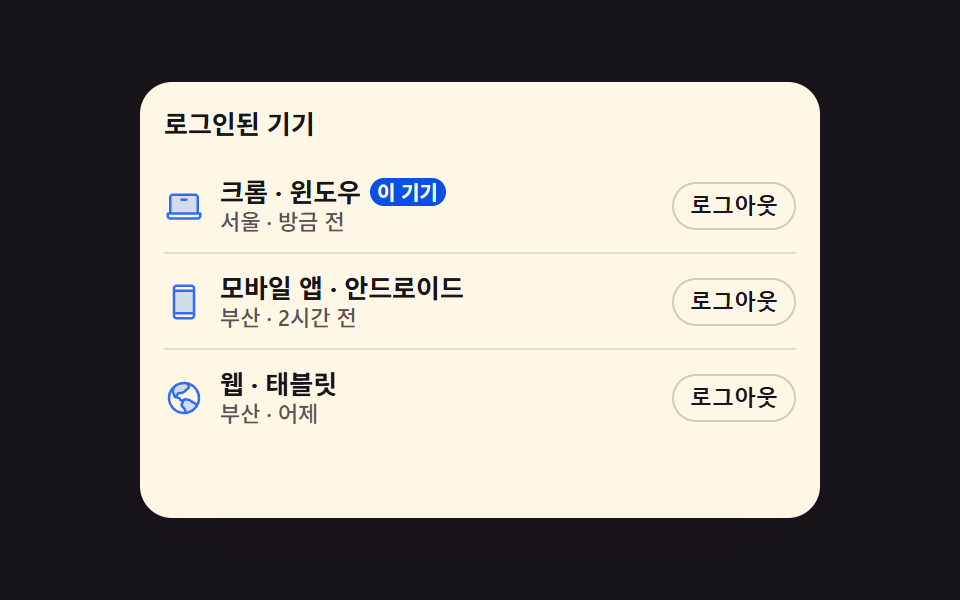
기기 아이콘과 접속한 도시, 마지막으로 쓴 시각이 한 줄에 놓이고 지금 보고 있는 기기에는 따로 배지가 붙습니다. 줄 오른쪽 버튼을 누르면 그 줄만 옆으로 밀려 나가면서 높이까지 같이 접혀 아래 줄이 튀지 않습니다.
쓰임설정의 보안 탭에서 다른 기기 접속을 확인하고 하나씩 끊는 자리
translateXmax-heightaria-live

<main class="stage">
  <section class="sd is-demo" id="sd">
    <h2 class="sd__title">로그인된 기기</h2>
    <ul class="sd__list">
      <li class="sd__row" data-row="1" data-name="크롬 · 윈도우">
        <span class="sd__ic" aria-hidden="true"><svg viewBox="0 0 256 256" width="20" height="20"><g fill="currentColor"><path d="M216 72v104H40V72a16 16 0 0 1 16-16h144a16 16 0 0 1 16 16" opacity=".2"/><path d="M232 168h-8V72a24 24 0 0 0-24-24H56a24 24 0 0 0-24 24v96h-8a8 8 0 0 0-8 8v16a24 24 0 0 0 24 24h176a24 24 0 0 0 24-24v-16a8 8 0 0 0-8-8M48 72a8 8 0 0 1 8-8h144a8 8 0 0 1 8 8v96H48Zm176 120a8 8 0 0 1-8 8H40a8 8 0 0 1-8-8v-8h192ZM152 88a8 8 0 0 1-8 8h-32a8 8 0 0 1 0-16h32a8 8 0 0 1 8 8"/></g></svg></span>
        <span class="sd__txt">
          <span class="sd__name">크롬 · 윈도우<span class="sd__badge">이 기기</span></span>
          <span class="sd__meta">서울 · 방금 전</span>
        </span>
        <button class="sd__out" type="button">로그아웃</button>
      </li>
      <li class="sd__row" data-row="2" data-name="모바일 앱 · 안드로이드">
        <span class="sd__ic" aria-hidden="true"><svg viewBox="0 0 256 256" width="20" height="20"><g fill="currentColor"><path d="M192 56v144H64V56Z" opacity=".2"/><path d="M176 16H80a24 24 0 0 0-24 24v176a24 24 0 0 0 24 24h96a24 24 0 0 0 24-24V40a24 24 0 0 0-24-24M72 64h112v128H72Zm8-32h96a8 8 0 0 1 8 8v8H72v-8a8 8 0 0 1 8-8m96 192H80a8 8 0 0 1-8-8v-8h112v8a8 8 0 0 1-8 8"/></g></svg></span>
        <span class="sd__txt">
          <span class="sd__name">모바일 앱 · 안드로이드</span>
          <span class="sd__meta">부산 · 2시간 전</span>
        </span>
        <button class="sd__out" type="button">로그아웃</button>
      </li>
      <li class="sd__row" data-row="3" data-name="웹 · 태블릿">
        <span class="sd__ic" aria-hidden="true"><svg viewBox="0 0 256 256" width="20" height="20"><g fill="currentColor"><path d="M213.09 172.48a96 96 0 0 1-80.41 51.41l3.17-16.44a8 8 0 0 0-2-6.95l-19.74-20.33a8 8 0 0 1-1.44-8.69l13.7-30.74a8 8 0 0 1 8.38-4.67l22.82 3.08a8.1 8.1 0 0 1 3.12 1.11ZM116.71 95L129 88.24a7.5 7.5 0 0 0 1.5-1.07l26.91-24.33A8 8 0 0 0 159 53l-10.5-18.81A96.6 96.6 0 0 0 128 32a95.6 95.6 0 0 0-60.22 21.23L56 81.08a8 8 0 0 0-.12 5.92l11.5 30.67a8 8 0 0 0 5.81 5l2.69.58L89.2 100a8 8 0 0 1 6.94-4h16.71a7.9 7.9 0 0 0 3.86-1" opacity=".2"/><path d="M128 24a104 104 0 1 0 104 104A104.11 104.11 0 0 0 128 24m88 104a87.6 87.6 0 0 1-6.4 32.94l-44.7-27.49a15.9 15.9 0 0 0-6.24-2.23l-22.82-3.08a16.11 16.11 0 0 0-16 7.86h-8.72l-3.8-7.86a15.91 15.91 0 0 0-11-8.67l-8-1.73L96.14 104h16.71a16.06 16.06 0 0 0 7.73-2l12.25-6.76a16.6 16.6 0 0 0 3-2.14l26.91-24.34A15.93 15.93 0 0 0 166 49.1l-.36-.65A88.11 88.11 0 0 1 216 128m-72.69-86.66L152 56.9l-26.91 24.34L112.85 88H96.14a16 16 0 0 0-13.88 8l-8.73 15.23l-10.15-27.04l10.94-25.87a87.87 87.87 0 0 1 69-17ZM40 128a87.5 87.5 0 0 1 8.54-37.8l11.34 30.27a16 16 0 0 0 11.62 10l21.43 4.61l3.81 7.92a16.09 16.09 0 0 0 14.4 9h1.48l-7.23 16.23a16 16 0 0 0 2.86 17.37l.14.14l19.61 20.2l-1.94 10A88.11 88.11 0 0 1 40 128m102.58 86.78l1.13-5.81a16.09 16.09 0 0 0-4-13.9a2 2 0 0 1-.14-.14L120 174.74L133.7 144l22.82 3.08l45.72 28.12a88.18 88.18 0 0 1-59.66 39.58"/></g></svg></span>
        <span class="sd__txt">
          <span class="sd__name">웹 · 태블릿</span>
          <span class="sd__meta">부산 · 어제</span>
        </span>
        <button class="sd__out" type="button">로그아웃</button>
      </li>
    </ul>
    <p class="sd__live" role="status" aria-live="polite"><span class="sd__say">웹 · 태블릿 기기를 로그아웃했습니다</span></p>
  </section>
</main>@use "../../../../site/static/demo-tokens" as *;
$duration: $dur-base;
$easing: $ease-spring;
$color: $subject-blue;
@include stage($stage-ink);
.sd {
--row-h: 48px;
box-sizing: border-box;
width: min(340px, 88vw);
padding: $sp-3;
border-radius: $r-card;
background-color: $subject-cream;
color: $subject-ink;
box-shadow: $shadow-raised;
overflow: hidden;
font-family: -apple-system, "Segoe UI", "Noto Sans KR", sans-serif;
}
.sd__title {
margin: 0 0 $sp-2;
font-size: 13px;
line-height: 18px;
font-weight: 700;
}
.sd__list {
// 줄이 접혀도 카드 높이가 변하지 않게 목록 높이를 고정한다 — 안 그러면 무대 가운데 정렬이 카드째 움직인다
height: calc(var(--row-h) * 3);
margin: 0;
padding: 0;
list-style: none;
overflow: hidden;
}
.sd__row {
position: relative;
box-sizing: border-box;
display: flex;
align-items: center;
gap: $sp-2;
height: var(--row-h);
max-height: var(--row-h);
overflow: hidden;
background-color: transparent;
transform: translateX(0);
transition: transform $duration $easing, max-height $duration $easing, background-color $duration $easing;
}
.sd__row::after {
content: "";
position: absolute;
left: 0;
right: 0;
bottom: 0;
height: 1px;
background-color: rgba($subject-ink, .12);
}
.sd__row:last-child::after { display: none; }
// 사람이 실제로 누른 경로 — 루프를 껐을 때도 규칙이 살아 있어야 한다
.sd:not(.is-demo) .sd__row[data-gone="1"] {
transform: translateX(112%);
max-height: 0;
background-color: $error-soft;
}
.sd__ic { display: inline-flex; flex: 0 0 auto; color: $color; }
.sd__ic svg { display: block; }
.sd__txt { display: flex; flex-direction: column; min-width: 0; flex: 1 1 auto; }
.sd__name {
display: flex;
align-items: center;
gap: $sp-1;
font-size: 13px;
line-height: 16px;
font-weight: 700;
white-space: nowrap;
}
.sd__badge {
padding-left: $sp-1;
padding-right: $sp-1;
border-radius: $r-pill;
background-color: $subject-blue-deep;
color: $subject-cream;
font-size: 10px;
line-height: 14px;
font-weight: 700;
}
.sd__meta {
font-size: 11px;
line-height: 14px;
font-weight: 500;
color: rgba($subject-ink, .72); // AA 4.5 (blog-design)
white-space: nowrap;
}
.sd__out {
flex: 0 0 auto;
box-sizing: border-box;
margin: 0;
padding: $sp-1 $sp-2;
border: 1px solid rgba($subject-ink, .2);
border-radius: $r-pill;
background-color: transparent;
color: $subject-ink;
font-size: 11px;
line-height: 14px;
font-weight: 700;
cursor: pointer;
}
.sd__out:focus-visible { outline: 3px solid $color; outline-offset: 2px; }
.sd__out:disabled { opacity: .4; cursor: default; }
.sd__live {
margin: $sp-2 0 0;
height: 16px;
font-size: 11px;
line-height: 16px;
font-weight: 500;
color: rgba($subject-ink, .64);
white-space: nowrap;
opacity: 0;
}
.sd:not(.is-demo)[data-said] .sd__live { opacity: 1; }
// ── 자동 루프: 셋째 줄이 밀려 나갔다(30~48%) 접히고(58%) 다시 펴져 제자리로(86%) ──
// 되돌아오는 길도 같은 이징으로 밀어 넣어 텔레포트로 보이지 않게 한다
.sd.is-demo .sd__row[data-row="3"] {
animation-name: sd-out;
animation-duration: $dur-loop;
animation-timing-function: $easing;
animation-iteration-count: infinite;
}
@keyframes sd-out {
0% { transform: translateX(0); max-height: var(--row-h); background-color: transparent; }
28% { transform: translateX(0); max-height: var(--row-h); background-color: transparent; }
31% { transform: translateX(0); max-height: var(--row-h); background-color: $error-soft; }
48% { transform: translateX(112%); max-height: var(--row-h); background-color: $error-soft; }
58% { transform: translateX(112%); max-height: 0; background-color: $error-soft; }
68% { transform: translateX(112%); max-height: var(--row-h); background-color: $error-soft; }
84% { transform: translateX(0); max-height: var(--row-h); background-color: $error-soft; }
87% { transform: translateX(0); max-height: var(--row-h); background-color: transparent; }
100% { transform: translateX(0); max-height: var(--row-h); background-color: transparent; }
}
// 알림 줄은 컷으로 켜고 끈다 — 반투명 중간 프레임을 만들지 않는다
.sd.is-demo .sd__live {
animation-name: sd-say;
animation-duration: $dur-loop;
animation-timing-function: steps(1, end);
animation-iteration-count: infinite;
}
@keyframes sd-say {
0% { opacity: 0; }
46% { opacity: 0; }
48% { opacity: 1; }
84% { opacity: 1; }
86% { opacity: 0; }
100% { opacity: 0; }
}
@media (max-width: 340px) {
.sd {
--row-h: 36px;
padding: $sp-2;
}
.sd__title { margin: 0 0 $sp-1; font-size: 11px; line-height: 14px; }
.sd__name { font-size: 12px; line-height: 15px; }
.sd__meta { font-size: 10px; line-height: 13px; }
.sd__badge { font-size: 9px; line-height: 13px; }
.sd__out { padding: 0 $sp-1; font-size: 10px; line-height: 20px; }
.sd__live { margin: $sp-1 0 0; height: 14px; font-size: 10px; line-height: 14px; }
}
@media (prefers-reduced-motion: reduce) {
.sd.is-demo .sd__row[data-row="3"],
.sd.is-demo .sd__live { animation: none !important; }
.sd__row { transition: none !important; }
.sd.is-demo .sd__live { opacity: 1 !important; }
}html, body {
margin: 0;
overflow: hidden;
}
.stage {
box-sizing: border-box;
min-height: 100vh;
display: grid;
place-items: center;
margin: 0;
background: #17141a;
font-family: -apple-system, "Segoe UI", "Noto Sans KR", sans-serif;
padding: clamp(8px, 4vw, 24px);
}
.sd {
--row-h: 48px;
box-sizing: border-box;
width: min(340px, 88vw);
padding: 12px;
border-radius: 16px;
background-color: #fff7e6;
color: #17141a;
box-shadow: 0 14px 24px rgba(23, 20, 26, 0.32);
overflow: hidden;
font-family: -apple-system, "Segoe UI", "Noto Sans KR", sans-serif;
}
.sd__title {
margin: 0 0 8px;
font-size: 13px;
line-height: 18px;
font-weight: 700;
}
.sd__list {
height: calc(var(--row-h) * 3);
margin: 0;
padding: 0;
list-style: none;
overflow: hidden;
}
.sd__row {
position: relative;
box-sizing: border-box;
display: flex;
align-items: center;
gap: 8px;
height: var(--row-h);
max-height: var(--row-h);
overflow: hidden;
background-color: transparent;
transform: translateX(0);
transition: transform 300ms cubic-bezier(0.2, 0.8, 0.2, 1), max-height 300ms cubic-bezier(0.2, 0.8, 0.2, 1), background-color 300ms cubic-bezier(0.2, 0.8, 0.2, 1);
}
.sd__row::after {
content: "";
position: absolute;
left: 0;
right: 0;
bottom: 0;
height: 1px;
background-color: rgba(23, 20, 26, 0.12);
}
.sd__row:last-child::after {
display: none;
}
.sd:not(.is-demo) .sd__row[data-gone="1"] {
transform: translateX(112%);
max-height: 0;
background-color: #ffe0d8;
}
.sd__ic {
display: inline-flex;
flex: 0 0 auto;
color: #2f6df6;
}
.sd__ic svg {
display: block;
}
.sd__txt {
display: flex;
flex-direction: column;
min-width: 0;
flex: 1 1 auto;
}
.sd__name {
display: flex;
align-items: center;
gap: 4px;
font-size: 13px;
line-height: 16px;
font-weight: 700;
white-space: nowrap;
}
.sd__badge {
padding-left: 4px;
padding-right: 4px;
border-radius: 999px;
background-color: #0a4fe8;
color: #fff7e6;
font-size: 10px;
line-height: 14px;
font-weight: 700;
}
.sd__meta {
font-size: 11px;
line-height: 14px;
font-weight: 500;
color: rgba(23, 20, 26, 0.72);
white-space: nowrap;
}
.sd__out {
flex: 0 0 auto;
box-sizing: border-box;
margin: 0;
padding: 4px 8px;
border: 1px solid rgba(23, 20, 26, 0.2);
border-radius: 999px;
background-color: transparent;
color: #17141a;
font-size: 11px;
line-height: 14px;
font-weight: 700;
cursor: pointer;
}
.sd__out:focus-visible {
outline: 3px solid #2f6df6;
outline-offset: 2px;
}
.sd__out:disabled {
opacity: 0.4;
cursor: default;
}
.sd__live {
margin: 8px 0 0;
height: 16px;
font-size: 11px;
line-height: 16px;
font-weight: 500;
color: rgba(23, 20, 26, 0.64);
white-space: nowrap;
opacity: 0;
}
.sd:not(.is-demo)[data-said] .sd__live {
opacity: 1;
}
.sd.is-demo .sd__row[data-row="3"] {
animation-name: sd-out;
animation-duration: 2s;
animation-timing-function: cubic-bezier(0.2, 0.8, 0.2, 1);
animation-iteration-count: infinite;
}
@keyframes sd-out {
0% {
transform: translateX(0);
max-height: var(--row-h);
background-color: transparent;
}
28% {
transform: translateX(0);
max-height: var(--row-h);
background-color: transparent;
}
31% {
transform: translateX(0);
max-height: var(--row-h);
background-color: #ffe0d8;
}
48% {
transform: translateX(112%);
max-height: var(--row-h);
background-color: #ffe0d8;
}
58% {
transform: translateX(112%);
max-height: 0;
background-color: #ffe0d8;
}
68% {
transform: translateX(112%);
max-height: var(--row-h);
background-color: #ffe0d8;
}
84% {
transform: translateX(0);
max-height: var(--row-h);
background-color: #ffe0d8;
}
87% {
transform: translateX(0);
max-height: var(--row-h);
background-color: transparent;
}
100% {
transform: translateX(0);
max-height: var(--row-h);
background-color: transparent;
}
}
.sd.is-demo .sd__live {
animation-name: sd-say;
animation-duration: 2s;
animation-timing-function: steps(1, end);
animation-iteration-count: infinite;
}
@keyframes sd-say {
0% {
opacity: 0;
}
46% {
opacity: 0;
}
48% {
opacity: 1;
}
84% {
opacity: 1;
}
86% {
opacity: 0;
}
100% {
opacity: 0;
}
}
@media (max-width: 340px) {
.sd {
--row-h: 36px;
padding: 8px;
}
.sd__title {
margin: 0 0 4px;
font-size: 11px;
line-height: 14px;
}
.sd__name {
font-size: 12px;
line-height: 15px;
}
.sd__meta {
font-size: 10px;
line-height: 13px;
}
.sd__badge {
font-size: 9px;
line-height: 13px;
}
.sd__out {
padding: 0 4px;
font-size: 10px;
line-height: 20px;
}
.sd__live {
margin: 4px 0 0;
height: 14px;
font-size: 10px;
line-height: 14px;
}
}
@media (prefers-reduced-motion: reduce) {
.sd.is-demo .sd__row[data-row="3"],
.sd.is-demo .sd__live {
animation: none !important;
}
.sd__row {
transition: none !important;
}
.sd.is-demo .sd__live {
opacity: 1 !important;
}
}// 실제 동작: 버튼을 누르면 그 줄만 옆으로 밀려 나가며 높이가 접히고, 읽히는 영역으로 한 번 알린다
var root = document.getElementById('sd');
var live = root.querySelector('.sd__live');
function disconnect(btn) {
var row = btn.parentNode;
if (row.getAttribute('data-gone') === '1') return;
root.classList.remove('is-demo'); // 사람이 만졌으니 자동 루프를 끈다
row.setAttribute('data-gone', '1');
btn.disabled = true;
root.setAttribute('data-said', '1');
live.textContent = row.getAttribute('data-name') + ' 기기를 로그아웃했습니다';
}
var buttons = root.querySelectorAll('.sd__out');
for (var i = 0; i < buttons.length; i++) {
buttons[i].addEventListener('click', function () { disconnect(this); });
}import { useState } from "react";
import type { CSSProperties, ReactNode } from "react";
import styles from "./SessionDeviceList.module.scss";
export type SessionIcon = "laptop" | "phone" | "globe";
export type Session = { id: string; name: string; meta: string; icon: SessionIcon; current?: boolean };
export type SessionDeviceListProps = {
title?: string;
sessions?: Session[];
currentLabel?: string;
outLabel?: string;
sayTail?: string;
duration?: number;
easing?: string;
color?: string;
};
type Vars = CSSProperties & { "--duration"?: string; "--easing"?: string; "--color"?: string };
const LAPTOP: ReactNode = (
<g fill="currentColor">
<path d="M216 72v104H40V72a16 16 0 0 1 16-16h144a16 16 0 0 1 16 16" opacity=".2" />
<path d="M232 168h-8V72a24 24 0 0 0-24-24H56a24 24 0 0 0-24 24v96h-8a8 8 0 0 0-8 8v16a24 24 0 0 0 24 24h176a24 24 0 0 0 24-24v-16a8 8 0 0 0-8-8M48 72a8 8 0 0 1 8-8h144a8 8 0 0 1 8 8v96H48Zm176 120a8 8 0 0 1-8 8H40a8 8 0 0 1-8-8v-8h192ZM152 88a8 8 0 0 1-8 8h-32a8 8 0 0 1 0-16h32a8 8 0 0 1 8 8" />
</g>
);
const PHONE: ReactNode = (
<g fill="currentColor">
<path d="M192 56v144H64V56Z" opacity=".2" />
<path d="M176 16H80a24 24 0 0 0-24 24v176a24 24 0 0 0 24 24h96a24 24 0 0 0 24-24V40a24 24 0 0 0-24-24M72 64h112v128H72Zm8-32h96a8 8 0 0 1 8 8v8H72v-8a8 8 0 0 1 8-8m96 192H80a8 8 0 0 1-8-8v-8h112v8a8 8 0 0 1-8 8" />
</g>
);
const GLOBE: ReactNode = (
<g fill="currentColor">
<path d="M213.09 172.48a96 96 0 0 1-80.41 51.41l3.17-16.44a8 8 0 0 0-2-6.95l-19.74-20.33a8 8 0 0 1-1.44-8.69l13.7-30.74a8 8 0 0 1 8.38-4.67l22.82 3.08a8.1 8.1 0 0 1 3.12 1.11ZM116.71 95L129 88.24a7.5 7.5 0 0 0 1.5-1.07l26.91-24.33A8 8 0 0 0 159 53l-10.5-18.81A96.6 96.6 0 0 0 128 32a95.6 95.6 0 0 0-60.22 21.23L56 81.08a8 8 0 0 0-.12 5.92l11.5 30.67a8 8 0 0 0 5.81 5l2.69.58L89.2 100a8 8 0 0 1 6.94-4h16.71a7.9 7.9 0 0 0 3.86-1" opacity=".2" />
<path d="M128 24a104 104 0 1 0 104 104A104.11 104.11 0 0 0 128 24m88 104a87.6 87.6 0 0 1-6.4 32.94l-44.7-27.49a15.9 15.9 0 0 0-6.24-2.23l-22.82-3.08a16.11 16.11 0 0 0-16 7.86h-8.72l-3.8-7.86a15.91 15.91 0 0 0-11-8.67l-8-1.73L96.14 104h16.71a16.06 16.06 0 0 0 7.73-2l12.25-6.76a16.6 16.6 0 0 0 3-2.14l26.91-24.34A15.93 15.93 0 0 0 166 49.1l-.36-.65A88.11 88.11 0 0 1 216 128m-72.69-86.66L152 56.9l-26.91 24.34L112.85 88H96.14a16 16 0 0 0-13.88 8l-8.73 15.23l-10.15-27.04l10.94-25.87a87.87 87.87 0 0 1 69-17ZM40 128a87.5 87.5 0 0 1 8.54-37.8l11.34 30.27a16 16 0 0 0 11.62 10l21.43 4.61l3.81 7.92a16.09 16.09 0 0 0 14.4 9h1.48l-7.23 16.23a16 16 0 0 0 2.86 17.37l.14.14l19.61 20.2l-1.94 10A88.11 88.11 0 0 1 40 128m102.58 86.78l1.13-5.81a16.09 16.09 0 0 0-4-13.9a2 2 0 0 1-.14-.14L120 174.74L133.7 144l22.82 3.08l45.72 28.12a88.18 88.18 0 0 1-59.66 39.58" />
</g>
);
const ICONS: Record<SessionIcon, ReactNode> = { laptop: LAPTOP, phone: PHONE, globe: GLOBE };
const DEFAULT_SESSIONS: Session[] = [
{ id: "s1", name: "크롬 · 윈도우", meta: "서울 · 방금 전", icon: "laptop", current: true },
{ id: "s2", name: "모바일 앱 · 안드로이드", meta: "부산 · 2시간 전", icon: "phone" },
{ id: "s3", name: "웹 · 태블릿", meta: "부산 · 어제", icon: "globe" },
];
export default function SessionDeviceList({
title = "로그인된 기기",
sessions = DEFAULT_SESSIONS,
currentLabel = "이 기기",
outLabel = "로그아웃",
sayTail = " 기기를 로그아웃했습니다",
duration = 300,
easing = "cubic-bezier(.2,.8,.2,1)",
color = "#2f6df6",
}: SessionDeviceListProps) {
const [demo, setDemo] = useState(true);
const [gone, setGone] = useState<string[]>([]);
const [say, setSay] = useState("");
const vars: Vars = { "--duration": `${duration}ms`, "--easing": easing, "--color": color };
// 버튼을 누르면 그 줄만 옆으로 밀려 나가며 높이가 접히고, 읽히는 영역으로 한 번 알린다
function cut(s: Session) {
if (gone.indexOf(s.id) >= 0) return;
setDemo(false); // 사람이 만졌으니 자동 루프를 끈다
setGone((prev: string[]) => prev.concat([s.id]));
setSay(s.name + sayTail);
}
return (
<section
className={`${styles.sd} ${demo ? styles.isDemo : ""}`}
style={vars}
data-said={say ? "1" : undefined}
>
<h2 className={styles.title}>{title}</h2>
<ul className={styles.list}>
{sessions.map((s: Session, i: number) => (
<li
key={s.id}
className={styles.row}
data-row={String(i + 1)}
data-gone={gone.indexOf(s.id) >= 0 ? "1" : undefined}
>
<span className={styles.ic} aria-hidden="true">
<svg viewBox="0 0 256 256" width="20" height="20">{ICONS[s.icon]}</svg>
</span>
<span className={styles.txt}>
<span className={styles.name}>
{s.name}
{s.current ? <span className={styles.badge}>{currentLabel}</span> : null}
</span>
<span className={styles.meta}>{s.meta}</span>
</span>
<button
className={styles.out}
type="button"
disabled={gone.indexOf(s.id) >= 0}
onClick={() => cut(s)}
>
{outLabel}
</button>
</li>
))}
</ul>
<p className={styles.live} role="status" aria-live="polite">{say}</p>
</section>
);
}01 지금 로그인된 기기 목록 — 측정 누적면적 11.214% · 움직인 프레임 9/23GODRICH 원작 · zip 에 SCSS·React 포함 · 계정 보안 설정 UI 9종 — 로그인한 뒤의 화면
이 데모가 속한 글
 계정 보안 설정 UI 9종 — 로그인한 뒤의 화면계정 보안 설정은 로그인을 통과한 사람이 마주하는, 접속 중인 기기와 2단계 인증, 비밀번호를 직접 만지는 화면입니다. 아홉 개는 전부 실제로 돌아갑니다. 기기 줄은 정말로 접히고, 백업 코드는 정말로 클립보드에 들 이 글의 데모 전부 보기