07값마다 반지름이 다른 꽃잎으로 펼치는 콕스콤 차트
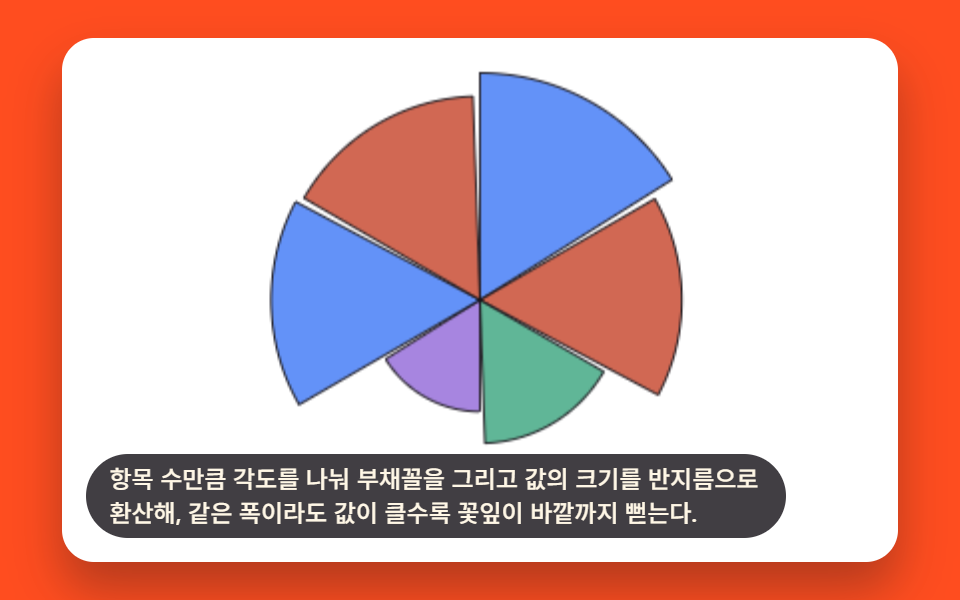
항목 수만큼 각도를 나눠 부채꼴을 그리고 값의 크기를 반지름으로 환산해, 같은 폭이라도 값이 클수록 꽃잎이 바깥까지 뻗는다.
쓰임월별 반복 지표 비교 대시보드 카드
COXCOMB_PETAL_GAP_DEGtargetRadiiradiusAt
<main class="stage">
<div class="cxc is-demo" id="cxcRoot">
  <canvas class="cxc__canvas" id="cxcCanvas" width="480" height="300"></canvas>
  <p class="cxc__caption">항목 수만큼 각도를 나눠 부채꼴을 그리고 값의 크기를 반지름으로 환산해, 같은 폭이라도 값이 클수록 꽃잎이 바깥까지 뻗는다.</p>
</div>
</main>
@use "../../../../site/static/demo-tokens" as *;
@include stage($stage-orange);
.cxc {
position: relative;
width: min(92vw, calc(160vh - 12.8vw));
aspect-ratio: 480 / 300;
margin: 0 auto;
border-radius: $r-card;
overflow: hidden;
box-shadow: $shadow-raised;
background: $stage-paper;
}
.cxc__canvas {
display: block;
width: 100%;
height: 100%;
}
.cxc__caption {
position: absolute;
left: $sp-3;
bottom: $sp-3;
max-width: 78%;
margin: 0;
padding: $sp-1 $sp-3;
border-radius: $r-pill;
background: rgba(23, 20, 26, .82);
color: $subject-cream;
font-weight: 500;
font-size: 12px;
line-height: 1.4;
pointer-events: none;
}
@media (max-width: 340px) {
.cxc__caption { font-size: 10px; padding: $sp-1 $sp-2; }
}
@media (prefers-reduced-motion: reduce) {
.cxc { cursor: default; }
}html, body {
margin: 0;
overflow: hidden;
}
.stage {
box-sizing: border-box;
min-height: 100vh;
display: grid;
place-items: center;
margin: 0;
background: #ff4d1f;
font-family: -apple-system, "Segoe UI", "Noto Sans KR", sans-serif;
padding: clamp(8px, 4vw, 24px);
}
.cxc {
position: relative;
width: min(92vw, 160vh - 12.8vw);
aspect-ratio: 480/300;
margin: 0 auto;
border-radius: 16px;
overflow: hidden;
box-shadow: 0 14px 24px rgba(23, 20, 26, 0.32);
background: #ffffff;
}
.cxc__canvas {
display: block;
width: 100%;
height: 100%;
}
.cxc__caption {
position: absolute;
left: 12px;
bottom: 12px;
max-width: 78%;
margin: 0;
padding: 4px 12px;
border-radius: 999px;
background: rgba(23, 20, 26, 0.82);
color: #fff7e6;
font-weight: 500;
font-size: 12px;
line-height: 1.4;
pointer-events: none;
}
@media (max-width: 340px) {
.cxc__caption {
font-size: 10px;
padding: 4px 8px;
}
}
@media (prefers-reduced-motion: reduce) {
.cxc {
cursor: default;
}
}(function () {
// 기법: 항목 수만큼 중심각을 똑같이 나눠 부채꼴(꽃잎) 자리를 만들고, 값의 크기를
// 반지름 목표치로 환산한다. 매 프레임 꽃잎마다 다른 시작 지연을 둔 완화 곡선으로
// 반지름을 0에서 목표까지 실제로 다시 계산해 그려 순차로 자라나는 과정을 보여준다.
var root = document.getElementById('cxcRoot');
var canvas = document.getElementById('cxcCanvas');
var ctx = canvas.getContext('2d');
var wrap = canvas.parentElement;
function seedRand(seed) {
var s = seed >>> 0;
return function () { s = (s * 1664525 + 1013904223) >>> 0; return s / 4294967296; };
}
var CALC_W = 480, CALC_H = 300;
var LOOP_MS = 2000;
var rand = seedRand(425071);
var COUNT = 6;
var VALUES = [];
for (var vi = 0; vi < COUNT; vi += 1) VALUES.push(20 + rand() * 80);
var COXCOMB_PETAL_GAP_DEG = 2;
var anglePerPetal = (360 - COXCOMB_PETAL_GAP_DEG * COUNT) / COUNT;
var MIN_R = 18, MAX_R = 130;
var maxValue = Math.max.apply(null, VALUES);
var targetRadii = VALUES.map(function (v) { return MIN_R + (v / maxValue) * (MAX_R - MIN_R); });
function easeOutCubic(x) { return 1 - Math.pow(1 - x, 3); }
function easeInCubic(x) { return x * x * x; }
function clamp01(x) { return Math.max(0, Math.min(1, x)); }
var CENTER_X = CALC_W * 0.5, CENTER_Y = CALC_H * 0.5;
var FILL_COLORS = ['47,109,246', '194,54,26', '43,157,116', '138,92,214'];
var INK_STROKE = '23,20,26';
function radiusAt(i, t) {
var target = targetRadii[i];
if (t < 1400) {
var growProgress = clamp01((t - i * 90) / 500);
return target * easeOutCubic(growProgress);
}
if (t < 1750) return target;
var shrinkProgress = clamp01((t - 1750) / 200);
return target * (1 - easeInCubic(shrinkProgress));
}
var cw = 480, ch = 300;
function draw(t) {
var sx = cw / CALC_W, sy = ch / CALC_H;
var scale = (sx + sy) / 2;
ctx.clearRect(0, 0, cw, ch);
var cx = CENTER_X * sx, cy = CENTER_Y * sy;
var startDeg = -90;
for (var i = 0; i < COUNT; i += 1) {
var r = radiusAt(i, t) * scale;
var a0 = startDeg * Math.PI / 180;
var a1 = (startDeg + anglePerPetal) * Math.PI / 180;
ctx.beginPath();
ctx.moveTo(cx, cy);
ctx.arc(cx, cy, r, a0, a1);
ctx.closePath();
ctx.fillStyle = 'rgba(' + FILL_COLORS[i % 4] + ',.75)';
ctx.fill();
ctx.strokeStyle = 'rgba(' + INK_STROKE + ',.9)';
ctx.lineWidth = 1;
ctx.stroke();
startDeg += anglePerPetal + COXCOMB_PETAL_GAP_DEG;
}
}
var reduce = window.matchMedia('(prefers-reduced-motion: reduce)').matches;
var elapsed = 0;
if (reduce) root.classList.remove('is-demo');
function phaseOf(ms) { return reduce ? LOOP_MS * 0.72 : (ms % LOOP_MS); }
function fit() {
var r = wrap.getBoundingClientRect();
cw = Math.max(1, Math.round(r.width));
ch = Math.max(1, Math.round(r.height));
canvas.width = cw; canvas.height = ch;
draw(phaseOf(elapsed));
}
var lastTs = null;
function tick(ts) {
if (lastTs === null) lastTs = ts;
var dt = Math.min(ts - lastTs, 48);
lastTs = ts;
if (!reduce) elapsed += dt;
draw(phaseOf(elapsed));
requestAnimationFrame(tick);
}
fit();
window.addEventListener('resize', fit);
draw(phaseOf(elapsed));
requestAnimationFrame(tick);
})();import { useEffect, useRef } from "react";
import styles from "./ChartAdvancedCoxcombRadialPetal.module.scss";
export default function ChartAdvancedCoxcombRadialPetal() {
const rootRef = useRef<HTMLDivElement>(null);
const canvasRef = useRef<HTMLCanvasElement>(null);
useEffect(() => {
const root = rootRef.current;
const canvas = canvasRef.current;
if (!root || !canvas) return;
const ctx = canvas.getContext("2d");
if (!ctx) return;
const wrap = canvas.parentElement as HTMLElement;
function seedRand(seed: number) {
let s = seed >>> 0;
return function () { s = (s * 1664525 + 1013904223) >>> 0; return s / 4294967296; };
}
const CALC_W = 480, CALC_H = 300;
const LOOP_MS = 2000;
const rand = seedRand(425071);
const COUNT = 6;
const VALUES: number[] = [];
for (let vi = 0; vi < COUNT; vi += 1) VALUES.push(20 + rand() * 80);
const COXCOMB_PETAL_GAP_DEG = 2;
const anglePerPetal = (360 - COXCOMB_PETAL_GAP_DEG * COUNT) / COUNT;
const MIN_R = 18, MAX_R = 130;
const maxValue = Math.max.apply(null, VALUES);
const targetRadii = VALUES.map(function (v) { return MIN_R + (v / maxValue) * (MAX_R - MIN_R); });
function easeOutCubic(x: number) { return 1 - Math.pow(1 - x, 3); }
function easeInCubic(x: number) { return x * x * x; }
function clamp01(x: number) { return Math.max(0, Math.min(1, x)); }
const CENTER_X = CALC_W * 0.5, CENTER_Y = CALC_H * 0.5;
const FILL_COLORS = ["47,109,246", "194,54,26", "43,157,116", "138,92,214"];
const INK_STROKE = "23,20,26";
function radiusAt(i: number, t: number) {
const target = targetRadii[i];
if (t < 1400) {
const growProgress = clamp01((t - i * 90) / 500);
return target * easeOutCubic(growProgress);
}
if (t < 1750) return target;
const shrinkProgress = clamp01((t - 1750) / 200);
return target * (1 - easeInCubic(shrinkProgress));
}
let cw = 480, ch = 300;
function draw(t: number) {
const sx = cw / CALC_W, sy = ch / CALC_H;
const scale = (sx + sy) / 2;
ctx!.clearRect(0, 0, cw, ch);
const cx = CENTER_X * sx, cy = CENTER_Y * sy;
let startDeg = -90;
for (let i = 0; i < COUNT; i += 1) {
const r = radiusAt(i, t) * scale;
const a0 = startDeg * Math.PI / 180;
const a1 = (startDeg + anglePerPetal) * Math.PI / 180;
ctx!.beginPath();
ctx!.moveTo(cx, cy);
ctx!.arc(cx, cy, r, a0, a1);
ctx!.closePath();
ctx!.fillStyle = "rgba(" + FILL_COLORS[i % 4] + ",.75)";
ctx!.fill();
ctx!.strokeStyle = "rgba(" + INK_STROKE + ",.9)";
ctx!.lineWidth = 1;
ctx!.stroke();
startDeg += anglePerPetal + COXCOMB_PETAL_GAP_DEG;
}
}
const reduce = window.matchMedia("(prefers-reduced-motion: reduce)").matches;
let elapsed = 0;
if (reduce) root.classList.remove("is-demo");
function phaseOf(ms: number) { return reduce ? LOOP_MS * 0.72 : (ms % LOOP_MS); }
function fit() {
const r = wrap.getBoundingClientRect();
cw = Math.max(1, Math.round(r.width));
ch = Math.max(1, Math.round(r.height));
canvas!.width = cw; canvas!.height = ch;
draw(phaseOf(elapsed));
}
let lastTs: number | null = null;
let raf = 0;
function tick(ts: number) {
if (lastTs === null) lastTs = ts;
const dt = Math.min(ts - lastTs, 48);
lastTs = ts;
if (!reduce) elapsed += dt;
draw(phaseOf(elapsed));
raf = requestAnimationFrame(tick);
}
fit();
window.addEventListener("resize", fit);
draw(phaseOf(elapsed));
raf = requestAnimationFrame(tick);
return () => {
cancelAnimationFrame(raf);
window.removeEventListener("resize", fit);
};
}, []);
return (
<main className={styles.stage}>
<div className={`${styles.cxc} is-demo`} ref={rootRef}>
<canvas className={styles.cxc__canvas} ref={canvasRef} width={480} height={300} />
<p className={styles.cxc__caption}>항목 수만큼 각도를 나눠 부채꼴을 그리고 값의 크기를 반지름으로 환산해, 같은 폭이라도 값이 클수록 꽃잎이 바깥까지 뻗는다.</p>
</div>
</main>
);
}07 값마다 반지름이 다른 꽃잎으로 펼치는 콕스콤 차트 — 측정 누적면적 19.5% · 움직인 프레임 17/23GODRICH 원작 · zip 에 SCSS·React 포함 · 그래프 그리기 9종 — 계산으로 그리는 데이터 시각화 차트
이 데모가 속한 글
 그래프 그리기 9종 — 계산으로 그리는 데이터 시각화 차트아홉 종류 중 셋은 리본처럼 흐르고, 셋은 막대로 끊어지고, 둘은 원으로 뭉치고, 하나는 깔때기 모양으로 좁아진다. 그래프 그리기 아홉 개를 값 하나가 바뀔 때마다 좌표를 다시 계산해서 그리는 방식으로 모았다. 이 글의 데모 전부 보기