07미니 플레이어 파형 막대
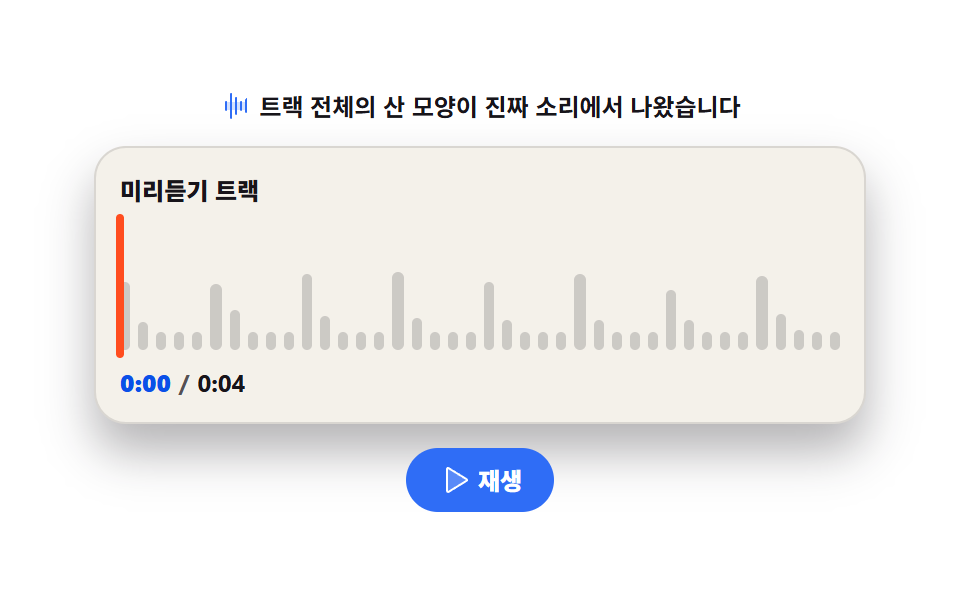
트랙 전체의 피크 값을 미리 뽑아 막대로 그려 두고, 재생 위치까지만 색을 채웁니다. 실시간 분석이 아니라 숫자 배열이라 스크롤해도 파형이 흔들리지 않습니다.
쓰임팟캐스트 에피소드 목록, 음원 미리듣기 카드
clip-patharia-valuenowgrid-auto-flow
<svg width="0" height="0" style="position:absolute" aria-hidden="true">
  <defs>
    <symbol id="ico-waveform" viewBox="0 0 256 256" fill="currentColor"><path d="M208 96v64H48V96Z" opacity=".2"/><path d="M56 96v64a8 8 0 0 1-16 0V96a8 8 0 0 1 16 0m32-72a8 8 0 0 0-8 8v192a8 8 0 0 0 16 0V32a8 8 0 0 0-8-8m40 32a8 8 0 0 0-8 8v128a8 8 0 0 0 16 0V64a8 8 0 0 0-8-8m40 32a8 8 0 0 0-8 8v64a8 8 0 0 0 16 0V96a8 8 0 0 0-8-8m40-16a8 8 0 0 0-8 8v96a8 8 0 0 0 16 0V72a8 8 0 0 0-8-8"/></symbol>
    <symbol id="ico-play" viewBox="0 0 256 256" fill="currentColor"><path d="M228.23 134.69L84.15 222.81A8 8 0 0 1 72 216.12V39.88a8 8 0 0 1 12.15-6.69l144.08 88.12a7.82 7.82 0 0 1 0 13.38" opacity=".2"/><path d="M232.4 114.49L88.32 26.35a16 16 0 0 0-16.2-.3A15.86 15.86 0 0 0 64 39.87v176.26A15.94 15.94 0 0 0 80 232a16.07 16.07 0 0 0 8.36-2.35l144.04-88.14a15.88 15.88 0 0 0 0-27.02M80 215.94V40l143.83 88Z"/></symbol>
    <symbol id="ico-pause" viewBox="0 0 256 256" fill="currentColor"><path d="M208 48v160a8 8 0 0 1-8 8h-40a8 8 0 0 1-8-8V48a8 8 0 0 1 8-8h40a8 8 0 0 1 8 8M96 40H56a8 8 0 0 0-8 8v160a8 8 0 0 0 8 8h40a8 8 0 0 0 8-8V48a8 8 0 0 0-8-8" opacity=".2"/><path d="M200 32h-40a16 16 0 0 0-16 16v160a16 16 0 0 0 16 16h40a16 16 0 0 0 16-16V48a16 16 0 0 0-16-16m0 176h-40V48h40zM96 32H56a16 16 0 0 0-16 16v160a16 16 0 0 0 16 16h40a16 16 0 0 0 16-16V48a16 16 0 0 0-16-16m0 176H56V48h40z"/></symbol>
  </defs>
</svg>
<main class="stage">
<div class="tp is-demo" id="tp">
  <p class="tp__hint"><svg class="tp__ico" aria-hidden="true"><use href="#ico-waveform"/></svg><span>트랙 전체의 산 모양이 진짜 소리에서 나왔습니다</span></p>
  <div class="tp__card">
    <p class="tp__label">미리듣기 트랙</p>
    <div class="tp__wave" id="wave" role="progressbar" aria-label="재생 위치" aria-valuemin="0" aria-valuemax="100" aria-valuenow="0">
      <div class="tp__row tp__row--base" id="baseBars" aria-hidden="true"></div>
      <div class="tp__lit" id="litWrap" aria-hidden="true"><div class="tp__row tp__row--lit" id="litBars"></div></div>
      <i class="tp__head" id="head" aria-hidden="true"></i>
    </div>
    <p class="tp__time"><span class="tp__now" id="timeText">0:00</span><span class="tp__sep">/</span><span>0:04</span></p>
  </div>
  <div class="tp__foot">
    <button class="tp__play" id="play" type="button" aria-pressed="false">
      <svg class="tp__ico tp__ico--play" aria-hidden="true"><use href="#ico-play"/></svg>
      <svg class="tp__ico tp__ico--pause" aria-hidden="true"><use href="#ico-pause"/></svg>
      <span id="playLabel">재생</span>
    </button>
  </div>
</div>
</main>@use "../../../../site/static/demo-tokens" as *;
// 미니 플레이어 파형 막대 — 트랙 전체의 피크를 미리 뽑아 산 모양으로 그려 두고, 재생 위치까지만 색을 채운다.
// 실시간 분석이 아니라 숫자 배열이라 스크롤·리사이즈에도 파형이 절대 흔들리지 않는다 — 이 항목의 교육 포인트.
// 채움은 캔버스가 아니라 clip-path: inset(0 calc(100% - var(--p)) 0 0) — 오른쪽부터 가리는 방식이라
// 막대를 두 벌 그릴 필요 없이 같은 산 위에 색만 얹는다.
$duration: $dur-quick;
$easing: $ease-out;
$color: $subject-blue;
// --x 를 등록해야 키프레임에서 연속으로 움직인다 — 등록 없는 커스텀 속성은 키프레임 경계에서 뚝 뛴다.
@property --x {
syntax: '<percentage>';
inherits: false;
initial-value: 0%;
}
@include stage($stage-paper);
.tp { display: flex; flex-direction: column; align-items: center; gap: $sp-3; width: 100%; max-width: 360px; }
.tp__hint {
display: flex; align-items: center; gap: $sp-1; margin: 0;
font-weight: 700; font-size: clamp(11px, 3vw, 12px); color: $subject-ink;
}
.tp__ico { width: 16px; height: 16px; color: $color; }
.tp__card {
display: flex; flex-direction: column; gap: $sp-2;
width: 100%; padding: $sp-3; border-radius: $r-card;
background: #f4f1ea; border: 1px solid rgba($subject-ink, .12);
box-shadow: $shadow-raised;
}
.tp__label { margin: 0; font-weight: 800; font-size: clamp(11px, 3vw, 12px); color: $subject-ink; }
.tp__wave { position: relative; width: 100%; height: 64px; }
// grid-auto-flow: column — 칸이 왼쪽에서 오른쪽으로 흐르는 한 줄. 칸 폭은 1fr 로 균등.
.tp__row {
display: grid; grid-template-rows: 1fr; grid-auto-flow: column; grid-auto-columns: 1fr;
gap: $sp-1; align-items: end; height: 100%;
}
.tp__bar {
display: block; border-radius: $r-xs;
height: calc(var(--h, .3) * 100%);
transform-origin: bottom center;
}
.tp__row--base .tp__bar { background: rgba($subject-ink, .18); }
// 채워진 쪽 산 — 포장지를 --p 지점에서 오른쪽으로 자른다.
.tp__lit {
position: absolute; inset: 0;
clip-path: inset(0 calc(100% - var(--p, 0%)) 0 0);
}
.tp__row--lit .tp__bar { background: linear-gradient(180deg, $subject-mint 0%, $color 100%); }
// 재생 머리 — 산 위를 좌에서 우로 간다. 위로 솟은 핀 모양.
.tp__head {
position: absolute; left: calc(var(--x, 0%)); top: -4px; bottom: -4px; width: 4px; margin-left: -2px;
border-radius: $r-pill; background: $stage-orange;
}
.tp__time { margin: 0; display: flex; align-items: center; gap: $sp-1; font-weight: 700; font-size: clamp(11px, 3vw, 12px); color: $subject-ink; }
.tp__now { font-weight: 800; color: $subject-blue-deep; } // 밝은 카드 위 파란 글자 — 5.65:1
.tp__sep { color: rgba($subject-ink, .72); } // AA 4.5 (.4 는 2.52:1 이었다)
.tp__foot { display: flex; align-items: center; justify-content: center; width: 100%; }
.tp__play {
display: inline-flex; align-items: center; gap: $sp-1;
border: 0; border-radius: $r-pill; padding: $sp-2 $sp-4;
background: $color; color: #ffffff; cursor: pointer;
font-family: inherit; font-weight: 800; font-size: clamp(11px, 3vw, 12px); line-height: 1;
}
.tp__ico--pause { display: none; }
.tp__play[aria-pressed="true"] .tp__ico--play { display: none; }
.tp__play[aria-pressed="true"] .tp__ico--pause { display: inline-block; }
.tp__play .tp__ico { color: #ffffff; }
// ── 격자 미리보기 루프 ─────────────────────────────────────────────
// 4초 트랙을 2초에 두 바퀴 돌린다(주기 2초의 약수 규칙): 0→90% 까지 채우고 90% 안에 되돌아온다.
// clip-path 와 재생 머리가 같은 이징이라 산과 핀이 어긋나지 않는다.
.tp.is-demo .tp__lit {
animation-name: tpFillLoop; animation-duration: $dur-loop; animation-timing-function: linear;
animation-iteration-count: infinite;
}
@keyframes tpFillLoop {
0% { clip-path: inset(0 100% 0 0); }
86% { clip-path: inset(0 8% 0 0); }
90% { clip-path: inset(0 100% 0 0); }
100% { clip-path: inset(0 100% 0 0); }
}
.tp.is-demo .tp__head {
animation-name: tpHeadLoop; animation-duration: $dur-loop; animation-timing-function: linear;
animation-iteration-count: infinite;
}
@keyframes tpHeadLoop {
0% { --x: 0%; }
86% { --x: 92%; }
88% { --x: 0%; }
100% { --x: 0%; }
}
@media (max-width: 340px) {
.tp { gap: $sp-2; }
.tp__card { padding: $sp-2; gap: $sp-1; }
.tp__wave { height: 48px; }
.tp__row { gap: 0; }
.tp__bar { border-radius: 0; }
.tp__play { padding: $sp-1 $sp-3; }
}
// reduce 에서는 채움 루프를 멈춘다 — 산은 60% 까지 칠해지고 재생 머리도 그 칠해진 끝(60%)에 선다
@media (prefers-reduced-motion: reduce) {
.tp.is-demo .tp__lit,
.tp.is-demo .tp__head { animation: none !important; }
.tp.is-demo .tp__lit { clip-path: inset(0 40% 0 0) !important; }
.tp.is-demo .tp__head { --x: 60% !important; }
}@property --x {
syntax: "<percentage>";
inherits: false;
initial-value: 0%;
}
html, body {
margin: 0;
overflow: hidden;
}
.stage {
box-sizing: border-box;
min-height: 100vh;
display: grid;
place-items: center;
margin: 0;
background: #ffffff;
font-family: -apple-system, "Segoe UI", "Noto Sans KR", sans-serif;
padding: clamp(8px, 4vw, 24px);
}
.tp {
display: flex;
flex-direction: column;
align-items: center;
gap: 12px;
width: 100%;
max-width: 360px;
}
.tp__hint {
display: flex;
align-items: center;
gap: 4px;
margin: 0;
font-weight: 700;
font-size: clamp(11px, 3vw, 12px);
color: #17141a;
}
.tp__ico {
width: 16px;
height: 16px;
color: #2f6df6;
}
.tp__card {
display: flex;
flex-direction: column;
gap: 8px;
width: 100%;
padding: 12px;
border-radius: 16px;
background: #f4f1ea;
border: 1px solid rgba(23, 20, 26, 0.12);
box-shadow: 0 14px 24px rgba(23, 20, 26, 0.32);
}
.tp__label {
margin: 0;
font-weight: 800;
font-size: clamp(11px, 3vw, 12px);
color: #17141a;
}
.tp__wave {
position: relative;
width: 100%;
height: 64px;
}
.tp__row {
display: grid;
grid-template-rows: 1fr;
grid-auto-flow: column;
grid-auto-columns: 1fr;
gap: 4px;
align-items: end;
height: 100%;
}
.tp__bar {
display: block;
border-radius: 4px;
height: calc(var(--h, 0.3) * 100%);
transform-origin: bottom center;
}
.tp__row--base .tp__bar {
background: rgba(23, 20, 26, 0.18);
}
.tp__lit {
position: absolute;
inset: 0;
clip-path: inset(0 calc(100% - var(--p, 0%)) 0 0);
}
.tp__row--lit .tp__bar {
background: linear-gradient(180deg, #4cd4a6 0%, #2f6df6 100%);
}
.tp__head {
position: absolute;
left: calc(var(--x, 0%));
top: -4px;
bottom: -4px;
width: 4px;
margin-left: -2px;
border-radius: 999px;
background: #ff4d1f;
}
.tp__time {
margin: 0;
display: flex;
align-items: center;
gap: 4px;
font-weight: 700;
font-size: clamp(11px, 3vw, 12px);
color: #17141a;
}
.tp__now {
font-weight: 800;
color: #0a4fe8;
}
.tp__sep {
color: rgba(23, 20, 26, 0.72);
}
.tp__foot {
display: flex;
align-items: center;
justify-content: center;
width: 100%;
}
.tp__play {
display: inline-flex;
align-items: center;
gap: 4px;
border: 0;
border-radius: 999px;
padding: 8px 16px;
background: #2f6df6;
color: #ffffff;
cursor: pointer;
font-family: inherit;
font-weight: 800;
font-size: clamp(11px, 3vw, 12px);
line-height: 1;
}
.tp__ico--pause {
display: none;
}
.tp__play[aria-pressed=true] .tp__ico--play {
display: none;
}
.tp__play[aria-pressed=true] .tp__ico--pause {
display: inline-block;
}
.tp__play .tp__ico {
color: #ffffff;
}
.tp.is-demo .tp__lit {
animation-name: tpFillLoop;
animation-duration: 2s;
animation-timing-function: linear;
animation-iteration-count: infinite;
}
@keyframes tpFillLoop {
0% {
clip-path: inset(0 100% 0 0);
}
86% {
clip-path: inset(0 8% 0 0);
}
90% {
clip-path: inset(0 100% 0 0);
}
100% {
clip-path: inset(0 100% 0 0);
}
}
.tp.is-demo .tp__head {
animation-name: tpHeadLoop;
animation-duration: 2s;
animation-timing-function: linear;
animation-iteration-count: infinite;
}
@keyframes tpHeadLoop {
0% {
--x: 0%;
}
86% {
--x: 92%;
}
88% {
--x: 0%;
}
100% {
--x: 0%;
}
}
@media (max-width: 340px) {
.tp {
gap: 8px;
}
.tp__card {
padding: 8px;
gap: 4px;
}
.tp__wave {
height: 48px;
}
.tp__row {
gap: 0;
}
.tp__bar {
border-radius: 0;
}
.tp__play {
padding: 4px 12px;
}
}
@media (prefers-reduced-motion: reduce) {
.tp.is-demo .tp__lit,
.tp.is-demo .tp__head {
animation: none !important;
}
.tp.is-demo .tp__lit {
clip-path: inset(0 40% 0 0) !important;
}
.tp.is-demo .tp__head {
--x: 60% !important;
}
}var root = document.getElementById('tp');
var wave = document.getElementById('wave');
var baseBars = document.getElementById('baseBars');
var litBars = document.getElementById('litBars');
var litWrap = document.getElementById('litWrap');
var head = document.getElementById('head');
var playBtn = document.getElementById('play');
var playLabel = document.getElementById('playLabel');
var timeText = document.getElementById('timeText');
var COLS = 40, TRACK_SEC = 4;
// 파형 산 모양: 페이지가 열릴 때 OfflineAudioContext 로 합성 버퍼를 한 번 렌더해
// 구간마다 최대 진폭(피크)을 뽑아 둔다. 난수가 아니라 이 트랙의 실제 데이터다.
var offline = new OfflineAudioContext(1, 44100 * TRACK_SEC, 44100);
var oOut = offline.createGain();
oOut.gain.value = 0.5;
oOut.connect(offline.destination);
[196, 246.94, 293.66, 392].forEach(function (hz, n) {
var osc = offline.createOscillator();
var amp = offline.createGain();
osc.type = n === 3 ? 'triangle' : 'sawtooth';
osc.frequency.value = hz;
amp.gain.value = 0;
for (var beat = 0; beat < TRACK_SEC * 2; beat++) {
var at = beat * 0.5;
amp.gain.setValueAtTime(beat % 4 === n % 4 ? 0.9 : 0.25, at);
amp.gain.exponentialRampToValueAtTime(0.02, at + 0.45);
}
osc.connect(amp); amp.connect(oOut); osc.start(0);
});
var peaks = [];
offline.startRendering().then(function (buf) {
var data = buf.getChannelData(0);
var slice = Math.floor(data.length / COLS);
for (var c = 0; c < COLS; c++) {
var peak = 0;
for (var k = c * slice; k < (c + 1) * slice; k++) {
var v = Math.abs(data[k]);
if (v > peak) { peak = v; }
}
peaks.push(Math.max(.14, peak));
}
for (var i = 0; i < COLS; i++) {
var a = document.createElement('i');
a.className = 'tp__bar';
a.style.setProperty('--h', peaks[i].toFixed(3));
baseBars.appendChild(a);
var b = document.createElement('i');
b.className = 'tp__bar';
b.style.setProperty('--h', peaks[i].toFixed(3));
litBars.appendChild(b);
}
});
var ctx = null, timer = 0, playing = false, startedAt = 0;
function buildAudio() {
ctx = new (window.AudioContext || window.webkitAudioContext)();
var out = ctx.createGain();
out.gain.value = 0.06;
out.connect(ctx.destination);
// 파형을 뽑은 것과 같은 진행을 실시간으로 합성해 재생한다 — 미리 뽑은 산과 지금 소리가 같은 트랙이다.
[196, 246.94, 293.66, 392].forEach(function (hz, n) {
var osc = ctx.createOscillator();
var amp = ctx.createGain();
osc.type = n === 3 ? 'triangle' : 'sawtooth';
osc.frequency.value = hz;
amp.gain.value = 0;
for (var beat = 0; beat < 64; beat++) {
var at = ctx.currentTime + beat * 0.5;
amp.gain.setValueAtTime(beat % 4 === n % 4 ? 0.9 : 0.25, at);
amp.gain.exponentialRampToValueAtTime(0.02, at + 0.45);
}
osc.connect(amp); amp.connect(out); osc.start();
});
}
function draw() {
// 재생 위치 — 트랙 길이로 나눈 나머지라 4초마다 처음으로 돌아간다.
var t = (ctx.currentTime - startedAt) % TRACK_SEC;
var pct = t / TRACK_SEC;
litWrap.style.setProperty('--p', (pct * 100).toFixed(1) + '%');
head.style.setProperty('--x', (pct * 100).toFixed(1) + '%');
wave.setAttribute('aria-valuenow', String(Math.round(pct * 100)));
var sec = Math.floor(t);
var txt = '0:0' + Math.min(sec, TRACK_SEC - 1);
if (timeText.textContent !== txt) { timeText.textContent = txt; }
timer = requestAnimationFrame(draw);
}
playBtn.addEventListener('click', function () {
root.classList.remove('is-demo');
if (!ctx) { buildAudio(); }
playing = !playing;
playBtn.setAttribute('aria-pressed', playing ? 'true' : 'false');
playLabel.textContent = playing ? '정지' : '재생';
// 자동재생 정책: AudioContext 는 사용자 제스처 뒤 resume() 해야 소리가 난다.
if (playing) { startedAt = ctx.currentTime; ctx.resume(); timer = requestAnimationFrame(draw); }
else { ctx.suspend(); cancelAnimationFrame(timer); }
});// TrackPeaks — vanilla 판(run/291/demo/07-audio-viz-track-peaks/index.html) 의 React 포트.
// 트랙 전체의 피크를 OfflineAudioContext 로 미리 뽑아 산 모양으로 그리고, 재생 위치까지만 색을 채운다.
import { useEffect, useRef, useState } from "react";
import type { CSSProperties } from "react";
import styles from "./TrackPeaks.module.scss";
export type TrackPeaksProps = {
/** 격자 미리보기용 2초 자동 루프. 재생을 누르면 꺼진다 */
demo?: boolean;
duration?: number;
easing?: string;
color?: string;
};
type Vars = CSSProperties & { "--duration"?: string; "--easing"?: string; "--color"?: string };
/** ambient 타입에 useRef<T> 의 null 합집합이 없어 로컬로 좁힌다 */
type Box<T> = { current: T };
const COLS = 40;
const TRACK_SEC = 4;
/** 파형 산 모양 — 페이지가 열릴 때 오프라인 렌더로 합성 버퍼에서 뽑는다. 난수가 아니다. */
async function renderPeaks(): Promise<number[]> {
const offline = new OfflineAudioContext(1, 44100 * TRACK_SEC, 44100);
const oOut = offline.createGain();
oOut.gain.value = 0.5;
oOut.connect(offline.destination);
[196, 246.94, 293.66, 392].forEach((hz, n) => {
const osc = offline.createOscillator();
const amp = offline.createGain();
osc.type = n === 3 ? "triangle" : "sawtooth";
osc.frequency.value = hz;
amp.gain.value = 0;
for (let beat = 0; beat < TRACK_SEC * 2; beat++) {
const at = beat * 0.5;
amp.gain.setValueAtTime(beat % 4 === n % 4 ? 0.9 : 0.25, at);
amp.gain.exponentialRampToValueAtTime(0.02, at + 0.45);
}
osc.connect(amp);
amp.connect(oOut);
osc.start(0);
});
const buf = await offline.startRendering();
const data = buf.getChannelData(0);
const slice = Math.floor(data.length / COLS);
const peaks: number[] = [];
for (let c = 0; c < COLS; c++) {
let peak = 0;
for (let k = c * slice; k < (c + 1) * slice; k++) {
peak = Math.max(peak, Math.abs(data[k]));
}
peaks.push(Math.max(0.14, peak));
}
return peaks;
}
export default function TrackPeaks({
demo = true,
duration = 220,
easing = "ease-out",
color = "#2f6df6",
}: TrackPeaksProps) {
const [live, setLive] = useState(demo);
const [playing, setPlaying] = useState(false);
const [peaks, setPeaks] = useState<number[]>([]);
const [pos, setPos] = useState(0);
const ctxBox = useRef(null) as Box<AudioContext | null>;
const frameBox = useRef(0) as Box<number>;
const startedBox = useRef(0) as Box<number>;
const vars: Vars = { "--duration": `${duration}ms`, "--easing": easing, "--color": color };
useEffect(() => {
renderPeaks().then(setPeaks);
return () => {
cancelAnimationFrame(frameBox.current);
if (ctxBox.current) {
ctxBox.current.close();
}
};
}, []);
function buildAudio() {
const ctx = new AudioContext();
const out = ctx.createGain();
out.gain.value = 0.06;
out.connect(ctx.destination);
// 파형을 뽑은 것과 같은 진행을 실시간으로 합성해 재생한다.
[196, 246.94, 293.66, 392].forEach((hz, n) => {
const osc = ctx.createOscillator();
const amp = ctx.createGain();
osc.type = n === 3 ? "triangle" : "sawtooth";
osc.frequency.value = hz;
amp.gain.value = 0;
for (let beat = 0; beat < 64; beat++) {
const at = ctx.currentTime + beat * 0.5;
amp.gain.setValueAtTime(beat % 4 === n % 4 ? 0.9 : 0.25, at);
amp.gain.exponentialRampToValueAtTime(0.02, at + 0.45);
}
osc.connect(amp);
amp.connect(out);
osc.start();
});
ctxBox.current = ctx;
}
function draw() {
const ctx = ctxBox.current;
if (!ctx) {
return;
}
// 재생 위치 — 트랙 길이로 나눈 나머지라 4초마다 처음으로 돌아간다.
const t = (ctx.currentTime - startedBox.current) % TRACK_SEC;
setPos(t / TRACK_SEC);
frameBox.current = requestAnimationFrame(draw);
}
function toggle() {
setLive(false);
if (!ctxBox.current) {
buildAudio();
}
const ctx = ctxBox.current;
if (!ctx) {
return;
}
const next = !playing;
setPlaying(next);
// 자동재생 정책: AudioContext 는 사용자 제스처 뒤 resume() 해야 소리가 난다.
if (next) {
startedBox.current = ctx.currentTime;
ctx.resume();
frameBox.current = requestAnimationFrame(draw);
} else {
ctx.suspend();
cancelAnimationFrame(frameBox.current);
}
}
const cls = [styles.root, live ? styles.isDemo : ""].filter(Boolean).join(" ");
const pct = (pos * 100).toFixed(1) + "%";
return (
<main className={styles.stage} style={vars}>
<svg width="0" height="0" style={{ position: "absolute" }} aria-hidden="true">
<defs>
<symbol id="ico-waveform" viewBox="0 0 256 256" fill="currentColor">
<path d="M208 96v64H48V96Z" opacity=".2" />
<path d="M56 96v64a8 8 0 0 1-16 0V96a8 8 0 0 1 16 0m32-72a8 8 0 0 0-8 8v192a8 8 0 0 0 16 0V32a8 8 0 0 0-8-8m40 32a8 8 0 0 0-8 8v128a8 8 0 0 0 16 0V64a8 8 0 0 0-8-8m40 32a8 8 0 0 0-8 8v64a8 8 0 0 0 16 0V96a8 8 0 0 0-8-8m40-16a8 8 0 0 0-8 8v96a8 8 0 0 0 16 0V72a8 8 0 0 0-8-8" />
</symbol>
<symbol id="ico-play" viewBox="0 0 256 256" fill="currentColor">
<path d="M228.23 134.69L84.15 222.81A8 8 0 0 1 72 216.12V39.88a8 8 0 0 1 12.15-6.69l144.08 88.12a7.82 7.82 0 0 1 0 13.38" opacity=".2" />
<path d="M232.4 114.49L88.32 26.35a16 16 0 0 0-16.2-.3A15.86 15.86 0 0 0 64 39.87v176.26A15.94 15.94 0 0 0 80 232a16.07 16.07 0 0 0 8.36-2.35l144.04-88.14a15.88 15.88 0 0 0 0-27.02M80 215.94V40l143.83 88Z" />
</symbol>
<symbol id="ico-pause" viewBox="0 0 256 256" fill="currentColor">
<path d="M208 48v160a8 8 0 0 1-8 8h-40a8 8 0 0 1-8-8V48a8 8 0 0 1 8-8h40a8 8 0 0 1 8 8M96 40H56a8 8 0 0 0-8 8v160a8 8 0 0 0 8 8h40a8 8 0 0 0 8-8V48a8 8 0 0 0-8-8" opacity=".2" />
<path d="M200 32h-40a16 16 0 0 0-16 16v160a16 16 0 0 0 16 16h40a16 16 0 0 0 16-16V48a16 16 0 0 0-16-16m0 176h-40V48h40zM96 32H56a16 16 0 0 0-16 16v160a16 16 0 0 0 16 16h40a16 16 0 0 0 16-16V48a16 16 0 0 0-16-16m0 176H56V48h40z" />
</symbol>
</defs>
</svg>
<div className={cls}>
<p className={styles.hint}>
<svg className={styles.ico} aria-hidden="true">
<use href="#ico-waveform" />
</svg>
<span>트랙 전체의 산 모양이 진짜 소리에서 나왔습니다</span>
</p>
<div className={styles.card}>
<p className={styles.label}>미리듣기 트랙</p>
<div
className={styles.wave}
role="progressbar"
aria-label="재생 위치"
aria-valuemin={0}
aria-valuemax={100}
aria-valuenow={Math.round(pos * 100)}
>
<div className={styles.rowBase} aria-hidden="true">
{peaks.map((h, i) => (
<i className={styles.bar} key={i} style={{ height: `calc(${h.toFixed(3)} * 100%)` }} />
))}
</div>
<div className={styles.lit} style={{ "--p": pct } as CSSProperties} aria-hidden="true">
<div className={styles.rowLit}>
{peaks.map((h, i) => (
<i className={styles.bar} key={i} style={{ height: `calc(${h.toFixed(3)} * 100%)` }} />
))}
</div>
</div>
<i className={styles.head} style={{ "--x": pct } as CSSProperties} aria-hidden="true" />
</div>
<p className={styles.time}>
<span className={styles.now}>0:0{Math.min(Math.floor(pos * TRACK_SEC), TRACK_SEC - 1)}</span>
<span className={styles.sep}>/</span>
<span>0:04</span>
</p>
</div>
<div className={styles.foot}>
<button className={styles.play} type="button" aria-pressed={playing} onClick={toggle}>
<svg className={[styles.ico, playing ? styles.icoHidden : ""].join(" ")} aria-hidden="true">
<use href="#ico-play" />
</svg>
<svg className={[styles.ico, playing ? "" : styles.icoHidden].join(" ")} aria-hidden="true">
<use href="#ico-pause" />
</svg>
<span>{playing ? "정지" : "재생"}</span>
</button>
</div>
</div>
</main>
);
}07 미니 플레이어 파형 막대 — 측정 누적면적 5.867% · 움직인 프레임 22/23GODRICH 원작 · zip 에 SCSS·React 포함 · 오디오 비주얼라이저 만들기 9종 — 막대부터 마이크까지
이 데모가 속한 글
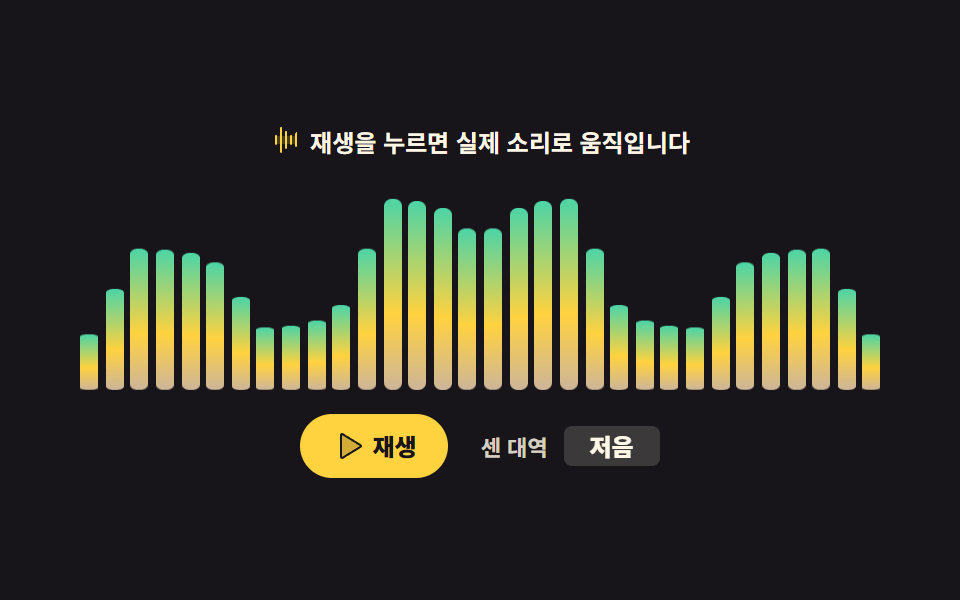 오디오 비주얼라이저 만들기 9종 — 막대부터 마이크까지오디오 비주얼라이저 만들기는 소리의 세기를 화면 움직임으로 옮기는 일입니다. 여기 모은 아홉 가지는 막대 스펙트럼부터 마이크 입력·볼륨 미터까지, 브라우저 안에서 CSS 와 짧은 JS 로 만든 재생 부품이라 zip 이 글의 데모 전부 보기