09사진 자리 잡기
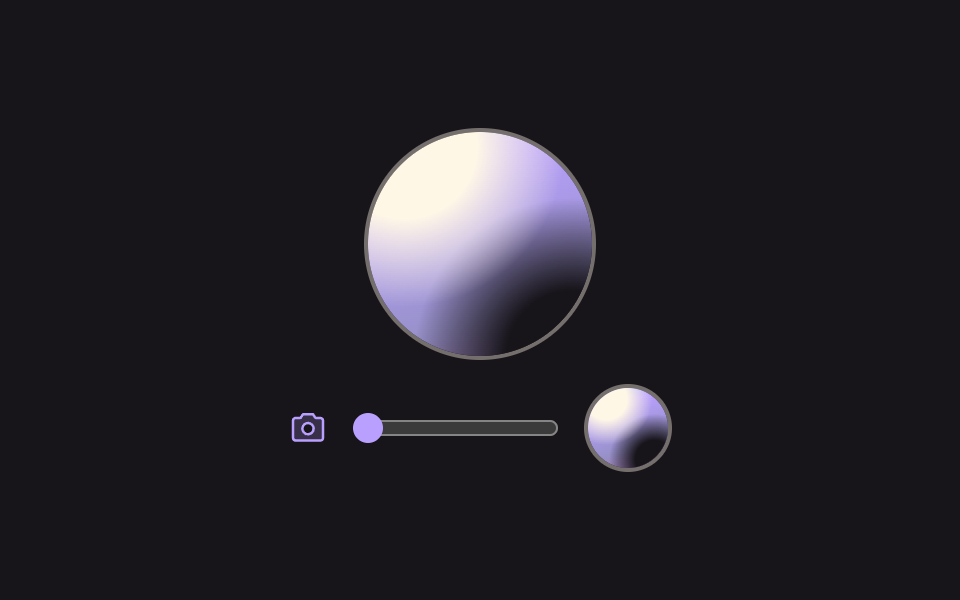
둥근 창 아래에서 그림을 끌어 위치를 옮기고 막대로 배율을 키우는데, 배율을 줄여도 창 바깥 여백이 생기지 않도록 이동 범위가 먼저 좁혀집니다.
쓰임프로필 사진을 올린 직후의 자르기 화면
clip-pathscaletranslate
<main class="stage">
  <section class="cu is-demo" aria-label="프로필 사진 위치 잡기">
    <!-- 테두리와 창은 제자리 — 움직이는 것은 그 안의 사진뿐이다. 사진 파일은 쓰지 않는다(그라디언트 한 겹) -->
    <div class="cu__frame">
      <div class="cu__window" tabindex="0" aria-label="사진을 끌어 위치를 맞추는 창">
        <div class="cu__photo" aria-hidden="true"></div>
      </div>
    </div>

    <div class="cu__controls">
      <svg class="cu__cam" viewBox="0 0 256 256" width="20" height="20" aria-hidden="true" focusable="false" fill="currentColor"><path d="M208,64H176L160,40H96L80,64H48A16,16,0,0,0,32,80V192a16,16,0,0,0,16,16H208a16,16,0,0,0,16-16V80A16,16,0,0,0,208,64ZM128,168a36,36,0,1,1,36-36A36,36,0,0,1,128,168Z" opacity="0.2"/><path d="M208,56H180.28L166.65,35.56A8,8,0,0,0,160,32H96a8,8,0,0,0-6.65,3.56L75.71,56H48A24,24,0,0,0,24,80V192a24,24,0,0,0,24,24H208a24,24,0,0,0,24-24V80A24,24,0,0,0,208,56Zm8,136a8,8,0,0,1-8,8H48a8,8,0,0,1-8-8V80a8,8,0,0,1,8-8H80a8,8,0,0,0,6.66-3.56L100.28,48h55.43l13.63,20.44A8,8,0,0,0,176,72h32a8,8,0,0,1,8,8ZM128,88a44,44,0,1,0,44,44A44.05,44.05,0,0,0,128,88Zm0,72a28,28,0,1,1,28-28A28,28,0,0,1,128,160Z"/></svg>
      <input class="cu__zoom" type="range" min="1" max="2" step="0.01" value="1" aria-label="확대 배율">
      <span class="cu__preview" aria-hidden="true"><span class="cu__mini"></span></span>
    </div>
  </section>
</main>
@use "../../../../site/static/demo-tokens" as *;
// 279 아바타 팔레트(쓰는 색만) — 사진 파일은 금지, 가짜 사진은 CSS 그라디언트 한 격으로 그린다
$av-violet: #9791c9; // 5.76:1 (크림 글자 기준)
$av-plum: #ab5488; // 6.52:1
// ── 변수 3개 ──────────────────────────────────────────
$duration: $dur-loop; // 사진이 이동·확대했다 되돌아오는 한 바퀴
$easing: $ease-out; // 느려지며 자리를 바꾼다
$color: $subject-lilac; // 카메라 아이콘·초점 테두리·슬라이더
@include stage($stage-ink);
.cu {
box-sizing: border-box;
display: grid;
justify-items: center;
gap: $sp-3;
width: min(208px, 100%);
}
.cu__frame {
position: relative;
width: 112px;
height: 112px;
border: 2px solid rgba($subject-cream, .4);
border-radius: 50%;
}
// 초점 표시는 클립되지 않는 테두리에 건다 — clip-path 는 outline 까지 잘라낸다
.cu__frame:focus-within { border-color: $color; box-shadow: 0 0 0 2px $color; }
.cu__window {
position: absolute;
inset: 0;
clip-path: circle(50%);
touch-action: none;
cursor: grab;
}
.cu__window:active { cursor: grabbing; }
// 사진 바탕은 창의 1.5배(inset -25%) — maxOffset = (1.5w × z − w) / 2 계산의 기준.
// JS 가 뿌리의 --x · --y · --z 를 바꾸면 사진과 미리보기가 함께 따라간다.
// 그라디언만으로는 이웃 화소끼리 차가 작아 10px 움직여도 강도가 문턱(15)을 못 넘는다(실측 13.8) —
// 밝은 얼굴 반점·어두운 어깨 반점 두 개를 겹쳐 가짜 사진의 경계를 뚜렷하게 만든다
%cu-photo-bg {
background:
radial-gradient(circle at 32% 26%, $subject-cream 0 17%, rgba($subject-cream, 0) 38%),
radial-gradient(circle at 72% 76%, $stage-ink 0 15%, rgba($stage-ink, 0) 36%),
linear-gradient(160deg, $subject-sky 0%, $subject-lilac 34%, $av-violet 62%, $av-plum 100%);
}
.cu__photo {
position: absolute;
inset: -25%;
@extend %cu-photo-bg;
transform: translate(var(--x, 0px), var(--y, 0px)) scale(var(--z, 1));
will-change: transform;
}
.cu__controls {
display: flex;
align-items: center;
gap: $sp-3;
}
.cu__cam { flex: none; color: $color; }
.cu__zoom {
width: 104px;
margin: 0;
accent-color: $color;
}
.cu__preview {
position: relative;
flex: none;
display: block;
width: $sp-10;
height: $sp-10;
overflow: hidden;
border: 2px solid rgba($subject-cream, .4);
border-radius: 50%;
}
// 결과 미리보기 — 같은 사진 바탕을 4분의 1 이동으로 미러한다
.cu__mini {
position: absolute;
inset: -25%;
@extend %cu-photo-bg;
transform: translate(calc(var(--x, 0px) * .25), calc(var(--y, 0px) * .25)) scale(var(--z, 1));
}
// ── 격자 미리보기 루프 ────────────────────────────────
// 사진이 천천히 이동·확대했다 되돌아온다(연속 transform, 텔레포트 없음). 창과 테두리는 제자리.
// 이동량은 언제나 maxOffset 안쪽 — 배율이 어떻더라도 창 가장자리에 빈 여백이 안 생긴다.
// 한 바퀴를 88% 안에 끝낸다 — 24프레임의 마지막 장이 95.8% 지점이라 그 뒤는 찍히지 않는다.
.cu.is-demo .cu__photo {
animation-name: cuPhoto;
animation-duration: $duration;
animation-timing-function: $easing;
animation-iteration-count: infinite;
}
@keyframes cuPhoto {
0% { transform: translate(0, 0) scale(1); }
30% { transform: translate(-16px, 10px) scale(1.25); }
55% { transform: translate(14px, -12px) scale(1.6); }
78% { transform: translate(0, 6px) scale(1.9); }
88%, 100% { transform: translate(0, 0) scale(1); }
}
// 좁은 화면 — 창·미리보기만 줄인다. 이동·배율 범위는 JS 가 창 크기에서 다시 계산한다
@media (max-width: 340px), (max-height: 220px) {
.cu { gap: $sp-2; }
.cu__frame { width: 96px; height: 96px; }
.cu__zoom { width: 84px; }
.cu__preview { width: $sp-8; height: $sp-8; }
}
@media (prefers-reduced-motion: reduce) {
// .cu.is-demo .cu__photo (0,3,0) 를 이기려면 !important. 사진은 가운데에 멈춰 보인다
.cu__photo { animation: none !important; }
}html, body {
margin: 0;
overflow: hidden;
}
.stage {
box-sizing: border-box;
min-height: 100vh;
display: grid;
place-items: center;
margin: 0;
background: #17141a;
font-family: -apple-system, "Segoe UI", "Noto Sans KR", sans-serif;
padding: clamp(8px, 4vw, 24px);
}
.cu {
box-sizing: border-box;
display: grid;
justify-items: center;
gap: 12px;
width: min(208px, 100%);
}
.cu__frame {
position: relative;
width: 112px;
height: 112px;
border: 2px solid rgba(255, 247, 230, 0.4);
border-radius: 50%;
}
.cu__frame:focus-within {
border-color: #b9a0ff;
box-shadow: 0 0 0 2px #b9a0ff;
}
.cu__window {
position: absolute;
inset: 0;
clip-path: circle(50%);
touch-action: none;
cursor: grab;
}
.cu__window:active {
cursor: grabbing;
}
.cu__mini, .cu__photo {
background: radial-gradient(circle at 32% 26%, #fff7e6 0 17%, rgba(255, 247, 230, 0) 38%), radial-gradient(circle at 72% 76%, #17141a 0 15%, rgba(23, 20, 26, 0) 36%), linear-gradient(160deg, #6ec8ff 0%, #b9a0ff 34%, #9791c9 62%, #ab5488 100%);
}
.cu__photo {
position: absolute;
inset: -25%;
transform: translate(var(--x, 0px), var(--y, 0px)) scale(var(--z, 1));
will-change: transform;
}
.cu__controls {
display: flex;
align-items: center;
gap: 12px;
}
.cu__cam {
flex: none;
color: #b9a0ff;
}
.cu__zoom {
width: 104px;
margin: 0;
accent-color: #b9a0ff;
}
.cu__preview {
position: relative;
flex: none;
display: block;
width: 40px;
height: 40px;
overflow: hidden;
border: 2px solid rgba(255, 247, 230, 0.4);
border-radius: 50%;
}
.cu__mini {
position: absolute;
inset: -25%;
transform: translate(calc(var(--x, 0px) * 0.25), calc(var(--y, 0px) * 0.25)) scale(var(--z, 1));
}
.cu.is-demo .cu__photo {
animation-name: cuPhoto;
animation-duration: 2s;
animation-timing-function: ease-out;
animation-iteration-count: infinite;
}
@keyframes cuPhoto {
0% {
transform: translate(0, 0) scale(1);
}
30% {
transform: translate(-16px, 10px) scale(1.25);
}
55% {
transform: translate(14px, -12px) scale(1.6);
}
78% {
transform: translate(0, 6px) scale(1.9);
}
88%, 100% {
transform: translate(0, 0) scale(1);
}
}
@media (max-width: 340px), (max-height: 220px) {
.cu {
gap: 8px;
}
.cu__frame {
width: 96px;
height: 96px;
}
.cu__zoom {
width: 84px;
}
.cu__preview {
width: 32px;
height: 32px;
}
}
@media (prefers-reduced-motion: reduce) {
.cu__photo {
animation: none !important;
}
}(function () {
var root = document.querySelector('.cu');
var win = root.querySelector('.cu__window');
var zoom = root.querySelector('.cu__zoom');
var x = 0, y = 0, z = 1;
// 핵심 — 허용 이동 범위는 maxOffset = (사진크기 × 배율 − 창크기) / 2.
// 배율을 줄이면 범위가 먼저 좁아지므로 창 가장자리에 빈 여백이 절대 생기지 않는다.
// 사진 바탕은 창의 1.5배(inset -25%).
function clamp(v, zz) {
var w = win.offsetWidth; // 창 크기(렌더 변환과 무관)
var m = Math.max(0, (w * 1.5 * zz - w) / 2);
return Math.max(-m, Math.min(m, v));
}
function apply() {
root.style.setProperty('--x', x + 'px');
root.style.setProperty('--y', y + 'px');
root.style.setProperty('--z', '' + z);
}
// 끌기 — setPointerCapture 로 창 밖으로 나가도 놓치지 않는다
var drag = null;
win.addEventListener('pointerdown', function (e) {
drag = { id: e.pointerId, px: e.clientX, py: e.clientY };
win.setPointerCapture(e.pointerId);
});
win.addEventListener('pointermove', function (e) {
if (!drag || e.pointerId !== drag.id) return;
x = clamp(x + e.clientX - drag.px, z);
y = clamp(y + e.clientY - drag.py, z);
drag.px = e.clientX; drag.py = e.clientY;
apply();
});
win.addEventListener('pointerup', function (e) { if (drag && e.pointerId === drag.id) drag = null; });
win.addEventListener('pointercancel', function () { drag = null; });
// 배율이 바뀌면 현재 x·y 를 새 범위로 다시 물린다(clamp)
zoom.addEventListener('input', function () {
z = parseFloat(zoom.value);
x = clamp(x, z);
y = clamp(y, z);
apply();
});
// 키보드 — 화살표 키로 4px 씩 움직인다
win.addEventListener('keydown', function (e) {
var step = { ArrowLeft: [-4, 0], ArrowRight: [4, 0], ArrowUp: [0, -4], ArrowDown: [0, 4] }[e.key];
if (!step) return;
e.preventDefault();
x = clamp(x + step[0], z);
y = clamp(y + step[1], z);
apply();
});
// 사람이 손을 대면 미리보기 루프를 뗀다
function stopLoop() { root.classList.remove('is-demo'); }
root.addEventListener('pointerdown', stopLoop);
root.addEventListener('focusin', stopLoop);
})();import { useRef, useState } from "react";
import type { CSSProperties, ReactNode } from "react";
import styles from "./AvatarCropUpload.module.scss";
export type AvatarCropUploadProps = {
label?: string;
windowLabel?: string;
zoomLabel?: string;
/** 사진이 이동·확대했다 되돌아오는 한 바퀴(ms) */
duration?: number;
easing?: string;
/** 카메라 아이콘·초점 테두리·슬라이더 색 */
color?: string;
};
type Vars = CSSProperties & {
"--duration"?: string;
"--easing"?: string;
"--color"?: string;
"--x"?: string;
"--y"?: string;
"--z"?: string;
};
type Box<T> = { current: T };
type PointerEvt = { clientX: number; clientY: number; pointerId: number; currentTarget: { setPointerCapture(id: number): void } };
type KeyEvt = { key: string; preventDefault(): void };
type RangeEvt = { target: { value: string } };
const ARROWS: Record<string, [number, number]> = {
ArrowLeft: [-4, 0],
ArrowRight: [4, 0],
ArrowUp: [0, -4],
ArrowDown: [0, 4],
};
const CameraIcon = (): ReactNode => (
<svg viewBox="0 0 256 256" width="20" height="20" aria-hidden="true" focusable="false" fill="currentColor" className={styles.cam}>
<path d="M208,64H176L160,40H96L80,64H48A16,16,0,0,0,32,80V192a16,16,0,0,0,16,16H208a16,16,0,0,0,16-16V80A16,16,0,0,0,208,64ZM128,168a36,36,0,1,1,36-36A36,36,0,0,1,128,168Z" opacity="0.2" />
<path d="M208,56H180.28L166.65,35.56A8,8,0,0,0,160,32H96a8,8,0,0,0-6.65,3.56L75.71,56H48A24,24,0,0,0,24,80V192a24,24,0,0,0,24,24H208a24,24,0,0,0,24-24V80A24,24,0,0,0,208,56Zm8,136a8,8,0,0,1-8,8H48a8,8,0,0,1-8-8V80a8,8,0,0,1,8-8H80a8,8,0,0,0,6.66-3.56L100.28,48h55.43l13.63,20.44A8,8,0,0,0,176,72h32a8,8,0,0,1,8,8ZM128,88a44,44,0,1,0,44,44A44.05,44.05,0,0,0,128,88Zm0,72a28,28,0,1,1,28-28A28,28,0,0,1,128,160Z" />
</svg>
);
export default function AvatarCropUpload({
label = "프로필 사진 위치 잡기",
windowLabel = "사진을 끌어 위치를 맞추는 창",
zoomLabel = "확대 배율",
duration = 2000,
easing = "ease-out",
color = "#b9a0ff",
}: AvatarCropUploadProps): ReactNode {
const [loop, setLoop] = useState<boolean>(true);
const [x, setX] = useState<number>(0);
const [y, setY] = useState<number>(0);
const [z, setZ] = useState<number>(1);
const win = useRef<HTMLDivElement | null>(null) as Box<HTMLDivElement | null>;
const drag = useRef<{ id: number; px: number; py: number } | null>(null) as Box<{ id: number; px: number; py: number } | null>;
// 핵심 — 허용 이동 범위는 maxOffset = (사진크기 × 배율 − 창크기) / 2.
// 배율을 줄이면 범위가 먼저 좁아지므로 창 가장자리에 빈 여백이 절대 생기지 않는다.
// 사진 바탕은 창의 1.5배(inset -25%).
function clamp(v: number, zz: number): number {
const el = win.current;
if (!el) return v;
const w = el.offsetWidth; // 창 크기(렌더 변환과 무관)
const m = Math.max(0, (w * 1.5 * zz - w) / 2);
return Math.max(-m, Math.min(m, v));
}
// 끌기 — setPointerCapture 로 창 밖으로 나가도 놓치지 않는다
function onDown(e: PointerEvt) {
drag.current = { id: e.pointerId, px: e.clientX, py: e.clientY };
e.currentTarget.setPointerCapture(e.pointerId);
}
function onMove(e: PointerEvt) {
const d = drag.current;
if (!d || e.pointerId !== d.id) return;
setX((prev) => clamp(prev + e.clientX - d.px, z));
setY((prev) => clamp(prev + e.clientY - d.py, z));
drag.current = { id: d.id, px: e.clientX, py: e.clientY };
}
function onUp(e: PointerEvt) {
if (drag.current && e.pointerId === drag.current.id) drag.current = null;
}
// 배율이 바뀌면 현재 x·y 를 새 범위로 다시 물린다(clamp)
function onZoom(e: RangeEvt) {
const nz = parseFloat(e.target.value);
setZ(nz);
setX((prev) => clamp(prev, nz));
setY((prev) => clamp(prev, nz));
}
// 키보드 — 화살표 키로 4px 씩 움직인다
function onKey(e: KeyEvt) {
const step = ARROWS[e.key];
if (!step) return;
e.preventDefault();
setX((prev) => clamp(prev + step[0], z));
setY((prev) => clamp(prev + step[1], z));
}
const vars: Vars = {
"--duration": `${duration}ms`,
"--easing": easing,
"--color": color,
"--x": `${x}px`,
"--y": `${y}px`,
"--z": `${z}`,
};
return (
<section
className={loop ? `${styles.cu} ${styles.isDemo}` : styles.cu}
style={vars}
aria-label={label}
onPointerDown={() => setLoop(false)}
onFocus={() => setLoop(false)}
>
{/* 테두리와 창은 제자리 — 움직이는 것은 그 안의 사진뿐이다. 사진 파일은 쓰지 않는다 */}
<div className={styles.frame}>
<div
className={styles.window}
tabIndex={0}
aria-label={windowLabel}
onPointerDown={onDown}
onPointerMove={onMove}
onPointerUp={onUp}
onPointerCancel={() => { drag.current = null; }}
onKeyDown={onKey}
>
<div className={styles.photo} aria-hidden="true" />
</div>
</div>
<div className={styles.controls}>
<CameraIcon />
<input
className={styles.zoom}
type="range"
min="1"
max="2"
step="0.01"
defaultValue="1"
aria-label={zoomLabel}
onChange={onZoom}
/>
{/* 결과 미리보기 — 같은 그라디언트를 4분의 1 이동으로 미러한다 */}
<span className={styles.preview} aria-hidden="true"><span className={styles.mini} /></span>
</div>
</section>
);
}09 사진 자리 잡기 — 측정 누적면적 6.282% · 움직인 프레임 13/23GODRICH 원작 · zip 에 SCSS·React 포함 · 아바타 UI 9종 — 사진 파일 없이 만드는 사용자 표시
이 데모가 속한 글
 아바타 UI 9종 — 사진 파일 없이 만드는 사용자 표시아바타 UI 는 사진 한 자리로 사람을 보여 주는 부품입니다. 여기 아홉 가지는 이름만으로 색과 무늬를 정하는 원, 사진이 없을 때 대체 순서, 겹침·상태 점·멘션 칩까지 사진 파일 한 장 없이 HTML·CSS·짧은 이 글의 데모 전부 보기