03현재 페이지 강조
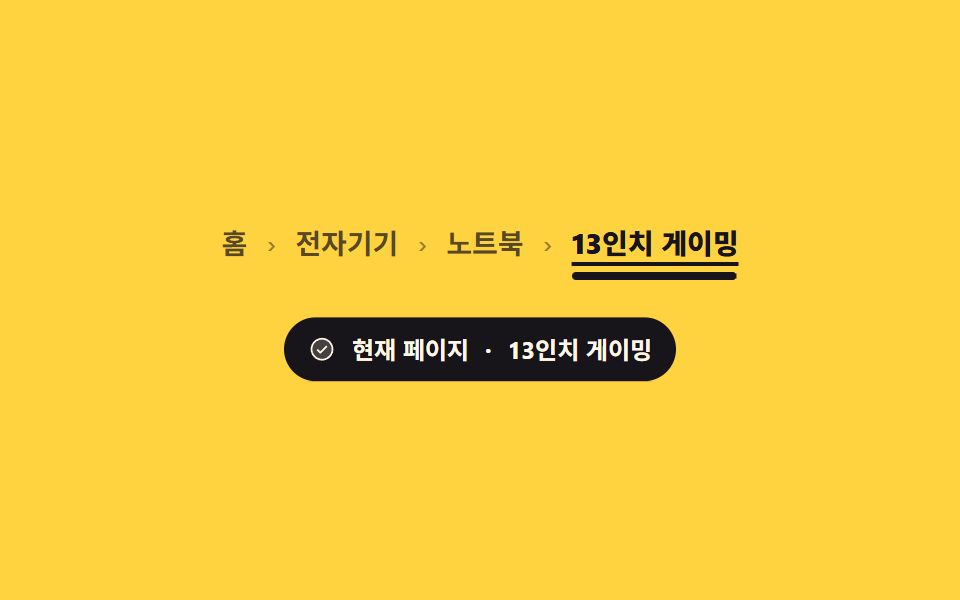
마지막 칸만 링크가 아닌 글자로 남아 굵기와 밑줄이 함께 붙고, 그 칸에 aria-current 가 붙어 읽기 프로그램이 「현재 페이지」라고 말합니다.
쓰임경로 안에서 지금 보고 있는 페이지가 어디인지 눈과 소리 양쪽으로 알려야 할 때
aria-currentfont-weighttext-underline-offset
<main class="stage">
  <div class="ce is-demo">
    <nav aria-label="현재 위치">
      <ol class="ce__list">
        <li><a class="ce__crumb" href="#">홈</a></li>
        <li><a class="ce__crumb" href="#">전자기기</a></li>
        <li><a class="ce__crumb" href="#">노트북</a></li>
        <li><span class="ce__crumb ce__cur" aria-current="page">13인치 게이밍</span></li>
      </ol>
    </nav>
    <p class="ce__say" aria-live="polite">
      <svg viewBox="0 0 256 256" width="14" height="14" aria-hidden="true"><g fill="currentColor"><path d="M224 128a96 96 0 1 1-96-96a96 96 0 0 1 96 96" opacity=".2"/><path d="M173.66 98.34a8 8 0 0 1 0 11.32l-56 56a8 8 0 0 1-11.32 0l-24-24a8 8 0 0 1 11.32-11.32L112 148.69l50.34-50.35a8 8 0 0 1 11.32 0M232 128A104 104 0 1 1 128 24a104.11 104.11 0 0 1 104 104m-16 0a88 88 0 1 0-88 88a88.1 88.1 0 0 0 88-88"/></g></svg><span class="ce__lab">현재 페이지</span> · <span class="ce__val">13인치 게이밍</span>
    </p>
  </div>
</main>
@use "../../../../site/static/demo-tokens" as *;
$duration: $dur-enter;
$easing: $ease-spring;
$color: $subject-ink;
@include stage($stage-yellow);
.ce {
display: flex;
flex-direction: column;
align-items: center;
gap: $sp-6;
user-select: none;
-webkit-user-select: none;
}
.ce__list {
display: flex;
align-items: center;
flex-wrap: nowrap;
gap: $sp-2;
margin: 0;
padding: 0;
list-style: none;
white-space: nowrap;
font-size: clamp(11px, 3.2vw, 14px);
line-height: 20px;
font-weight: 600;
}
.ce__list > li { display: inline-flex; align-items: center; gap: $sp-2; }
.ce__list > li[hidden] { display: none; }
// 구분자는 앞 칸이 있을 때만 — 뒤 칸을 숨겨도 꼬리 구분자가 남지 않는다
.ce__list > li + li::before {
content: "\203A";
display: inline-flex;
justify-content: center;
width: 8px;
color: rgba($color, .45);
}
a.ce__crumb { color: rgba($color, .72); text-decoration: none; border-radius: $r-xs; cursor: pointer; }
a.ce__crumb:hover { color: $color; text-decoration: underline; text-underline-offset: 4px; }
a.ce__crumb:focus-visible { outline: 2px solid $color; outline-offset: 2px; }
// 현재 칸: 굵기 + 진짜 밑줄 + 그 아래로 자라는 강조 막대
.ce__list .ce__cur {
position: relative;
color: $color;
font-weight: 800;
text-decoration: underline;
text-underline-offset: 4px;
text-decoration-thickness: 2px;
}
.ce__list .ce__cur::after {
content: "";
position: absolute;
left: 0;
right: 0;
bottom: -8px;
height: 4px;
border-radius: $r-pill;
background: $color;
transform: scaleX(1);
transform-origin: left center; // 규칙8: 현재칸 강조막대 좌측 성장
transition: transform $duration $easing;
}
// 읽어 주는 말 — 실제로 aria-live 영역이다
.ce__say {
display: inline-flex;
align-items: center;
gap: $sp-2;
margin: 0;
padding: $sp-2 $sp-3;
border-radius: $r-pill;
background: $subject-ink;
color: $subject-cream;
font-size: 12px;
line-height: 16px;
font-weight: 700;
white-space: nowrap;
}
.ce__say svg { flex: none; color: $subject-cream; }
.ce__val { color: $subject-cream; }
// ── 자동 루프: 막대가 scaleX 로 자라고 말풍선이 떠오름 → 유지 → 접힘. 복귀는 88% 안에 ──
.ce.is-demo .ce__cur::after {
animation-name: ce-bar;
animation-duration: $dur-loop;
animation-timing-function: $easing;
animation-iteration-count: infinite;
}
@keyframes ce-bar {
0%, 8% { transform: scaleX(0); }
42%, 76% { transform: scaleX(1); }
88%, 100% { transform: scaleX(0); }
}
// 말풍선은 나타남/사라짐만 steps(1, end) 로 컷하고 떠오름은 translateY 가 맡는다 —
// opacity 를 서서히 올리면 poster 가 반투명하게 뜬 흐린 알약이 된다 (blog-demo 실패표)
.ce.is-demo .ce__say {
animation-name: ce-cut, ce-rise;
animation-duration: $dur-loop, $dur-loop;
animation-timing-function: steps(1, end), $easing;
animation-iteration-count: infinite, infinite;
}
// 들어올 때만 컷(steps), 나갈 때는 서서히 — 나감도 컷하면 그 프레임이 가장 크게 달라져서
// poster 가 "말풍선이 사라진 빈 화면" 으로 뽑힌다 (demo.py 산출() 은 최대 변화 프레임을 고른다)
@keyframes ce-cut {
0% { opacity: 0; animation-timing-function: steps(1, end); }
30% { opacity: 1; animation-timing-function: linear; }
76% { opacity: 1; }
88%, 100% { opacity: 0; }
}
@keyframes ce-rise {
0%, 30% { transform: translateY(6px); }
52%, 76% { transform: translateY(0); }
88%, 100% { transform: translateY(6px); }
}
@media (max-width: 340px) {
.ce { gap: $sp-5; }
.ce__say { padding: $sp-1 $sp-2; font-size: 11px; }
}
@media (prefers-reduced-motion: reduce) {
.ce.is-demo .ce__cur::after,
.ce.is-demo .ce__say { animation: none !important; }
.ce__list .ce__cur::after { transition: none; transform: scaleX(1); }
.ce__say { opacity: 1; transform: none; }
}@charset "UTF-8";
html, body {
margin: 0;
overflow: hidden;
}
.stage {
box-sizing: border-box;
min-height: 100vh;
display: grid;
place-items: center;
margin: 0;
background: #ffd23f;
font-family: -apple-system, "Segoe UI", "Noto Sans KR", sans-serif;
padding: clamp(8px, 4vw, 24px);
}
.ce {
display: flex;
flex-direction: column;
align-items: center;
gap: 24px;
user-select: none;
-webkit-user-select: none;
}
.ce__list {
display: flex;
align-items: center;
flex-wrap: nowrap;
gap: 8px;
margin: 0;
padding: 0;
list-style: none;
white-space: nowrap;
font-size: clamp(11px, 3.2vw, 14px);
line-height: 20px;
font-weight: 600;
}
.ce__list > li {
display: inline-flex;
align-items: center;
gap: 8px;
}
.ce__list > li[hidden] {
display: none;
}
.ce__list > li + li::before {
content: "›";
display: inline-flex;
justify-content: center;
width: 8px;
color: rgba(23, 20, 26, 0.45);
}
a.ce__crumb {
color: rgba(23, 20, 26, 0.72);
text-decoration: none;
border-radius: 4px;
cursor: pointer;
}
a.ce__crumb:hover {
color: #17141a;
text-decoration: underline;
text-underline-offset: 4px;
}
a.ce__crumb:focus-visible {
outline: 2px solid #17141a;
outline-offset: 2px;
}
.ce__list .ce__cur {
position: relative;
color: #17141a;
font-weight: 800;
text-decoration: underline;
text-underline-offset: 4px;
text-decoration-thickness: 2px;
}
.ce__list .ce__cur::after {
content: "";
position: absolute;
left: 0;
right: 0;
bottom: -8px;
height: 4px;
border-radius: 999px;
background: #17141a;
transform: scaleX(1);
transform-origin: left center;
transition: transform 600ms cubic-bezier(0.2, 0.8, 0.2, 1);
}
.ce__say {
display: inline-flex;
align-items: center;
gap: 8px;
margin: 0;
padding: 8px 12px;
border-radius: 999px;
background: #17141a;
color: #fff7e6;
font-size: 12px;
line-height: 16px;
font-weight: 700;
white-space: nowrap;
}
.ce__say svg {
flex: none;
color: #fff7e6;
}
.ce__val {
color: #fff7e6;
}
.ce.is-demo .ce__cur::after {
animation-name: ce-bar;
animation-duration: 2s;
animation-timing-function: cubic-bezier(0.2, 0.8, 0.2, 1);
animation-iteration-count: infinite;
}
@keyframes ce-bar {
0%, 8% {
transform: scaleX(0);
}
42%, 76% {
transform: scaleX(1);
}
88%, 100% {
transform: scaleX(0);
}
}
.ce.is-demo .ce__say {
animation-name: ce-cut, ce-rise;
animation-duration: 2s, 2s;
animation-timing-function: steps(1, end), cubic-bezier(0.2, 0.8, 0.2, 1);
animation-iteration-count: infinite, infinite;
}
@keyframes ce-cut {
0% {
opacity: 0;
animation-timing-function: steps(1, end);
}
30% {
opacity: 1;
animation-timing-function: linear;
}
76% {
opacity: 1;
}
88%, 100% {
opacity: 0;
}
}
@keyframes ce-rise {
0%, 30% {
transform: translateY(6px);
}
52%, 76% {
transform: translateY(0);
}
88%, 100% {
transform: translateY(6px);
}
}
@media (max-width: 340px) {
.ce {
gap: 20px;
}
.ce__say {
padding: 4px 8px;
font-size: 11px;
}
}
@media (prefers-reduced-motion: reduce) {
.ce.is-demo .ce__cur::after,
.ce.is-demo .ce__say {
animation: none !important;
}
.ce__list .ce__cur::after {
transition: none;
transform: scaleX(1);
}
.ce__say {
opacity: 1;
transform: none;
}
}// 실동작: 앞쪽 칸을 누르면 그 칸이 현재 페이지가 된다 — aria-current 를 옮기고 뒤 칸을 숨긴다.
// 현재 칸을 한 번 더 누르면 전체 경로로 되돌린다. 링크라 Enter 로도 같은 동작.
var root = document.querySelector('.ce');
var lis = [].slice.call(document.querySelectorAll('.ce__list > li'));
var crumbs = lis.map(function (li) { return li.querySelector('.ce__crumb'); });
var val = document.querySelector('.ce__val');
var currentIndex = crumbs.length - 1;
function setCurrent(i) {
root.classList.remove('is-demo');
currentIndex = i;
lis.forEach(function (li, n) {
li.hidden = n > i;
var c = crumbs[n];
c.classList.toggle('ce__cur', n === i);
if (n === i) c.setAttribute('aria-current', 'page');
else c.removeAttribute('aria-current');
});
val.textContent = crumbs[i].textContent;
}
crumbs.forEach(function (c, i) {
if (c.tagName !== 'A') return;
c.addEventListener('click', function (e) {
e.preventDefault();
setCurrent(currentIndex === i ? crumbs.length - 1 : i);
});
});import { useState } from "react";
import type { CSSProperties } from "react";
import styles from "./CurrentPageEmphasis.module.scss";
export type CurrentPageEmphasisProps = {
trail?: string[];
label?: string;
duration?: number;
easing?: string;
color?: string;
};
type ClickEvt = { preventDefault(): void };
type Vars = CSSProperties & { "--duration"?: string; "--easing"?: string; "--color"?: string };
const IconCheck = () => (
<svg viewBox="0 0 256 256" width="14" height="14" aria-hidden="true"><g fill="currentColor"><path d="M224 128a96 96 0 1 1-96-96a96 96 0 0 1 96 96" opacity=".2"/><path d="M173.66 98.34a8 8 0 0 1 0 11.32l-56 56a8 8 0 0 1-11.32 0l-24-24a8 8 0 0 1 11.32-11.32L112 148.69l50.34-50.35a8 8 0 0 1 11.32 0M232 128A104 104 0 1 1 128 24a104.11 104.11 0 0 1 104 104m-16 0a88 88 0 1 0-88 88a88.1 88.1 0 0 0 88-88"/></g></svg>
);
export default function CurrentPageEmphasis({
trail = ["Home", "Electronics", "Laptops", "13-inch gaming"],
label = "Current page",
duration = 600,
easing = "cubic-bezier(.2,.8,.2,1)",
color = "#17141a",
}: CurrentPageEmphasisProps) {
const [at, setAt] = useState(trail.length - 1);
const vars: Vars = { "--duration": `${duration}ms`, "--easing": easing, "--color": color };
function pick(e: ClickEvt, i: number) {
e.preventDefault();
setAt(at === i ? trail.length - 1 : i);
}
return (
<div className={styles.ce} style={vars}>
<nav aria-label="Breadcrumb">
<ol className={styles.list}>
{trail.map((text, i) => (
<li key={text} hidden={i > at}>
{i === trail.length - 1
? <span className={[styles.crumb, i === at ? styles.cur : ""].join(" ")} aria-current={i === at ? "page" : undefined}>{text}</span>
: <a
className={[styles.crumb, i === at ? styles.cur : ""].join(" ")}
href="#"
aria-current={i === at ? "page" : undefined}
onClick={(e: ClickEvt): void => pick(e, i)}
>{text}</a>}
</li>
))}
</ol>
</nav>
<p className={styles.say} aria-live="polite">
<IconCheck /><span>{label}</span> · <span className={styles.val}>{trail[at]}</span>
</p>
</div>
);
}03 현재 페이지 강조 — 측정 누적면적 5.282% · 움직인 프레임 16/23GODRICH 원작 · zip 에 SCSS·React 포함 · 브레드크럼 UI 9종 — 경로가 길어도 안 깨지는 내비게이션
이 데모가 속한 글
 브레드크럼 UI 9종 — 경로가 길어도 안 깨지는 내비게이션브레드크럼 UI는 지금 열린 페이지가 사이트 어디에 있는지 홈부터 차례로 경로로 보여 주는 내비게이션입니다. 경로가 길어도 안 깨지는 아홉 벌을 실제로 돌아가는 코드로 드립니다. 아홉 개 중 하나는 화면에 보이는 경 이 글의 데모 전부 보기