06찾기·바꾸기 바
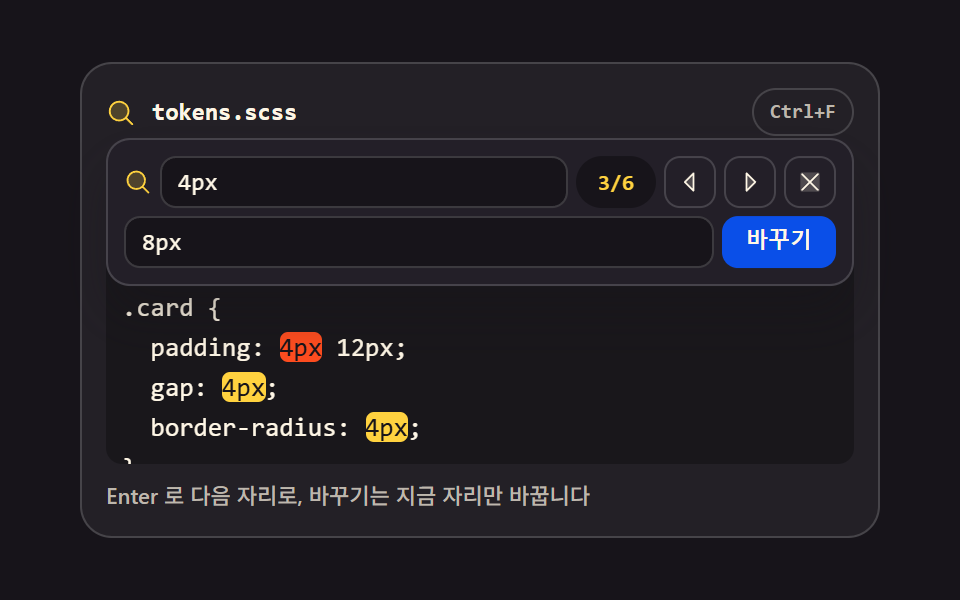
Ctrl+F 로 바가 내려오고 맞는 자리마다 노란 표시가 깔립니다. 몇 번째 중 몇 개인지 세어 주고 Enter 로 다음 자리로 넘어갑니다.
쓰임긴 설정을 한 번에 고치는 화면
matchAllmarkscrollIntoView
<main class="stage">
<div class="fr is-demo" id="fr">
  <div class="fr__bar">
    <span class="fr__ico" aria-hidden="true"><svg xmlns="http://www.w3.org/2000/svg" width="1em" height="1em" viewBox="0 0 256 256"><g fill="currentColor"><path d="M192 112a80 80 0 1 1-80-80a80 80 0 0 1 80 80" opacity=".2"/><path d="m229.66 218.34l-50.06-50.06a88.21 88.21 0 1 0-11.32 11.31l50.06 50.07a8 8 0 0 0 11.32-11.32M40 112a72 72 0 1 1 72 72a72.08 72.08 0 0 1-72-72"/></g></svg></span>
    <span class="fr__name">tokens.scss</span>
    <span class="fr__hint">Ctrl+F</span>
  </div>
  <div class="fr__wrap" id="wrap">
    <div class="fr__find" id="find" role="group" aria-label="찾기·바꾸기">
      <div class="fr__row">
        <span class="fr__fico" aria-hidden="true"><svg xmlns="http://www.w3.org/2000/svg" width="1em" height="1em" viewBox="0 0 256 256"><g fill="currentColor"><path d="M192 112a80 80 0 1 1-80-80a80 80 0 0 1 80 80" opacity=".2"/><path d="m229.66 218.34l-50.06-50.06a88.21 88.21 0 1 0-11.32 11.31l50.06 50.07a8 8 0 0 0 11.32-11.32M40 112a72 72 0 1 1 72 72a72.08 72.08 0 0 1-72-72"/></g></svg></span>
        <input class="fr__q" id="q" type="text" value="4px" placeholder="찾을 말" aria-label="찾을 말" spellcheck="false" autocomplete="off">
        <span class="fr__count" id="count" aria-live="polite"><span class="fr__cnum fr__cnum--a">3/6</span><span class="fr__cnum fr__cnum--b">5/6</span></span>
        <button class="fr__nav" id="prev" type="button" aria-label="이전 자리"><svg xmlns="http://www.w3.org/2000/svg" width="1em" height="1em" viewBox="0 0 256 256"><g fill="currentColor"><path d="M160 48v160l-80-80Z" opacity=".2"/><path d="M163.06 40.61a8 8 0 0 0-8.72 1.73l-80 80a8 8 0 0 0 0 11.32l80 80A8 8 0 0 0 168 208V48a8 8 0 0 0-4.94-7.39M152 188.69L91.31 128L152 67.31Z"/></g></svg></button>
        <button class="fr__nav" id="next" type="button" aria-label="다음 자리"><svg xmlns="http://www.w3.org/2000/svg" width="1em" height="1em" viewBox="0 0 256 256"><g fill="currentColor"><path d="m176 128l-80 80V48Z" opacity=".2"/><path d="m181.66 122.34l-80-80A8 8 0 0 0 88 48v160a8 8 0 0 0 13.66 5.66l80-80a8 8 0 0 0 0-11.32M104 188.69V67.31L164.69 128Z"/></g></svg></button>
        <button class="fr__nav" id="close" type="button" aria-label="닫기"><svg xmlns="http://www.w3.org/2000/svg" width="1em" height="1em" viewBox="0 0 256 256"><g fill="currentColor"><path d="M216 56v144a16 16 0 0 1-16 16H56a16 16 0 0 1-16-16V56a16 16 0 0 1 16-16h144a16 16 0 0 1 16 16" opacity=".2"/><path d="M205.66 194.34a8 8 0 0 1-11.32 11.32L128 139.31l-66.34 66.35a8 8 0 0 1-11.32-11.32L116.69 128L50.34 61.66a8 8 0 0 1 11.32-11.32L128 116.69l66.34-66.35a8 8 0 0 1 11.32 11.32L139.31 128Z"/></g></svg></button>
      </div>
      <div class="fr__row">
        <input class="fr__r" id="rep" type="text" value="8px" placeholder="바꿀 말" aria-label="바꿀 말" spellcheck="false" autocomplete="off">
        <button class="fr__go" id="go" type="button">바꾸기</button>
      </div>
    </div>
    <pre class="fr__hl" id="hl" aria-hidden="true">/* spacing scale — <mark class="fr__m">4px</mark> grid */
$sp-1: <mark class="fr__m">4px</mark>;
$sp-2: 8px;
.card {
  padding: <mark class="fr__m">4px</mark> 12px;
  gap: <mark class="fr__m">4px</mark>;
  border-radius: <mark class="fr__m">4px</mark>;
}
.chip { margin: <mark class="fr__m">4px</mark>; }</pre>
    <textarea class="fr__ta" id="ta" spellcheck="false" autocomplete="off" wrap="off" aria-label="코드 입력칸">/* spacing scale — 4px grid */
$sp-1: 4px;
$sp-2: 8px;
.card {
  padding: 4px 12px;
  gap: 4px;
  border-radius: 4px;
}
.chip { margin: 4px; }</textarea>
  </div>
  <p class="fr__note">Enter 로 다음 자리로, 바꾸기는 지금 자리만 바꿉니다</p>
</div>
</main>@use "../../../../site/static/demo-tokens" as *;
// 찾기·바꾸기 바 — Ctrl+F 로 바가 내려오고, 맞는 자리마다 오버레이 pre 안의 mark 로 노란 표시가 깔린다.
// 몇 번째 중 몇 개인지 세어 주고(n/개수) Enter 로 다음 자리로 넘어가며, 바꾸기는 지금 자리만 바꾼다.
// 표시는 늘 오버레이 쪽이다 — textarea 의 글자는 투명하고(01 실시간 구문 강조와 같은 두 겹 기법)
// matchAll 로 뽑은 구간을 mark 로 감싸 다시 칠한다. 현재 자리만 주황으로 갈라 본다.
// 노란 면·주황 면 위 글자는 잉크다 — 크림을 얹으면 대비 미달이다.
// 격자 미리보기(.is-demo)는 바를 steps(1, end) 컷 + translateY 팝으로 내리고,
// 보이는 줄의 마크 3개를 한 개씩 깐 뒤 현재 자리(주황)가 3번 에서 5번 으로 옮겨 간다.
$duration: $dur-quick;
$easing: $ease-spring;
$color: $stage-yellow;
$mono: ui-monospace, SFMono-Regular, "SF Mono", Consolas, "Liberation Mono", monospace;
$line: rgba(255, 255, 255, .16);
$dim: #beb7ad;
$fs: clamp(11px, 3vw, 13px);
$lh: 20px;
@include stage($stage-ink);
// 격자 미리보기 루프 공통 — 낱개 속성만 쓴다(단축은 delay 를 지운다), 시작 전은 0% 상태로 채운다
@mixin loop($name, $timing) {
animation-name: $name;
animation-duration: $dur-loop;
animation-timing-function: $timing;
animation-iteration-count: infinite;
animation-fill-mode: backwards;
}
.fr {
display: flex; flex-direction: column; gap: $sp-2;
box-sizing: border-box; width: min(100%, 400px);
padding: $sp-3; border: 1px solid $line; border-radius: $r-card;
background: rgba(255, 255, 255, .05);
}
// ── 파일 이름 줄
.fr__bar { display: flex; align-items: center; gap: $sp-2; }
.fr__ico { display: grid; place-items: center; color: $color; font-size: 15px; }
.fr__name {
flex: 1 1 auto; color: $subject-cream;
font-family: $mono; font-weight: 700; font-size: 12px; line-height: 1.4;
}
.fr__hint {
flex: 0 0 auto; padding: $sp-1 $sp-2; border: 1px solid $line; border-radius: $r-pill;
color: $dim; font-family: $mono; font-weight: 700; font-size: 10px; line-height: 1.4;
}
// ── 두 겹이 겹치는 자리 + 내려오는 찾기 바
// 트랙을 minmax(0, 1fr) 로 못박는다 — auto 트랙은 textarea 내용 줄 수만큼 커져 무대를 넘긴다
.fr__wrap { position: relative; display: grid; grid-template-rows: minmax(0, 1fr); height: $lh * 7 + $sp-4; }
.fr__hl, .fr__ta { grid-area: 1 / 1; }
%layer {
box-sizing: border-box; margin: 0; padding: $sp-2;
border: 0; border-radius: $r-sm;
font-family: $mono; font-weight: 500; font-size: $fs; line-height: $lh;
letter-spacing: 0; tab-size: 2;
white-space: pre; overflow: auto; overscroll-behavior: contain;
scrollbar-width: none;
}
.fr__hl::-webkit-scrollbar, .fr__ta::-webkit-scrollbar { display: none; }
.fr__hl {
@extend %layer;
background: rgba(0, 0, 0, .28); color: $subject-cream;
pointer-events: none;
}
// 글자는 투명하고 캐럿만 남긴다 — 색과 표시는 위 pre 가 그린다
.fr__ta {
@extend %layer;
background: transparent; color: transparent; caret-color: $color;
resize: none;
-webkit-text-fill-color: transparent;
}
.fr__ta::selection { background: rgba(255, 210, 63, .32); }
.fr__ta:focus-visible { outline: 2px solid $subject-blue; outline-offset: 2px; }
// ── 매치 표시. 닫힌 상태에서는 투명 — 바가 열려야(is-find) 노란다
.fr__m { background: transparent; color: inherit; border-radius: $r-xs; }
.fr.is-find .fr__m { background: $color; color: $subject-ink; }
.fr.is-find .fr__m--cur { background: $stage-orange; color: $subject-ink; }
// ── 찾기 바. 절대배치로 코드 위에 떠서 줄을 밀어내지 않는다 (VS Code 의 창 위젯과 같은 결)
.fr__find {
position: absolute; top: 0; left: 0; right: 0; z-index: 2;
display: flex; flex-direction: column; gap: $sp-1;
padding: $sp-2; border: 1px solid $line; border-radius: $r-control;
background: $tick-panel; box-shadow: $shadow-raised;
opacity: 0; visibility: hidden; transform: translateY(-12px); pointer-events: none;
transition: opacity $duration $ease-out, transform $duration $easing, visibility $duration;
}
.fr.is-find .fr__find { opacity: 1; visibility: visible; transform: translateY(0); pointer-events: auto; }
.fr__row { display: flex; align-items: center; gap: $sp-1; }
.fr__fico { display: grid; place-items: center; flex: 0 0 auto; color: $color; font-size: 14px; }
.fr__q, .fr__r {
flex: 1 1 auto; min-width: 0; box-sizing: border-box; height: 26px;
padding: 0 $sp-2; border: 1px solid $line; border-radius: $r-sm;
background: rgba(0, 0, 0, .35); color: $subject-cream;
font-family: $mono; font-weight: 500; font-size: 12px; line-height: 24px;
}
.fr__q::placeholder, .fr__r::placeholder { color: $dim; opacity: 1; }
.fr__q:focus-visible, .fr__r:focus-visible { outline: 2px solid $subject-blue; outline-offset: 1px; }
// 몇 번째 중 몇 개 — 두 숫자 겹을 그리드 한 칸에 포갠다(미리보기에서 상태를 컷으로 갈아 낀다)
.fr__count {
position: relative; flex: 0 0 auto; min-width: 40px; height: 26px;
display: grid; place-items: center;
border-radius: $r-pill; background: rgba(0, 0, 0, .35); color: $color;
font-family: $mono; font-weight: 700; font-size: 11px; line-height: 1.4;
}
.fr__cnum { grid-area: 1 / 1; opacity: 0; }
.fr__nav {
flex: 0 0 auto; display: grid; place-items: center;
width: 26px; height: 26px; box-sizing: border-box;
padding: 0; border: 1px solid $line; border-radius: $r-sm;
background: transparent; color: $subject-cream; font-size: 14px; cursor: pointer;
}
.fr__nav:hover, .fr__nav:focus-visible { background: rgba(255, 255, 255, .12); }
.fr__go {
flex: 0 0 auto; height: 26px; padding: 0 $sp-3;
border: 0; border-radius: $r-sm;
background: $subject-blue-deep; color: $subject-cream; // 깊은 파랑 면 위 크림
font-weight: 700; font-size: 11px; line-height: 1.4; cursor: pointer;
}
.fr__go:hover, .fr__go:focus-visible { outline: 2px solid $color; outline-offset: 2px; }
.fr__note {
margin: 0; color: $dim;
font-weight: 500; font-size: 11px; line-height: 1.4;
}
// ── 격자 미리보기 루프 (2초)
// 매치 표시 3개(padding·gap·border-radius 줄)는 처음부터 깔려 있고 첫 표시가 곧 현재 자리(주황),
// 카운터는 3/6 이다 — 첫 샘플 프레임이 완성 상태라 poster 가 빈 장면이 되지 않는다. 3% 에 바가 컷으로 내려온다(팝은 14% 까지).
// 58% 에 현재 자리가 3번 에서 5번 으로 옮겨가고(Enter) 카운터가 5/6 이 되며, 70~84% 바꾸기 단추가 한 번 부풀고 유지.
// 퇴장은 찍지 않는다 — 루프 경계에서만 되돌아간다.
.fr.is-demo .fr__find {
animation-name: frBarVis, frBarPop;
animation-duration: $dur-loop, $dur-loop;
animation-timing-function: steps(1, end), $easing;
animation-iteration-count: infinite, infinite;
animation-fill-mode: backwards, backwards;
}
// 막대 아래(1·2번 줄)와 접힌 줄(9번 줄)의 마크는 보이지 않으니 굳이 움직이지 않는다
.fr.is-demo .fr__m { background: $color; color: $subject-ink; }
.fr.is-demo .fr__hl mark:nth-of-type(3) { @include loop(frM3, steps(1, end)); }
.fr.is-demo .fr__hl mark:nth-of-type(4) { @include loop(frM4, steps(1, end)); }
.fr.is-demo .fr__hl mark:nth-of-type(5) { @include loop(frM5, steps(1, end)); }
.fr.is-demo .fr__cnum--a { @include loop(frCntA, steps(1, end)); }
.fr.is-demo .fr__cnum--b { @include loop(frCntB, steps(1, end)); }
.fr.is-demo .fr__go { @include loop(frGoPulse, $easing); }
@keyframes frBarVis {
0% { opacity: 0; visibility: hidden; }
3%, 100% { opacity: 1; visibility: visible; }
}
@keyframes frBarPop {
0%, 3% { transform: translateY(-12px); }
14%, 100% { transform: translateY(0); }
}
// steps(1, end) 컷 — 반투명 유령 프레임 없이 한 프레임에 상태가 바뀐다
// 매치 표시는 **첫 프레임부터 켜 둔다**. 켜지는 순간을 루프 안에 두면 24장 샘플(4.1667% 간격)이
// 그 구간을 못 잡아 대표 이미지가 「바만 있고 표시가 없는」 장면이 된다 (실측 2026-09-13:
// 3.5% 컷을 줬는데 프레임 0·1 의 mark 배경이 둘 다 투명이었다). 움직임은 현재 자리 이동으로 만든다.
@keyframes frM3 {
0%, 57% { background: $stage-orange; color: $subject-ink; }
58%, 100% { background: $color; color: $subject-ink; }
}
@keyframes frM4 {
0%, 100% { background: $color; color: $subject-ink; }
}
@keyframes frM5 {
0%, 57% { background: $color; color: $subject-ink; }
58%, 100% { background: $stage-orange; color: $subject-ink; }
}
@keyframes frCntA {
0%, 57% { opacity: 1; }
58%, 100% { opacity: 0; }
}
@keyframes frCntB {
0%, 57% { opacity: 0; }
58%, 100% { opacity: 1; }
}
@keyframes frGoPulse {
0%, 70% { transform: scale(1); }
76% { transform: scale(1.14); }
84%, 100% { transform: scale(1); }
}
// ── 좁은 화면: 행간과 여백을 줄여 무대 안에 들어오게 한다
@media (max-width: 340px) {
.fr { gap: $sp-1; padding: $sp-2; }
.fr__wrap { height: 16px * 6 + $sp-2; }
.fr__hl, .fr__ta { font-size: 11px; line-height: 16px; padding: $sp-1; }
.fr__note { font-size: 10px; }
.fr__find { gap: $sp-1; padding: $sp-1; }
.fr__q, .fr__r { height: 24px; font-size: 11px; line-height: 22px; }
.fr__count { height: 24px; min-width: 36px; font-size: 10px; }
.fr__nav { width: 24px; height: 24px; font-size: 12px; }
.fr__go { height: 24px; padding: 0 $sp-2; font-size: 10px; }
}
@media (prefers-reduced-motion: reduce) {
.fr.is-demo .fr__find,
.fr.is-demo .fr__hl mark,
.fr.is-demo .fr__cnum,
.fr.is-demo .fr__go {
animation: none !important;
opacity: 1 !important;
visibility: visible !important;
transform: none !important;
}
// 카운터 두 겹이 겹치지 않게 앞 숫자만 보이게 한다
.fr.is-demo .fr__cnum--b { opacity: 0 !important; }
}html, body {
margin: 0;
overflow: hidden;
}
.stage {
box-sizing: border-box;
min-height: 100vh;
display: grid;
place-items: center;
margin: 0;
background: #17141a;
font-family: -apple-system, "Segoe UI", "Noto Sans KR", sans-serif;
padding: clamp(8px, 4vw, 24px);
}
.fr {
display: flex;
flex-direction: column;
gap: 8px;
box-sizing: border-box;
width: min(100%, 400px);
padding: 12px;
border: 1px solid rgba(255, 255, 255, 0.16);
border-radius: 16px;
background: rgba(255, 255, 255, 0.05);
}
.fr__bar {
display: flex;
align-items: center;
gap: 8px;
}
.fr__ico {
display: grid;
place-items: center;
color: #ffd23f;
font-size: 15px;
}
.fr__name {
flex: 1 1 auto;
color: #fff7e6;
font-family: ui-monospace, SFMono-Regular, "SF Mono", Consolas, "Liberation Mono", monospace;
font-weight: 700;
font-size: 12px;
line-height: 1.4;
}
.fr__hint {
flex: 0 0 auto;
padding: 4px 8px;
border: 1px solid rgba(255, 255, 255, 0.16);
border-radius: 999px;
color: #beb7ad;
font-family: ui-monospace, SFMono-Regular, "SF Mono", Consolas, "Liberation Mono", monospace;
font-weight: 700;
font-size: 10px;
line-height: 1.4;
}
.fr__wrap {
position: relative;
display: grid;
grid-template-rows: minmax(0, 1fr);
height: 156px;
}
.fr__hl, .fr__ta {
grid-area: 1/1;
}
.fr__ta, .fr__hl {
box-sizing: border-box;
margin: 0;
padding: 8px;
border: 0;
border-radius: 8px;
font-family: ui-monospace, SFMono-Regular, "SF Mono", Consolas, "Liberation Mono", monospace;
font-weight: 500;
font-size: clamp(11px, 3vw, 13px);
line-height: 20px;
letter-spacing: 0;
tab-size: 2;
white-space: pre;
overflow: auto;
overscroll-behavior: contain;
scrollbar-width: none;
}
.fr__hl::-webkit-scrollbar, .fr__ta::-webkit-scrollbar {
display: none;
}
.fr__hl {
background: rgba(0, 0, 0, 0.28);
color: #fff7e6;
pointer-events: none;
}
.fr__ta {
background: transparent;
color: transparent;
caret-color: #ffd23f;
resize: none;
-webkit-text-fill-color: transparent;
}
.fr__ta::selection {
background: rgba(255, 210, 63, 0.32);
}
.fr__ta:focus-visible {
outline: 2px solid #2f6df6;
outline-offset: 2px;
}
.fr__m {
background: transparent;
color: inherit;
border-radius: 4px;
}
.fr.is-find .fr__m {
background: #ffd23f;
color: #17141a;
}
.fr.is-find .fr__m--cur {
background: #ff4d1f;
color: #17141a;
}
.fr__find {
position: absolute;
top: 0;
left: 0;
right: 0;
z-index: 2;
display: flex;
flex-direction: column;
gap: 4px;
padding: 8px;
border: 1px solid rgba(255, 255, 255, 0.16);
border-radius: 12px;
background: #231f28;
box-shadow: 0 14px 24px rgba(23, 20, 26, 0.32);
opacity: 0;
visibility: hidden;
transform: translateY(-12px);
pointer-events: none;
transition: opacity 220ms ease-out, transform 220ms cubic-bezier(0.2, 0.8, 0.2, 1), visibility 220ms;
}
.fr.is-find .fr__find {
opacity: 1;
visibility: visible;
transform: translateY(0);
pointer-events: auto;
}
.fr__row {
display: flex;
align-items: center;
gap: 4px;
}
.fr__fico {
display: grid;
place-items: center;
flex: 0 0 auto;
color: #ffd23f;
font-size: 14px;
}
.fr__q, .fr__r {
flex: 1 1 auto;
min-width: 0;
box-sizing: border-box;
height: 26px;
padding: 0 8px;
border: 1px solid rgba(255, 255, 255, 0.16);
border-radius: 8px;
background: rgba(0, 0, 0, 0.35);
color: #fff7e6;
font-family: ui-monospace, SFMono-Regular, "SF Mono", Consolas, "Liberation Mono", monospace;
font-weight: 500;
font-size: 12px;
line-height: 24px;
}
.fr__q::placeholder, .fr__r::placeholder {
color: #beb7ad;
opacity: 1;
}
.fr__q:focus-visible, .fr__r:focus-visible {
outline: 2px solid #2f6df6;
outline-offset: 1px;
}
.fr__count {
position: relative;
flex: 0 0 auto;
min-width: 40px;
height: 26px;
display: grid;
place-items: center;
border-radius: 999px;
background: rgba(0, 0, 0, 0.35);
color: #ffd23f;
font-family: ui-monospace, SFMono-Regular, "SF Mono", Consolas, "Liberation Mono", monospace;
font-weight: 700;
font-size: 11px;
line-height: 1.4;
}
.fr__cnum {
grid-area: 1/1;
opacity: 0;
}
.fr__nav {
flex: 0 0 auto;
display: grid;
place-items: center;
width: 26px;
height: 26px;
box-sizing: border-box;
padding: 0;
border: 1px solid rgba(255, 255, 255, 0.16);
border-radius: 8px;
background: transparent;
color: #fff7e6;
font-size: 14px;
cursor: pointer;
}
.fr__nav:hover, .fr__nav:focus-visible {
background: rgba(255, 255, 255, 0.12);
}
.fr__go {
flex: 0 0 auto;
height: 26px;
padding: 0 12px;
border: 0;
border-radius: 8px;
background: #0a4fe8;
color: #fff7e6;
font-weight: 700;
font-size: 11px;
line-height: 1.4;
cursor: pointer;
}
.fr__go:hover, .fr__go:focus-visible {
outline: 2px solid #ffd23f;
outline-offset: 2px;
}
.fr__note {
margin: 0;
color: #beb7ad;
font-weight: 500;
font-size: 11px;
line-height: 1.4;
}
.fr.is-demo .fr__find {
animation-name: frBarVis, frBarPop;
animation-duration: 2s, 2s;
animation-timing-function: steps(1, end), cubic-bezier(0.2, 0.8, 0.2, 1);
animation-iteration-count: infinite, infinite;
animation-fill-mode: backwards, backwards;
}
.fr.is-demo .fr__m {
background: #ffd23f;
color: #17141a;
}
.fr.is-demo .fr__hl mark:nth-of-type(3) {
animation-name: frM3;
animation-duration: 2s;
animation-timing-function: steps(1, end);
animation-iteration-count: infinite;
animation-fill-mode: backwards;
}
.fr.is-demo .fr__hl mark:nth-of-type(4) {
animation-name: frM4;
animation-duration: 2s;
animation-timing-function: steps(1, end);
animation-iteration-count: infinite;
animation-fill-mode: backwards;
}
.fr.is-demo .fr__hl mark:nth-of-type(5) {
animation-name: frM5;
animation-duration: 2s;
animation-timing-function: steps(1, end);
animation-iteration-count: infinite;
animation-fill-mode: backwards;
}
.fr.is-demo .fr__cnum--a {
animation-name: frCntA;
animation-duration: 2s;
animation-timing-function: steps(1, end);
animation-iteration-count: infinite;
animation-fill-mode: backwards;
}
.fr.is-demo .fr__cnum--b {
animation-name: frCntB;
animation-duration: 2s;
animation-timing-function: steps(1, end);
animation-iteration-count: infinite;
animation-fill-mode: backwards;
}
.fr.is-demo .fr__go {
animation-name: frGoPulse;
animation-duration: 2s;
animation-timing-function: cubic-bezier(0.2, 0.8, 0.2, 1);
animation-iteration-count: infinite;
animation-fill-mode: backwards;
}
@keyframes frBarVis {
0% {
opacity: 0;
visibility: hidden;
}
3%, 100% {
opacity: 1;
visibility: visible;
}
}
@keyframes frBarPop {
0%, 3% {
transform: translateY(-12px);
}
14%, 100% {
transform: translateY(0);
}
}
@keyframes frM3 {
0%, 57% {
background: #ff4d1f;
color: #17141a;
}
58%, 100% {
background: #ffd23f;
color: #17141a;
}
}
@keyframes frM4 {
0%, 100% {
background: #ffd23f;
color: #17141a;
}
}
@keyframes frM5 {
0%, 57% {
background: #ffd23f;
color: #17141a;
}
58%, 100% {
background: #ff4d1f;
color: #17141a;
}
}
@keyframes frCntA {
0%, 57% {
opacity: 1;
}
58%, 100% {
opacity: 0;
}
}
@keyframes frCntB {
0%, 57% {
opacity: 0;
}
58%, 100% {
opacity: 1;
}
}
@keyframes frGoPulse {
0%, 70% {
transform: scale(1);
}
76% {
transform: scale(1.14);
}
84%, 100% {
transform: scale(1);
}
}
@media (max-width: 340px) {
.fr {
gap: 4px;
padding: 8px;
}
.fr__wrap {
height: 104px;
}
.fr__hl, .fr__ta {
font-size: 11px;
line-height: 16px;
padding: 4px;
}
.fr__note {
font-size: 10px;
}
.fr__find {
gap: 4px;
padding: 4px;
}
.fr__q, .fr__r {
height: 24px;
font-size: 11px;
line-height: 22px;
}
.fr__count {
height: 24px;
min-width: 36px;
font-size: 10px;
}
.fr__nav {
width: 24px;
height: 24px;
font-size: 12px;
}
.fr__go {
height: 24px;
padding: 0 8px;
font-size: 10px;
}
}
@media (prefers-reduced-motion: reduce) {
.fr.is-demo .fr__find,
.fr.is-demo .fr__hl mark,
.fr.is-demo .fr__cnum,
.fr.is-demo .fr__go {
animation: none !important;
opacity: 1 !important;
visibility: visible !important;
transform: none !important;
}
.fr.is-demo .fr__cnum--b {
opacity: 0 !important;
}
}var fr = document.getElementById('fr');
var ta = document.getElementById('ta');
var hl = document.getElementById('hl');
var q = document.getElementById('q');
var rep = document.getElementById('rep');
var count = document.getElementById('count');
var idx = 0;
// 찾을 말을 정규식 특수문자 없이 글자 그대로 잡는다
function escRe(s) { return s.replace(/[.*+?^${}()|[\]\\]/g, '\\$&'); }
function esc(t) { return t.replace(/&/g, '&').replace(/</g, '<').replace(/>/g, '>'); }
// matchAll 로 모든 자리를 한 번에 뽑고, 몇 번째인지 셀 수 있게 시작·끝 인덱스를 남긴다
function hits() {
if (!q.value) return [];
var re = new RegExp(escRe(q.value), 'g');
return Array.from(ta.value.matchAll(re)).map(function (m) {
return { s: m.index, e: m.index + m[0].length };
});
}
// 오버레이 pre 를 다시 칠한다 — 표시(mark)는 늘 오버레이 쪽이지 textarea 가 아니다
function paint() {
var list = hits();
if (idx >= list.length) idx = 0;
var out = '', at = 0;
list.forEach(function (m, i) {
out += esc(ta.value.slice(at, m.s))
+ '<mark class="fr__m' + (i === idx ? ' fr__m--cur' : '') + '">'
+ esc(ta.value.slice(m.s, m.e)) + '</mark>';
at = m.e;
});
hl.innerHTML = out + esc(ta.value.slice(at));
count.textContent = list.length ? (idx + 1) + '/' + list.length : '0';
var cur = hl.querySelector('.fr__m--cur');
if (cur) cur.scrollIntoView({ block: 'nearest', inline: 'nearest' });
ta.scrollTop = hl.scrollTop;
ta.scrollLeft = hl.scrollLeft;
}
function step(d) {
var n = hits().length;
if (!n) return;
idx = (idx + d + n) % n;
paint();
}
function openBar() {
fr.classList.add('is-find');
q.focus({ preventScroll: true });
q.select();
paint();
}
function closeBar() {
fr.classList.remove('is-find');
ta.focus({ preventScroll: true });
}
// 바꾸기는 지금 자리 하나만 — 전체 바꾸기가 아니라는 게 이 부품의 주제다
function replaceCur() {
var list = hits();
if (!list.length) return;
var m = list[idx];
ta.value = ta.value.slice(0, m.s) + rep.value + ta.value.slice(m.e);
paint();
}
fr.addEventListener('pointerdown', function () { fr.classList.remove('is-demo'); });
fr.addEventListener('focusin', function () { fr.classList.remove('is-demo'); });
fr.addEventListener('keydown', function (e) {
if ((e.ctrlKey || e.metaKey) && (e.key === 'f' || e.key === 'F')) { e.preventDefault(); openBar(); }
});
q.addEventListener('input', function () { idx = 0; paint(); });
q.addEventListener('keydown', function (e) {
if (e.key === 'Enter') { e.preventDefault(); step(e.shiftKey ? -1 : 1); }
else if (e.key === 'Escape') { closeBar(); }
});
rep.addEventListener('keydown', function (e) {
if (e.key === 'Enter') { e.preventDefault(); replaceCur(); }
else if (e.key === 'Escape') { closeBar(); }
});
document.getElementById('prev').addEventListener('click', function () { step(-1); });
document.getElementById('next').addEventListener('click', function () { step(1); });
document.getElementById('close').addEventListener('click', closeBar);
document.getElementById('go').addEventListener('click', replaceCur);
ta.addEventListener('input', paint);
ta.addEventListener('scroll', function () { hl.scrollTop = ta.scrollTop; hl.scrollLeft = ta.scrollLeft; });
// 격자 미리보기 동안에는 손으로 써 둔 오버레이를 그대로 둔다 — 사람이 손대는 순간부터 다시 칠한다
if (!fr.classList.contains('is-demo')) paint();// FindReplaceBar — vanilla 판(run/299/demo/06-editor-find-replace-bar/index.html) 의 React 포트.
// Ctrl+F 로 찾기 바가 코드 위에 내려오고, 맞는 자리마다 오버레이 pre 안의 mark 로 표시가 깔린다.
// 표시는 늘 오버레이 쪽이다 — textarea 의 글자는 투명하고 색은 아래 pre 가 그린다(01 과 같은 두 겹 기법).
// 찾기·세기·이동·바꾸기 로직은 vanilla 의 escRe·hits·paint·step·replaceCur 과 같은 글자다.
import { useEffect, useMemo, useRef, useState } from "react";
import type { CSSProperties } from "react";
import styles from "./FindReplaceBar.module.scss";
export type FindReplaceBarProps = {
duration?: number;
easing?: string;
color?: string;
initialCode?: string;
};
type Vars = CSSProperties & { "--duration"?: string; "--easing"?: string; "--color"?: string };
// useRef<T> 는 T | null 을 돌려준다 — ambient 타입에 맞춰 상자 타입을 따로 둔다
type Box<T> = { current: T | null };
// ambient 에 React 이벤트 제네릭이 없다 — 쓰는 필드만 로컬 타입으로 선언한다
type KeyEvt = { key: string; shiftKey: boolean; ctrlKey: boolean; metaKey: boolean; preventDefault(): void };
type TextEvt = { target: { value: string } };
const FILE_NAME = "tokens.scss";
const HINT = "Ctrl+F";
const FIND_LABEL = "찾기·바꾸기";
const QUERY_LABEL = "찾을 말";
const REPLACE_LABEL = "바꿀 말";
const PREV_LABEL = "이전 자리";
const NEXT_LABEL = "다음 자리";
const CLOSE_LABEL = "닫기";
const GO_LABEL = "바꾸기";
const TA_LABEL = "코드 입력칸";
const NOTE = "Enter 로 다음 자리로, 바꾸기는 지금 자리만 바꿉니다";
const COUNT_A = "3/6";
const COUNT_B = "5/6";
const QUERY = "4px";
const REPLACEMENT = "8px";
const CODE = [
"/* spacing scale — 4px grid */",
"$sp-1: 4px;",
"$sp-2: 8px;",
".card {",
" padding: 4px 12px;",
" gap: 4px;",
" border-radius: 4px;",
"}",
".chip { margin: 4px; }",
].join("\n");
type Hit = { s: number; e: number };
// 찾을 말을 정규식 특수문자 없이 글자 그대로 잡는다
function escRe(s: string): string {
return s.replace(/[.*+?^${}()|[\]\\]/g, "\\$&");
}
function escapeHtml(text: string): string {
return text.replace(/&/g, "&").replace(/</g, "<").replace(/>/g, ">");
}
// matchAll 로 모든 자리를 한 번에 뽑고, 몇 번째인지 셀 수 있게 시작·끝 인덱스를 남긴다
function hits(text: string, query: string): Hit[] {
if (!query) return [];
const re = new RegExp(escRe(query), "g");
return Array.from(text.matchAll(re)).map((m) => {
const at = m.index ?? 0; // RegExpMatchArray.index 는 선택 필드다 — strict 에서 0 으로 받친다
return { s: at, e: at + m[0].length };
});
}
// 오버레이 pre 의 HTML 을 짓는다 — 표시(mark)는 늘 오버레이 쪽이지 textarea 가 아니다.
// cur 가 -1 이면 현재 자리 없이 깔기만 한다(격자 미리보기 경로).
function paint(text: string, list: Hit[], cur: number): string {
let out = "";
let at = 0;
list.forEach((m, i) => {
const on = i === cur;
out += escapeHtml(text.slice(at, m.s)) +
'<mark class="' + styles.m + (on ? " " + styles["m--cur"] : "") + '"' + (on ? ' data-cur="1"' : "") + ">" +
escapeHtml(text.slice(m.s, m.e)) + "</mark>";
at = m.e;
});
return out + escapeHtml(text.slice(at));
}
const ICON_SEARCH = (
<svg xmlns="http://www.w3.org/2000/svg" width="1em" height="1em" viewBox="0 0 256 256">
<g fill="currentColor">
<path d="M192 112a80 80 0 1 1-80-80a80 80 0 0 1 80 80" opacity=".2" />
<path d="m229.66 218.34l-50.06-50.06a88.21 88.21 0 1 0-11.32 11.31l50.06 50.07a8 8 0 0 0 11.32-11.32M40 112a72 72 0 1 1 72 72a72.08 72.08 0 0 1-72-72" />
</g>
</svg>
);
export default function FindReplaceBar(props: FindReplaceBarProps) {
const duration = props.duration ?? 220;
const easing = props.easing ?? "cubic-bezier(.2, .8, .2, 1)";
const color = props.color ?? "#ffd23f";
const [code, setCode] = useState<string>(props.initialCode ?? CODE);
const [query, setQuery] = useState<string>(QUERY);
const [replacement, setReplacement] = useState<string>(REPLACEMENT);
const [idx, setIdx] = useState<number>(0);
const [findOpen, setFindOpen] = useState<boolean>(false);
const [preview, setPreview] = useState<boolean>(true);
const taRef = useRef<HTMLTextAreaElement>(null) as Box<HTMLTextAreaElement>;
const hlRef = useRef<HTMLPreElement>(null) as Box<HTMLPreElement>;
const qRef = useRef<HTMLInputElement>(null) as Box<HTMLInputElement>;
const list = useMemo(() => hits(code, query), [code, query]);
// vanilla 의 paint() 첫 줄과 같다 — 자리 수가 줄면 처음으로 되돌아간다
const cur = idx >= list.length ? 0 : idx;
// 격자 미리보기 동안에는 현재 자리(주황)를 찍지 않는다 — 손으로 써 둔 오버레이와 같은 모양이다
const html = useMemo(() => paint(code, list, preview ? -1 : cur), [code, list, cur, preview]);
// 현재 자리를 눈에 들이고 두 겹의 가로·세로 스크롤을 맞춘다. 미리보기 루프는 건드리지 않는다
useEffect(() => {
if (preview) return;
const hl = hlRef.current;
const ta = taRef.current;
if (!hl || !ta) return;
const el = hl.querySelector("[data-cur]"); // CSS 모듈은 클래스 이름을 바꾸므로 표식 속성으로 찾는다
if (el) el.scrollIntoView({ block: "nearest", inline: "nearest" });
ta.scrollTop = hl.scrollTop;
ta.scrollLeft = hl.scrollLeft;
}, [html, preview]);
// 바가 막 열린 프레임에서 찾을 말 칸을 잡는다 — 닫힌 동안은 visibility: hidden 이라 focus 가 먹지 않는다
useEffect(() => {
if (!findOpen) return;
const el = qRef.current;
if (!el) return;
el.focus({ preventScroll: true });
el.select();
}, [findOpen]);
const openBar = () => {
setPreview(false);
setFindOpen(true);
const el = qRef.current;
if (el) {
el.focus({ preventScroll: true }); // 이미 열려 있으면 이 자리에서 바로 잡힌다
el.select();
}
};
const closeBar = () => {
setFindOpen(false);
const el = taRef.current;
if (el) el.focus({ preventScroll: true });
};
const step = (d: number) => {
const n = list.length;
if (!n) return;
setIdx((cur + d + n) % n);
};
// 바꾸기는 지금 자리 하나만 — 전체 바꾸기가 아니라는 게 이 부품의 주제다
const replaceCur = () => {
if (!list.length) return;
const m = list[cur];
setCode(code.slice(0, m.s) + replacement + code.slice(m.e));
};
const sync = () => {
const hl = hlRef.current;
const ta = taRef.current;
if (hl && ta) {
hl.scrollTop = ta.scrollTop;
hl.scrollLeft = ta.scrollLeft;
}
};
const vars: Vars = { "--duration": duration + "ms", "--easing": easing, "--color": color };
const cls = styles.root + (preview ? " " + styles.isDemo : "") + (findOpen ? " " + styles.isFind : "");
return (
<main className={styles.stage}>
<div
className={cls}
style={vars}
onPointerDown={() => setPreview(false)}
onFocus={() => setPreview(false)}
onKeyDown={(e: KeyEvt) => {
if ((e.ctrlKey || e.metaKey) && (e.key === "f" || e.key === "F")) {
e.preventDefault();
openBar();
}
}}
>
<div className={styles.bar}>
<span className={styles.ico} aria-hidden="true">{ICON_SEARCH}</span>
<span className={styles.name}>{FILE_NAME}</span>
<span className={styles.hint}>{HINT}</span>
</div>
<div className={styles.wrap}>
<div className={styles.find} role="group" aria-label={FIND_LABEL}>
<div className={styles.row}>
<span className={styles.fico} aria-hidden="true">{ICON_SEARCH}</span>
<input
className={styles.q}
ref={qRef}
type="text"
value={query}
placeholder={QUERY_LABEL}
aria-label={QUERY_LABEL}
spellCheck={false}
autoComplete="off"
onChange={(e: TextEvt) => {
setIdx(0);
setQuery(e.target.value);
}}
onKeyDown={(e: KeyEvt) => {
if (e.key === "Enter") {
e.preventDefault();
step(e.shiftKey ? -1 : 1);
} else if (e.key === "Escape") {
closeBar();
}
}}
/>
<span className={styles.count} aria-live="polite">
{preview ? (
<>
<span className={styles.cnum + " " + styles["cnum--a"]}>{COUNT_A}</span>
<span className={styles.cnum + " " + styles["cnum--b"]}>{COUNT_B}</span>
</>
) : (
list.length ? (cur + 1) + "/" + list.length : "0"
)}
</span>
<button className={styles.nav} type="button" aria-label={PREV_LABEL} onClick={() => step(-1)}>
<svg xmlns="http://www.w3.org/2000/svg" width="1em" height="1em" viewBox="0 0 256 256">
<g fill="currentColor">
<path d="M160 48v160l-80-80Z" opacity=".2" />
<path d="M163.06 40.61a8 8 0 0 0-8.72 1.73l-80 80a8 8 0 0 0 0 11.32l80 80A8 8 0 0 0 168 208V48a8 8 0 0 0-4.94-7.39M152 188.69L91.31 128L152 67.31Z" />
</g>
</svg>
</button>
<button className={styles.nav} type="button" aria-label={NEXT_LABEL} onClick={() => step(1)}>
<svg xmlns="http://www.w3.org/2000/svg" width="1em" height="1em" viewBox="0 0 256 256">
<g fill="currentColor">
<path d="m176 128l-80 80V48Z" opacity=".2" />
<path d="m181.66 122.34l-80-80A8 8 0 0 0 88 48v160a8 8 0 0 0 13.66 5.66l80-80a8 8 0 0 0 0-11.32M104 188.69V67.31L164.69 128Z" />
</g>
</svg>
</button>
<button className={styles.nav} type="button" aria-label={CLOSE_LABEL} onClick={closeBar}>
<svg xmlns="http://www.w3.org/2000/svg" width="1em" height="1em" viewBox="0 0 256 256">
<g fill="currentColor">
<path d="M216 56v144a16 16 0 0 1-16 16H56a16 16 0 0 1-16-16V56a16 16 0 0 1 16-16h144a16 16 0 0 1 16 16" opacity=".2" />
<path d="M205.66 194.34a8 8 0 0 1-11.32 11.32L128 139.31l-66.34 66.35a8 8 0 0 1-11.32-11.32L116.69 128L50.34 61.66a8 8 0 0 1 11.32-11.32L128 116.69l66.34-66.35a8 8 0 0 1 11.32 11.32L139.31 128Z" />
</g>
</svg>
</button>
</div>
<div className={styles.row}>
<input
className={styles.r}
type="text"
value={replacement}
placeholder={REPLACE_LABEL}
aria-label={REPLACE_LABEL}
spellCheck={false}
autoComplete="off"
onChange={(e: TextEvt) => setReplacement(e.target.value)}
onKeyDown={(e: KeyEvt) => {
if (e.key === "Enter") {
e.preventDefault();
replaceCur();
} else if (e.key === "Escape") {
closeBar();
}
}}
/>
<button className={styles.go} type="button" onClick={replaceCur}>{GO_LABEL}</button>
</div>
</div>
<pre className={styles.hl} ref={hlRef} aria-hidden="true" dangerouslySetInnerHTML={{ __html: html }} />
<textarea
className={styles.ta}
ref={taRef}
value={code}
spellCheck={false}
autoComplete="off"
wrap="off"
aria-label={TA_LABEL}
onChange={(e: TextEvt) => {
setPreview(false);
setCode(e.target.value);
}}
onScroll={sync}
/>
</div>
<p className={styles.note}>{NOTE}</p>
</div>
</main>
);
}06 찾기·바꾸기 바 — 측정 누적면적 15.163% · 움직인 프레임 9/23GODRICH 원작 · zip 에 SCSS·React 포함 · 코드 에디터 만들기 9종 — 온라인 코드 편집기 핵심 기법
이 데모가 속한 글
 코드 에디터 만들기 9종 — 온라인 코드 편집기 핵심 기법코드 에디터 만들기는 웹 페이지 안에서 코드를 치면 색이 입고 줄 번호가 붙고 괄호가 저절로 닫히는 입력칸을 짜는 일입니다. 아홉 개를 라이브러리 없이 textarea 하나로 만들었고, 아래 격자에서 지금 돌아갑니다 이 글의 데모 전부 보기