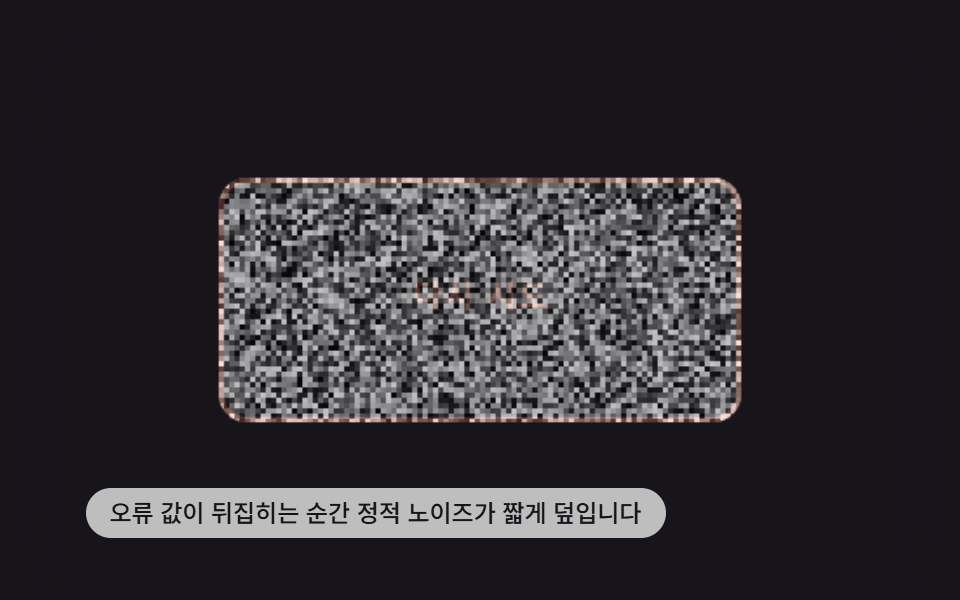
09오류 값이 뒤집히면 정적처럼 흔들리는 노이즈 버튼
오류 값이 false에서 true로 뒤집히는 순간 버튼 표면 픽셀마다 밝기 값을 무작위로 다시 계산해 텔레비전 정적 같은 노이즈를 짧게 덮어씌운다.
쓰임오류 상태 버튼, 재시도 유도
BTN_CANVAS_STATIC_BURST_MSdrawNoiseTICK_MS
<main class="stage">
<div class="ns is-demo" id="root">
  <canvas class="ns__cv" id="cv" width="480" height="300"></canvas>
  <button class="ns__btn" id="btn" type="button">다시 시도</button>
  <p class="ns__hint">오류 값이 뒤집히는 순간 정적 노이즈가 짧게 덮입니다</p>
</div>
</main>
@use "../../../../site/static/demo-tokens" as *;
$duration: $dur-instant;
$easing: $ease-out;
$color: $subject-cream;
@include stage($stage-ink);
.ns {
position: relative;
width: min(92vw, calc(160vh - 12.8vw));
aspect-ratio: 480 / 300;
margin: 0 auto;
border-radius: $r-card;
overflow: hidden;
box-shadow: $shadow-raised;
}
.ns__cv {
display: block;
width: 100%;
height: 100%;
}
.ns__btn {
position: absolute;
left: 50%;
top: 50%;
width: calc(300 / 480 * 100%);
height: calc(140 / 300 * 100%);
transform: translate(-50%, -50%);
z-index: 2;
border: 0;
border-radius: $r-control;
background: transparent;
color: transparent;
cursor: pointer;
font-size: 16px;
font-weight: 700;
}
.ns__btn:focus-visible {
outline: 2px solid $subject-cream;
outline-offset: 3px;
}
.ns__hint {
position: absolute;
left: $sp-3;
bottom: $sp-3;
margin: 0;
padding: $sp-1 $sp-3;
border-radius: $r-pill;
font-size: 12px;
line-height: 1.4;
font-weight: 500;
background: rgba(255, 255, 255, .72);
color: $subject-ink;
pointer-events: none;
z-index: 3;
}
@media (prefers-reduced-motion: reduce) {
.ns__btn { transition: none; }
}html, body {
margin: 0;
overflow: hidden;
}
.stage {
box-sizing: border-box;
min-height: 100vh;
display: grid;
place-items: center;
margin: 0;
background: #17141a;
font-family: -apple-system, "Segoe UI", "Noto Sans KR", sans-serif;
padding: clamp(8px, 4vw, 24px);
}
.ns {
position: relative;
width: min(92vw, 160vh - 12.8vw);
aspect-ratio: 480/300;
margin: 0 auto;
border-radius: 16px;
overflow: hidden;
box-shadow: 0 14px 24px rgba(23, 20, 26, 0.32);
}
.ns__cv {
display: block;
width: 100%;
height: 100%;
}
.ns__btn {
position: absolute;
left: 50%;
top: 50%;
width: 62.5%;
height: 46.6666666667%;
transform: translate(-50%, -50%);
z-index: 2;
border: 0;
border-radius: 12px;
background: transparent;
color: transparent;
cursor: pointer;
font-size: 16px;
font-weight: 700;
}
.ns__btn:focus-visible {
outline: 2px solid #fff7e6;
outline-offset: 3px;
}
.ns__hint {
position: absolute;
left: 12px;
bottom: 12px;
margin: 0;
padding: 4px 12px;
border-radius: 999px;
font-size: 12px;
line-height: 1.4;
font-weight: 500;
background: rgba(255, 255, 255, 0.72);
color: #17141a;
pointer-events: none;
z-index: 3;
}
@media (prefers-reduced-motion: reduce) {
.ns__btn {
transition: none;
}
}(function () {
'use strict';
function hashNoise(x, y, seed) {
var v = Math.sin(x * 12.9898 + y * 78.233 + seed * 0.0013) * 43758.5453;
return v - Math.floor(v);
}
function roundRect(c, x, y, w, h, r) {
c.beginPath();
c.moveTo(x + r, y);
c.arcTo(x + w, y, x + w, y + h, r);
c.arcTo(x + w, y + h, x, y + h, r);
c.arcTo(x, y + h, x, y, r);
c.arcTo(x, y, x + w, y, r);
c.closePath();
}
var W = 480, H = 300;
var SEED = 90909;
var BW = 300, BH = 140;
var BX = (W - BW) / 2, BY = (H - BH) / 2;
var NOISE_CELL = 3; // px — 노이즈 블록 한 칸
var BTN_CANVAS_STATIC_BURST_MS = 650; // 정적이 덮였다가 가라앉는 데 걸리는 시간
var TICK_MS = 40; // 이 간격마다 노이즈 패턴을 다시 계산한다 (깜빡임 속도)
var root = document.getElementById('root');
var cv = document.getElementById('cv');
var btn = document.getElementById('btn');
var ctx = cv.getContext('2d');
var reduceMQ = window.matchMedia('(prefers-reduced-motion: reduce)');
var errorOn = false;
var burstT0 = null;
function drawPanel(errored) {
roundRect(ctx, BX, BY, BW, BH, 16);
ctx.fillStyle = '#17141a';
ctx.fill();
ctx.fillStyle = errored ? '#ff8a6b' : '#fff7e6';
ctx.font = '700 18px system-ui, sans-serif';
ctx.textAlign = 'center';
ctx.textBaseline = 'middle';
ctx.fillText('다시 시도', BX + BW / 2, BY + BH / 2);
if (errored) {
ctx.lineWidth = 3;
ctx.strokeStyle = '#ff8a6b';
roundRect(ctx, BX + 1.5, BY + 1.5, BW - 3, BH - 3, 15);
ctx.stroke();
}
}
function drawNoise(envelope, tick) {
ctx.save();
roundRect(ctx, BX, BY, BW, BH, 16);
ctx.clip();
ctx.globalAlpha = envelope;
for (var y = BY; y < BY + BH; y += NOISE_CELL) {
for (var x = BX; x < BX + BW; x += NOISE_CELL) {
var n = hashNoise(x / NOISE_CELL, y / NOISE_CELL, SEED + tick);
var v = Math.floor(n * 255);
ctx.fillStyle = 'rgb(' + v + ',' + v + ',' + v + ')';
ctx.fillRect(x, y, NOISE_CELL, NOISE_CELL);
}
}
ctx.restore();
ctx.globalAlpha = 1;
}
function render(now) {
ctx.clearRect(0, 0, W, H);
drawPanel(errorOn);
if (burstT0 !== null) {
var elapsed = now - burstT0;
if (elapsed >= BTN_CANVAS_STATIC_BURST_MS) {
burstT0 = null;
} else {
var envelope = 1 - elapsed / BTN_CANVAS_STATIC_BURST_MS;
var tick = Math.floor(elapsed / TICK_MS);
drawNoise(envelope, tick);
}
}
}
function trigger() {
root.classList.remove('is-demo');
errorOn = !errorOn;
if (errorOn) burstT0 = performance.now();
if (reduceMQ.matches) render(performance.now());
}
btn.addEventListener('click', trigger);
btn.addEventListener('keydown', function (e) {
if (e.key !== 'Enter' && e.key !== ' ') return;
e.preventDefault();
trigger();
});
cv.addEventListener('pointerdown', function () { trigger(); });
window.addEventListener('resize', function () { render(performance.now()); });
function frame(now) {
if (!reduceMQ.matches) {
if (root.classList.contains('is-demo')) {
// 데모 재생 중엔 정적이 끊기지 않도록 번짐이 끝나는 즉시 다음 번짐을 이어 붙인다.
errorOn = true;
if (burstT0 === null || now - burstT0 >= BTN_CANVAS_STATIC_BURST_MS) burstT0 = now;
}
render(now);
requestAnimationFrame(frame);
}
}
if (reduceMQ.matches) {
errorOn = true;
burstT0 = performance.now() - BTN_CANVAS_STATIC_BURST_MS * 0.4;
render(performance.now());
} else {
requestAnimationFrame(frame);
}
})();// NoiseStaticButton — vanilla 판(run/404/demo/09-btn-canvas-noise-static-glitch/index.html) 의 React 포트.
// 오류 값이 false에서 true로 뒤집히는 순간 버튼 표면 픽셀마다 밝기 값을 무작위로 다시 계산해
// 텔레비전 정적 같은 노이즈를 짧게 덮어씌운다.
import { useEffect, useRef } from "react";
import styles from "./NoiseStaticButton.module.scss";
type Box<T> = { current: T };
type KeyEvt = { key: string; preventDefault(): void };
const W = 480, H = 300;
const SEED = 90909;
const BW = 300, BH = 140;
const BX = (W - BW) / 2, BY = (H - BH) / 2;
const NOISE_CELL = 3;
const BTN_CANVAS_STATIC_BURST_MS = 650;
const TICK_MS = 40;
function hashNoise(x: number, y: number, seed: number): number {
const v = Math.sin(x * 12.9898 + y * 78.233 + seed * 0.0013) * 43758.5453;
return v - Math.floor(v);
}
function roundRect(c: CanvasRenderingContext2D, x: number, y: number, w: number, h: number, r: number): void {
c.beginPath();
c.moveTo(x + r, y);
c.arcTo(x + w, y, x + w, y + h, r);
c.arcTo(x + w, y + h, x, y + h, r);
c.arcTo(x, y + h, x, y, r);
c.arcTo(x, y, x + w, y, r);
c.closePath();
}
export default function NoiseStaticButton() {
const cvRef = useRef<HTMLCanvasElement | null>(null);
const btnRef = useRef<HTMLButtonElement | null>(null);
const errorOnRef = useRef<boolean>(false) as Box<boolean>;
const burstT0Ref = useRef<number | null>(null) as Box<number | null>;
const reduceRef = useRef<boolean>(false) as Box<boolean>;
const demoRef = useRef<boolean>(true) as Box<boolean>;
const frameRef = useRef<number>(0) as Box<number>;
function drawPanel(ctx: CanvasRenderingContext2D, errored: boolean): void {
roundRect(ctx, BX, BY, BW, BH, 16);
ctx.fillStyle = "#17141a";
ctx.fill();
ctx.fillStyle = errored ? "#ff8a6b" : "#fff7e6";
ctx.font = "700 18px system-ui, sans-serif";
ctx.textAlign = "center";
ctx.textBaseline = "middle";
ctx.fillText("다시 시도", BX + BW / 2, BY + BH / 2);
if (errored) {
ctx.lineWidth = 3;
ctx.strokeStyle = "#ff8a6b";
roundRect(ctx, BX + 1.5, BY + 1.5, BW - 3, BH - 3, 15);
ctx.stroke();
}
}
function drawNoise(ctx: CanvasRenderingContext2D, envelope: number, tick: number): void {
ctx.save();
roundRect(ctx, BX, BY, BW, BH, 16);
ctx.clip();
ctx.globalAlpha = envelope;
for (let y = BY; y < BY + BH; y += NOISE_CELL) {
for (let x = BX; x < BX + BW; x += NOISE_CELL) {
const n = hashNoise(x / NOISE_CELL, y / NOISE_CELL, SEED + tick);
const v = Math.floor(n * 255);
ctx.fillStyle = "rgb(" + v + "," + v + "," + v + ")";
ctx.fillRect(x, y, NOISE_CELL, NOISE_CELL);
}
}
ctx.restore();
ctx.globalAlpha = 1;
}
function render(now: number): void {
const cv = cvRef.current;
if (!cv) return;
const ctx = cv.getContext("2d");
if (!ctx) return;
ctx.clearRect(0, 0, W, H);
drawPanel(ctx, errorOnRef.current);
const burstT0 = burstT0Ref.current;
if (burstT0 !== null) {
const elapsed = now - burstT0;
if (elapsed >= BTN_CANVAS_STATIC_BURST_MS) {
burstT0Ref.current = null;
} else {
const envelope = 1 - elapsed / BTN_CANVAS_STATIC_BURST_MS;
const tick = Math.floor(elapsed / TICK_MS);
drawNoise(ctx, envelope, tick);
}
}
}
function trigger(): void {
demoRef.current = false;
errorOnRef.current = !errorOnRef.current;
if (errorOnRef.current) burstT0Ref.current = performance.now();
if (reduceRef.current) render(performance.now());
}
function onKeyDown(e: KeyEvt): void {
if (e.key !== "Enter" && e.key !== " ") return;
e.preventDefault();
trigger();
}
useEffect(() => {
reduceRef.current = window.matchMedia("(prefers-reduced-motion: reduce)").matches;
if (reduceRef.current) {
errorOnRef.current = true;
burstT0Ref.current = performance.now() - BTN_CANVAS_STATIC_BURST_MS * 0.4;
render(performance.now());
return;
}
function frame(now: number): void {
if (demoRef.current) {
// 데모 재생 중엔 정적이 끊기지 않도록 번짐이 끝나는 즉시 다음 번짐을 이어 붙인다.
errorOnRef.current = true;
const t0 = burstT0Ref.current;
if (t0 === null || now - t0 >= BTN_CANVAS_STATIC_BURST_MS) burstT0Ref.current = now;
}
render(now);
frameRef.current = requestAnimationFrame(frame);
}
frameRef.current = requestAnimationFrame(frame);
return () => cancelAnimationFrame(frameRef.current);
}, []);
return (
<main className={styles.stage}>
<div className={styles.ns}>
<canvas className={styles.cv} ref={cvRef} width={W} height={H} onPointerDown={trigger} />
<button className={styles.btn} ref={btnRef} type="button" onClick={trigger} onKeyDown={onKeyDown}>
다시 시도
</button>
<p className={styles.hint}>오류 값이 뒤집히는 순간 정적 노이즈가 짧게 덮입니다</p>
</div>
</main>
);
}09 오류 값이 뒤집히면 정적처럼 흔들리는 노이즈 버튼 — 측정 누적면적 22.181% · 움직인 프레임 23/23GODRICH 원작 · zip 에 SCSS·React 포함 · css 버튼 클릭 애니메이션 9가지 — 캔버스 계산판
이 데모가 속한 글
 css 버튼 클릭 애니메이션 9가지 — 캔버스 계산판버튼이 유리처럼 금 가 보이는 원인은 눌림 상태 값이 켜질 때 뻗는 균열 각도 값 하나다. 2번은 그 값으로 균열선을 그리고, 5번은 같은 값을 테두리를 도는 전류 굵기로 다시 쓰며, 8번은 눌린 좌표를 중심으로 같 이 글의 데모 전부 보기