03도넛 그래프 스윕
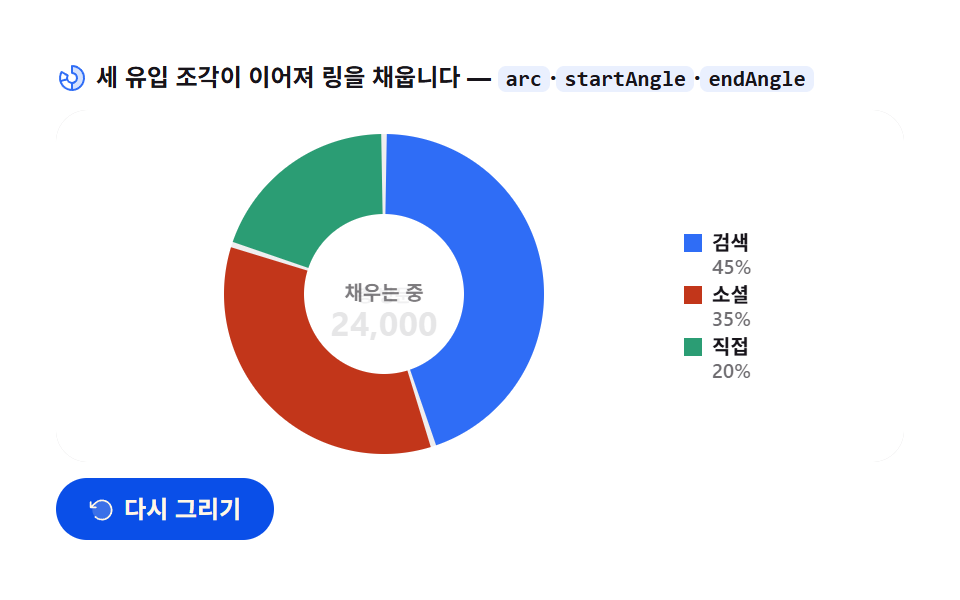
세 트래픽源의 점유가 arc 로 채색되는데, 이어지는 조각은 시작각이 앞 조각의 끝각에서 출발해 멈추지 않고 흐른다. 중앙 총량이 마지막에 뒤집힌다.
쓰임유입 경로·구성비 한눈에
arcstartAngleendAngle
<main class="stage">
<div class="dn" id="dn">
  <p class="dn__hint">
    <svg class="dn__ico" viewBox="0 0 256 256" aria-hidden="true"><g fill="currentColor"><path d="M224 128a96 96 0 0 1-96 96v-56a40 40 0 0 0 0-80V32a96 96 0 0 1 96 96" opacity=".2"/><path d="M128 24a8 8 0 0 0-8 8v56a8 8 0 0 0 8 8a32 32 0 1 1-27.72 16a8 8 0 0 0-2.93-10.93l-48.5-28A8 8 0 0 0 37.92 76A104 104 0 1 0 128 24M48.09 91.1L83 111.26A48.1 48.1 0 0 0 80 128c0 1.53.08 3 .22 4.52L41.28 143a88.16 88.16 0 0 1 6.81-51.9m-2.67 67.31l39-10.44A48.1 48.1 0 0 0 120 175.32v40.31a88.2 88.2 0 0 1-74.58-57.22M136 215.63v-40.31a48 48 0 0 0 0-94.65V40.36a88 88 0 0 1 0 175.27"/></g></svg>
    <span>세 유입 조각이 이어져 링을 채웁니다 — <code>arc</code>·<code>startAngle</code>·<code>endAngle</code></span>
  </p>
  <div class="dn__field" id="field" role="application" aria-label="도넛 그래프 스윕 실험판" tabindex="0">
    <canvas class="dn__cv" id="cv" role="img" aria-label="트래픽 유입 도넛 그래프 — 세 조각이 시계 방향으로 채워지는 모습"></canvas>
  </div>
  <div class="dn__bar">
    <button class="dn__btn" id="replay" type="button">
      <svg class="dn__bico" viewBox="0 0 256 256" aria-hidden="true"><g fill="currentColor"><path d="M216 128a88 88 0 1 1-88-88a88 88 0 0 1 88 88" opacity=".2"/><path d="M224 128a96 96 0 0 1-94.71 96H128a95.38 95.38 0 0 1-65.9-26.2a8 8 0 0 1 11-11.63a80 80 0 1 0-1.67-114.78a3 3 0 0 1-.26.25L44.59 96H72a8 8 0 0 1 0 16H24a8 8 0 0 1-8-8V56a8 8 0 0 1 16 0v29.8L60.25 60A96 96 0 0 1 224 128"/></g></svg>
      <span>다시 그리기</span>
    </button>
    <table class="sr-only">
      <caption>트래픽 유입 구성(단위: 방문, 합계 24,000)</caption>
      <thead><tr><th scope="col">유입원</th><th scope="col">방문</th><th scope="col">점유</th></tr></thead>
      <tbody>
        <tr><th scope="row">검색</th><td>10,800</td><td>45%</td></tr>
        <tr><th scope="row">소셜</th><td>8,400</td><td>35%</td></tr>
        <tr><th scope="row">직접</th><td>4,800</td><td>20%</td></tr>
      </tbody>
    </table>
  </div>
</div>
</main>@use "../../../../site/static/demo-tokens" as *;
// 도넛 그래프 스윕 — 움직임은 전부 캔버스 rAF 루프 안(이어지는 arc 스윕 + 중앙 총량 플립).
// CSS 애니메이션 0개 — 렌더러가 실시간 24장을 찍는다(077·304 선례).
// 조각은 차트 토큰 고정 순서 1·2·3번.
$duration: $dur-loop;
$easing: $ease-out; // 스윕 감속은 JS 에서 계산하므로 CSS 쪽 이징 토큰은 감속 역할명으로
$color: $chart-1;
@include stage($stage-paper);
// 화면 낭독기용 표 — 캔버스를 읽지 못하므로 같은 데이터를 표로 붙인다
.sr-only {
// fixed + top/left 명시 — absolute 였을 때 표의 실제 콘텐츠 높이(행 수만큼 ≒ 390px)가
// scrollHeight 에 잡혀 데스크톱·폰 전부 세로 넘침(BD8/BD9)이 났다. top 을 주지 않으면
// static 자리 기준으로 배치돼 여전히 scrollHeight 에 들어간다 — 좌상단 고정으로 뺀다.
position: fixed; top: 0; left: 0; width: 1px; height: 1px; margin: -1px;
overflow: hidden; clip: rect(0 0 0 0); white-space: nowrap;
}
.dn {
// 캔버스가 읽는 색 — JS 가 getComputedStyle 로 꺼내 쓴다
--chart-1: #{$chart-1};
--chart-2: #{$chart-2};
--chart-3: #{$chart-3};
--ink: #{$subject-ink};
--mute: #{rgba($subject-ink, .62)};
--track: #{rgba($subject-ink, .07)};
--paper: #{$stage-paper};
display: flex; flex-direction: column; gap: $sp-2;
width: 100%; max-width: 424px;
}
.dn__hint {
display: flex; align-items: center; gap: $sp-1; margin: 0;
font-weight: 700; font-size: clamp(10px, 2.8vw, 12px); line-height: 1.35;
color: $subject-ink;
}
.dn__hint code {
padding: 0 $sp-1; border-radius: $r-xs;
background: rgba($chart-1, .10);
color: $subject-ink;
font-weight: 700; font-size: .92em; line-height: 1.3;
}
.dn__ico { width: 16px; height: 16px; flex: 0 0 auto; color: $color; }
.dn__field {
position: relative; height: 176px;
border-radius: $r-card; overflow: hidden;
background: $stage-paper;
box-shadow: inset 0 0 0 1px rgba($subject-ink, .16);
}
.dn__cv { display: block; width: 100%; height: 100%; }
.dn__bar {
display: flex; align-items: center; gap: $sp-2;
}
.dn__btn {
display: inline-flex; align-items: center; gap: $sp-1;
box-sizing: border-box; padding: $sp-2 $sp-4; border: 0;
border-radius: $r-pill; background: $subject-blue-deep; color: $subject-cream;
font-family: inherit; font-weight: 700; font-size: 12px; line-height: 1.2;
cursor: pointer;
}
.dn__btn:focus-visible { outline: 2px solid $color; outline-offset: 2px; }
.dn__bico { width: 14px; height: 14px; flex: 0 0 auto; }
@media (max-width: 340px) {
.dn { gap: $sp-1; }
.dn__field { height: 112px; }
.dn__hint { font-size: 10px; }
.dn__btn { padding: $sp-1 $sp-3; font-size: 11px; }
}
// reduce — 루프가 아예 안 돌므로 끌 애니메이션이 없다. 완성 상태 한 장만 남는다.
@media (prefers-reduced-motion: reduce) {
.dn__btn { cursor: default; }
}html, body {
margin: 0;
overflow: hidden;
}
.stage {
box-sizing: border-box;
min-height: 100vh;
display: grid;
place-items: center;
margin: 0;
background: #ffffff;
font-family: -apple-system, "Segoe UI", "Noto Sans KR", sans-serif;
padding: clamp(8px, 4vw, 24px);
}
.sr-only {
position: fixed;
top: 0;
left: 0;
width: 1px;
height: 1px;
margin: -1px;
overflow: hidden;
clip: rect(0 0 0 0);
white-space: nowrap;
}
.dn {
--chart-1: #2f6df6;
--chart-2: #c2361a;
--chart-3: #2b9d74;
--ink: #17141a;
--mute: rgba(23, 20, 26, 0.62);
--track: rgba(23, 20, 26, 0.07);
--paper: #ffffff;
display: flex;
flex-direction: column;
gap: 8px;
width: 100%;
max-width: 424px;
}
.dn__hint {
display: flex;
align-items: center;
gap: 4px;
margin: 0;
font-weight: 700;
font-size: clamp(10px, 2.8vw, 12px);
line-height: 1.35;
color: #17141a;
}
.dn__hint code {
padding: 0 4px;
border-radius: 4px;
background: rgba(47, 109, 246, 0.1);
color: #17141a;
font-weight: 700;
font-size: 0.92em;
line-height: 1.3;
}
.dn__ico {
width: 16px;
height: 16px;
flex: 0 0 auto;
color: #2f6df6;
}
.dn__field {
position: relative;
height: 176px;
border-radius: 16px;
overflow: hidden;
background: #ffffff;
box-shadow: inset 0 0 0 1px rgba(23, 20, 26, 0.16);
}
.dn__cv {
display: block;
width: 100%;
height: 100%;
}
.dn__bar {
display: flex;
align-items: center;
gap: 8px;
}
.dn__btn {
display: inline-flex;
align-items: center;
gap: 4px;
box-sizing: border-box;
padding: 8px 16px;
border: 0;
border-radius: 999px;
background: #0a4fe8;
color: #fff7e6;
font-family: inherit;
font-weight: 700;
font-size: 12px;
line-height: 1.2;
cursor: pointer;
}
.dn__btn:focus-visible {
outline: 2px solid #2f6df6;
outline-offset: 2px;
}
.dn__bico {
width: 14px;
height: 14px;
flex: 0 0 auto;
}
@media (max-width: 340px) {
.dn {
gap: 4px;
}
.dn__field {
height: 112px;
}
.dn__hint {
font-size: 10px;
}
.dn__btn {
padding: 4px 12px;
font-size: 11px;
}
}
@media (prefers-reduced-motion: reduce) {
.dn__btn {
cursor: default;
}
}// 도넛 그래프 스윕 — 세 트래픽 유입의 점유가 링을 채운다.
// 각 조각은 arc 로 그리되, 이어지는 조각의 시작각(startAngle)이 앞 조각의 현재 끝각(endAngle)에서 출발한다.
// 그래서 조각 경계에서 펜이 멈추지 않고 링 전체가 한 번에 흐른다.
// 중앙 총량은 링이 다 채워진 뒤 숫자가 뒤집히며(세로 슬라이드 교체) 나타난다.
var root = document.getElementById('dn');
var field = document.getElementById('field');
var cv = document.getElementById('cv');
var ctx = cv.getContext('2d');
var replayBtn = document.getElementById('replay');
var css = getComputedStyle(root);
var C_1 = css.getPropertyValue('--chart-1').trim();
var C_2 = css.getPropertyValue('--chart-2').trim();
var C_3 = css.getPropertyValue('--chart-3').trim();
var C_INK = css.getPropertyValue('--ink').trim();
var C_MUTE = css.getPropertyValue('--mute').trim();
var C_TRACK = css.getPropertyValue('--track').trim();
var C_PAPER = css.getPropertyValue('--paper').trim();
var FONT = '-apple-system, "Segoe UI", "Noto Sans KR", sans-serif';
// 고정 시드 데이터 — 세 유입원의 방문 수(합계 24,000). 난수가 아니라 코드 안 배열
var SRC = [
{ name: '검색', v: 10800, c: C_1 }, // 45%
{ name: '소셜', v: 8400, c: C_2 }, // 35%
{ name: '직접', v: 4800, c: C_3 } // 20%
];
var TOTAL = 24000;
var TAU = Math.PI * 2;
var START = -Math.PI / 2; // 12시 방향에서 시작
var GAP = 0.035; // 조각 사이 표면 틈(라디안) — 붙어 있으면 경계가 안 읽힌다
var LOOP = 2; // 한 사이클 2초
var SWEEP = 0.80; // 전체 2초의 80% 동안 링이 채워진다
var reduce = window.matchMedia('(prefers-reduced-motion: reduce)').matches;
var W = 0, H = 0, dpr = 1;
var t0 = 0, raf = 0;
function fit() {
var r = field.getBoundingClientRect();
dpr = window.devicePixelRatio || 1;
W = r.width; H = r.height;
cv.width = Math.round(W * dpr);
cv.height = Math.round(H * dpr);
ctx.setTransform(dpr, 0, 0, dpr, 0, 0);
}
// p(0..1) → 이어지는 스윕의 현재 각도. 진행률을 점유합(1.0)에 얹는다
function sweepAngle(p) {
var q = Math.max(0, Math.min(1, p / SWEEP));
return q; // 0..1, 1 이면 링 전체
}
function draw(p) {
ctx.clearRect(0, 0, W, H);
ctx.fillStyle = C_PAPER;
ctx.fillRect(0, 0, W, H);
// 도넛 중심·반지름 — 캔버스를 채운다(누적면적). 범례는 오른쪽 세로 줄
var legendW = Math.min(96, Math.max(72, W * 0.26));
var cx = PAD_L() + (W - PAD_L() - legendW - PAD_R()) / 2;
var cy = H * 0.5 + 4;
var R = Math.min((W - PAD_L() - legendW - PAD_R()) / 2 - 4, H / 2 - 8);
var ring = Math.max(16, R * 0.5);
// 링 트랙 — 다 채워질 자리를 옅게 깐다. 스윕 진행까지만 깔린다:
// 첫 프레임에 전체 트랙을 깔면 그 자리는 끝까지 변하지 않아 누적면적이 죽는다 —
// 펜이 지나가며 트랙이 열리고 조각이 따라 붙는 그림(077 품질 기준선: 화면이 살아 있어야 한다)
var qTrack = sweepAngle(p);
if (qTrack > 0.005) {
ctx.beginPath();
ctx.arc(cx, cy, R - ring / 2, START, START + qTrack * TAU);
ctx.strokeStyle = C_TRACK;
ctx.lineWidth = ring;
ctx.stroke();
}
// 조각 — 이어지는 스윕. 진행 q 를 각 조각 점유에 분배한다:
// 앞 조각이 다 채워졌으면 전체 각을 확정하고, 현재 조각은 남은 진행으로 부분각을 그린다.
var q = qTrack;
var pen = START;
var acc = 0;
var cur = -1;
for (var i = 0; i < SRC.length; i++) {
var share = SRC[i].v / TOTAL;
var segEnd = acc + share;
if (q >= segEnd) {
// 이미 지나온 조각 — 전체 각을 그린다(양쪽에 틈 반씩)
var a0 = START + acc * TAU + GAP / 2;
var a1 = START + segEnd * TAU - GAP / 2;
slice(cx, cy, R, ring, a0, a1, SRC[i].c, 1);
pen = a1;
acc = segEnd;
} else if (q > acc) {
// 현재 그려지는 조각 — 시작각은 앞 조각의 끝각. 끝각은 진행에 따라 벌어진다
cur = i;
var a0c = START + acc * TAU + (i === 0 ? 0 : GAP / 2);
var a1c = START + q * TAU;
slice(cx, cy, R, ring, a0c, a1c, SRC[i].c, 1);
acc = segEnd;
} else {
break;
}
}
// 스윕 펜 끝 — 지나가는 지점에 작은 점. 조각이 흐른다는 감을 준다
if (cur >= 0 && q < 1) {
var penA = START + q * TAU;
var px = cx + Math.cos(penA) * (R - ring / 2);
var py = cy + Math.sin(penA) * (R - ring / 2);
ctx.beginPath();
ctx.arc(px, py, 2.6, 0, TAU);
ctx.fillStyle = C_PAPER;
ctx.fill();
ctx.strokeStyle = SRC[cur].c;
ctx.lineWidth = 2;
ctx.stroke();
}
// 중앙 총량 — 링이 다 채워진 뒤(SWEEP 이후) 세로 슬라이드로 뒤집혀 나타난다
var flipP = Math.max(0, Math.min(1, (p - SWEEP) / 0.16));
var midY = cy + 2;
var label = '총 방문';
var value = '24,000';
if (flipP > 0) {
// 숫자가 위에서 내려오고 "총 방문" 은 자리를 비켜 준다 — 두 줄이 교체되는 뒤집힘
var up = 1 - flipP;
ctx.save();
ctx.beginPath();
ctx.rect(cx - R, cy - R, R * 2, R * 2);
ctx.clip();
ctx.globalAlpha = up;
ctx.fillStyle = C_MUTE;
ctx.textAlign = 'center';
ctx.textBaseline = 'middle';
ctx.font = '600 10px ' + FONT;
ctx.fillText('채우는 중', cx, midY - flipP * 18);
ctx.restore();
ctx.globalAlpha = 1;
}
if (flipP > 0) {
ctx.textAlign = 'center';
ctx.textBaseline = 'middle';
ctx.globalAlpha = flipP;
ctx.fillStyle = C_INK;
ctx.font = '700 17px ' + FONT;
ctx.fillText(value, cx, midY + (1 - flipP) * 16);
ctx.fillStyle = C_MUTE;
ctx.font = '600 9px ' + FONT;
ctx.fillText(label, cx, midY - 13 + (1 - flipP) * 14);
ctx.globalAlpha = 1;
} else {
ctx.textAlign = 'center';
ctx.textBaseline = 'middle';
ctx.fillStyle = C_MUTE;
ctx.font = '600 10px ' + FONT;
ctx.fillText('채우는 중', cx, midY);
}
// 범례 — 오른쪽 세로 줄. 각 항목은 조각이 시작될 때 나타난다
var lx = W - PAD_R() - legendW;
var ly = cy - 30;
for (var k = 0; k < SRC.length; k++) {
var appear = Math.max(0, Math.min(1, (p - (k * 0.26)) / 0.14));
if (appear <= 0) continue;
ctx.globalAlpha = appear;
var ly2 = ly + k * 26;
ctx.fillStyle = SRC[k].c;
ctx.fillRect(lx, ly2, 9, 9);
ctx.fillStyle = C_INK;
ctx.textAlign = 'left';
ctx.textBaseline = 'alphabetic';
ctx.font = '700 10px ' + FONT;
ctx.fillText(SRC[k].name, lx + 14, ly2 + 8);
ctx.fillStyle = C_MUTE;
ctx.font = '600 10px ' + FONT;
ctx.fillText(Math.round(SRC[k].v / TOTAL * 100) + '%', lx + 14, ly2 + 20);
ctx.globalAlpha = 1;
}
}
// 링 조각 한 덩이 — arc 를 stroke 로 그린다(선 두께 = 링 두께). cap 을 butt 로 둬야 각이 정확하다
function slice(cx, cy, R, ring, a0, a1, color, alpha) {
if (a1 <= a0) return;
ctx.beginPath();
ctx.arc(cx, cy, R - ring / 2, a0, a1);
ctx.strokeStyle = color;
ctx.lineWidth = ring;
ctx.lineCap = 'butt';
ctx.globalAlpha = alpha;
ctx.stroke();
ctx.globalAlpha = 1;
}
// 왼쪽 패드 — 폭이 좁으면 라벨 패드를 줄인다
function PAD_L() { return W < 220 ? 10 : 14; }
function PAD_R() { return W < 220 ? 8 : 14; }
function frame(now) {
if (!t0) t0 = now;
var p = ((now - t0) / 1000 % LOOP) / LOOP; // 0..1, 2초 루프
draw(p);
raf = requestAnimationFrame(frame);
}
replayBtn.addEventListener('click', function () { t0 = 0; });
window.addEventListener('resize', function () { fit(); if (reduce) draw(1); });
fit();
if (reduce) {
// reduce — 루프 없이 완성 상태(링이 다 채워지고 총량이 떠 있는 한 장)만 그린다
draw(1);
} else {
raf = requestAnimationFrame(frame);
}// DonutSweepChart — vanilla 판(run/305/demo/03-chart-canvas-donut-sweep/index.html) 의 React 포트.
// 세 트래픽 조각이 arc 로 채색되되 이어지는 조각의 시작각이 앞 조각의 끝각에서 출발해
// 링이 멈추지 않고 흐른다. 중앙 총량은 링이 다 채워진 뒤 뒤집혀 나타난다.
// @keyframes 없음 — props 는 CSS 변수로 내려간다.
import { useEffect, useRef } from "react";
import type { CSSProperties } from "react";
import styles from "./DonutSweepChart.module.scss";
export type DonutSweepChartProps = {
duration?: string;
easing?: string;
color?: string;
};
type Vars = CSSProperties & { "--duration"?: string; "--easing"?: string; "--color"?: string };
type Box<T> = { current: T };
// 고정 시드 데이터 — 세 유입원의 방문 수(합계 24,000)
const SRC = [
{ name: "검색", v: 10800, cvar: "--chart-1" },
{ name: "소셜", v: 8400, cvar: "--chart-2" },
{ name: "직접", v: 4800, cvar: "--chart-3" }
];
const TOTAL = 24000;
const TAU = Math.PI * 2;
const START = -Math.PI / 2; // 12시 방향에서 시작
const GAP = 0.035; // 조각 사이 표면 틈(라디안)
const LOOP = 2; // 한 사이클 2초
const SWEEP = 0.80; // 전체의 80% 동안 링이 채워진다
const FONT = '-apple-system, "Segoe UI", "Noto Sans KR", sans-serif';
const FIELD_LABEL = "도넛 그래프 스윕 실험판";
const CV_LABEL = "트래픽 유입 도넛 그래프 — 세 조각이 시계 방향으로 채워지는 모습";
export default function DonutSweepChart({
duration = "2s",
easing = "ease-out",
color = "#2f6df6",
}: DonutSweepChartProps) {
const rootRef = useRef<HTMLDivElement | null>(null);
const cvRef = useRef<HTMLCanvasElement | null>(null);
const ctxRef = useRef<CanvasRenderingContext2D | null>(null);
const sizeRef = useRef({ w: 0, h: 0 }) as Box<{ w: number; h: number }>;
const t0Ref = useRef(0) as Box<number>;
const rafRef = useRef(0) as Box<number>;
const vars: Vars = { "--duration": duration, "--easing": easing, "--color": color };
function reduced(): boolean {
return window.matchMedia("(prefers-reduced-motion: reduce)").matches;
}
function cssv(n: string): string {
const root = rootRef.current;
return root ? getComputedStyle(root).getPropertyValue(n).trim() : "";
}
// 고DPI — 배킹 스토어는 devicePixelRatio 배, 그리기 좌표계는 CSS 픽셀 그대로
function fit(): void {
const cv = cvRef.current;
const s = sizeRef.current;
if (!cv) return;
const r = cv.getBoundingClientRect();
const dpr = window.devicePixelRatio || 1;
s.w = r.width; s.h = r.height;
cv.width = Math.round(r.width * dpr);
cv.height = Math.round(r.height * dpr);
const ctx = ctxRef.current;
if (ctx) ctx.setTransform(dpr, 0, 0, dpr, 0, 0);
}
// 링 조각 한 덩이 — arc 를 stroke 로 그린다(선 두께 = 링 두께). cap 을 butt 로 둬야 각이 정확하다
function slice(cx: number, cy: number, R: number, ring: number, a0: number, a1: number, col: string): void {
const ctx = ctxRef.current;
if (!ctx || a1 <= a0) return;
ctx.beginPath();
ctx.arc(cx, cy, R - ring / 2, a0, a1);
ctx.strokeStyle = col;
ctx.lineWidth = ring;
ctx.lineCap = "butt";
ctx.stroke();
}
function draw(p: number): void {
const ctx = ctxRef.current;
if (!ctx) return;
const W = sizeRef.current.w, H = sizeRef.current.h;
const C_INK = cssv("--ink");
const C_MUTE = cssv("--mute");
const C_TRACK = cssv("--track");
const C_PAPER = cssv("--paper");
ctx.clearRect(0, 0, W, H);
ctx.fillStyle = C_PAPER;
ctx.fillRect(0, 0, W, H);
// 도넛 중심·반지름 — 캔버스를 채운다(누적면적). 범례는 오른쪽 세로 줄
const padL = W < 220 ? 10 : 14;
const padR = W < 220 ? 8 : 14;
const legendW = Math.min(96, Math.max(72, W * 0.26));
const cx = padL + (W - padL - legendW - padR) / 2;
const cy = H * 0.5 + 4;
const R = Math.min((W - padL - legendW - padR) / 2 - 8, H / 2 - 14);
const ring = Math.max(16, R * 0.34);
// 링 트랙 — 다 채워질 자리를 옅게 깐다
ctx.beginPath();
ctx.arc(cx, cy, R - ring / 2, 0, TAU);
ctx.strokeStyle = C_TRACK;
ctx.lineWidth = ring;
ctx.stroke();
// 조각 — 이어지는 스윕. q(0..1) 를 점유에 분배한다
const q = Math.max(0, Math.min(1, p / SWEEP));
let acc = 0;
let cur = -1;
for (let i = 0; i < SRC.length; i++) {
const share = SRC[i].v / TOTAL;
const segEnd = acc + share;
const col = i === 0 ? (cssv(SRC[i].cvar) || color) : cssv(SRC[i].cvar);
if (q >= segEnd) {
// 지나온 조각 — 전체 각(양쪽 틈 반씩)
const a0 = START + acc * TAU + GAP / 2;
const a1 = START + segEnd * TAU - GAP / 2;
slice(cx, cy, R, ring, a0, a1, col);
acc = segEnd;
} else if (q > acc) {
// 현재 조각 — 시작각은 앞 조각 끝각. 끝각은 진행에 따라 벌어진다
cur = i;
const a0c = START + acc * TAU + (i === 0 ? 0 : GAP / 2);
const a1c = START + q * TAU;
slice(cx, cy, R, ring, a0c, a1c, col);
acc = segEnd;
} else {
break;
}
}
// 스윕 펜 끝 — 지나가는 지점의 작은 점
if (cur >= 0 && q < 1) {
const penA = START + q * TAU;
const px = cx + Math.cos(penA) * (R - ring / 2);
const py = cy + Math.sin(penA) * (R - ring / 2);
const col = cur === 0 ? (cssv(SRC[cur].cvar) || color) : cssv(SRC[cur].cvar);
ctx.beginPath();
ctx.arc(px, py, 2.6, 0, TAU);
ctx.fillStyle = C_PAPER;
ctx.fill();
ctx.strokeStyle = col;
ctx.lineWidth = 2;
ctx.stroke();
}
// 중앙 총량 — 링이 다 채워진 뒤 세로 슬라이드로 뒤집혀 나타난다
const flipP = Math.max(0, Math.min(1, (p - SWEEP) / 0.16));
const midY = cy + 2;
ctx.textAlign = "center";
ctx.textBaseline = "middle";
if (flipP > 0) {
ctx.globalAlpha = 1 - flipP;
ctx.fillStyle = C_MUTE;
ctx.font = "600 10px " + FONT;
ctx.fillText("채우는 중", cx, midY - flipP * 18);
ctx.globalAlpha = 1;
ctx.globalAlpha = flipP;
ctx.fillStyle = C_INK;
ctx.font = "700 17px " + FONT;
ctx.fillText("24,000", cx, midY + (1 - flipP) * 16);
ctx.fillStyle = C_MUTE;
ctx.font = "600 9px " + FONT;
ctx.fillText("총 방문", cx, midY - 13 + (1 - flipP) * 14);
ctx.globalAlpha = 1;
} else {
ctx.fillStyle = C_MUTE;
ctx.font = "600 10px " + FONT;
ctx.fillText("채우는 중", cx, midY);
}
// 범례 — 각 항목은 조각이 시작될 때 나타난다
const lx = W - padR - legendW;
const ly = cy - 30;
for (let k = 0; k < SRC.length; k++) {
const appear = Math.max(0, Math.min(1, (p - k * 0.26) / 0.14));
if (appear <= 0) continue;
const col = k === 0 ? (cssv(SRC[k].cvar) || color) : cssv(SRC[k].cvar);
const ly2 = ly + k * 26;
ctx.globalAlpha = appear;
ctx.fillStyle = col;
ctx.fillRect(lx, ly2, 9, 9);
ctx.fillStyle = C_INK;
ctx.textAlign = "left";
ctx.textBaseline = "alphabetic";
ctx.font = "700 10px " + FONT;
ctx.fillText(SRC[k].name, lx + 14, ly2 + 8);
ctx.fillStyle = C_MUTE;
ctx.font = "600 10px " + FONT;
ctx.fillText(Math.round(SRC[k].v / TOTAL * 100) + "%", lx + 14, ly2 + 20);
ctx.globalAlpha = 1;
}
}
function frame(now: number): void {
if (!t0Ref.current) t0Ref.current = now;
const p = ((now - t0Ref.current) / 1000 % LOOP) / LOOP;
draw(p);
rafRef.current = requestAnimationFrame(frame);
}
function replay(): void {
t0Ref.current = 0;
}
function onResize(): void {
fit();
if (reduced()) draw(1);
}
useEffect(() => {
const cv = cvRef.current;
if (!cv) return;
ctxRef.current = cv.getContext("2d");
if (!ctxRef.current) return;
fit();
window.addEventListener("resize", onResize);
if (reduced()) {
// reduce — 루프 없이 완성 상태 한 장만 그린다
draw(1);
} else {
rafRef.current = requestAnimationFrame(frame);
}
return () => {
window.removeEventListener("resize", onResize);
cancelAnimationFrame(rafRef.current);
};
}, []);
return (
<main className={styles.stage}>
<div className={styles.root} ref={rootRef} style={vars}>
<p className={styles.hint}>
<svg className={styles.ico} viewBox="0 0 256 256" aria-hidden="true"><g fill="currentColor"><path d="M224 128a96 96 0 0 1-96 96v-56a40 40 0 0 0 0-80V32a96 96 0 0 1 96 96" opacity=".2"/><path d="M128 24a8 8 0 0 0-8 8v56a8 8 0 0 0 8 8a32 32 0 1 1-27.72 16a8 8 0 0 0-2.93-10.93l-48.5-28A8 8 0 0 0 37.92 76A104 104 0 1 0 128 24M48.09 91.1L83 111.26A48.1 48.1 0 0 0 80 128c0 1.53.08 3 .22 4.52L41.28 143a88.16 88.16 0 0 1 6.81-51.9m-2.67 67.31l39-10.44A48.1 48.1 0 0 0 120 175.32v40.31a88.2 88.2 0 0 1-74.58-57.22M136 215.63v-40.31a48 48 0 0 0 0-94.65V40.36a88 88 0 0 1 0 175.27"/></g></svg>
<span>세 유입 조각이 이어져 링을 채웁니다 — <code>arc</code>·<code>startAngle</code>·<code>endAngle</code></span>
</p>
<div className={styles.field} role="application" aria-label={FIELD_LABEL} tabIndex={0}>
<canvas className={styles.cv} ref={cvRef} role="img" aria-label={CV_LABEL}></canvas>
</div>
<div className={styles.bar}>
<button className={styles.btn} type="button" onClick={replay}>
<svg className={styles.bico} viewBox="0 0 256 256" aria-hidden="true"><g fill="currentColor"><path d="M216 128a88 88 0 1 1-88-88a88 88 0 0 1 88 88" opacity=".2"/><path d="M224 128a96 96 0 0 1-94.71 96H128a95.38 95.38 0 0 1-65.9-26.2a8 8 0 0 1 11-11.63a80 80 0 1 0-1.67-114.78a3 3 0 0 1-.26.25L44.59 96H72a8 8 0 0 1 0 16H24a8 8 0 0 1-8-8V56a8 8 0 0 1 16 0v29.8L60.25 60A96 96 0 0 1 224 128"/></g></svg>
<span>다시 그리기</span>
</button>
<table className={styles.srOnly}>
<caption>트래픽 유입 구성(단위: 방문, 합계 24,000)</caption>
<thead><tr><th scope="col">유입원</th><th scope="col">방문</th><th scope="col">점유</th></tr></thead>
<tbody>
{SRC.map((s, i) => (
<tr key={i}><th scope="row">{s.name}</th><td>{s.v.toLocaleString()}</td><td>{Math.round(s.v / TOTAL * 100)}%</td></tr>
))}
</tbody>
</table>
</div>
</div>
</main>
);
}03 도넛 그래프 스윕 — 측정 누적면적 11.843% · 움직인 프레임 23/23GODRICH 원작 · zip 에 SCSS·React 포함 · canvas 그래프 그리기 — 라이브러리 없이 그리는 애니메이션 차트 9종
이 데모가 속한 글
 canvas 그래프 그리기 — 라이브러리 없이 그리는 애니메이션 차트 9종canvas 그래프 그리기는 데이터 배열을 x·y 좌표로 바꿔 캔버스 위에 선·막대·원호로 얹는 일입니다. 라이브러리와 CDN 없이 값이 그려지고 차오르고 모여드는 차트 아홉 종을 만들었고, 파일만 열면 복사한 그대 이 글의 데모 전부 보기