05영역 그래프 채움
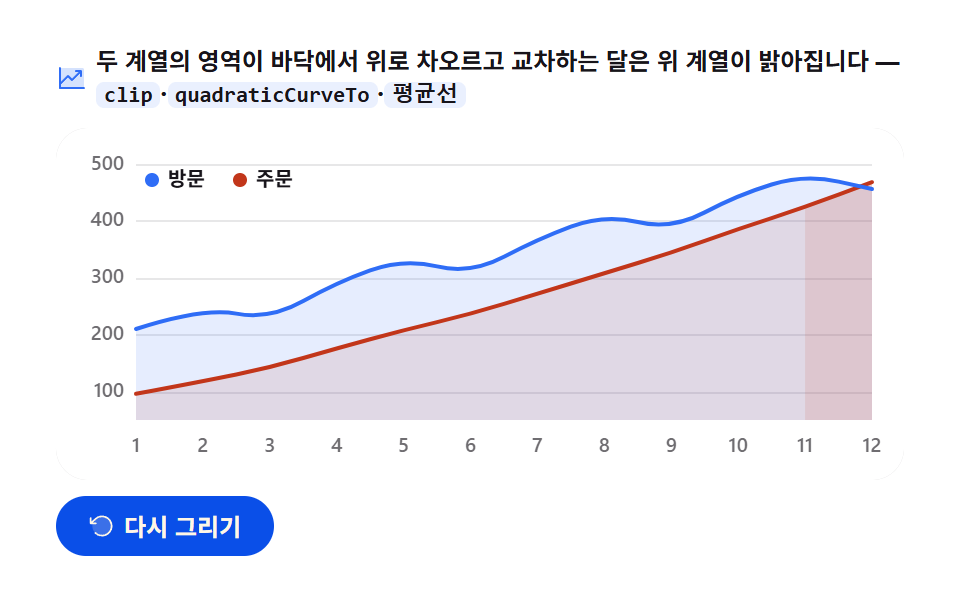
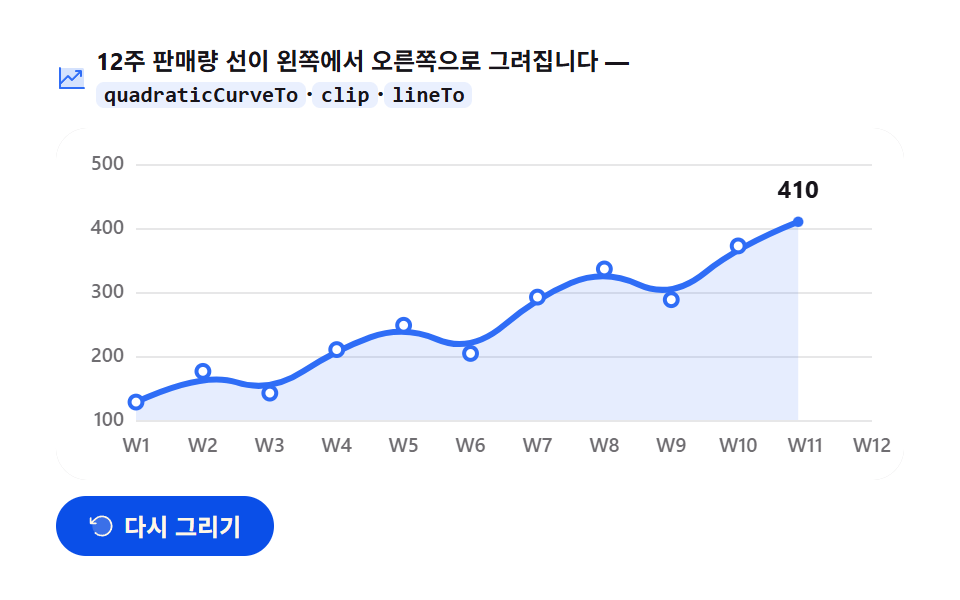
두 계열의 영역이 아래에서 위로 채워지며(clip rect 상승) 교차하는 달에는 앞선 계열이 살짝 밝아진다. 채움이 끝나면 평균선이 그 집을 가로질러 긋는다.
쓰임목표 대비 실적·누적 추이
globalAlphaclipquadraticCurveTo
<main class="stage">
<div class="ar" id="ar">
  <p class="ar__hint">
    <svg class="ar__ico" viewBox="0 0 256 256" aria-hidden="true"><g fill="currentColor"><path d="M224 64v144H32V48h176a16 16 0 0 1 16 16" opacity=".2"/><path d="M232 208a8 8 0 0 1-8 8H32a8 8 0 0 1-8-8V48a8 8 0 0 1 16 0v108.69l50.34-50.35a8 8 0 0 1 11.32 0L128 132.69L180.69 80H160a8 8 0 0 1 0-16h40a8 8 0 0 1 8 8v40a8 8 0 0 1-16 0V91.31l-58.34 58.35a8 8 0 0 1-11.32 0L96 123.31l-56 56V200h184a8 8 0 0 1 8 8"/></g></svg>
    <span>두 계열의 영역이 바닥에서 위로 차오르고 교차하는 달은 위 계열이 밝아집니다 — <code>clip</code>·<code>quadraticCurveTo</code>·<code>평균선</code></span>
  </p>
  <div class="ar__field" id="field" role="application" aria-label="영역 채움 실험판" tabindex="0">
    <canvas class="ar__cv" id="cv" role="img" aria-label="12개월 방문·주문 두 계열 영역 그래프 — 채움이 아래에서 위로 차오르고 교차하는 달은 위 계열이 밝아지며, 뒤늦게 평균선이 가로지르는 모습"></canvas>
  </div>
  <div class="ar__bar">
    <button class="ar__btn" id="replay" type="button">
      <svg class="ar__bico" viewBox="0 0 256 256" aria-hidden="true"><g fill="currentColor"><path d="M216 128a88 88 0 1 1-88-88a88 88 0 0 1 88 88" opacity=".2"/><path d="M224 128a96 96 0 0 1-94.71 96H128a95.38 95.38 0 0 1-65.9-26.2a8 8 0 0 1 11-11.63a80 80 0 1 0-1.67-114.78a3 3 0 0 1-.26.25L44.59 96H72a8 8 0 0 1 0 16H24a8 8 0 0 1-8-8V56a8 8 0 0 1 16 0v29.8L60.25 60A96 96 0 0 1 224 128"/></g></svg>
      <span>다시 그리기</span>
    </button>
    <table class="sr-only">
      <caption>12개월 방문수·주문수(단위: 명)</caption>
      <thead><tr><th scope="col">월</th><th scope="col">방문수</th><th scope="col">주문수</th></tr></thead>
      <tbody>
        <tr><th scope="row">1월</th><td>210</td><td>96</td></tr>
        <tr><th scope="row">2월</th><td>248</td><td>118</td></tr>
        <tr><th scope="row">3월</th><td>226</td><td>142</td></tr>
        <tr><th scope="row">4월</th><td>292</td><td>176</td></tr>
        <tr><th scope="row">5월</th><td>334</td><td>208</td></tr>
        <tr><th scope="row">6월</th><td>306</td><td>236</td></tr>
        <tr><th scope="row">7월</th><td>368</td><td>272</td></tr>
        <tr><th scope="row">8월</th><td>412</td><td>308</td></tr>
        <tr><th scope="row">9월</th><td>384</td><td>344</td></tr>
        <tr><th scope="row">10월</th><td>446</td><td>386</td></tr>
        <tr><th scope="row">11월</th><td>482</td><td>424</td></tr>
        <tr><th scope="row">12월</th><td>456</td><td>468</td></tr>
      </tbody>
    </table>
  </div>
</div>
</main>@use "sass:color";
@use "../../../../site/static/demo-tokens" as *;
// 영역 채움 — 움직임은 전부 캔버스 rAF 루프 안(아래→위 clip 리빌 + 면 높이 감속 + 교차 리프트 + 평균선).
// CSS 애니메이션이 0개여야 렌더러가 실시간 24장을 찍는다(077·304 선례).
// 무대는 $stage-paper(흰) — 차트는 밝은 무대가 정석. 두 계열은 차트 토큰 고정 순서 1·2번.
$duration: $dur-loop;
$easing: $ease-out; // easeOutCubic 을 JS 에서 계산하므로 CSS 쪽 이징 토큰은 감속 역할명으로
$color: $chart-1;
@include stage($stage-paper);
// 화면 낭독기용 표 — 캔버스를 읽지 못하므로 같은 데이터를 표로 붙인다
.sr-only {
// fixed + top/left 명시 — absolute 였을 때 표의 실제 콘텐츠 높이(행 수만큼 ≒ 390px)가
// scrollHeight 에 잡혀 데스크톱·폰 전부 세로 넘침(BD8/BD9)이 났다. top 을 주지 않으면
// static 자리 기준으로 배치돼 여전히 scrollHeight 에 들어간다 — 좌상단 고정으로 뺀다.
position: fixed; top: 0; left: 0; width: 1px; height: 1px; margin: -1px;
overflow: hidden; clip: rect(0 0 0 0); white-space: nowrap;
}
.ar {
// 캔버스가 읽는 색 — JS 가 getComputedStyle 로 꺼내 쓴다. vivid 리터럴은 두지 않는다(BD26)
--chart-1: #{$chart-1};
--chart-2: #{$chart-2};
--fill-1: #{rgba($chart-1, .12)};
--fill-2: #{rgba($chart-2, .12)};
// 교차 구간 리프트 — 위 계열의 면이 밝아지는 톤. 채움색 한 단 위
--fill-1-lift: #{rgba(color.mix(#ffffff, $chart-1, 18%), .34)};
--fill-2-lift: #{rgba(color.mix(#ffffff, $chart-2, 16%), .34)};
--ink: #{$subject-ink};
--mute: #{rgba($subject-ink, .62)};
--grid: #{rgba($subject-ink, .10)};
--paper: #{$stage-paper};
display: flex; flex-direction: column; gap: $sp-2;
width: 100%; max-width: 424px;
}
.ar__hint {
display: flex; align-items: center; gap: $sp-1; margin: 0;
font-weight: 700; font-size: clamp(10px, 2.8vw, 12px); line-height: 1.35;
color: $subject-ink;
}
.ar__hint code {
padding: 0 $sp-1; border-radius: $r-xs;
background: rgba($chart-1, .10);
color: $subject-ink;
font-weight: 700; font-size: .92em; line-height: 1.3;
}
.ar__ico { width: 16px; height: 16px; flex: 0 0 auto; color: $color; }
.ar__field {
position: relative; height: 176px;
border-radius: $r-card; overflow: hidden;
background: $stage-paper;
box-shadow: inset 0 0 0 1px rgba($subject-ink, .16);
}
.ar__cv { display: block; width: 100%; height: 100%; }
.ar__bar {
display: flex; align-items: center; gap: $sp-2;
}
.ar__btn {
display: inline-flex; align-items: center; gap: $sp-1;
box-sizing: border-box; padding: $sp-2 $sp-4; border: 0;
border-radius: $r-pill; background: $subject-blue-deep; color: $subject-cream;
font-family: inherit; font-weight: 700; font-size: 12px; line-height: 1.2;
cursor: pointer;
}
.ar__btn:focus-visible { outline: 2px solid $color; outline-offset: 2px; }
.ar__bico { width: 14px; height: 14px; flex: 0 0 auto; }
@media (max-width: 340px) {
.ar { gap: $sp-1; }
.ar__field { height: 112px; }
.ar__hint { font-size: 10px; }
.ar__btn { padding: $sp-1 $sp-3; font-size: 11px; }
}
// reduce — 루프가 아예 안 돌므로 끄고 말고 할 애니메이션이 없다.
// 완성 상태 한 장이 남으므로 "다시 그리기"는 여전히 정지 이미지를 다시 그린다.
@media (prefers-reduced-motion: reduce) {
.ar__btn { cursor: default; }
}html, body {
margin: 0;
overflow: hidden;
}
.stage {
box-sizing: border-box;
min-height: 100vh;
display: grid;
place-items: center;
margin: 0;
background: #ffffff;
font-family: -apple-system, "Segoe UI", "Noto Sans KR", sans-serif;
padding: clamp(8px, 4vw, 24px);
}
.sr-only {
position: fixed;
top: 0;
left: 0;
width: 1px;
height: 1px;
margin: -1px;
overflow: hidden;
clip: rect(0 0 0 0);
white-space: nowrap;
}
.ar {
--chart-1: #2f6df6;
--chart-2: #c2361a;
--fill-1: rgba(47, 109, 246, 0.12);
--fill-2: rgba(194, 54, 26, 0.12);
--fill-1-lift: rgba(33.1137254902%, 53.0509803922%, 97.1058823529%, 0.34);
--fill-2-lift: rgba(79.9058823529%, 33.7882352941%, 24.5647058824%, 0.34);
--ink: #17141a;
--mute: rgba(23, 20, 26, 0.62);
--grid: rgba(23, 20, 26, 0.1);
--paper: #ffffff;
display: flex;
flex-direction: column;
gap: 8px;
width: 100%;
max-width: 424px;
}
.ar__hint {
display: flex;
align-items: center;
gap: 4px;
margin: 0;
font-weight: 700;
font-size: clamp(10px, 2.8vw, 12px);
line-height: 1.35;
color: #17141a;
}
.ar__hint code {
padding: 0 4px;
border-radius: 4px;
background: rgba(47, 109, 246, 0.1);
color: #17141a;
font-weight: 700;
font-size: 0.92em;
line-height: 1.3;
}
.ar__ico {
width: 16px;
height: 16px;
flex: 0 0 auto;
color: #2f6df6;
}
.ar__field {
position: relative;
height: 176px;
border-radius: 16px;
overflow: hidden;
background: #ffffff;
box-shadow: inset 0 0 0 1px rgba(23, 20, 26, 0.16);
}
.ar__cv {
display: block;
width: 100%;
height: 100%;
}
.ar__bar {
display: flex;
align-items: center;
gap: 8px;
}
.ar__btn {
display: inline-flex;
align-items: center;
gap: 4px;
box-sizing: border-box;
padding: 8px 16px;
border: 0;
border-radius: 999px;
background: #0a4fe8;
color: #fff7e6;
font-family: inherit;
font-weight: 700;
font-size: 12px;
line-height: 1.2;
cursor: pointer;
}
.ar__btn:focus-visible {
outline: 2px solid #2f6df6;
outline-offset: 2px;
}
.ar__bico {
width: 14px;
height: 14px;
flex: 0 0 auto;
}
@media (max-width: 340px) {
.ar {
gap: 4px;
}
.ar__field {
height: 112px;
}
.ar__hint {
font-size: 10px;
}
.ar__btn {
padding: 4px 12px;
font-size: 11px;
}
}
@media (prefers-reduced-motion: reduce) {
.ar__btn {
cursor: default;
}
}// 영역 채움 — 12개월 두 계열(방문·주문)의 면이 바닥에서 위로 차오른다.
// 세 겹이 함께 움직인다:
// 1) 클리핑 사각형이 아래에서 위로 열린다(01 의 좌→우 clip 과 축만 다른 같은 기법).
// 2) 면의 꼭짓점 높이를 같은 진행률로 (값-바닥)*s+바닥 으로 눌러, 클립과 면이 함께 위로 차오르는
// 키가 큰 면을 만든다(누적면적). 곡선은 quadraticCurveTo 중점 제어로 부드럽게.
// 3) 두 계열이 교차하는 달(11~12월)은 채움이 그 달에 닿은 순간부터 위 계열의 면을 리프트 톤(한 단 밝게)으로.
// 채움이 끝나면(0.85) 두 계열 평균의 수평선이 왼쪽에서 오른쪽으로 그 위를 가로질러 긋는다(--ink 점선).
var root = document.getElementById('ar');
var field = document.getElementById('field');
var cv = document.getElementById('cv');
var ctx = cv.getContext('2d');
var replayBtn = document.getElementById('replay');
var css = getComputedStyle(root);
var C_1 = css.getPropertyValue('--chart-1').trim();
var C_2 = css.getPropertyValue('--chart-2').trim();
var C_1F = css.getPropertyValue('--fill-1').trim();
var C_2F = css.getPropertyValue('--fill-2').trim();
var C_1L = css.getPropertyValue('--fill-1-lift').trim();
var C_2L = css.getPropertyValue('--fill-2-lift').trim();
var C_INK = css.getPropertyValue('--ink').trim();
var C_MUTE = css.getPropertyValue('--mute').trim();
var C_GRID = css.getPropertyValue('--grid').trim();
var C_PAPER = css.getPropertyValue('--paper').trim();
var FONT = '-apple-system, "Segoe UI", "Noto Sans KR", sans-serif';
// 고정 시드 데이터 — 손으로 쓴 배열이라 다시 그려도 같은 그림.
// 연말(12월)에 주문이 방문을 앞지른다 — 11→12월 구간이 교차 구간이 되어 리프트가 목격된다
var A = [210, 248, 226, 292, 334, 306, 368, 412, 384, 446, 482, 456]; // 방문(계열 1)
var B = [ 96, 118, 142, 176, 208, 236, 272, 308, 344, 386, 424, 468]; // 주문(계열 2)
var MONTHS = ['1', '2', '3', '4', '5', '6', '7', '8', '9', '10', '11', '12'];
var PAD_L = 40, PAD_R = 16, PAD_T = 18, PAD_B = 30; // 축 라벨 여백(CSS px)
var LOOP = 2; // 한 사이클 2초 — 캡처 창과 같아 gif 가 이어진다
var FILL_AT = 0.85; // 전체 2초의 85% 동안 차오르고, 그 뒤 평균선이 그 위를 지나간다
var LINE_AT = 0.93; // 평균선 그리기가 끝나는 지점 — 이후 확정 상태로 쉰다
var Y_TOP = 50, Y_SPAN = 500; // y 축 스케일 고정(50~500명)
// 두 계열의 전 기간 평균 — 평균선(확정선)의 y 값
var sumA = 0, sumB = 0;
for (var q = 0; q < 12; q++) { sumA += A[q]; sumB += B[q]; }
var AVG_A = Math.round(sumA / 12);
var AVG_B = Math.round(sumB / 12);
var AVG = Math.round((AVG_A + AVG_B) / 2);
var reduce = window.matchMedia('(prefers-reduced-motion: reduce)').matches;
var W = 0, H = 0, dpr = 1;
var t0 = 0, raf = 0;
function fit() {
var r = field.getBoundingClientRect();
dpr = window.devicePixelRatio || 1;
W = r.width; H = r.height;
cv.width = Math.round(W * dpr);
cv.height = Math.round(H * dpr);
ctx.setTransform(dpr, 0, 0, dpr, 0, 0);
}
// 데이터 인덱스 → 플롯 x. 월은 12칸 균등
function xAt(i) { return PAD_L + (W - PAD_L - PAD_R) * (i / (A.length - 1)); }
// 데이터 값 → 플롯 y. 위로 갈수록 크다
function yAt(v) { return PAD_T + (H - PAD_T - PAD_B) * (1 - (v - Y_TOP) / (Y_SPAN - Y_TOP)); }
// 채움 진행 s(0..1) 가 누른 꼭짓점 높이 — 바닥(Y_TOP) 기준 (v-바닥)*s+바닥. s=1 이면 제값
function vAt(v, s) { return Y_TOP + (v - Y_TOP) * s; }
// 계열의 윗가장자리 곡선 — 꼭짓점을 중점 제어로 눌러 부드럽게 이은 열린 경로
function linePath(S, s) {
var n = S.length;
ctx.beginPath();
ctx.moveTo(xAt(0), yAt(vAt(S[0], s)));
for (var j = 1; j < n - 1; j++) {
ctx.quadraticCurveTo(xAt(j), yAt(vAt(S[j], s)),
(xAt(j) + xAt(j + 1)) / 2, (yAt(vAt(S[j], s)) + yAt(vAt(S[j + 1], s))) / 2);
}
ctx.lineTo(xAt(n - 1), yAt(vAt(S[n - 1], s)));
}
// 면 경로 — 윗가장자리 곡선을 바닥까지 닫는다
function areaPath(S, s) {
linePath(S, s);
ctx.lineTo(xAt(S.length - 1), H - PAD_B);
ctx.lineTo(xAt(0), H - PAD_B);
ctx.closePath();
}
// 감속 이징 — 1 - (1-t)^3. 채움이 끝에서 뭉툭해지며 멈춘다
function easeOutCubic(t) { return 1 - Math.pow(1 - t, 3); }
function draw(p) {
ctx.clearRect(0, 0, W, H);
ctx.fillStyle = C_PAPER;
ctx.fillRect(0, 0, W, H);
// 가로 그리드 + y 라벨 — 100~500 다섯 줄. 첫 12% 동안 아래에서 위로 떠오른다
var axisP = Math.min(1, p / 0.12);
ctx.lineWidth = 1;
ctx.font = '600 10px ' + FONT;
ctx.textBaseline = 'middle';
ctx.textAlign = 'right';
for (var g = 100; g <= Y_SPAN; g += 100) {
var gy = yAt(g) + (1 - axisP) * 14;
ctx.strokeStyle = C_GRID;
ctx.beginPath();
ctx.moveTo(PAD_L, Math.round(gy) + 0.5);
ctx.lineTo(W - PAD_R, Math.round(gy) + 0.5);
ctx.stroke();
ctx.fillStyle = C_MUTE;
ctx.globalAlpha = axisP;
ctx.fillText(String(g), PAD_L - 6, gy);
ctx.globalAlpha = 1;
}
// x 라벨(월) — 축이 뜬 뒤 왼쪽부터 차례로 나타난다
ctx.textAlign = 'center';
for (var m = 0; m < MONTHS.length; m++) {
var mp = Math.max(0, Math.min(1, (p - 0.10 - m * 0.018) / 0.10));
if (mp <= 0) continue;
ctx.fillStyle = C_MUTE;
ctx.globalAlpha = mp;
ctx.fillText(MONTHS[m], xAt(m), H - PAD_B + 13);
ctx.globalAlpha = 1;
}
// 채움 진행률 — 감속 이징 하나로 클립과 면 높이를 함께 누른다
var f = easeOutCubic(Math.min(1, p / FILL_AT));
var s = f * f; // 면 높이 — 시작이 급하고 끝에 붙는 감
// 클리핑 사각형 — 바닥에서 위로 열린다. 이 안에서만 면과 선이 보인다
var cutY = (H - PAD_B) - (H - PAD_T - PAD_B) * f;
ctx.save();
ctx.beginPath();
ctx.rect(0, cutY - 1, W, H);
ctx.clip();
// 계열 2(주문) 면 — 아래 깔리는 쪽. 채움 내내 채워진다
areaPath(B, s);
ctx.fillStyle = C_2F;
ctx.fill();
// 계열 1(방문) 면 — 위에 겹친다
areaPath(A, s);
ctx.fillStyle = C_1F;
ctx.fill();
// 교차 리프트 — 두 계열의 순서가 바뀌는 구간에서, 채움이 닿은 순간부터
// 그 달 구간의 위 계열 면을 리프트 톤(한 단 밝게)으로 다시 깐다
var reachI = Math.floor(Math.min(1, p / FILL_AT) * (A.length - 1)); // 채움이 닿은 마지막 달
for (var c = 0; c < A.length - 1; c++) {
if (c > reachI) break; // 아직 채움이 닿지 않은 달은 두지 않는다
var topNow = A[c + 1] >= B[c + 1] ? 1 : 2; // 구간 끝 월에서 위에 있는 계열
var topPrev = A[c] >= B[c] ? 1 : 2; // 구간 시작 월에서 위에 있는 계열
if (topNow === topPrev) continue; // 교차가 없는 구간은 그대로
var S2 = topNow === 1 ? A : B;
var lift = topNow === 1 ? C_1L : C_2L;
ctx.save();
ctx.beginPath();
ctx.rect(xAt(c), 0, xAt(c + 1) - xAt(c) + 1, H); // 그 달 구간만
ctx.clip();
areaPath(S2, s);
ctx.fillStyle = lift;
ctx.globalAlpha = 0.4;
ctx.fill();
ctx.globalAlpha = 1;
ctx.restore();
}
// 계열 2 윤곽선 — 면 위 가장자리만 얇게(2px. 마크 규격)
ctx.strokeStyle = C_2;
ctx.lineWidth = 2;
ctx.lineJoin = 'round';
ctx.lineCap = 'round';
linePath(B, s);
ctx.stroke();
// 계열 1 윤곽선
ctx.strokeStyle = C_1;
linePath(A, s);
ctx.stroke();
ctx.restore();
// 범례 — 계열 1·2 색점과 이름. 왼쪽 위(초반 저값 구간)에 채움과 함께 뜬다
if (f > 0.15) {
ctx.globalAlpha = Math.min(1, (f - 0.15) / 0.2);
ctx.textAlign = 'left';
ctx.textBaseline = 'middle';
ctx.font = '700 10px ' + FONT;
ctx.beginPath();
ctx.arc(PAD_L + 8, PAD_T + 8, 3.5, 0, Math.PI * 2);
ctx.fillStyle = C_1;
ctx.fill();
ctx.fillStyle = C_INK;
ctx.fillText('방문', PAD_L + 16, PAD_T + 8);
ctx.beginPath();
ctx.arc(PAD_L + 52, PAD_T + 8, 3.5, 0, Math.PI * 2);
ctx.fillStyle = C_2;
ctx.fill();
ctx.fillStyle = C_INK;
ctx.fillText('주문', PAD_L + 60, PAD_T + 8);
ctx.globalAlpha = 1;
}
// 평균선 — 채움 완료(0.85) 뒤 왼쪽에서 오른쪽으로 그 위를 가로질러 긋는다(--ink 점선)
if (p > FILL_AT) {
var lp = Math.min(1, (p - FILL_AT) / (LINE_AT - FILL_AT));
var ly = yAt(AVG);
var lx = PAD_L + (W - PAD_L - PAD_R) * easeOutCubic(lp);
ctx.beginPath();
ctx.moveTo(PAD_L, ly);
ctx.lineTo(lx, ly);
ctx.strokeStyle = C_INK;
ctx.lineWidth = 1.5;
ctx.setLineDash([6, 4]);
ctx.stroke();
ctx.setLineDash([]);
// 평균 라벨 — 선 끝에 붙어 따라간다
ctx.font = '700 10px ' + FONT;
ctx.textAlign = 'left';
ctx.textBaseline = 'alphabetic';
ctx.fillStyle = C_INK;
ctx.fillText('평균 ' + AVG, Math.min(W - PAD_R - 52, PAD_L + 6), ly - 7);
}
}
function frame(now) {
if (!t0) t0 = now;
var p = ((now - t0) / 1000 % LOOP) / LOOP; // 0..1, 2초 루프
draw(p);
raf = requestAnimationFrame(frame);
}
replayBtn.addEventListener('click', function () { t0 = 0; });
window.addEventListener('resize', function () { fit(); if (reduce) draw(1); });
fit();
if (reduce) {
// reduce — 루프 없이 완성 상태(두 면이 가득 차고 평균선이 끝까지 그어진 한 장)만 그린다
draw(1);
} else {
raf = requestAnimationFrame(frame);
}// AreaRiseChart — vanilla 판(run/305/demo/05-chart-canvas-area-rise/index.html) 의 React 포트.
// 두 계열의 면이 클리핑 사각형(아래→위)과 면 높이 감속으로 바닥에서 위로 차오르고,
// 교차하는 달은 위 계열의 면이 리프트 톤으로 밝아지며, 채움 뒤 평균선이 가로지른다.
// 움직임은 캔버스 rAF 루프가 전부 그리므로 @keyframes 가 없다 — props 는 CSS 변수로 내려간다.
import { useEffect, useRef } from "react";
import type { CSSProperties } from "react";
import styles from "./AreaRiseChart.module.scss";
export type AreaRiseChartProps = {
duration?: string;
easing?: string;
color?: string;
};
type Vars = CSSProperties & { "--duration"?: string; "--easing"?: string; "--color"?: string };
// useRef 는 T | null 을 돌려준다. 처음부터 값이 있고 절대 비지 않는 상자는 이렇게 좁혀 쓴다
type Box<T> = { current: T };
// 고정 시드 데이터 — 손으로 쓴 배열. 연말(12월)에 주문이 방문을 앞지른다(교차 구간)
const A = [210, 248, 226, 292, 334, 306, 368, 412, 384, 446, 482, 456]; // 방문(계열 1)
const B = [96, 118, 142, 176, 208, 236, 272, 308, 344, 386, 424, 468]; // 주문(계열 2)
const MONTHS = ["1", "2", "3", "4", "5", "6", "7", "8", "9", "10", "11", "12"];
const PAD_L = 40, PAD_R = 16, PAD_T = 18, PAD_B = 30;
const LOOP = 2; // 한 사이클 2초
const FILL_AT = 0.85; // 전체의 85% 동안 차오르고 그 뒤 평균선이 지나간다
const LINE_AT = 0.93; // 평균선 그리기가 끝나는 지점
const Y_TOP = 50, Y_SPAN = 500;
const FONT = '-apple-system, "Segoe UI", "Noto Sans KR", sans-serif';
const FIELD_LABEL = "영역 채움 실험판";
const CV_LABEL = "12개월 방문·주문 두 계열 영역 그래프 — 채움이 아래에서 위로 차오르고 교차하는 달은 위 계열이 밝아지며, 뒤늦게 평균선이 가로지르는 모습";
// 두 계열의 전 기간 평균 — 평균선(확정선)의 값
const AVG_A = Math.round(A.reduce((s, v) => s + v, 0) / A.length);
const AVG_B = Math.round(B.reduce((s, v) => s + v, 0) / B.length);
const AVG = Math.round((AVG_A + AVG_B) / 2);
export default function AreaRiseChart({
duration = "2s", // vanilla $duration: $dur-loop
easing = "ease-out", // vanilla $easing: $ease-out
color = "#2f6df6", // vanilla $color: $chart-1
}: AreaRiseChartProps) {
const rootRef = useRef<HTMLDivElement | null>(null);
const cvRef = useRef<HTMLCanvasElement | null>(null);
const ctxRef = useRef<CanvasRenderingContext2D | null>(null);
const sizeRef = useRef({ w: 0, h: 0 }) as Box<{ w: number; h: number }>;
const t0Ref = useRef(0) as Box<number>;
const rafRef = useRef(0) as Box<number>;
const vars: Vars = { "--duration": duration, "--easing": easing, "--color": color };
function reduced(): boolean {
return window.matchMedia("(prefers-reduced-motion: reduce)").matches;
}
function cssv(n: string): string {
const root = rootRef.current;
return root ? getComputedStyle(root).getPropertyValue(n).trim() : "";
}
// 고DPI — 배킹 스토어는 devicePixelRatio 배, 그리기 좌표계는 CSS 픽셀 그대로
function fit(): void {
const cv = cvRef.current;
const s = sizeRef.current;
if (!cv) return;
const r = cv.getBoundingClientRect();
const dpr = window.devicePixelRatio || 1;
s.w = r.width; s.h = r.height;
cv.width = Math.round(r.width * dpr);
cv.height = Math.round(r.height * dpr);
const ctx = ctxRef.current;
if (ctx) ctx.setTransform(dpr, 0, 0, dpr, 0, 0);
}
// 데이터 인덱스 → 플롯 x. 월은 12칸 균등
function xAt(i: number): number {
const W = sizeRef.current.w;
return PAD_L + (W - PAD_L - PAD_R) * (i / (A.length - 1));
}
// 데이터 값 → 플롯 y. 위로 갈수록 크다
function yAt(v: number): number {
const H = sizeRef.current.h;
return PAD_T + (H - PAD_T - PAD_B) * (1 - (v - Y_TOP) / (Y_SPAN - Y_TOP));
}
// 채움 진행 s(0..1) 가 누른 꼭짓점 높이 — 바닥(Y_TOP) 기준 (v-바닥)*s+바닥. s=1 이면 제값
function vAt(v: number, s: number): number {
return Y_TOP + (v - Y_TOP) * s;
}
// 계열의 윗가장자리 곡선 — 꼭짓점을 중점 제어로 눌러 부드럽게 이은 열린 경로
function linePath(S: number[], s: number): void {
const ctx = ctxRef.current!;
const n = S.length;
ctx.beginPath();
ctx.moveTo(xAt(0), yAt(vAt(S[0], s)));
for (let j = 1; j < n - 1; j++) {
ctx.quadraticCurveTo(xAt(j), yAt(vAt(S[j], s)),
(xAt(j) + xAt(j + 1)) / 2, (yAt(vAt(S[j], s)) + yAt(vAt(S[j + 1], s))) / 2);
}
ctx.lineTo(xAt(n - 1), yAt(vAt(S[n - 1], s)));
}
// 면 경로 — 윗가장자리 곡선을 바닥까지 닫는다
function areaPath(S: number[], s: number): void {
const ctx = ctxRef.current!;
linePath(S, s);
ctx.lineTo(xAt(S.length - 1), sizeRef.current.h - PAD_B);
ctx.lineTo(xAt(0), sizeRef.current.h - PAD_B);
ctx.closePath();
}
// 감속 이징 — 1 - (1-t)^3. 채움이 끝에서 뭉툭해지며 멈춘다
function easeOutCubic(t: number): number {
return 1 - Math.pow(1 - t, 3);
}
function draw(p: number): void {
const ctx = ctxRef.current;
if (!ctx) return;
const W = sizeRef.current.w, H = sizeRef.current.h;
const C_1 = cssv("--chart-1") || color;
const C_2 = cssv("--chart-2");
const C_1F = cssv("--fill-1");
const C_2F = cssv("--fill-2");
const C_1L = cssv("--fill-1-lift");
const C_2L = cssv("--fill-2-lift");
const C_INK = cssv("--ink");
const C_MUTE = cssv("--mute");
const C_GRID = cssv("--grid");
const C_PAPER = cssv("--paper");
ctx.clearRect(0, 0, W, H);
ctx.fillStyle = C_PAPER;
ctx.fillRect(0, 0, W, H);
// 가로 그리드 + y 라벨 — 100~500 다섯 줄. 첫 12% 동안 아래에서 위로 떠오른다
const axisP = Math.min(1, p / 0.12);
ctx.lineWidth = 1;
ctx.font = "600 10px " + FONT;
ctx.textBaseline = "middle";
ctx.textAlign = "right";
for (let g = 100; g <= Y_SPAN; g += 100) {
const gy = yAt(g) + (1 - axisP) * 14;
ctx.strokeStyle = C_GRID;
ctx.beginPath();
ctx.moveTo(PAD_L, Math.round(gy) + 0.5);
ctx.lineTo(W - PAD_R, Math.round(gy) + 0.5);
ctx.stroke();
ctx.fillStyle = C_MUTE;
ctx.globalAlpha = axisP;
ctx.fillText(String(g), PAD_L - 6, gy);
ctx.globalAlpha = 1;
}
// x 라벨(월) — 축이 뜬 뒤 왼쪽부터 차례로 나타난다
ctx.textAlign = "center";
for (let m = 0; m < MONTHS.length; m++) {
const mp = Math.max(0, Math.min(1, (p - 0.10 - m * 0.018) / 0.10));
if (mp <= 0) continue;
ctx.fillStyle = C_MUTE;
ctx.globalAlpha = mp;
ctx.fillText(MONTHS[m], xAt(m), H - PAD_B + 13);
ctx.globalAlpha = 1;
}
// 채움 진행률 — 감속 이징 하나로 클립과 면 높이를 함께 누른다
const f = easeOutCubic(Math.min(1, p / FILL_AT));
const s = f * f; // 면 높이 — 시작이 급하고 끝에 붙는 감
// 클리핑 사각형 — 바닥에서 위로 열린다. 이 안에서만 면과 선이 보인다
const cutY = (H - PAD_B) - (H - PAD_T - PAD_B) * f;
ctx.save();
ctx.beginPath();
ctx.rect(0, cutY - 1, W, H);
ctx.clip();
// 계열 2(주문) 면 — 아래 깔리는 쪽
areaPath(B, s);
ctx.fillStyle = C_2F;
ctx.fill();
// 계열 1(방문) 면 — 위에 겹친다
areaPath(A, s);
ctx.fillStyle = C_1F;
ctx.fill();
// 교차 리프트 — 두 계열의 순서가 바뀌는 구간에서, 채움이 닿은 순간부터
// 그 달 구간의 위 계열 면을 리프트 톤(한 단 밝게)으로 다시 깐다
const reachI = Math.floor(Math.min(1, p / FILL_AT) * (A.length - 1)); // 채움이 닿은 마지막 달
for (let c = 0; c < A.length - 1; c++) {
if (c > reachI) break; // 아직 채움이 닿지 않은 달은 두지 않는다
const topNow = A[c + 1] >= B[c + 1] ? 1 : 2; // 구간 끝 월에서 위에 있는 계열
const topPrev = A[c] >= B[c] ? 1 : 2; // 구간 시작 월에서 위에 있는 계열
if (topNow === topPrev) continue; // 교차가 없는 구간은 그대로
const S2 = topNow === 1 ? A : B;
const lift = topNow === 1 ? C_1L : C_2L;
ctx.save();
ctx.beginPath();
ctx.rect(xAt(c), 0, xAt(c + 1) - xAt(c) + 1, H); // 그 달 구간만
ctx.clip();
areaPath(S2, s);
ctx.fillStyle = lift;
ctx.globalAlpha = 0.4;
ctx.fill();
ctx.globalAlpha = 1;
ctx.restore();
}
// 계열 2 윤곽선 — 면 위 가장자리만 얇게(2px. 마크 규격)
ctx.strokeStyle = C_2;
ctx.lineWidth = 2;
ctx.lineJoin = "round";
ctx.lineCap = "round";
linePath(B, s);
ctx.stroke();
// 계열 1 윤곽선
ctx.strokeStyle = C_1;
linePath(A, s);
ctx.stroke();
ctx.restore();
// 범례 — 계열 1·2 색점과 이름. 왼쪽 위(초반 저값 구간)에 채움과 함께 뜬다
if (f > 0.15) {
ctx.globalAlpha = Math.min(1, (f - 0.15) / 0.2);
ctx.textAlign = "left";
ctx.textBaseline = "middle";
ctx.font = "700 10px " + FONT;
ctx.beginPath();
ctx.arc(PAD_L + 8, PAD_T + 8, 3.5, 0, Math.PI * 2);
ctx.fillStyle = C_1;
ctx.fill();
ctx.fillStyle = C_INK;
ctx.fillText("방문", PAD_L + 16, PAD_T + 8);
ctx.beginPath();
ctx.arc(PAD_L + 52, PAD_T + 8, 3.5, 0, Math.PI * 2);
ctx.fillStyle = C_2;
ctx.fill();
ctx.fillStyle = C_INK;
ctx.fillText("주문", PAD_L + 60, PAD_T + 8);
ctx.globalAlpha = 1;
}
// 평균선 — 채움 완료(0.85) 뒤 왼쪽에서 오른쪽으로 그 위를 가로질러 긋는다(--ink 점선)
if (p > FILL_AT) {
const lp = Math.min(1, (p - FILL_AT) / (LINE_AT - FILL_AT));
const ly = yAt(AVG);
const lx = PAD_L + (W - PAD_L - PAD_R) * easeOutCubic(lp);
ctx.beginPath();
ctx.moveTo(PAD_L, ly);
ctx.lineTo(lx, ly);
ctx.strokeStyle = C_INK;
ctx.lineWidth = 1.5;
ctx.setLineDash([6, 4]);
ctx.stroke();
ctx.setLineDash([]);
// 평균 라벨 — 선 끝에 붙어 따라간다
ctx.font = "700 10px " + FONT;
ctx.textAlign = "left";
ctx.textBaseline = "alphabetic";
ctx.fillStyle = C_INK;
ctx.fillText("평균 " + AVG, Math.min(W - PAD_R - 52, PAD_L + 6), ly - 7);
}
}
function frame(now: number): void {
if (!t0Ref.current) t0Ref.current = now;
const p = ((now - t0Ref.current) / 1000 % LOOP) / LOOP;
draw(p);
rafRef.current = requestAnimationFrame(frame);
}
function replay(): void {
t0Ref.current = 0;
}
function onResize(): void {
fit();
if (reduced()) draw(1);
}
useEffect(() => {
const cv = cvRef.current;
if (!cv) return;
ctxRef.current = cv.getContext("2d");
if (!ctxRef.current) return;
fit();
window.addEventListener("resize", onResize);
if (reduced()) {
// reduce — 루프 없이 완성 상태(두 면이 가득 차고 평균선이 끝까지 그어진 한 장)만 그린다
draw(1);
} else {
rafRef.current = requestAnimationFrame(frame);
}
return () => {
window.removeEventListener("resize", onResize);
cancelAnimationFrame(rafRef.current);
};
}, []);
return (
<main className={styles.stage}>
<div className={styles.root} ref={rootRef} style={vars}>
<p className={styles.hint}>
<svg className={styles.ico} viewBox="0 0 256 256" aria-hidden="true"><g fill="currentColor"><path d="M224 64v144H32V48h176a16 16 0 0 1 16 16" opacity=".2"/><path d="M232 208a8 8 0 0 1-8 8H32a8 8 0 0 1-8-8V48a8 8 0 0 1 16 0v108.69l50.34-50.35a8 8 0 0 1 11.32 0L128 132.69L180.69 80H160a8 8 0 0 1 0-16h40a8 8 0 0 1 8 8v40a8 8 0 0 1-16 0V91.31l-58.34 58.35a8 8 0 0 1-11.32 0L96 123.31l-56 56V200h184a8 8 0 0 1 8 8"/></g></svg>
<span>두 계열의 영역이 바닥에서 위로 차오르고 교차하는 달은 위 계열이 밝아집니다 — <code>clip</code>·<code>quadraticCurveTo</code>·<code>평균선</code></span>
</p>
<div className={styles.field} role="application" aria-label={FIELD_LABEL} tabIndex={0}>
<canvas className={styles.cv} ref={cvRef} role="img" aria-label={CV_LABEL}></canvas>
</div>
<div className={styles.bar}>
<button className={styles.btn} type="button" onClick={replay}>
<svg className={styles.bico} viewBox="0 0 256 256" aria-hidden="true"><g fill="currentColor"><path d="M216 128a88 88 0 1 1-88-88a88 88 0 0 1 88 88" opacity=".2"/><path d="M224 128a96 96 0 0 1-94.71 96H128a95.38 95.38 0 0 1-65.9-26.2a8 8 0 0 1 11-11.63a80 80 0 1 0-1.67-114.78a3 3 0 0 1-.26.25L44.59 96H72a8 8 0 0 1 0 16H24a8 8 0 0 1-8-8V56a8 8 0 0 1 16 0v29.8L60.25 60A96 96 0 0 1 224 128"/></g></svg>
<span>다시 그리기</span>
</button>
<table className={styles.srOnly}>
<caption>12개월 방문수·주문수(단위: 명)</caption>
<thead><tr><th scope="col">월</th><th scope="col">방문수</th><th scope="col">주문수</th></tr></thead>
<tbody>
{A.map((v, i) => (
<tr key={i}><th scope="row">{i + 1}월</th><td>{v}</td><td>{B[i]}</td></tr>
))}
</tbody>
</table>
</div>
</div>
</main>
);
}05 영역 그래프 채움 — 측정 누적면적 25.02% · 움직인 프레임 23/23GODRICH 원작 · zip 에 SCSS·React 포함 · canvas 그래프 그리기 — 라이브러리 없이 그리는 애니메이션 차트 9종
이 데모가 속한 글
 canvas 그래프 그리기 — 라이브러리 없이 그리는 애니메이션 차트 9종canvas 그래프 그리기는 데이터 배열을 x·y 좌표로 바꿔 캔버스 위에 선·막대·원호로 얹는 일입니다. 라이브러리와 CDN 없이 값이 그려지고 차오르고 모여드는 차트 아홉 종을 만들었고, 파일만 열면 복사한 그대 이 글의 데모 전부 보기