01필드 한 겹 — 픽셀마다 임계값을 넘는지 세는 첫 메타볼
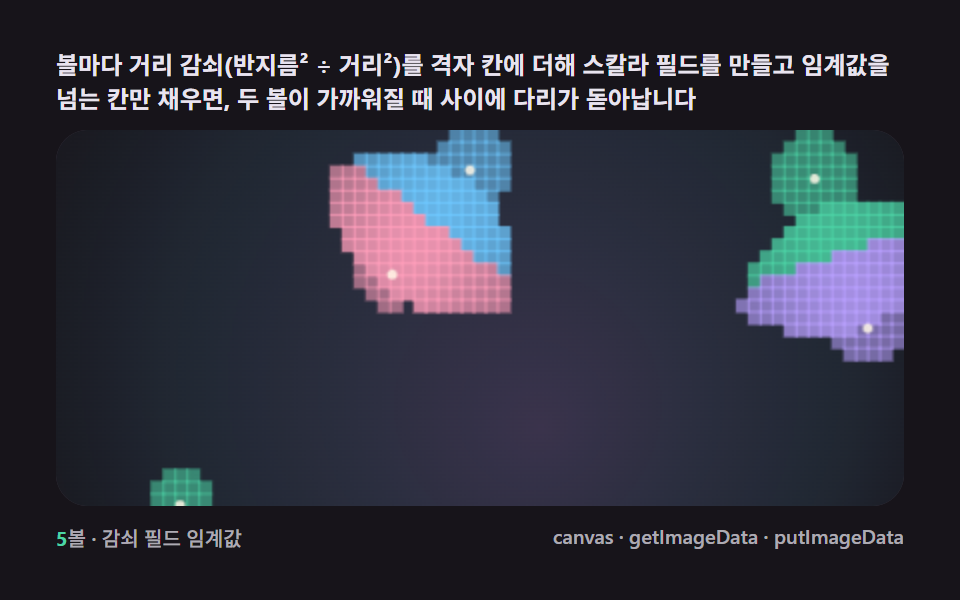
각 볼의 중심에서 거리의 역수를 더한 스칼라 필드를 픽셀 단위로 계산해 임계값을 넘는 칸만 채우면, 원을 따로 그리지 않았는데 두 볼 사이에 다리가 스며들듯 생깁니다.
쓰임히어로 배경의 단일 액체 덩어리
getImageDataputImageDatarequestAnimationFrame

<main class="stage">
<div class="cd is-demo" id="cdRoot">
  <p class="cd__hint">
    <span>볼마다 거리 감쇠(반지름² ÷ 거리²)를 격자 칸에 더해 스칼라 필드를 만들고 임계값을 넘는 칸만 채우면, 두 볼이 가까워질 때 사이에 다리가 돋아납니다</span>
  </p>
  <div class="cd__field" id="cdField" role="application" aria-label="필드 한 겹 임계값 실험판" tabindex="0">
    <canvas class="cd__cv" id="cdCv"></canvas>
  </div>
  <div class="cd__bar">
    <span class="cd__meta"><b class="cd__val" id="cdN">5</b>볼 · 감쇠 필드 임계값</span>
    <span class="cd__meta cd__meta--dim">canvas · getImageData · putImageData</span>
  </div>
</div>
</main>
@use "../../../../site/static/demo-tokens" as *;
// 필드 한 겹(01). @keyframes 를 아예 두지 않는다 — 움직임은 전부 캔버스 rAF 루프
// (스프라이트 굽기 putImageData → 필드 합산 getImageData → 임계값 칸 채움)가 만든다.
// 무대는 잉크. 파스텔 팔레트를 --ft-* 로 편다(편 공통 규격).
$duration: $dur-loop;
$easing: $ease-spring;
$color: $subject-mint;
@include stage($stage-ink);
// ── 파스텔 팔레트(BD26: vivid hex 잔존 0 — 전부 토큰·뮤트 파생) ──
$ft-mint: $subject-mint; // 임계값 직후 밴드
$ft-sky: $subject-sky; // 깊은 밴드
$ft-lilac: $subject-lilac; // 더 깊은 밴드
$ft-pink: $subject-pink; // 피크 밴드
$ft-cream: $subject-cream; // 코어 하이라이트·글자
$ft-line: #3a3542; // 어두운 무대 위 패널 경계(뮤트)
$ft-text: #e8e4ef; // 잉크 위 본문(밝은 라벤더 그레이·뮤트)
.cd {
--ft-mint: #{$ft-mint};
--ft-sky: #{$ft-sky};
--ft-lilac: #{$ft-lilac};
--ft-pink: #{$ft-pink};
--ft-cream: #{$ft-cream};
display: flex; flex-direction: column; gap: $sp-2;
width: 100%; max-width: 424px;
}
.cd__hint {
display: flex; align-items: center; gap: $sp-1; margin: 0;
font-weight: 700; font-size: clamp(10px, 2.8vw, 12px); line-height: 1.35;
color: $ft-text;
}
.cd__field {
position: relative; height: 188px;
border-radius: $r-card; overflow: hidden;
background: $stage-ink;
box-shadow: inset 0 0 0 1px $ft-line;
}
.cd__field:focus-visible { outline: 2px solid $ft-mint; outline-offset: 2px; }
.cd__cv { display: block; width: 100%; height: 100%; }
.cd__bar { display: flex; align-items: center; justify-content: space-between; gap: $sp-2; }
.cd__meta { font-size: 10px; font-weight: 500; color: rgba($ft-text, .72); }
.cd__val { color: $ft-mint; font-weight: 700; }
.cd__meta--dim { font-size: 10px; }
@media (max-width: 340px) {
.cd { gap: $sp-1; }
.cd__field { height: 104px; }
.cd__meta--dim { display: none; }
}
// reduce — rAF 를 돌리지 않고 임계값 한 장만 남는다.
@media (prefers-reduced-motion: reduce) {
.cd.is-still .cd__field { cursor: default !important; }
}html, body {
margin: 0;
overflow: hidden;
}
.stage {
box-sizing: border-box;
min-height: 100vh;
display: grid;
place-items: center;
margin: 0;
background: #17141a;
font-family: -apple-system, "Segoe UI", "Noto Sans KR", sans-serif;
padding: clamp(8px, 4vw, 24px);
}
.cd {
--ft-mint: #4cd4a6;
--ft-sky: #6ec8ff;
--ft-lilac: #b9a0ff;
--ft-pink: #ff9ebb;
--ft-cream: #fff7e6;
display: flex;
flex-direction: column;
gap: 8px;
width: 100%;
max-width: 424px;
}
.cd__hint {
display: flex;
align-items: center;
gap: 4px;
margin: 0;
font-weight: 700;
font-size: clamp(10px, 2.8vw, 12px);
line-height: 1.35;
color: #e8e4ef;
}
.cd__field {
position: relative;
height: 188px;
border-radius: 16px;
overflow: hidden;
background: #17141a;
box-shadow: inset 0 0 0 1px #3a3542;
}
.cd__field:focus-visible {
outline: 2px solid #4cd4a6;
outline-offset: 2px;
}
.cd__cv {
display: block;
width: 100%;
height: 100%;
}
.cd__bar {
display: flex;
align-items: center;
justify-content: space-between;
gap: 8px;
}
.cd__meta {
font-size: 10px;
font-weight: 500;
color: rgba(232, 228, 239, 0.72);
}
.cd__val {
color: #4cd4a6;
font-weight: 700;
}
.cd__meta--dim {
font-size: 10px;
}
@media (max-width: 340px) {
.cd {
gap: 4px;
}
.cd__field {
height: 104px;
}
.cd__meta--dim {
display: none;
}
}
@media (prefers-reduced-motion: reduce) {
.cd.is-still .cd__field {
cursor: default !important;
}
}// 필드 한 겹(01). 오프스크린 캔버스에 ImageData 를 직접 채워(putImageData) 부드러운 radial 스프라이트를
// 한 장 굽고, 그 스프라이트의 밝기를 getImageData 로 읽어 "거리 → 감쇠" 룩업 테이블로 쓴다.
// 매 프레임 볼마다 격자 칸에 그 감쇠값(반지름² / 거리² 꼴, 스프라이트 그대로 근사)을 더해
// 스칼라 필드를 합산하고, 합이 임계값을 넘는 칸만 색을 채운다 — 마칭 스퀘어 경계 추출 없이
// 칸 단위(복셀식) 채움이라 경계가 계단 모양이다(02 가 이 경계를 매끈하게 뽑는다).
(function () {
// ── 변형 상수 블록 — 아래 값 하나만 바꿔 변형을 만든다 ──
var N_BALL = 5; // 볼 개수 — 3 은 성긴 장면, 7 은 붐비는 장면
var THRESH = 0.92; // 필드 임계값 — 낮추면 다리가 더 굵고 자주 이어진다
var CELL = 6; // 격자 셀 픽셀 크기 — 작을수록 매끈하지만 계산량 증가
// ────────────────────────────────────────────────────
var root = document.getElementById('cdRoot');
var field = document.getElementById('cdField');
var cv = document.getElementById('cdCv');
var ctx = cv.getContext('2d');
var nOut = document.getElementById('cdN');
nOut.textContent = String(N_BALL);
var css = getComputedStyle(root);
function tok(name) { return css.getPropertyValue(name).trim(); }
var COL = [tok('--ft-mint'), tok('--ft-sky'), tok('--ft-lilac'), tok('--ft-pink')];
var C_CREAM = tok('--ft-cream');
var reduce = window.matchMedia('(prefers-reduced-motion: reduce)').matches;
var W = 0, H = 0, COLS = 0, ROWS = 0;
var raf = 0, t0 = -1;
// 스프라이트 캔버스 — putImageData 로 부드러운 radial 감쇠를 픽셀 단위로 직접 굽는다
var SPR_R = 64;
var sprCv = document.createElement('canvas');
sprCv.width = SPR_R * 2; sprCv.height = SPR_R * 2;
var sprCtx = sprCv.getContext('2d');
var lut = new Float32Array(SPR_R + 1); // 거리 → 감쇠(0..1) 룩업
function bakeSprite() {
var img = sprCtx.createImageData(SPR_R * 2, SPR_R * 2);
var d = img.data;
for (var y = 0; y < SPR_R * 2; y++) {
for (var x = 0; x < SPR_R * 2; x++) {
var dx = x - SPR_R, dy = y - SPR_R;
var dist = Math.max(1, Math.sqrt(dx * dx + dy * dy));
// r² / d² 감쇠(메타볼 표준식) — 스프라이트 반경에서 정확히 1(=임계값 경계)
var v = Math.min(1, (SPR_R * SPR_R) / (dist * dist));
var idx = (y * SPR_R * 2 + x) * 4;
var a = Math.round(v * 255);
d[idx] = 255; d[idx + 1] = 255; d[idx + 2] = 255; d[idx + 3] = a;
}
}
sprCtx.putImageData(img, 0, 0);
// 룩업 테이블을 구운 스프라이트에서 getImageData 로 다시 읽는다 — 실사용값과 일치
var check = sprCtx.getImageData(SPR_R, 0, SPR_R, 1).data;
for (var i = 0; i < SPR_R; i++) lut[i] = check[i * 4 + 3] / 255;
}
// 시드 고정 PRNG — 미리보기가 항상 같은 볼 궤도로 흐른다
function makeRand(seed) {
var st = seed >>> 0;
return function () {
st = (st + 0x6D2B79F5) >>> 0;
var t = st;
t = Math.imul(t ^ (t >>> 15), t | 1);
t ^= t + Math.imul(t ^ (t >>> 7), t | 61);
return ((t ^ (t >>> 14)) >>> 0) / 4294967296;
};
}
var rand = makeRand(0x317A01);
var balls = [];
function buildBalls() {
balls = [];
for (var i = 0; i < N_BALL; i++) {
balls.push({
fx: 0.32 + rand() * 0.5, fy: 0.26 + rand() * 0.46,
ph: rand() * Math.PI * 2, ax: 0.3 + rand() * 0.22, ay: 0.28 + rand() * 0.22,
cx: 0.5, cy: 0.5, rad: 52 + rand() * 26
});
}
}
function fit() {
var r = field.getBoundingClientRect();
W = r.width; H = r.height;
cv.width = Math.round(W); cv.height = Math.round(H);
COLS = Math.max(24, Math.round(W / CELL));
ROWS = Math.max(16, Math.round(H / CELL));
}
function ballPos(b, t) {
return [
(b.cx + Math.sin(t * b.fx + b.ph) * b.ax) * W,
(b.cy + Math.cos(t * b.fy + b.ph * 1.4) * b.ay) * H
];
}
function fieldAt(px, py, t) {
var sum = 0, closest = -1, closestD = 1e9;
for (var i = 0; i < balls.length; i++) {
var p = ballPos(balls[i], t);
var dx = px - p[0], dy = py - p[1];
var dist = Math.sqrt(dx * dx + dy * dy);
// 감쇠 = 룩업 테이블(putImageData 로 구운 스프라이트에서 읽은 값)을 볼 반지름으로 스케일
// 스프라이트 반경(64)에서 감쇠 1이므로 scaled = dist * 64 / rad 이 거리에서 정확히 경계
var scaled = dist * (SPR_R / balls[i].rad);
var v = scaled >= SPR_R ? 0 : lut[Math.min(SPR_R - 1, Math.round(scaled))];
sum += v;
if (dist < closestD) { closestD = dist; closest = i; }
}
return [sum, closest];
}
function draw(t) {
ctx.clearRect(0, 0, W, H);
ctx.fillStyle = '#17141a';
ctx.fillRect(0, 0, W, H);
// 배경 잔광 드리프트 — 느린 안개(누적면적 확보, 077 기준 "화면이 살아 있음")
var mist = ctx.createRadialGradient(
W * (0.5 + Math.sin(t * 0.13) * 0.3), H * (0.5 + Math.cos(t * 0.11) * 0.3), 0,
W * 0.5, H * 0.5, Math.max(W, H) * 0.75
);
mist.addColorStop(0, 'rgba(185,160,255,0.22)');
mist.addColorStop(0.55, 'rgba(110,200,255,0.10)');
mist.addColorStop(1, 'rgba(23,20,26,0)');
ctx.fillStyle = mist;
ctx.fillRect(0, 0, W, H);
var cw = W / COLS, ch = H / ROWS;
for (var gy = 0; gy < ROWS; gy++) {
var py = (gy + 0.5) * ch;
for (var gx = 0; gx < COLS; gx++) {
var px = (gx + 0.5) * cw;
var fc = fieldAt(px, py, t);
if (fc[0] >= THRESH) {
var over = Math.min(1, (fc[0] - THRESH) / THRESH);
ctx.fillStyle = COL[fc[1] % COL.length];
ctx.globalAlpha = 0.55 + over * 0.45;
ctx.fillRect(gx * cw - 0.5, gy * ch - 0.5, cw + 1, ch + 1);
}
}
}
ctx.globalAlpha = 1;
// 볼 코어 — 크림 하이라이트 점(중심을 눈으로 짚을 수 있게)
for (var i = 0; i < balls.length; i++) {
var p = ballPos(balls[i], t);
ctx.fillStyle = C_CREAM;
ctx.globalAlpha = 0.85;
ctx.beginPath(); ctx.arc(p[0], p[1], 2.4, 0, Math.PI * 2); ctx.fill();
}
ctx.globalAlpha = 1;
}
function stillFrame() { draw(0.6); }
function frame(now) {
if (t0 < 0) t0 = now;
var t = (now - t0) / 1000;
draw(t);
raf = requestAnimationFrame(frame);
}
window.addEventListener('resize', function () {
fit();
if (reduce) stillFrame();
});
bakeSprite();
fit();
buildBalls();
if (reduce) {
stillFrame();
root.classList.add('is-still');
} else {
raf = requestAnimationFrame(frame);
}
})();// FieldThreshold — vanilla 판(run/317/demo/01-metaball-field-threshold/index.html) 의 React 포트.
// 필드 한 겹 — 오프스크린 캔버스에 putImageData 로 부드러운 radial 감쇠 스프라이트를 굽고
// getImageData 로 읽어 룩업 테이블로 쓴다. 볼마다 r²/d² 감쇠를 격자 칸에 합산하고
// 임계값을 넘는 칸만 채운다 — 두 볼이 가까워지면 다리가 돋는다.
import { useEffect, useRef, useState } from "react";
import type { CSSProperties } from "react";
import styles from "./FieldThreshold.module.scss";
export type FieldThresholdProps = {
duration?: string;
easing?: string;
color?: string;
balls?: number; // 볼 개수 — 변형 "성긴/붐비는 장면" 축
threshold?: number; // 필드 임계값 — 낮추면 다리가 굵어진다
cell?: number; // 격자 셀 픽셀 크기
};
type Vars = CSSProperties & { "--duration"?: string; "--easing"?: string; "--color"?: string };
type Box<T> = { current: T };
type Ball = { fx: number; fy: number; ph: number; ax: number; ay: number; cx: number; cy: number; rad: number };
const FIELD_LABEL = "필드 한 겹 임계값 실험판";
const SPR_R = 64;
function makePRNG(seed: number): () => number {
let s = seed >>> 0;
return function () {
s = (s + 0x6d2b79f5) >>> 0;
let t = s;
t = Math.imul(t ^ (t >>> 15), t | 1);
t ^= t + Math.imul(t ^ (t >>> 7), t | 61);
return ((t ^ (t >>> 14)) >>> 0) / 4294967296;
};
}
export default function FieldThreshold({
duration = "2s",
easing = "cubic-bezier(.2, .8, .2, 1)",
color = "#4cd4a6",
balls: nBall = 5,
threshold = 0.92,
cell = 6,
}: FieldThresholdProps) {
const rootRef = useRef<HTMLDivElement | null>(null);
const fieldRef = useRef<HTMLDivElement | null>(null);
const cvRef = useRef<HTMLCanvasElement | null>(null);
const ctxRef = useRef<CanvasRenderingContext2D | null>(null);
const sizeRef = useRef({ w: 0, h: 0 }) as Box<{ w: number; h: number }>;
const colsRef = useRef(0) as Box<number>;
const rowsRef = useRef(0) as Box<number>;
const lutRef = useRef(new Float32Array(SPR_R)) as Box<Float32Array>;
const colRef = useRef<{ bands: string[]; cream: string } | null>(null);
const ballNRef = useRef(nBall) as Box<number>;
const thrRef = useRef(threshold) as Box<number>;
const cellRef = useRef(cell) as Box<number>;
const ballsRef = useRef<Ball[]>([]) as Box<Ball[]>;
const rafRef = useRef(0) as Box<number>;
const [n, setN] = useState(String(nBall));
const [still, setStill] = useState(false);
const vars: Vars = { "--duration": duration, "--easing": easing, "--color": color };
function reduced(): boolean {
return window.matchMedia("(prefers-reduced-motion: reduce)").matches;
}
// 스프라이트 굽기 — putImageData 로 r²/d² 감쇠를 픽셀 단위로 쓰고 getImageData 로 룩업을 읽는다
function bakeSprite(): void {
const c = document.createElement("canvas");
c.width = SPR_R * 2;
c.height = SPR_R * 2;
const sc = c.getContext("2d");
if (!sc) return;
const img = sc.createImageData(SPR_R * 2, SPR_R * 2);
const d = img.data;
for (let y = 0; y < SPR_R * 2; y++) {
for (let x = 0; x < SPR_R * 2; x++) {
const dx = x - SPR_R;
const dy = y - SPR_R;
const dist = Math.max(1, Math.sqrt(dx * dx + dy * dy));
const v = Math.min(1, (SPR_R * SPR_R) / (dist * dist));
const idx = (y * SPR_R * 2 + x) * 4;
d[idx] = 255; d[idx + 1] = 255; d[idx + 2] = 255;
d[idx + 3] = Math.round(v * 255);
}
}
sc.putImageData(img, 0, 0);
const check = sc.getImageData(SPR_R, 0, SPR_R, 1).data;
for (let i = 0; i < SPR_R; i++) lutRef.current[i] = check[i * 4 + 3] / 255;
}
function buildBalls(): void {
const rand = makePRNG(0x317a01);
const arr: Ball[] = [];
for (let i = 0; i < ballNRef.current; i++) {
arr.push({
fx: 0.32 + rand() * 0.5, fy: 0.26 + rand() * 0.46,
ph: rand() * Math.PI * 2, ax: 0.3 + rand() * 0.22, ay: 0.28 + rand() * 0.22,
cx: 0.5, cy: 0.5, rad: 52 + rand() * 26,
});
}
ballsRef.current = arr;
}
function fit(): void {
const field = fieldRef.current;
const cv = cvRef.current;
if (!field || !cv) return;
const ctx = cv.getContext("2d");
if (!ctx) return;
const r = field.getBoundingClientRect();
sizeRef.current.w = r.width;
sizeRef.current.h = r.height;
cv.width = Math.round(r.width);
cv.height = Math.round(r.height);
colsRef.current = Math.max(24, Math.round(r.width / cellRef.current));
rowsRef.current = Math.max(16, Math.round(r.height / cellRef.current));
ctxRef.current = ctx;
}
function ballPos(b: Ball, t: number, w: number, h: number): [number, number] {
return [
(b.cx + Math.sin(t * b.fx + b.ph) * b.ax) * w,
(b.cy + Math.cos(t * b.fy + b.ph * 1.4) * b.ay) * h,
];
}
function fieldAt(px: number, py: number, t: number): [number, number] {
const { w, h } = sizeRef.current;
let sum = 0;
let closest = 0;
let closestD = Infinity;
const balls = ballsRef.current;
const lut = lutRef.current;
for (let i = 0; i < balls.length; i++) {
const p = ballPos(balls[i], t, w, h);
const dx = px - p[0];
const dy = py - p[1];
const dist = Math.sqrt(dx * dx + dy * dy);
const scaled = dist * (SPR_R / balls[i].rad);
const v = scaled >= SPR_R ? 0 : lut[Math.min(SPR_R - 1, Math.round(scaled))];
sum += v;
if (dist < closestD) { closestD = dist; closest = i; }
}
return [sum, closest];
}
function draw(t: number): void {
const ctx = ctxRef.current;
const col = colRef.current;
const { w: W, h: H } = sizeRef.current;
if (!ctx || !col) return;
ctx.fillStyle = "#17141a";
ctx.fillRect(0, 0, W, H);
const mist = ctx.createRadialGradient(
W * (0.5 + Math.sin(t * 0.13) * 0.3), H * (0.5 + Math.cos(t * 0.11) * 0.3), 0,
W * 0.5, H * 0.5, Math.max(W, H) * 0.75,
);
mist.addColorStop(0, "rgba(185,160,255,0.22)");
mist.addColorStop(0.55, "rgba(110,200,255,0.10)");
mist.addColorStop(1, "rgba(23,20,26,0)");
ctx.fillStyle = mist;
ctx.fillRect(0, 0, W, H);
const cw = W / colsRef.current;
const ch = H / rowsRef.current;
const thr = thrRef.current;
for (let gy = 0; gy < rowsRef.current; gy++) {
const py = (gy + 0.5) * ch;
for (let gx = 0; gx < colsRef.current; gx++) {
const px = (gx + 0.5) * cw;
const fc = fieldAt(px, py, t);
if (fc[0] >= thr) {
const over = Math.min(1, (fc[0] - thr) / thr);
ctx.fillStyle = col.bands[fc[1] % col.bands.length];
ctx.globalAlpha = 0.55 + over * 0.45;
ctx.fillRect(gx * cw - 0.5, gy * ch - 0.5, cw + 1, ch + 1);
}
}
}
ctx.globalAlpha = 1;
const balls = ballsRef.current;
for (let i = 0; i < balls.length; i++) {
const p = ballPos(balls[i], t, W, H);
ctx.fillStyle = col.cream;
ctx.globalAlpha = 0.85;
ctx.beginPath();
ctx.arc(p[0], p[1], 2.4, 0, Math.PI * 2);
ctx.fill();
}
ctx.globalAlpha = 1;
}
function stillFrame(): void { draw(0.6); }
let t0 = -1;
function frame(now: number): void {
if (t0 < 0) t0 = now;
const t = (now - t0) / 1000;
draw(t);
rafRef.current = requestAnimationFrame(frame);
}
useEffect(() => {
const root = rootRef.current;
if (!root) return;
ballNRef.current = nBall;
thrRef.current = threshold;
cellRef.current = cell;
const cs = getComputedStyle(root);
const tok = (name: string) => cs.getPropertyValue(name).trim();
colRef.current = {
bands: [tok("--ft-mint"), tok("--ft-sky"), tok("--ft-lilac"), tok("--ft-pink")],
cream: tok("--ft-cream"),
};
bakeSprite();
buildBalls();
fit();
setN(String(nBall));
function onResize(): void {
fit();
if (reduced()) stillFrame();
}
window.addEventListener("resize", onResize);
if (reduced()) {
stillFrame();
setStill(true);
} else {
rafRef.current = requestAnimationFrame(frame);
}
return () => {
window.removeEventListener("resize", onResize);
cancelAnimationFrame(rafRef.current);
};
// eslint-disable-next-line react-hooks/exhaustive-deps
}, [nBall, threshold, cell]);
const rootCls = still ? `${styles.root} ${styles.isStill}` : styles.root;
return (
<main className={styles.stage}>
<div className={rootCls} ref={rootRef} style={vars}>
<p className={styles.hint}>
<span>볼마다 거리 감쇠(반지름² ÷ 거리²)를 격자 칸에 더해 스칼라 필드를 만들고 임계값을 넘는 칸만 채우면, 두 볼이 가까워질 때 사이에 다리가 돋아납니다</span>
</p>
<div
className={styles.field}
ref={fieldRef}
role="application"
aria-label={FIELD_LABEL}
tabIndex={0}
>
<canvas className={styles.cv} ref={cvRef}></canvas>
</div>
<div className={styles.bar}>
<span className={styles.meta}><b className={styles.val}>{n}</b>볼 · 감쇠 필드 임계값</span>
<span className={styles.metaDim}>canvas · getImageData · putImageData</span>
</div>
</div>
</main>
);
}01 필드 한 겹 — 픽셀마다 임계값을 넘는지 세는 첫 메타볼 — 측정 누적면적 33.374% · 움직인 프레임 23/23GODRICH 원작 · zip 에 SCSS·React 포함 · 캔버스 메타볼 효과 9종 — 마칭 스퀘어로 합체하는 액체 덩어리
이 데모가 속한 글
 캔버스 메타볼 효과 9종 — 마칭 스퀘어로 합체하는 액체 덩어리메타볼 효과는 여러 덩어리가 가까워지면 하나로 녹아 붙고 멀어지면 갈라지는, 액체처럼 굴러가는 캔버스 장면입니다. 필드 값이 임계값을 넘는 경계를 격자 칸마다 잇는 마칭 스퀘어 하나로 블롭이 스며들듯 합쳐졌다 갈라집 이 글의 데모 전부 보기