06포인터 인력 — 끌려왔다가 찢어지는 당김 다리
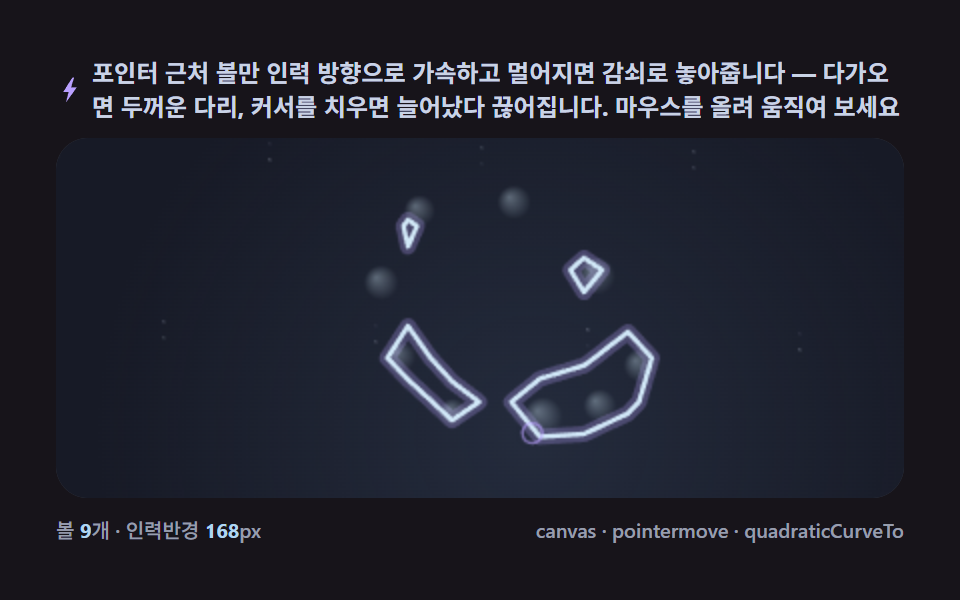
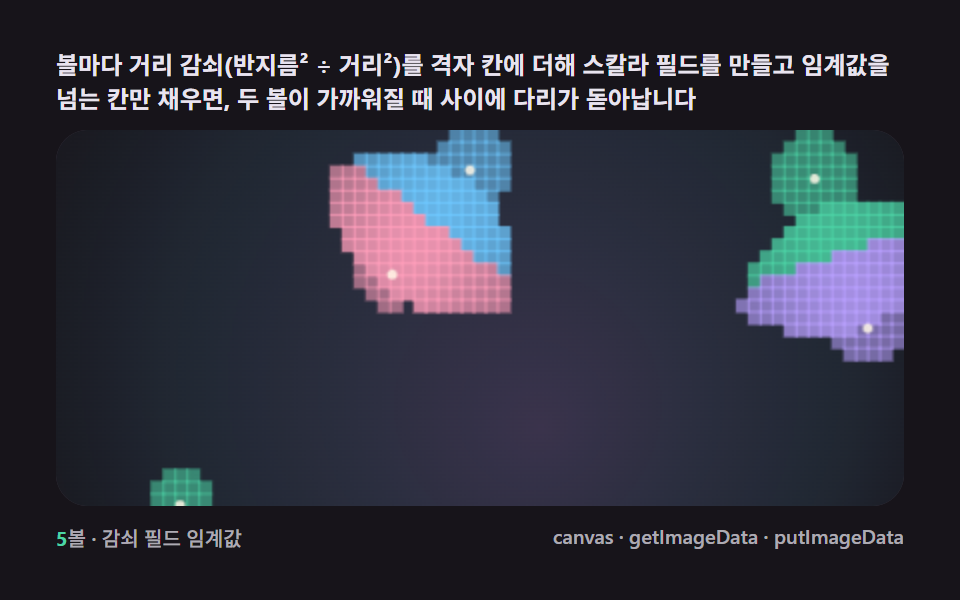
포인터 근처의 볼만 인력 방향으로 가속하고 멀어지면 감쇠로 놓아주면, 다가올 때는 두꺼운 다리가 붙었다가 커서를 치우는 순간 늘어났다 끊어지는 인터랙션이 계산만으로 잡힙니다.
쓰임인트로·놀이형 랜딩의 손끝 반응
addEventListenerrequestAnimationFramequadraticCurveTo
<main class="stage">
<div class="cd is-demo" id="cdRoot">
  <p class="cd__hint">
    <svg class="cd__ico" viewBox="0 0 256 256" aria-hidden="true"><path fill="currentColor" d="M150 14 66 146h49l-24 96 99-138h-52l28-90z"/></svg>
    <span>포인터 근처 볼만 인력 방향으로 가속하고 멀어지면 감쇠로 놓아줍니다 — 다가오면 두꺼운 다리, 커서를 치우면 늘어났다 끊어집니다. 마우스를 올려 움직여 보세요</span>
  </p>
  <div class="cd__field" id="cdField" role="application" aria-label="포인터 인력 메타볼 실험판" tabindex="0">
    <canvas class="cd__cv" id="cdCv"></canvas>
  </div>
  <div class="cd__bar">
    <span class="cd__meta">볼 <b class="cd__val" id="cdN">9</b>개 · 인력반경 <b class="cd__val">168</b>px</span>
    <span class="cd__meta cd__meta--dim">canvas · pointermove · quadraticCurveTo</span>
  </div>
</div>
</main>
@use "../../../../site/static/demo-tokens" as *;
// 포인터 인력(06). @keyframes 를 아예 두지 않는다 —
// 움직임은 전부 캔버스 rAF 루프(포인터 인력 가속 + 마칭 스퀘어 재추출)가 만든다.
// 무대는 잉크(06 = ink, BD11 순환). pointermove 없는 렌더 환경은 원운동 자동 순찰이 대신한다.
$duration: $dur-loop;
$easing: $ease-spring;
$color: $subject-sky;
@include stage($stage-ink);
// ── 편 공통 파스텔 팔레트(317 전 항목 동일 — JS 가 --pull-* 로 읽는다) ──
$pull-ink: #171a26; // 어스름 무대 — 잉크보다 한 단계 남색 기운
$pull-dusk: #3d4d68; // 인력장 안개 — 포인터 주변이 밝아지는 색
$pull-body: #b0d6f1; // 액체 본체 — 하늘색
$pull-hi: #d8f0ff; // 하이라이트·테두리 — 연하늘
$pull-ring: #b9a0ff; // 포인터 링·글로우 — 라일락
$pull-mist: #c9d3e6; // 먼지·보조 글자
.cd {
// 렌더러가 읽는 색 — JS 는 getComputedStyle 로 --pull-* 를 받아 쓴다
--pull-ink: #{$pull-ink};
--pull-dusk: #{$pull-dusk};
--pull-body: #{$pull-body};
--pull-hi: #{$pull-hi};
--pull-ring: #{$pull-ring};
--pull-mist: #{$pull-mist};
display: flex; flex-direction: column; gap: $sp-2;
width: 100%; max-width: 424px;
}
.cd__hint {
display: flex; align-items: center; gap: $sp-1; margin: 0;
font-weight: 700; font-size: clamp(10px, 2.8vw, 12px); line-height: 1.35;
color: $pull-mist; // 잉크 무대 위 — 먼 먼지 톤 글자
}
.cd__ico { width: 14px; height: 14px; flex: none; color: $pull-ring; }
.cd__field {
position: relative; height: 180px;
border-radius: $r-card; overflow: hidden;
background: $pull-ink;
box-shadow: inset 0 0 0 1px rgba($pull-mist, .18);
cursor: pointer;
}
.cd__field:focus-visible { outline: 2px solid $pull-ring; outline-offset: 2px; }
.cd__cv { display: block; width: 100%; height: 100%; }
.cd__bar { display: flex; align-items: baseline; justify-content: space-between; gap: $sp-2; }
.cd__meta { font-size: 10px; font-weight: 500; color: rgba($pull-mist, .72); }
.cd__val { color: $pull-body; font-weight: 700; } // 잉크 위 하늘색 라벨
.cd__meta--dim { font-size: 10px; }
@media (max-width: 340px) {
.cd { gap: $sp-1; }
.cd__field { height: 100px; }
.cd__meta--dim { display: none; }
}
// reduce — rAF 없이 시뮬레이션 몇 걸음 뒤의 한 장.
@media (prefers-reduced-motion: reduce) {
.cd.is-still .cd__field { cursor: default !important; }
}html, body {
margin: 0;
overflow: hidden;
}
.stage {
box-sizing: border-box;
min-height: 100vh;
display: grid;
place-items: center;
margin: 0;
background: #17141a;
font-family: -apple-system, "Segoe UI", "Noto Sans KR", sans-serif;
padding: clamp(8px, 4vw, 24px);
}
.cd {
--pull-ink: #171a26;
--pull-dusk: #3d4d68;
--pull-body: #b0d6f1;
--pull-hi: #d8f0ff;
--pull-ring: #b9a0ff;
--pull-mist: #c9d3e6;
display: flex;
flex-direction: column;
gap: 8px;
width: 100%;
max-width: 424px;
}
.cd__hint {
display: flex;
align-items: center;
gap: 4px;
margin: 0;
font-weight: 700;
font-size: clamp(10px, 2.8vw, 12px);
line-height: 1.35;
color: #c9d3e6;
}
.cd__ico {
width: 14px;
height: 14px;
flex: none;
color: #b9a0ff;
}
.cd__field {
position: relative;
height: 180px;
border-radius: 16px;
overflow: hidden;
background: #171a26;
box-shadow: inset 0 0 0 1px rgba(201, 211, 230, 0.18);
cursor: pointer;
}
.cd__field:focus-visible {
outline: 2px solid #b9a0ff;
outline-offset: 2px;
}
.cd__cv {
display: block;
width: 100%;
height: 100%;
}
.cd__bar {
display: flex;
align-items: baseline;
justify-content: space-between;
gap: 8px;
}
.cd__meta {
font-size: 10px;
font-weight: 500;
color: rgba(201, 211, 230, 0.72);
}
.cd__val {
color: #b0d6f1;
font-weight: 700;
}
.cd__meta--dim {
font-size: 10px;
}
@media (max-width: 340px) {
.cd {
gap: 4px;
}
.cd__field {
height: 100px;
}
.cd__meta--dim {
display: none;
}
}
@media (prefers-reduced-motion: reduce) {
.cd.is-still .cd__field {
cursor: default !important;
}
}// 포인터 인력 메타볼(06). 포인터(또는 자동 모드의 가상 포인터) 반경 안의 볼만 인력 방향으로
// 가속하고, 반경 밖으로 나가면 감쇠하며 원래 궤도로 놓아준다. 필드는 마칭 스퀘어로 매 프레임
// 경계를 다시 추출해 quadraticCurveTo 로 잇는다 — 볼이 몰리면 두꺼운 다리가, 흩어지면 가는 목이
// 늘어나다 끊어진다(임계값을 넘던 셀이 넘지 못하면 다리가 자연히 사라진다). pointermove 없으면
// (렌더 환경) 원운동 자동 순찰 경로를 따라가는 가상 포인터가 같은 인력을 만든다(is-demo 자동 모드).
(function () {
// ── 변형 상수 블록 — 아래 값 하나만 바꿔 변형을 만든다 ──
var N_BALLS = 9; // 볼 수
var PULL_R = 168; // 인력 반경(px)
var PULL_K = 3.4; // 인력 가속 배율
// ────────────────────────────────────────────────────
var GRID = 22; // 마칭 스퀘어 격자(px)
var THR = 1.05; // 임계값
var root = document.getElementById('cdRoot');
var field = document.getElementById('cdField');
var cv = document.getElementById('cdCv');
var ctx = cv.getContext('2d');
var nOut = document.getElementById('cdN');
// 시드 고정 PRNG — mulberry32
function makeRand(seed) {
var st = seed >>> 0;
return function () {
st = (st + 0x6D2B79F5) >>> 0;
var t = st;
t = Math.imul(t ^ (t >>> 15), t | 1);
t ^= t + Math.imul(t ^ (t >>> 7), t | 61);
return ((t ^ (t >>> 14)) >>> 0) / 4294967296;
};
}
var rand = makeRand(0x317A06);
// 색은 CSS 커스텀 프로퍼티(--pull-*)에서 getComputedStyle 로 읽는다
var css = getComputedStyle(root);
function tokRGB(name) {
var s = css.getPropertyValue(name).trim();
var hx = s.length === 4
? s.charAt(1) + s.charAt(1) + s.charAt(2) + s.charAt(2) + s.charAt(3) + s.charAt(3)
: s.slice(1);
return [parseInt(hx.slice(0, 2), 16), parseInt(hx.slice(2, 4), 16), parseInt(hx.slice(4, 6), 16)];
}
var C_INK = tokRGB('--pull-ink');
var C_DUSK = tokRGB('--pull-dusk');
var C_BODY = tokRGB('--pull-body');
var C_HI = tokRGB('--pull-hi');
var C_RING = tokRGB('--pull-ring');
var C_MIST = tokRGB('--pull-mist');
var TAU = Math.PI * 2;
var reduce = window.matchMedia('(prefers-reduced-motion: reduce)').matches;
var W = 0, H = 0;
var raf = 0, t0 = -1;
var STILL_T = 1.4;
var balls = [];
var hasPointer = false; // pointermove 를 한 번이라도 받았는가
var ptrX = 0, ptrY = 0;
var cols = 0, rows = 0, fieldGrid = null;
function build() {
balls = [];
for (var i = 0; i < N_BALLS; i++) {
var ang = (i / N_BALLS) * TAU;
var rad = Math.min(W, H) * (0.24 + rand() * 0.14);
balls.push({
homeX: W * 0.5 + Math.cos(ang) * rad,
homeY: H * 0.5 + Math.sin(ang) * rad,
x: W * 0.5 + Math.cos(ang) * rad,
y: H * 0.5 + Math.sin(ang) * rad,
r: 12 + rand() * 7,
vx: 0, vy: 0,
ph: rand() * TAU
});
}
cols = Math.ceil(W / GRID) + 1;
rows = Math.ceil(H / GRID) + 1;
fieldGrid = new Float32Array(cols * rows);
ptrX = W * 0.5; ptrY = H * 0.5;
}
function fieldAt(px, py) {
var s = 0;
for (var i = 0; i < balls.length; i++) {
var b = balls[i];
var dx = px - b.x, dy = py - b.y;
var q = (dx * dx + dy * dy) / (b.r * b.r);
s += 1 / (1 + q);
}
return s;
}
function sampleGrid() {
for (var j = 0; j < rows; j++) {
for (var i = 0; i < cols; i++) {
fieldGrid[j * cols + i] = fieldAt(i * GRID, j * GRID);
}
}
}
function lerpPt(x1, y1, v1, x2, y2, v2) {
var t = (THR - v1) / (v2 - v1 || 1e-6);
t = Math.max(0, Math.min(1, t));
return [x1 + (x2 - x1) * t, y1 + (y2 - y1) * t];
}
// ── 마칭 스퀘어 — 16경우 테이블로 경계 세그먼트를 뽑는다 ──
function march() {
var segs = [];
for (var j = 0; j < rows - 1; j++) {
for (var i = 0; i < cols - 1; i++) {
var x = i * GRID, y = j * GRID;
var vTL = fieldGrid[j * cols + i];
var vTR = fieldGrid[j * cols + i + 1];
var vBR = fieldGrid[(j + 1) * cols + i + 1];
var vBL = fieldGrid[(j + 1) * cols + i];
var code = (vTL > THR ? 8 : 0) | (vTR > THR ? 4 : 0) | (vBR > THR ? 2 : 0) | (vBL > THR ? 1 : 0);
if (code === 0 || code === 15) continue;
var top = lerpPt(x, y, vTL, x + GRID, y, vTR);
var right = lerpPt(x + GRID, y, vTR, x + GRID, y + GRID, vBR);
var bottom = lerpPt(x + GRID, y + GRID, vBR, x, y + GRID, vBL);
var left = lerpPt(x, y + GRID, vBL, x, y, vTL);
switch (code) {
case 1: case 14: segs.push([left, bottom]); break;
case 2: case 13: segs.push([bottom, right]); break;
case 3: case 12: segs.push([left, right]); break;
case 4: case 11: segs.push([top, right]); break;
case 6: case 9: segs.push([top, bottom]); break;
case 7: case 8: segs.push([left, top]); break;
case 5: segs.push([left, top]); segs.push([bottom, right]); break;
case 10: segs.push([top, right]); segs.push([left, bottom]); break;
}
}
}
return segs;
}
function rgba(c, a) { return 'rgba(' + c[0] + ',' + c[1] + ',' + c[2] + ',' + a + ')'; }
function mix(c1, c2, k) {
return [c1[0] + (c2[0] - c1[0]) * k, c1[1] + (c2[1] - c1[1]) * k, c1[2] + (c2[2] - c1[2]) * k];
}
function update(t, dt) {
// 자동 모드 — pointermove 가 없으면 원운동 순찰 경로를 가상 포인터로 쓴다
if (!hasPointer) {
var a = t * 0.7;
ptrX = W * 0.5 + Math.cos(a) * W * 0.34;
ptrY = H * 0.5 + Math.sin(a * 1.15) * H * 0.32;
}
var m = 16;
for (var i = 0; i < balls.length; i++) {
var b = balls[i];
var dx = ptrX - b.x, dy = ptrY - b.y;
var d = Math.hypot(dx, dy) || 1;
if (d < PULL_R) {
var pull = (1 - d / PULL_R) * PULL_K;
b.vx += (dx / d) * pull * 60 * dt;
b.vy += (dy / d) * pull * 60 * dt;
} else {
// 감쇠 — 홈 위치로 서서히 되돌아간다
b.vx += (b.homeX - b.x) * 0.9 * dt;
b.vy += (b.homeY - b.y) * 0.9 * dt;
}
// 살짝 배회 — 정지 상태를 피한다
b.vx += Math.cos(t * 0.8 + b.ph) * 3 * dt;
b.vy += Math.sin(t * 0.9 + b.ph) * 3 * dt;
b.vx *= 0.9; b.vy *= 0.9;
b.x += b.vx * dt; b.y += b.vy * dt;
if (b.x < m) { b.x = m; b.vx *= -0.4; }
if (b.x > W - m) { b.x = W - m; b.vx *= -0.4; }
if (b.y < m) { b.y = m; b.vy *= -0.4; }
if (b.y > H - m) { b.y = H - m; b.vy *= -0.4; }
}
}
function draw(t) {
ctx.globalCompositeOperation = 'source-over';
ctx.fillStyle = rgba(C_INK, 1);
ctx.fillRect(0, 0, W, H);
// 인력장 안개 — 포인터 주변이 은은히 밝다(배경도 함께 숨쉰다)
var fog = ctx.createRadialGradient(ptrX, ptrY, 0, ptrX, ptrY, PULL_R * 1.3);
fog.addColorStop(0, rgba(C_DUSK, 0.34));
fog.addColorStop(1, rgba(C_DUSK, 0));
ctx.fillStyle = fog;
ctx.fillRect(0, 0, W, H);
sampleGrid();
var segs = march();
var path = new Path2D();
for (var s = 0; s < segs.length; s++) {
var sg = segs[s];
path.moveTo(sg[0][0], sg[0][1]);
path.quadraticCurveTo(sg[0][0], sg[0][1], (sg[0][0] + sg[1][0]) / 2, (sg[0][1] + sg[1][1]) / 2);
path.lineTo(sg[1][0], sg[1][1]);
}
// 글로우 겹
ctx.strokeStyle = rgba(C_RING, 0.28);
ctx.lineWidth = 8;
ctx.lineCap = 'round';
ctx.stroke(path);
// 본체
ctx.fillStyle = rgba(C_BODY, 0.9);
ctx.strokeStyle = rgba(C_HI, 0.95);
ctx.lineWidth = 2.4;
ctx.stroke(path);
// 볼 하이라이트
for (var i = 0; i < balls.length; i++) {
var b = balls[i];
var rr = b.r * 0.55;
var g = ctx.createRadialGradient(b.x - rr * 0.3, b.y - rr * 0.3, 0, b.x, b.y, rr);
g.addColorStop(0, rgba(C_HI, 0.35));
g.addColorStop(1, rgba(C_HI, 0));
ctx.fillStyle = g;
ctx.fillRect(b.x - rr, b.y - rr, rr * 2, rr * 2);
}
// 포인터 표시 — 자동/실제 공통
ctx.beginPath();
ctx.arc(ptrX, ptrY, 5, 0, TAU);
ctx.strokeStyle = rgba(C_RING, 0.6);
ctx.lineWidth = 1.4;
ctx.stroke();
// 먼지
for (var k = 0; k < 16; k++) {
var a = 0.05 + 0.2 * (0.5 + 0.5 * Math.sin(t * (0.7 + k * 0.13) + k));
var px = ((k * 53) % W); var py = ((k * 91) % H);
ctx.fillStyle = rgba(C_MIST, a);
ctx.fillRect(px, py, 1.4, 1.4);
}
}
function fit() {
var r = field.getBoundingClientRect();
W = Math.max(2, Math.round(r.width));
H = Math.max(2, Math.round(r.height));
cv.width = W; cv.height = H;
}
// 포인터 — 첫 이동부터 추적. field 밖으로 나가도 마지막 좌표를 유지한다
field.addEventListener('pointermove', function (ev) {
var r = field.getBoundingClientRect();
ptrX = ev.clientX - r.left;
ptrY = ev.clientY - r.top;
hasPointer = true;
});
field.addEventListener('pointerleave', function () {
hasPointer = false; // 커서를 치우면 다시 자동 순찰로 — 다리가 늘어났다 끊어진다
});
function frame(now) {
if (t0 < 0) t0 = now;
var t = (now - t0) / 1000;
var dt = Math.min(0.05, (now - (frame.prev || now)) / 1000);
frame.prev = now;
update(t, dt);
draw(t);
raf = requestAnimationFrame(frame);
}
window.addEventListener('resize', function () {
fit(); build();
if (reduce) draw(STILL_T);
});
fit();
build();
nOut.textContent = String(N_BALLS);
if (reduce) {
for (var q = 0; q < 40; q++) update(STILL_T, 1 / 60);
draw(STILL_T);
root.classList.add('is-still');
} else {
raf = requestAnimationFrame(frame);
}
})();// PointerAttract — vanilla 판(run/317/demo/06-metaball-pointer-attract-split/index.html) 의 React 포트.
// 포인터 인력 — 포인터(또는 자동 모드의 가상 포인터) 반경 안의 볼만 인력 방향으로 가속하고,
// 반경 밖으로 나가면 감쇠하며 원래 궤도로 놓아준다. 필드는 마칭 스퀘어로 매 프레임 경계를 다시
// 추출해 quadraticCurveTo 로 잇는다 — 볼이 몰리면 두꺼운 다리가, 흩어지면 가는 목이 늘어나다 끊어진다.
// pointermove 없으면(렌더 환경) 원운동 자동 순찰 경로를 따라가는 가상 포인터가 같은 인력을 만든다.
import { useEffect, useRef, useState } from "react";
import type { CSSProperties } from "react";
import styles from "./PointerAttract.module.scss";
export type PointerAttractProps = {
duration?: string;
easing?: string;
color?: string;
count?: number; // 볼 수
pullRadius?: number; // 인력 반경(px)
pullStrength?: number; // 인력 가속 배율
};
type Vars = CSSProperties & { "--duration"?: string; "--easing"?: string; "--color"?: string };
type Box<T> = { current: T };
type RGB = [number, number, number];
type Pt = [number, number];
type Ball = { homeX: number; homeY: number; x: number; y: number; r: number; vx: number; vy: number; ph: number };
const FIELD_LABEL = "포인터 인력 메타볼 실험판";
const TAU = Math.PI * 2;
const GRID = 22;
const THR = 1.05;
function makePRNG(seed: number): () => number {
let s = seed >>> 0;
return function () {
s = (s + 0x6d2b79f5) >>> 0;
let t = s;
t = Math.imul(t ^ (t >>> 15), t | 1);
t ^= t + Math.imul(t ^ (t >>> 7), t | 61);
return ((t ^ (t >>> 14)) >>> 0) / 4294967296;
};
}
export default function PointerAttract({
duration = "2s",
easing = "cubic-bezier(.2, .8, .2, 1)",
color = "#6ec8ff",
count = 9,
pullRadius = 168,
pullStrength = 3.4,
}: PointerAttractProps) {
const rootRef = useRef<HTMLDivElement | null>(null);
const fieldRef = useRef<HTMLDivElement | null>(null);
const cvRef = useRef<HTMLCanvasElement | null>(null);
const ctxRef = useRef<CanvasRenderingContext2D | null>(null);
const sizeRef = useRef({ w: 0, h: 0 }) as Box<{ w: number; h: number }>;
const colRef = useRef<Record<string, RGB> | null>(null);
const ballsRef = useRef<Ball[]>([]) as Box<Ball[]>;
const ptrRef = useRef({ x: 0, y: 0, has: false }) as Box<{ x: number; y: number; has: boolean }>;
const dimsRef = useRef({ cols: 0, rows: 0 }) as Box<{ cols: number; rows: number }>;
const fieldGridRef = useRef<Float32Array | null>(null);
const countRef = useRef(count) as Box<number>;
const pullRRef = useRef(pullRadius) as Box<number>;
const pullKRef = useRef(pullStrength) as Box<number>;
const rafRef = useRef(0) as Box<number>;
const [label, setLabel] = useState(String(count));
const [still, setStill] = useState(false);
const vars: Vars = { "--duration": duration, "--easing": easing, "--color": color };
function reduced(): boolean {
return window.matchMedia("(prefers-reduced-motion: reduce)").matches;
}
function build(): void {
const { w: W, h: H } = sizeRef.current;
if (W <= 0) return;
const rand = makePRNG(0x317a06);
const balls: Ball[] = [];
for (let i = 0; i < countRef.current; i++) {
const ang = (i / countRef.current) * TAU;
const rad = Math.min(W, H) * (0.24 + rand() * 0.14);
const hx = W * 0.5 + Math.cos(ang) * rad;
const hy = H * 0.5 + Math.sin(ang) * rad;
balls.push({ homeX: hx, homeY: hy, x: hx, y: hy, r: 12 + rand() * 7, vx: 0, vy: 0, ph: rand() * TAU });
}
ballsRef.current = balls;
dimsRef.current.cols = Math.ceil(W / GRID) + 1;
dimsRef.current.rows = Math.ceil(H / GRID) + 1;
fieldGridRef.current = new Float32Array(dimsRef.current.cols * dimsRef.current.rows);
ptrRef.current.x = W * 0.5;
ptrRef.current.y = H * 0.5;
}
// 필드 값 — 스무스 커널 r²/(r²+d²)
function fieldAt(px: number, py: number): number {
const balls = ballsRef.current;
let s = 0;
for (let i = 0; i < balls.length; i++) {
const b = balls[i];
const dx = px - b.x, dy = py - b.y;
const q = (dx * dx + dy * dy) / (b.r * b.r);
s += 1 / (1 + q);
}
return s;
}
function sampleGrid(): void {
const fg = fieldGridRef.current;
const { cols, rows } = dimsRef.current;
if (!fg) return;
for (let j = 0; j < rows; j++) {
for (let i = 0; i < cols; i++) {
fg[j * cols + i] = fieldAt(i * GRID, j * GRID);
}
}
}
function lerpPt(x1: number, y1: number, v1: number, x2: number, y2: number, v2: number): Pt {
let t = (THR - v1) / (v2 - v1 || 1e-6);
t = Math.max(0, Math.min(1, t));
return [x1 + (x2 - x1) * t, y1 + (y2 - y1) * t];
}
// ── 마칭 스퀘어 — 16경우 테이블로 경계 세그먼트를 뽑는다 ──
function march(): Pt[][] {
const fg = fieldGridRef.current;
const { cols, rows } = dimsRef.current;
if (!fg) return [];
const segs: Pt[][] = [];
for (let j = 0; j < rows - 1; j++) {
for (let i = 0; i < cols - 1; i++) {
const x = i * GRID, y = j * GRID;
const vTL = fg[j * cols + i];
const vTR = fg[j * cols + i + 1];
const vBR = fg[(j + 1) * cols + i + 1];
const vBL = fg[(j + 1) * cols + i];
const code = (vTL > THR ? 8 : 0) | (vTR > THR ? 4 : 0) | (vBR > THR ? 2 : 0) | (vBL > THR ? 1 : 0);
if (code === 0 || code === 15) continue;
const top = lerpPt(x, y, vTL, x + GRID, y, vTR);
const right = lerpPt(x + GRID, y, vTR, x + GRID, y + GRID, vBR);
const bottom = lerpPt(x + GRID, y + GRID, vBR, x, y + GRID, vBL);
const left = lerpPt(x, y + GRID, vBL, x, y, vTL);
switch (code) {
case 1: case 14: segs.push([left, bottom]); break;
case 2: case 13: segs.push([bottom, right]); break;
case 3: case 12: segs.push([left, right]); break;
case 4: case 11: segs.push([top, right]); break;
case 6: case 9: segs.push([top, bottom]); break;
case 7: case 8: segs.push([left, top]); break;
case 5: segs.push([left, top]); segs.push([bottom, right]); break;
case 10: segs.push([top, right]); segs.push([left, bottom]); break;
}
}
}
return segs;
}
function rgba(c: RGB, a: number): string {
return `rgba(${c[0]},${c[1]},${c[2]},${a})`;
}
function update(t: number, dt: number): void {
const { w: W, h: H } = sizeRef.current;
const ptr = ptrRef.current;
// 자동 모드 — pointermove 가 없으면 원운동 순찰 경로를 가상 포인터로 쓴다
if (!ptr.has) {
const a = t * 0.7;
ptr.x = W * 0.5 + Math.cos(a) * W * 0.34;
ptr.y = H * 0.5 + Math.sin(a * 1.15) * H * 0.32;
}
const m = 16;
const PULL_R = pullRRef.current, PULL_K = pullKRef.current;
const balls = ballsRef.current;
for (let i = 0; i < balls.length; i++) {
const b = balls[i];
const dx = ptr.x - b.x, dy = ptr.y - b.y;
const d = Math.hypot(dx, dy) || 1;
if (d < PULL_R) {
const pull = (1 - d / PULL_R) * PULL_K;
b.vx += (dx / d) * pull * 60 * dt;
b.vy += (dy / d) * pull * 60 * dt;
} else {
// 감쇠 — 홈 위치로 서서히 되돌아간다
b.vx += (b.homeX - b.x) * 0.9 * dt;
b.vy += (b.homeY - b.y) * 0.9 * dt;
}
// 살짝 배회 — 정지 상태를 피한다
b.vx += Math.cos(t * 0.8 + b.ph) * 3 * dt;
b.vy += Math.sin(t * 0.9 + b.ph) * 3 * dt;
b.vx *= 0.9; b.vy *= 0.9;
b.x += b.vx * dt; b.y += b.vy * dt;
if (b.x < m) { b.x = m; b.vx *= -0.4; }
if (b.x > W - m) { b.x = W - m; b.vx *= -0.4; }
if (b.y < m) { b.y = m; b.vy *= -0.4; }
if (b.y > H - m) { b.y = H - m; b.vy *= -0.4; }
}
}
function draw(t: number): void {
const ctx = ctxRef.current;
const col = colRef.current;
const { w: W, h: H } = sizeRef.current;
if (!ctx || !col) return;
const C_INK = col.ink, C_DUSK = col.dusk, C_BODY = col.body;
const C_HI = col.hi, C_RING = col.ring, C_MIST = col.mist;
const ptr = ptrRef.current;
ctx.globalCompositeOperation = "source-over";
ctx.fillStyle = rgba(C_INK, 1);
ctx.fillRect(0, 0, W, H);
// 인력장 안개 — 포인터 주변이 은은히 밝다(배경도 함께 숨쉰다)
const fog = ctx.createRadialGradient(ptr.x, ptr.y, 0, ptr.x, ptr.y, pullRRef.current * 1.3);
fog.addColorStop(0, rgba(C_DUSK, 0.34));
fog.addColorStop(1, rgba(C_DUSK, 0));
ctx.fillStyle = fog;
ctx.fillRect(0, 0, W, H);
sampleGrid();
const segs = march();
const path = new Path2D();
for (let s = 0; s < segs.length; s++) {
const sg = segs[s];
path.moveTo(sg[0][0], sg[0][1]);
path.quadraticCurveTo(sg[0][0], sg[0][1], (sg[0][0] + sg[1][0]) / 2, (sg[0][1] + sg[1][1]) / 2);
path.lineTo(sg[1][0], sg[1][1]);
}
// 글로우 겹
ctx.strokeStyle = rgba(C_RING, 0.28);
ctx.lineWidth = 8;
ctx.lineCap = "round";
ctx.stroke(path);
// 본체
ctx.strokeStyle = rgba(C_HI, 0.95);
ctx.lineWidth = 2.4;
ctx.stroke(path);
// 볼 하이라이트
const balls = ballsRef.current;
for (let i = 0; i < balls.length; i++) {
const b = balls[i];
const rr = b.r * 0.55;
const g = ctx.createRadialGradient(b.x - rr * 0.3, b.y - rr * 0.3, 0, b.x, b.y, rr);
g.addColorStop(0, rgba(C_HI, 0.35));
g.addColorStop(1, rgba(C_HI, 0));
ctx.fillStyle = g;
ctx.fillRect(b.x - rr, b.y - rr, rr * 2, rr * 2);
}
// 포인터 표시 — 자동/실제 공통
ctx.beginPath();
ctx.arc(ptr.x, ptr.y, 5, 0, TAU);
ctx.strokeStyle = rgba(C_RING, 0.6);
ctx.lineWidth = 1.4;
ctx.stroke();
// 먼지
for (let k = 0; k < 16; k++) {
const a = 0.05 + 0.2 * (0.5 + 0.5 * Math.sin(t * (0.7 + k * 0.13) + k));
const px = (k * 53) % W;
const py = (k * 91) % H;
ctx.fillStyle = rgba(C_MIST, a);
ctx.fillRect(px, py, 1.4, 1.4);
}
}
function fit(): void {
const field = fieldRef.current;
const cv = cvRef.current;
if (!field || !cv) return;
const ctx = cv.getContext("2d");
if (!ctx) return;
const r = field.getBoundingClientRect();
sizeRef.current = { w: Math.max(2, Math.round(r.width)), h: Math.max(2, Math.round(r.height)) };
cv.width = sizeRef.current.w;
cv.height = sizeRef.current.h;
ctxRef.current = ctx;
}
let t0 = -1;
let prev = 0;
function frame(now: number): void {
if (t0 < 0) t0 = now;
const t = (now - t0) / 1000;
const dt = Math.min(0.05, (now - (prev || now)) / 1000);
prev = now;
update(t, dt);
draw(t);
rafRef.current = requestAnimationFrame(frame);
}
useEffect(() => {
const root = rootRef.current;
const field = fieldRef.current;
if (!root || !field) return;
countRef.current = count;
pullRRef.current = pullRadius;
pullKRef.current = pullStrength;
const cs = getComputedStyle(root);
const tokRGB = (name: string): RGB => {
const s = cs.getPropertyValue(name).trim();
const hx = s.length === 4
? s.charAt(1) + s.charAt(1) + s.charAt(2) + s.charAt(2) + s.charAt(3) + s.charAt(3)
: s.slice(1);
return [parseInt(hx.slice(0, 2), 16), parseInt(hx.slice(2, 4), 16), parseInt(hx.slice(4, 6), 16)];
};
colRef.current = {
ink: tokRGB("--pull-ink"),
dusk: tokRGB("--pull-dusk"),
body: tokRGB("--pull-body"),
hi: tokRGB("--pull-hi"),
ring: tokRGB("--pull-ring"),
mist: tokRGB("--pull-mist"),
};
fit();
build();
setLabel(String(count));
// 포인터 — 첫 이동부터 추적. field 밖으로 나가면 자동 순찰로 돌아간다
const fld = field;
function onMove(ev: PointerEvent): void {
const r = fld.getBoundingClientRect();
ptrRef.current.x = ev.clientX - r.left;
ptrRef.current.y = ev.clientY - r.top;
ptrRef.current.has = true;
}
function onLeave(): void {
ptrRef.current.has = false; // 커서를 치우면 다시 자동 순찰로 — 다리가 늘어났다 끊어진다
}
function onResize(): void {
fit();
build();
if (reduced()) draw(1.4);
}
fld.addEventListener("pointermove", onMove);
fld.addEventListener("pointerleave", onLeave);
window.addEventListener("resize", onResize);
if (reduced()) {
for (let q = 0; q < 40; q++) update(1.4, 1 / 60);
draw(1.4);
setStill(true);
} else {
rafRef.current = requestAnimationFrame(frame);
}
return () => {
fld.removeEventListener("pointermove", onMove);
fld.removeEventListener("pointerleave", onLeave);
window.removeEventListener("resize", onResize);
cancelAnimationFrame(rafRef.current);
};
// eslint-disable-next-line react-hooks/exhaustive-deps
}, [count, pullRadius, pullStrength]);
const rootCls = still ? `${styles.root} ${styles.isStill}` : styles.root;
return (
<main className={styles.stage}>
<div className={rootCls} ref={rootRef} style={vars}>
<p className={styles.hint}>
<svg className={styles.ico} viewBox="0 0 256 256" aria-hidden="true"><path fill="currentColor" d="M150 14 66 146h49l-24 96 99-138h-52l28-90z"/></svg>
<span>포인터 근처 볼만 인력 방향으로 가속하고 멀어지면 감쇠로 놓아줍니다 — 다가오면 두꺼운 다리, 커서를 치우면 늘어났다 끊어집니다. 마우스를 올려 움직여 보세요</span>
</p>
<div
className={styles.field}
ref={fieldRef}
role="application"
aria-label={FIELD_LABEL}
tabIndex={0}
>
<canvas className={styles.cv} ref={cvRef}></canvas>
</div>
<div className={styles.bar}>
<span className={styles.meta}>볼 <b className={styles.val}>{label}</b>개 · 인력반경 <b className={styles.val}>{pullRadius}</b>px</span>
<span className={styles.metaDim}>canvas · pointermove · quadraticCurveTo</span>
</div>
</div>
</main>
);
}06 포인터 인력 — 끌려왔다가 찢어지는 당김 다리 — 측정 누적면적 32.608% · 움직인 프레임 23/23GODRICH 원작 · zip 에 SCSS·React 포함 · 캔버스 메타볼 효과 9종 — 마칭 스퀘어로 합체하는 액체 덩어리
이 데모가 속한 글
 캔버스 메타볼 효과 9종 — 마칭 스퀘어로 합체하는 액체 덩어리메타볼 효과는 여러 덩어리가 가까워지면 하나로 녹아 붙고 멀어지면 갈라지는, 액체처럼 굴러가는 캔버스 장면입니다. 필드 값이 임계값을 넘는 경계를 격자 칸마다 잇는 마칭 스퀘어 하나로 블롭이 스며들듯 합쳐졌다 갈라집 이 글의 데모 전부 보기