07등고 띠 — 임계값을 여러 겹으로 쌓는 위상 지도
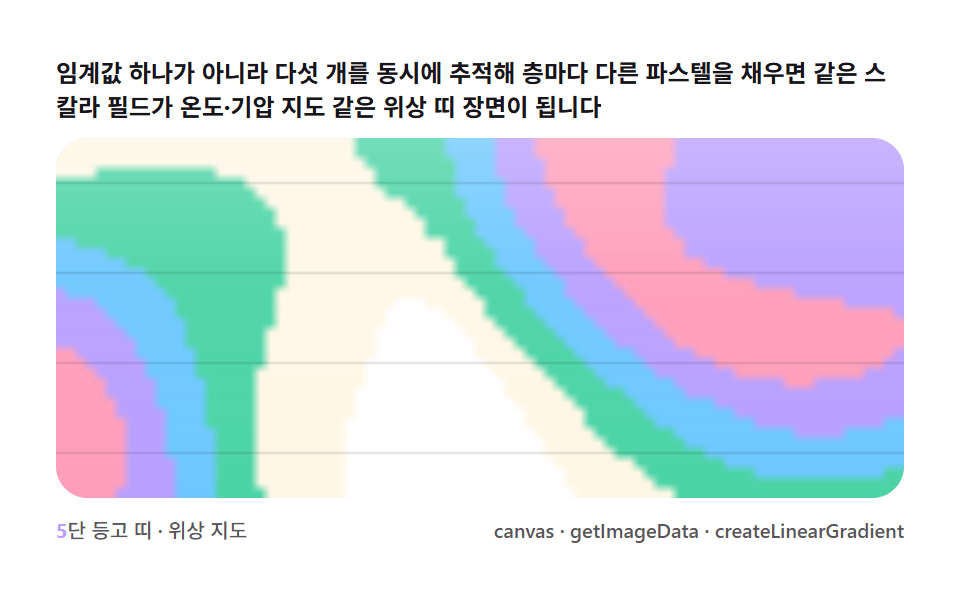
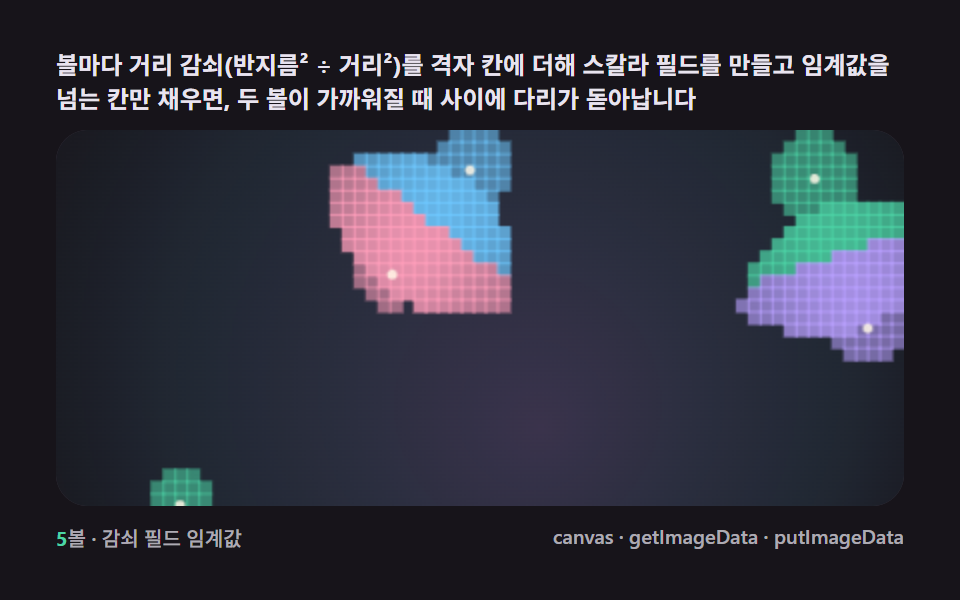
임계값 하나가 아니라 여러 개를 동시에 추적해 층마다 다른 파스텔 색을 채우면 같은 필드가 온도 지도·기압 지도 같은 위상 띠 장면으로 변합니다.
쓰임데이터 아트·섹션 배경
getImageDatacreateLinearGradientrequestAnimationFrame
<main class="stage">
<div class="cd is-demo" id="cdRoot">
  <p class="cd__hint">
    <span>임계값 하나가 아니라 다섯 개를 동시에 추적해 층마다 다른 파스텔을 채우면 같은 스칼라 필드가 온도·기압 지도 같은 위상 띠 장면이 됩니다</span>
  </p>
  <div class="cd__field" id="cdField" role="application" aria-label="등고 띠 위상 지도 실험판" tabindex="0">
    <canvas class="cd__cv" id="cdCv"></canvas>
  </div>
  <div class="cd__bar">
    <span class="cd__meta"><b class="cd__val" id="cdN">5</b>단 등고 띠 · 위상 지도</span>
    <span class="cd__meta cd__meta--dim">canvas · getImageData · createLinearGradient</span>
  </div>
</div>
</main>
@use "../../../../site/static/demo-tokens" as *;
// 등고 띠(07). @keyframes 없음 — 움직임은 rAF 필드 시뮬레이션(가산 열원 + getImageData 임계값)뿐.
// 무대는 밝은 지도(paper). 편 공통 파스텔 팔레트를 --mb-* 로 (07~09 동일 계열, 항목마다 무대만 다름).
$duration: $dur-loop;
$easing: $ease-spring;
$color: $subject-sky;
@include stage($stage-paper);
// ── 편 공통 파스텔 팔레트(BD9~11 원칙: 편마다 다시 정하지 않는다) ──
$mb-ink: $stage-paper; // "무데이터" 낮은 층 — 종이색 그대로(빈 바다)
$mb-band1: $subject-cream; // 저지대
$mb-band2: $subject-mint;
$mb-band3: $subject-sky;
$mb-band4: $subject-lilac;
$mb-band5: $subject-pink; // 고지대(피크)
$mb-line: $stage-ink;
$mb-text: $stage-ink;
.cd {
--mb-ink: #{$mb-ink};
--mb-band-1: #{$mb-band1};
--mb-band-2: #{$mb-band2};
--mb-band-3: #{$mb-band3};
--mb-band-4: #{$mb-band4};
--mb-band-5: #{$mb-band5};
--mb-line: #{$mb-line};
display: flex; flex-direction: column; gap: $sp-2;
width: 100%; max-width: 424px;
}
.cd__hint {
display: flex; align-items: center; gap: $sp-1; margin: 0;
font-weight: 700; font-size: clamp(10px, 2.8vw, 12px); line-height: 1.35;
color: $mb-text;
}
.cd__field {
position: relative; height: 180px;
border-radius: $r-card; overflow: hidden;
background: $mb-ink;
box-shadow: inset 0 0 0 1px rgba($mb-line, .14);
}
.cd__field:focus-visible { outline: 2px solid $mb-band3; outline-offset: 2px; }
.cd__cv { display: block; width: 100%; height: 100%; }
.cd__bar { display: flex; align-items: baseline; justify-content: space-between; gap: $sp-2; }
.cd__meta { font-size: 10px; font-weight: 500; color: rgba($mb-text, .72); }
.cd__val { color: $mb-band4; font-weight: 700; }
.cd__meta--dim { font-size: 10px; }
@media (max-width: 340px) {
.cd { gap: $sp-1; }
.cd__field { height: 100px; }
.cd__meta--dim { display: none; }
}
// reduce — rAF 를 돌리지 않고 등고 한 장만 남는다.
@media (prefers-reduced-motion: reduce) {
.cd.is-still .cd__field { cursor: default !important; }
}html, body {
margin: 0;
overflow: hidden;
}
.stage {
box-sizing: border-box;
min-height: 100vh;
display: grid;
place-items: center;
margin: 0;
background: #ffffff;
font-family: -apple-system, "Segoe UI", "Noto Sans KR", sans-serif;
padding: clamp(8px, 4vw, 24px);
}
.cd {
--mb-ink: #ffffff;
--mb-band-1: #fff7e6;
--mb-band-2: #4cd4a6;
--mb-band-3: #6ec8ff;
--mb-band-4: #b9a0ff;
--mb-band-5: #ff9ebb;
--mb-line: #17141a;
display: flex;
flex-direction: column;
gap: 8px;
width: 100%;
max-width: 424px;
}
.cd__hint {
display: flex;
align-items: center;
gap: 4px;
margin: 0;
font-weight: 700;
font-size: clamp(10px, 2.8vw, 12px);
line-height: 1.35;
color: #17141a;
}
.cd__field {
position: relative;
height: 180px;
border-radius: 16px;
overflow: hidden;
background: #ffffff;
box-shadow: inset 0 0 0 1px rgba(23, 20, 26, 0.14);
}
.cd__field:focus-visible {
outline: 2px solid #6ec8ff;
outline-offset: 2px;
}
.cd__cv {
display: block;
width: 100%;
height: 100%;
}
.cd__bar {
display: flex;
align-items: baseline;
justify-content: space-between;
gap: 8px;
}
.cd__meta {
font-size: 10px;
font-weight: 500;
color: rgba(23, 20, 26, 0.72);
}
.cd__val {
color: #b9a0ff;
font-weight: 700;
}
.cd__meta--dim {
font-size: 10px;
}
@media (max-width: 340px) {
.cd {
gap: 4px;
}
.cd__field {
height: 100px;
}
.cd__meta--dim {
display: none;
}
}
@media (prefers-reduced-motion: reduce) {
.cd.is-still .cd__field {
cursor: default !important;
}
}// 등고 띠(07). 스칼라 필드 = 이동하는 열원 5개(가우시안 낙하) + 지형 파동(사인 두 겹)의 합.
// 필드를 저해상도 오프스크린 캔버스에 가산 합성(globalCompositeOperation=lighter)으로 그린 뒤
// getImageData 로 읽어 임계값 5단으로 층을 나누고, 층마다 다른 파스텔을 저해상도 색 캔버스에 칠해
// 확대(drawImage, 이미지 스무딩)하면 등고선 대신 부드러운 등고 "띠"가 된다 — 실제 등고선(마칭 스퀘어
// 경계 폴리곤)이 아니라 필드를 직접 색칠하는 채워진 등고대 방식(기상도가 쓰는 방식)이다.
(function () {
// ── 변형 상수 블록 — 아래 값 하나만 바꿔 변형을 만든다 ──
var N_SRC = 5; // 열원 개수 — 3 은 성긴 지도, 7 은 촘촘한 등고
var BANDS = 5; // 임계값 층 수
var SPREAD = 0.46; // 열원 낙하 반경 비율(필드 폭 대비) — 크면 띠가 화면을 넓게 덮는다
// ────────────────────────────────────────────────────
var root = document.getElementById('cdRoot');
var field = document.getElementById('cdField');
var cv = document.getElementById('cdCv');
var ctx = cv.getContext('2d');
var nOut = document.getElementById('cdN');
nOut.textContent = String(BANDS);
var css = getComputedStyle(root);
function tok(name) { return css.getPropertyValue(name).trim(); }
var BAND_COL = [tok('--mb-band-1'), tok('--mb-band-2'), tok('--mb-band-3'), tok('--mb-band-4'), tok('--mb-band-5')];
var C_INK = tok('--mb-ink');
var C_LINE = tok('--mb-line');
var reduce = window.matchMedia('(prefers-reduced-motion: reduce)').matches;
var W = 0, H = 0;
var LOWW = 0, LOWH = 0, SCALE = 5;
var fieldCv = document.createElement('canvas');
var fieldCtx = fieldCv.getContext('2d');
var bandCv = document.createElement('canvas');
var bandCtx = bandCv.getContext('2d');
var raf = 0, t0 = -1;
// 시드 고정 PRNG — 미리보기가 항상 같은 열원 경로로 흐른다
function makeRand(seed) {
var st = seed >>> 0;
return function () {
st = (st + 0x6D2B79F5) >>> 0;
var t = st;
t = Math.imul(t ^ (t >>> 15), t | 1);
t ^= t + Math.imul(t ^ (t >>> 7), t | 61);
return ((t ^ (t >>> 14)) >>> 0) / 4294967296;
};
}
var rand = makeRand(0x317A07);
var sources = [];
function buildSources() {
sources = [];
for (var i = 0; i < N_SRC; i++) {
sources.push({
fx: 0.35 + rand() * 1.6, fy: 0.28 + rand() * 1.4,
ph: rand() * Math.PI * 2, ax: 0.22 + rand() * 0.24, ay: 0.22 + rand() * 0.24,
cx: rand(), cy: rand()
});
}
}
function fit() {
var r = field.getBoundingClientRect();
W = r.width; H = r.height;
cv.width = Math.round(W); cv.height = Math.round(H);
LOWW = Math.max(48, Math.round(W / SCALE));
LOWH = Math.max(30, Math.round(H / SCALE));
fieldCv.width = LOWW; fieldCv.height = LOWH;
bandCv.width = LOWW; bandCv.height = LOWH;
ctx.imageSmoothingEnabled = true;
}
// 열원 위치 — 리사주 곡선으로 화면을 골고루 도는 궤도(누적면적 확보)
function srcPos(s, t) {
return [
(s.cx + Math.sin(t * s.fx + s.ph) * s.ax) * LOWW,
(s.cy + Math.cos(t * s.fy + s.ph * 1.3) * s.ay) * LOWH
];
}
function drawField(t) {
fieldCtx.clearRect(0, 0, LOWW, LOWH);
fieldCtx.globalCompositeOperation = 'source-over';
fieldCtx.fillStyle = '#000';
fieldCtx.fillRect(0, 0, LOWW, LOWH);
fieldCtx.globalCompositeOperation = 'lighter';
var rad = Math.max(LOWW, LOWH) * SPREAD;
for (var i = 0; i < sources.length; i++) {
var p = srcPos(sources[i], t);
var g = fieldCtx.createRadialGradient(p[0], p[1], 0, p[0], p[1], rad);
g.addColorStop(0, 'rgba(255,255,255,0.95)');
g.addColorStop(0.55, 'rgba(255,255,255,0.38)');
g.addColorStop(1, 'rgba(255,255,255,0)');
fieldCtx.fillStyle = g;
fieldCtx.fillRect(0, 0, LOWW, LOWH);
}
fieldCtx.globalCompositeOperation = 'source-over';
}
// 지형 파동 — 열원과 무관하게 화면 전체를 항상 등고대로 채우는 배경 항(기상도의 "언제나 있는" 등고)
function terrain(nx, ny, t) {
var a = Math.sin(nx * 5.4 + t * 0.25) * Math.cos(ny * 4.1 - t * 0.19);
var b = Math.sin((nx + ny) * 3.1 - t * 0.31);
return (0.5 + 0.32 * a + 0.18 * b);
}
function classify(t) {
var img = fieldCtx.getImageData(0, 0, LOWW, LOWH);
var d = img.data;
var thr = [];
for (var k = 1; k <= BANDS; k++) thr.push(k / (BANDS + 1));
for (var y = 0; y < LOWH; y++) {
for (var x = 0; x < LOWW; x++) {
var idx = (y * LOWW + x) * 4;
var v = d[idx] / 255; // 열원 필드(0..1)
var mix = v * 0.72 + terrain(x / LOWW, y / LOWH, t) * 0.28;
var band = 0;
for (var k2 = 0; k2 < thr.length; k2++) if (mix >= thr[k2]) band = k2 + 1;
bandCtx.fillStyle = band === 0 ? C_INK : BAND_COL[band - 1];
bandCtx.fillRect(x, y, 1, 1);
}
}
}
function draw(t) {
drawField(t);
classify(t);
ctx.clearRect(0, 0, W, H);
ctx.drawImage(bandCv, 0, 0, LOWW, LOWH, 0, 0, W, H);
// 대기 하이라이트 — 위쪽에서 은은하게 밝아지는 선형 그라디언트(지도 위 유리 반사감)
var sky = ctx.createLinearGradient(0, 0, 0, H);
sky.addColorStop(0, 'rgba(255,255,255,0.22)');
sky.addColorStop(0.4, 'rgba(255,255,255,0.04)');
sky.addColorStop(1, 'rgba(255,255,255,0)');
ctx.fillStyle = sky;
ctx.fillRect(0, 0, W, H);
// 등고 경계선 — 저해상도 색 경계를 살짝 도드라지게(격자 라인 몇 개)
ctx.strokeStyle = C_LINE;
ctx.lineWidth = 1;
ctx.globalAlpha = 0.14;
for (var gy = 0; gy < 4; gy++) {
var yy = (gy + 0.5) / 4 * H;
ctx.beginPath(); ctx.moveTo(0, yy); ctx.lineTo(W, yy); ctx.stroke();
}
ctx.globalAlpha = 1;
}
function stillFrame() { draw(0.4); }
function frame(now) {
if (t0 < 0) t0 = now;
var t = (now - t0) / 1000;
draw(t);
raf = requestAnimationFrame(frame);
}
window.addEventListener('resize', function () {
fit();
if (reduce) stillFrame();
});
fit();
buildSources();
if (reduce) {
stillFrame();
root.classList.add('is-still');
} else {
raf = requestAnimationFrame(frame);
}
})();// ContourBand — vanilla 판(run/317/demo/07-metaball-contour-band-topo/index.html) 의 React 포트.
// 등고 띠 — 열원 5개(가우시안 낙하)와 지형 파동을 저해상도 캔버스에 가산 합성하고 getImageData 로
// 읽어 임계값 5단으로 층을 나눠 층마다 다른 파스텔 띠를 채운다. 위상 지도(기상도) 장면.
import { useEffect, useRef, useState } from "react";
import type { CSSProperties } from "react";
import styles from "./ContourBand.module.scss";
export type ContourBandProps = {
duration?: string;
easing?: string;
color?: string;
sources?: number; // 열원 개수 — 변형 "성긴/촘촘한 등고" 축
bands?: number; // 임계값 층 수
spread?: number; // 열원 낙하 반경 비율 — 크면 띠가 화면을 넓게 덮는다
};
type Vars = CSSProperties & { "--duration"?: string; "--easing"?: string; "--color"?: string };
type Box<T> = { current: T };
type Source = { fx: number; fy: number; ph: number; ax: number; ay: number; cx: number; cy: number };
const FIELD_LABEL = "등고 띠 위상 지도 실험판";
const SCALE = 5;
function makePRNG(seed: number): () => number {
let s = seed >>> 0;
return function () {
s = (s + 0x6d2b79f5) >>> 0;
let t = s;
t = Math.imul(t ^ (t >>> 15), t | 1);
t ^= t + Math.imul(t ^ (t >>> 7), t | 61);
return ((t ^ (t >>> 14)) >>> 0) / 4294967296;
};
}
export default function ContourBand({
duration = "2s",
easing = "cubic-bezier(.2, .8, .2, 1)",
color = "#6ec8ff",
sources: nSrc = 5,
bands = 5,
spread = 0.46,
}: ContourBandProps) {
const rootRef = useRef<HTMLDivElement | null>(null);
const fieldRef = useRef<HTMLDivElement | null>(null);
const cvRef = useRef<HTMLCanvasElement | null>(null);
const ctxRef = useRef<CanvasRenderingContext2D | null>(null);
const sizeRef = useRef({ w: 0, h: 0 }) as Box<{ w: number; h: number }>;
const lowRef = useRef({ w: 0, h: 0 }) as Box<{ w: number; h: number }>;
const fieldCtxRef = useRef<CanvasRenderingContext2D | null>(null);
const bandCtxRef = useRef<CanvasRenderingContext2D | null>(null);
const colRef = useRef<{ band: string[]; ink: string; line: string } | null>(null);
const srcRef = useRef(nSrc) as Box<number>;
const bandsRef = useRef(bands) as Box<number>;
const spreadRef = useRef(spread) as Box<number>;
const sourcesRef = useRef<Source[]>([]) as Box<Source[]>;
const rafRef = useRef(0) as Box<number>;
const [n, setN] = useState(String(bands));
const [still, setStill] = useState(false);
const vars: Vars = { "--duration": duration, "--easing": easing, "--color": color };
function reduced(): boolean {
return window.matchMedia("(prefers-reduced-motion: reduce)").matches;
}
function buildSources(): void {
const rand = makePRNG(0x317a07);
const arr: Source[] = [];
for (let i = 0; i < srcRef.current; i++) {
arr.push({
fx: 0.35 + rand() * 1.6, fy: 0.28 + rand() * 1.4,
ph: rand() * Math.PI * 2, ax: 0.22 + rand() * 0.24, ay: 0.22 + rand() * 0.24,
cx: rand(), cy: rand(),
});
}
sourcesRef.current = arr;
}
function srcPos(s: Source, t: number, lw: number, lh: number): [number, number] {
return [
(s.cx + Math.sin(t * s.fx + s.ph) * s.ax) * lw,
(s.cy + Math.cos(t * s.fy + s.ph * 1.3) * s.ay) * lh,
];
}
function drawField(t: number): void {
const fieldCtx = fieldCtxRef.current;
const { w: lw, h: lh } = lowRef.current;
if (!fieldCtx) return;
fieldCtx.globalCompositeOperation = "source-over";
fieldCtx.fillStyle = "#000";
fieldCtx.fillRect(0, 0, lw, lh);
fieldCtx.globalCompositeOperation = "lighter";
const rad = Math.max(lw, lh) * spreadRef.current;
const sources = sourcesRef.current;
for (let i = 0; i < sources.length; i++) {
const p = srcPos(sources[i], t, lw, lh);
const g = fieldCtx.createRadialGradient(p[0], p[1], 0, p[0], p[1], rad);
g.addColorStop(0, "rgba(255,255,255,0.95)");
g.addColorStop(0.55, "rgba(255,255,255,0.38)");
g.addColorStop(1, "rgba(255,255,255,0)");
fieldCtx.fillStyle = g;
fieldCtx.fillRect(0, 0, lw, lh);
}
fieldCtx.globalCompositeOperation = "source-over";
}
function terrain(nx: number, ny: number, t: number): number {
const a = Math.sin(nx * 5.4 + t * 0.25) * Math.cos(ny * 4.1 - t * 0.19);
const b = Math.sin((nx + ny) * 3.1 - t * 0.31);
return 0.5 + 0.32 * a + 0.18 * b;
}
function classify(t: number): void {
const fieldCtx = fieldCtxRef.current;
const bandCtx = bandCtxRef.current;
const col = colRef.current;
const { w: lw, h: lh } = lowRef.current;
if (!fieldCtx || !bandCtx || !col) return;
const img = fieldCtx.getImageData(0, 0, lw, lh);
const d = img.data;
const nB = bandsRef.current;
const thr: number[] = [];
for (let k = 1; k <= nB; k++) thr.push(k / (nB + 1));
for (let y = 0; y < lh; y++) {
for (let x = 0; x < lw; x++) {
const idx = (y * lw + x) * 4;
const v = d[idx] / 255;
const mix = v * 0.72 + terrain(x / lw, y / lh, t) * 0.28;
let band = 0;
for (let k2 = 0; k2 < thr.length; k2++) if (mix >= thr[k2]) band = k2 + 1;
bandCtx.fillStyle = band === 0 ? col.ink : col.band[band - 1];
bandCtx.fillRect(x, y, 1, 1);
}
}
}
function draw(t: number): void {
const ctx = ctxRef.current;
const bandCtx = bandCtxRef.current;
const col = colRef.current;
const { w: W, h: H } = sizeRef.current;
const { w: lw, h: lh } = lowRef.current;
if (!ctx || !bandCtx || !col) return;
drawField(t);
classify(t);
ctx.clearRect(0, 0, W, H);
ctx.drawImage(bandCvOf(), 0, 0, lw, lh, 0, 0, W, H);
const sky = ctx.createLinearGradient(0, 0, 0, H);
sky.addColorStop(0, "rgba(255,255,255,0.22)");
sky.addColorStop(0.4, "rgba(255,255,255,0.04)");
sky.addColorStop(1, "rgba(255,255,255,0)");
ctx.fillStyle = sky;
ctx.fillRect(0, 0, W, H);
ctx.strokeStyle = col.line;
ctx.lineWidth = 1;
ctx.globalAlpha = 0.14;
for (let gy = 0; gy < 4; gy++) {
const yy = ((gy + 0.5) / 4) * H;
ctx.beginPath(); ctx.moveTo(0, yy); ctx.lineTo(W, yy); ctx.stroke();
}
ctx.globalAlpha = 1;
}
// 저해상도 캔버스 참조 — fit 에서 생성한 것을 다시 얻는 헬퍼
const fieldCvRef = useRef<HTMLCanvasElement | null>(null);
const bandCvRef = useRef<HTMLCanvasElement | null>(null);
function fieldCvOf(): HTMLCanvasElement { return fieldCvRef.current as HTMLCanvasElement; }
function bandCvOf(): HTMLCanvasElement { return bandCvRef.current as HTMLCanvasElement; }
function fit(): void {
const field = fieldRef.current;
const cv = cvRef.current;
if (!field || !cv) return;
const ctx = cv.getContext("2d");
if (!ctx) return;
const r = field.getBoundingClientRect();
sizeRef.current.w = r.width;
sizeRef.current.h = r.height;
cv.width = Math.round(r.width);
cv.height = Math.round(r.height);
const lw = Math.max(48, Math.round(r.width / SCALE));
const lh = Math.max(30, Math.round(r.height / SCALE));
lowRef.current = { w: lw, h: lh };
const fc = fieldCvOf(); fc.width = lw; fc.height = lh;
const bc = bandCvOf(); bc.width = lw; bc.height = lh;
fieldCtxRef.current = fc.getContext("2d");
bandCtxRef.current = bc.getContext("2d");
ctx.imageSmoothingEnabled = true;
ctxRef.current = ctx;
}
function stillFrame(): void { draw(0.4); }
let t0 = -1;
function frame(now: number): void {
if (t0 < 0) t0 = now;
const t = (now - t0) / 1000;
draw(t);
rafRef.current = requestAnimationFrame(frame);
}
useEffect(() => {
const root = rootRef.current;
if (!root) return;
srcRef.current = nSrc;
bandsRef.current = bands;
spreadRef.current = spread;
const cs = getComputedStyle(root);
const tok = (name: string) => cs.getPropertyValue(name).trim();
colRef.current = {
band: [tok("--mb-band-1"), tok("--mb-band-2"), tok("--mb-band-3"), tok("--mb-band-4"), tok("--mb-band-5")],
ink: tok("--mb-ink"),
line: tok("--mb-line"),
};
buildSources();
fit();
setN(String(bands));
function onResize(): void {
fit();
if (reduced()) stillFrame();
}
window.addEventListener("resize", onResize);
if (reduced()) {
stillFrame();
setStill(true);
} else {
rafRef.current = requestAnimationFrame(frame);
}
return () => {
window.removeEventListener("resize", onResize);
cancelAnimationFrame(rafRef.current);
};
// eslint-disable-next-line react-hooks/exhaustive-deps
}, [nSrc, bands, spread]);
const rootCls = still ? `${styles.root} ${styles.isStill}` : styles.root;
return (
<main className={styles.stage}>
<div className={rootCls} ref={rootRef} style={vars}>
<p className={styles.hint}>
<span>임계값 하나가 아니라 다섯 개를 동시에 추적해 층마다 다른 파스텔을 채우면 같은 스칼라 필드가 온도·기압 지도 같은 위상 띠 장면이 됩니다</span>
</p>
<div
className={styles.field}
ref={fieldRef}
role="application"
aria-label={FIELD_LABEL}
tabIndex={0}
>
<canvas className={styles.cv} ref={cvRef}></canvas>
</div>
<div className={styles.bar}>
<span className={styles.meta}><b className={styles.val}>{n}</b>단 등고 띠 · 위상 지도</span>
<span className={styles.metaDim}>canvas · getImageData · createLinearGradient</span>
</div>
</div>
</main>
);
}07 등고 띠 — 임계값을 여러 겹으로 쌓는 위상 지도 — 측정 누적면적 52.869% · 움직인 프레임 23/23GODRICH 원작 · zip 에 SCSS·React 포함 · 캔버스 메타볼 효과 9종 — 마칭 스퀘어로 합체하는 액체 덩어리
이 데모가 속한 글
 캔버스 메타볼 효과 9종 — 마칭 스퀘어로 합체하는 액체 덩어리메타볼 효과는 여러 덩어리가 가까워지면 하나로 녹아 붙고 멀어지면 갈라지는, 액체처럼 굴러가는 캔버스 장면입니다. 필드 값이 임계값을 넘는 경계를 격자 칸마다 잇는 마칭 스퀘어 하나로 블롭이 스며들듯 합쳐졌다 갈라집 이 글의 데모 전부 보기