08비교 링 쌍 (이번 주/지난 주)
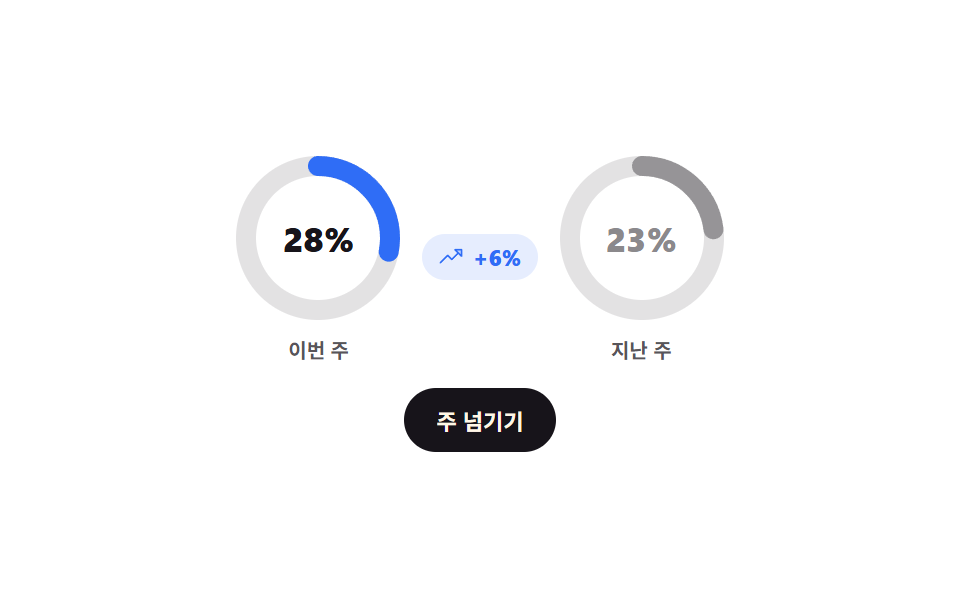
이번 주 링과 지난 주 링이 나란히 채워지고 사이의 차이 숫자가 색으로 오르내림을 알리며, '주 넘기기'를 누르면 이번 주가 지난 주 자리로 실제로 밀려갑니다.
쓰임주간 리포트·리텐션 비교처럼 두 기간을 한눈에 대야 하는 카드
2 ringsdeltaclick
<main class="stage">
  <div class="bp is-demo">
    <div class="bp__pair">
      <figure class="bp__cell bp__cell--now">
        <div class="bp__dial">
          <svg class="bp__svg" viewBox="0 0 88 88" width="88" height="88" aria-hidden="true">
            <circle class="bp__track" cx="44" cy="44" r="36"/>
            <circle class="bp__ring" cx="44" cy="44" r="36"/>
          </svg>
          <span class="bp__num" role="status" aria-label="이번 주 달성률"></span>
        </div>
        <figcaption class="bp__cap">이번 주</figcaption>
      </figure>
      <span class="bp__delta">
        <span class="bp__ic" aria-hidden="true"><svg viewBox="0 0 256 256" width="13" height="13"><g fill="currentColor"><path d="M232 56v64l-64-64Z" opacity=".2"/><path d="M232 48h-64a8 8 0 0 0-5.66 13.66L188.69 88L136 140.69l-34.34-34.35a8 8 0 0 0-11.32 0l-72 72a8 8 0 0 0 11.32 11.32L96 123.31l34.34 34.35a8 8 0 0 0 11.32 0L200 99.31l26.34 26.35A8 8 0 0 0 240 120V56a8 8 0 0 0-8-8m-8 52.69L187.31 64H224Z"/></g></svg></span>
      </span>
      <figure class="bp__cell bp__cell--prev">
        <div class="bp__dial">
          <svg class="bp__svg" viewBox="0 0 88 88" width="88" height="88" aria-hidden="true">
            <circle class="bp__track" cx="44" cy="44" r="36"/>
            <circle class="bp__ring" cx="44" cy="44" r="36"/>
          </svg>
          <span class="bp__num" aria-hidden="true"></span>
        </div>
        <figcaption class="bp__cap">지난 주</figcaption>
      </figure>
    </div>
    <button class="bp__btn" type="button">주 넘기기</button>
  </div>
</main>@use "../../../../site/static/demo-tokens" as *;
$duration: $dur-loop;
$easing: $ease-spring;
$color: $subject-blue;
@include stage($stage-paper);
@property --a { syntax: "<integer>"; inherits: true; initial-value: 0; }
@property --b { syntax: "<integer>"; inherits: true; initial-value: 0; }
@property --d { syntax: "<integer>"; inherits: true; initial-value: 0; }
.bp {
--a: 72;
--b: 58;
--d: 14;
box-sizing: border-box;
display: grid;
justify-items: center;
gap: $sp-3;
color: $stage-ink;
font-family: -apple-system, "Segoe UI", "Noto Sans KR", sans-serif;
transition: --a $dur-enter $easing, --b $dur-enter $easing, --d $dur-enter $easing;
}
.bp__pair { display: flex; align-items: center; gap: $sp-2; }
.bp__cell { margin: 0; display: grid; justify-items: center; gap: $sp-1; }
.bp__dial { position: relative; display: grid; place-items: center; }
.bp__svg { width: clamp(72px, 23vw, 88px); height: clamp(72px, 23vw, 88px); transform: rotate(-90deg); }
.bp__track { fill: none; stroke: rgba(23, 20, 26, .12); stroke-width: 10; }
.bp__ring {
fill: none;
stroke-width: 10;
stroke-linecap: round;
// r=36 → C = 2π × 36 = 226.195. 두 링이 같은 반지름이라 차이가 각도로 바로 보인다
stroke-dasharray: 226.195;
}
.bp__cell--now .bp__ring { stroke: $color; stroke-dashoffset: calc(226.195 * (1 - var(--a) / 100)); }
.bp__cell--prev .bp__ring { stroke: rgba(23, 20, 26, .38); stroke-dashoffset: calc(226.195 * (1 - var(--b) / 100)); }
.bp__num {
position: absolute;
font-size: clamp(15px, 4.6vw, 17px);
font-weight: 800;
font-variant-numeric: tabular-nums;
}
.bp__cell--now .bp__num::after { counter-reset: n var(--a); content: counter(n) "%"; }
.bp__cell--prev .bp__num::after { counter-reset: n var(--b); content: counter(n) "%"; }
.bp__cell--prev .bp__num { color: rgba(23, 20, 26, .5); }
.bp__cap { font-size: 10px; font-weight: 700; color: rgba(23, 20, 26, .72); }
.bp__delta {
display: inline-flex;
align-items: center;
gap: $sp-1;
padding: $sp-1 $sp-2;
border-radius: $r-pill;
background: rgba(47, 109, 246, .12);
color: $color;
font-size: 11px;
font-weight: 800;
font-variant-numeric: tabular-nums;
}
.bp__ic { display: inline-flex; }
.bp__delta::after { counter-reset: d var(--d); content: "+" counter(d) "%"; }
.bp.is-down .bp__delta { background: $error-soft; color: $error; }
.bp.is-down .bp__ic { transform: scaleY(-1); }
.bp.is-down .bp__delta::after { content: "−" counter(d) "%"; }
.bp__btn {
border: 0;
border-radius: $r-pill;
background: $stage-ink;
color: $subject-cream;
font-family: inherit;
font-size: 11px;
font-weight: 700;
padding: $sp-2 $sp-4;
cursor: pointer;
transition: transform $dur-quick $ease-pop;
}
.bp__btn:hover, .bp__btn:focus-visible { transform: translateY(-2px); }
// ── 자동 루프: 두 링이 각자 목표까지 감겼다 같이 풀린다. 차이 숫자도 함께 자란다 ──
.bp.is-demo { animation: bp-fill $duration $easing infinite; }
@keyframes bp-fill {
0% { --a: 0; --b: 0; --d: 0; }
45%, 55% { --a: 72; --b: 58; --d: 14; }
100% { --a: 0; --b: 0; --d: 0; }
}
@media (max-width: 340px) {
.bp__delta { font-size: 10px; padding: $sp-1; }
.bp__pair { gap: $sp-1; }
}
@media (prefers-reduced-motion: reduce) {
.bp.is-demo { animation: none !important; }
.bp { transition: none; }
.bp__btn { transition: none; }
}@charset "UTF-8";
html, body {
margin: 0;
overflow: hidden;
}
.stage {
box-sizing: border-box;
min-height: 100vh;
display: grid;
place-items: center;
margin: 0;
background: #ffffff;
font-family: -apple-system, "Segoe UI", "Noto Sans KR", sans-serif;
padding: clamp(8px, 4vw, 24px);
}
@property --a {
syntax: "<integer>";
inherits: true;
initial-value: 0;
}
@property --b {
syntax: "<integer>";
inherits: true;
initial-value: 0;
}
@property --d {
syntax: "<integer>";
inherits: true;
initial-value: 0;
}
.bp {
--a: 72;
--b: 58;
--d: 14;
box-sizing: border-box;
display: grid;
justify-items: center;
gap: 12px;
color: #17141a;
font-family: -apple-system, "Segoe UI", "Noto Sans KR", sans-serif;
transition: --a 600ms cubic-bezier(0.2, 0.8, 0.2, 1), --b 600ms cubic-bezier(0.2, 0.8, 0.2, 1), --d 600ms cubic-bezier(0.2, 0.8, 0.2, 1);
}
.bp__pair {
display: flex;
align-items: center;
gap: 8px;
}
.bp__cell {
margin: 0;
display: grid;
justify-items: center;
gap: 4px;
}
.bp__dial {
position: relative;
display: grid;
place-items: center;
}
.bp__svg {
width: clamp(72px, 23vw, 88px);
height: clamp(72px, 23vw, 88px);
transform: rotate(-90deg);
}
.bp__track {
fill: none;
stroke: rgba(23, 20, 26, 0.12);
stroke-width: 10;
}
.bp__ring {
fill: none;
stroke-width: 10;
stroke-linecap: round;
stroke-dasharray: 226.195;
}
.bp__cell--now .bp__ring {
stroke: #2f6df6;
stroke-dashoffset: calc(226.195 * (1 - var(--a) / 100));
}
.bp__cell--prev .bp__ring {
stroke: rgba(23, 20, 26, 0.38);
stroke-dashoffset: calc(226.195 * (1 - var(--b) / 100));
}
.bp__num {
position: absolute;
font-size: clamp(15px, 4.6vw, 17px);
font-weight: 800;
font-variant-numeric: tabular-nums;
}
.bp__cell--now .bp__num::after {
counter-reset: n var(--a);
content: counter(n) "%";
}
.bp__cell--prev .bp__num::after {
counter-reset: n var(--b);
content: counter(n) "%";
}
.bp__cell--prev .bp__num {
color: rgba(23, 20, 26, 0.5);
}
.bp__cap {
font-size: 10px;
font-weight: 700;
color: rgba(23, 20, 26, 0.72);
}
.bp__delta {
display: inline-flex;
align-items: center;
gap: 4px;
padding: 4px 8px;
border-radius: 999px;
background: rgba(47, 109, 246, 0.12);
color: #2f6df6;
font-size: 11px;
font-weight: 800;
font-variant-numeric: tabular-nums;
}
.bp__ic {
display: inline-flex;
}
.bp__delta::after {
counter-reset: d var(--d);
content: "+" counter(d) "%";
}
.bp.is-down .bp__delta {
background: #ffe0d8;
color: #c2361a;
}
.bp.is-down .bp__ic {
transform: scaleY(-1);
}
.bp.is-down .bp__delta::after {
content: "−" counter(d) "%";
}
.bp__btn {
border: 0;
border-radius: 999px;
background: #17141a;
color: #fff7e6;
font-family: inherit;
font-size: 11px;
font-weight: 700;
padding: 8px 16px;
cursor: pointer;
transition: transform 220ms cubic-bezier(0.2, 1.4, 0.4, 1);
}
.bp__btn:hover, .bp__btn:focus-visible {
transform: translateY(-2px);
}
.bp.is-demo {
animation: bp-fill 2s cubic-bezier(0.2, 0.8, 0.2, 1) infinite;
}
@keyframes bp-fill {
0% {
--a: 0;
--b: 0;
--d: 0;
}
45%, 55% {
--a: 72;
--b: 58;
--d: 14;
}
100% {
--a: 0;
--b: 0;
--d: 0;
}
}
@media (max-width: 340px) {
.bp__delta {
font-size: 10px;
padding: 4px;
}
.bp__pair {
gap: 4px;
}
}
@media (prefers-reduced-motion: reduce) {
.bp.is-demo {
animation: none !important;
}
.bp {
transition: none;
}
.bp__btn {
transition: none;
}
}// 실제 동작: 이번 주 값이 지난 주 자리로 밀려가고 새 값이 들어온다. 차이의 부호는 is-down 이 맡는다.
var bp = document.querySelector('.bp');
var now = 72, prev = 58;
bp.querySelector('.bp__btn').addEventListener('click', function () {
bp.classList.remove('is-demo');
prev = now;
now = 20 + Math.floor(Math.random() * 80);
bp.style.setProperty('--a', String(now));
bp.style.setProperty('--b', String(prev));
bp.style.setProperty('--d', String(Math.abs(now - prev)));
bp.classList.toggle('is-down', now < prev);
});import { useState } from "react";
import type { CSSProperties } from "react";
import styles from "./CompareRingPair.module.scss";
export type CompareRingPairProps = {
duration?: number;
easing?: string;
color?: string;
};
type Vars = CSSProperties & {
"--duration"?: string;
"--easing"?: string;
"--color"?: string;
"--a"?: string;
"--b"?: string;
"--d"?: string;
};
export default function CompareRingPair({
duration = 600,
easing = "cubic-bezier(.2,.8,.2,1)",
color = "#2f6df6",
}: CompareRingPairProps) {
const [pair, setPair] = useState<{ now: number; prev: number }>({ now: 72, prev: 58 });
// this week's value slides into last week's slot and a new one comes in
const nextWeek = () => {
setPair((p) => ({ prev: p.now, now: 20 + Math.floor(Math.random() * 80) }));
};
const down = pair.now < pair.prev;
const vars: Vars = {
"--duration": `${duration}ms`,
"--easing": easing,
"--color": color,
"--a": String(pair.now),
"--b": String(pair.prev),
"--d": String(Math.abs(pair.now - pair.prev)),
};
return (
<div className={`${styles.bp} ${down ? styles.isDown : ""}`} style={vars}>
<div className={styles.pair}>
<figure className={`${styles.cell} ${styles.cellNow}`}>
<div className={styles.dial}>
<svg className={styles.svg} viewBox="0 0 88 88" width="88" height="88" aria-hidden="true">
<circle className={styles.track} cx="44" cy="44" r="36" />
<circle className={styles.ring} cx="44" cy="44" r="36" />
</svg>
<span className={styles.num} role="status" aria-label="This week's rate" />
</div>
<figcaption className={styles.cap}>This week</figcaption>
</figure>
<span className={styles.delta}>
<span className={styles.ic} aria-hidden="true">
<svg viewBox="0 0 256 256" width="13" height="13">
<g fill="currentColor">
<path d="M232 56v64l-64-64Z" opacity=".2" />
<path d="M232 48h-64a8 8 0 0 0-5.66 13.66L188.69 88L136 140.69l-34.34-34.35a8 8 0 0 0-11.32 0l-72 72a8 8 0 0 0 11.32 11.32L96 123.31l34.34 34.35a8 8 0 0 0 11.32 0L200 99.31l26.34 26.35A8 8 0 0 0 240 120V56a8 8 0 0 0-8-8m-8 52.69L187.31 64H224Z" />
</g>
</svg>
</span>
</span>
<figure className={`${styles.cell} ${styles.cellPrev}`}>
<div className={styles.dial}>
<svg className={styles.svg} viewBox="0 0 88 88" width="88" height="88" aria-hidden="true">
<circle className={styles.track} cx="44" cy="44" r="36" />
<circle className={styles.ring} cx="44" cy="44" r="36" />
</svg>
<span className={styles.num} aria-hidden="true" />
</div>
<figcaption className={styles.cap}>Last week</figcaption>
</figure>
</div>
<button className={styles.btn} type="button" onClick={nextWeek}>
Next week
</button>
</div>
);
}08 비교 링 쌍 (이번 주/지난 주) — 측정 누적면적 4.356% · 움직인 프레임 17/23GODRICH 원작 · zip 에 SCSS·React 포함 · 원형 프로그레스바 css 스탯 링 위젯 9종 — 숫자가 진짜 올라가는
이 데모가 속한 글
 원형 프로그레스바 css 스탯 링 위젯 9종 — 숫자가 진짜 올라가는원형 프로그레스바 css 는 막대 대신 원을 따라 값을 채우는 진행 표시이고, SVG 원 하나에 stroke-dasharray 와 stroke-dashoffset 두 속성만 주면 만들 수 있습니다. 아홉 개 모두 버 이 글의 데모 전부 보기