09설정 저장 토스트
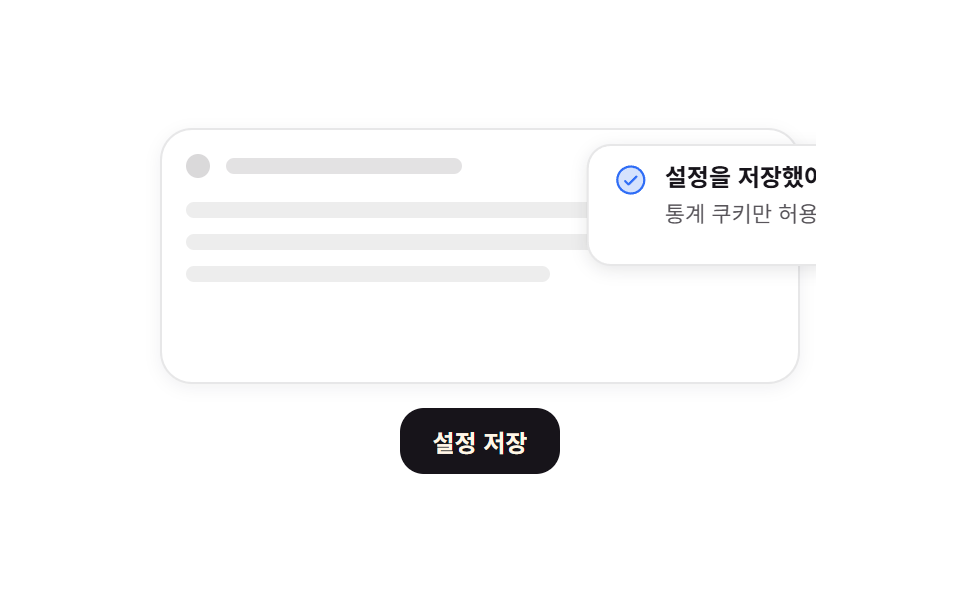
저장을 누르면 토스트가 오른쪽에서 밀려 들어오고, 남은 시간을 재는 가는 선이 왼쪽으로 줄어든 뒤 같은 방향으로 나갑니다.
쓰임동의 설정 저장 확인, 짧게 사라지는 성공 알림
translateX 120%→0scaleX 1→0 타이머radius 12
<main class="stage">
  <div class="ts is-demo">
    <div class="ts__page" aria-hidden="true">
      <div class="ts__topbar"><i class="ts__dot"></i><i class="ts__slug"></i></div>
      <div class="ts__lines"><i></i><i></i><i></i></div>
    </div>
    <button class="ts__save" type="button">설정 저장</button>
    <div class="ts__toast" role="status" aria-live="polite">
      <span class="ts__ic" aria-hidden="true"><svg viewBox="0 0 256 256" width="18" height="18"><g fill="currentColor"><path d="M224 128a96 96 0 1 1-96-96a96 96 0 0 1 96 96" opacity=".2"/><path d="M173.66 98.34a8 8 0 0 1 0 11.32l-56 56a8 8 0 0 1-11.32 0l-24-24a8 8 0 0 1 11.32-11.32L112 148.69l50.34-50.35a8 8 0 0 1 11.32 0M232 128A104 104 0 1 1 128 24a104.11 104.11 0 0 1 104 104m-16 0a88 88 0 1 0-88 88a88.1 88.1 0 0 0 88-88"/></g></svg></span>
      <span class="ts__txt">
        <b class="ts__title">설정을 저장했어요</b>
        <span class="ts__sub">통계 쿠키만 허용됨</span>
      </span>
      <i class="ts__timer" aria-hidden="true"></i>
    </div>
  </div>
</main>
@use "../../../../site/static/demo-tokens" as *;
$duration: $dur-loop;
$easing: $ease-spring;
$color: $subject-blue;
@include stage($stage-paper);
.ts {
position: relative;
overflow: hidden; // 화면 밖으로 나간 토스트를 잘라 480×300 밖으로 새지 않게
box-sizing: border-box;
width: clamp(240px, 80vw, 336px);
display: grid;
gap: $sp-3;
padding: $sp-2;
color: $subject-ink;
font-family: -apple-system, "Segoe UI", "Noto Sans KR", sans-serif;
}
// ── 가짜 페이지 목업: 움직이지 않는다 ──
.ts__page {
height: clamp(96px, 34vh, 132px);
border: 1px solid rgba(23, 20, 26, .10);
border-radius: $r-card;
background: $stage-paper;
box-shadow: 0 2px 8px rgba(23, 20, 26, .06);
display: grid;
align-content: start;
gap: $sp-3;
padding: $sp-3;
}
.ts__topbar { display: flex; align-items: center; gap: $sp-2; }
.ts__dot { width: 12px; height: 12px; border-radius: 50%; background: rgba(23, 20, 26, .16); }
.ts__slug { width: 40%; height: 8px; border-radius: $r-xs; background: rgba(23, 20, 26, .12); }
.ts__lines { display: grid; gap: $sp-2; }
.ts__lines i { height: 8px; border-radius: $r-xs; background: rgba(23, 20, 26, .08); }
.ts__lines i:nth-child(2) { width: 84%; }
.ts__lines i:nth-child(3) { width: 62%; }
.ts__save {
justify-self: center;
border: 0;
border-radius: $r-control;
background: $subject-ink;
color: $subject-cream;
font-family: inherit;
font-size: clamp(11px, 2.8vw, 12px);
font-weight: 700;
padding: $sp-2 $sp-4;
cursor: pointer;
transition: transform $dur-quick $ease-out, opacity $dur-quick $ease-out;
}
.ts__save:hover { opacity: .86; }
.ts__save:focus-visible { outline: 2px solid $color; outline-offset: 2px; }
.ts__save:active { transform: scale(.96); }
// ── 토스트: 오른쪽 위, 기본은 화면 밖 ──
.ts__toast {
position: absolute;
top: $sp-4;
right: $sp-4;
width: clamp(152px, 52vw, 200px);
box-sizing: border-box;
display: grid;
grid-template-columns: auto 1fr;
align-items: start;
gap: $sp-2;
padding: $sp-2 $sp-3;
border-radius: $r-control;
background: $stage-paper;
border: 1px solid rgba(23, 20, 26, .10);
box-shadow: 0 2px 8px rgba(23, 20, 26, .10);
transform: translateX(120%);
}
.ts__ic { display: inline-flex; color: $color; }
.ts__txt { display: grid; gap: $sp-1; min-width: 0; }
.ts__title {
font-size: clamp(11px, 2.8vw, 12px);
font-weight: 700;
line-height: 1.3;
}
.ts__sub {
font-size: clamp(9px, 2.4vw, 11px);
line-height: 1.3;
color: rgba($stage-ink, .72);
overflow-wrap: anywhere;
}
.ts__timer {
grid-column: 1 / -1;
height: 2px;
border-radius: $r-pill;
background: $color;
transform: scaleX(1);
transform-origin: right; // 규칙8: 토스트 타이머 우측 기준 감소
}
// ── 들어왔다 · 타이머가 줄고 · 같은 방향으로 나간다. 0% 와 100% 는 화면 밖으로 같다 ──
.ts.is-demo .ts__toast,
.ts__toast.is-shot { animation: ts-slide $duration $easing infinite; }
.ts.is-demo .ts__timer,
.ts__toast.is-shot .ts__timer { animation: ts-timer $duration linear infinite; }
.ts__toast.is-shot,
.ts__toast.is-shot .ts__timer { animation-iteration-count: 1; }
@keyframes ts-slide {
0% { transform: translateX(120%); }
14% { transform: translateX(0); }
86% { transform: translateX(0); }
100% { transform: translateX(120%); }
}
@keyframes ts-timer {
0% { transform: scaleX(1); }
14% { transform: scaleX(1); }
86% { transform: scaleX(0); }
99% { transform: scaleX(0); } // 다 나간 뒤에 되감아 0%/100% 를 같게 만든다
100% { transform: scaleX(1); }
}
@media (max-width: 340px) {
.ts { gap: $sp-2; width: 92vw; }
.ts__page { gap: $sp-2; padding: $sp-2; }
.ts__toast { top: $sp-2; right: $sp-2; padding: $sp-1 $sp-2; }
.ts__save { padding: $sp-2 $sp-3; }
}
@media (prefers-reduced-motion: reduce) {
.ts.is-demo .ts__toast, .ts__toast.is-shot,
.ts.is-demo .ts__timer, .ts__toast.is-shot .ts__timer { animation: none !important; }
// 루프는 끄고 "들어온 뒤" 상태는 남긴다
.ts__toast { transform: translateX(0); }
.ts__timer { transform: scaleX(1); }
.ts__save { transition: none; }
}html, body {
margin: 0;
overflow: hidden;
}
.stage {
box-sizing: border-box;
min-height: 100vh;
display: grid;
place-items: center;
margin: 0;
background: #ffffff;
font-family: -apple-system, "Segoe UI", "Noto Sans KR", sans-serif;
padding: clamp(8px, 4vw, 24px);
}
.ts {
position: relative;
overflow: hidden;
box-sizing: border-box;
width: clamp(240px, 80vw, 336px);
display: grid;
gap: 12px;
padding: 8px;
color: #17141a;
font-family: -apple-system, "Segoe UI", "Noto Sans KR", sans-serif;
}
.ts__page {
height: clamp(96px, 34vh, 132px);
border: 1px solid rgba(23, 20, 26, 0.1);
border-radius: 16px;
background: #ffffff;
box-shadow: 0 2px 8px rgba(23, 20, 26, 0.06);
display: grid;
align-content: start;
gap: 12px;
padding: 12px;
}
.ts__topbar {
display: flex;
align-items: center;
gap: 8px;
}
.ts__dot {
width: 12px;
height: 12px;
border-radius: 50%;
background: rgba(23, 20, 26, 0.16);
}
.ts__slug {
width: 40%;
height: 8px;
border-radius: 4px;
background: rgba(23, 20, 26, 0.12);
}
.ts__lines {
display: grid;
gap: 8px;
}
.ts__lines i {
height: 8px;
border-radius: 4px;
background: rgba(23, 20, 26, 0.08);
}
.ts__lines i:nth-child(2) {
width: 84%;
}
.ts__lines i:nth-child(3) {
width: 62%;
}
.ts__save {
justify-self: center;
border: 0;
border-radius: 12px;
background: #17141a;
color: #fff7e6;
font-family: inherit;
font-size: clamp(11px, 2.8vw, 12px);
font-weight: 700;
padding: 8px 16px;
cursor: pointer;
transition: transform 220ms ease-out, opacity 220ms ease-out;
}
.ts__save:hover {
opacity: 0.86;
}
.ts__save:focus-visible {
outline: 2px solid #2f6df6;
outline-offset: 2px;
}
.ts__save:active {
transform: scale(0.96);
}
.ts__toast {
position: absolute;
top: 16px;
right: 16px;
width: clamp(152px, 52vw, 200px);
box-sizing: border-box;
display: grid;
grid-template-columns: auto 1fr;
align-items: start;
gap: 8px;
padding: 8px 12px;
border-radius: 12px;
background: #ffffff;
border: 1px solid rgba(23, 20, 26, 0.1);
box-shadow: 0 2px 8px rgba(23, 20, 26, 0.1);
transform: translateX(120%);
}
.ts__ic {
display: inline-flex;
color: #2f6df6;
}
.ts__txt {
display: grid;
gap: 4px;
min-width: 0;
}
.ts__title {
font-size: clamp(11px, 2.8vw, 12px);
font-weight: 700;
line-height: 1.3;
}
.ts__sub {
font-size: clamp(9px, 2.4vw, 11px);
line-height: 1.3;
color: rgba(23, 20, 26, 0.72);
overflow-wrap: anywhere;
}
.ts__timer {
grid-column: 1/-1;
height: 2px;
border-radius: 999px;
background: #2f6df6;
transform: scaleX(1);
transform-origin: right;
}
.ts.is-demo .ts__toast,
.ts__toast.is-shot {
animation: ts-slide 2s cubic-bezier(0.2, 0.8, 0.2, 1) infinite;
}
.ts.is-demo .ts__timer,
.ts__toast.is-shot .ts__timer {
animation: ts-timer 2s linear infinite;
}
.ts__toast.is-shot,
.ts__toast.is-shot .ts__timer {
animation-iteration-count: 1;
}
@keyframes ts-slide {
0% {
transform: translateX(120%);
}
14% {
transform: translateX(0);
}
86% {
transform: translateX(0);
}
100% {
transform: translateX(120%);
}
}
@keyframes ts-timer {
0% {
transform: scaleX(1);
}
14% {
transform: scaleX(1);
}
86% {
transform: scaleX(0);
}
99% {
transform: scaleX(0);
}
100% {
transform: scaleX(1);
}
}
@media (max-width: 340px) {
.ts {
gap: 8px;
width: 92vw;
}
.ts__page {
gap: 8px;
padding: 8px;
}
.ts__toast {
top: 8px;
right: 8px;
padding: 4px 8px;
}
.ts__save {
padding: 8px 12px;
}
}
@media (prefers-reduced-motion: reduce) {
.ts.is-demo .ts__toast, .ts__toast.is-shot,
.ts.is-demo .ts__timer, .ts__toast.is-shot .ts__timer {
animation: none !important;
}
.ts__toast {
transform: translateX(0);
}
.ts__timer {
transform: scaleX(1);
}
.ts__save {
transition: none;
}
}// 실제 동작: 저장 버튼이 토스트를 한 번 재생한다. 저장 횟수·마지막 시각은 localStorage 에 남아 둘째 줄에 붙는다.
var ts = document.querySelector('.ts');
var tsToast = ts.querySelector('.ts__toast');
var tsSub = ts.querySelector('.ts__sub');
var TS_TPL = '통계 쿠키만 허용됨 · {n}회 · {t}';
var tsN = 0;
try {
var saved = JSON.parse(localStorage.getItem('gd-consent-09') || '{}');
tsN = parseInt(saved.n, 10) || 0;
if (tsN > 0 && saved.t) { tsSub.textContent = TS_TPL.replace('{n}', String(tsN)).replace('{t}', String(saved.t)); }
} catch (e) {}
tsToast.addEventListener('animationend', function (ev) {
if (ev.target === tsToast) { tsToast.classList.remove('is-shot'); }
});
ts.querySelector('.ts__save').addEventListener('click', function () {
ts.classList.remove('is-demo');
tsN = tsN + 1;
var now = new Date().toTimeString().slice(0, 5);
tsSub.textContent = TS_TPL.replace('{n}', String(tsN)).replace('{t}', now);
try { localStorage.setItem('gd-consent-09', JSON.stringify({ n: tsN, t: now })); } catch (e) {}
tsToast.classList.remove('is-shot');
void tsToast.offsetWidth; // 연타해도 다시 재생되게 리플로를 강제한다
tsToast.classList.add('is-shot');
});import { useEffect, useState } from "react";
import type { CSSProperties } from "react";
import styles from "./SettingsSavedToast.module.scss";
export type SettingsSavedToastProps = {
duration?: number;
easing?: string;
color?: string;
};
type Vars = CSSProperties & {
"--duration"?: string;
"--easing"?: string;
"--color"?: string;
};
const KEY = "gd-consent-09";
const BASE = "Analytics cookies only";
function line(n: number, t: string): string {
return `${BASE} · saved ${n}× · ${t}`;
}
export default function SettingsSavedToast({
duration = 2000,
easing = "cubic-bezier(.2,.8,.2,1)",
color = "#2f6df6",
}: SettingsSavedToastProps) {
const [count, setCount] = useState(0);
const [sub, setSub] = useState(BASE);
// 0 이면 자동 루프, 1 이상이면 그 번째 한 번짜리 재생 (key 로 갈아끼워 애니메이션을 되감는다)
const [runId, setRunId] = useState(0);
useEffect(() => {
try {
const raw = localStorage.getItem(KEY);
if (raw) {
const saved = JSON.parse(raw) as { n?: number; t?: string };
const n = Number(saved.n) || 0;
setCount(n);
if (n > 0 && saved.t) {
setSub(line(n, saved.t));
}
}
} catch {
/* 샌드박스에서 던질 수 있다 */
}
}, []);
function save() {
const n = count + 1;
const t = new Date().toTimeString().slice(0, 5);
setCount(n);
setSub(line(n, t));
try {
localStorage.setItem(KEY, JSON.stringify({ n: n, t: t }));
} catch {
/* 무시 */
}
setRunId(runId + 1);
}
const vars: Vars = {
"--duration": `${duration}ms`,
"--easing": easing,
"--color": color,
};
const demo = runId === 0;
return (
<div className={`${styles.ts} ${demo ? styles.isDemo : ""}`} style={vars}>
<div className={styles.page} aria-hidden="true">
<div className={styles.topbar}>
<i className={styles.dot} />
<i className={styles.slug} />
</div>
<div className={styles.lines}>
<i />
<i />
<i />
</div>
</div>
<button type="button" className={styles.save} onClick={save}>
Save settings
</button>
<div
className={`${styles.toast} ${demo ? "" : styles.isShot}`}
key={runId}
role="status"
aria-live="polite"
>
<span className={styles.ic} aria-hidden="true">
<svg viewBox="0 0 256 256" width="18" height="18">
<g fill="currentColor">
<path d="M224 128a96 96 0 1 1-96-96a96 96 0 0 1 96 96" opacity=".2" />
<path d="M173.66 98.34a8 8 0 0 1 0 11.32l-56 56a8 8 0 0 1-11.32 0l-24-24a8 8 0 0 1 11.32-11.32L112 148.69l50.34-50.35a8 8 0 0 1 11.32 0M232 128A104 104 0 1 1 128 24a104.11 104.11 0 0 1 104 104m-16 0a88 88 0 1 0-88 88a88.1 88.1 0 0 0 88-88" />
</g>
</svg>
</span>
<span className={styles.txt}>
<b className={styles.title}>Settings saved</b>
<span className={styles.sub}>{sub}</span>
</span>
<i className={styles.timer} aria-hidden="true" />
</div>
</div>
);
}09 설정 저장 토스트 — 측정 누적면적 4.706% · 움직인 프레임 22/23GODRICH 원작 · zip 에 SCSS·React 포함 · 쿠키 동의 배너 UI 9종 — 그대로 붙이는 동의 관리 코드
이 데모가 속한 글
 쿠키 동의 배너 UI 9종 — 그대로 붙이는 동의 관리 코드쿠키 동의 배너는 사이트가 쿠키를 쓴다는 사실을 알리고 방문자의 선택을 받아 두는 UI입니다. 여기 아홉 개는 배너·패널·모달·토스트를 모두 실제로 눌러 볼 수 있는 상태로 만든 것입니다. 그중 하나는 끝까지 읽기 이 글의 데모 전부 보기