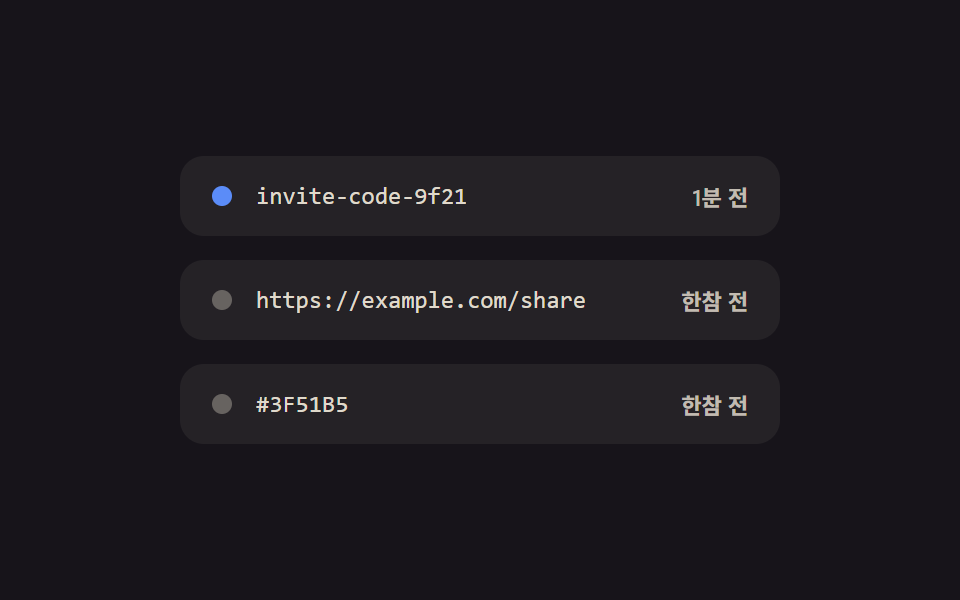
05대기줄 히스토리 — 최근 복사의 시간 차를 상대 시각으로 다시 쓰는 목록
최근 복사들이 줄을 이루는 목록에서, 지금으로부터 각 복사까지의 시간 차를 계속 다시 재어 '방금·1분 전·한참 전' 라벨이 시간 흐름만으로 저절로 갱신됩니다.
쓰임임시 저장 패널, 여러 스니펫을 오가는 작업 화면
data-basedata-statesetAttribute
<main class="stage">
<ul class="list" id="list">
  <li class="row" data-base="0">
    <span class="dot" data-dot></span>
    <span class="text">invite-code-9f21</span>
    <span class="label" data-label>방금</span>
  </li>
  <li class="row" data-base="50000">
    <span class="dot" data-dot></span>
    <span class="text">https://example.com/share</span>
    <span class="label" data-label>1분 전</span>
  </li>
  <li class="row" data-base="170000">
    <span class="dot" data-dot></span>
    <span class="text">#3F51B5</span>
    <span class="label" data-label>한참 전</span>
  </li>
</ul>
</main>
@use "../../../../site/static/demo-tokens" as *;
@include stage($stage-ink);
.list {
list-style: none;
margin: 0;
padding: 0;
display: flex;
flex-direction: column;
gap: $sp-3;
width: 300px;
}
.row {
display: flex;
align-items: center;
gap: $sp-3;
background: rgba($subject-cream, .06);
border-radius: $r-control;
padding: $sp-3 $sp-4;
}
.dot {
width: 10px;
height: 10px;
border-radius: $r-pill;
flex: none;
background: rgba($subject-cream, .3);
transition: background $dur-quick $ease-out;
}
.dot[data-state="now"] {
background: $subject-blue;
}
.dot[data-state="minute"] {
background: $subject-blue-light;
}
.dot[data-state="old"] {
background: rgba($subject-cream, .3);
}
.text {
flex: 1;
min-width: 0;
overflow: hidden;
text-overflow: ellipsis;
white-space: nowrap;
font-family: "SFMono-Regular", Consolas, monospace;
font-size: 12px;
color: rgba($subject-cream, .86);
}
.label {
flex: none;
font-family: -apple-system, "Segoe UI", "Noto Sans KR", sans-serif;
font-size: 11px;
font-weight: 600;
color: rgba($subject-cream, .72);
}
@media (max-width: 340px) {
.list {
width: 260px;
}
.text {
font-size: 11px;
}
}
@media (prefers-reduced-motion: reduce) {
.dot {
transition: none;
}
}html, body {
margin: 0;
overflow: hidden;
}
.stage {
box-sizing: border-box;
min-height: 100vh;
display: grid;
place-items: center;
margin: 0;
background: #17141a;
font-family: -apple-system, "Segoe UI", "Noto Sans KR", sans-serif;
padding: clamp(8px, 4vw, 24px);
}
.list {
list-style: none;
margin: 0;
padding: 0;
display: flex;
flex-direction: column;
gap: 12px;
width: 300px;
}
.row {
display: flex;
align-items: center;
gap: 12px;
background: rgba(255, 247, 230, 0.06);
border-radius: 12px;
padding: 12px 16px;
}
.dot {
width: 10px;
height: 10px;
border-radius: 999px;
flex: none;
background: rgba(255, 247, 230, 0.3);
transition: background 220ms ease-out;
}
.dot[data-state=now] {
background: #2f6df6;
}
.dot[data-state=minute] {
background: #5b8cf8;
}
.dot[data-state=old] {
background: rgba(255, 247, 230, 0.3);
}
.text {
flex: 1;
min-width: 0;
overflow: hidden;
text-overflow: ellipsis;
white-space: nowrap;
font-family: "SFMono-Regular", Consolas, monospace;
font-size: 12px;
color: rgba(255, 247, 230, 0.86);
}
.label {
flex: none;
font-family: -apple-system, "Segoe UI", "Noto Sans KR", sans-serif;
font-size: 11px;
font-weight: 600;
color: rgba(255, 247, 230, 0.72);
}
@media (max-width: 340px) {
.list {
width: 260px;
}
.text {
font-size: 11px;
}
}
@media (prefers-reduced-motion: reduce) {
.dot {
transition: none;
}
}// 대기줄 히스토리 — 최근 복사 3건이 줄을 이루고, 지금으로부터 각 항목까지의 시간 차를
// 매 프레임 다시 재어 '방금·1분 전·한참 전' 라벨과 점 색을 시간 흐름만으로 갱신한다.
// 데모 캡처 시간이 짧아 가짜 시계 배속(TIME_SCALE)으로 몇 분이 몇 초 안에 흐르게 만든다.
// 계산 겹: 항목별 기준 경과시간 + 배속×경과 실시간 = 가짜 경과시간 → 라벨 재계산.
// 자동 시연만, 실사용자 리스너 없음. 실 클립보드 API 호출 없음 — 상태는 시뮬레이션.
(function () {
var rows = Array.prototype.slice.call(document.querySelectorAll('#list .row'));
if (!rows.length) return;
var items = rows.map(function (row) {
return {
row: row,
base: parseInt(row.getAttribute('data-base'), 10) || 0,
dot: row.querySelector('[data-dot]'),
label: row.querySelector('[data-label]')
};
});
var TIME_SCALE = 60;
var JUST_NOW_MS = 15000;
var A_MINUTE_MS = 120000;
function bucket(ms) {
if (ms < JUST_NOW_MS) return 'now';
if (ms < A_MINUTE_MS) return 'minute';
return 'old';
}
function labelFor(b) {
if (b === 'now') return '방금';
if (b === 'minute') return '1분 전';
return '한참 전';
}
function apply(elapsedRealMs) {
items.forEach(function (item) {
var fake = item.base + elapsedRealMs * TIME_SCALE;
var b = bucket(fake);
item.label.textContent = labelFor(b);
item.dot.setAttribute('data-state', b);
});
}
apply(0);
var CYCLE_MS = 2000;
var reduce = window.matchMedia('(prefers-reduced-motion: reduce)').matches;
if (reduce) return;
var start = null;
function loop(ts) {
if (start === null) start = ts;
var t = (ts - start) % CYCLE_MS;
apply(t);
requestAnimationFrame(loop);
}
requestAnimationFrame(loop);
})();import { useEffect, useRef } from "react";
import styles from "./CopyQueueHistories.module.scss";
// 대기줄 히스토리 — 최근 복사 3건이 줄을 이루고, 지금으로부터 각 항목까지의 시간 차를
// 매 프레임 다시 재어 '방금·1분 전·한참 전' 라벨과 점 색을 시간 흐름만으로 갱신한다.
// 데모 캡처 시간이 짧아 가짜 시계 배속(TIME_SCALE)으로 몇 분이 몇 초 안에 흐르게 만든다.
// 계산 겹: 항목별 기준 경과시간 + 배속×경과 실시간 = 가짜 경과시간 → 라벨 재계산.
// 자동 시연만, 실사용자 리스너 없음. 실 클립보드 API 호출 없음 — 상태는 시뮬레이션.
const TIME_SCALE = 60;
const JUST_NOW_MS = 15000;
const A_MINUTE_MS = 120000;
const CYCLE_MS = 2000;
// ambient 가 얇아 배열 ref 의 "possibly null" 을 못 좁힌다 — 로컬 Box 로 우회
type Box<T> = { current: T };
type Bucket = "now" | "minute" | "old";
const ENTRIES: { base: number; text: string }[] = [
{ base: 0, text: "invite-code-9f21" },
{ base: 50000, text: "https://example.com/share" },
{ base: 170000, text: "#3F51B5" },
];
function bucket(ms: number): Bucket {
if (ms < JUST_NOW_MS) return "now";
if (ms < A_MINUTE_MS) return "minute";
return "old";
}
function labelFor(b: Bucket) {
if (b === "now") return "방금";
if (b === "minute") return "1분 전";
return "한참 전";
}
export default function CopyQueueHistories() {
const dotRefs = useRef<(HTMLSpanElement | null)[]>([]) as unknown as Box<(HTMLSpanElement | null)[]>;
const labelRefs = useRef<(HTMLSpanElement | null)[]>([]) as unknown as Box<(HTMLSpanElement | null)[]>;
useEffect(() => {
function apply(elapsedRealMs: number) {
ENTRIES.forEach((entry, i) => {
const dot = dotRefs.current[i];
const label = labelRefs.current[i];
if (!dot || !label) return;
const fake = entry.base + elapsedRealMs * TIME_SCALE;
const b = bucket(fake);
label.textContent = labelFor(b);
dot.setAttribute("data-state", b);
});
}
apply(0);
const reduce = window.matchMedia("(prefers-reduced-motion: reduce)").matches;
if (reduce) return;
let start: number | null = null;
let raf = 0;
function loop(ts: number) {
if (start === null) start = ts;
const t = (ts - start) % CYCLE_MS;
apply(t);
raf = requestAnimationFrame(loop);
}
raf = requestAnimationFrame(loop);
return () => cancelAnimationFrame(raf);
}, []);
return (
<div className={styles.stage}>
<ul className={styles.list}>
{ENTRIES.map((entry, i) => (
<li key={entry.text} className={styles.row}>
<span
ref={(el: HTMLSpanElement | null) => {
dotRefs.current[i] = el;
}}
className={styles.dot}
/>
<span className={styles.text}>{entry.text}</span>
<span
ref={(el: HTMLSpanElement | null) => {
labelRefs.current[i] = el;
}}
className={styles.label}
>
{labelFor(bucket(entry.base))}
</span>
</li>
))}
</ul>
</div>
);
}05 대기줄 히스토리 — 최근 복사의 시간 차를 상대 시각으로 다시 쓰는 목록 — 측정 누적면적 0.401% · 움직인 프레임 18/23GODRICH 원작 · zip 에 SCSS·React 포함 · 클립보드 복사 버튼 UI 9종 — 코드·링크·텍스트 복사 피드백까지
이 데모가 속한 글
 클립보드 복사 버튼 UI 9종 — 코드·링크·텍스트 복사 피드백까지아홉 개 중 하나는 복사 결과를 버튼 두 개가 나눠 갖고, 하나는 복사된 글자 수를 세어 자릿수만큼 표시를 채우고, 또 하나는 실패한 복사를 되돌리는 시간을 스스로 잽니다. 이 클립보드 복사 버튼 아홉 개는 실제 n 이 글의 데모 전부 보기