08호버 캡션 오버레이
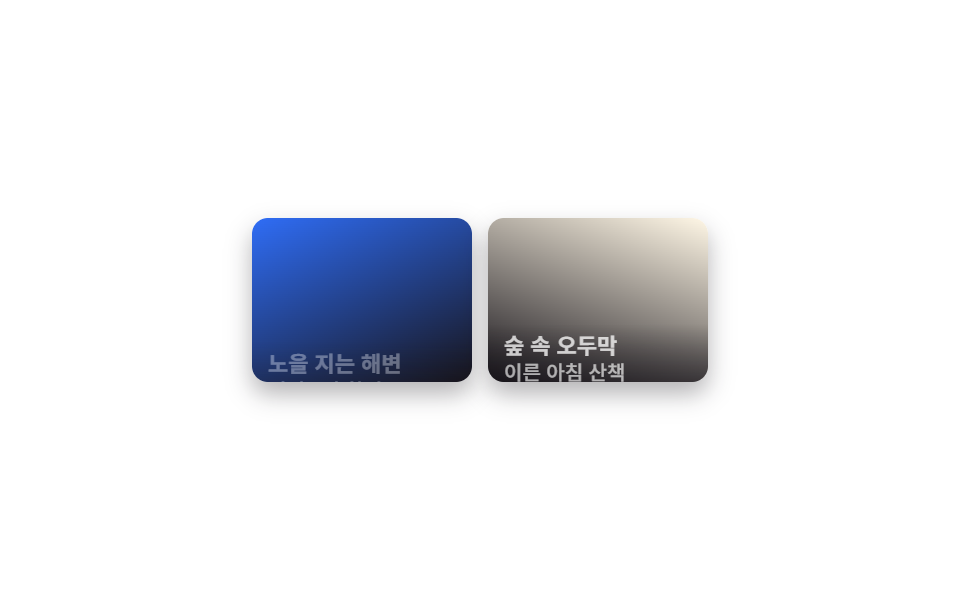
평소엔 사진 아래쪽에 살짝 가려져 있던 반투명 띠가 호버하면 translateY로 완전히 올라오면서 제목과 위치 같은 캡션 글자가 함께 드러납니다.
쓰임여행 사진마다 장소 이름을 붙이는 갤러리, 작품마다 제목을 다는 포트폴리오
translateY hover반투명 그러데이션opacity
<main class="stage">
  <ul class="gallery is-demo" aria-label="사진 갤러리">
    <li class="tile" tabindex="0">
      <span class="tile__media" aria-hidden="true"></span>
      <div class="tile__caption">
        <h3 class="tile__title">노을 지는 해변</h3>
        <p class="tile__desc">저녁 6시 촬영</p>
      </div>
    </li>
    <li class="tile" tabindex="0">
      <span class="tile__media tile__media--b" aria-hidden="true"></span>
      <div class="tile__caption">
        <h3 class="tile__title">숲 속 오두막</h3>
        <p class="tile__desc">이른 아침 산책</p>
      </div>
    </li>
  </ul>
</main>
@use "../../../../site/static/demo-tokens" as *;
$duration: $dur-base; // 캡션이 올라오는 시간
$easing: $ease-out;
$color: $subject-blue; // 사진 그러데이션
@include stage($stage-paper);
.stage { padding: clamp(8px, 2.4vw, 16px); }
.gallery {
display: grid;
grid-template-columns: repeat(2, 1fr);
gap: $sp-2;
list-style: none;
margin: 0;
padding: 0;
width: 228px;
max-width: 100%;
}
.tile {
position: relative;
aspect-ratio: 4 / 3;
border-radius: $r-sm;
overflow: hidden;
outline: none;
cursor: pointer;
box-shadow: $shadow-press;
}
.tile__media {
position: absolute; inset: 0;
background: linear-gradient(155deg, $color 0%, $stage-ink 100%);
}
.tile__media--b { background: linear-gradient(200deg, $subject-cream 0%, $stage-ink 100%); }
.tile__caption {
position: absolute; left: 0; right: 0; bottom: 0;
padding: $sp-1 $sp-2;
background: linear-gradient(0deg, rgba($stage-ink, .88), rgba($stage-ink, 0));
transform: translateY(64%);
opacity: 0;
transition: transform $duration $easing, opacity $duration $easing;
}
.tile__title { margin: 0; font-weight: 700; font-size: clamp(10px, 3vw, 11px); line-height: 1.3; font-family: inherit; color: $stage-paper; }
.tile__desc { margin: 0; font-weight: 500; font-size: clamp(9px, 2.6vw, 10px); line-height: 1.3; font-family: inherit; color: rgba($stage-paper, .85); }
.tile:hover .tile__caption, .tile:focus-visible .tile__caption, .tile:active .tile__caption {
transform: translateY(0);
opacity: 1;
}
.gallery.is-demo .tile__caption { animation: caption-loop $dur-loop $easing infinite; }
.gallery.is-demo .tile:nth-child(2) .tile__caption { animation-delay: -1s; }
@keyframes caption-loop {
0%, 10% { transform: translateY(64%); opacity: 0; }
40%, 60% { transform: translateY(0); opacity: 1; }
100% { transform: translateY(64%); opacity: 0; }
}
@media (hover: none) {
.tile:active .tile__caption { transform: translateY(0); opacity: 1; }
}
@media (prefers-reduced-motion: reduce) {
.tile__caption { transition: none; transform: translateY(0); opacity: 1; }
.gallery.is-demo .tile__caption { animation: none; }
}html, body {
margin: 0;
overflow: hidden;
}
.stage {
box-sizing: border-box;
min-height: 100vh;
display: grid;
place-items: center;
margin: 0;
background: #ffffff;
font-family: -apple-system, "Segoe UI", "Noto Sans KR", sans-serif;
padding: clamp(8px, 4vw, 24px);
}
.stage {
padding: clamp(8px, 2.4vw, 16px);
}
.gallery {
display: grid;
grid-template-columns: repeat(2, 1fr);
gap: 8px;
list-style: none;
margin: 0;
padding: 0;
width: 228px;
max-width: 100%;
}
.tile {
position: relative;
aspect-ratio: 4/3;
border-radius: 8px;
overflow: hidden;
outline: none;
cursor: pointer;
box-shadow: 0 6px 12px rgba(23, 20, 26, 0.32);
}
.tile__media {
position: absolute;
inset: 0;
background: linear-gradient(155deg, #2f6df6 0%, #17141a 100%);
}
.tile__media--b {
background: linear-gradient(200deg, #fff7e6 0%, #17141a 100%);
}
.tile__caption {
position: absolute;
left: 0;
right: 0;
bottom: 0;
padding: 4px 8px;
background: linear-gradient(0deg, rgba(23, 20, 26, 0.88), rgba(23, 20, 26, 0));
transform: translateY(64%);
opacity: 0;
transition: transform 300ms ease-out, opacity 300ms ease-out;
}
.tile__title {
margin: 0;
font-weight: 700;
font-size: clamp(10px, 3vw, 11px);
line-height: 1.3;
font-family: inherit;
color: #ffffff;
}
.tile__desc {
margin: 0;
font-weight: 500;
font-size: clamp(9px, 2.6vw, 10px);
line-height: 1.3;
font-family: inherit;
color: rgba(255, 255, 255, 0.85);
}
.tile:hover .tile__caption, .tile:focus-visible .tile__caption, .tile:active .tile__caption {
transform: translateY(0);
opacity: 1;
}
.gallery.is-demo .tile__caption {
animation: caption-loop 2s ease-out infinite;
}
.gallery.is-demo .tile:nth-child(2) .tile__caption {
animation-delay: -1s;
}
@keyframes caption-loop {
0%, 10% {
transform: translateY(64%);
opacity: 0;
}
40%, 60% {
transform: translateY(0);
opacity: 1;
}
100% {
transform: translateY(64%);
opacity: 0;
}
}
@media (hover: none) {
.tile:active .tile__caption {
transform: translateY(0);
opacity: 1;
}
}
@media (prefers-reduced-motion: reduce) {
.tile__caption {
transition: none;
transform: translateY(0);
opacity: 1;
}
.gallery.is-demo .tile__caption {
animation: none;
}
}import type { CSSProperties } from "react";
import styles from "./HoverCaptionGallery.module.scss";
export type CaptionTile = { title: string; desc: string };
export type HoverCaptionGalleryProps = {
items?: CaptionTile[];
duration?: number;
easing?: string;
color?: string;
};
const DEFAULT_ITEMS: CaptionTile[] = [
{ title: "Sunset beach", desc: "Shot at 6 PM" },
{ title: "Cabin in the woods", desc: "Early morning walk" },
];
type Vars = CSSProperties & { "--duration"?: string; "--easing"?: string; "--color"?: string };
/** 평소엔 살짝 가려진 캡션 띠가 호버하면 translateY 로 완전히 올라오며 제목·설명이 드러난다 */
export default function HoverCaptionGallery({
items = DEFAULT_ITEMS,
duration = 300,
easing = "ease-out",
color = "#2f6df6",
}: HoverCaptionGalleryProps) {
const vars: Vars = { "--duration": `${duration}ms`, "--easing": easing, "--color": color };
return (
<ul className={styles.gallery} style={vars} aria-label="Photo gallery">
{items.map((it, i) => (
<li key={i} className={styles.tile} tabIndex={0}>
<span className={styles.media} aria-hidden="true" />
<div className={styles.caption}>
<h3 className={styles.title}>{it.title}</h3>
<p className={styles.desc}>{it.desc}</p>
</div>
</li>
))}
</ul>
);
}08 호버 캡션 오버레이 — 측정 누적면적 4.308% · 움직인 프레임 18/23GODRICH 원작 · zip 에 SCSS·React 포함 · 이미지 갤러리 CSS 9종 — 메이슨리부터 라이트박스까지
이 데모가 속한 글
 이미지 갤러리 CSS 9종 — 메이슨리부터 라이트박스까지이미지 갤러리 CSS는 사진 여러 장을 그리드나 워터폴 모양으로 배치하고 호버·클릭에 반응하게 만드는 레이아웃 기법입니다. 핀터레스트에 저장해 둔 그 갤러리처럼 예쁘지만, 막상 코드로 옮기려면 그리드 수식과 크롭 처 이 글의 데모 전부 보기