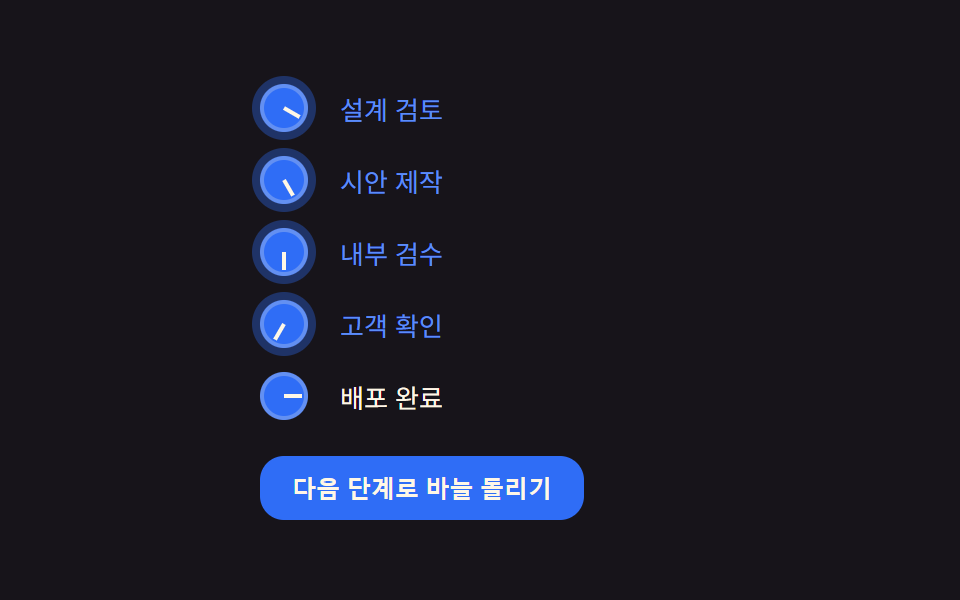
01다이얼 회전 마커 — 항목 번호에 각도 값을 쌓아 불릿이 시계처럼 도는 방식
불릿 안의 바늘이 항목 번호에 비례해 각도 값을 쌓아가며 돌아, 목록 전체가 하나의 다이얼 세트처럼 보입니다.
쓰임단계 안내 목차, 사용법 순서 리스트
DIAL_STEP_DEGrotate$subject-blue
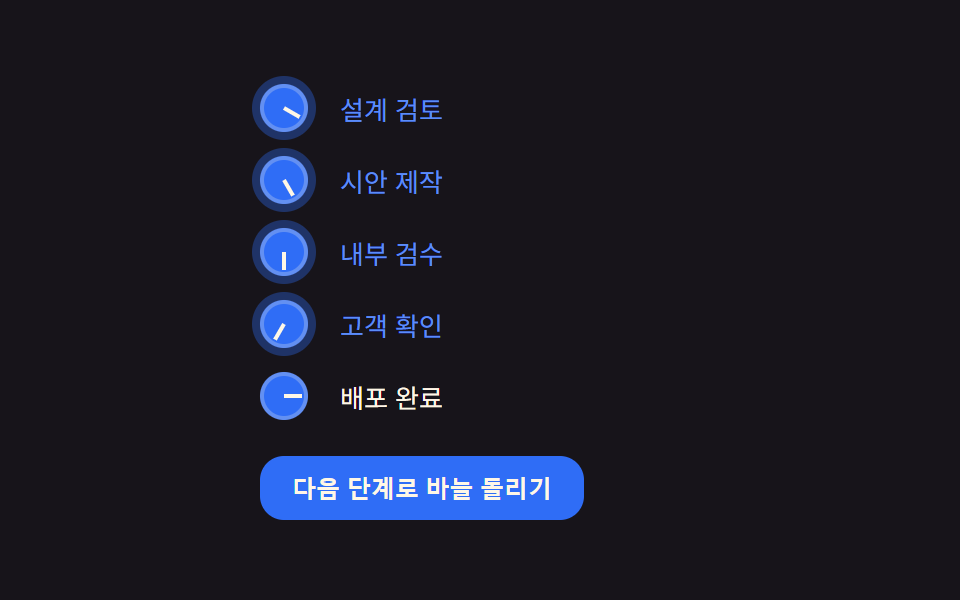
<main class="stage">
<div class="wrap is-demo" id="wrap">
  <ol class="dial-list" id="list">
    <li style="--i:0">설계 검토</li>
    <li style="--i:1">시안 제작</li>
    <li style="--i:2">내부 검수</li>
    <li style="--i:3">고객 확인</li>
    <li style="--i:4">배포 완료</li>
  </ol>
  <button class="advance" id="advance" type="button">다음 단계로 바늘 돌리기</button>
</div>
</main>
@use "../../../../site/static/demo-tokens" as *;
// 계산 겹은 index.html 의 turns[i] * DIAL_STEP_DEG * (i+1) 누적식에 있다 — 여기는 다이얼 모양·판만 맡는다.
// ::marker 는 transform(rotate) 을 지원하지 않아 바늘을 돌릴 수 없다 (::marker 로 되는 건 color·content·font 뿐).
// 그래서 list-style:none 으로 네이티브 마커를 지우고 ::before(다이얼 원판)·::after(바늘) 로 대체한다.
@include stage($stage-ink);
.dial-list {
list-style: none;
margin: 0;
padding: 0;
display: flex;
flex-direction: column;
gap: $sp-2;
width: 220px;
}
.dial-list li {
position: relative;
padding-left: 40px;
min-height: 28px;
display: flex;
align-items: center;
color: $subject-cream;
font-size: 13px;
transition: color $dur-quick $ease-out;
}
.dial-list li::before {
content: '';
position: absolute;
left: 0;
top: 50%;
width: 24px;
height: 24px;
margin-top: -12px;
border-radius: 50%;
background: $subject-blue;
box-shadow: inset 0 0 0 2px rgba($subject-cream, .25);
}
.dial-list li::after {
content: '';
position: absolute;
left: 12px;
top: 50%;
width: 9px;
height: 2px;
margin-top: -1px;
background: $subject-cream;
transform-origin: left center; // 바늘의 회전축 — 다이얼 중심에 고정된 채 끝만 돈다
transform: rotate(var(--angle, 0deg));
transition: transform $dur-quick $ease-out;
}
.dial-list li.is-active {
color: $subject-blue-light;
}
.dial-list li.is-active::before {
box-shadow: inset 0 0 0 2px rgba($subject-cream, .25), 0 0 0 4px rgba($subject-blue, .35);
}
.advance {
appearance: none;
border: none;
margin-top: $sp-4;
padding: $sp-2 $sp-4;
border-radius: $r-control;
background: $subject-blue;
color: $subject-cream;
font-size: 12px;
font-weight: 600;
cursor: pointer;
transition: transform $dur-instant $ease-out;
&:hover { transform: translateY(-1px); }
&:active { transform: scale(.96); }
&:focus-visible { outline: 2px solid $subject-blue-light; outline-offset: 2px; }
}
@media (max-width: 340px) {
.dial-list { width: 180px; gap: $sp-1; }
.dial-list li { font-size: 11px; min-height: 22px; padding-left: 32px; }
.dial-list li::before { width: 20px; height: 20px; margin-top: -10px; }
.dial-list li::after { left: 10px; }
.advance { margin-top: $sp-2; padding: $sp-1 $sp-3; }
}
@media (prefers-reduced-motion: reduce) {
.dial-list li::after { transition: none; }
.advance { transition: none; }
}html, body {
margin: 0;
overflow: hidden;
}
.stage {
box-sizing: border-box;
min-height: 100vh;
display: grid;
place-items: center;
margin: 0;
background: #17141a;
font-family: -apple-system, "Segoe UI", "Noto Sans KR", sans-serif;
padding: clamp(8px, 4vw, 24px);
}
.dial-list {
list-style: none;
margin: 0;
padding: 0;
display: flex;
flex-direction: column;
gap: 8px;
width: 220px;
}
.dial-list li {
position: relative;
padding-left: 40px;
min-height: 28px;
display: flex;
align-items: center;
color: #fff7e6;
font-size: 13px;
transition: color 220ms ease-out;
}
.dial-list li::before {
content: "";
position: absolute;
left: 0;
top: 50%;
width: 24px;
height: 24px;
margin-top: -12px;
border-radius: 50%;
background: #2f6df6;
box-shadow: inset 0 0 0 2px rgba(255, 247, 230, 0.25);
}
.dial-list li::after {
content: "";
position: absolute;
left: 12px;
top: 50%;
width: 9px;
height: 2px;
margin-top: -1px;
background: #fff7e6;
transform-origin: left center;
transform: rotate(var(--angle, 0deg));
transition: transform 220ms ease-out;
}
.dial-list li.is-active {
color: #5b8cf8;
}
.dial-list li.is-active::before {
box-shadow: inset 0 0 0 2px rgba(255, 247, 230, 0.25), 0 0 0 4px rgba(47, 109, 246, 0.35);
}
.advance {
appearance: none;
border: none;
margin-top: 16px;
padding: 8px 16px;
border-radius: 12px;
background: #2f6df6;
color: #fff7e6;
font-size: 12px;
font-weight: 600;
cursor: pointer;
transition: transform 140ms ease-out;
}
.advance:hover {
transform: translateY(-1px);
}
.advance:active {
transform: scale(0.96);
}
.advance:focus-visible {
outline: 2px solid #5b8cf8;
outline-offset: 2px;
}
@media (max-width: 340px) {
.dial-list {
width: 180px;
gap: 4px;
}
.dial-list li {
font-size: 11px;
min-height: 22px;
padding-left: 32px;
}
.dial-list li::before {
width: 20px;
height: 20px;
margin-top: -10px;
}
.dial-list li::after {
left: 10px;
}
.advance {
margin-top: 8px;
padding: 4px 12px;
}
}
@media (prefers-reduced-motion: reduce) {
.dial-list li::after {
transition: none;
}
.advance {
transition: none;
}
}(function () {
var DIAL_STEP_DEG = 30; // 클릭 한 번이 바늘에 더하는 각도 — 변형 01 목표: 30 → 15
var reduce = window.matchMedia('(prefers-reduced-motion: reduce)').matches;
var wrap = document.getElementById('wrap');
var list = document.getElementById('list');
var items = Array.prototype.slice.call(list.querySelectorAll('li'));
var button = document.getElementById('advance');
var isDemo = true;
// 계산 겹: 항목 i 의 바늘 각도는 그 항목이 지금까지 지나온 횟수(turns[i]) 에 자기 번호(i+1) 를 곱해 쌓인다.
// 뒤 항목일수록 같은 한 번의 전진에도 더 큰 각도를 받는다 — 단순 지연이 아니라 번호에 비례한 누적이다.
var turns = items.map(function () { return 0; });
function render() {
items.forEach(function (el, i) {
var deg = turns[i] * DIAL_STEP_DEG * (i + 1);
el.style.setProperty('--angle', (deg % 360) + 'deg');
});
}
function human() { if (isDemo) { wrap.classList.remove('is-demo'); isDemo = false; } }
var active = 0;
function advance() {
turns[active] += 1;
items[active].classList.add('is-active');
setTimeout(function () { items[active] && items[active].classList.remove('is-active'); }, 260);
active = (active + 1) % items.length;
render();
}
button.addEventListener('click', function () { human(); advance(); });
var last = 0;
var STEP_MS = 480;
function loop(ts) {
if (!last) last = ts;
if (isDemo) {
if (reduce) {
turns = items.map(function (_, i) { return i + 1; }); // 계산은 유지, 시간 축소 대신 종료 상태로 즉시 고정
render();
} else if (ts - last >= STEP_MS) {
last = ts;
advance();
}
}
requestAnimationFrame(loop);
}
requestAnimationFrame(loop);
render();
})();// DialRotateMarker — vanilla 판(run/373/demo/01-list-style-marker-dial-rotate/index.html) 의 React 포트.
// ::marker 는 transform(rotate) 을 지원하지 않아 list-style:none 으로 지우고 ::before(다이얼 원판)·
// ::after(바늘) 로 마커를 다시 그린다. 바늘 각도는 turns[i] * DIAL_STEP_DEG * (i+1) 로 항목 번호에 비례해 쌓인다.
import { useEffect, useRef } from "react";
import styles from "./DialRotateMarker.module.scss";
type Box<T> = { current: T };
const DIAL_STEP_DEG = 30; // 클릭 한 번이 바늘에 더하는 각도 — 변형 01 목표: 30 → 15
const STEP_MS = 480; // 자동 루프에서 한 단계 전진하는 간격
const STEPS = ["설계 검토", "시안 제작", "내부 검수", "고객 확인", "배포 완료"];
export default function DialRotateMarker() {
const rootRef = useRef(null) as unknown as Box<HTMLDivElement>;
const listRef = useRef(null) as unknown as Box<HTMLOListElement>;
const rafRef = useRef(0) as unknown as Box<number>;
useEffect(() => {
const reduce = window.matchMedia("(prefers-reduced-motion: reduce)").matches;
const root = rootRef.current;
const list = listRef.current;
if (!root || !list) return;
const items = Array.prototype.slice.call(list.querySelectorAll("li"));
let isDemo = true;
// 계산 겹: 항목 i 의 바늘 각도는 그 항목이 지금까지 지나온 횟수(turns[i]) 에 자기 번호(i+1) 를 곱해 쌓인다.
// 뒤 항목일수록 같은 한 번의 전진에도 더 큰 각도를 받는다 — 단순 지연이 아니라 번호에 비례한 누적이다.
let turns = items.map(function () { return 0; });
function render() {
items.forEach(function (el: HTMLElement, i: number) {
const deg = turns[i] * DIAL_STEP_DEG * (i + 1);
el.style.setProperty("--angle", (deg % 360) + "deg");
});
}
function human() { if (isDemo) { root!.classList.remove(styles.isDemo); isDemo = false; } }
let active = 0;
function advance() {
turns[active] += 1;
items[active].classList.add("is-active");
setTimeout(function () { items[active] && items[active].classList.remove("is-active"); }, 260);
active = (active + 1) % items.length;
render();
}
function onClick() { human(); advance(); }
root!.addEventListener("click", onClick);
let last = 0;
function loop(ts: number) {
if (!last) last = ts;
if (isDemo) {
if (reduce) {
turns = items.map(function (_: HTMLElement, i: number) { return i + 1; }); // 계산은 유지, 종료 상태로 즉시 고정
render();
} else if (ts - last >= STEP_MS) {
last = ts;
advance();
}
}
rafRef.current = requestAnimationFrame(loop);
}
rafRef.current = requestAnimationFrame(loop);
render();
return () => {
root!.removeEventListener("click", onClick);
cancelAnimationFrame(rafRef.current);
};
}, []);
return (
<main className={styles.stage}>
<div className={styles.wrap + " " + styles.isDemo} ref={rootRef}>
<ol className={styles.dialList} ref={listRef}>
{STEPS.map(function (s, i) { return <li key={s} style={{ ["--i" as string]: String(i) } as Record<string, string>}>{s}</li>; })}
</ol>
<button className={styles.advance} type="button">다음 단계로 바늘 돌리기</button>
</div>
</main>
);
}01 다이얼 회전 마커 — 항목 번호에 각도 값을 쌓아 불릿이 시계처럼 도는 방식 — 측정 누적면적 2.805% · 움직인 프레임 17/23GODRICH 원작 · zip 에 SCSS·React 포함 · css 리스트 디자인 9종 — 마커가 계산으로 움직이는 목록 꾸미기
이 데모가 속한 글
 css 리스트 디자인 9종 — 마커가 계산으로 움직이는 목록 꾸미기아홉 가지 리스트 마커 중 하나는 다이얼 각도 값이 항목마다 쌓이며 불릿이 시계처럼 돌고, 하나는 카운터 값이 자릿수별로 분해되어 숫자가 주행계처럼 굴러가고, 하나는 소수 판정 값에 따라 그 번호의 마커만 글로우가 이 글의 데모 전부 보기