02훑고 지나가는 검색 0건
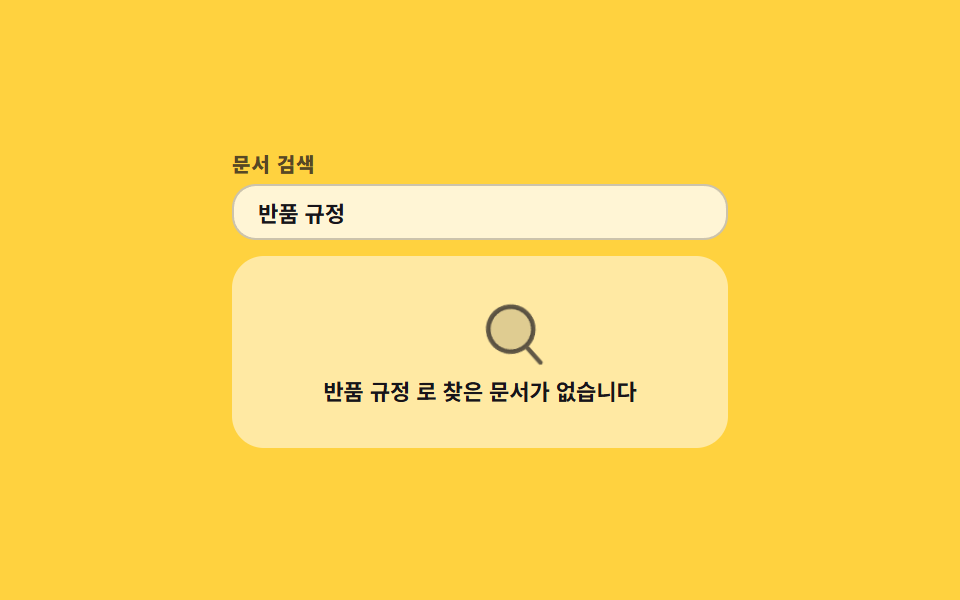
글자를 치면 목록 줄이 실제로 줄어들고, 남는 줄이 없으면 돋보기가 빈 칸을 좌우로 훑는 카드가 대신 나옵니다.
쓰임검색 결과가 0건일 때 '찾고는 있었다'를 보여 주고 검색어를 고치게 만들 때
translateXrotatehidden
<main class="stage">
  <section class="sw is-demo">
    <label class="sw__label" for="sw-q">문서 검색</label>
    <input class="sw__input" id="sw-q" type="search" value="반품 규정" autocomplete="off">
    <div class="sw__panel">
      <ul class="sw__rows" id="sw-rows">
        <li class="sw__row" data-name="배송 정책">배송 정책</li>
        <li class="sw__row" data-name="교환 안내">교환 안내</li>
        <li class="sw__row" data-name="결제 수단">결제 수단</li>
      </ul>
      <div class="sw__empty" id="sw-empty">
        <span class="sw__lens" aria-hidden="true"><svg viewBox="0 0 256 256" width="1em" height="1em"><g fill="currentColor"><path d="M192 112a80 80 0 1 1-80-80a80 80 0 0 1 80 80" opacity=".2"/><path d="m229.66 218.34l-50.06-50.06a88.21 88.21 0 1 0-11.32 11.31l50.06 50.07a8 8 0 0 0 11.32-11.32M40 112a72 72 0 1 1 72 72a72.08 72.08 0 0 1-72-72"/></g></svg></span>
        <p class="sw__msg" id="sw-msg" data-hit="{q} 로 찾은 문서가 없습니다" aria-live="polite">찾은 문서가 없습니다</p>
      </div>
    </div>
  </section>
</main>
@use "../../../../site/static/demo-tokens" as *;
$duration: $dur-loop;
$easing: ease-in-out;
$color: $subject-ink;
@include stage($stage-yellow);
.sw {
box-sizing: border-box;
width: min(248px, 86vw);
display: flex;
flex-direction: column;
gap: $sp-1;
font-family: -apple-system, "Segoe UI", "Noto Sans KR", sans-serif;
color: $color;
}
.sw__label {
font-size: 10px;
line-height: 12px;
font-weight: 800;
letter-spacing: .04em;
color: rgba(23, 20, 26, .72); // AA 4.5 (blog-design)
}
.sw__input {
box-sizing: border-box;
width: 100%;
height: 28px;
margin: 0;
padding: 0 $sp-3;
border: 1px solid rgba(23, 20, 26, .22);
border-radius: $r-control;
background: rgba(255, 255, 255, .78);
color: $color;
font-family: inherit;
font-size: 11px;
font-weight: 600;
}
.sw__input:focus-visible { outline: 2px solid $color; outline-offset: 1px; }
.sw__panel {
position: relative;
box-sizing: border-box;
height: 96px;
margin-top: $sp-1;
padding: $sp-2;
border-radius: $r-card;
background: rgba(255, 255, 255, .52);
overflow: hidden;
}
.sw__rows {
margin: 0;
padding: 0;
list-style: none;
display: flex;
flex-direction: column;
gap: $sp-2;
}
.sw__row[hidden] { display: none; }
.sw__row {
height: 20px;
padding: 0 $sp-2;
display: flex;
align-items: center;
border-radius: $r-sm;
background: rgba(255, 255, 255, .82);
font-size: 11px;
font-weight: 600;
}
.sw__empty {
position: absolute;
inset: 0;
display: flex;
flex-direction: column;
align-items: center;
justify-content: center;
gap: $sp-1;
}
.sw__empty[hidden] { display: none; }
.sw__lens {
display: block;
font-size: 36px;
line-height: 0;
color: rgba(23, 20, 26, .68);
}
.sw__msg {
margin: 0;
padding: 0 $sp-2;
font-size: 11px;
line-height: 14px;
font-weight: 700;
text-align: center;
}
// ── 자동 루프: 렌즈가 오른쪽 끝까지 훑고 같은 길로 되돌아온다. 끝 프레임이 첫 프레임과 같다 ──
.sw.is-demo .sw__lens { animation: sw-sweep $duration $easing infinite; }
@keyframes sw-sweep {
0%, 100% { transform: translateX(-62px) rotate(-12deg); }
50% { transform: translateX(62px) rotate(12deg); }
}
@media (prefers-reduced-motion: reduce) {
.sw.is-demo .sw__lens { animation: none !important; }
}html, body {
margin: 0;
overflow: hidden;
}
.stage {
box-sizing: border-box;
min-height: 100vh;
display: grid;
place-items: center;
margin: 0;
background: #ffd23f;
font-family: -apple-system, "Segoe UI", "Noto Sans KR", sans-serif;
padding: clamp(8px, 4vw, 24px);
}
.sw {
box-sizing: border-box;
width: min(248px, 86vw);
display: flex;
flex-direction: column;
gap: 4px;
font-family: -apple-system, "Segoe UI", "Noto Sans KR", sans-serif;
color: #17141a;
}
.sw__label {
font-size: 10px;
line-height: 12px;
font-weight: 800;
letter-spacing: 0.04em;
color: rgba(23, 20, 26, 0.72);
}
.sw__input {
box-sizing: border-box;
width: 100%;
height: 28px;
margin: 0;
padding: 0 12px;
border: 1px solid rgba(23, 20, 26, 0.22);
border-radius: 12px;
background: rgba(255, 255, 255, 0.78);
color: #17141a;
font-family: inherit;
font-size: 11px;
font-weight: 600;
}
.sw__input:focus-visible {
outline: 2px solid #17141a;
outline-offset: 1px;
}
.sw__panel {
position: relative;
box-sizing: border-box;
height: 96px;
margin-top: 4px;
padding: 8px;
border-radius: 16px;
background: rgba(255, 255, 255, 0.52);
overflow: hidden;
}
.sw__rows {
margin: 0;
padding: 0;
list-style: none;
display: flex;
flex-direction: column;
gap: 8px;
}
.sw__row[hidden] {
display: none;
}
.sw__row {
height: 20px;
padding: 0 8px;
display: flex;
align-items: center;
border-radius: 8px;
background: rgba(255, 255, 255, 0.82);
font-size: 11px;
font-weight: 600;
}
.sw__empty {
position: absolute;
inset: 0;
display: flex;
flex-direction: column;
align-items: center;
justify-content: center;
gap: 4px;
}
.sw__empty[hidden] {
display: none;
}
.sw__lens {
display: block;
font-size: 36px;
line-height: 0;
color: rgba(23, 20, 26, 0.68);
}
.sw__msg {
margin: 0;
padding: 0 8px;
font-size: 11px;
line-height: 14px;
font-weight: 700;
text-align: center;
}
.sw.is-demo .sw__lens {
animation: sw-sweep 2s ease-in-out infinite;
}
@keyframes sw-sweep {
0%, 100% {
transform: translateX(-62px) rotate(-12deg);
}
50% {
transform: translateX(62px) rotate(12deg);
}
}
@media (prefers-reduced-motion: reduce) {
.sw.is-demo .sw__lens {
animation: none !important;
}
}// 실제 동작: 입력한 글자로 세 줄을 거른다. 남는 줄이 없으면 빈 상태 카드가 대신 나온다.
var card = document.querySelector('.sw');
var q = document.getElementById('sw-q');
var rows = [].slice.call(document.querySelectorAll('.sw__row'));
var empty = document.getElementById('sw-empty');
var msg = document.getElementById('sw-msg');
var NONE = msg.textContent;
function render() {
var v = q.value.trim();
var hit = 0;
rows.forEach(function (r) {
var on = !v || r.dataset.name.indexOf(v) >= 0;
r.hidden = !on;
if (on) hit += 1;
});
empty.hidden = hit > 0;
msg.textContent = v ? msg.dataset.hit.replace('{q}', v) : NONE;
}
q.addEventListener('input', function () { card.classList.remove('is-demo'); render(); });
render();import { useState } from "react";
import type { CSSProperties } from "react";
import styles from "./NoResultsCard.module.scss";
export type NoResultsCardProps = {
label?: string;
rows?: string[];
initialQuery?: string;
none?: string;
noneFor?: string;
duration?: number;
easing?: string;
color?: string;
};
type Vars = CSSProperties & { "--duration"?: string; "--easing"?: string; "--color"?: string };
type ChangeEvt = { target: { value: string } };
export default function NoResultsCard({
label = "Search docs",
rows = ["Shipping policy", "Exchange guide", "Payment methods"],
initialQuery = "return policy",
none = "No documents found",
noneFor = "No documents found for {q}",
duration = 2000,
easing = "ease-in-out",
color = "#17141a",
}: NoResultsCardProps) {
const [q, setQ] = useState(initialQuery);
const [loop, setLoop] = useState(true);
const vars: Vars = { "--duration": `${duration}ms`, "--easing": easing, "--color": color };
const term = q.trim();
const hits = rows.filter((r) => !term || r.toLowerCase().indexOf(term.toLowerCase()) >= 0);
function onInput(e: ChangeEvt) {
setLoop(false);
setQ(e.target.value);
}
return (
<section className={`${styles.sw} ${loop ? styles.isDemo : ""}`} style={vars}>
<label className={styles.label} htmlFor="sw-q">{label}</label>
<input className={styles.input} id="sw-q" type="search" value={q} onChange={onInput} autoComplete="off" />
<div className={styles.panel}>
<ul className={styles.rows}>
{hits.map((r) => <li className={styles.row} key={r}>{r}</li>)}
</ul>
{hits.length === 0 && (
<div className={styles.empty}>
<span className={styles.lens} aria-hidden="true">
<svg viewBox="0 0 256 256" width="1em" height="1em">
<g fill="currentColor">
<path d="M192 112a80 80 0 1 1-80-80a80 80 0 0 1 80 80" opacity=".2" />
<path d="m229.66 218.34l-50.06-50.06a88.21 88.21 0 1 0-11.32 11.31l50.06 50.07a8 8 0 0 0 11.32-11.32M40 112a72 72 0 1 1 72 72a72.08 72.08 0 0 1-72-72" />
</g>
</svg>
</span>
<p className={styles.msg} aria-live="polite">{term ? noneFor.replace("{q}", term) : none}</p>
</div>
)}
</div>
</section>
);
}02 훑고 지나가는 검색 0건 — 측정 누적면적 2.691% · 움직인 프레임 23/23GODRICH 원작 · zip 에 SCSS·React 포함 · 빈 화면 디자인 9종 — CSS로 그리는 빈 상태 카드
이 데모가 속한 글
 빈 화면 디자인 9종 — CSS로 그리는 빈 상태 카드빈 화면 디자인은 목록에 표시할 데이터가 하나도 없을 때 그 빈 자리를 대신 채우는 화면입니다. 여기 아홉 개 중 하나는 데이터가 없어서가 아니라 볼 권한이 없어서 비어 있고, 그 차이를 자물쇠 하나로 구분해 말합니 이 글의 데모 전부 보기