08스크롤 진행률 커서 링
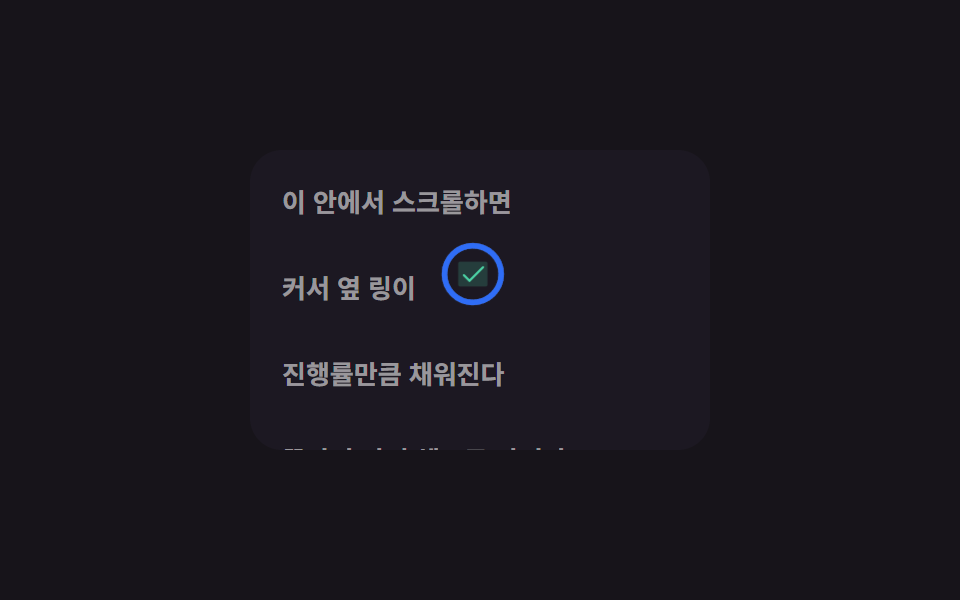
안에서 스크롤하는 동안 커서를 따라다니는 작은 링이 진행률만큼 채워지고, 끝까지 읽으면 체크 표시로 바뀝니다.
쓰임긴 아티클의 읽기 진행률, 약관 스크롤 확인
stroke-dashoffsetscrollTop/scrollHeight 비율pointermove translate
<main class="stage">
  <div class="pr-box is-demo">
    <div class="pr-content">
      <p>이 안에서 스크롤하면</p>
      <p>커서 옆 링이</p>
      <p>진행률만큼 채워진다</p>
      <p>끝까지 가면 체크로 바뀐다</p>
    </div>
    <div class="pr-ring" aria-hidden="true">
      <svg viewBox="0 0 36 36">
        <circle class="pr-ring__track" cx="18" cy="18" r="15"/>
        <circle class="pr-ring__fill" cx="18" cy="18" r="15"/>
      </svg>
      <svg class="pr-ring__check" viewBox="0 0 256 256"><g fill="currentColor"><path d="M232 56v144a16 16 0 0 1-16 16H40a16 16 0 0 1-16-16V56a16 16 0 0 1 16-16h176a16 16 0 0 1 16 16" opacity=".2"/><path d="m205.66 85.66l-96 96a8 8 0 0 1-11.32 0l-40-40a8 8 0 0 1 11.32-11.32L104 164.69l90.34-90.35a8 8 0 0 1 11.32 11.32"/></g></svg>
    </div>
  </div>
</main>
@use "../../../../site/static/demo-tokens" as *;
$duration: $dur-quick;
$easing: $ease-out;
$color: $subject-blue;
@include stage($stage-ink);
.pr-box {
position: relative;
width: min(230px, 76vw);
height: 150px;
overflow-y: auto;
border-radius: $r-card;
background: #1c1822;
cursor: none;
}
.pr-content {
padding: $sp-4;
height: 340px;
p { margin: 0 0 $sp-6; font-size: 13px; font-weight: 700; color: rgba(255, 255, 255, .55); }
}
.pr-ring {
position: absolute;
left: 0;
top: 0;
width: 34px;
height: 34px;
margin: -17px 0 0 -17px;
pointer-events: none;
transform: translate(24px, 112px);
transition: transform $duration $easing;
}
.pr-ring svg:first-child { transform: rotate(-90deg); }
.pr-ring__track { fill: none; stroke: rgba(255, 255, 255, .18); stroke-width: 3; }
.pr-ring__fill {
fill: none;
stroke: $color;
stroke-width: 3;
stroke-linecap: round;
stroke-dasharray: 94.2;
stroke-dashoffset: var(--dash, 94.2);
}
.pr-ring__check {
position: absolute;
inset: 8px;
color: $subject-mint;
opacity: 0;
}
.pr-box.is-done .pr-ring__check { opacity: 1; }
.pr-box.is-done .pr-ring svg:first-child { opacity: 0; }
// 데모 강제 루프 — 실제 스크롤 없이도 링이 채워졌다가 체크로 바뀐다
.pr-box.is-demo { overflow: hidden; }
.pr-box.is-demo .pr-ring { animation: pr-move $dur-loop $easing infinite; transition: none; }
.pr-box.is-demo .pr-ring__fill { animation: pr-fill $dur-loop $easing infinite; }
.pr-box.is-demo .pr-ring__check { animation: pr-check $dur-loop $easing infinite; }
@keyframes pr-move {
0%, 8% { transform: translate(24px, 112px); }
50% { transform: translate(150px, 40px); }
92%, 100% { transform: translate(24px, 112px); }
}
@keyframes pr-fill {
0%, 8% { stroke-dashoffset: 94.2; }
50%, 62% { stroke-dashoffset: 0; }
92%, 100% { stroke-dashoffset: 94.2; }
}
@keyframes pr-check {
0%, 46% { opacity: 0; }
52%, 60% { opacity: 1; }
68%, 100% { opacity: 0; }
}
@media (hover: none), (pointer: coarse) {
.pr-box { cursor: auto; } // 터치엔 커서가 없다 — 링은 스크롤 위치에만 반응하는 진행 표시로 남는다
}
@media (prefers-reduced-motion: reduce) {
.pr-ring, .pr-ring__fill, .pr-ring__check { animation: none !important; transition: none !important; }
}html, body {
margin: 0;
overflow: hidden;
}
.stage {
box-sizing: border-box;
min-height: 100vh;
display: grid;
place-items: center;
margin: 0;
background: #17141a;
font-family: -apple-system, "Segoe UI", "Noto Sans KR", sans-serif;
padding: clamp(8px, 4vw, 24px);
}
.pr-box {
position: relative;
width: min(230px, 76vw);
height: 150px;
overflow-y: auto;
border-radius: 16px;
background: #1c1822;
cursor: none;
}
.pr-content {
padding: 16px;
height: 340px;
}
.pr-content p {
margin: 0 0 24px;
font-size: 13px;
font-weight: 700;
color: rgba(255, 255, 255, 0.55);
}
.pr-ring {
position: absolute;
left: 0;
top: 0;
width: 34px;
height: 34px;
margin: -17px 0 0 -17px;
pointer-events: none;
transform: translate(24px, 112px);
transition: transform 220ms ease-out;
}
.pr-ring svg:first-child {
transform: rotate(-90deg);
}
.pr-ring__track {
fill: none;
stroke: rgba(255, 255, 255, 0.18);
stroke-width: 3;
}
.pr-ring__fill {
fill: none;
stroke: #2f6df6;
stroke-width: 3;
stroke-linecap: round;
stroke-dasharray: 94.2;
stroke-dashoffset: var(--dash, 94.2);
}
.pr-ring__check {
position: absolute;
inset: 8px;
color: #4cd4a6;
opacity: 0;
}
.pr-box.is-done .pr-ring__check {
opacity: 1;
}
.pr-box.is-done .pr-ring svg:first-child {
opacity: 0;
}
.pr-box.is-demo {
overflow: hidden;
}
.pr-box.is-demo .pr-ring {
animation: pr-move 2s ease-out infinite;
transition: none;
}
.pr-box.is-demo .pr-ring__fill {
animation: pr-fill 2s ease-out infinite;
}
.pr-box.is-demo .pr-ring__check {
animation: pr-check 2s ease-out infinite;
}
@keyframes pr-move {
0%, 8% {
transform: translate(24px, 112px);
}
50% {
transform: translate(150px, 40px);
}
92%, 100% {
transform: translate(24px, 112px);
}
}
@keyframes pr-fill {
0%, 8% {
stroke-dashoffset: 94.2;
}
50%, 62% {
stroke-dashoffset: 0;
}
92%, 100% {
stroke-dashoffset: 94.2;
}
}
@keyframes pr-check {
0%, 46% {
opacity: 0;
}
52%, 60% {
opacity: 1;
}
68%, 100% {
opacity: 0;
}
}
@media (hover: none), (pointer: coarse) {
.pr-box {
cursor: auto;
}
}
@media (prefers-reduced-motion: reduce) {
.pr-ring, .pr-ring__fill, .pr-ring__check {
animation: none !important;
transition: none !important;
}
}(function () {
var box = document.querySelector('.pr-box');
var ring = box.querySelector('.pr-ring');
var CIRC = 2 * Math.PI * 15;
// 실제 사용자: 포인터를 따라가고, 스크롤 진행률만큼 링 테두리가 채워진다
box.addEventListener('pointermove', function (e) {
if (box.classList.contains('is-demo')) return;
var r = box.getBoundingClientRect();
ring.style.transform = 'translate(' + (e.clientX - r.left) + 'px,' + (e.clientY - r.top) + 'px)';
});
box.addEventListener('scroll', function () {
if (box.classList.contains('is-demo')) return;
var max = box.scrollHeight - box.clientHeight;
var pct = max > 0 ? box.scrollTop / max : 0;
ring.style.setProperty('--dash', (CIRC * (1 - pct)).toFixed(1));
box.classList.toggle('is-done', pct > 0.98);
});
})();import { useRef, useState, type CSSProperties, type PointerEvent } from "react";
import styles from "./CursorScrollProgressRing.module.scss";
export type CursorScrollProgressRingProps = {
duration?: number;
easing?: string;
color?: string;
};
type Vars = CSSProperties & { "--duration"?: string; "--easing"?: string; "--color"?: string };
const CIRC = 2 * Math.PI * 15;
/** pointermove 로 커서를 따라가고, 내부 스크롤 비율만큼 stroke-dashoffset 을 채운다 */
export default function CursorScrollProgressRing({
duration = 220,
easing = "ease-out",
color = "#2f6df6",
}: CursorScrollProgressRingProps) {
const ringRef = useRef<HTMLDivElement>(null);
const [done, setDone] = useState(false);
const [dash, setDash] = useState(CIRC);
const vars: Vars = { "--duration": `${duration}ms`, "--easing": easing, "--color": color };
const move = (e: PointerEvent<HTMLDivElement>) => {
const ring = ringRef.current;
if (!ring) return;
const r = e.currentTarget.getBoundingClientRect();
ring.style.transform = `translate(${e.clientX - r.left}px,${e.clientY - r.top}px)`;
};
const scroll = (e: { currentTarget: HTMLDivElement }) => {
const box = e.currentTarget;
const max = box.scrollHeight - box.clientHeight;
const pct = max > 0 ? box.scrollTop / max : 0;
setDash(CIRC * (1 - pct));
setDone(pct > 0.98);
};
return (
<div className={`${styles.box} ${done ? styles.isDone : ""}`} style={vars} onPointerMove={move} onScroll={scroll}>
<div className={styles.content}>
<p>이 안에서 스크롤하면</p>
<p>커서 옆 링이</p>
<p>진행률만큼 채워진다</p>
<p>끝까지 가면 체크로 바뀐다</p>
</div>
<div ref={ringRef} className={styles.ring} aria-hidden="true">
<svg viewBox="0 0 36 36">
<circle className={styles.track} cx="18" cy="18" r="15" />
<circle className={styles.fill} cx="18" cy="18" r="15" style={{ strokeDashoffset: dash }} />
</svg>
<svg className={styles.check} viewBox="0 0 256 256"><g fill="currentColor"><path d="M232 56v144a16 16 0 0 1-16 16H40a16 16 0 0 1-16-16V56a16 16 0 0 1 16-16h176a16 16 0 0 1 16 16" opacity=".2" /><path d="m205.66 85.66l-96 96a8 8 0 0 1-11.32 0l-40-40a8 8 0 0 1 11.32-11.32L104 164.69l90.34-90.35a8 8 0 0 1 11.32 11.32" /></g></svg>
</div>
</div>
);
}08 스크롤 진행률 커서 링 — 측정 누적면적 3.108% · 움직인 프레임 22/23GODRICH 원작 · zip 에 SCSS·React 포함 · 마우스 이펙트 9가지 — 커서부터 드래그까지
이 데모가 속한 글
 마우스 이펙트 9가지 — 커서부터 드래그까지마우스 이펙트는 커서를 움직이거나 클릭·드래그·스크롤할 때 화면이 그에 맞춰 반응하는 작은 인터랙션을 말한다. 커서만 움직였을 뿐인데 버튼이 끌려오거나 카드가 기울어지는 것도 여기 속한다. 이 글의 데모 전부 보기