09호버 캡션 이미지 그리드
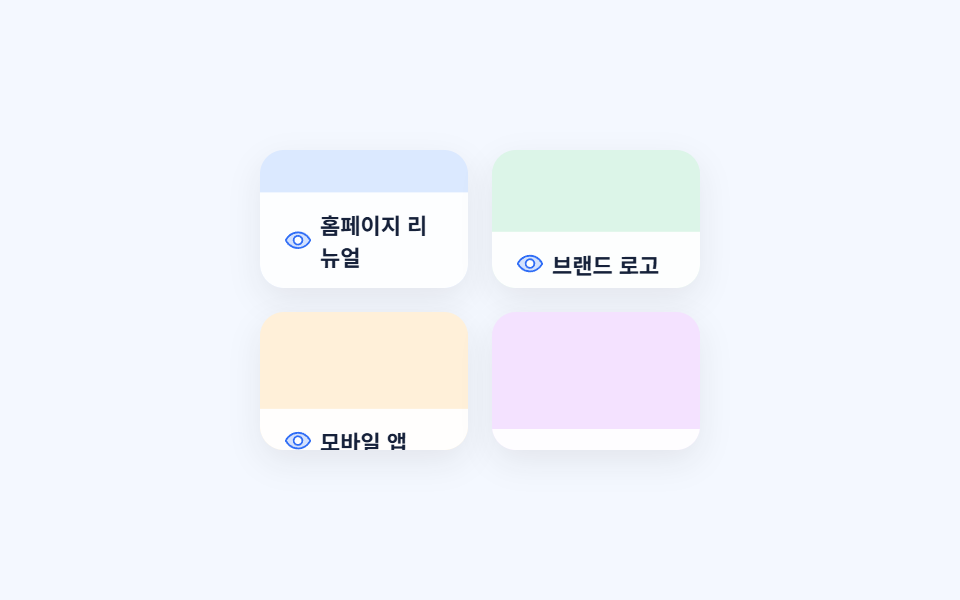
그리드 타일에 마우스를 올리면 아래에서 흰 캡션 띠가 올라오며 이름표가 나타나고, 키보드 포커스에도 똑같이 반응합니다.
쓰임포트폴리오 작업물 그리드, 케이스 스터디 목록
:hover + :focus-visibletransform: translateYstagger animation-delay
<main class="stage">
  <div class="hg-grid is-demo">
    <div class="hg-tile" style="background:#dbe9ff" tabindex="0">
      <span class="hg-tile__cap"><svg viewBox="0 0 256 256" aria-hidden="true"><g fill="currentColor"><path d="M128 56c-80 0-112 72-112 72s32 72 112 72s112-72 112-72s-32-72-112-72m0 112a40 40 0 1 1 40-40a40 40 0 0 1-40 40" opacity=".2"/><path d="M247.31 124.76c-.35-.79-8.82-19.58-27.65-38.41C194.57 61.26 162.88 48 128 48S61.43 61.26 36.34 86.35C17.51 105.18 9 124 8.69 124.76a8 8 0 0 0 0 6.5c.35.79 8.82 19.57 27.65 38.4C61.43 194.74 93.12 208 128 208s66.57-13.26 91.66-38.34c18.83-18.83 27.3-37.61 27.65-38.4a8 8 0 0 0 0-6.5M128 192c-30.78 0-57.67-11.19-79.93-33.25A133.5 133.5 0 0 1 25 128a133.3 133.3 0 0 1 23.07-30.75C70.33 75.19 97.22 64 128 64s57.67 11.19 79.93 33.25A133.5 133.5 0 0 1 231.05 128c-7.21 13.46-38.62 64-103.05 64m0-112a48 48 0 1 0 48 48a48.05 48.05 0 0 0-48-48m0 80a32 32 0 1 1 32-32a32 32 0 0 1-32 32"/></g></svg>홈페이지 리뉴얼</span>
    </div>
    <div class="hg-tile" style="background:#dcf5e8" tabindex="0">
      <span class="hg-tile__cap"><svg viewBox="0 0 256 256" aria-hidden="true"><g fill="currentColor"><path d="M128 56c-80 0-112 72-112 72s32 72 112 72s112-72 112-72s-32-72-112-72m0 112a40 40 0 1 1 40-40a40 40 0 0 1-40 40" opacity=".2"/><path d="M247.31 124.76c-.35-.79-8.82-19.58-27.65-38.41C194.57 61.26 162.88 48 128 48S61.43 61.26 36.34 86.35C17.51 105.18 9 124 8.69 124.76a8 8 0 0 0 0 6.5c.35.79 8.82 19.57 27.65 38.4C61.43 194.74 93.12 208 128 208s66.57-13.26 91.66-38.34c18.83-18.83 27.3-37.61 27.65-38.4a8 8 0 0 0 0-6.5M128 192c-30.78 0-57.67-11.19-79.93-33.25A133.5 133.5 0 0 1 25 128a133.3 133.3 0 0 1 23.07-30.75C70.33 75.19 97.22 64 128 64s57.67 11.19 79.93 33.25A133.5 133.5 0 0 1 231.05 128c-7.21 13.46-38.62 64-103.05 64m0-112a48 48 0 1 0 48 48a48.05 48.05 0 0 0-48-48m0 80a32 32 0 1 1 32-32a32 32 0 0 1-32 32"/></g></svg>브랜드 로고</span>
    </div>
    <div class="hg-tile" style="background:#fff0d9" tabindex="0">
      <span class="hg-tile__cap"><svg viewBox="0 0 256 256" aria-hidden="true"><g fill="currentColor"><path d="M128 56c-80 0-112 72-112 72s32 72 112 72s112-72 112-72s-32-72-112-72m0 112a40 40 0 1 1 40-40a40 40 0 0 1-40 40" opacity=".2"/><path d="M247.31 124.76c-.35-.79-8.82-19.58-27.65-38.41C194.57 61.26 162.88 48 128 48S61.43 61.26 36.34 86.35C17.51 105.18 9 124 8.69 124.76a8 8 0 0 0 0 6.5c.35.79 8.82 19.57 27.65 38.4C61.43 194.74 93.12 208 128 208s66.57-13.26 91.66-38.34c18.83-18.83 27.3-37.61 27.65-38.4a8 8 0 0 0 0-6.5M128 192c-30.78 0-57.67-11.19-79.93-33.25A133.5 133.5 0 0 1 25 128a133.3 133.3 0 0 1 23.07-30.75C70.33 75.19 97.22 64 128 64s57.67 11.19 79.93 33.25A133.5 133.5 0 0 1 231.05 128c-7.21 13.46-38.62 64-103.05 64m0-112a48 48 0 1 0 48 48a48.05 48.05 0 0 0-48-48m0 80a32 32 0 1 1 32-32a32 32 0 0 1-32 32"/></g></svg>모바일 앱</span>
    </div>
    <div class="hg-tile" style="background:#f4e2ff" tabindex="0">
      <span class="hg-tile__cap"><svg viewBox="0 0 256 256" aria-hidden="true"><g fill="currentColor"><path d="M128 56c-80 0-112 72-112 72s32 72 112 72s112-72 112-72s-32-72-112-72m0 112a40 40 0 1 1 40-40a40 40 0 0 1-40 40" opacity=".2"/><path d="M247.31 124.76c-.35-.79-8.82-19.58-27.65-38.41C194.57 61.26 162.88 48 128 48S61.43 61.26 36.34 86.35C17.51 105.18 9 124 8.69 124.76a8 8 0 0 0 0 6.5c.35.79 8.82 19.57 27.65 38.4C61.43 194.74 93.12 208 128 208s66.57-13.26 91.66-38.34c18.83-18.83 27.3-37.61 27.65-38.4a8 8 0 0 0 0-6.5M128 192c-30.78 0-57.67-11.19-79.93-33.25A133.5 133.5 0 0 1 25 128a133.3 133.3 0 0 1 23.07-30.75C70.33 75.19 97.22 64 128 64s57.67 11.19 79.93 33.25A133.5 133.5 0 0 1 231.05 128c-7.21 13.46-38.62 64-103.05 64m0-112a48 48 0 1 0 48 48a48.05 48.05 0 0 0-48-48m0 80a32 32 0 1 1 32-32a32 32 0 0 1-32 32"/></g></svg>대시보드</span>
    </div>
  </div>
</main>
@use "../../../../site/static/demo-tokens" as *;
$duration: $dur-base;
$easing: $ease-out;
$color: $subject-blue;
@include stage(#f4f8ff);
.hg-grid {
display: grid;
grid-template-columns: repeat(2, 1fr);
gap: $sp-3;
width: min(220px, 74vw);
}
.hg-tile {
position: relative;
aspect-ratio: 3 / 2;
border-radius: $r-control;
overflow: hidden;
cursor: pointer;
box-shadow: 0 6px 16px rgba(23, 20, 26, .08);
}
.hg-tile:focus-visible { outline: 2px solid $color; outline-offset: 2px; }
.hg-tile__cap {
position: absolute;
inset: auto 0 0 0;
display: flex;
align-items: center;
gap: $sp-1;
padding: $sp-2 $sp-3;
background: rgba(255, 255, 255, .94);
color: #16213a;
font-size: 11px;
font-weight: 700;
transform: translateY(100%);
transition: transform $duration $easing;
}
.hg-tile__cap svg { width: 14px; height: 14px; flex: 0 0 auto; color: $color; }
.hg-tile:hover .hg-tile__cap,
.hg-tile:focus-visible .hg-tile__cap { transform: translateY(0); }
// 데모 강제 루프 — 네 칸이 순서대로 캡션을 올렸다 내린다
.hg-grid.is-demo .hg-tile__cap { animation: hg-reveal $dur-loop $easing infinite; }
.hg-grid.is-demo .hg-tile:nth-child(2) .hg-tile__cap { animation-delay: .12s; }
.hg-grid.is-demo .hg-tile:nth-child(3) .hg-tile__cap { animation-delay: .24s; }
.hg-grid.is-demo .hg-tile:nth-child(4) .hg-tile__cap { animation-delay: .36s; }
@keyframes hg-reveal {
0%, 6% { transform: translateY(100%); }
30%, 55% { transform: translateY(0); }
80%, 100% { transform: translateY(100%); }
}
@media (prefers-reduced-motion: reduce) {
.hg-tile__cap { animation: none !important; transition: none !important; }
}html, body {
margin: 0;
overflow: hidden;
}
.stage {
box-sizing: border-box;
min-height: 100vh;
display: grid;
place-items: center;
margin: 0;
background: #f4f8ff;
font-family: -apple-system, "Segoe UI", "Noto Sans KR", sans-serif;
padding: clamp(8px, 4vw, 24px);
}
.hg-grid {
display: grid;
grid-template-columns: repeat(2, 1fr);
gap: 12px;
width: min(220px, 74vw);
}
.hg-tile {
position: relative;
aspect-ratio: 3/2;
border-radius: 12px;
overflow: hidden;
cursor: pointer;
box-shadow: 0 6px 16px rgba(23, 20, 26, 0.08);
}
.hg-tile:focus-visible {
outline: 2px solid #2f6df6;
outline-offset: 2px;
}
.hg-tile__cap {
position: absolute;
inset: auto 0 0 0;
display: flex;
align-items: center;
gap: 4px;
padding: 8px 12px;
background: rgba(255, 255, 255, 0.94);
color: #16213a;
font-size: 11px;
font-weight: 700;
transform: translateY(100%);
transition: transform 300ms ease-out;
}
.hg-tile__cap svg {
width: 14px;
height: 14px;
flex: 0 0 auto;
color: #2f6df6;
}
.hg-tile:hover .hg-tile__cap,
.hg-tile:focus-visible .hg-tile__cap {
transform: translateY(0);
}
.hg-grid.is-demo .hg-tile__cap {
animation: hg-reveal 2s ease-out infinite;
}
.hg-grid.is-demo .hg-tile:nth-child(2) .hg-tile__cap {
animation-delay: 0.12s;
}
.hg-grid.is-demo .hg-tile:nth-child(3) .hg-tile__cap {
animation-delay: 0.24s;
}
.hg-grid.is-demo .hg-tile:nth-child(4) .hg-tile__cap {
animation-delay: 0.36s;
}
@keyframes hg-reveal {
0%, 6% {
transform: translateY(100%);
}
30%, 55% {
transform: translateY(0);
}
80%, 100% {
transform: translateY(100%);
}
}
@media (prefers-reduced-motion: reduce) {
.hg-tile__cap {
animation: none !important;
transition: none !important;
}
}import type { CSSProperties } from "react";
import styles from "./CursorHoverCaptionGrid.module.scss";
export type CursorHoverCaptionGridProps = {
items?: { bg: string; label: string }[];
duration?: number;
easing?: string;
color?: string;
};
type Vars = CSSProperties & { "--duration"?: string; "--easing"?: string; "--color"?: string };
const EYE = (
<svg viewBox="0 0 256 256" aria-hidden="true"><g fill="currentColor"><path d="M128 56c-80 0-112 72-112 72s32 72 112 72s112-72 112-72s-32-72-112-72m0 112a40 40 0 1 1 40-40a40 40 0 0 1-40 40" opacity=".2" /><path d="M247.31 124.76c-.35-.79-8.82-19.58-27.65-38.41C194.57 61.26 162.88 48 128 48S61.43 61.26 36.34 86.35C17.51 105.18 9 124 8.69 124.76a8 8 0 0 0 0 6.5c.35.79 8.82 19.57 27.65 38.4C61.43 194.74 93.12 208 128 208s66.57-13.26 91.66-38.34c18.83-18.83 27.3-37.61 27.65-38.4a8 8 0 0 0 0-6.5M128 192c-30.78 0-57.67-11.19-79.93-33.25A133.5 133.5 0 0 1 25 128a133.3 133.3 0 0 1 23.07-30.75C70.33 75.19 97.22 64 128 64s57.67 11.19 79.93 33.25A133.5 133.5 0 0 1 231.05 128c-7.21 13.46-38.62 64-103.05 64m0-112a48 48 0 1 0 48 48a48.05 48.05 0 0 0-48-48m0 80a32 32 0 1 1 32-32a32 32 0 0 1-32 32" /></g></svg>
);
/** :hover 와 :focus-visible 로 캡션을 올린다 — JS 없이도 실제 사이트에서 그대로 동작한다 */
export default function CursorHoverCaptionGrid({
items = [
{ bg: "#dbe9ff", label: "홈페이지 리뉴얼" },
{ bg: "#dcf5e8", label: "브랜드 로고" },
{ bg: "#fff0d9", label: "모바일 앱" },
{ bg: "#f4e2ff", label: "대시보드" },
],
duration = 300,
easing = "ease-out",
color = "#2f6df6",
}: CursorHoverCaptionGridProps) {
const vars: Vars = { "--duration": `${duration}ms`, "--easing": easing, "--color": color };
return (
<div className={styles.grid} style={vars}>
{items.map((it, i) => (
<div key={i} className={styles.tile} style={{ background: it.bg }} tabIndex={0}>
<span className={styles.cap}>{EYE}{it.label}</span>
</div>
))}
</div>
);
}09 호버 캡션 이미지 그리드 — 측정 누적면적 10.226% · 움직인 프레임 21/23GODRICH 원작 · zip 에 SCSS·React 포함 · 마우스 이펙트 9가지 — 커서부터 드래그까지
이 데모가 속한 글
 마우스 이펙트 9가지 — 커서부터 드래그까지마우스 이펙트는 커서를 움직이거나 클릭·드래그·스크롤할 때 화면이 그에 맞춰 반응하는 작은 인터랙션을 말한다. 커서만 움직였을 뿐인데 버튼이 끌려오거나 카드가 기울어지는 것도 여기 속한다. 이 글의 데모 전부 보기