03드래그 관성 — 포인터 속도를 추적해 놓은 뒤 지수 감쇠로 미끄러지는 lerp
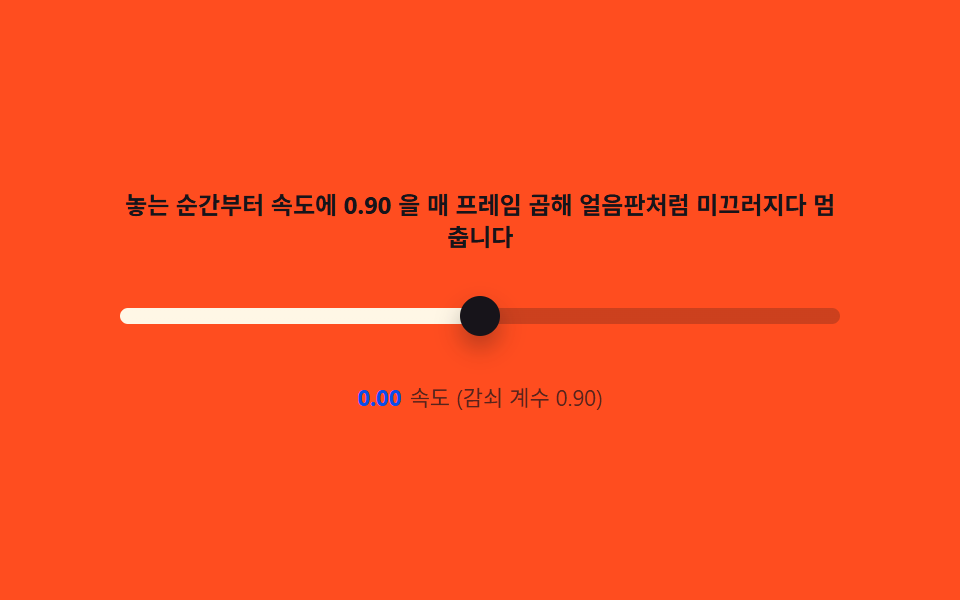
pointermove 사이의 이동거리로 순간 속도를 기록해 두고, 놓는 순간부터 매 프레임 속도에 0.9 같은 감쇠 계수를 곱해 위치에 더하면 얼음판에서 미끄러지듯 감속하는 관성이 붙습니다. 속도가 임계값 밑으로 떨어지면 정지하고 트랙 한계에서 클램프합니다.
쓰임음량 조절, 타임라인 스크럽
requestAnimationFramepointermoveCSS custom properties
<main class="stage">
<div class="di" id="di">
  <p class="di__hint">놓는 순간부터 속도에 0.90 을 매 프레임 곱해 얼음판처럼 미끄러지다 멈춥니다</p>
  <div class="di__wrap" id="diWrap" role="img" aria-label="관성으로 미끄러지다 감속해 멈추는 슬라이더 장면">
    <input class="di__range" id="diRange" type="range" min="0" max="100" step="1" value="50" aria-label="값 슬라이더">
  </div>
  <p class="di__meta"><b class="di__tag" id="diVel">0.00</b><span class="di__unit">속도 (감쇠 계수 0.90)</span></p>
</div>
</main>
@use "../../../../site/static/demo-tokens" as *;
// 드래그 관성(03) — 위치는 JS 가 매초 DECAY^12 배(변형 0.90 기준)로 감쇠하는
// 속도를 적분해 계산한다. 트랙 색만 --pct 로 채운다.
$duration: $dur-base;
$easing: $ease-out;
$color: $subject-cream;
@include stage($stage-orange);
$track-h: 8px;
$thumb-d: 20px;
.di {
display: flex; flex-direction: column; align-items: center; gap: $sp-3;
width: 100%; max-width: 360px;
}
.di__hint {
margin: 0; font-weight: 700; font-size: clamp(10px, 2.8vw, 12px); line-height: 1.35;
color: $subject-ink; text-align: center;
}
.di__wrap {
position: relative; width: 100%; height: 40px;
display: flex; align-items: center;
--pct: 50;
}
.di__range {
appearance: none; -webkit-appearance: none;
width: 100%; height: $thumb-d; margin: 0; background: transparent;
touch-action: none;
}
.di__range:focus-visible { outline: 2px solid $subject-ink; outline-offset: 4px; border-radius: $r-pill; }
.di__range::-webkit-slider-runnable-track {
height: $track-h; border-radius: $r-pill;
background: linear-gradient(to right, $color calc(var(--pct) * 1%), rgba($subject-ink, .22) calc(var(--pct) * 1%));
}
.di__range::-webkit-slider-thumb {
appearance: none; -webkit-appearance: none;
width: $thumb-d; height: $thumb-d; border-radius: 50%;
background: $subject-ink; box-shadow: $shadow-press;
margin-top: calc(($track-h - $thumb-d) / 2);
}
.di__range::-moz-range-track {
height: $track-h; border-radius: $r-pill; background: rgba($subject-ink, .22);
}
.di__range::-moz-range-progress {
height: $track-h; border-radius: $r-pill; background: $color;
}
.di__range::-moz-range-thumb {
width: $thumb-d; height: $thumb-d; border: 0; border-radius: 50%;
background: $subject-ink; box-shadow: $shadow-press;
}
.di__meta { margin: 0; font-size: clamp(9px, 2.4vw, 11px); color: rgba($subject-ink, .82); }
.di__tag { font-weight: 700; color: $subject-blue-deep; font-variant-numeric: tabular-nums; margin-right: $sp-1; }
.di__unit { color: rgba($subject-ink, .72); }
@media (max-width: 340px) {
.di { gap: $sp-2; max-width: 280px; }
.di__hint { font-size: 8px; }
.di__meta { font-size: 7px; }
}
@media (prefers-reduced-motion: reduce) {
.di__range { transition: none; }
}html, body {
margin: 0;
overflow: hidden;
}
.stage {
box-sizing: border-box;
min-height: 100vh;
display: grid;
place-items: center;
margin: 0;
background: #ff4d1f;
font-family: -apple-system, "Segoe UI", "Noto Sans KR", sans-serif;
padding: clamp(8px, 4vw, 24px);
}
.di {
display: flex;
flex-direction: column;
align-items: center;
gap: 12px;
width: 100%;
max-width: 360px;
}
.di__hint {
margin: 0;
font-weight: 700;
font-size: clamp(10px, 2.8vw, 12px);
line-height: 1.35;
color: #17141a;
text-align: center;
}
.di__wrap {
position: relative;
width: 100%;
height: 40px;
display: flex;
align-items: center;
--pct: 50;
}
.di__range {
appearance: none;
-webkit-appearance: none;
width: 100%;
height: 20px;
margin: 0;
background: transparent;
touch-action: none;
}
.di__range:focus-visible {
outline: 2px solid #17141a;
outline-offset: 4px;
border-radius: 999px;
}
.di__range::-webkit-slider-runnable-track {
height: 8px;
border-radius: 999px;
background: linear-gradient(to right, #fff7e6 calc(var(--pct) * 1%), rgba(23, 20, 26, 0.22) calc(var(--pct) * 1%));
}
.di__range::-webkit-slider-thumb {
appearance: none;
-webkit-appearance: none;
width: 20px;
height: 20px;
border-radius: 50%;
background: #17141a;
box-shadow: 0 6px 12px rgba(23, 20, 26, 0.32);
margin-top: -6px;
}
.di__range::-moz-range-track {
height: 8px;
border-radius: 999px;
background: rgba(23, 20, 26, 0.22);
}
.di__range::-moz-range-progress {
height: 8px;
border-radius: 999px;
background: #fff7e6;
}
.di__range::-moz-range-thumb {
width: 20px;
height: 20px;
border: 0;
border-radius: 50%;
background: #17141a;
box-shadow: 0 6px 12px rgba(23, 20, 26, 0.32);
}
.di__meta {
margin: 0;
font-size: clamp(9px, 2.4vw, 11px);
color: rgba(23, 20, 26, 0.82);
}
.di__tag {
font-weight: 700;
color: #0a4fe8;
font-variant-numeric: tabular-nums;
margin-right: 4px;
}
.di__unit {
color: rgba(23, 20, 26, 0.72);
}
@media (max-width: 340px) {
.di {
gap: 8px;
max-width: 280px;
}
.di__hint {
font-size: 8px;
}
.di__meta {
font-size: 7px;
}
}
@media (prefers-reduced-motion: reduce) {
.di__range {
transition: none;
}
}// 드래그 관성(03) — 놓는 순간의 속도를 저장해 두고, 매 프레임 velocity *= 0.90 을
// 곱해 위치에 더한다. 속도가 문턱 밑으로 떨어지면 정지, 트랙 끝에서는 클램프한다.
// 실제 드래그가 없는 동안은 시드 난수(mulberry32)로 결정적인 "놓는 순간" 을 만든다.
(function () {
var root = document.getElementById('di');
var wrap = document.getElementById('diWrap');
var range = document.getElementById('diRange');
var velEl = document.getElementById('diVel');
if (!root || !wrap || !range || !velEl) return;
var MIN = 0, MAX = 100;
var DECAY = 0.90; // "매 프레임" 감쇠 계수 (변형: 0.75) — 기준 프레임률 12fps
var BASE_FPS = 12;
var DECAY_PER_SEC = Math.pow(DECAY, BASE_FPS); // 실제 rAF 주사율과 무관하게 같은 감쇠가 되도록 시간 기준으로 환산
var STOP_THRESHOLD = 0.03;
var KICK_EVERY_MS = 650;
function mulberry32(seed) {
return function () {
seed |= 0; seed = (seed + 0x6D2B79F5) | 0;
var t = Math.imul(seed ^ (seed >>> 15), 1 | seed);
t = (t + Math.imul(t ^ (t >>> 7), 61 | t)) ^ t;
return ((t ^ (t >>> 14)) >>> 0) / 4294967296;
};
}
var rand = mulberry32(42);
var pos = 50;
var velocity = 0;
var lastKick = 0;
function paint() {
var pct = (pos - MIN) / (MAX - MIN) * 100;
wrap.style.setProperty('--pct', pct.toFixed(2));
range.setAttribute('aria-valuenow', String(Math.round(pos)));
velEl.textContent = velocity.toFixed(2);
}
paint();
var reduce = window.matchMedia('(prefers-reduced-motion: reduce)').matches;
var dragging = false, lastX = 0, lastT = 0;
function pointerDown(e) {
dragging = true; velocity = 0;
lastX = e.clientX; lastT = performance.now();
}
function pointerMove(e) {
if (!dragging) return;
var now = performance.now();
var dt = Math.max(now - lastT, 1);
var dx = e.clientX - lastX;
var trackW = wrap.getBoundingClientRect().width || 1;
velocity = (dx / trackW) * 100 / (dt / 1000); // 퍼센트/초
lastX = e.clientX; lastT = now;
}
function pointerUp() { dragging = false; }
range.addEventListener('pointerdown', pointerDown);
range.addEventListener('pointermove', pointerMove);
window.addEventListener('pointerup', pointerUp);
range.addEventListener('input', function () { if (dragging) pos = Number(range.value); });
if (reduce) {
pos = 50; velocity = 0;
range.value = String(pos);
paint();
} else {
var last = performance.now();
(function step(now) {
var dt = now - last; last = now;
if (!dragging) {
if (now - lastKick > KICK_EVERY_MS && Math.abs(velocity) < STOP_THRESHOLD) {
velocity = (rand() - 0.5) * 160; // 결정적 "놓는 순간" 속도(퍼센트/초)
lastKick = now;
}
if (Math.abs(velocity) >= STOP_THRESHOLD) {
pos += velocity * (dt / 1000);
velocity *= Math.pow(DECAY_PER_SEC, dt / 1000);
if (pos < MIN) { pos = MIN; velocity = 0; }
if (pos > MAX) { pos = MAX; velocity = 0; }
if (Math.abs(velocity) < STOP_THRESHOLD) velocity = 0;
range.value = String(Math.round(pos));
}
}
paint();
requestAnimationFrame(step);
})(last);
}
})();// RangeSliderDragInertiaLerp — vanilla 판(run/334/demo/03-range-slider-drag-inertia-lerp/index.html)
// 의 React 포트. 놓는 순간의 속도를 저장해 두고, 매 프레임 velocity *= 0.90 을 곱해
// 위치에 더한다. 속도가 문턱 밑으로 떨어지면 정지, 트랙 끝에서는 클램프한다. 실제 드래그가
// 없는 동안은 시드 난수(mulberry32)로 결정적인 "놓는 순간" 을 만든다.
import { useEffect, useRef } from "react";
import type { CSSProperties } from "react";
import styles from "./RangeSliderDragInertiaLerp.module.scss";
export type RangeSliderDragInertiaLerpProps = {
duration?: string;
easing?: string;
color?: string;
};
type Vars = CSSProperties & { "--duration"?: string; "--easing"?: string; "--color"?: string };
type Box<T> = { current: T };
const HINT = "놓는 순간부터 속도에 0.90 을 매 프레임 곱해 얼음판처럼 미끄러지다 멈춥니다";
const ARIA_SCENE = "관성으로 미끄러지다 감속해 멈추는 슬라이더 장면";
const ARIA_RANGE = "값 슬라이더";
const UNIT = "속도 (감쇠 계수 0.90)";
const MIN = 0, MAX = 100;
const DECAY = 0.90; // "매 프레임" 감쇠 계수 (변형: 0.75) — 기준 프레임률 12fps
const BASE_FPS = 12;
const DECAY_PER_SEC = Math.pow(DECAY, BASE_FPS); // 실제 rAF 주사율과 무관하게 같은 감쇠가 되도록 시간 기준으로 환산
const STOP_THRESHOLD = 0.03;
const KICK_EVERY_MS = 650;
function mulberry32(seed: number): () => number {
let s = seed;
return function () {
s |= 0;
s = (s + 0x6D2B79F5) | 0;
let t = Math.imul(s ^ (s >>> 15), 1 | s);
t = (t + Math.imul(t ^ (t >>> 7), 61 | t)) ^ t;
return ((t ^ (t >>> 14)) >>> 0) / 4294967296;
};
}
export default function RangeSliderDragInertiaLerp({
duration = "300ms",
easing = "ease-out",
color = "#fff7e6"
}: RangeSliderDragInertiaLerpProps) {
const wrapRef = useRef<HTMLDivElement | null>(null);
const rangeRef = useRef<HTMLInputElement | null>(null);
const velRef = useRef<HTMLElement | null>(null);
const rafRef = useRef(0) as Box<number>;
useEffect(() => {
const wrap = wrapRef.current;
const range = rangeRef.current;
const velEl = velRef.current;
if (!wrap || !range || !velEl) return;
const rand = mulberry32(42);
let pos = 50;
let velocity = 0;
let lastKick = 0;
function paint(): void {
const pct = ((pos - MIN) / (MAX - MIN)) * 100;
wrap!.style.setProperty("--pct", pct.toFixed(2));
range!.setAttribute("aria-valuenow", String(Math.round(pos)));
velEl!.textContent = velocity.toFixed(2);
}
paint();
const reduce = window.matchMedia("(prefers-reduced-motion: reduce)").matches;
let dragging = false, lastX = 0, lastT = 0;
function pointerDown(e: PointerEvent): void {
dragging = true;
velocity = 0;
lastX = e.clientX;
lastT = performance.now();
}
function pointerMove(e: PointerEvent): void {
if (!dragging) return;
const now = performance.now();
const dt = Math.max(now - lastT, 1);
const dx = e.clientX - lastX;
const trackW = wrap!.getBoundingClientRect().width || 1;
velocity = ((dx / trackW) * 100) / (dt / 1000); // 퍼센트/초
lastX = e.clientX;
lastT = now;
}
function pointerUp(): void {
dragging = false;
}
function onInput(): void {
if (dragging) pos = Number(range!.value);
}
range.addEventListener("pointerdown", pointerDown);
range.addEventListener("pointermove", pointerMove);
window.addEventListener("pointerup", pointerUp);
range.addEventListener("input", onInput);
if (reduce) {
pos = 50;
velocity = 0;
range.value = String(pos);
paint();
} else {
let last = performance.now();
const step = (now: number): void => {
const dt = now - last;
last = now;
if (!dragging) {
if (now - lastKick > KICK_EVERY_MS && Math.abs(velocity) < STOP_THRESHOLD) {
velocity = (rand() - 0.5) * 160; // 결정적 "놓는 순간" 속도(퍼센트/초)
lastKick = now;
}
if (Math.abs(velocity) >= STOP_THRESHOLD) {
pos += velocity * (dt / 1000);
velocity *= Math.pow(DECAY_PER_SEC, dt / 1000);
if (pos < MIN) { pos = MIN; velocity = 0; }
if (pos > MAX) { pos = MAX; velocity = 0; }
if (Math.abs(velocity) < STOP_THRESHOLD) velocity = 0;
range!.value = String(Math.round(pos));
}
}
paint();
rafRef.current = requestAnimationFrame(step);
};
rafRef.current = requestAnimationFrame(step);
}
return () => {
cancelAnimationFrame(rafRef.current);
range.removeEventListener("pointerdown", pointerDown);
range.removeEventListener("pointermove", pointerMove);
window.removeEventListener("pointerup", pointerUp);
range.removeEventListener("input", onInput);
};
// eslint-disable-next-line react-hooks/exhaustive-deps
}, []);
return (
<main className={styles.stage}>
<div
className={styles.di}
style={{ "--duration": duration, "--easing": easing, "--color": color } as Vars}
>
<p className={styles.hint}>{HINT}</p>
<div className={styles.wrap} ref={wrapRef} role="img" aria-label={ARIA_SCENE}>
<input
className={styles.range}
ref={rangeRef}
type="range"
min={0}
max={100}
step={1}
defaultValue={50}
aria-label={ARIA_RANGE}
/>
</div>
<p className={styles.meta}>
<b className={styles.tag} ref={velRef}>0.00</b>
<span className={styles.unit}>{UNIT}</span>
</p>
</div>
</main>
);
}03 드래그 관성 — 포인터 속도를 추적해 놓은 뒤 지수 감쇠로 미끄러지는 lerp — 측정 누적면적 1.847% · 움직인 프레임 19/23GODRICH 원작 · zip 에 SCSS·React 포함 · css input range 슬라이더 — 관성·스냅 계산을 얹은 커스텀 9종
이 데모가 속한 글
 css input range 슬라이더 — 관성·스냅 계산을 얹은 커스텀 9종드래그를 놓으면 속도값으로 관성 lerp가 감쇠하고, 값이 바뀔 때마다 스프링 오버슈트로 썸이 살짝 튕겨 안착합니다. 눈금 스냅·세로 볼륨형·색 그라디언트 트랙까지 — css input range 슬라이더 9종, 코 이 글의 데모 전부 보기