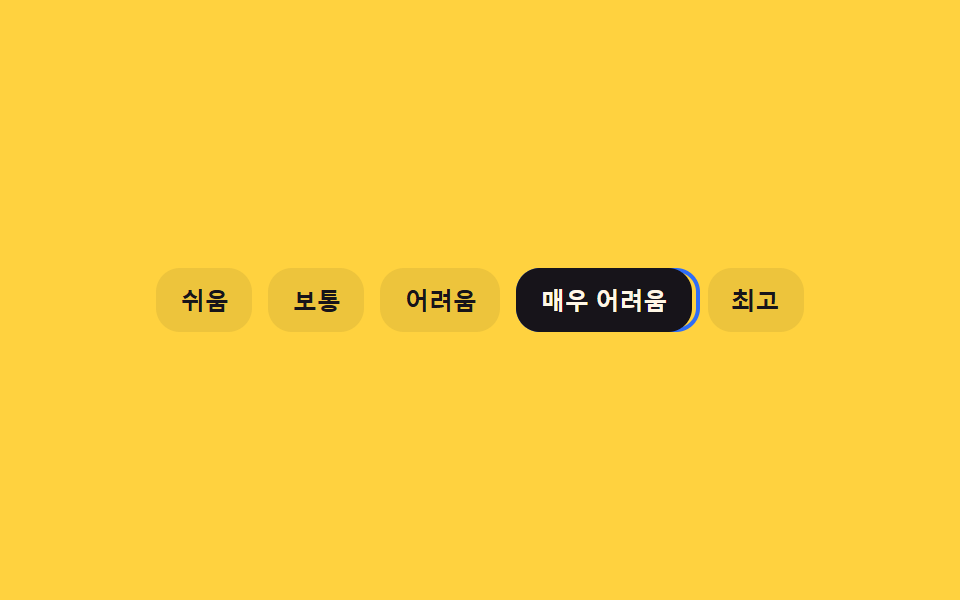
06초점 고리가 관성으로 따라오는 키보드 난이도 선택
화살표 키로 단계를 옮기면 초점 고리가 그 자리로 즉시 이동하지 않고, 매 프레임 남은 거리의 일부만 좁히는 계산으로 뒤따라와 멈춘다.
쓰임키보드만으로 조작하는 접근성 설정의 난이도 선택 자리
measuremoveRingTopaintRing
<main class="stage">
<div class="kal is-demo" id="kal">
  <div class="kal__row" id="kalRow" role="radiogroup" aria-label="난이도">
    <div class="kal__ring" id="kalRing" aria-hidden="true"></div>
    <button type="button" class="kal__opt" role="radio" aria-checked="true" data-i="0" tabindex="0">쉬움</button>
    <button type="button" class="kal__opt" role="radio" aria-checked="false" data-i="1" tabindex="-1">보통</button>
    <button type="button" class="kal__opt" role="radio" aria-checked="false" data-i="2" tabindex="-1">어려움</button>
    <button type="button" class="kal__opt" role="radio" aria-checked="false" data-i="3" tabindex="-1">매우 어려움</button>
    <button type="button" class="kal__opt" role="radio" aria-checked="false" data-i="4" tabindex="-1">최고</button>
  </div>
</div>
</main>
@use "../../../../site/static/demo-tokens" as *;
// 변수 3개
$duration: $dur-quick;
$easing: $ease-out;
$color: $subject-blue;
// 계산 겹: loop() 가 매 프레임 (목표-현재)*TRAIL_LERP 로 남은 거리의 일부만 좁히는 지수 감쇠를 적분한다(JS)
@include stage($stage-yellow);
.kal__row { position: relative; display: flex; gap: $sp-2; padding: $sp-1; }
.kal__ring {
position: absolute; top: $sp-1; bottom: $sp-1; left: 0; width: 0;
border: 2px solid $color; border-radius: $r-control; pointer-events: none;
}
.kal__opt {
position: relative; appearance: none; border: 0; border-radius: $r-control;
background: rgba($subject-ink, .08); color: $subject-ink; font-weight: 700; font-size: 12px;
padding: $sp-2 $sp-3; cursor: pointer; white-space: nowrap;
}
.kal__opt[aria-checked="true"] { background: $subject-ink; color: $subject-cream; }
.kal__opt:focus-visible { outline: 2px solid $subject-ink; outline-offset: 2px; }
@media (max-width: 340px) {
.kal__row { flex-wrap: wrap; max-width: 260px; }
.kal__opt { font-size: 11px; padding: $sp-1 $sp-2; }
}
@media (prefers-reduced-motion: reduce) {
// 실사용 경로 적용: moveRingTo() 안에서 reduce 를 확인해 lerp 루프 없이 고리가 목표로 바로 이동한다(JS 쪽 처리)
.kal__ring { transition: none; }
}html, body {
margin: 0;
overflow: hidden;
}
.stage {
box-sizing: border-box;
min-height: 100vh;
display: grid;
place-items: center;
margin: 0;
background: #ffd23f;
font-family: -apple-system, "Segoe UI", "Noto Sans KR", sans-serif;
padding: clamp(8px, 4vw, 24px);
}
.kal__row {
position: relative;
display: flex;
gap: 8px;
padding: 4px;
}
.kal__ring {
position: absolute;
top: 4px;
bottom: 4px;
left: 0;
width: 0;
border: 2px solid #2f6df6;
border-radius: 12px;
pointer-events: none;
}
.kal__opt {
position: relative;
appearance: none;
border: 0;
border-radius: 12px;
background: rgba(23, 20, 26, 0.08);
color: #17141a;
font-weight: 700;
font-size: 12px;
padding: 8px 12px;
cursor: pointer;
white-space: nowrap;
}
.kal__opt[aria-checked=true] {
background: #17141a;
color: #fff7e6;
}
.kal__opt:focus-visible {
outline: 2px solid #17141a;
outline-offset: 2px;
}
@media (max-width: 340px) {
.kal__row {
flex-wrap: wrap;
max-width: 260px;
}
.kal__opt {
font-size: 11px;
padding: 4px 8px;
}
}
@media (prefers-reduced-motion: reduce) {
.kal__ring {
transition: none;
}
}(function () {
var TRAIL_LERP = 0.18;
var root = document.getElementById('kal');
var rowEl = document.getElementById('kalRow');
var ring = document.getElementById('kalRing');
var opts = Array.prototype.slice.call(rowEl.querySelectorAll('.kal__opt'));
var index = 0;
var ringX = 0, ringW = 0, targetX = 0, targetW = 0, raf = 0;
var reduce = window.matchMedia('(prefers-reduced-motion: reduce)').matches;
function measure(i) {
var r = opts[i].getBoundingClientRect();
var pr = rowEl.getBoundingClientRect();
return { x: r.left - pr.left, w: r.width };
}
function paintRing(x, w) { ring.style.transform = 'translateX(' + x + 'px)'; ring.style.width = w + 'px'; }
// 계산 겹: 매 프레임 남은 거리의 TRAIL_LERP 비율만 좁히는 지수 감쇠(lerp)로 고리가 목표를 뒤따라온다
function loop() {
ringX += (targetX - ringX) * TRAIL_LERP;
ringW += (targetW - ringW) * TRAIL_LERP;
paintRing(ringX, ringW);
if (Math.abs(targetX - ringX) > 0.4 || Math.abs(targetW - ringW) > 0.4) raf = requestAnimationFrame(loop);
else { ringX = targetX; ringW = targetW; paintRing(ringX, ringW); }
}
function moveRingTo(i) {
var m = measure(i);
targetX = m.x; targetW = m.w;
cancelAnimationFrame(raf);
if (reduce) { ringX = targetX; ringW = targetW; paintRing(ringX, ringW); return; }
raf = requestAnimationFrame(loop);
}
function human() { root.classList.remove('is-demo'); clearInterval(timer); }
function select(i) {
index = i;
opts.forEach(function (o, idx) {
o.setAttribute('aria-checked', idx === i ? 'true' : 'false');
o.setAttribute('tabindex', idx === i ? '0' : '-1');
});
moveRingTo(i);
}
opts.forEach(function (o, i) {
o.addEventListener('click', function () { human(); select(i); opts[i].focus({ preventScroll: true }); });
o.addEventListener('keydown', function (e) {
if (e.key === 'ArrowRight') { e.preventDefault(); human(); var n = Math.min(opts.length - 1, index + 1); select(n); opts[n].focus({ preventScroll: true }); }
else if (e.key === 'ArrowLeft') { e.preventDefault(); human(); var p = Math.max(0, index - 1); select(p); opts[p].focus({ preventScroll: true }); }
else if (e.key === 'Home') { e.preventDefault(); human(); select(0); opts[0].focus({ preventScroll: true }); }
else if (e.key === 'End') { e.preventDefault(); human(); select(opts.length - 1); opts[opts.length - 1].focus({ preventScroll: true }); }
});
});
var sequence = [3, 1, 4, 0, 2];
var si = 0;
function tick() { select(sequence[si % sequence.length]); si++; }
var timer = reduce ? null : setInterval(tick, 850);
var m0 = measure(0); ringX = m0.x; ringW = m0.w; targetX = m0.x; targetW = m0.w; paintRing(ringX, ringW);
}());import { useEffect, useRef } from 'react';
import styles from './DifficultySelectorKeyboardArrowLerp.module.scss';
const LEVELS = ['쉬움', '보통', '어려움', '매우 어려움', '최고'];
const TRAIL_LERP = 0.18;
const SEQUENCE = [3, 1, 4, 0, 2];
const TICK_MS = 850;
export default function DifficultySelectorKeyboardArrowLerp() {
const rootRef = useRef<HTMLDivElement>(null);
const rowRef = useRef<HTMLDivElement>(null);
const ringRef = useRef<HTMLDivElement>(null);
const optRefs = useRef<HTMLButtonElement[]>([]);
useEffect(() => {
const root = rootRef.current;
const rowEl = rowRef.current;
const ring = ringRef.current;
if (!root || !rowEl || !ring || !optRefs.current) return undefined;
const opts = optRefs.current;
if (opts.length !== LEVELS.length) return undefined;
let index = 0;
let ringX = 0, ringW = 0, targetX = 0, targetW = 0, raf = 0;
const reduce = window.matchMedia('(prefers-reduced-motion: reduce)').matches;
function measure(i: number) {
const r = opts[i].getBoundingClientRect();
const pr = rowEl!.getBoundingClientRect();
return { x: r.left - pr.left, w: r.width };
}
function paintRing(x: number, w: number) { ring!.style.transform = 'translateX(' + x + 'px)'; ring!.style.width = w + 'px'; }
// 계산 겹: 매 프레임 남은 거리의 TRAIL_LERP 비율만 좁히는 지수 감쇠(lerp)로 고리가 목표를 뒤따라온다
function loop() {
ringX += (targetX - ringX) * TRAIL_LERP;
ringW += (targetW - ringW) * TRAIL_LERP;
paintRing(ringX, ringW);
if (Math.abs(targetX - ringX) > 0.4 || Math.abs(targetW - ringW) > 0.4) raf = requestAnimationFrame(loop);
else { ringX = targetX; ringW = targetW; paintRing(ringX, ringW); }
}
function moveRingTo(i: number) {
const m = measure(i);
targetX = m.x; targetW = m.w;
cancelAnimationFrame(raf);
if (reduce) { ringX = targetX; ringW = targetW; paintRing(ringX, ringW); return; }
raf = requestAnimationFrame(loop);
}
let timer = 0;
function human() { root!.classList.remove(styles['is-demo']); window.clearInterval(timer); }
function select(i: number) {
index = i;
opts.forEach((o, idx) => {
o.setAttribute('aria-checked', idx === i ? 'true' : 'false');
o.setAttribute('tabindex', idx === i ? '0' : '-1');
});
moveRingTo(i);
}
const offs = opts.map((o, i) => {
function onClick() { human(); select(i); opts[i].focus({ preventScroll: true }); }
function onKey(e: KeyboardEvent) {
if (e.key === 'ArrowRight') { e.preventDefault(); human(); const n = Math.min(opts.length - 1, index + 1); select(n); opts[n].focus({ preventScroll: true }); }
else if (e.key === 'ArrowLeft') { e.preventDefault(); human(); const p = Math.max(0, index - 1); select(p); opts[p].focus({ preventScroll: true }); }
else if (e.key === 'Home') { e.preventDefault(); human(); select(0); opts[0].focus({ preventScroll: true }); }
else if (e.key === 'End') { e.preventDefault(); human(); select(opts.length - 1); opts[opts.length - 1].focus({ preventScroll: true }); }
}
o.addEventListener('click', onClick);
o.addEventListener('keydown', onKey);
return () => { o.removeEventListener('click', onClick); o.removeEventListener('keydown', onKey); };
});
let si = 0;
function tick() { select(SEQUENCE[si % SEQUENCE.length]); si++; }
if (!reduce) timer = window.setInterval(tick, TICK_MS);
const m0 = measure(0); ringX = m0.x; ringW = m0.w; targetX = m0.x; targetW = m0.w; paintRing(ringX, ringW);
return () => { offs.forEach((off) => off()); cancelAnimationFrame(raf); window.clearInterval(timer); };
}, []);
return (
<main className={styles.stage}>
<div className={styles.kal + ' ' + styles['is-demo']} ref={rootRef}>
<div className={styles.kalRow} ref={rowRef} role="radiogroup" aria-label="난이도">
<div className={styles.kalRing} ref={ringRef} aria-hidden="true" />
{LEVELS.map((label, i) => (
<button
key={label}
type="button"
className={styles.kalOpt}
ref={(el: HTMLButtonElement | null) => { if (el && optRefs.current) optRefs.current[i] = el; }}
role="radio"
aria-checked={i === 0 ? 'true' : 'false'}
data-i={i}
tabIndex={i === 0 ? 0 : -1}
>
{label}
</button>
))}
</div>
</div>
</main>
);
}06 초점 고리가 관성으로 따라오는 키보드 난이도 선택 — 측정 누적면적 5.865% · 움직인 프레임 14/23GODRICH 원작 · zip 에 SCSS·React 포함 · 난이도 선택 ui 9종 — 드래그 각도로 값이 바뀌는 계산까지
이 데모가 속한 글
 난이도 선택 ui 9종 — 드래그 각도로 값이 바뀌는 계산까지난이도 선택 ui 아홉 가지 가운데 하나는 손을 떼면 슬라이더 손잡이가 단계를 살짝 지나쳤다가 스프링 계산으로 되튕겨 멈추고, 하나는 배지 다섯 개의 색을 고정값이 아니라 단계 번호를 넣은 색상각 수식으로 계산하며, 이 글의 데모 전부 보기